HubSpot connector for ChatGPT

Use Porter’s HubSpot connector for ChatGPT to analyze contacts, deals and pipelines next to your ad spend, then update records you confirm on Business, Enterprise or Edu.

  • Find which lead sources turn into customers
  • Spot stalled deals and each rep’s win rate
  • Match Google, Meta and LinkedIn ad spend to deals won
  • Update deals, create contacts and log notes from chat
G2★★★★★Rated 4.6/5 on G2 (288 reviews, October 2026)

By Porter Metrics team · Last updated October 20, 2026

ChatGPTPorter connected
For deals created this quarter, show Total deals, Deal amount and Deal amount won by pipeline and stage.
Porter / HubSpot / Trailgear Demo✓ 4 rows
Proposal sent holds the most open value ($184K). Closed won so far: $96K from 14 deals.
Deal stageDealsAmountWon
Qualified42$128K—
Demo done27$141K—
Proposal sent19$184K—
Closed won14$96K$96K
Demo data, Trailgear Demo account
500+ HubSpot fields
01Setup

How to connect HubSpot to ChatGPT

Porter’s HubSpot connector for ChatGPT takes 3 steps, with no code and no server to run. Sign in to HubSpot in Porter and pick your portals, add one MCP URL to ChatGPT as a custom MCP server, then sign in and ask. For more screenshots, see Porter’s step-by-step HubSpot to ChatGPT tutorial.

What you need

  • Before you start, you need a HubSpot user in the portal (any HubSpot tier, Free included), a free Porter account and a ChatGPT plan that supports custom MCP servers.
  • Custom MCP servers are in beta in ChatGPT on the web, so set up Porter and ask your questions from a browser. On Business, Enterprise or Edu, an admin or owner turns on developer mode, and then ChatGPT can also make the changes you confirm. On Pro, you turn on developer mode yourself, and ChatGPT reads and recommends (OpenAI’s guide to custom MCP apps).
  • Works in ChatGPT on the web (chatgpt.com, custom MCP servers in beta) and in Codex, with the same Porter MCP URL.
  1. Step 1: Connect HubSpot in Porter

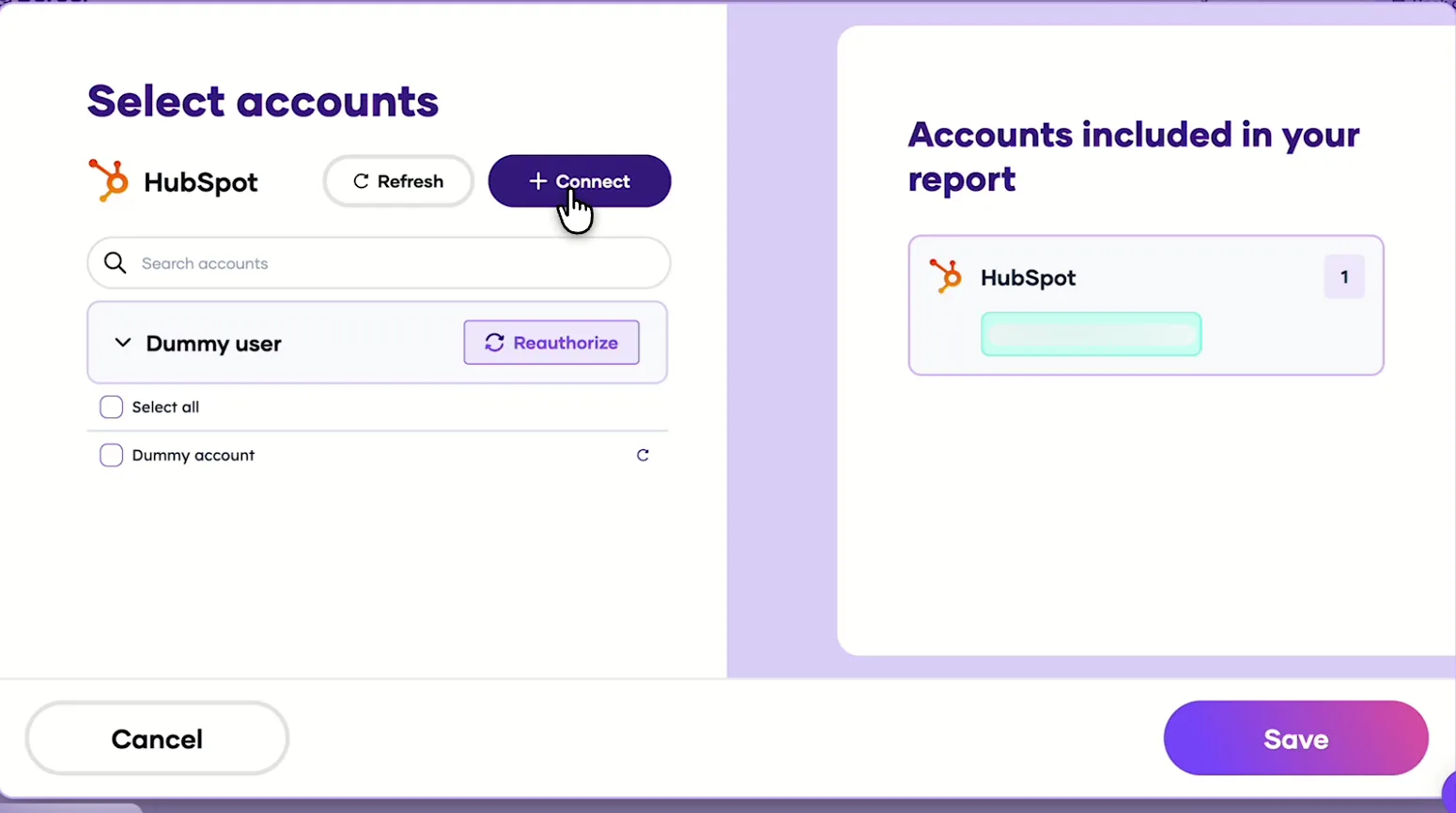
    Sign up free at Porter, then pick HubSpot as the source and sign in with HubSpot. Select the portals ChatGPT should read (several portals blend into one source), then pick ChatGPT as the destination.

  2. Step 2: Add the connector to ChatGPT

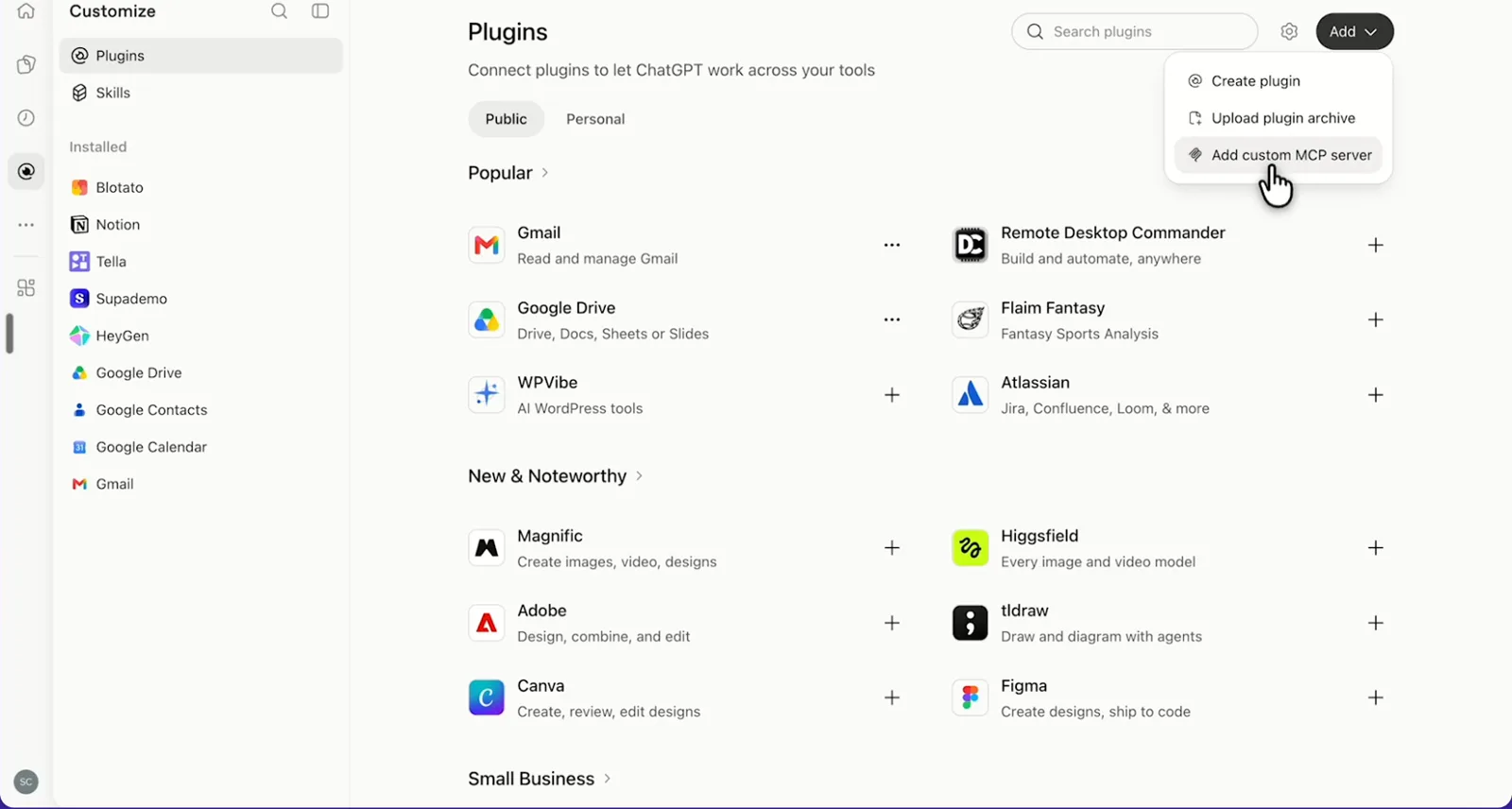
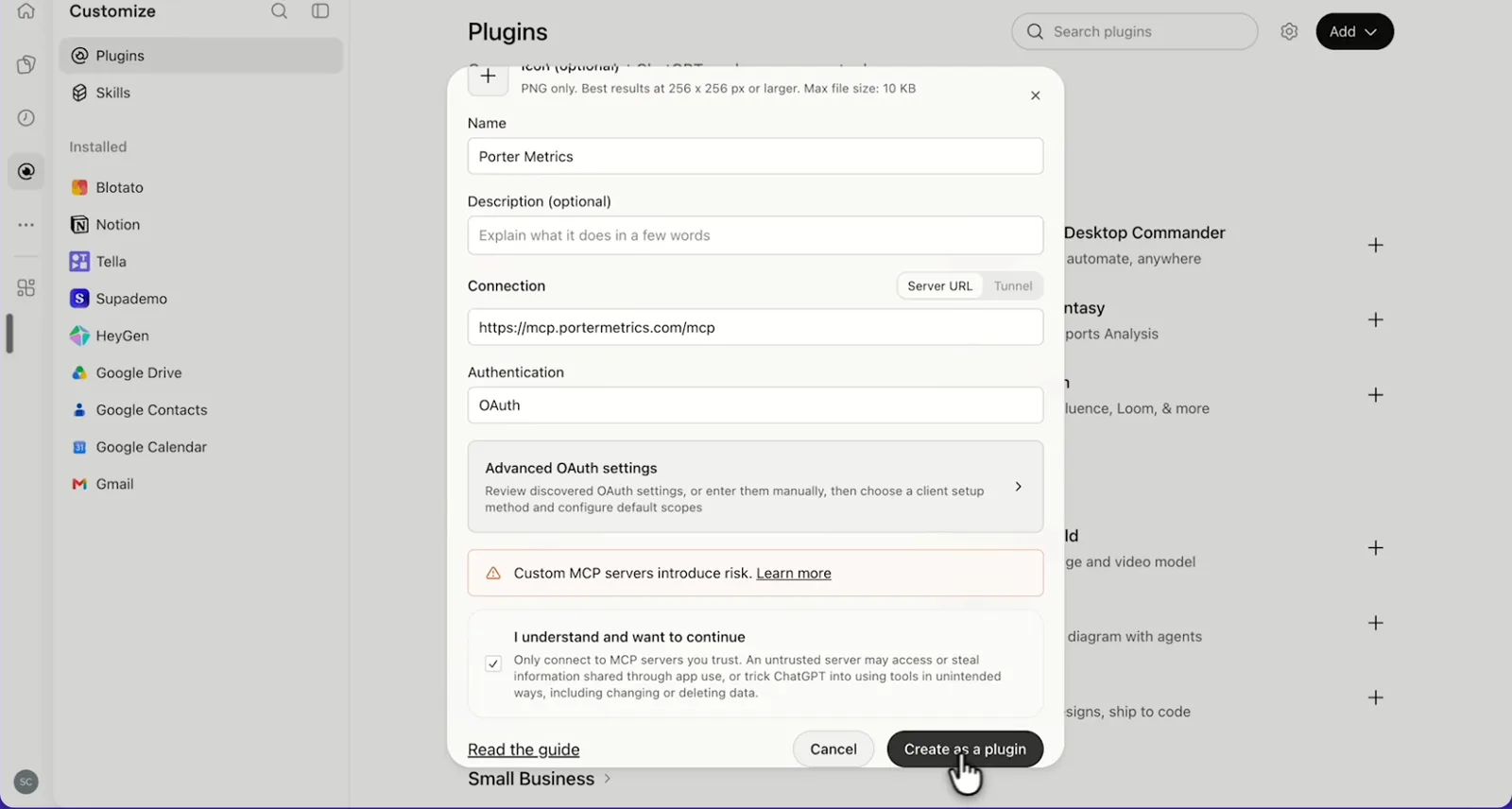
    In ChatGPT, open Customize › Plugins, click Add and choose Add custom MCP server. On Business, an admin does this from Workspace settings › Apps › Create. Name it Porter Metrics, paste this URL as the Server URL and keep OAuth as the authentication:

    MCP URL
    https://mcp.portermetrics.com/mcp

    Tick “I understand and want to continue”, then select Create as a plugin.

  3. Step 3: Ask ChatGPT about HubSpot

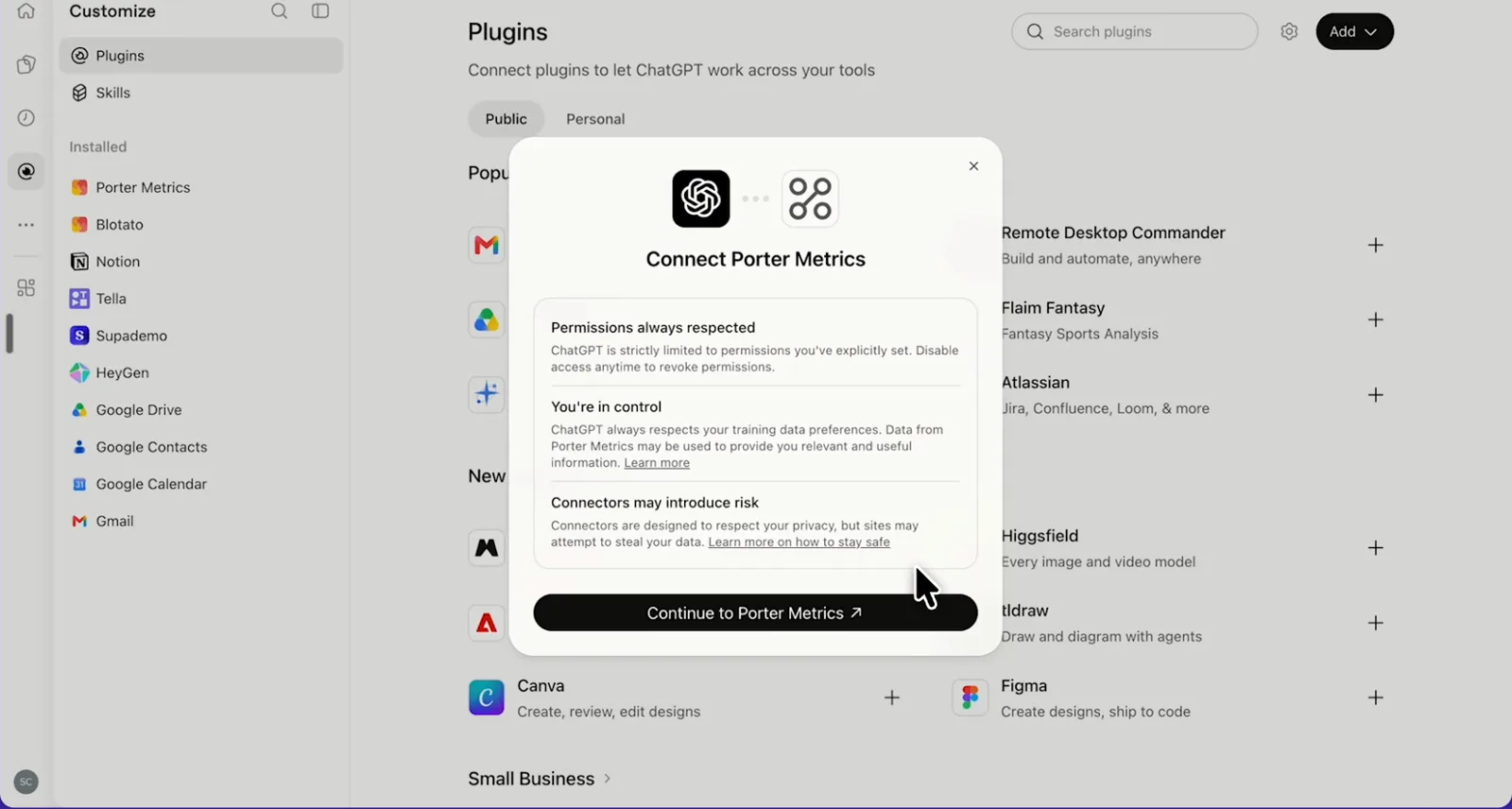
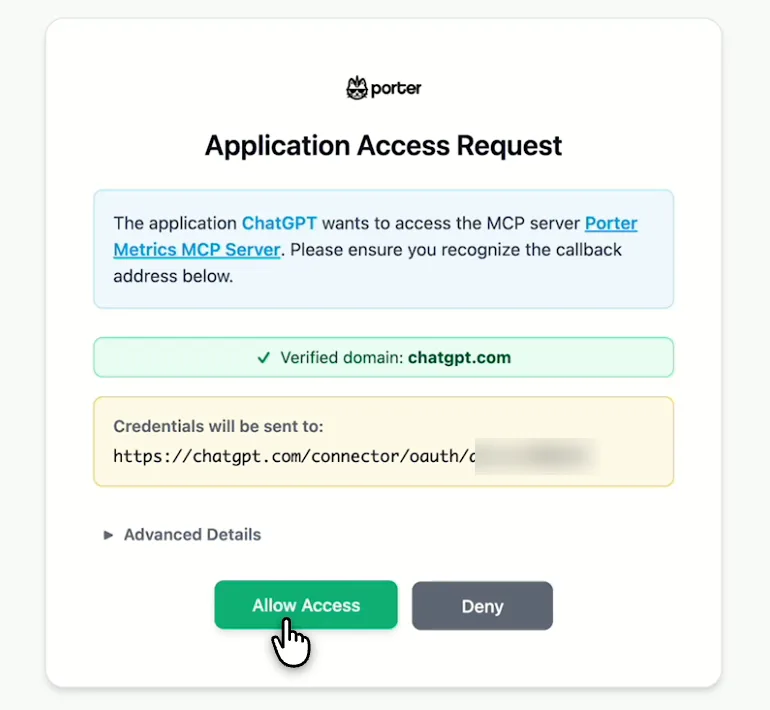
    Next, select Continue to Porter Metrics, sign in to Porter and click Allow Access. Then select Try in chat and paste this prompt:

    Prompt
    For HubSpot deals created this quarter, show Total deals, Deal amount and Deal amount won by Deal pipeline and Deal stage.

Guides and videos

app.portermetrics.com / create
Porter's Select accounts window for HubSpot with a demo account and the Connect button
First, in Porter, open HubSpot and select Connect.
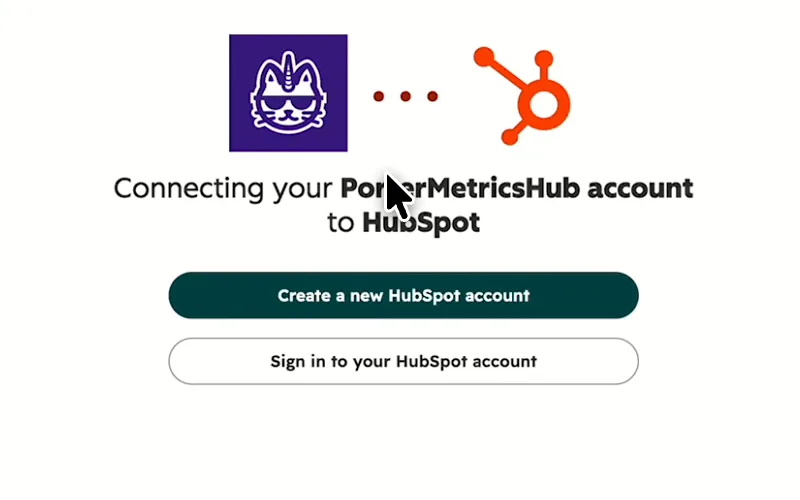
HubSpot screen for connecting your Porter Metrics Hub account to HubSpot
Then, sign in to your HubSpot account and approve access.
ChatGPT's Plugins page with the Add menu open on Add custom MCP server
In ChatGPT, open Customize, then Plugins, and choose Add custom MCP server.
ChatGPT's Add custom MCP server form with the name Porter Metrics, Porter's MCP URL and OAuth filled in
Then, paste Porter's MCP URL, keep OAuth, tick the box and select Create as a plugin.
ChatGPT's Connect Porter Metrics window with the Continue to Porter Metrics button
Next, ChatGPT asks you to continue to Porter Metrics to sign in.
Porter's Application Access Request screen asking you to let ChatGPT use the Porter MCP server
Finally, sign in to Porter and select Allow Access.
If you prefer video, watch the whole HubSpot to ChatGPT setup (1:45, no sound).
Interactive walkthrough, so you can click along here
02Use cases and prompts

What you can ask ChatGPT

Each use case comes with a prompt to copy, the fields it uses from the HubSpot fields list and who it’s for. Every prompt asks about one CRM object at a time (contacts, deals or marketing emails), so the totals stay clean. On Business, Enterprise or Edu, ChatGPT can also make the changes you confirm; on Pro it reads and recommends.

Can ChatGPT show which lead sources turn into customers?

The problemPaid social fills the contacts list every month, while Sales swears the good leads come from organic search. Still, nobody has the numbers to settle it.

What ChatGPT doesChatGPT counts new contacts each month by original source and drill-down, then splits them by lifecycle stage. It also ranks sources by the share that became customers. Lifecycle stage is each contact’s stage today rather than the stage they had that month.

What you getBudget then moves to the sources that produce customers instead of the ones that just fill the database.

Prompt
For HubSpot contacts created in the last 6 months, show Total contacts by Month and year, Contact original source and Contact original source drill-down 1, split by Contact lifecycle stage. Rank the sources by the share of contacts now at Customer and tell me which 3 to invest in.

For: B2B and demand-gen marketers · marketing ops · agencies reporting to a client

Fields used: Total contactsMonth and yearContact original sourceContact original source drill-down 1Contact lifecycle stage

Can ChatGPT show how long a lead takes to close?

The problemThe board wants to know how long a new lead takes to close. But the “became a” dates sit on each contact record, one at a time.

What ChatGPT doesChatGPT lists contacts that became customers last quarter, with the dates they became a lead, MQL, SQL and customer. It then works out the days between stages and gives the median by original source.

What you getYou get a median time per source instead of a spreadsheet of date columns with a formula in every row.

Prompt
List HubSpot contacts created in the last 24 months whose Contact became a customer date is in the last quarter, with Contact original source, Contact became a lead date, Contact became a marketing qualified lead date, Contact became a sales qualified lead date and Contact became a customer date. Calculate the days between each stage and give the median per Contact original source.

For: marketing ops · CRM managers · B2B marketers

Fields used: Contact became a lead dateContact became a marketing qualified lead dateContact became a sales qualified lead dateContact became a customer dateContact original source

Can ChatGPT find open deals that have stalled?

The problemForecast calls keep turning up deals whose close date passed weeks ago, while the stage still says Contract sent.

What ChatGPT doesChatGPT lists open deals with either no activity in 2 weeks or a close date that has already passed. Each row shows stage, amount, probability, owner and next activity, sorted so the biggest deal comes first.

What you getThe forecast call then starts from a ranked list of deals to chase instead of a scroll through the board view.

Prompt
Show HubSpot deals created in the last 12 months where Is Deal Closed? is false and Deal last activity date is more than 14 days ago or Deal close date is in the past. Include Deal name, Deal pipeline, Deal stage, Deal amount, Deal forecast probability, Deal owner and Deal next activity date. Sort by Deal amount.

For: CRM managers · founders · marketing ops

Fields used: Deal nameIs Deal Closed?Deal last activity dateDeal close dateDeal pipelineDeal stageDeal amountDeal forecast probabilityDeal ownerDeal next activity date

Can ChatGPT show each rep's win rate this quarter?

The problemPipeline reviews turn into debates about who’s carrying the quarter, because closed-won and closed-lost deals sit in different views.

What ChatGPT doesChatGPT counts deals won and lost, as well as amount won and average won value, by owner and pipeline. It then works out each win rate and flags reps below the team rate.

What you getThe pipeline review then starts from each owner’s own numbers against the team, so nobody builds a custom report per owner.

Prompt
For HubSpot deals with a Deal close date this quarter, show Deal closed won, Deal closed lost, Deal amount won and Average value of deals won by Deal owner and Deal pipeline. Add win rate as won ÷ (won + lost) and flag owners below the team rate.

For: CRM managers · agencies comparing client portals · marketing ops

Fields used: Deal closed wonDeal closed lostDeal amount wonAverage value of deals wonDeal ownerDeal pipelineDeal close date

Can ChatGPT show which emails got the best open and click rates?

The problemThe newsletter’s open rate looks fine on the email dashboard, but nobody has compared subject lines across a whole quarter of sends.

What ChatGPT doesChatGPT ranks last quarter’s marketing emails by click ratio, with sends, deliveries, opens, unsubscribes and bounces. Then it tells you what the best subject lines have in common.

What you getNext quarter’s subject lines start from what your list clicked, not from the last send’s open rate.

Prompt
List HubSpot marketing emails created last quarter with Marketing email name, Marketing email subject, Marketing email sent, Marketing email delivered, Marketing email open ratio, Marketing email click ratio, Marketing email unsubscribed and Marketing email bounce ratio. Rank by Marketing email click ratio and tell me what the top 3 subject lines have in common.

For: email marketers · B2B marketers

Fields used: Marketing email nameMarketing email subjectMarketing email sentMarketing email deliveredMarketing email open ratioMarketing email click ratioMarketing email unsubscribedMarketing email bounce ratio

Can ChatGPT show which ad spend turns into deals?

The problemLinkedIn Ads spend climbs every month and HubSpot tracks deals by original source, but the two never land in the same table without an export.

What ChatGPT doesChatGPT puts weekly ad spend from Google Ads, Meta Ads and LinkedIn Ads next to both HubSpot deals created and amount won. It then lists the deals by original source, so you can see which paid channel each one came from.

What you getThe budget talk then moves from cost per lead to deals and amount won per channel.

Prompt
By week for the last 12 weeks, show Blended Ad Spend from my Google Ads, Meta Ads and LinkedIn Ads accounts next to HubSpot Total deals, Deal amount won and ROAS (HubSpot). Then, in a second table, list HubSpot deals created in the same weeks by Deal original source and Deal original source data 1.

For: B2B and demand-gen marketers · agencies running ads and reporting pipeline · CRM managers

Fields used: Blended Ad SpendROAS (HubSpot)Week and yearTotal dealsDeal amount wonDeal original sourceDeal original source data 1

Can ChatGPT find where my CRM data is incomplete?

The problemLead routing fails quietly when contacts arrive without an owner or a lifecycle stage. You find out when a rep asks where their leads went.

What ChatGPT doesChatGPT counts recent contacts by owner, lifecycle stage and lead status, with blanks shown, then companies by industry. It then ranks the gaps that break routing and reports.

What you getYou fix the gaps behind broken routing before the next campaign, not after a dashboard comes back wrong.

Prompt
For HubSpot contacts created in the last 90 days, show Total contacts by Contact owner, Contact lifecycle stage and Contact lead status, and count how many have each one empty.
Then ask
Prompt
Now show Total companies created in the same period by Company industry and count the blanks.

For: marketing ops · CRM managers · agencies onboarding a client portal

Fields used: Total contactsContact ownerContact lifecycle stageContact lead statusTotal companiesCompany industry

Can ChatGPT update deals, create contacts and log notes?

The problemAfter a good call, the stage change, new amount and call notes wait until someone opens HubSpot. As a result, by Friday the pipeline view is out of date.

What ChatGPT doesChatGPT finds the deal and suggests the new stage and amount. Then, on Business, Enterprise or Edu, it creates the contact, links it to the deal and logs a note once you confirm.

What you getThe CRM stays current from the same chat where you wrote the call summary, instead of waiting for someone to open HubSpot.

Prompt
Find my HubSpot deal 'Acme renewal', move it to the Contract sent stage with a Deal amount of 24,000, create a contact for Jane Doe (jane@acme.com), associate her with the deal and log a note with today's call summary. Show me each change before you make it.

For: CRM managers · founders

Actions: deal_search · pipeline_list (stage IDs) · deal_update · contact_create · association_create · note_create
03Why Porter

Why Porter for HubSpot in ChatGPT

Porter puts HubSpot next to your ad spend and your other portals, with nothing to host. For tickets, leads, quotes or campaign work inside HubSpot alone, HubSpot’s own tools read more HubSpot objects, such as HubSpot’s official connector for Claude. You can run both.

✓

HubSpot next to your ad spend

Ask about deals and amount won next to Google Ads, Meta Ads, LinkedIn Ads and GA4 in one chat, so the budget talk moves from cost per lead to revenue.

⊞

Several portals in one connection

Select several HubSpot portals when you connect, and ChatGPT compares them in one answer with the portal name as a column.

⚙

Read and change records

ChatGPT reads 500+ fields and, on Business, Enterprise or Edu, makes the contact, company, deal and ticket updates, notes and record links you confirm. On Pro it reads and recommends.

Aa

500+ ready-made fields

ChatGPT gets 500+ named fields plus your custom properties, such as Deal amount won or Contact original source, ready to ask about without building a custom report.

↻

One URL, nothing to host

Sign in to HubSpot in Porter and add one MCP URL to ChatGPT on the web. There’s no server, API key or config file to manage.

✓

Claude and Data Studio from one account

The same Porter MCP URL works in Claude, and the same HubSpot portals can also feed Data Studio, Google Sheets and BigQuery.

⊞

Years of deals, by create date

Porter reads contacts, companies and deals by create date, back to 2021 in Porter’s tests. On paid plans, ChatGPT compares this quarter’s new deals with the same quarter in past years in one answer.

⚙

Live dashboards, not only chat answers

Ask ChatGPT for a dashboard and Porter’s AI dashboards publish it at its own link, synced automatically and ready to share. Official MCP servers answer inside the chat and stop there.

04Dashboard

Dashboard template

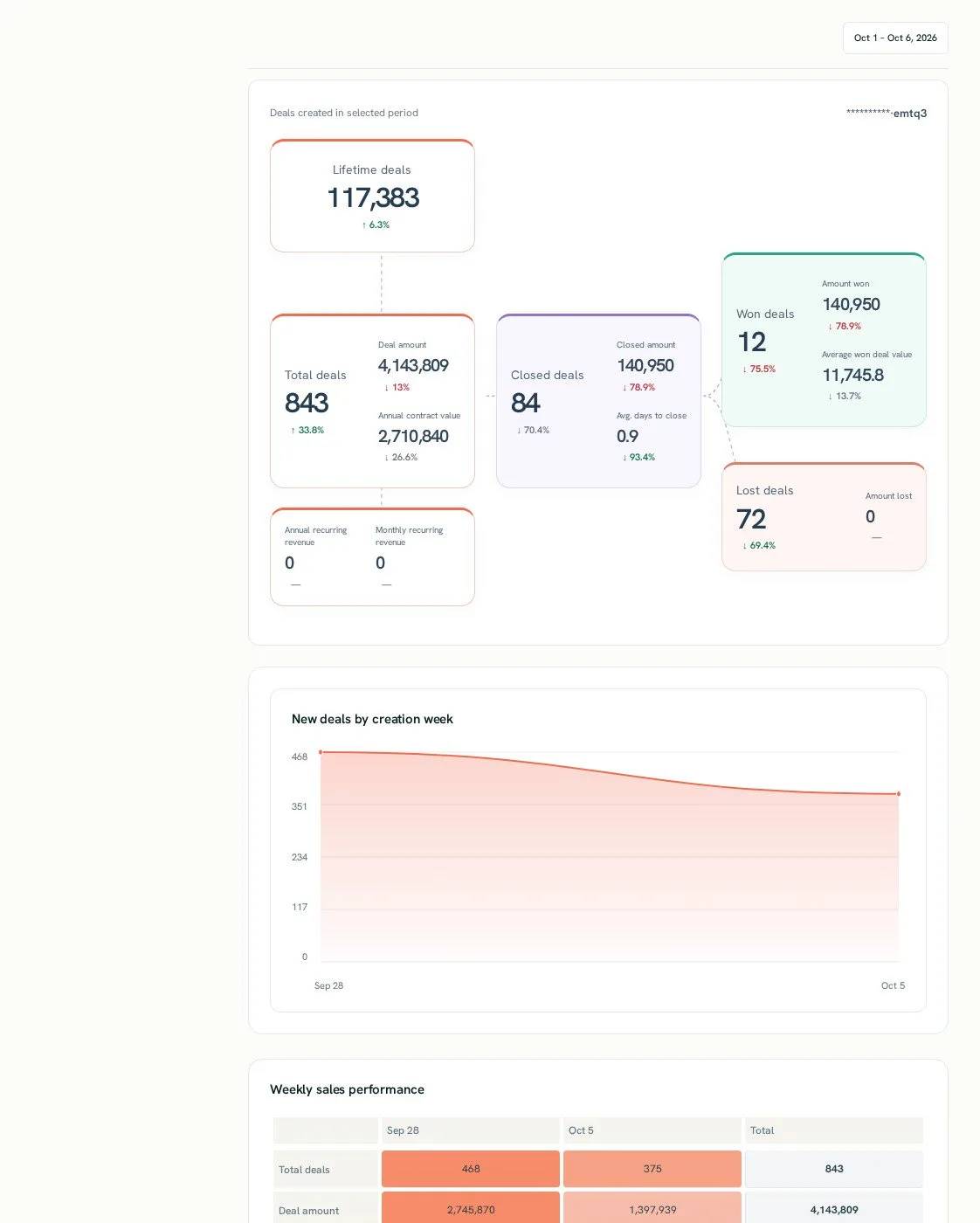
Want a shared view instead of a ChatGPT chat? Copy one of Porter’s free HubSpot dashboard templates for a report your team opens every week, with contacts, deals, pipeline and marketing email results in one view.

AI dashboards

Build a live HubSpot dashboard from the chat

Describe the dashboard in one sentence and Porter builds it. A client-ready dashboard in minutes, with no chart dragging and no BI tool to learn. Ask ChatGPT:

Prompt
Build a live HubSpot dashboard for my account with the last 30 days, the main KPIs and a weekly trend.
Live URLEach dashboard at its own link: no login, no app, no download
Auto-syncFresh HubSpot data, nobody re-exports each period
Scheduled deliveryEmail or PDF sends on a set day
White labelYour logo and branding for clients
Sharing permissionsView or edit access per person
HubSpot AI dashboard template built with Porter Metrics AI dashboards
Template

The HubSpot AI dashboard template

Built with Porter's AI dashboards on a real account. Open it live, then ask ChatGPT to make one like it for your account.

Open the live HubSpot dashboard

05Pricing

Pricing

You can start free, since Porter’s HubSpot connector for ChatGPT comes with every plan. Use the calculator for your number of accounts, or see Porter pricing for every plan.

What you get

  • Free plan: never expires, with unlimited connected accounts and the last 15 days of data in ChatGPT (30 days in Data Studio and Sheets)
  • Reporting: from $12.50 per account a month billed annually, or $15 month to month for one account
  • Billing: each HubSpot portal counts as one account, with volume discounts and no per-seat fee
  • Changes: record updates you confirm on Business, Enterprise or Edu; AI credits as listed on Porter pricing
  • Trial: 14 days of full access, no card

Price calculator

$33.33/mo$6.67 per account

An account is one ad account, Stripe account, store, page or GA4 property. The Free plan never expires and has unlimited accounts, with the last 15 days of data in AI chats.

06Data and actions

HubSpot data and actions in ChatGPT

The HubSpot connector gives ChatGPT 500+ fields as well as your portal's custom properties. It also has 28 actions to search, create, update, link and delete records. Fields cover areas including contacts, lifecycle stages, original sources, companies, deals, pipelines, owners, marketing emails, forms and lists. The full list of HubSpot fields also has every label and ID.

The 12 HubSpot fields ChatGPT uses most

FieldWhat it's for
Total contactshubspot_total_contactsContact volume by month, source or owner
Contact original source · Contact original source drill-down 1hubspot_contact_analytics_source · hubspot_contact_analytics_source_data_1Where each contact first came from
Contact lifecycle stagehubspot_contact_lifecycle_stageEach contact's stage today
Contact became a marketing qualified lead date · Contact became a customer datehubspot_contact_lifecycle_stage_marketing_qualified_lead_date · hubspot_contact_lifecycle_stage_customer_dateTime between lifecycle stages
Contact owner · Deal ownerhubspot_contact_owner · hubspot_deal_ownerResults and gaps by rep
Total dealshubspot_total_dealsDeal volume by pipeline, stage or week
Deal pipeline · Deal stagehubspot_deal_pipeline · hubspot_deal_stageWhere each deal sits
Deal amount · Deal amount wonhubspot_deal_amount · hubspot_deal_amount_closed_wonPipeline value and revenue won
Deal closed won · Deal closed losthubspot_deal_closed_won · hubspot_deal_closed_lostWin rate by owner or pipeline
Deal last activity datehubspot_deal_notes_last_updatedStalled-deal checks
Marketing email open ratio · Marketing email click ratiohubspot_mkt_email_openratio · hubspot_mkt_email_clickratioEmail performance by send
Total companies · Company industryhubspot_total_companies · hubspot_company_industryAccount counts and data gaps

Can ChatGPT change or delete HubSpot records?

On Business, Enterprise and Edu plans, yes. If you're weighing read-only vs write permissions, Porter covers both. ChatGPT can search, list and open contacts, companies, deals and tickets, then create and update the ones you confirm. It can also log notes and link records (contact to company, deal to contact).

It can also delete contacts, companies, deals or tickets, which moves them to HubSpot's recycling bin for 90 days (HubSpot's guide to restoring deleted records). On Pro, and for calls, meetings, tasks, campaigns, marketing emails, pages, lists and workflows, ChatGPT drafts what to set up and you add it in HubSpot.

How fresh is the data, and how far back?

Each answer shows when Porter last refreshed the portal. Records go back as far as your portal holds them (tested to 2021), while properties show today's values rather than past ones.

Paid plans read your full history, while the free plan covers 15 days in AI chats (30 days in Data Studio and Sheets). New or edited records can also take a few moments to show up in search (HubSpot's CRM search docs).

Product stats

WhatHubSpot connector
Fields500+ plus your portal's custom properties
Actions28 to search, create, update, link and delete records
ChatGPT plansReads on Pro; reads and changes you confirm on Business, Enterprise and Edu (web, beta)
FreshnessEach answer shows when Porter last refreshed the portal; new or edited records can take a few moments to show up
HistoryAs far back as your portal holds records on paid plans (tested to 2021); 30 days on the Free plan, 15 in AI chats
Objects per questionOne CRM object at a time (contacts, companies, deals or marketing emails); ChatGPT combines the answers
Time zoneDate presets use UTC; ask with explicit dates to match your portal
AccessHubSpot sign-in with the read and write permissions Porter needs; changes only after you confirm

See all 500+ HubSpot fields

07Security

Is it safe?

Yes. ChatGPT makes HubSpot changes only on Business, Enterprise or Edu, and only the ones you confirm. Porter's HubSpot connector for ChatGPT uses HubSpot's official API with the permissions you grant at sign-in, and you can also revoke access at any time.

How changes get approved

Reading data never changes HubSpot, because only a change you confirm does. ChatGPT asks you to confirm changes based on the app's permissions and holds back some high-risk actions for extra care. Start with one record before you ask for bulk changes, and check lifecycle stage and deal stage changes before you confirm them.

HubSpot's own pipeline rules still apply to every change. If a record gets deleted by mistake, you can bring it back from the recycling bin (restore deleted HubSpot records).

What the connector needs from HubSpot

Porter needs both a HubSpot user in each portal and a sign-in to HubSpot from Porter. During sign-in, it asks only for the read and write permissions it needs.

If ChatGPT can query a portal but hosted reports reject it, that portal needs a licence slot in Porter. To revoke access, either uninstall Porter in HubSpot's Connected Apps (HubSpot's steps to uninstall a connected app) or disconnect it in Porter.

08FAQ

FAQ

Before connecting HubSpot to ChatGPT, teams usually want to know about MCP, Claude, several portals, Breeze and Data Studio. The last three answers help when numbers look off.

What is a HubSpot MCP?

A HubSpot MCP is a server that lets ChatGPT read, and sometimes change, a HubSpot portal, so you ask instead of building reports. MCP (Model Context Protocol) is the open standard behind ChatGPT's custom MCP servers. Porter's HubSpot connector for ChatGPT is a hosted one: one URL, 500+ fields and changes you confirm.

Can I use Porter in Claude too?

Yes. Porter's MCP URL, the same one behind the HubSpot connector for ChatGPT, also works in Claude as a custom connector, with the same Porter account and portals. See Porter's HubSpot connector for Claude for the Claude setup and what it covers.

Can I connect several portals as an agency?

Yes. Select several HubSpot portals when you connect Porter, and ChatGPT compares them in one answer with the portal name as a column. Each portal is then billed as one account under one subscription, so the monthly client report starts from one prompt.

Is Porter's HubSpot MCP the same as HubSpot's Breeze AI?

They do different jobs: Breeze works inside HubSpot for in-app tasks, while Porter brings HubSpot data into ChatGPT. There you can analyze HubSpot next to other sources, such as ad platforms and GA4. On Business, Enterprise or Edu, you also confirm record changes in the same chat where you asked the question.

I already send HubSpot to Looker Studio with Porter. Do I need to reconnect for ChatGPT?

No. Porter reuses the HubSpot portal you already connected for the HubSpot connector for Data Studio. ChatGPT then reads the same data with no second connection or extra cost. Just add Porter's MCP URL to ChatGPT as a custom MCP server, then sign in with Porter and ask about your pipeline.

Troubleshooting

Why don't ChatGPT's numbers match HubSpot's reports?

Ask about contacts and deals in separate questions, and filter deals by Deal close date when you compare with HubSpot deal reports. Porter counts records by create date, while those reports often use close date. Account "to date" totals differ from counted records, Porter's presets use UTC, and Deal days to close by stage is added rather than averaged.

Why does a HubSpot field come back as 0 or empty?

Count contacts by lifecycle stage for lead, MQL and SQL totals, and add line items in HubSpot for ACV, ARR, MRR and TCV. Total leads, MQLs, SQLs and lead-to-customer rate return 0, and website analytics fields return no rows; both are reported to Porter's team. Some properties exist only in some HubSpot editions.

Why does ChatGPT stop at an older date or skip a portal?

Reconnect HubSpot in Porter if answers stop at an older date, since the portal's data may have stopped updating. If ChatGPT answers but hosted reports reject the portal, give it a licence slot in Porter. When a portal was never used in Porter, the first question adds it as an account.


09Next

More ChatGPT connectors

Most HubSpot teams also run an email platform or a data warehouse, and Porter connects those to ChatGPT the same way. Browse all ChatGPT connectors to add your email platform, or open a related page below:

Not only ChatGPT. Send HubSpot data anywhere

The same Porter account and connection also send HubSpot data to these destinations, at no extra cost.

Try it on your own pipeline

Your next pipeline review can start in ChatGPT as soon as you add the HubSpot connector. Add Porter's MCP URL, pick your HubSpot portals, then ask which sources bring customers, which deals stalled and what each channel's spend returned. The free plan includes the MCP, and the trial also needs no card.

Free forever plan · 14-day full trial · No card

B2B marketers: the "which channel brought revenue" question gets deals and spend in one answer instead of two exports.

CRM managers: stalled deals and win rates come back ranked by owner before the pipeline review.

Agencies: client portals sit side by side in one answer, so the monthly pipeline report starts from a prompt.