Facebook Insights connector for ChatGPT

Use Porter’s Facebook Insights connector for ChatGPT to rank your Page’s posts and Reels, track followers and unfollows, and reply to the comments you confirm on Business, Enterprise or Edu.

  • Rank last month’s posts by engagement and see what they share
  • Compare Reels and videos on watch time
  • Track new followers and unfollows week by week
  • Compare Facebook followers and reach with Instagram
G2★★★★★Rated 4.6/5 from 288 G2 reviews (October 2026)

By Porter Metrics team · Last updated October 20, 2026

ChatGPTPorter connected
Show Page new followers, unfollows, engagements and views by week for the last 4 full weeks.
Porter / Facebook Insights / Trailgear Demo✓ 4 rows
The week of Sep 28 brought the most new followers (412). Unfollows stayed under 60 every week.
WeekNew followersUnfollowsEngagements
Sep 14268413,920
Sep 21305524,410
Sep 28412386,180
Oct 5331574,870
Demo data, Trailgear Demo account
270+ Facebook Page fields
01Setup

How to connect Facebook Insights to ChatGPT

Porter’s Facebook Insights connector for ChatGPT takes 3 steps, with no code and no server to host. Sign in to Facebook in Porter, add Porter’s URL to ChatGPT as a custom MCP server, then ask. For more screenshots, see Porter’s guide on how to connect Facebook Page Insights to ChatGPT. MCP (Model Context Protocol) is the open standard ChatGPT uses to connect to tools such as Porter.

What you need

  • Before you start, you need a Facebook profile that manages the Page, a free Porter account and a ChatGPT plan that supports custom MCP servers. A personal profile can’t connect, and Meta’s 100-like minimum for Page Insights also leaves smaller Pages without insights.
  • Custom MCP servers are in beta in ChatGPT on the web, so set up Porter and ask your questions from a browser. On Business, Enterprise or Edu, an admin or owner turns on developer mode, and then ChatGPT can also make the changes you confirm. On Pro, you turn on developer mode yourself, and ChatGPT reads and recommends (OpenAI’s guide to custom MCP apps).
  • Works in ChatGPT on the web (chatgpt.com, custom MCP servers in beta) and in Codex, with the same Porter MCP URL.
  1. Step 1: Connect your Page in Porter

    Sign up free at Porter, then pick Facebook Insights as the source (that’s the connector’s name in Porter) and sign in with Facebook. Select the Pages ChatGPT should read (several Pages blend into one source), then pick ChatGPT as the destination.

  2. Step 2: Add the Facebook Insights connector to ChatGPT

    In ChatGPT, open Customize › Plugins, click Add and choose Add custom MCP server. On Business, an admin does this from Workspace settings › Apps › Create. Name it Porter Metrics, paste this URL as the Server URL and keep OAuth as the authentication:

    MCP URL
    https://mcp.portermetrics.com/mcp

    Tick “I understand and want to continue”, then select Create as a plugin.

  3. Step 3: Ask ChatGPT about your Facebook Insights

    Next, select Continue to Porter Metrics, sign in to Porter and click Allow Access. Then select Try in chat and paste this prompt:

    Prompt
    For my Facebook Page, show Page new followers, Page new unfollows, Page Engagements and Page views by Week for the last 4 full weeks.

Guides and videos

app.portermetrics.com / create

Create: Facebook Insights to ChatGPT

Sign in: Facebook Insights

Select the accounts ChatGPT can use.

ChatGPT / Customize / Plugins / Add / Add custom MCP server

Remote MCP server URL

https://mcp.portermetrics.com/mcp

ChatGPT

Using Porter / Facebook Insights …

Demo data
02Use cases and prompts

What you can ask ChatGPT

Each use case comes with a prompt to copy, the fields it uses from the Facebook Insights fields list and who it’s for. Every prompt sticks to metrics Meta still reports, so every answer comes back with data. On Business, Enterprise or Edu, ChatGPT can also make the changes you confirm; on Pro it reads and recommends.

Can ChatGPT show which posts got the most engagement last month?

The problemOrganic reach swings from post to post, while the one that took off is buried somewhere in Business Suite’s post list.

What ChatGPT doesChatGPT ranks last month’s posts by engagements, including reactions, comments, shares, clicks and views for each. Then it tells you what the top posts share: format, weekday or topic. Post numbers are lifetime totals, while the date range picks posts by the day they went out.

What you getNext month’s content plan starts from what earned engagement instead of scrolling the post list.

Prompt
For my Facebook Page, list posts published last month with Post Date, Post type, the first 80 characters of Post message, Post engagements, Post reactions, Post Comments Count, Post shares, Post Clicks and Total impressions of posts. Rank by Post engagements and tell me what the top 5 have in common, including the weekday they went out.

For: social media managers · agency social teams · small-business owners

Fields used: Post IDPost DatePost typePost messagePost engagementsPost reactionsPost Comments CountPost sharesPost ClicksTotal impressions of posts

Do my Reels hold attention better than my videos?

The problemReels pull views, but Business Suite won’t tell you at a glance whether people watch them longer than your regular videos.

What ChatGPT doesChatGPT ranks Reels by views and viewers, as well as average watch time as a share of Reel length. Then it lists regular videos by average time viewed and 95% views, so you see which format keeps people around.

What you getYou know whether the next shoot should be a Reel or a longer video.

Prompt
List my Facebook Reels from the last 60 days with Reel creation time, Reel description, Reel length, Reel views, Reel post impressions unique, Reel post video avg time watched, Reel post video social actions and Reel reactions total. Add average watch time as a share of Reel length and rank by it. Then, in a second table, list video posts from the same period with Post message, Post video length, Post average time video viewed and Post video organic views to 95%.

For: content marketers · social media managers

Fields used: Reel IDReel creation timeReel descriptionReel lengthReel viewsReel post impressions uniqueReel post video avg time watchedReel post video social actionsReel reactions totalPost IDPost messagePost video lengthPost average time video viewedPost video organic views to 95%

Is my Page gaining or losing followers?

The problemThe follower count dipped, but Business Suite doesn’t say which week or which post started it.

What ChatGPT doesChatGPT shows new followers and unfollows by week, as well as the net change and today’s follower total. It also flags weeks where unfollows jumped, then lists that week’s posts. Page total followers is a daily snapshot, so ChatGPT reads the latest value instead of adding days.

What you getYou see which posts cost you followers, so the team stops repeating them.

Prompt
For the last 12 full weeks, show Page new followers and Page new unfollows by Week with net growth, and today's Page total followers. Flag any week where Page new unfollows were more than 50% above the 12-week average and list that week's posts with Post Date, Post message and Post engagements.

For: social media managers · marketing leads · agency social teams

Fields used: WeekPage new followersPage new unfollowsPage total followersPost DatePost messagePost engagements

Can ChatGPT write my weekly report?

The problemEvery Monday someone screenshots Business Suite tiles, then retypes views, viewers and followers into the client deck.

What ChatGPT doesChatGPT compares last week with the week before for views, viewers, Page views, engagements, video views, new followers and unfollows. Then it adds three takeaways for a client update. Viewers are counted per week instead of added up from days.

What you getAs a result, the Monday report becomes one prompt, with the takeaways already drafted for the client.

Prompt
Build my weekly Facebook Page report for the last full week vs the week before: Page total impressions (call it views), Total reach (call it viewers), Page views, Page Engagements, Page video views, Page new followers and Page new unfollows, by Week, with % change. Finish with 3 bullets: what grew, what dropped, what to post next week.

For: agency social teams (one report per client Page) · social media managers · marketing leads

Fields used: WeekPage total impressionsTotal reachPage viewsPage EngagementsPage video viewsPage new followersPage new unfollows

Can ChatGPT find posts with angry reactions and what people are saying?

The problemA post draws angry reactions overnight, but you only notice once the comment section is already a pile-on.

What ChatGPT doesChatGPT ranks recent posts by Anger reactions against Love and Like. Then it reads the first comments on the worst three and sums up the complaint. You can reply or adjust before the anger shows up in unfollows.

What you getThe one-line summary tells you whether to reply, clarify or leave the thread alone, without reading every comment.

Prompt
For posts from the last 30 days, show Post Date, Post message, Post actions: Anger, Post actions: Love, Post actions: Like and Post Comments Count. Rank by Post actions: Anger as a share of all three reactions. For the top 3, read First 10 Post Comments and summarise the main complaint in one line each, without quoting names.

For: community managers · social media managers · agencies

Fields used: Post IDPost DatePost messageAngerLoveLikePost Comments CountFirst 10 Post Commentscomment_list

Can ChatGPT show where my followers live?

The problemPosting times and language get picked by gut, because nobody has checked where followers actually are.

What ChatGPT doesChatGPT lists your followers’ top countries and cities, one breakdown per table. Porter returns these for the last 7 days, and Meta reports groups of 100 or more people.

What you getPosting language, local references and timing can then follow where followers live.

Prompt
Show Page total followers by Country name for the last 7 days, top 10, with each country's share. Then do the same by City.

For: social media managers · local business owners · agencies planning posting language

Fields used: Country nameCityPage total followers

Can ChatGPT compare Facebook Insights with Instagram?

The problemFacebook and Instagram numbers sit in separate tabs, while leadership keeps asking which one is growing.

What ChatGPT doesIf you also connect Instagram in Porter, ChatGPT can compare the two. It puts weekly Facebook new followers, viewers and engagements next to Instagram new followers and reach. One answer then shows which platform is growing. Each platform counts reach its own way, so ChatGPT compares trends instead of adding them.

What you getYou answer “which one is growing?” with a weekly trend instead of two screenshots.

Prompt
For the last 8 full weeks, by Week, show Facebook Page new followers, Total reach and Page Engagements next to Instagram Profile new followers and Profile reach. Compare the trends; don't add the two platforms' reach together.

For: social media leads · agency social teams · marketing leads

Fields used: WeekPage new followersTotal reachPage EngagementsProfile new followersProfile reach

Can ChatGPT reply to comments or schedule posts?

The problemUnanswered comments stack up on last week’s posts, and scheduling the next one means another session in Business Suite.

What ChatGPT doesChatGPT lists recent comments and drafts replies. Then, on Business, Enterprise or Edu, it posts the replies you confirm as your Page and hides comments. It also publishes or schedules text, link and photo posts, and edits the comments your Page wrote.

What you getYou clear the comment backlog, then set up next week’s post in the same chat where you read the numbers.

Prompt
List comments from the last 3 days on my latest 5 posts that the Page hasn't answered. Draft a short, friendly reply for each and show them to me. Post only the replies I approve.
Then ask
Prompt
Schedule this post on my Page for Friday at 9:00 with this link: {link}. Show me the text and time before you schedule it.

For: community managers · agency social teams · small-business owners

Fields used: Post IDPost messagePost comment textPost comment datetime
Actions: page_list · post_list · comment_list · comment_create · comment_update · post_create · scheduledpost_list
03Why Porter

Why Porter for Facebook Insights in ChatGPT

Meta’s official MCP server manages ads rather than Pages, so Porter is how ChatGPT reads your posts, Reels, videos, comments and inbox. If you also manage ads, Meta’s server at mcp.facebook.com/ads is the right tool for that side (Meta’s Ads MCP server overview). You can run both.

✓

Organic Page data Meta's MCP doesn't cover

Meta’s Ads MCP server lists tools for ads, catalogs and A/B tests. Porter brings your Pages, posts, Reels, videos, comments and inbox into ChatGPT.

⊞

Read and change your Page

ChatGPT reads every post and, on Business, Enterprise or Edu, publishes, schedules, edits or hides the posts, comment replies and inbox messages you confirm. On Pro it reads and recommends.

⚙

270+ ready-made fields

ChatGPT gets 270+ Page fields, from Page new unfollows to Reel views, plus 19 actions to read, publish, reply and moderate.

Aa

Facebook next to Instagram and GA4

Ask about your Page next to Instagram, GA4 and other Porter connectors in one chat, instead of comparing exports one file at a time.

↻

One URL, nothing to host

Sign in with Facebook in Porter and add one URL to ChatGPT on the web. A community server such as HagaiHen/facebook-mcp-server on GitHub needs a Page access token and a local Python server.

✓

Follower history Facebook doesn't keep

Facebook doesn’t keep its own follower history. On paid plans, Porter stores total followers day by day and new followers per day from the day you start paying, so you can compare months later.

⊞

Live dashboards, not only chat answers

Ask ChatGPT for a dashboard and Porter’s AI dashboards publish it at its own link, synced automatically and ready to share. Official MCP servers answer inside the chat and stop there.

04Dashboard

Dashboard template

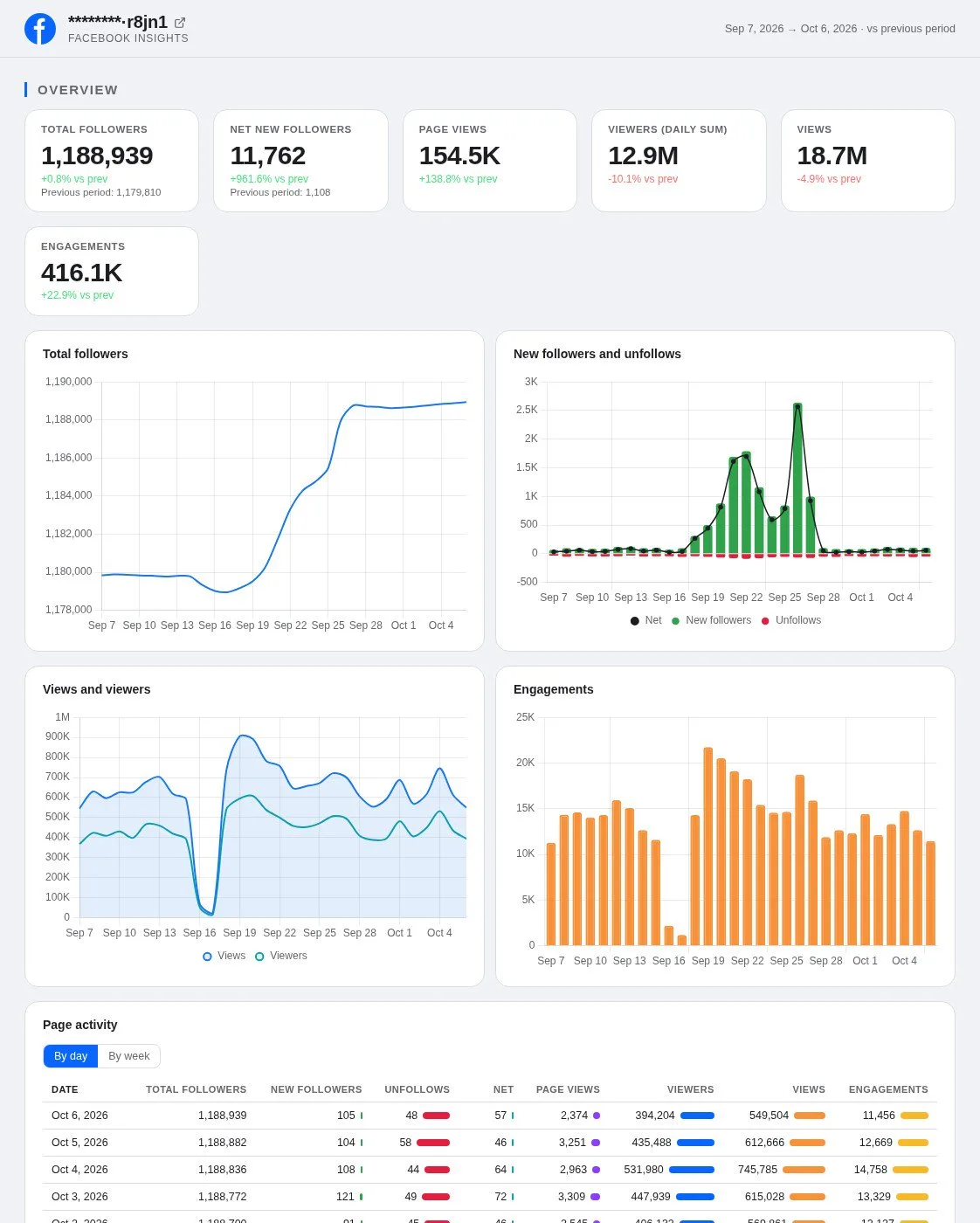
Porter’s free Facebook Insights dashboard template shows your Page’s followers and views, as well as engagement and top posts, in one report. With the Facebook Insights connector, ChatGPT can build the same view live in chat. If you prefer, open the template and pick your Page.

AI dashboards

Build a live Facebook Insights dashboard from the chat

Describe the dashboard in one sentence and Porter builds it. A client-ready dashboard in minutes, with no chart dragging and no BI tool to learn. Ask ChatGPT:

Prompt
Build a live Facebook Insights dashboard for my account with the last 30 days, the main KPIs and a weekly trend.
Live URLEach dashboard at its own link: no login, no app, no download
Auto-syncFresh Facebook Insights data, nobody re-exports each period
Scheduled deliveryEmail or PDF sends on a set day
White labelYour logo and branding for clients
Sharing permissionsView or edit access per person
05Pricing

Pricing

You can start free, since Porter’s Facebook Insights connector for ChatGPT comes with every plan. Use the calculator for your number of accounts, or see Porter pricing for every plan.

What you get

  • Free plan: never expires, with unlimited connected accounts and the last 15 days of data in ChatGPT (30 days in Data Studio and Sheets)
  • Reporting: from $12.50 per account a month billed annually, or $15 month to month for one account
  • Billing: each Facebook Page counts as one account, with volume discounts and no per-seat fee
  • Changes: 1 AI credit per completed change you confirm on Business, Enterprise or Edu; failed tasks are free, and the Free plan includes 100 credits a month
  • Trial: 14 days of full access, no card

Price calculator

$33.33/mo$6.67 per account

An account is one ad account, Stripe account, store, page or GA4 property. The Free plan never expires and has unlimited accounts, with the last 15 days of data in AI chats.

06Data and actions

Facebook Insights data and actions in ChatGPT

The Facebook Insights connector gives ChatGPT 270+ Page fields across the Page, posts, Reels and videos, plus 19 actions to read, publish, reply and moderate. The fields cover followers, views and viewers, as well as Page views, engagement, reactions, comments, shares and video watch time. The full list of Facebook Insights fields has every one, including its label and ID.

12 Facebook Insights fields ChatGPT uses most

FieldWhat it's for
Page total followersfollowsToday's follower count; a snapshot, never summed
Page new followers · Page new unfollowspage_daily_follows · page_daily_unfollowsNet follower growth by week
Page total impressionspage_impressionsPage views as Business Suite counts them ("Views")
Total reachpage_impressions_uniquePeople who saw the Page ("Viewers"), by day, week or 28 days
Page viewspage_views_totalVisits to the Page itself
Page Engagementspage_post_engagementsEngagement across the Page
Post engagements · Post reactions · Post Comments Count · Post shares · Post Clicksengagement_by_post · post_reactions_by_type_total · post_comments_count · post_share · post_clicksRanking posts
Total impressions of postspost_impressionsViews per post
Reel views · Reel post video avg time watchedreel_default_views · reel_post_video_avg_time_watchedReels reach and attention
Page video views · Post average time video viewedpage_video_views · post_video_avg_time_watchedVideo reach and attention
Post actions: Anger · Post actions: Love · Post actions: Likepost_actions_post_reactions_anger_total · post_actions_post_reactions_love_total · post_actions_post_reactions_like_totalHow people feel about a post
First 10 Post Commentspost_comments_10What people say

Can the connector let ChatGPT post, schedule or reply on Facebook?

On Business, Enterprise and Edu plans, yes, after you confirm. ChatGPT gets both Page analytics and posting and moderation, and publishes text, link and photo posts either now or on a schedule. It also edits, hides or deletes posts, and uploads photos and videos.

On comments, ChatGPT replies as your Page, hides, unhides or deletes comments and edits the Page's own comments. It also answers inbox messages, while Reels, Stories, boosts and Page settings stay in Business Suite as usual. On Pro, ChatGPT reads the Page and lists the changes for you to make in Business Suite.

Is Facebook Insights still around, and what did Meta retire?

Yes. Page Insights still shows on Facebook, as the Facebook Help Center guide to Page Insights describes. But Meta retired dozens of Page metrics in four rounds between March 2024 and November 2025.

Page likes became followers, while impressions became views. Engaged users, fans online and organic vs paid splits were removed, according to Meta's deprecated Page Insights metrics.

How fresh is Facebook Insights data in ChatGPT, and how far back?

Porter refreshes Page data daily. Meta's Page Insights limits say most metrics update once every 24 hours, so the latest day in ChatGPT is partial. Meta keeps the last two years of Page metrics, and Porter's daily follower totals start in October 2024.

Product stats

WhatFacebook Insights connector
Fields270+ across the Page, posts, Reels and videos
Actions19 to read, publish, schedule, reply and moderate, each after you confirm
ChatGPT plansReads on Pro; reads and changes you confirm on Business, Enterprise and Edu (web, beta)
FreshnessRefreshed daily; Meta updates most metrics once every 24 hours, so the latest day is partial
HistoryThe last two years of Page metrics; daily follower totals from October 2024; the last 15 days in ChatGPT on the Free plan (30 days in Data Studio and Sheets)
Follower historyFacebook's API gives only the current total; Porter stores total and new followers day by day on paid plans, from the day you start paying
ViewersBy day, week or 28 days, as Meta reports them
AccessA Facebook profile that manages the Page; Pages with 100+ likes get insights

See all 270+ Facebook Insights fields

07Security

Is it safe?

Yes. ChatGPT posts from your Page only on Business, Enterprise or Edu, and only the replies, posts or inbox messages you confirm before the Facebook Insights connector sends them. Porter also works only on Pages your Facebook profile manages, with the permissions you grant at sign-in. Reading data leaves the Page exactly as you set it, so reports and questions publish nothing.

How ChatGPT asks before posting

ChatGPT asks you to confirm changes based on the app's permissions and holds back some high-risk actions for extra care. Published posts, comments and inbox replies are permanent, so check each one before you confirm it, and you can still delete or hide posts and comments.

Meta's 24-hour messaging window limits inbox replies to 24 hours after the person's message. Each completed change also uses one AI credit.

What the connector needs from Facebook

Porter needs a Facebook sign-in from a profile that manages the Page. Reports use read_insights and pages_read_engagement. Publishing, comments and the inbox also need pages_manage_posts, pages_manage_engagement and pages_messaging, as Meta's permissions reference lists.

If a permission is missing, Porter returns a reconnect link. In that case, reconnect the Page in Porter and accept every permission.

08FAQ

FAQ

Before connecting a Page, people ask about missing insights, several Pages, Claude, ads, Data Studio (formerly Looker Studio) and Marketplace. The last three answers help when numbers differ from Business Suite, a metric returns 0 or a Page shows no data.

Can I connect several Facebook Pages, for example as an agency?

Yes. Select several Pages when you connect them in Porter. Porter then blends them into one source ChatGPT can query together, with the Page name as a column. Each Page is billed as one data source account, so every client Page adds one account.

Can I use Porter in Claude too?

Yes. Porter's MCP URL, the same one behind the Facebook Insights connector for ChatGPT, also works in Claude as a custom connector, with the same Porter account and Pages. See Porter's Facebook Insights connector for Claude for the Claude setup and what it covers.

Can ChatGPT look at my ads or competitors' Pages?

Yes, through two more Porter connectors on the same MCP URL. Ad results go through Porter's Meta Ads connector for ChatGPT. Public or competitor Pages go through the Facebook Public Data connector for ChatGPT. The Facebook Insights connector covers the Pages you manage, so all three share one chat.

I already send my Page to Looker Studio with Porter. Do I need to reconnect for ChatGPT?

No. A Page connected in Porter feeds every Porter destination at no extra cost, including ChatGPT and the Facebook Insights connector for Data Studio. Add Porter's MCP URL to ChatGPT as a custom MCP server, then sign in with the same Porter account and ask your first question.

Can ChatGPT check Facebook Marketplace?

Porter connects ChatGPT to the Pages you run, with their posts, Reels, comments and Page insights. Marketplace listings, buyers and sellers live in Facebook's own Marketplace tab, so you check them there as usual while ChatGPT covers your Page.

Troubleshooting

Why can't I see insights on my Facebook Page?

Connect a Page rather than a personal profile, since Facebook shows insights for Pages. Meta's Page Insights requirements also add two conditions. The Page needs at least 100 likes, and the person connecting needs a Page role that can view insights. Once both are true, ChatGPT reads the Page's numbers through Porter.

Why don't ChatGPT's numbers match Meta Business Suite?

ChatGPT's Facebook Page numbers differ from Business Suite for three reasons. Business Suite says Views and Viewers where Porter's fields say impressions and reach, while reshared videos show 0 in Porter. A calendar month of viewers also comes back as Meta's 28-day window. Finally, over 31 days without a Week or Date breakdown, viewers can read lower.

Why does a Facebook metric come back as 0 or fail?

Remove the field, then ask for followers, views or viewers instead. Porter's Facebook catalog still lists metrics Meta retired, so they come back as 0 or an error. Page likes, Page Engaged Users and Organic Impressions return 0, while Organic reach and Page fans online fail the whole question. Meta's list of retired Page metrics gives each date.

Why does ChatGPT show no data for my Facebook Page?

Reconnect the Page in Porter, or use the reconnect link ChatGPT shows. ChatGPT shows no Facebook Page data in three cases: the Page is too small for insights, the Facebook sign-in has expired, or a write needs a permission you haven't granted. If one Page errors on every question, tell Porter support.


09Next

More ChatGPT connectors

Besides the Facebook Insights connector, Porter connects ChatGPT to other social and ad sources, each with its own prompts, fields and limits. Start with these, pick from all ChatGPT connectors, or browse Porter's MCP servers for marketing data so other AI clients can use the same sources.

Not only ChatGPT. Send Facebook Insights data anywhere

The same Porter account and connection also send Facebook Insights data to these destinations, at no extra cost.

Try the connector in ChatGPT

Once the Facebook Insights connector links your Page to ChatGPT, the weekly check-in is one question. Ask which posts got the most engagement, why unfollows jumped last week or which comments still need a reply. Then, on Business, Enterprise or Edu, act on the answer without leaving ChatGPT.

Free plan · 14-day trial · No card needed

Social media managers: top posts, follower swings and weekly numbers from one question.

Agencies: every client Page answers the same prompt, with report takeaways drafted.

Community managers: angry threads and unanswered comments surface before they cost followers.