





The best free Shopify dashboard templates in 2026 connect your store data to Data Studio (formerly Looker Studio) — tracking orders, revenue, AOV, product performance, customer segments, and fulfillment status automatically.
Built and tested by Porter Metrics, used by +10,000 marketing teams worldwide.
Quick answer — 8 Best Free Shopify Dashboard Templates in 2026
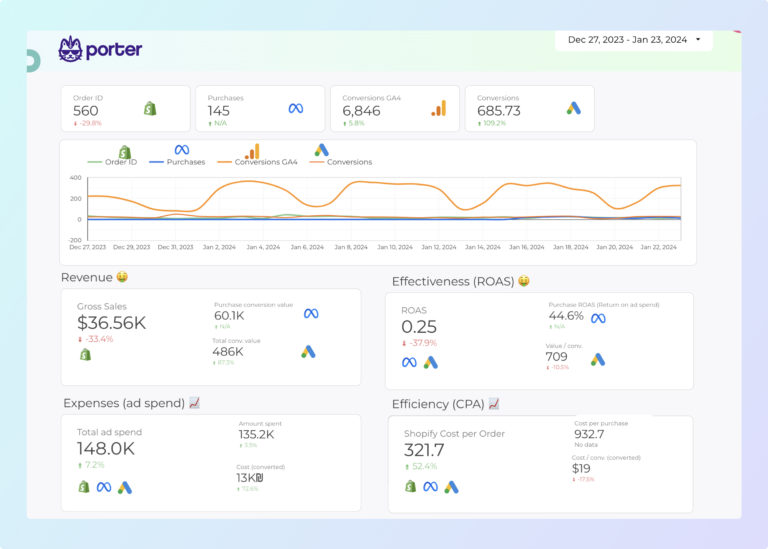
Paid Media E-commerce Template 
Paid ads + Shopify sales: connects Google and Meta ad spend to actual store revenue by campaign. Shows true ROAS — not platform-reported ROAS, but real Shopify revenue divided by real ad spend. The number that tells you whether scaling ads will grow profit or just grow costs.
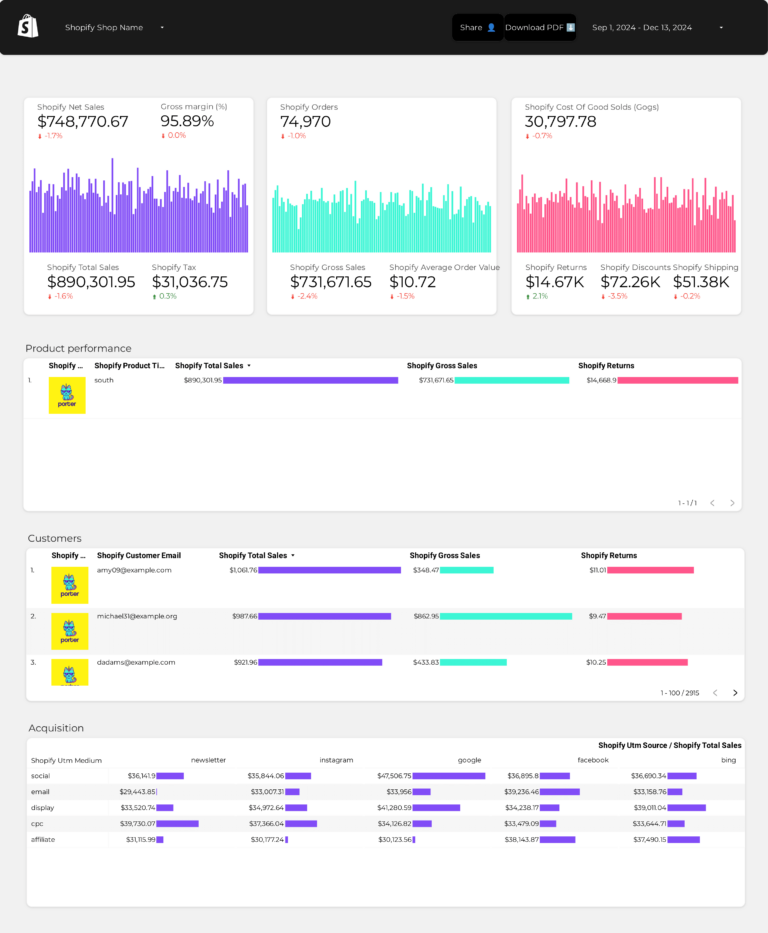
Shopify Sales Dashboard Template
Shopify sales outcomes: daily revenue trend, orders by fulfillment status, refund rate, and net revenue after returns. Focused on the conversion bottom line — revenue collected vs revenue kept. A $50K month with 15% refund rate is really $42.5K. This template shows the number that matters.
Quick Comparison
| Template | Best For | Setup |
|---|---|---|
| Shopify Most Popular | 2 min | |
| Shopify Store Performance | 2 min | |
| Shopify KPIs | 2 min | |
| Shopify Attribution | 2 min | |
| E-commerce | 2 min | |
| AOV | 2 min | |
| DTC | 2 min | |
| Dropshipping | 2 min |
The 10 Best Templates
Shopify Dashboard Template
Most PopularShopify store funnel: sessions and traffic sources (visibility — who arrives), product views and add-to-cart rate (engagement — what interests them), orders, revenue, and AOV (conversion — what they buy). Session-to-order conversion rate tells you whether your store experience converts browsers into buyers.
Key metrics visualized
- Visibility: store sessions, users, traffic sources
- Engagement: product views, add to cart rate, cart abandonment
- Conversion: orders, revenue, AOV, returning customer rate
- Set up period-over-period comparisons to track trends, not just totals
- Segment by audience or campaign to find what drives the best results
- Focus on conversion metrics first — visibility and engagement only matter if they lead to outcomes
Shopify Store Performance Dashboard Template
Product-level analysis: revenue by SKU, units sold, and average selling price. Shows which products carry the business and which ones sit in inventory. When combined with traffic source data, tells you which marketing channels drive buyers for your best-margin products.
Key metrics visualized
- Visibility: store sessions, users, traffic sources
- Engagement: product views, add to cart rate, cart abandonment
- Conversion: orders, revenue, AOV, returning customer rate
- Set up period-over-period comparisons to track trends, not just totals
- Segment by audience or campaign to find what drives the best results
- Focus on conversion metrics first — visibility and engagement only matter if they lead to outcomes
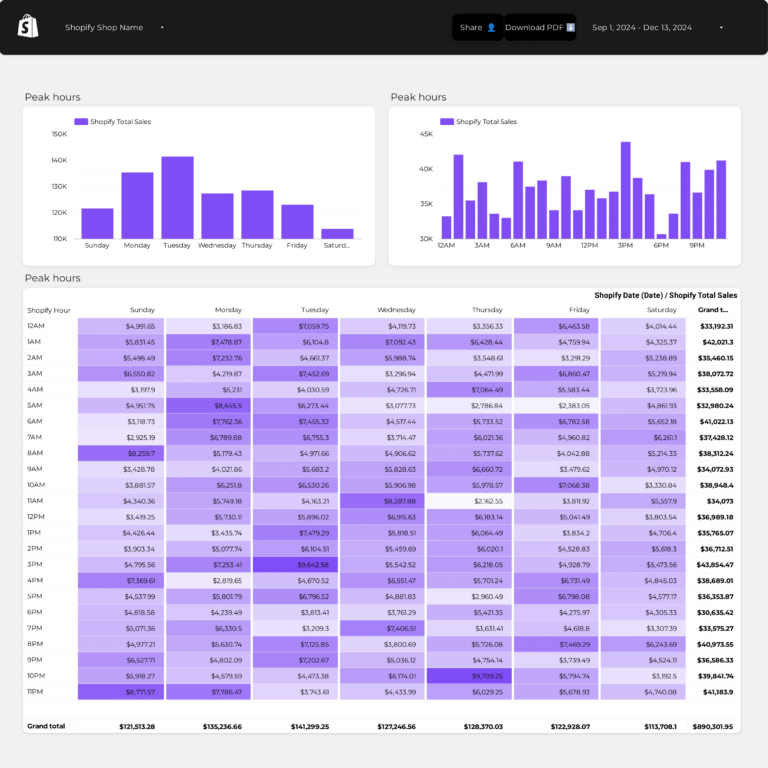
Shopify KPIs Dashboard Template
Shopify scorecard: revenue, orders, AOV, conversion rate, returning customer rate — each with period-over-period delta. Shows which part of the funnel improved or declined. If conversion rate dropped but traffic grew, your visibility increased but engagement quality fell. This template surfaces that.
Key metrics visualized
- Visibility: store sessions, users, traffic sources
- Engagement: product views, add to cart rate, cart abandonment
- Conversion: orders, revenue, AOV, returning customer rate
- Set up period-over-period comparisons to track trends, not just totals
- Segment by audience or campaign to find what drives the best results
- Focus on conversion metrics first — visibility and engagement only matter if they lead to outcomes
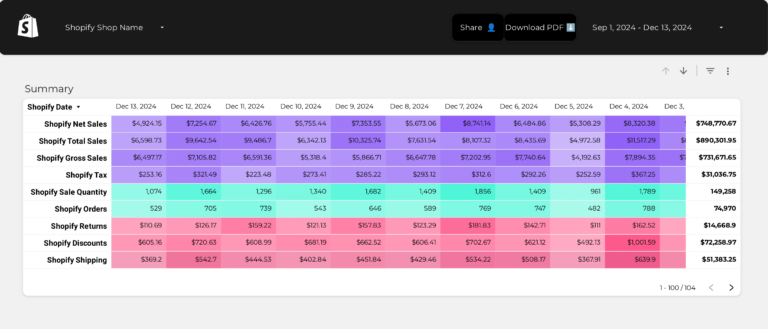
Shopify Attribution Dashboard Template
Revenue attribution by funnel source: which UTM campaigns and channels produce Shopify orders (conversion), not just clicks (engagement). Shows true ROAS per channel — the efficiency metric that connects marketing spend at the top of the funnel to store revenue at the bottom.
Key metrics visualized
- Visibility: store sessions, users, traffic sources
- Engagement: product views, add to cart rate, cart abandonment
- Conversion: orders, revenue, AOV, returning customer rate
- Set up period-over-period comparisons to track trends, not just totals
- Segment by audience or campaign to find what drives the best results
- Focus on conversion metrics first — visibility and engagement only matter if they lead to outcomes
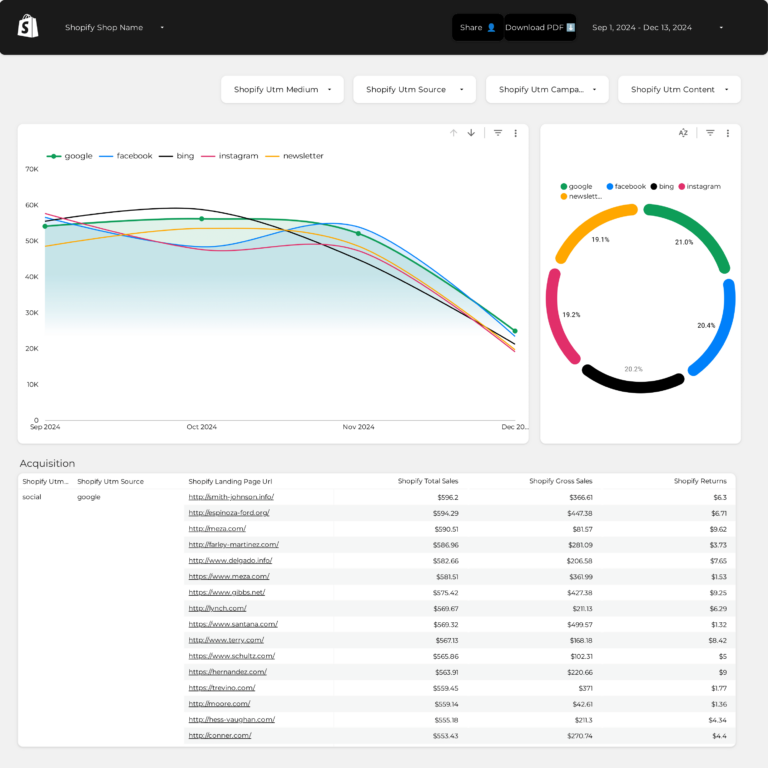
E-commerce Dashboard Template
E-commerce with GA4 behavior data: sessions (visibility), scroll depth and time on page (engagement quality), cart abandonment (conversion leak), and revenue by product. Complements Shopify data with browsing behavior context — shows how people engage with your store before they buy or leave.
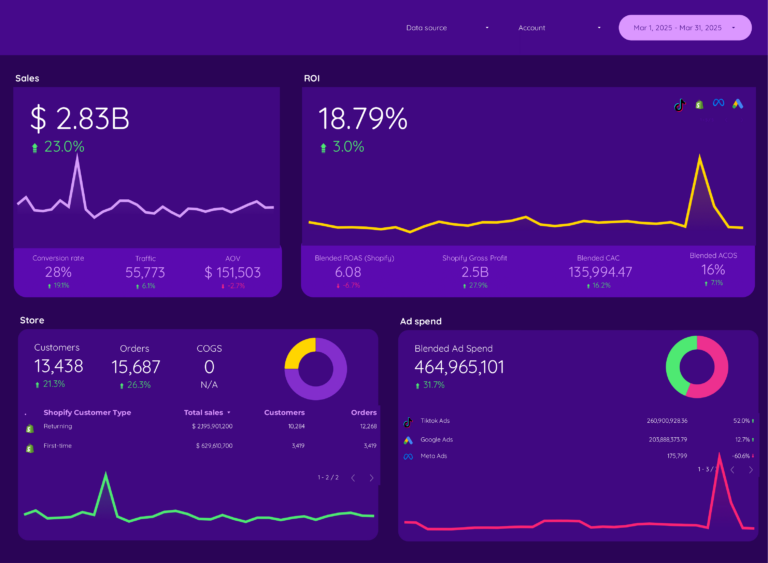
AOV Dashboard Template
AOV segmented by acquisition channel and customer type: shows which traffic sources bring high-value conversions vs low-value ones. If paid traffic has $35 AOV but email has $85 AOV, the conversion value per visitor is 2.4x higher from email — a segmentation insight that changes budget allocation.
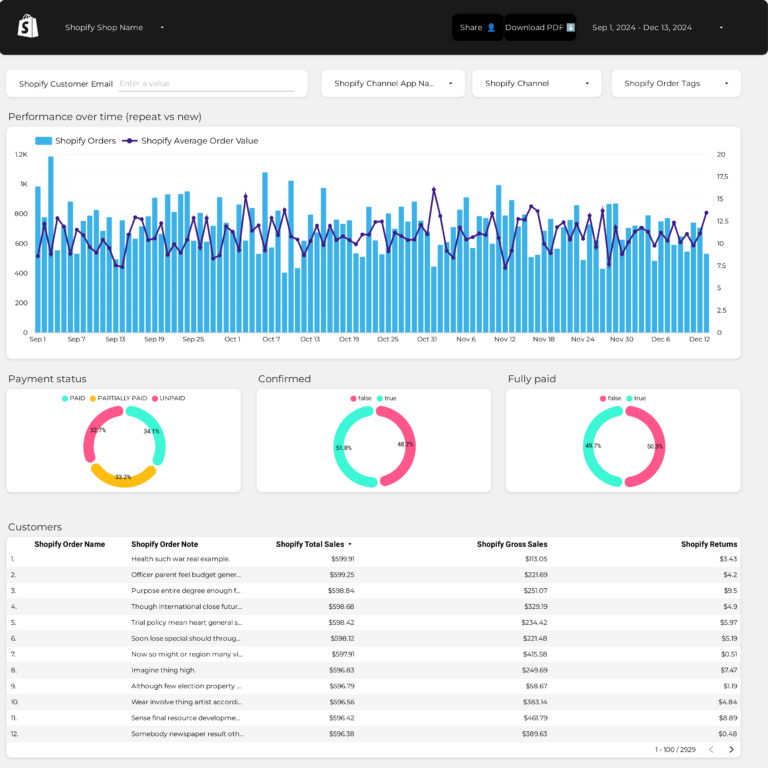
DTC Dashboard Template
DTC funnel economics: CAC (cost to move someone from visibility to first conversion), first-order AOV (initial conversion value), repeat rate (engagement retention), and LTV (lifetime conversion value). If LTV is less than 3x CAC, each new customer costs more than they’re worth.
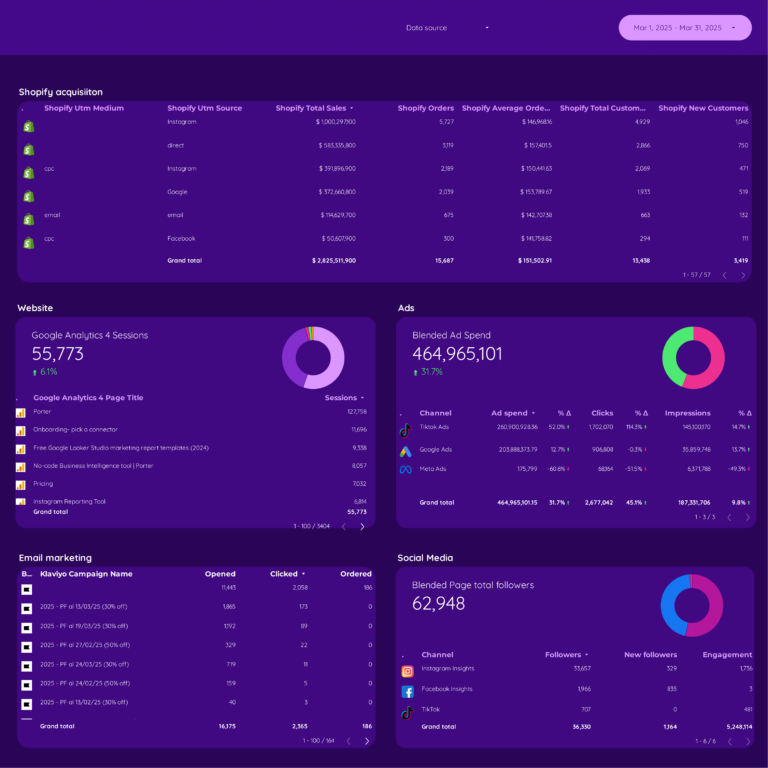
Dropshipping Dashboard Template
Per-product funnel profitability: ad spend (acquisition cost at visibility stage) → orders and revenue (conversion) → minus product cost and returns = actual margin. Surfaces which products convert profitably and which ones cost more to sell than they earn. Scale the winners, cut the losers.
How to Use a Template
- Choose a template from the list above
- Click "Get this template"
- Copy to your Data Studio account
- Connect your data
- Customize with your branding
What Should a Shopify Dashboard Include?
The most effective shopify dashboards are organized around three layers of the marketing funnel, with context and segmentation to make the data actionable:
1. Visibility metrics (is your audience seeing your content?)
Start with top-of-funnel metrics that tell you whether your shopify efforts are generating reach: store sessions, users, traffic sources. These are the leading indicators that show if your campaigns are getting in front of the right audience.
2. Engagement metrics (are they interacting?)
Once your audience sees your content, are they responding? Track product views, add to cart rate, cart abandonment. The gap between visibility and engagement reveals whether your messaging, creative, or targeting needs adjustment.
3. Conversion metrics (are they taking action?)
The bottom line: orders, revenue, AOV, returning customer rate. A dashboard without conversion data is just a vanity report. Connect engagement to business outcomes to prove ROI and justify budget.
4. Add context to every metric
Raw numbers mean nothing without comparison. Include period-over-period trends, efficiency rates (CTR, conversion rate, CPA), and progress against goals. This turns data into decisions.
5. Segment to find insights
Aggregate data hides opportunities. Segment by campaign, audience, content type, device, and time period to find what actually drives results.
Shopify Dashboard Best Practices
- Match the dashboard to the audience. A media buyer needs granular campaign data. A CMO needs a high-level summary. Build the right view for the reader.
- Use period-over-period comparisons, not just totals. “5,000 clicks” is meaningless. “5,000 clicks, up 18% month over month” tells a story.
- Include conversion data, not just engagement. Impressions and clicks are leading indicators. Revenue, leads, and ROAS are what the business cares about.
- Automate the data refresh. Manual exports kill consistency. Use Data Studio with native connectors so the dashboard updates every time you open it.
- Set goals with pacing indicators. The first question stakeholders ask is “are we on track?” Add progress bars or target lines for top KPIs.
- Segment by campaign and audience. Site-wide or account-wide averages hide your best and worst performers. Always include a breakdown table.
- Keep it focused. A dashboard with 50 charts is a data dump, not a dashboard. Aim for 5–8 key visualizations per view.
FAQ
Does Shopify have a dashboard?
Shopify has built-in analytics, but it is limited to basic store data. A Data Studio dashboard gives you much more: cross-channel ROAS, customer segmentation, product-level trends, and the ability to combine Shopify data with Google Ads, Meta Ads, and GA4 in one view.
Does Shopify have built-in analytics?
Yes, but the native Shopify analytics are basic. They show orders, revenue, and top products. For advanced reporting — multi-channel attribution, cohort analysis, custom metrics, and combined ad + store data — you need a Data Studio dashboard connected through Porter Metrics.
How do I track my Shopify sales in Data Studio?
Connect your Shopify store to Data Studio through Porter Metrics. Porter automatically backfills your order data into BigQuery and refreshes daily, so reports load fast even for stores with thousands of orders. Copy a Shopify template and your data appears in minutes.
How to see analytics on Shopify?
For basic analytics, use Shopify Admin > Analytics. For professional dashboards with trends, multi-channel attribution, and custom KPIs, use a Data Studio template connected through Porter Metrics. It combines Shopify data with your ad platforms and Google Analytics.
Can I combine Shopify data with my ad platforms?
Yes. Our E-commerce Overview template combines Shopify orders and revenue with Meta Ads, Google Ads, and GA4 data. You see true ROAS per channel — how much revenue each ad platform actually generates for your store.
What metrics should I track in a shopify dashboard?
Organize metrics in three layers. Visibility: store sessions, users, traffic sources. Engagement: product views, add to cart rate, cart abandonment. Conversion: orders, revenue, AOV, returning customer rate. Add context with period-over-period comparisons and segment by campaign, audience, or content type to find actionable insights.
How often should I check my shopify dashboard?
For operational monitoring, check daily or every few days. For performance management and client reporting, weekly or monthly. The right cadence depends on your role: media buyers need daily data, account managers need weekly summaries, executives need monthly overviews.
Can I white-label these templates for my clients?
Yes. Every Data Studio template is fully customizable. Add your logo, change colors, adjust date ranges, and remove Porter Metrics branding. Share via live link (always updated) or scheduled PDF export for professional, branded reporting.
Do I need a connector to use these templates?
It depends on the data source. Google-native sources (Google Ads, GA4, Search Console) connect directly to Data Studio for free. For non-Google sources (Facebook, Instagram, Shopify, HubSpot, LinkedIn, etc.), you need a connector like Porter Metrics to bridge the data.
What should a Shopify analytics dashboard include?
A Shopify analytics dashboard should include real-time sales, orders, AOV, sessions, conversion rate, and traffic sources. Add product-level performance to identify best sellers and dead stock. The best Shopify dashboard templates also track Shopify data visualization for inventory levels, Shopify KPI dashboard metrics like customer lifetime value, and repeat purchase rate. Connect to Data Studio for custom Shopify report templates beyond what the native Shopify admin dashboard offers.
Can I use Databox or DashThis with Shopify?
Yes, Databox Shopify and DashThis Shopify integrations exist, but they require paid subscriptions. The Data Studio templates on this page offer the same Shopify dashboard functionality for free using the Porter Metrics Shopify connector. You get the same KPIs — revenue, orders, AOV, sessions — without a monthly dashboard software fee.
Start with a free template
Every template is free, white-label ready, and takes under 5 minutes to set up.
Browse all 110+ templates →Other Dashboard Templates
Explore more free Data Studio templates by category: