





The best free social media dashboard templates in 2026 unify your Facebook, Instagram, LinkedIn, TikTok, and YouTube data into Data Studio (formerly Looker Studio) — tracking followers, engagement, reach, and content performance across all platforms.
We have built and tested over 100 Data Studio templates at Porter Metrics over the past 6 years, used by +10,000 marketing teams and agencies in 60 countries.
Quick answer — 12 Best Free Social Media Dashboard Templates in 2026
- Social Media
- Social Media Engagement
- Social Media Followers Tracking
- Social Media Post Performance
- Social Media Client Presentation
- Social Media Competitors
- Instagram Insights
- Instagram Insights Reels
- Facebook Insights
- LinkedIn Pages
- YouTube
- TikTok
All templates free and white-label ready. Browse all 110+ templates →
Quick Comparison Table
| Template | Best For | Setup |
|---|---|---|
 Social Media Most Popular Social Media Most Popular | 2 min | |
| Social Media Engagement | 2 min | |
| Social Media Followers Tracking | 2 min | |
| Social Media Post Performance | 2 min | |
| Social Media Client Presentation | 2 min | |
| Social Media Competitors | 2 min | |
 Instagram Insights Popular Instagram Insights Popular | 2 min | |
| Instagram Insights Reels Trending | 2 min | |
| Facebook Insights | 2 min | |
 LinkedIn Pages LinkedIn Pages | 2 min | |
 YouTube YouTube | 2 min | |
 TikTok TikTok | 2 min |
The 12 Best Templates
Social Media Engagement Dashboard Template
Engagement by type: reactions (low effort), comments (medium effort), shares and saves (high effort). A post with 100 shares has more distribution value than one with 1,000 likes. This template separates engagement quality from engagement volume to show which content people actively spread.
Key metrics visualized
- Visibility: reach, impressions, follower growth
- Engagement: likes, comments, shares, saves, video views
- Conversion: link clicks, profile visits, DMs, leads
- Set up period-over-period comparisons to track trends, not just totals
- Segment by audience or campaign to find what drives the best results
- Focus on conversion metrics first — visibility and engagement only matter if they lead to outcomes
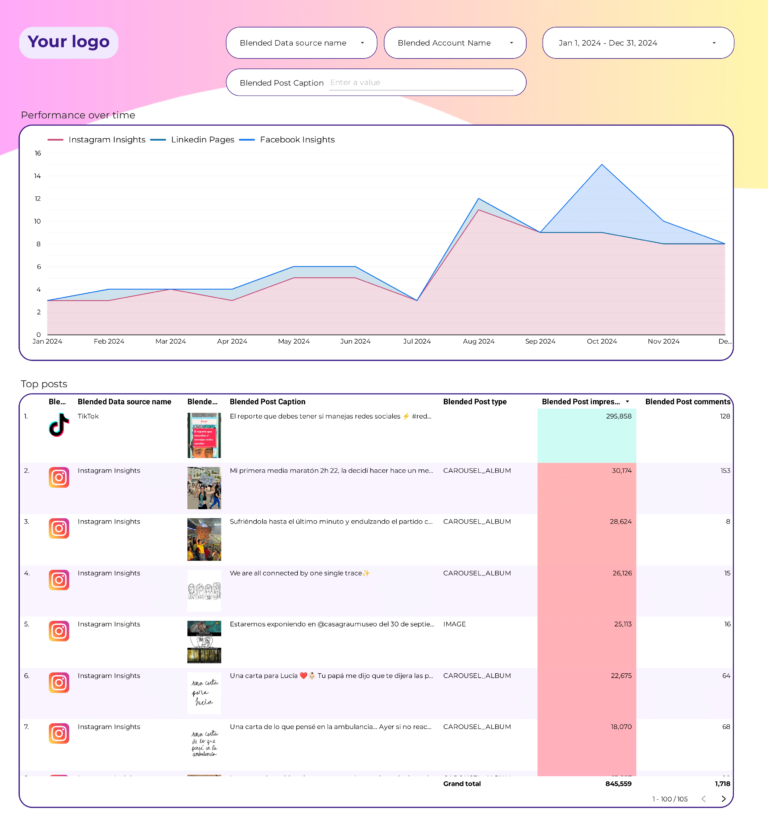
Social Media Followers Tracking Dashboard Template
Follower growth by platform: net new per week, growth rate trend, and platform comparison. Shows whether your audience is growing because of your content (steady organic growth) or because of a viral moment (spike then plateau). Steady growth compounds; spikes don’t.
Key metrics visualized
- Visibility: reach, impressions, follower growth
- Engagement: likes, comments, shares, saves, video views
- Conversion: link clicks, profile visits, DMs, leads
- Set up period-over-period comparisons to track trends, not just totals
- Segment by audience or campaign to find what drives the best results
- Focus on conversion metrics first — visibility and engagement only matter if they lead to outcomes
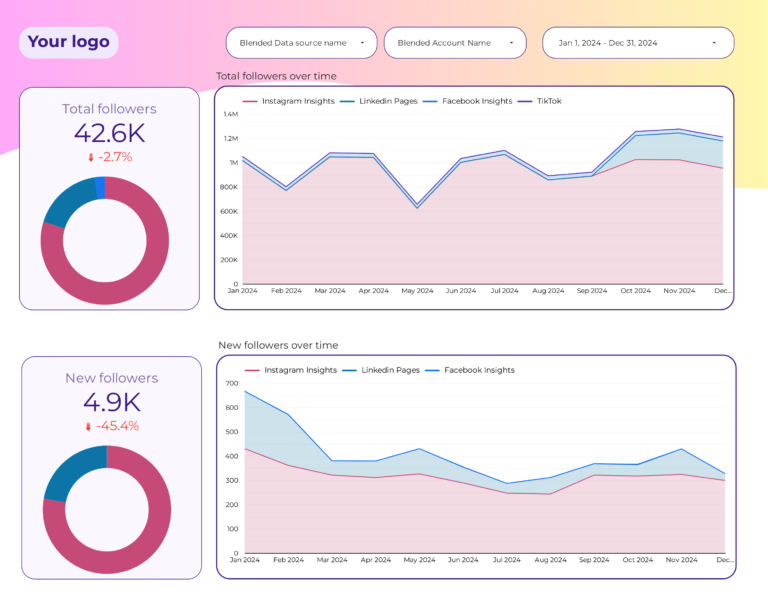
Social Media Post Performance Dashboard Template
Post-level ranking across all platforms: sort by reach to find your loudest content, by engagement rate to find your most resonant, by saves/shares to find your most valuable. Filter by platform and format to discover which combinations consistently outperform.
Key metrics visualized
- Visibility: reach, impressions, follower growth
- Engagement: likes, comments, shares, saves, video views
- Conversion: link clicks, profile visits, DMs, leads
- Set up period-over-period comparisons to track trends, not just totals
- Segment by audience or campaign to find what drives the best results
- Focus on conversion metrics first — visibility and engagement only matter if they lead to outcomes
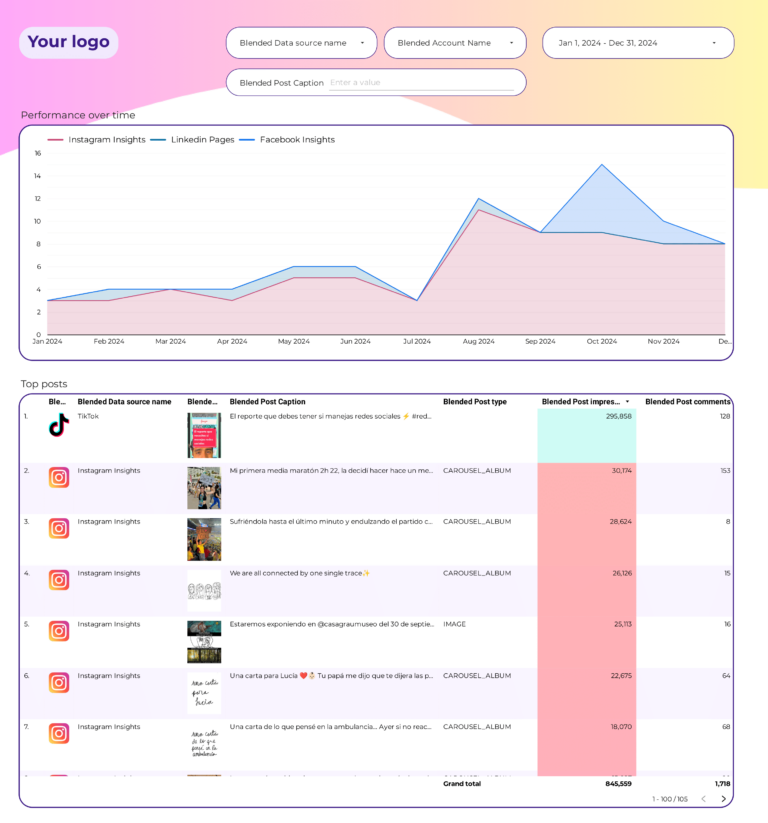
Social Media Client Presentation Dashboard Template
Client-facing monthly report: key metrics summary, top performing posts, audience growth, and channel comparison in a clean layout. Exports to PDF without reformatting. Shows results with context — ‘engagement up 15% MoM’ tells a story that ‘4,230 engagements’ doesn’t.
Key metrics visualized
- Visibility: reach, impressions, follower growth
- Engagement: likes, comments, shares, saves, video views
- Conversion: link clicks, profile visits, DMs, leads
- Set up period-over-period comparisons to track trends, not just totals
- Segment by audience or campaign to find what drives the best results
- Focus on conversion metrics first — visibility and engagement only matter if they lead to outcomes
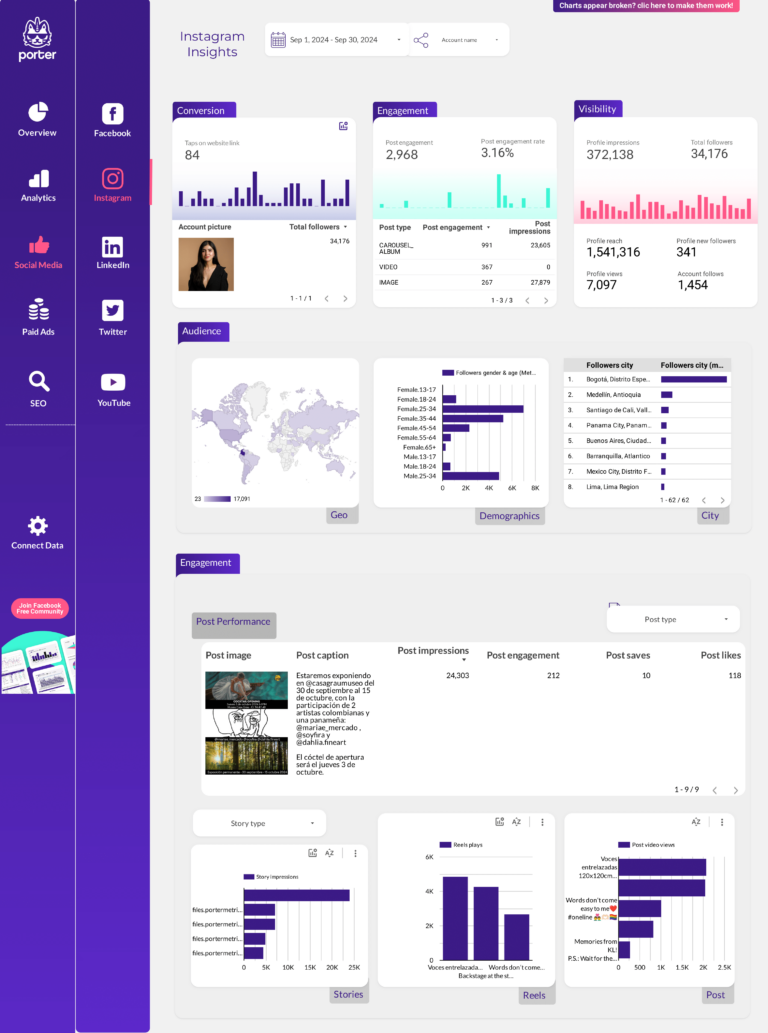
Social Media Competitors Dashboard Template
Competitor benchmarking across the funnel: their reach vs yours (visibility comparison), their engagement rate vs yours (content quality comparison), their follower growth vs yours (audience building comparison). Shows whether you’re keeping up, falling behind, or leading — and on which metric.
Key metrics visualized
- Visibility: reach, impressions, follower growth
- Engagement: likes, comments, shares, saves, video views
- Conversion: link clicks, profile visits, DMs, leads
- Set up period-over-period comparisons to track trends, not just totals
- Segment by audience or campaign to find what drives the best results
- Focus on conversion metrics first — visibility and engagement only matter if they lead to outcomes
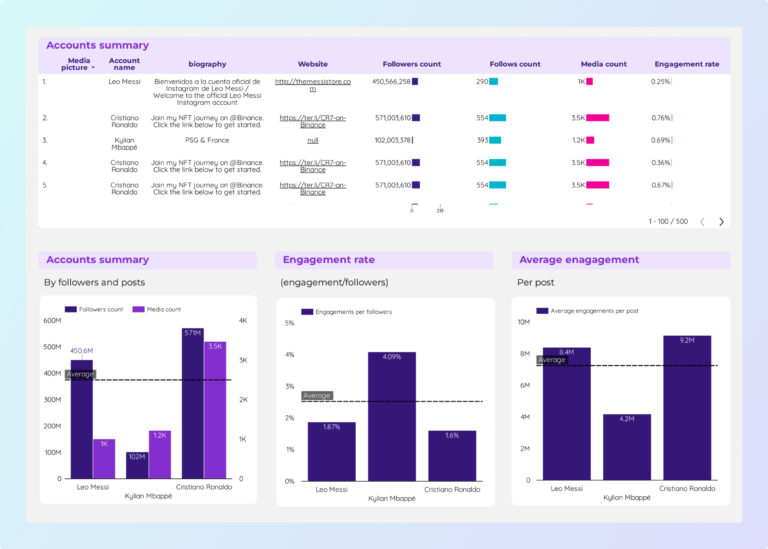
Instagram Insights Dashboard Template
PopularInstagram metrics in your social stack: reach (visibility), engagement rate, saves, and shares (response depth), broken down by post type. Shows whether reels, carousels, or images earn the most organic reach — the key input for your content calendar.
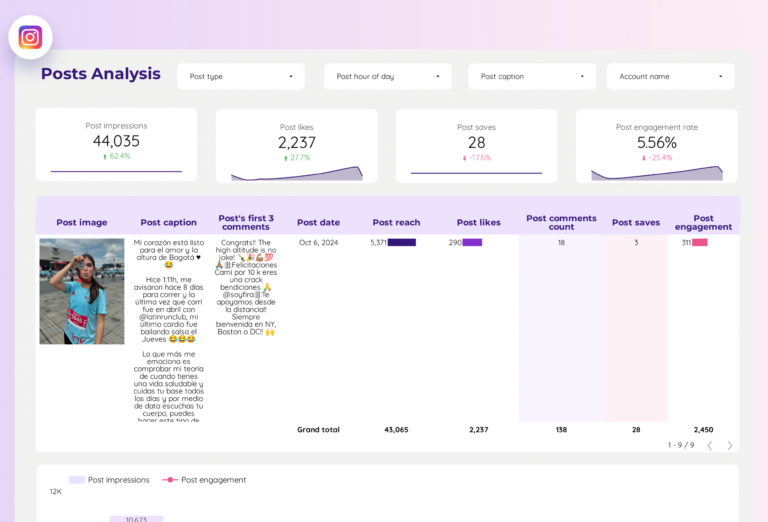
Instagram Insights Reels Dashboard Template
TrendingReels analytics: plays and reach (how far it spread), engagement and shares (how people responded), average watch time (how long they stayed). A reel with high reach but low watch time means the hook worked but the content didn’t deliver. This template separates clickbait from value.
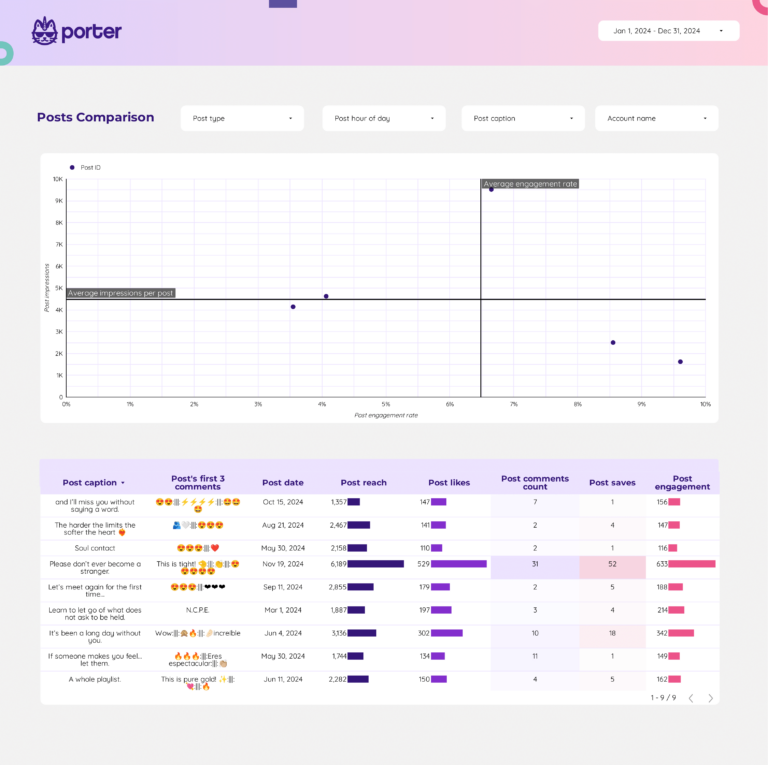
Facebook Insights Dashboard Template
Facebook Page within your social dashboard: page reach, post performance, video views, and follower trends. Separates organic vs paid to show whether your Facebook audience engages because of your content or because of your ad spend. The answer changes your strategy.
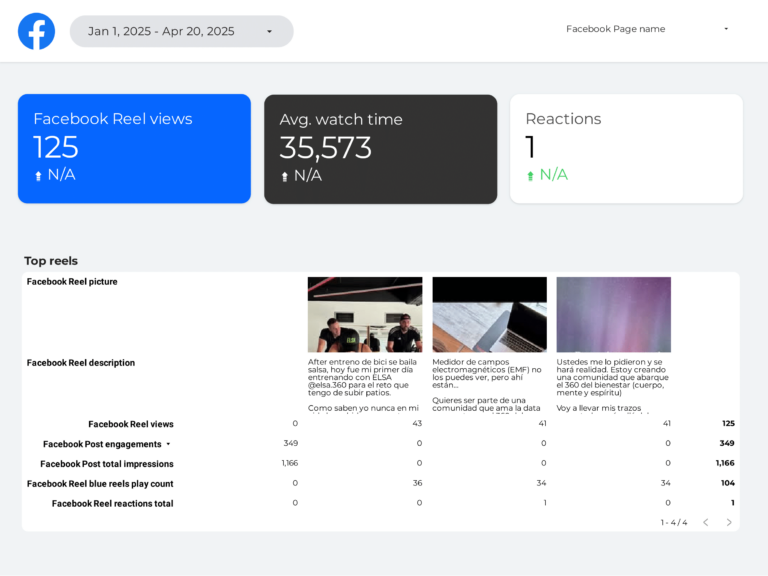
LinkedIn Pages Dashboard Template
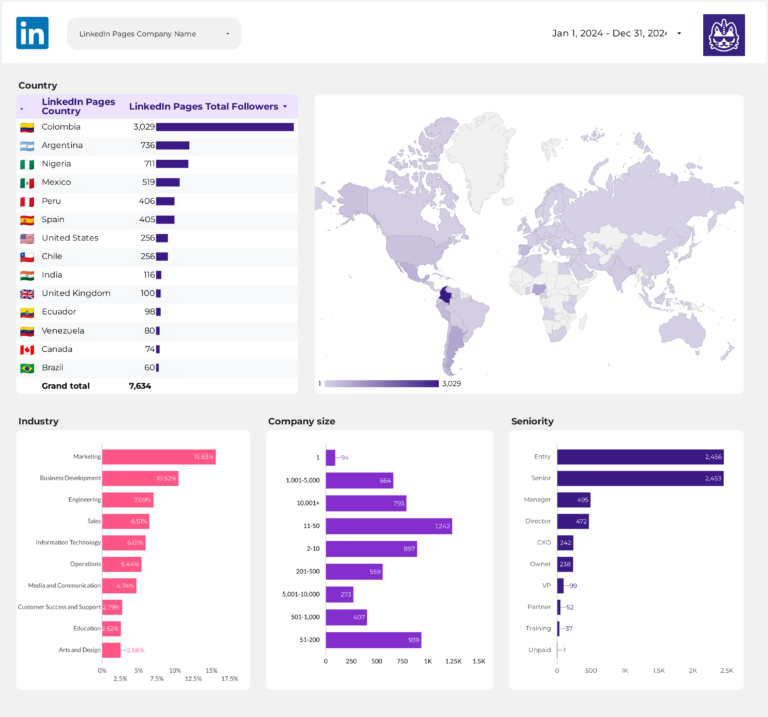
LinkedIn Company Page: impressions and clicks (visibility), engagement rate by content type — articles, images, documents, polls (response), and follower growth by industry and seniority (audience quality). For B2B, follower count matters less than follower composition.
YouTube Dashboard Template
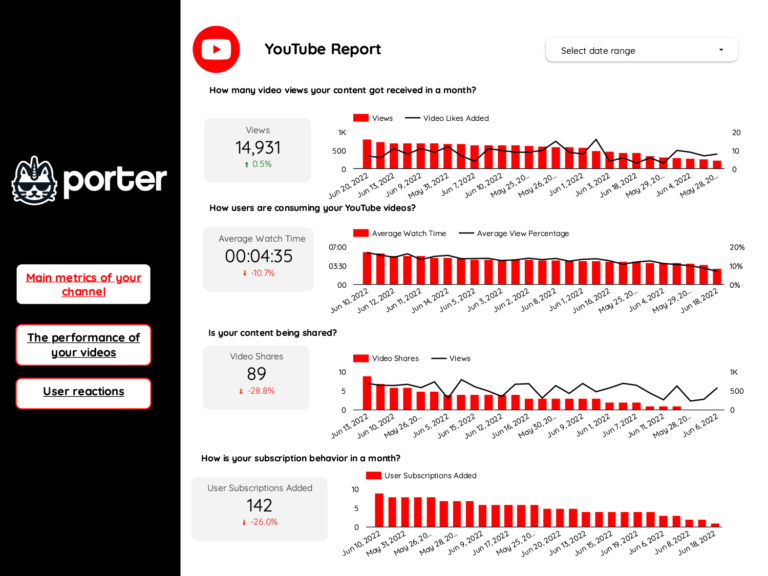
YouTube funnel: impressions and thumbnail CTR (visibility and click-through), views and average watch duration (engagement depth), subscribers gained (conversion to committed audience). The algorithm rewards retention, not clicks — this template shows whether your content earns sustained attention.
TikTok Dashboard Template
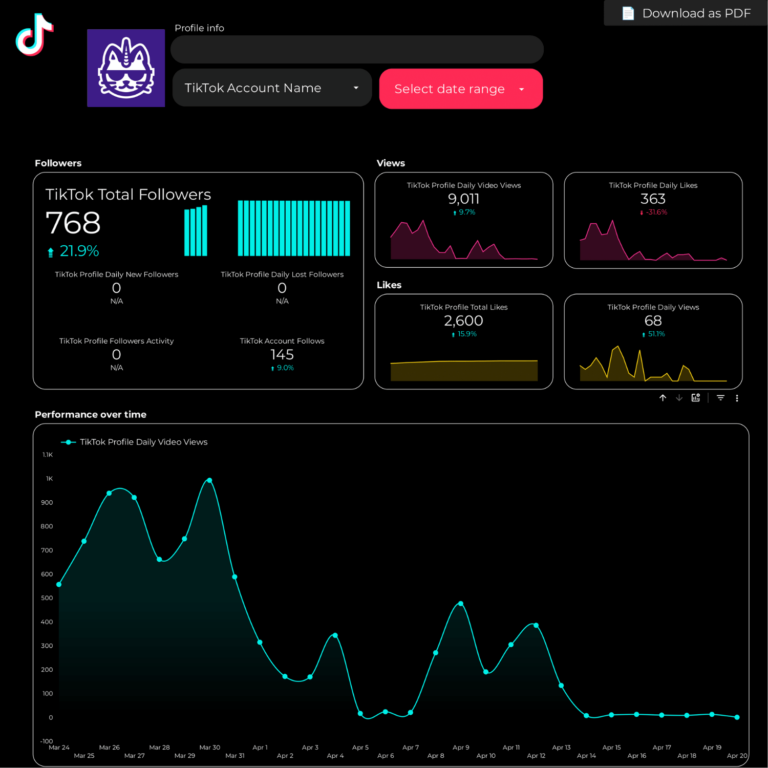
TikTok analytics: video views and profile visits (reach velocity), likes, comments, shares (engagement depth), and follower growth (audience building). Tracks how fast a video accumulates views in its first 48 hours — the window that determines whether TikTok’s algorithm amplifies or buries your content.
How to Use a Template
- Choose a template from the list above or browse all 110+ templates
- Click "Get this template" to open the template page
- Copy the template to your own Data Studio account
- Connect your data source — Google-native sources connect directly; others connect through Porter Metrics connectors
- Customize — add your logo, change colors, adjust date ranges
What Should a Social Media Dashboard Include?
The most effective social media dashboards are organized around three layers of the marketing funnel, with context and segmentation to make the data actionable:
1. Visibility metrics (is your audience seeing your content?)
Start with top-of-funnel metrics that tell you whether your social media efforts are generating reach: reach, impressions, follower growth. These are the leading indicators that show if your campaigns are getting in front of the right audience.
2. Engagement metrics (are they interacting?)
Once your audience sees your content, are they responding? Track likes, comments, shares, saves, video views. The gap between visibility and engagement reveals whether your messaging, creative, or targeting needs adjustment.
3. Conversion metrics (are they taking action?)
The bottom line: link clicks, profile visits, DMs, leads. A dashboard without conversion data is just a vanity report. Connect engagement to business outcomes to prove ROI and justify budget.
4. Add context to every metric
Raw numbers mean nothing without comparison. Include period-over-period trends, efficiency rates (CTR, conversion rate, CPA), and progress against goals. This turns data into decisions.
5. Segment to find insights
Aggregate data hides opportunities. Segment by campaign, audience, content type, device, and time period to find what actually drives results.
Social Media Dashboard Best Practices
- Match the dashboard to the audience. A media buyer needs granular campaign data. A CMO needs a high-level summary. Build the right view for the reader.
- Use period-over-period comparisons, not just totals. “5,000 clicks” is meaningless. “5,000 clicks, up 18% month over month” tells a story.
- Include conversion data, not just engagement. Impressions and clicks are leading indicators. Revenue, leads, and ROAS are what the business cares about.
- Automate the data refresh. Manual exports kill consistency. Use Data Studio with native connectors so the dashboard updates every time you open it.
- Set goals with pacing indicators. The first question stakeholders ask is “are we on track?” Add progress bars or target lines for top KPIs.
- Segment by campaign and audience. Site-wide or account-wide averages hide your best and worst performers. Always include a breakdown table.
- Keep it focused. A dashboard with 50 charts is a data dump, not a dashboard. Aim for 5–8 key visualizations per view.
Frequently Asked Questions
How to make a social media dashboard?
Use a Data Studio template that connects to your social accounts through Porter Metrics. Choose a multi-platform template (Facebook + Instagram + LinkedIn + TikTok) or a single-platform template. Copy it, connect your accounts, and your dashboard is ready in minutes.
What is the best way to track social media analytics?
A unified dashboard that pulls data from all your social platforms into one view. Instead of checking Facebook Insights, Instagram Insights, and LinkedIn Analytics separately, a Data Studio dashboard shows followers, engagement, reach, and top posts across all platforms side by side.
What are the 7 layers of social media analytics?
The 7 layers typically include: 1) Reach and impressions, 2) Engagement (likes, comments, shares), 3) Follower growth, 4) Content performance by type, 5) Audience demographics, 6) Competitor benchmarking, 7) ROI and conversion tracking. Our Social Media template covers all of these.
Can I see all social media platforms in one dashboard?
Yes. Porter Metrics connects Facebook Pages, Instagram Business, LinkedIn Pages, TikTok, and YouTube to Data Studio. The Social Media Overview template shows unified metrics across all platforms with per-platform breakdowns.
Which social media platforms are supported?
Porter Metrics supports Facebook Pages, Instagram Business/Creator, LinkedIn Company Pages, TikTok (organic and ads), and YouTube. All can be combined in multi-source templates with automatic data blending.
What metrics should I track in a social media dashboard?
Organize metrics in three layers. Visibility: reach, impressions, follower growth. Engagement: likes, comments, shares, saves, video views. Conversion: link clicks, profile visits, DMs, leads. Add context with period-over-period comparisons and segment by campaign, audience, or content type to find actionable insights.
How often should I check my social media dashboard?
For operational monitoring, check daily or every few days. For performance management and client reporting, weekly or monthly. The right cadence depends on your role: media buyers need daily data, account managers need weekly summaries, executives need monthly overviews.
Can I white-label these templates for my clients?
Yes. Every Data Studio template is fully customizable. Add your logo, change colors, adjust date ranges, and remove Porter Metrics branding. Share via live link (always updated) or scheduled PDF export for professional, branded reporting.
Do I need a connector to use these templates?
It depends on the data source. Google-native sources (Google Ads, GA4, Search Console) connect directly to Data Studio for free. For non-Google sources (Facebook, Instagram, Shopify, HubSpot, LinkedIn, etc.), you need a connector like Porter Metrics to bridge the data.
What is a social media dashboard and why do I need one?
A social media dashboard is a visual report that consolidates your social media performance metrics from multiple platforms (Instagram, Facebook, LinkedIn, TikTok, YouTube) into one view. Instead of checking each platform’s native analytics separately, a social media dashboard template gives you cross-channel visibility into reach, engagement, and conversions. It answers: which platform drives the best results?
Can I build a social media dashboard in Google Analytics?
Google Analytics tracks social referral traffic (clicks from social to your website), but it doesn’t pull native social metrics like followers, engagement rate, or reach. A proper social media dashboard Google Analytics integration combines GA4 website data with platform-specific metrics from a connector. The templates on this page do exactly that — they merge social media interaction metrics with website behavior data.
Is there a free social media report template?
Yes. All templates on this page are free social media report templates for Data Studio. They include pre-built charts for reach, engagement, follower growth, and content performance. Unlike a social media dashboard template Excel that requires manual data entry, these templates pull live data automatically through connectors.
Start with a free template
Every template in this list is free, white-label ready, and takes under 5 minutes to set up. Choose the template that matches your use case, connect your data, and start reporting today.
Browse all 110+ templates →Other Dashboard Templates
Explore more free Data Studio templates by category:
Social Media Dashboard Template
Most PopularCross-platform overview: reach and impressions (visibility), engagement rate and interactions (response), and follower growth (audience building) from Facebook, Instagram, LinkedIn, TikTok, and YouTube. The starting point to understand which platform earns the most attention for your content.
Key metrics visualized