





Trusted by 1,600+ marketing teams and agencies


What you can do with this SEO KPI dashboard
Five ways to keep SEO goals on track. Click one to see its view on demo data, then paste its prompt into the same Claude chat.
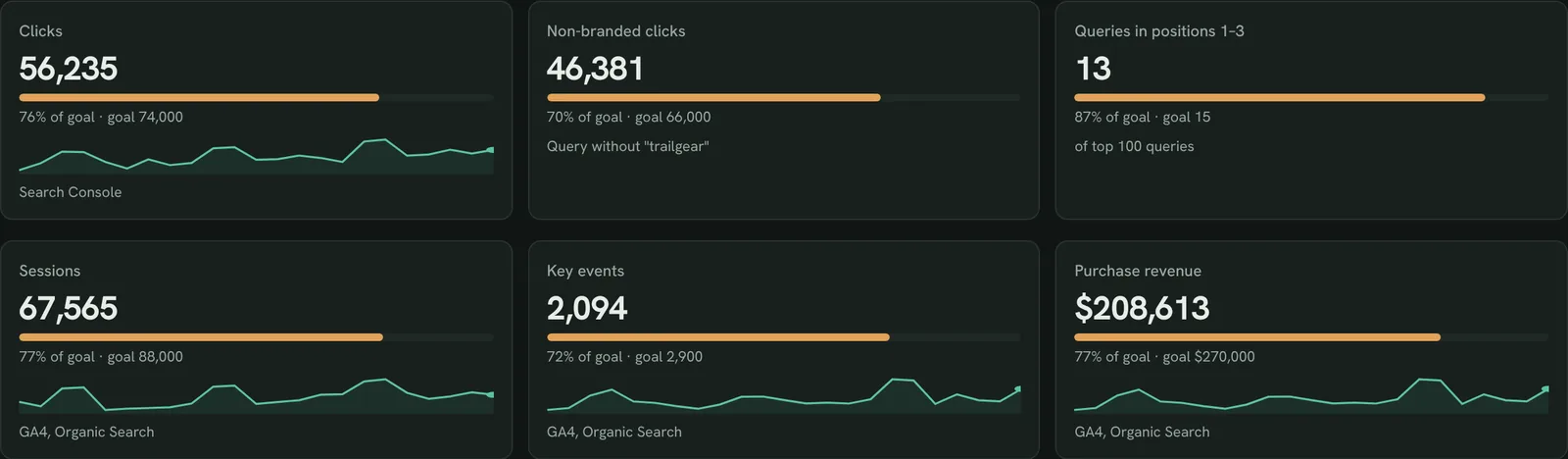
Track your SEO KPIs against targets
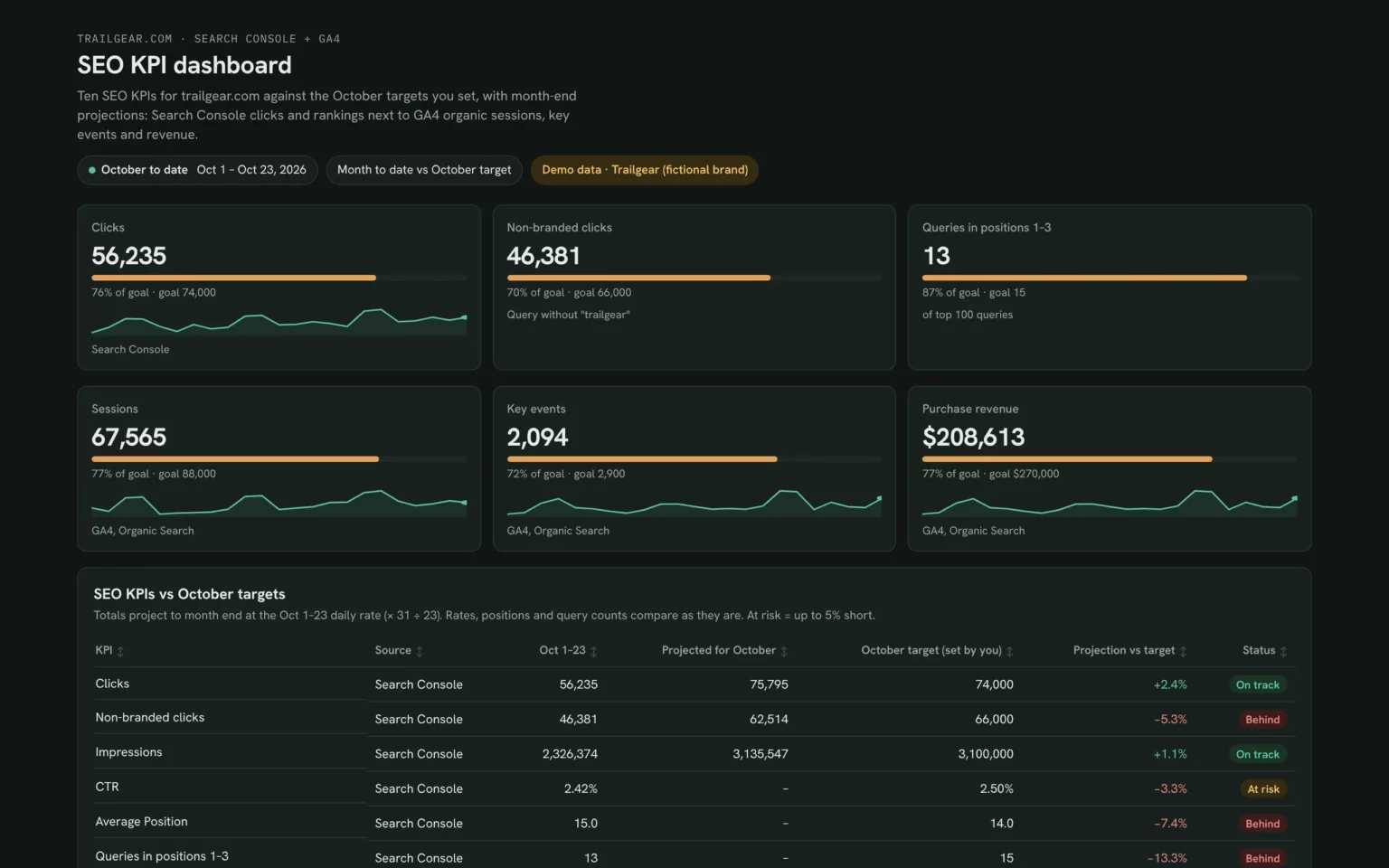
Each KPI with a progress bar to its monthly target, so the team sees where it stands at a glance.
- How far along is each KPI this month?
- Which target is furthest away?
Show month-to-date clicks, non-branded clicks, queries in positions 1–3, organic sessions, key events and purchase revenue, each with a progress bar to these targets: [targets].Also built for this: Client SEO dashboard template
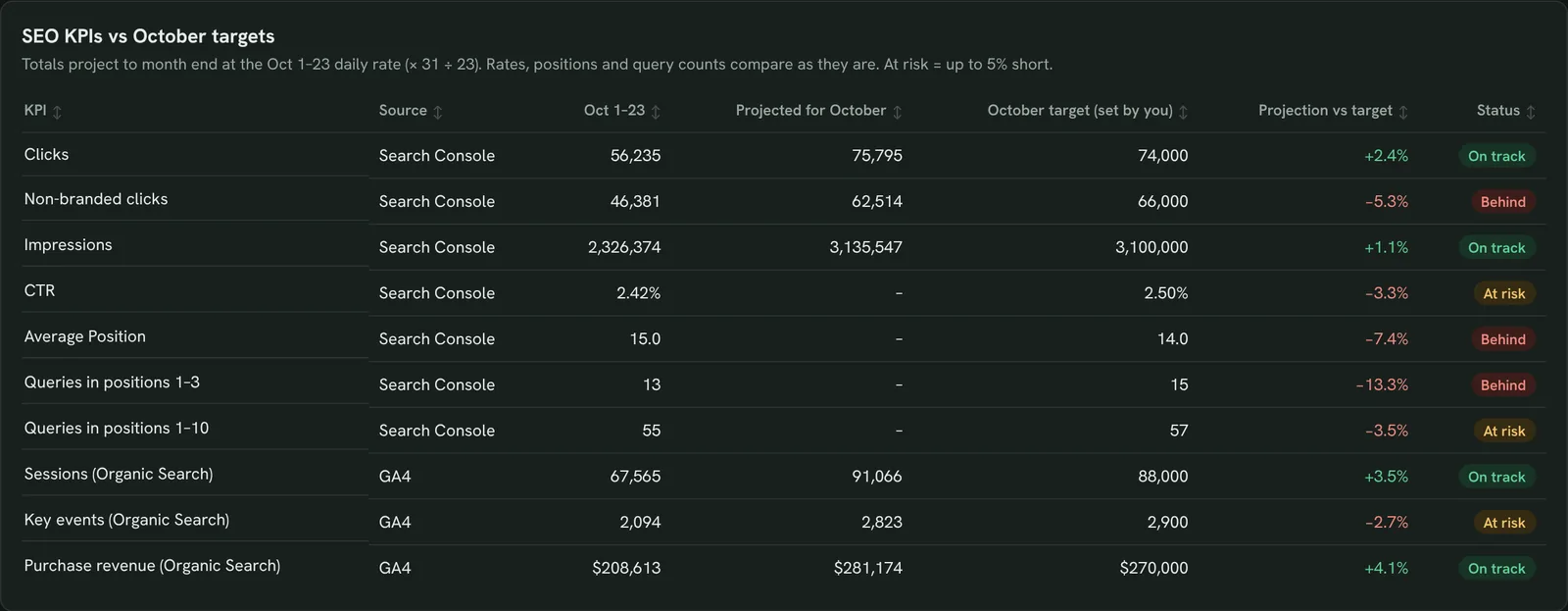
See which KPIs will miss this month
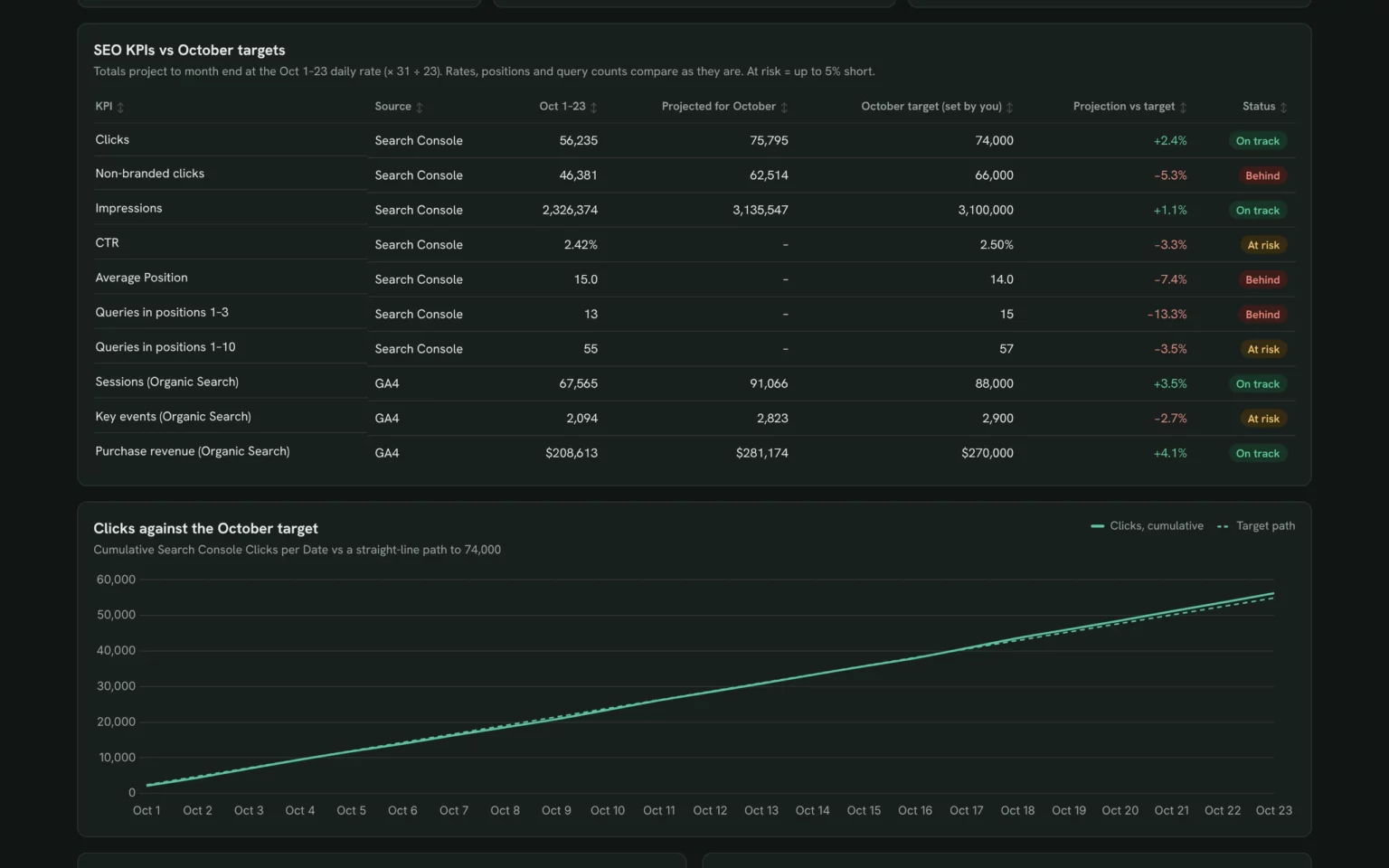
Ten KPIs with a month-end projection and an on track, at risk or behind status, so you act while there is still time in the month.
- Which KPIs will finish below target?
- Is the gap small enough to close?
Make a table of my 10 SEO KPIs with month to date, projected month-end value at the current daily rate, target, projection vs target and an on track / at risk / behind status.Also built for this: Monthly SEO dashboard template
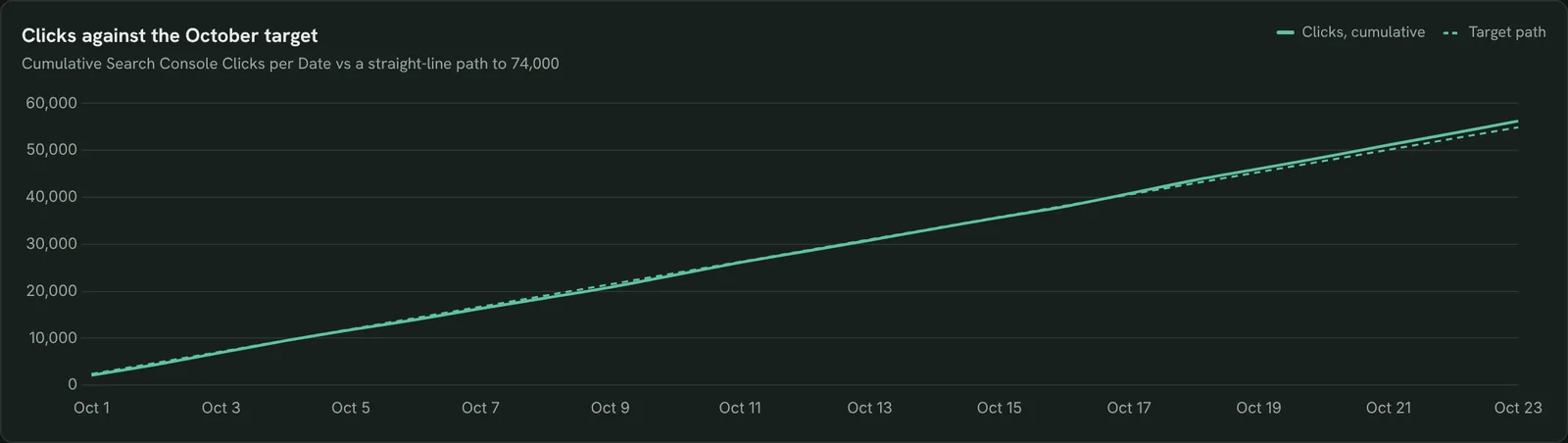
Check clicks against the monthly target
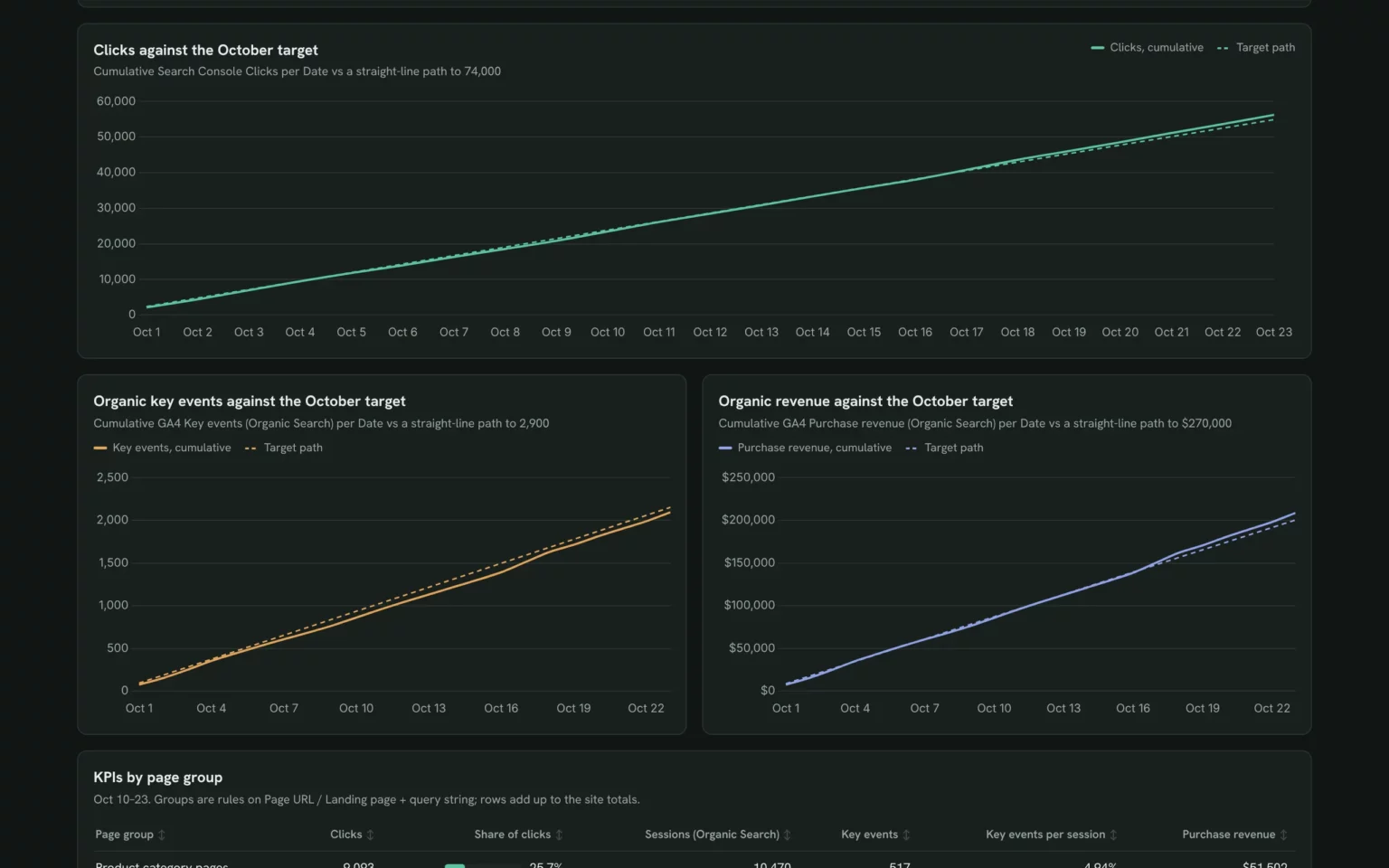
Cumulative clicks against a straight-line path to the target, so you can see the day clicks fell behind or pulled ahead.
- Are clicks ahead of or behind the target path?
- When did the gap open?
Chart cumulative Search Console clicks per day this month against a straight line from zero to my monthly clicks target.Also built for this: Google Search Console dashboard template
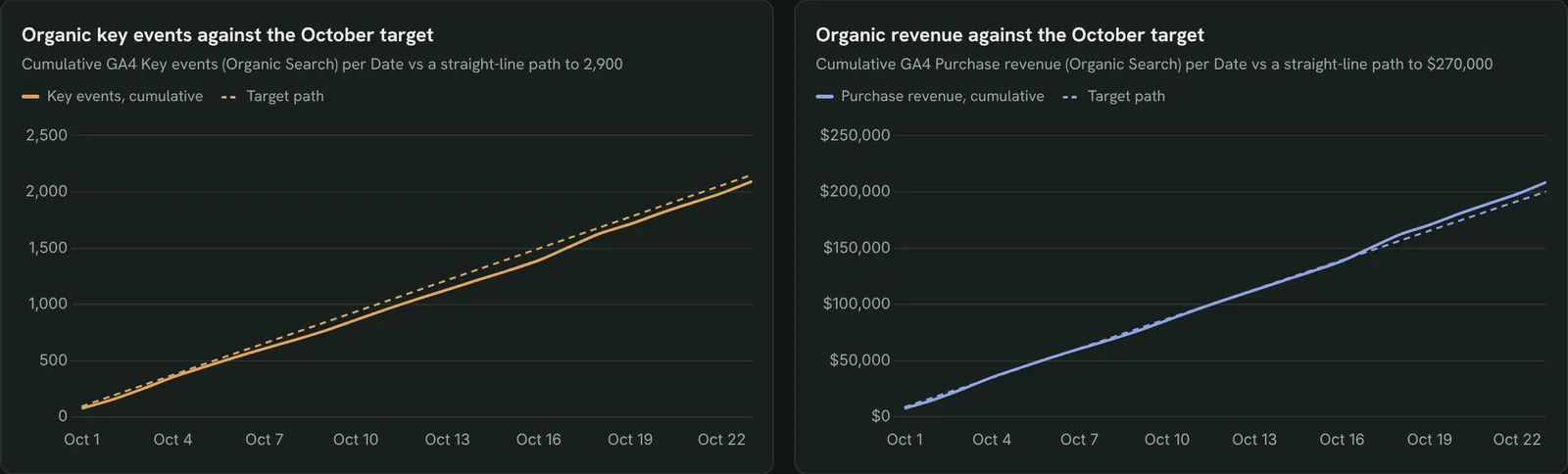
Check key events and revenue against target
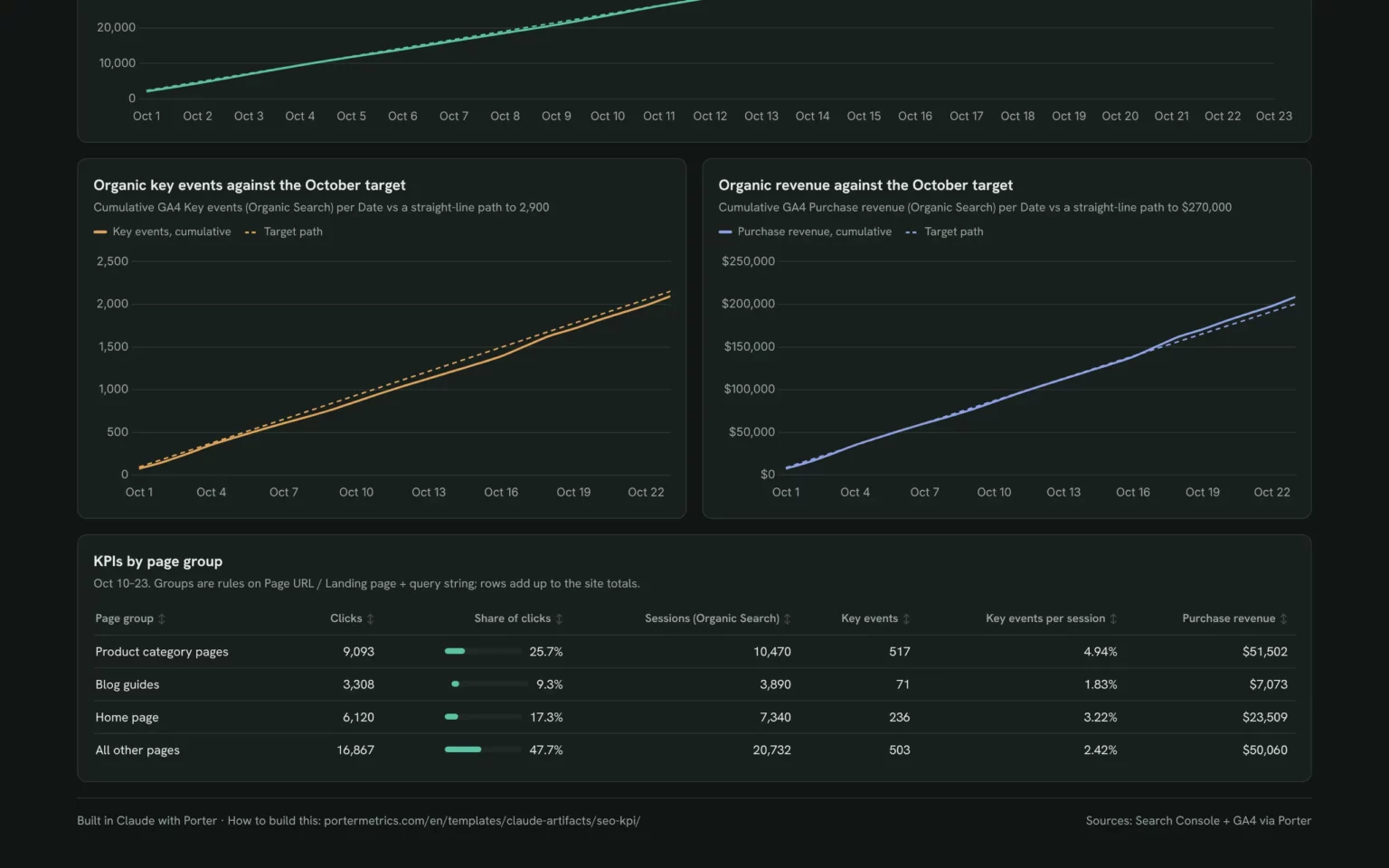
Cumulative organic key events and revenue against their targets, so traffic gains get checked against the results the business counts.
- Is organic revenue on pace for the month?
- Are key events keeping up with traffic?
Chart cumulative GA4 key events and purchase revenue for Organic Search this month against straight-line paths to my targets.Also built for this: GA4 SEO dashboard template
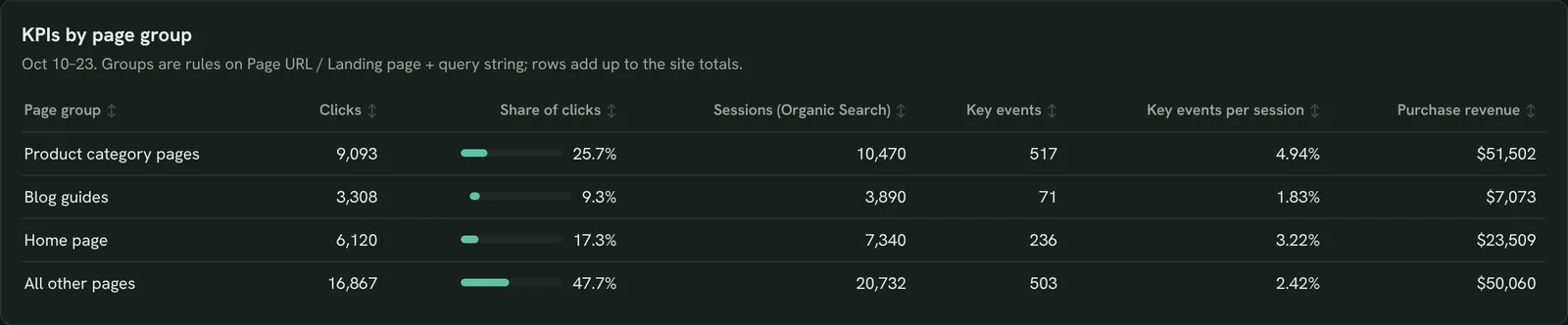
See which page groups carry your KPIs
Clicks, organic sessions, key events and revenue for product, blog and home pages, so you know which part of the site to push when a KPI falls short.
- Which page group brings most of the revenue?
- Do blog clicks turn into key events?
Group my pages into product category pages, blog guides, the home page and all other pages and show clicks, share of clicks, organic sessions, key events, key events per session and purchase revenue.Also built for this: SEO dashboard template
How to set up the SEO KPI dashboard in Claude
You need a Search Console and a GA4 property your Google account can open, a free Porter account and Claude Pro, Max, Team or Enterprise for Claude Dashboards. Have your monthly targets ready; setup takes about 10 minutes.
Connect Search Console and GA4 in Porter
Sign up free at Porter, open Data sources, connect Google Search Console and Google Analytics 4 and choose your property in each. The Search Console to Claude tutorial and the GA4 to Claude tutorial show each click.
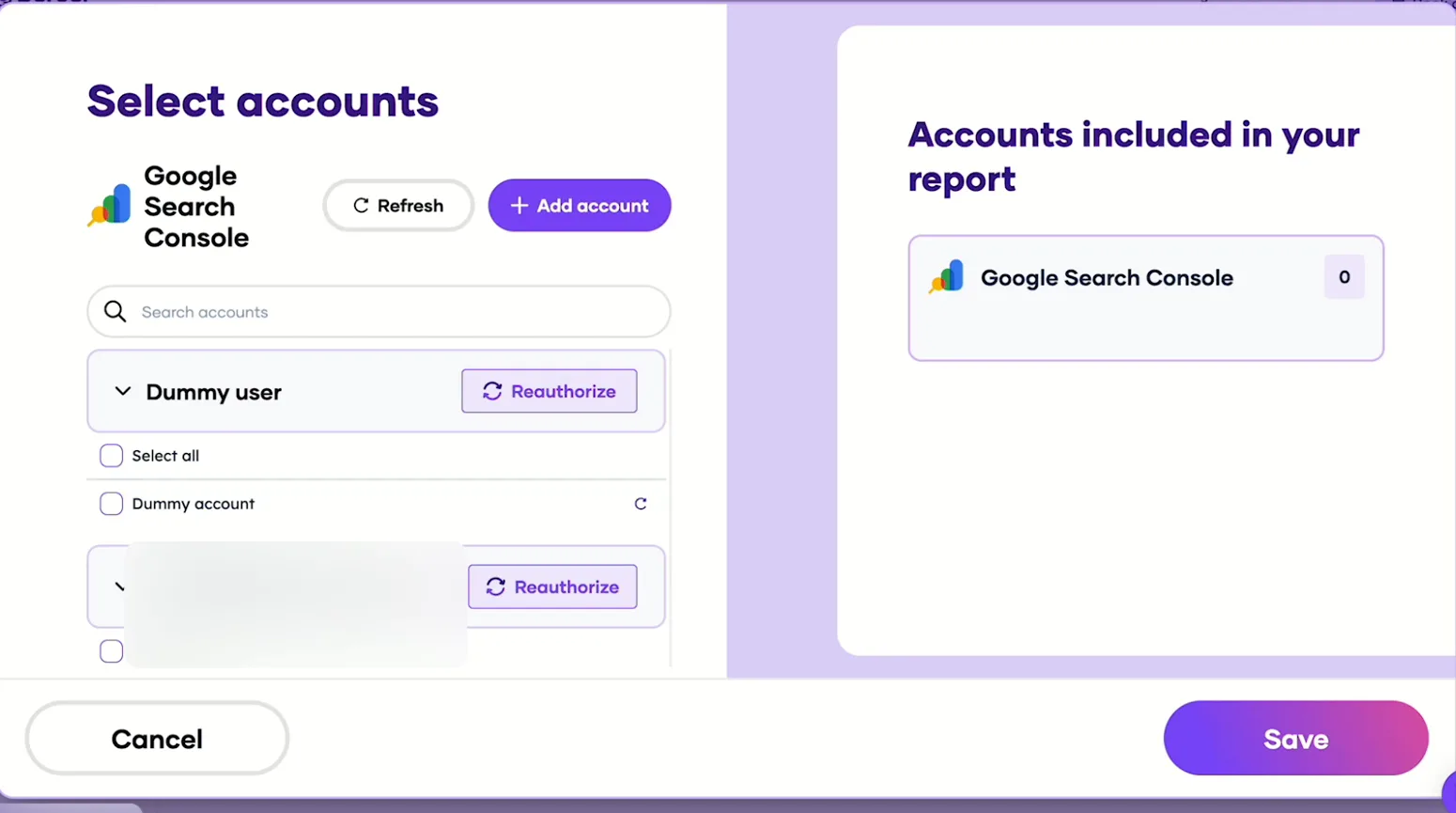
Pick the Search Console sites Claude can read, then save. Add Porter to Claude
In Claude, go to Customize → Connectors → Add custom connector, paste https://mcp.portermetrics.com/mcp and name it Porter Metrics. Click Continue, then sign in to Porter and allow access.
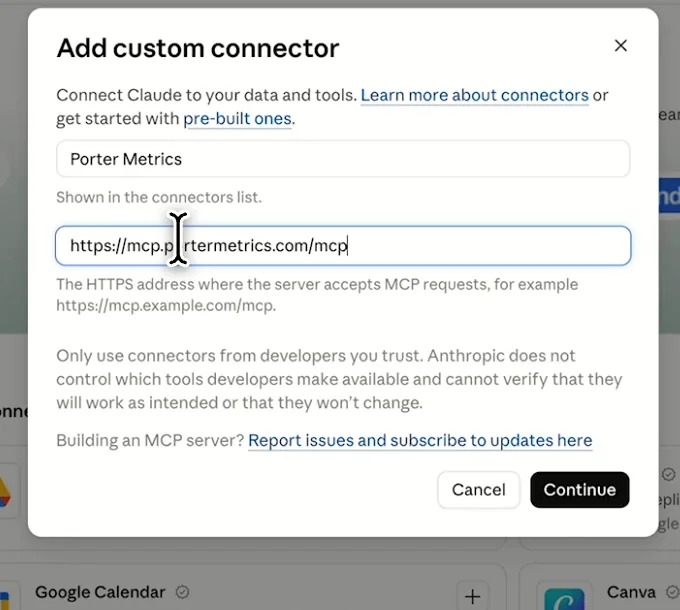
In Claude: Customize, Connectors, Add custom connector, then paste Porter’s MCP URL Paste the install prompt
Open a new chat in Claude, paste this prompt and replace the site, brand and targets in brackets. Claude reads both sources through Porter and builds the dashboard.
Install promptDuplicate this Claude dashboard template and keep its layout, views and styling: https://claude.ai/artifact/R3FtQikqyoa355VLFmzede Then rebuild it with my own data through Porter: an SEO KPI dashboard for [site] for this month to date against these monthly targets: [targets]. Show clicks, non-branded clicks (queries without [brand]), impressions, CTR, average position and queries in positions 1–3 and 1–10 from Search Console, and organic sessions, key events and purchase revenue from GA4, each with a month-end projection at the current daily rate and an on track / at risk / behind status; cumulative daily clicks, key events and revenue against a straight-line path to each target; and the KPIs by page group. Open in Claude with this prompt
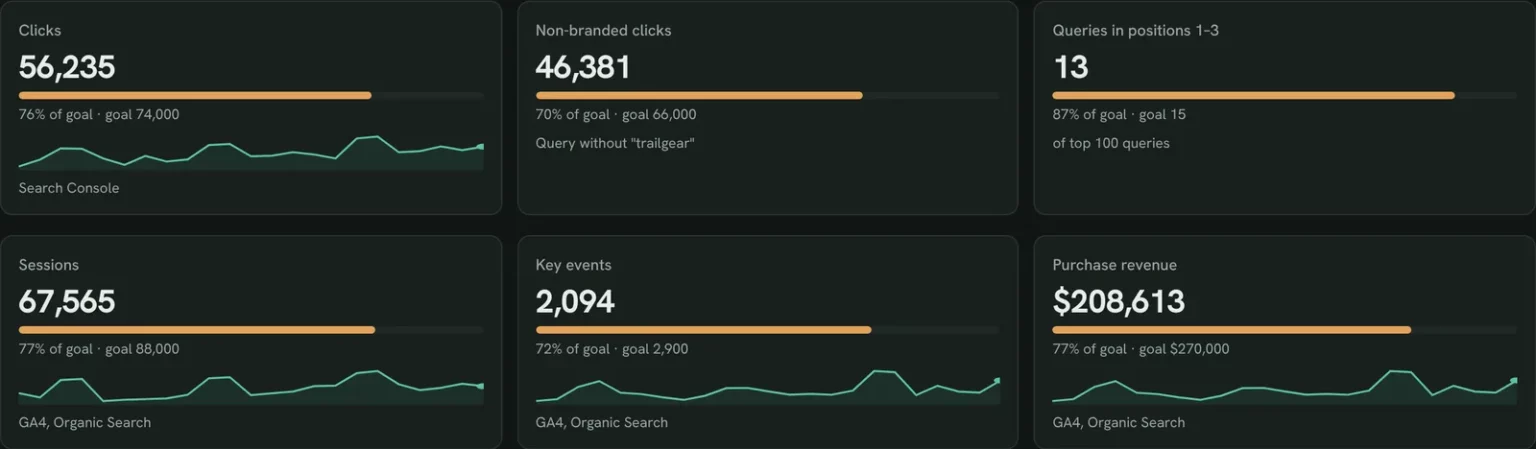
The first thing Claude builds: KPI cards against your own targets. Demo data shown.
Build a Google Search Console dashboard with Claude
SEO KPI dashboard fields and data
The dashboard reads Search Console Performance data and GA4 Organic Search results. Porter reads 27 Search Console fields and 285 GA4 fields if you need more.
Top 5 SEO KPIs to watch
Trailgear demo data · Oct 1–23 against October targets
- Non-branded clicks46,38170% of goal
The cleanest read of SEO work; branded clicks follow ads, press and seasons more than rankings.
- Queries in positions 1–313goal 15
The top three take most clicks, so a gain here pays off faster than one from 15 to 8.
- Key events2,09472% of goal
If clicks are on track and key events aren’t, look at the landing pages, not the rankings.
- Purchase revenue$208,61377% of goal
The KPI leadership asks about. Set its target with sales, not from last month’s traffic.
- Average Position15.0goal 14.0
Set it as a guardrail, not a goal: new rankings on page 3 can raise it while clicks grow.
How the numbers are calculated
- Projected for the month
- Month to date ÷ days so far × days in the month. Rates, positions and query counts compare as they are.
- Projection vs target
- (Projection − target) ÷ target; for Average Position, lower than target counts as ahead.
- Status
- On track at or above target, at risk up to 5% short, behind more than 5% short.
- Non-branded clicks
- Clicks on queries that don’t contain your brand name. Search Console hides some rare queries, so it is an estimate.
- Organic sessions, key events, revenue
- GA4 metrics where Session default channel group is Organic Search.
Data sources
Metrics
 Clicks
- Impressions
- CTR
- Average Position
 Sessions
- Key events
- Purchase revenue
Dimensions
- Date
- Query
- Page URL
- Session default channel group
- Landing page + query string
See all fields:Google Search Console · 27 fieldsGoogle Analytics 4 · 285 fields
What makes this SEO KPI dashboard different
What you get that a goals slide built from Search Console and GA4 exports can’t give you.
Set your targets in one sentence
Type them into the prompt and change them the same way next month.
See the miss before the month ends
Every KPI gets a projection and a status, so the review happens mid-month instead of after.
Put rankings and revenue on one table
Search Console and GA4 KPIs sit side by side, so a traffic win and a revenue miss show up together.
Ask why a KPI is behind
Ask Claude which pages or queries pulled it down and get the numbers in the same chat.
Send the scorecard on a set day
Publish it as a Porter dashboard to add your logo and email it to leadership every month.
Share a link instead of a slide
Your team opens the published dashboard in the browser, without a Claude account.
What the dashboard includes
- KPI cards with progress to each target
- A 10-KPI scorecard with month-end projection and status
- Cumulative clicks, key events and revenue against the target path
- KPIs by page group
- Share by link, PDF and scheduled email once published in Porter
Related dashboard templates
 Claude
SEO dashboard template
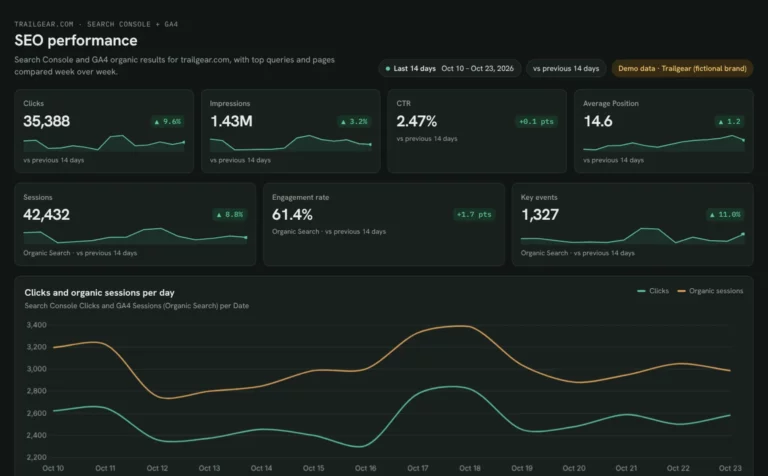
See which Search Console clicks turn into GA4 sessions and key events.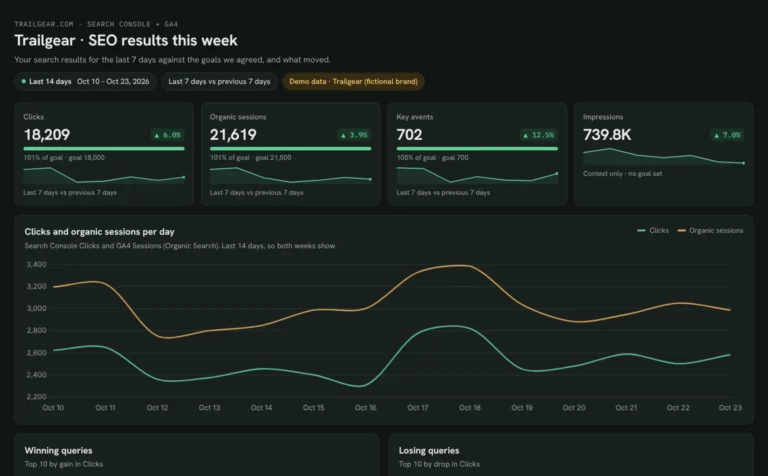 Claude
Client SEO dashboard template
Report clicks, sessions and key events against each client’s goals.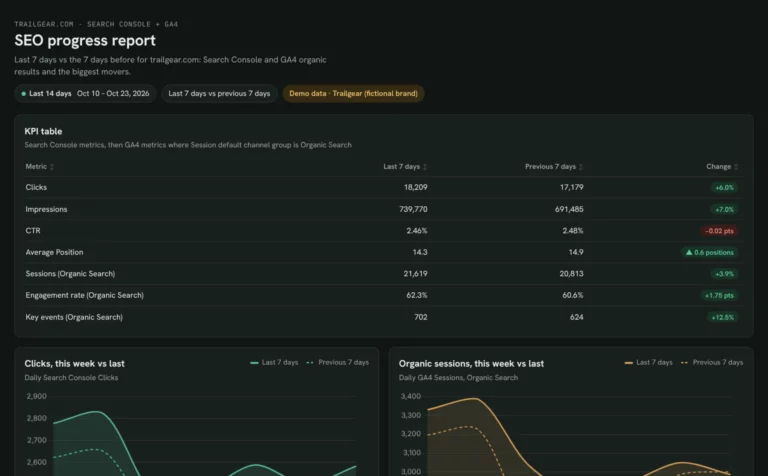 Claude
Monthly SEO dashboard template
Show month-on-month SEO results and the pages that moved them.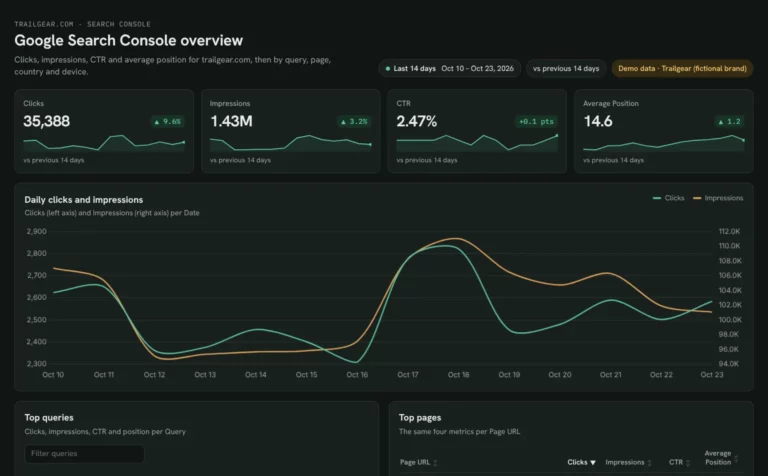 Claude
Google Search Console dashboard template
Find queries close to page one and fix low CTR by page and device.Browse more Claude dashboard templates
 Data Studio
 Google Sheets
 ChatGPT
Get your free SEO KPI dashboard
Sign up free, connect Search Console and GA4 and paste the prompt with your targets. Your own data fills the same layout as the demo.
Free plan · 14-day trial · No card needed