





Trusted by 1,600+ marketing teams and agencies


What you can do with this SEO audit report
Eight jobs this audit does. Click one to see its view, then paste its prompt into Claude.
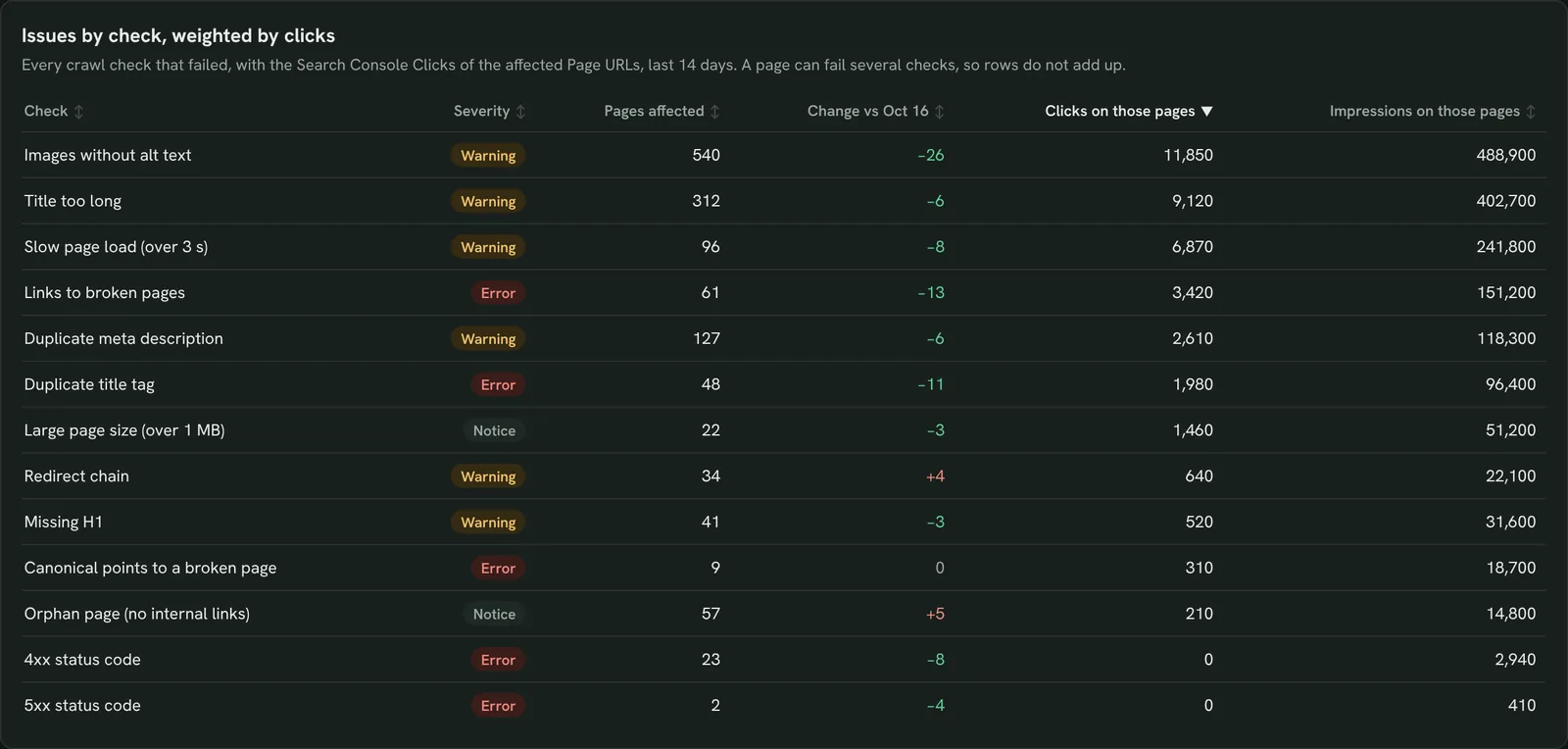
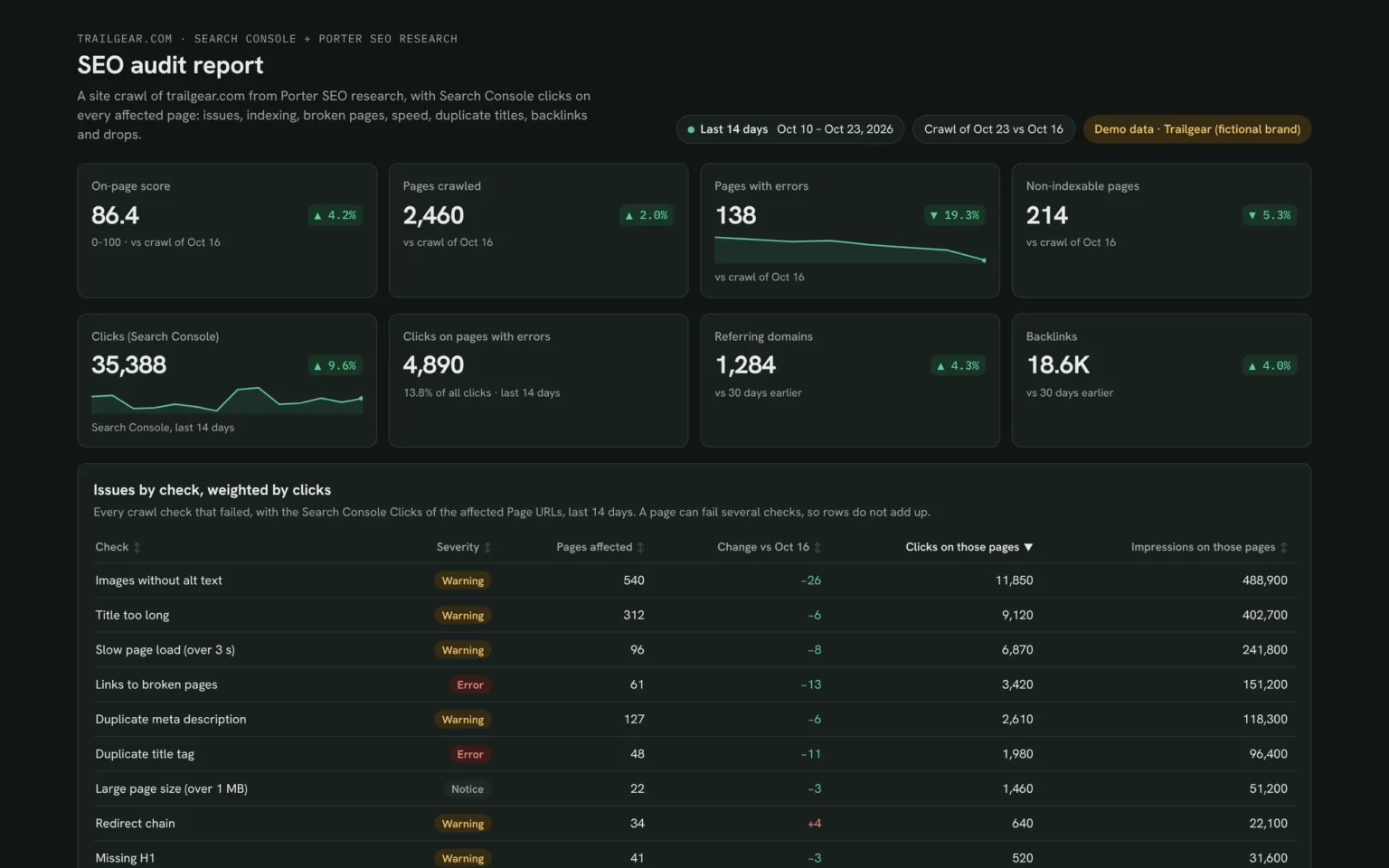
Fix the issues that cost the most clicks
Each failed check with the clicks on the pages it hits, so you fix what affects traffic first.
- Which checks hit pages that earn clicks?
- Which errors are new since the last crawl?
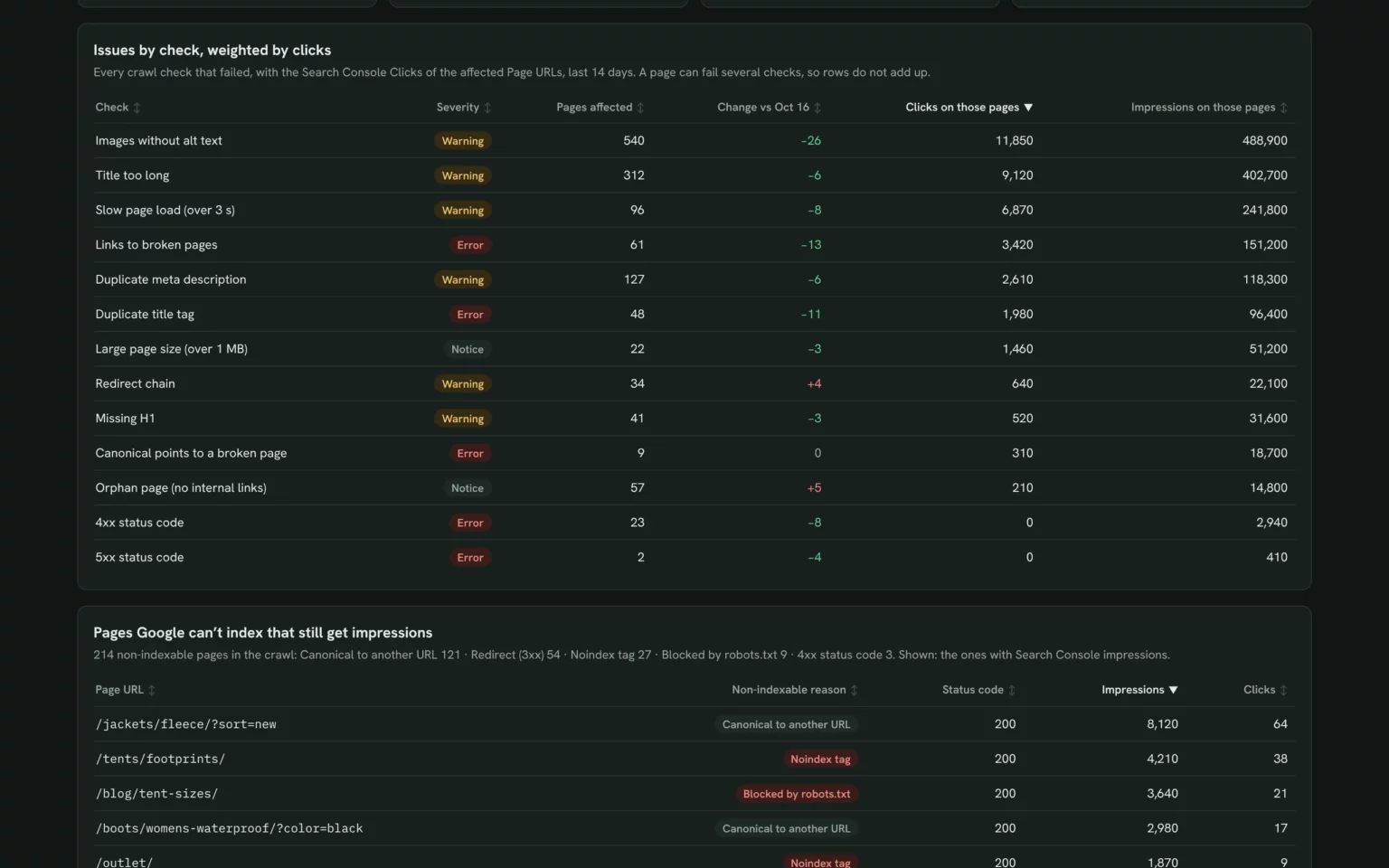
List every failed crawl check with severity, pages affected and the Search Console clicks on those pages for the last 14 days, most clicks first.Also built for this: Google Search Console dashboard template
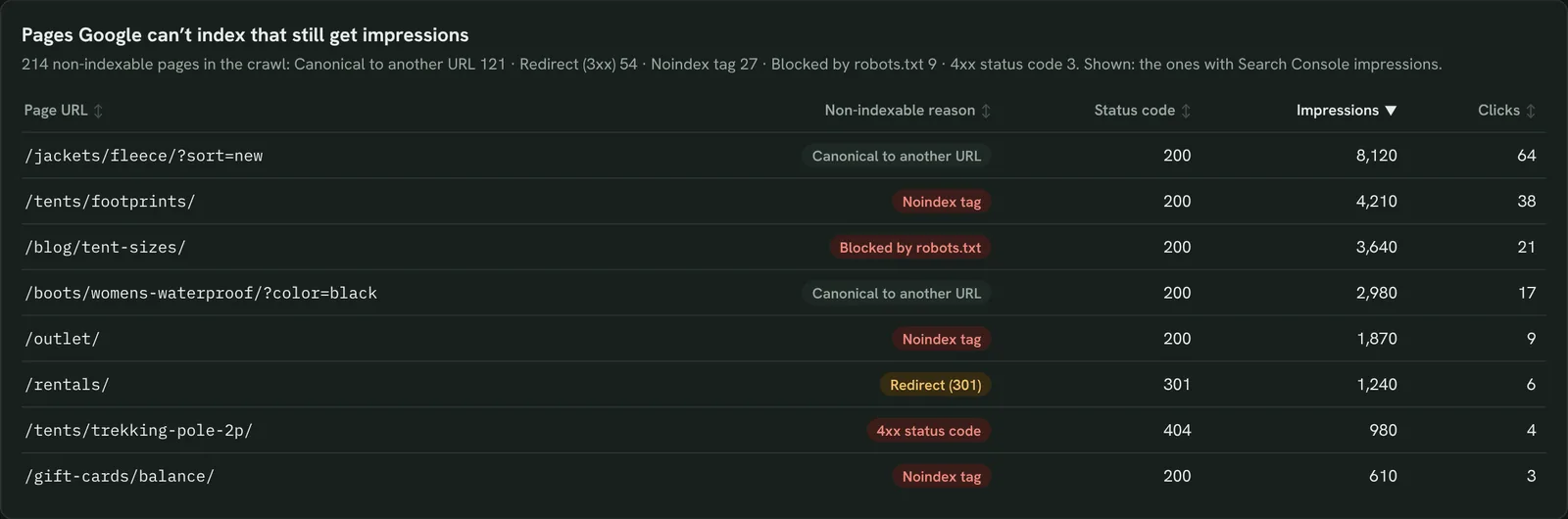
Find pages Google can’t index
Non-indexable pages that still show up in search, so you catch a stray noindex early.
- Which non-indexable pages still get impressions?
- Is any page blocked by mistake?
List non-indexable pages from the crawl with the reason and status code, joined to their Search Console impressions and clicks.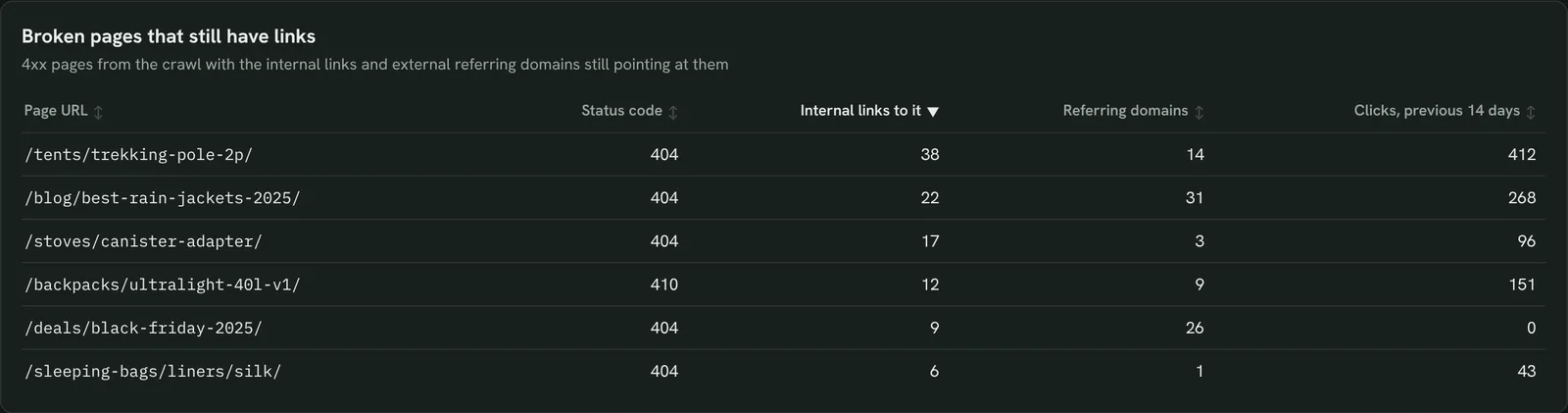
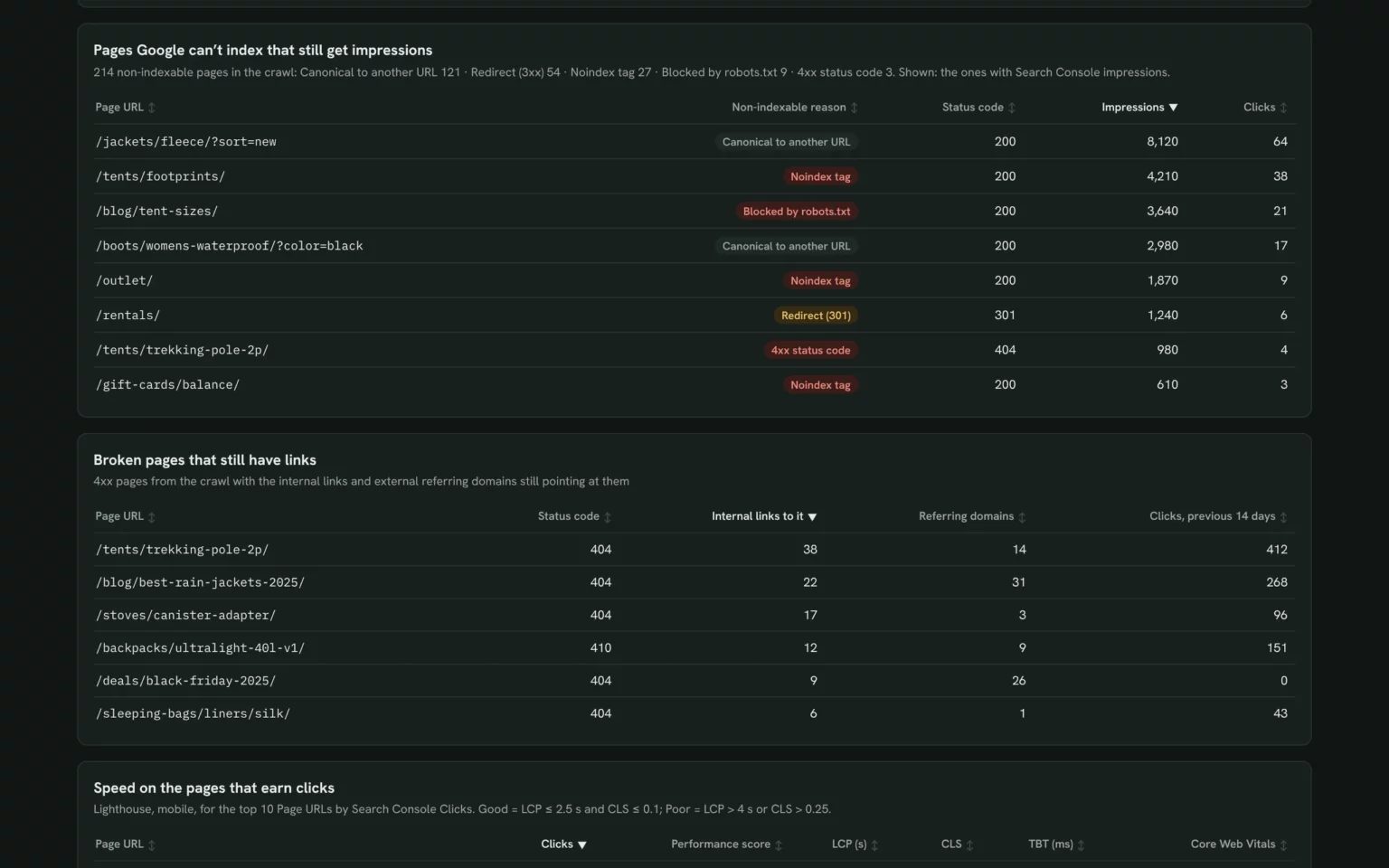
Fix broken pages that still get links
4xx pages with the links still pointing at them, so you know which to redirect first.
- Which broken pages have the most links?
- Which ones earned clicks before they broke?
List 4xx pages from the crawl with internal links to each, referring domains and their Search Console clicks in the previous 14 days.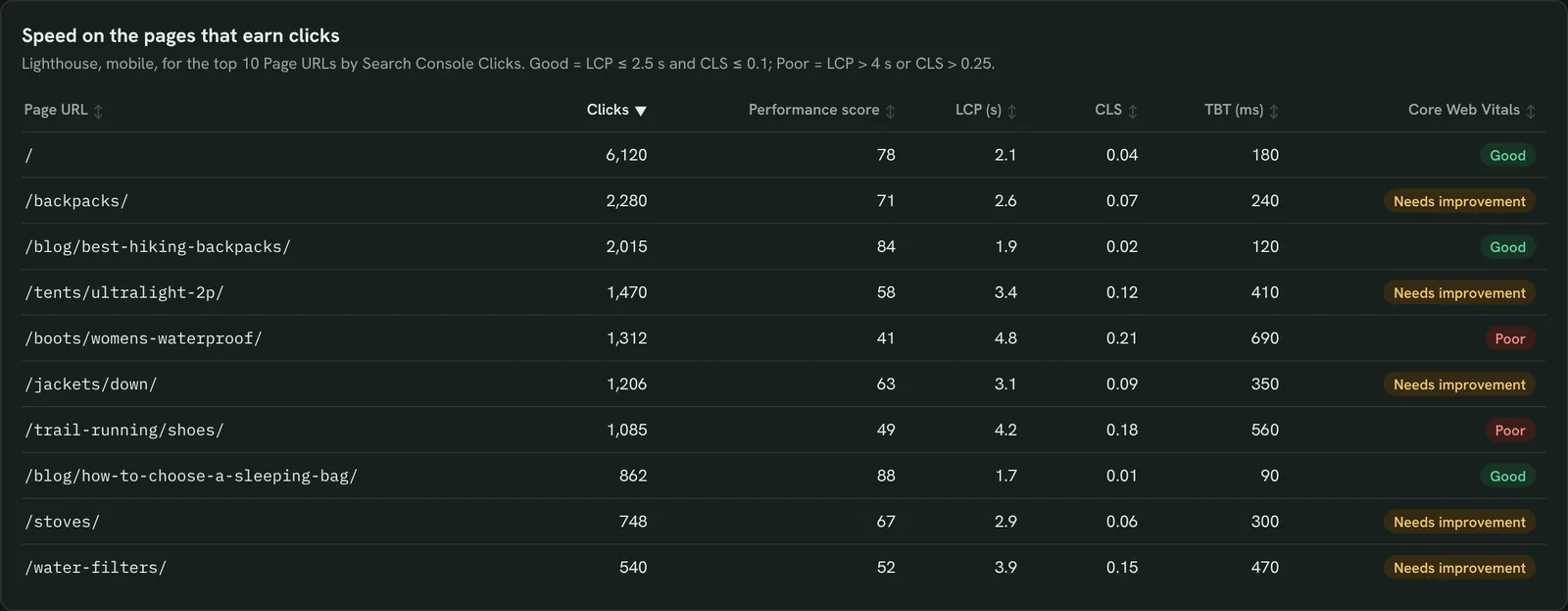
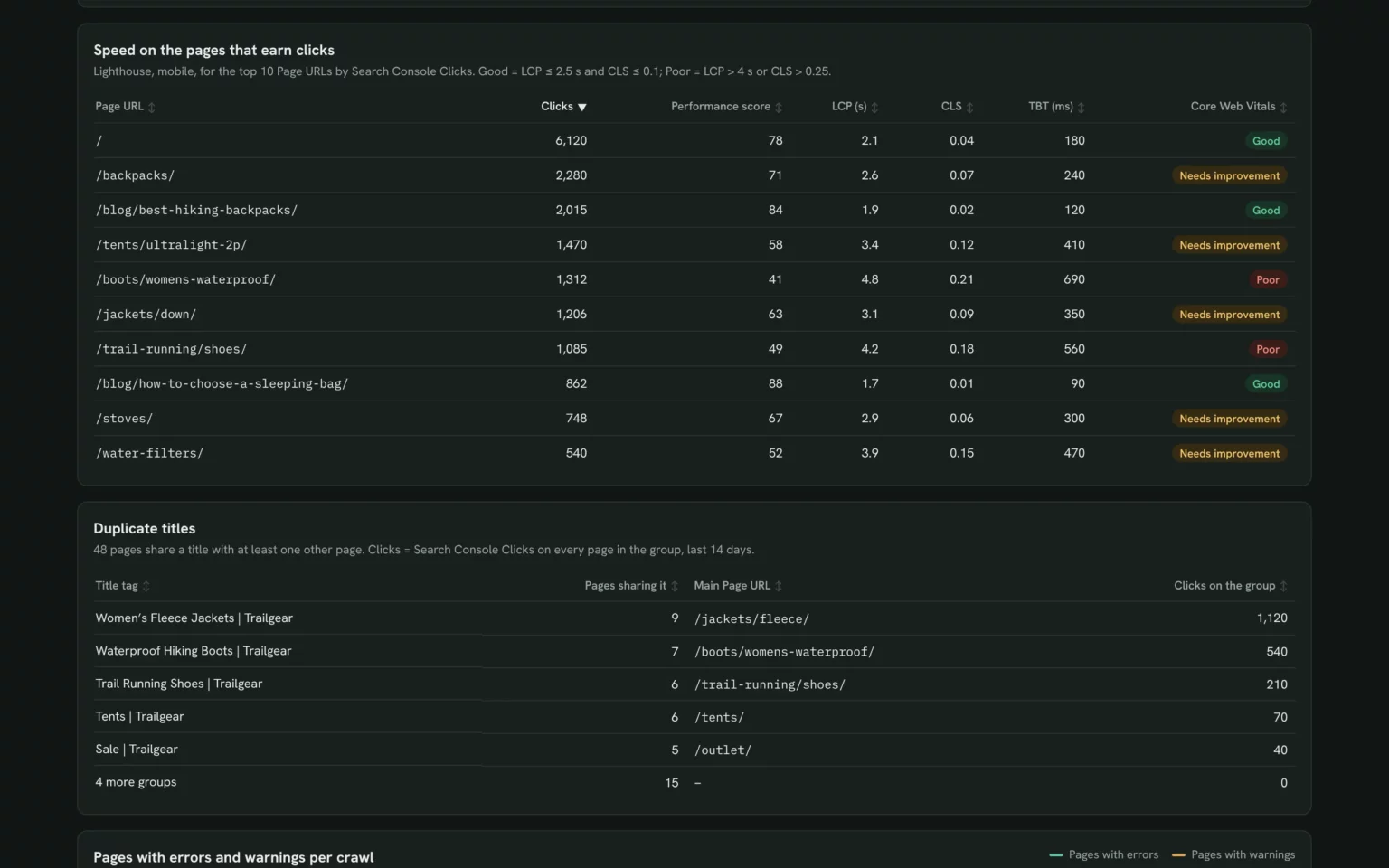
Check speed on the pages that earn clicks
Core Web Vitals for your top pages by clicks, so speed work starts where visitors land.
- Which top pages fail LCP or CLS?
- How slow is my best-selling page on mobile?
Run Lighthouse on mobile for my top 10 pages by Search Console clicks and show performance score, LCP, CLS and TBT.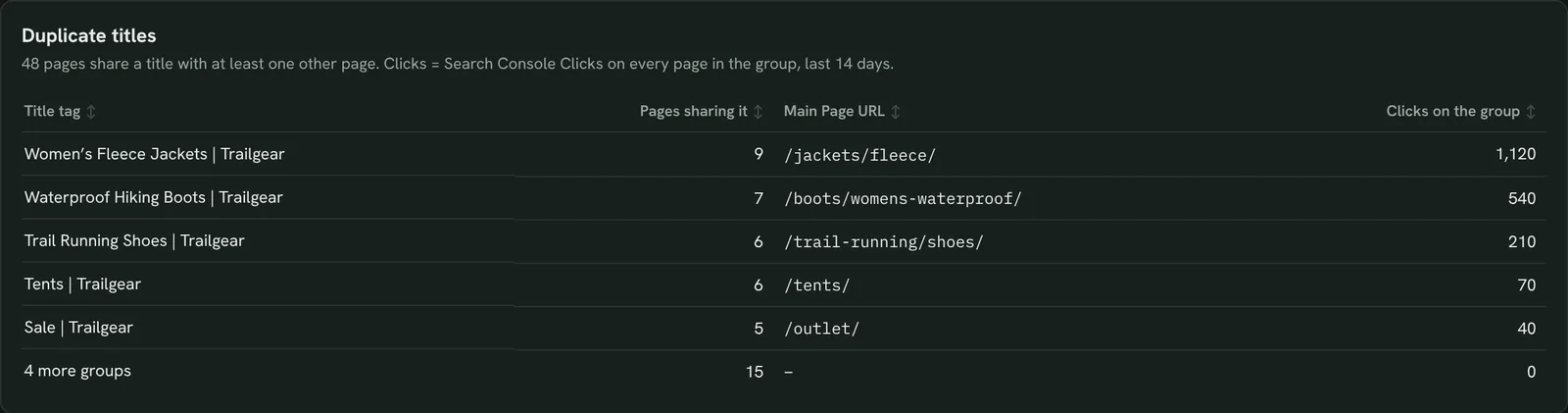
Find duplicate titles across the site
Pages sharing one title tag, with their clicks, so you rewrite the groups that compete.
- Which titles are used on several pages?
- Which group gets the most clicks?
Group pages that share a title tag, with the number of pages and their Search Console clicks for the last 14 days.Also built for this: SEO dashboard template
See if fixes stick between crawls
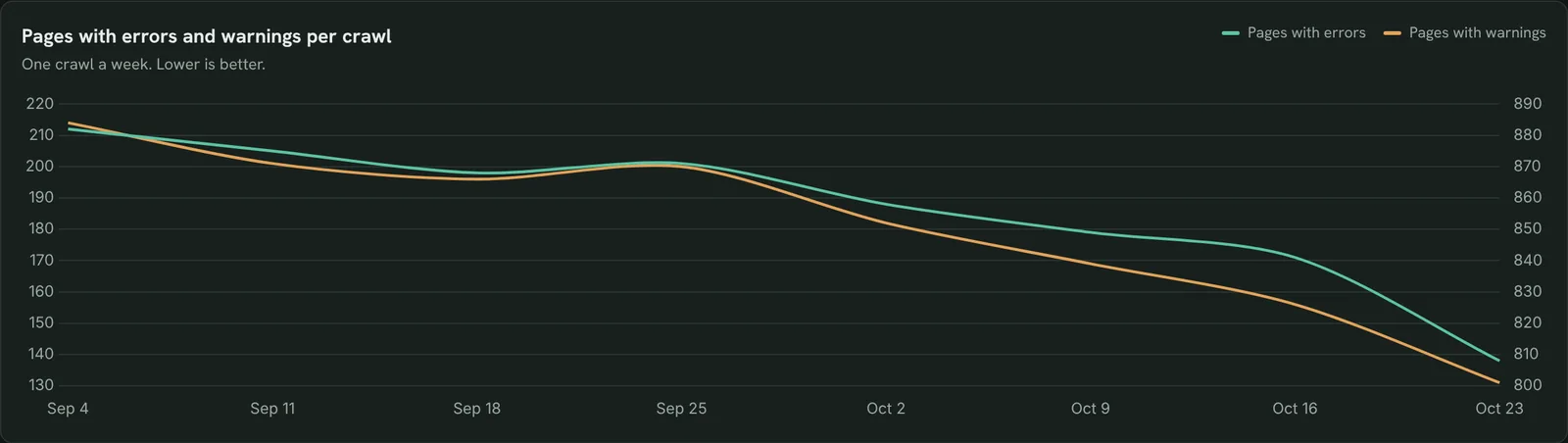
Errors and warnings per weekly crawl, so you see whether fixes held.
- Are errors going down crawl after crawl?
- Did a release bring issues back?
Chart pages with errors and pages with warnings for each crawl of [site] in the last 8 weeks.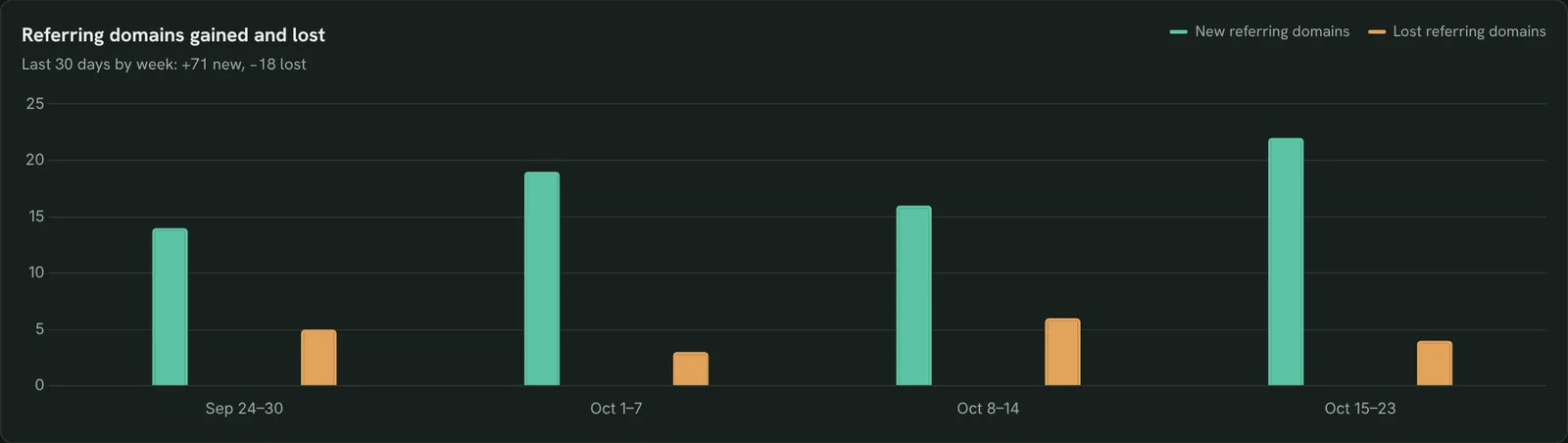
Check the backlink profile
Referring domains gained and lost each week, so you spot a link loss before rankings move.
- Are referring domains growing?
- How many did we lose this month?
Show referring domains and backlinks for [site] now vs 30 days ago, and new and lost referring domains per week.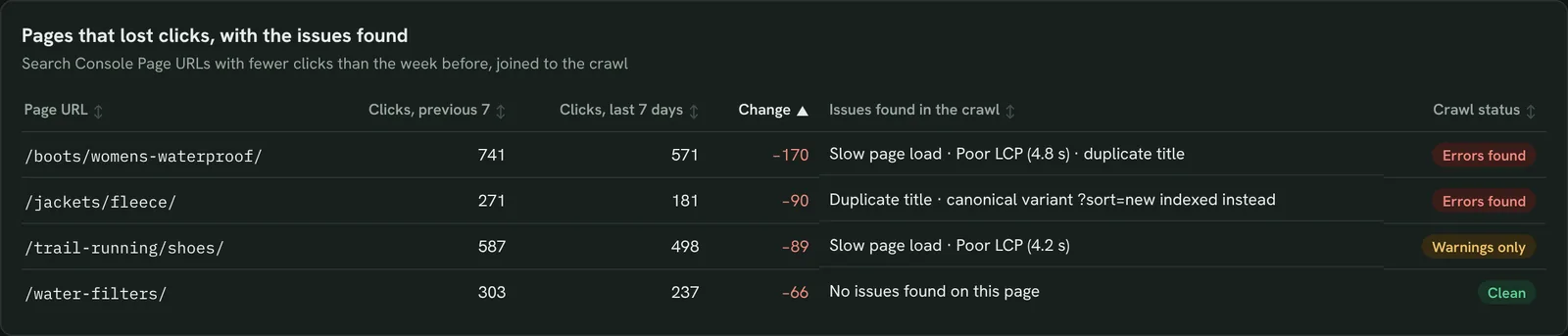
Find out if a technical issue caused a drop
Pages that lost clicks next to their crawl issues, so you know if the cause is technical.
- Do the pages that dropped have errors?
- Is it speed, a duplicate or something else?
List pages with fewer Search Console clicks in the last 7 days than the 7 before, with the crawl issues found on each.Also built for this: Keyword ranking dashboard template
How to set up the SEO audit report in Claude
You need a Search Console property, a free Porter account and Claude Pro, Max, Team or Enterprise for Claude Dashboards. Setup takes about 10 minutes.
Connect Search Console in Porter
Sign up free at Porter, open Data sources, pick Google Search Console and choose your property. Porter SEO research needs no account: it crawls the site you name. The Search Console to Claude tutorial shows each click.
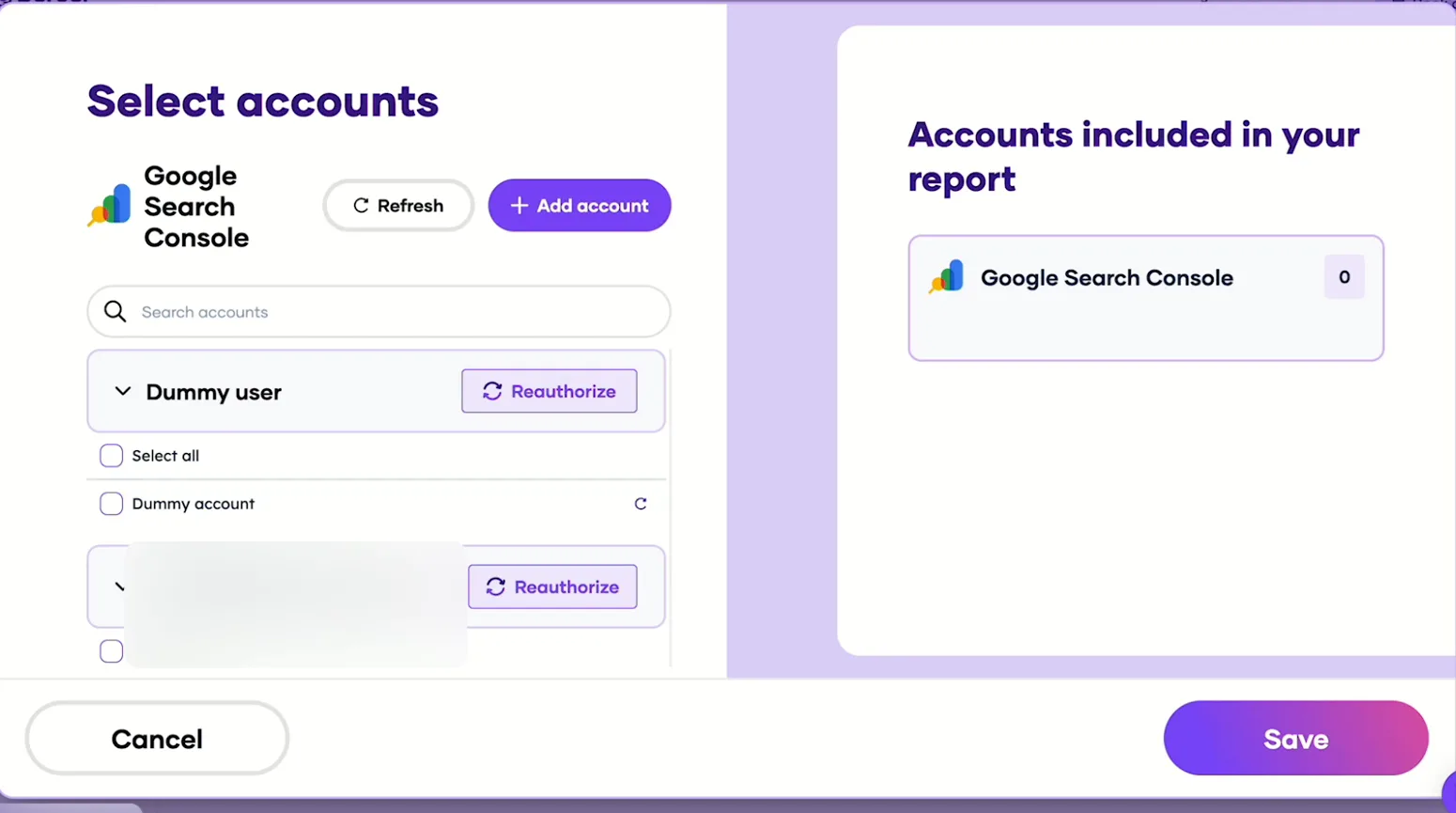
Pick the Search Console sites Claude can read, then save. Add Porter to Claude
In Claude, go to Customize → Connectors → Add custom connector, paste https://mcp.portermetrics.com/mcp and name it Porter Metrics. Click Continue, then sign in to Porter and allow access.
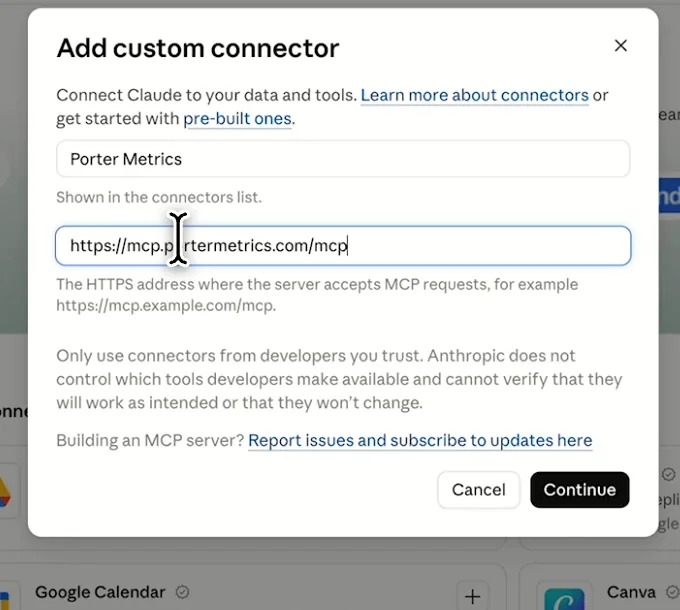
In Claude: Customize, Connectors, Add custom connector, then paste Porter’s MCP URL Paste the install prompt
Open a new chat in Claude, paste this prompt and replace the site in brackets. Claude starts the crawl, reads Search Console through Porter and builds the report.
Install promptDuplicate this Claude dashboard template and keep its layout, views and styling: https://claude.ai/artifact/6zxe5NBXCWJ3VHRdJfzBUu Then rebuild it with my own data through Porter. Crawl [site] (up to 500 pages) and build an SEO audit dashboard: KPI cards for on-page score, pages crawled, pages with errors, non-indexable pages, Search Console clicks, clicks on pages with errors, referring domains and backlinks; failed checks with severity, pages affected and their clicks (last 14 days); non-indexable pages with reason and impressions; 4xx pages with internal links and referring domains; Lighthouse LCP, CLS and TBT for my top 10 pages by clicks; shared titles; errors and warnings per crawl; referring domains gained and lost per week; and pages that lost clicks with their issues. Open in Claude with this prompt
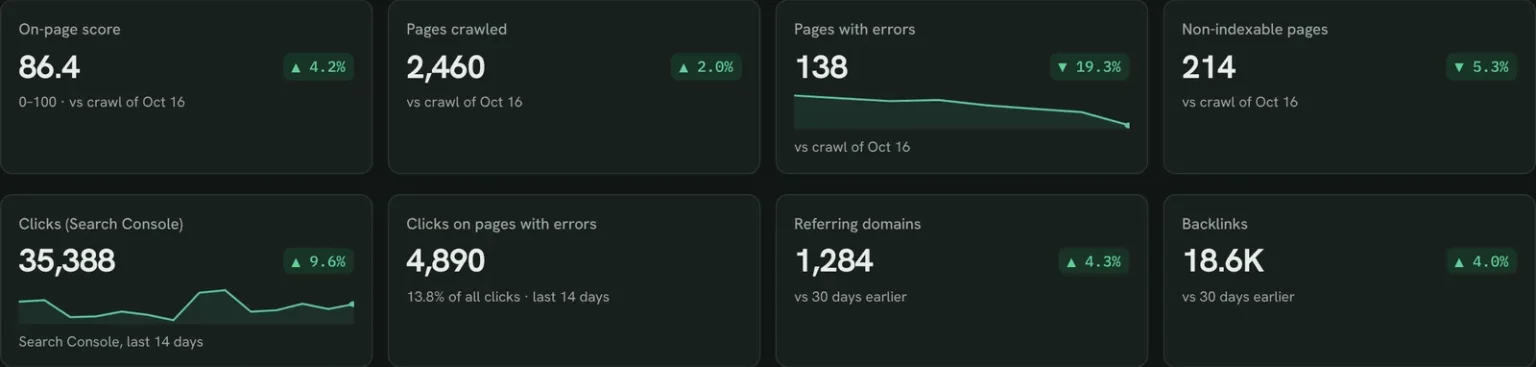
The first thing Claude builds: crawl and Search Console KPI cards for your own site. Demo data shown.
Build a Google Search Console dashboard with Claude
SEO audit report fields and data
The template joins a Porter SEO research crawl to Search Console on Page URL. Porter reads 27 Search Console fields.
Top 5 SEO audit KPIs to watch
Trailgear demo data · crawl of Oct 23 vs Oct 16, clicks for the last 14 days
- On-page score86.4+4.2%
A jump after a sprint means fixes landed; a drop after a release means check what shipped.
- Pages with errors138−19.3%
Errors on pages that earn clicks come first. Warnings on pages with no clicks can wait.
- Non-indexable pages214−5.3%
A rise you didn’t plan usually means a stray noindex or canonical in a template.
- Clicks on pages with errors4,89013.8% of clicks
The traffic at stake. If it grows, move audit fixes up the sprint.
- Referring domains1,284+4.3%
Losing several in one week is worth a look before rankings react.
How the numbers are calculated
- On-page score
- The crawler’s 0–100 score across all checks on every crawled page.
- Pages with errors
- Unique pages failing at least one error-level check.
- Clicks at stake
- Search Console clicks on the affected Page URLs, last 14 days.
- Core Web Vitals
- Good = LCP ≤ 2.5 s and CLS ≤ 0.1; Poor = LCP over 4 s or CLS over 0.25.
- Change
- This crawl vs the previous crawl; links vs 30 days earlier.
Data sources
Metrics
 Clicks
- Impressions
- Average Position
 On-page score
- Pages affected
- Performance score
- LCP
- CLS
- Referring domains
- Backlinks
Dimensions
- Date
- Page URL
- Page URL
- Check
- Severity
- Status code
- Non-indexable reason
See all fields:Google Search Console · 27 fields
What makes this SEO audit report different
Crawlers list issues and Search Console lists clicks. This report puts them in one row.
See which fixes move traffic
Every issue shows the clicks on the pages it hits, so the list sorts itself.
Re-crawl and compare in one chat
Ask Claude to crawl again after a release and compare it with the last crawl.
Ask why a page dropped
Spot a drop, then ask Claude to check that page’s index status and speed.
Skip the CSV exports
No crawler export or Search Console download to merge in a sheet.
Send clients the audit on your logo
Publish it in Porter and email it on the day you choose.
Share it without tool logins
Anyone with the Porter link sees the audit, no crawler seat needed.
What the dashboard includes
- Crawl and Search Console KPI cards
- Issues table weighted by clicks
- Indexing, broken pages and duplicate titles
- Lighthouse table, crawl trend, backlinks and drops
Related dashboard templates
 Claude
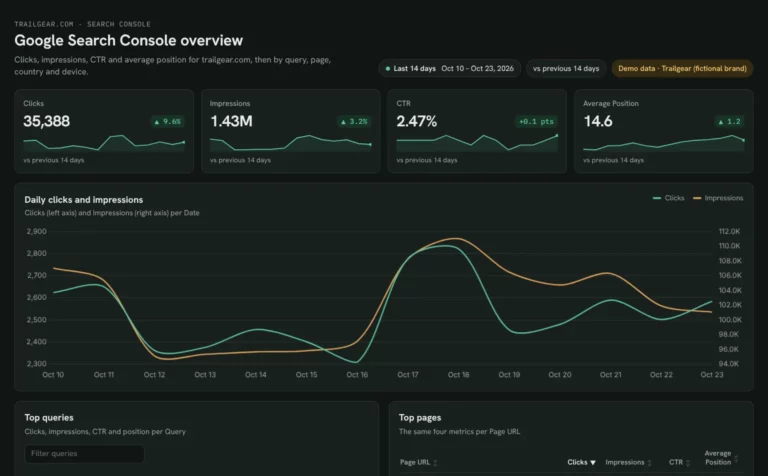
Google Search Console dashboard template
Find queries close to page one and fix low CTR by page and device.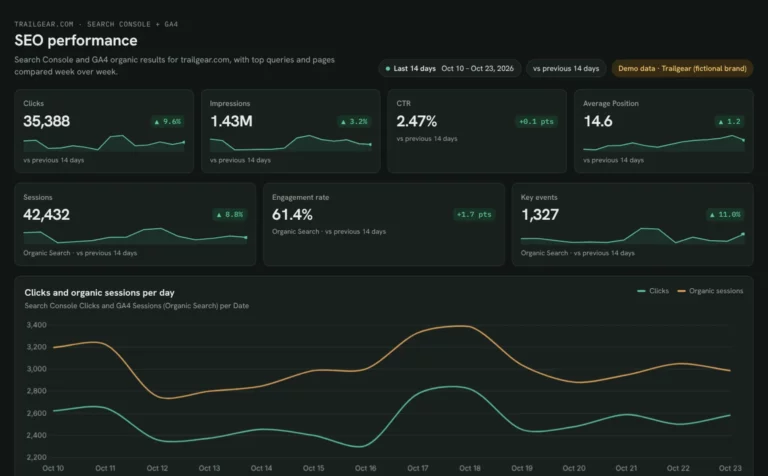 Claude

SEO dashboard template
See which Search Console clicks turn into GA4 sessions and key events.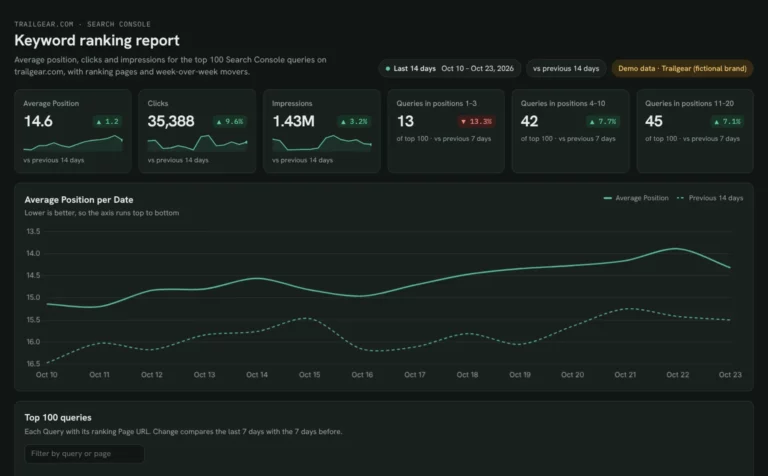 Claude
Keyword ranking dashboard template
Track which keywords reach page one and what moved this week.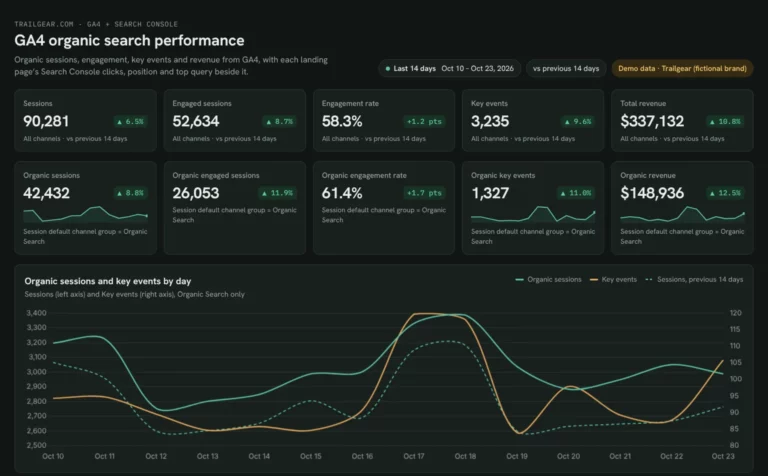 Claude
GA4 SEO dashboard template
See which landing pages bring organic sessions and key events.Browse more Claude dashboard templates
 Data Studio
 Google Sheets
 ChatGPT
Get your free SEO audit report
Sign up free, connect Search Console and paste the prompt. Your own crawl fills the same layout as the demo.
Free plan · 14-day trial · No card needed