



 Google Analytics 4
→
Google Analytics 4
→
 Anthropic Claude
GOOGLE ANALYTICS 4 connector for Claude (MCP)
Ask Anthropic Claude about your Google Analytics 4 data using all available fields — without exporting a single CSV.
- +288 Google Analytics 4 fields plus calculated metrics — every dimension and breakdown Google Analytics 4 reports.
- Your Google Analytics 4 data already lives in Porter. Enable MCP and start asking Claude — no new integrations, no tokens, no servers.
- Cross your Google Analytics 4 performance with Google Analytics 4 revenue in one Claude conversation to see real outcomes, not just clicks.
Free forever plan · 14-day full trial · No credit card










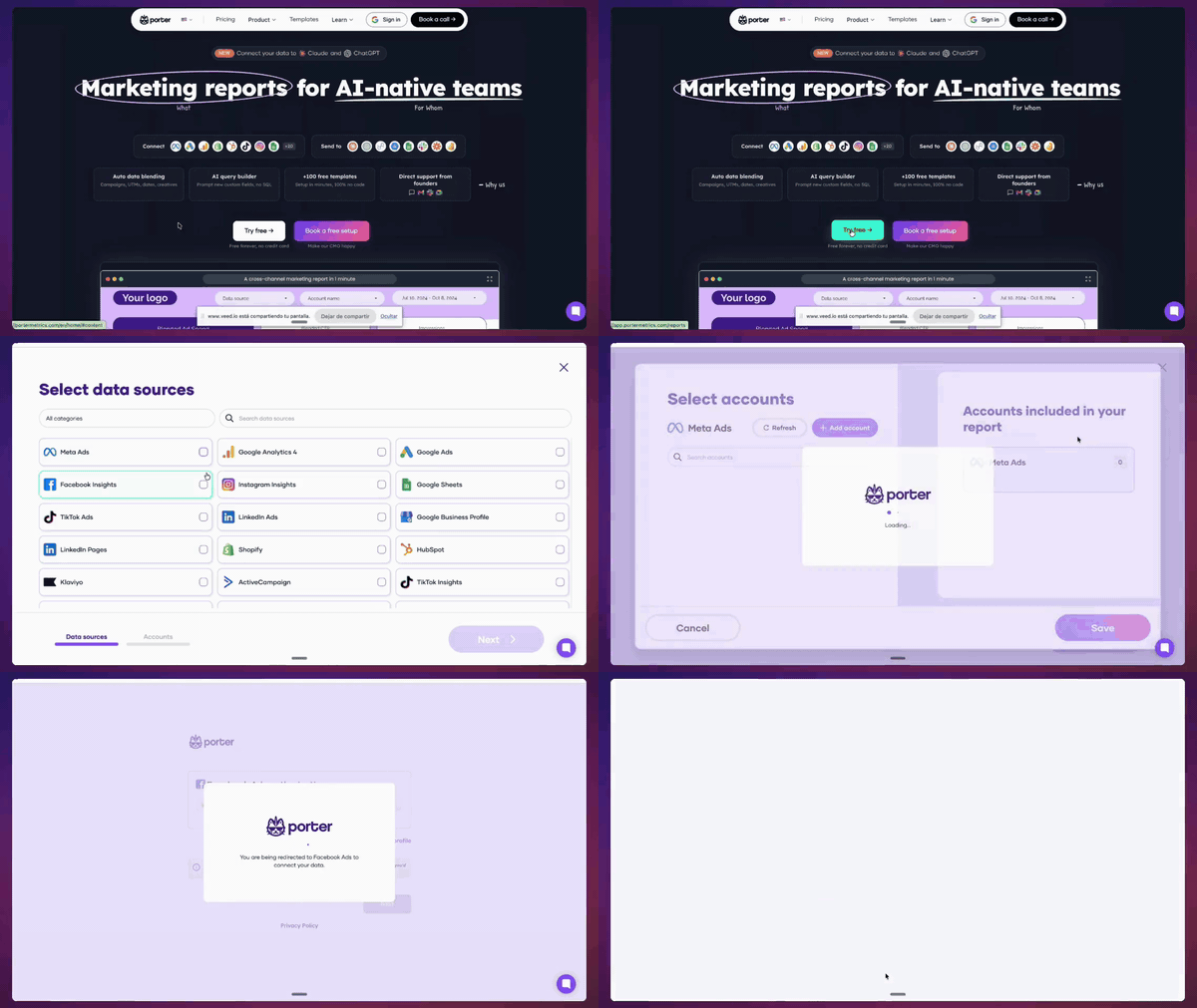
How to connect Google Analytics 4 to Claude
-
Connect Google Analytics 4 to Porter
Log in to Porter with your Google Analytics 4 account and grant read-only access. Takes 2 minutes — no engineering, no exports.
-
Pick your ad account
Select one or blend multiple properties into a single data source — useful for agencies managing several clients.
-
Add Porter MCP to Claude
In Claude, paste the URL
https://mcp.portermetrics.com/mcpas a custom connector. No JSON-RPC, no local servers. -
Authorize Claude to read Porter
One click. Claude now has read-only access to your Google Analytics 4 data through Porter — same scope as your Porter account.
-
Ask in plain English
“Show me Google Analytics 4 performance trends over the last 14 days.” Claude returns a filtered table in seconds.
+288 Google Analytics 4 fields, ready for Anthropic Claude
Every field in Google Analytics 4 Manager — plus calculated metrics, every attribution window, and creative preview URLs — accessible to Claude on demand.
All Ads Manager fields (and more)
288 fields total — every native Google Analytics 4 field plus calculated metrics that aren’t offered natively.
Every breakdown
Segment by campaign, ad set, creative, audience, placement, device, region, hour, date — every breakdown Google Analytics 4 supports.
Creative previews and assets
Ad preview URLs plus links to creative assets — Claude can reason over performance + creative in the same answer.
Marketer-friendly naming
Fields named exactly as in Google Analytics 4 (e.g. “Cost” not cost_micros). Claude understands them natively.
Full granularity
Hour, day, week, month, year — plus every dimension Google Analytics 4 reports.
Cross-channel blending
Same field naming standard across Porter’s connectors — Claude can join Google Analytics 4 with GA4, BigQuery, or other sources in one prompt.
- First user campaign ID
- First user campaign
- First user default channel group
- First user Google Ads account name
- First user Google Ads ad group ID
- First user Google Ads ad group name
- Add to carts
- Checkouts
- Ecommerce purchases
- Gross item revenue
- Gross purchase revenue
- Item affiliation
- Achievement ID
- Ads clicks
- Ads cost
- Ads cost per click
- Character
- Crash-affected users
- Date
- Date + hour
- Date hour and minute
- Day
- Day of week (Mon – Sun)
- Day of week name
- Campaign ID
- Campaign
- Default channel group
- Google Ads account name
- Google Ads ad group ID
- Google Ads ad group name
- App version
- Browser
- Device category
- Device model
- Language
- Language code
- 1-day active users
- 28-day active users
- 7-day active users
- Active users
- Audience ID
- Audience name
- Content group
- Content ID
- Content type
- Full page URL
- Hostname
- Landing page + query string
- City
- City ID
- Continent
- Continent ID
- Country
- Country icon
Copy-paste prompts for Google Analytics 4 × Claude
Add Porter MCP to Claude (paste https://mcp.portermetrics.com/mcp), open a new conversation, and paste any prompt below.
Weekly Executive Summary Dashboard
Generate a weekly executive summary for the last 7 days. Pull Active users, Sessions, Engagement rate, Ecommerce purchases, Purchase revenue, New users, and Bounce rate. Compare each metric to the previous 7-day period. Highlight any metric that changed by more than 15% and explain the likely cause. Format as a 3-paragraph summary with a key-takeaways bullet list.First-User Campaign Attribution Ranking
Show me the top 10 First user campaign by Ecommerce purchases and Purchase revenue for the last 30 days, broken down by First user default channel group. Highlight any campaign where First user source / medium is 'google / cpc' but Purchase revenue is below $500.Organic vs Paid Cross-Channel Snapshot
Report Organic google search clicks and Organic google search average position alongside Session source / medium and Sessions for the last 30 days. Identify which organic landing pages (Landing page + query string) are driving engaged sessions with an Engagement rate above 60%.Google Ads Creative Fatigue Detector
For the last 14 days, rank Session Google Ads creative ID by Session Google Ads campaign, Sessions, Ecommerce purchases, and Purchase revenue. Break down by Session Google Ads ad network type. Flag any creative with more than 500 Sessions but zero Ecommerce purchases, or where Purchase revenue per session dropped by more than 30% compared to the first 7 days of the period. Output as a ranked table with a fatigue-risk column.Keyword Budget Efficiency Diagnosis
Compare Session Google Ads keyword text performance by Session Google Ads campaign for the last 7 days. Include Sessions, Ecommerce purchases, and Purchase revenue. Flag any keyword with more than 100 Sessions and zero Ecommerce purchases.Video Content Engagement Drop-Off
For the last 30 days, pull Video title, Video provider, Video URL, Views, User engagement, and Engagement rate for pages containing embedded videos. Calculate average User engagement per video and flag any Video title where Engagement rate is below the site average. Output as a ranked list with watch-quality score.Daily Anomaly Detection for Core Metrics
Pull daily Active users, Sessions, Ecommerce purchases, Purchase revenue, and Bounce rate for the last 28 days. Calculate the 7-day rolling average and standard deviation for each metric. Flag any day where a metric deviates by more than 2 standard deviations from its rolling average. For each flagged day, list the most likely Session source / medium and Session campaign driving the anomaly.Multi-Account Agency ROAS Comparison
Compare ROAS across all linked Google Ads accounts for the last 30 days. Pull First user Google Ads account name, First user Google Ads customer ID, Ads cost, Purchase revenue, Ecommerce purchases, and Return on ad spend. Rank accounts by Return on ad spend and flag any account where Ads cost increased by more than 20% week-over-week but Purchase revenue remained flat. Output as a multi-account comparison table.Audience Overlap & Value Analysis
For the last 30 days, analyze Audience name and Audience ID performance. Pull Active users, Ecommerce purchases, Purchase revenue, First-time purchasers, and Total purchasers per audience. Calculate Purchase revenue per Active user for each audience. Flag any audience with high Active users but low Purchase revenue per user, and recommend which audiences to prioritize for remarketing. Output as a ranked table with value-tier labels.Automated Threshold Alert Configuration
Set up a monitoring rule for the last 14 days: analyze Item name and Item category through Item view events, Add to carts, Checkouts, and Ecommerce purchases. Calculate the drop-off rate between each stage. Alert on any Item name where the checkout-to-purchase drop-off exceeds 40% or where Add to carts is above 100 but Ecommerce purchases is below 5. Output as an alert-ready table with priority flags.Google Analytics 4 MCP safety
Porter authenticates to Google Analytics 4 with the read-only scope you already approved for your reports. Anthropic Claude queries Porter — not Google Analytics 4 directly — so every conversation is rate-limited and cached at Porter side. No new permissions, no ban risk.
- Caching. Porter caches recent query results for 15 minutes per (account, field set) so repeated Claude prompts don’t hit the API again.
- Batching. Multiple field requests are merged into a single API call when possible (max 9 dimensions + 10 metrics per call).
- Backoff & retry. Exponential backoff on 429 responses (1s → 2s → 4s → 8s).
- Per-account quotas. Porter tracks per-account daily usage and pauses queries before hitting 80% of the 10,000-token daily quota.
- Read-only enforcement. Porter never requests write scopes from Google Analytics 4, so even compromised tokens cannot modify property settings, audiences, or data streams.
- Audited tools. The MCP exposes 6 read-only methods:
get_blend_id,list_accounts,list_categories,list_data_sources,list_fields,query_data.
GDPR compliant · 1,600+ marketers trust Porter with their Google Analytics 4 data.
Start free. Pay per data source account
- +288 Google Analytics 4 fieldsEvery native field plus calculated metrics — accessible to Claude in plain English.
- All attribution windowsCompare 1d-click, 7d-click, 28d-click and 1d_click+1d_view side by side from one connection.
- Same plan, every destinationSend to Anthropic Claude, ChatGPT, Looker Studio, Google Sheets, BigQuery and Slack — one subscription.
- Unlimited usersNo extra cost per team member or seat.
Number of Google Analytics 4 properties
Billed annually · $12.5/account






Unlimited 14-day free trial + Free forever plan
Other connectors & destinations
Porter supports 15+ data sources and 10+ destinations. Mix and match in one subscription — no extra seats or hidden per-destination fees.






Questions about Google Analytics 4 + Anthropic Claude
What is MCP and how does it connect Google Analytics 4 to Claude?
Do I need technical skills or coding to set this up?
Will connecting my Google Analytics 4 account get it banned?
What Google Analytics 4 metrics can I analyze in Claude?
Can I create or edit campaigns from Claude, or is this read-only?
I already use Porter for Google Analytics 4 reporting — do I need to reconnect?
How much does the Google Analytics 4 MCP integration cost?
Chat with your Google Analytics 4 data in Claude
Your Google Analytics 4 data already lives in Porter. Enable MCP and start asking Claude about campaigns, creatives, and ROAS — no new integrations, no tokens, no servers. Get live, conversational access to all 288 Google Analytics 4 fields including creative previews, every attribution window, and multi-account blends.
Free forever plan · 14-day full trial · No credit card