





Trusted by 1,600+ marketing teams and agencies


What you can do with this client SEO report
Seven jobs this report does. Click one to see its view on demo data, then paste its prompt into the same Claude chat.

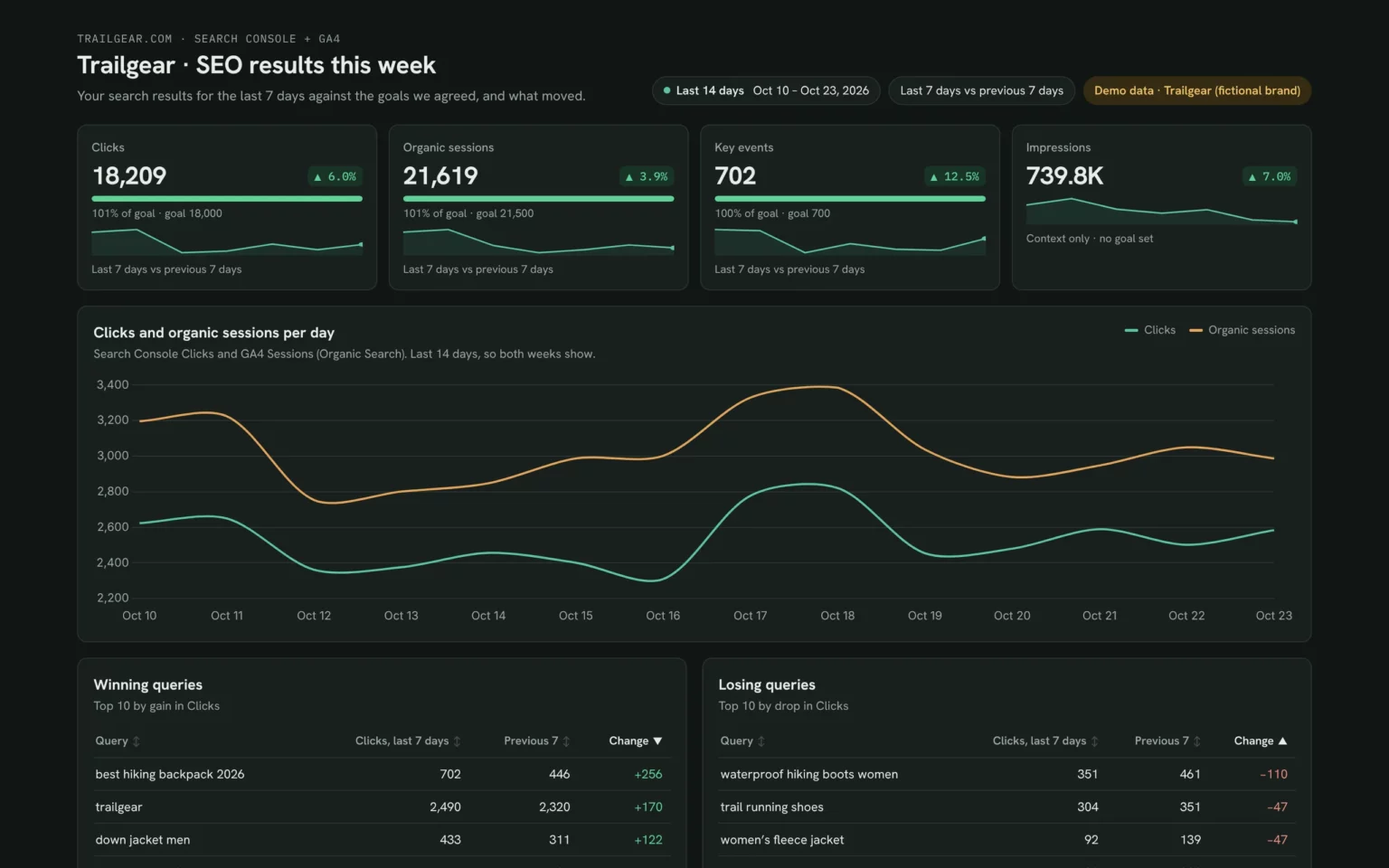
Show progress against each client goal
Clicks, organic sessions and key events next to the goals you set, so the client sees at a glance whether you’re on track.
- Are we on track for our goals?
- Which goal needs attention?
Show clicks, organic sessions and key events for the last 7 days against these goals: [goals], with the percent of each goal reached.Also built for this: Monthly SEO dashboard template
Show the trend behind the numbers
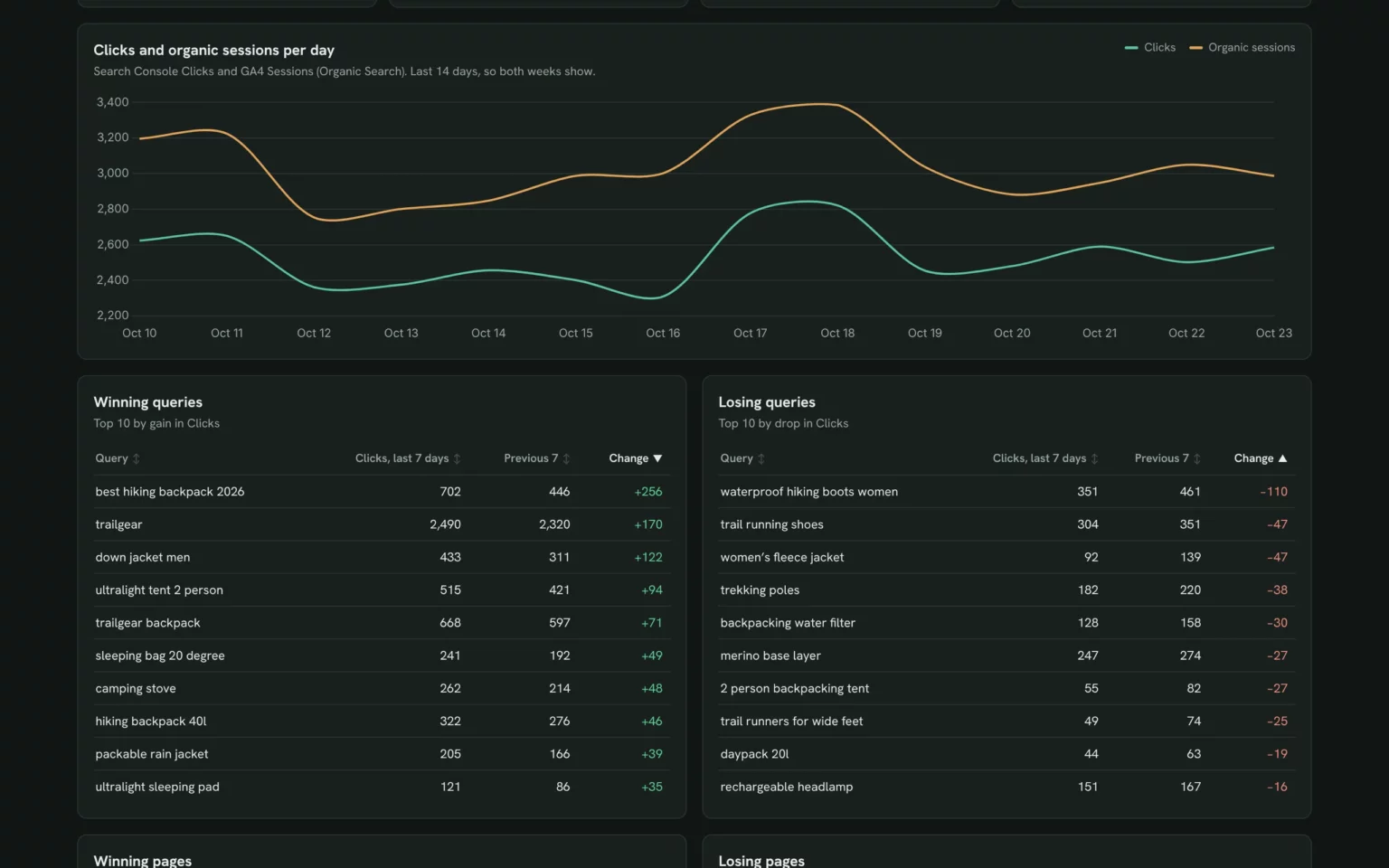
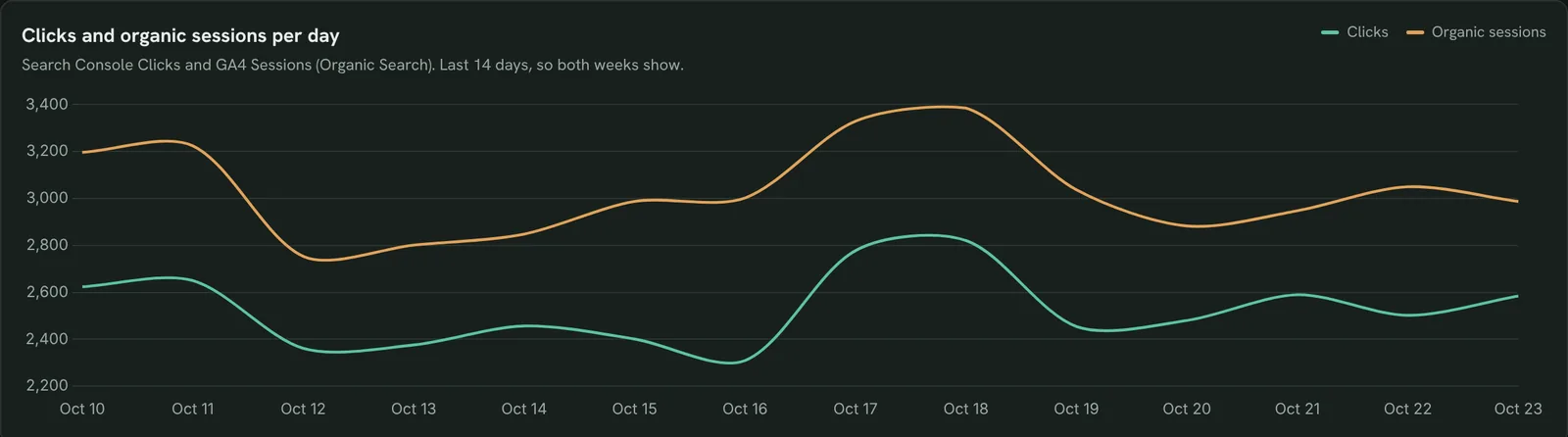
Daily clicks and organic sessions side by side, so one good or bad day doesn’t surprise anyone.
- Did traffic grow steadily?
- Did clicks and visits move together?
Chart daily Search Console clicks and GA4 organic sessions for the last 14 days.Also built for this: SEO dashboard template
Show which queries won clicks
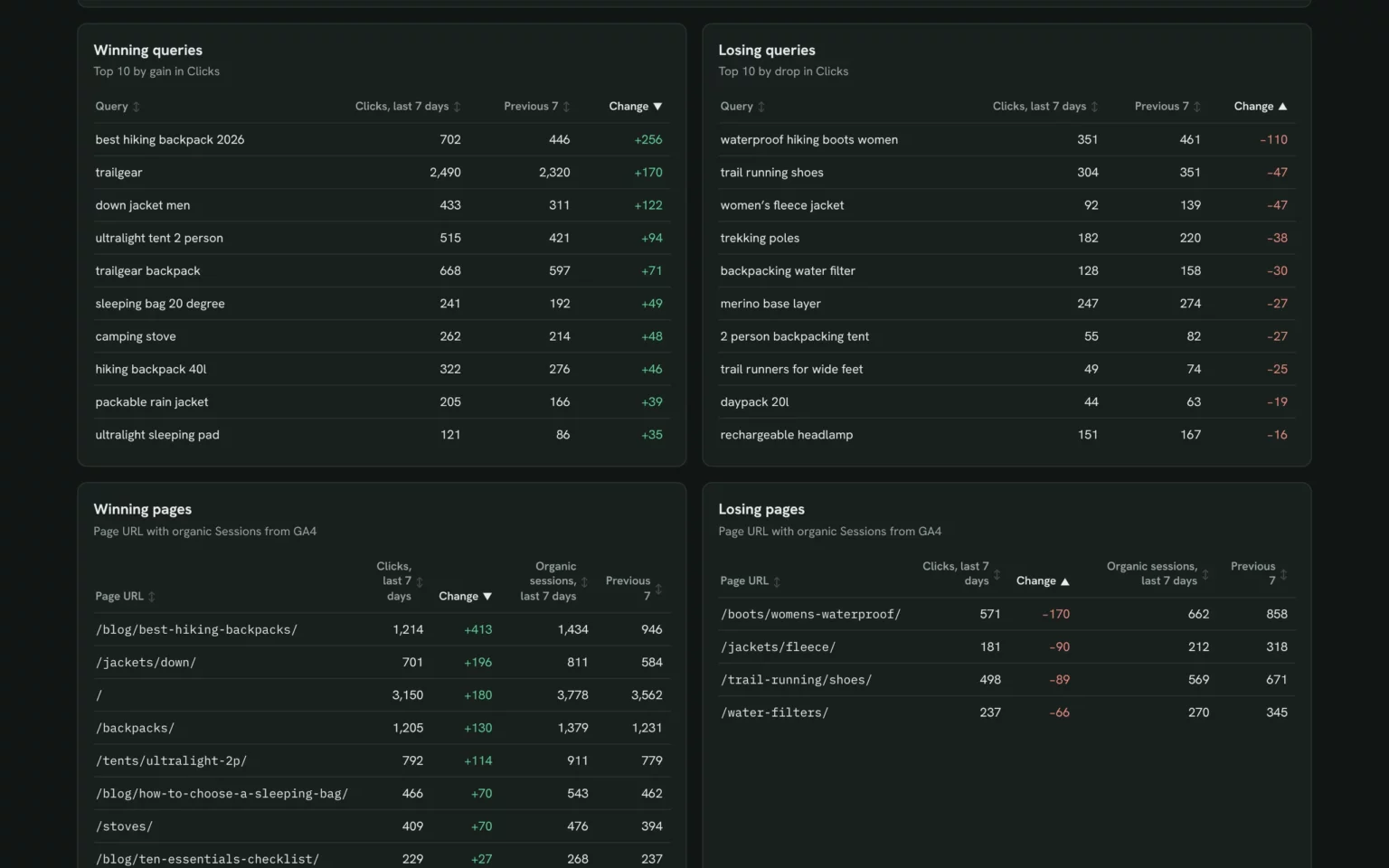
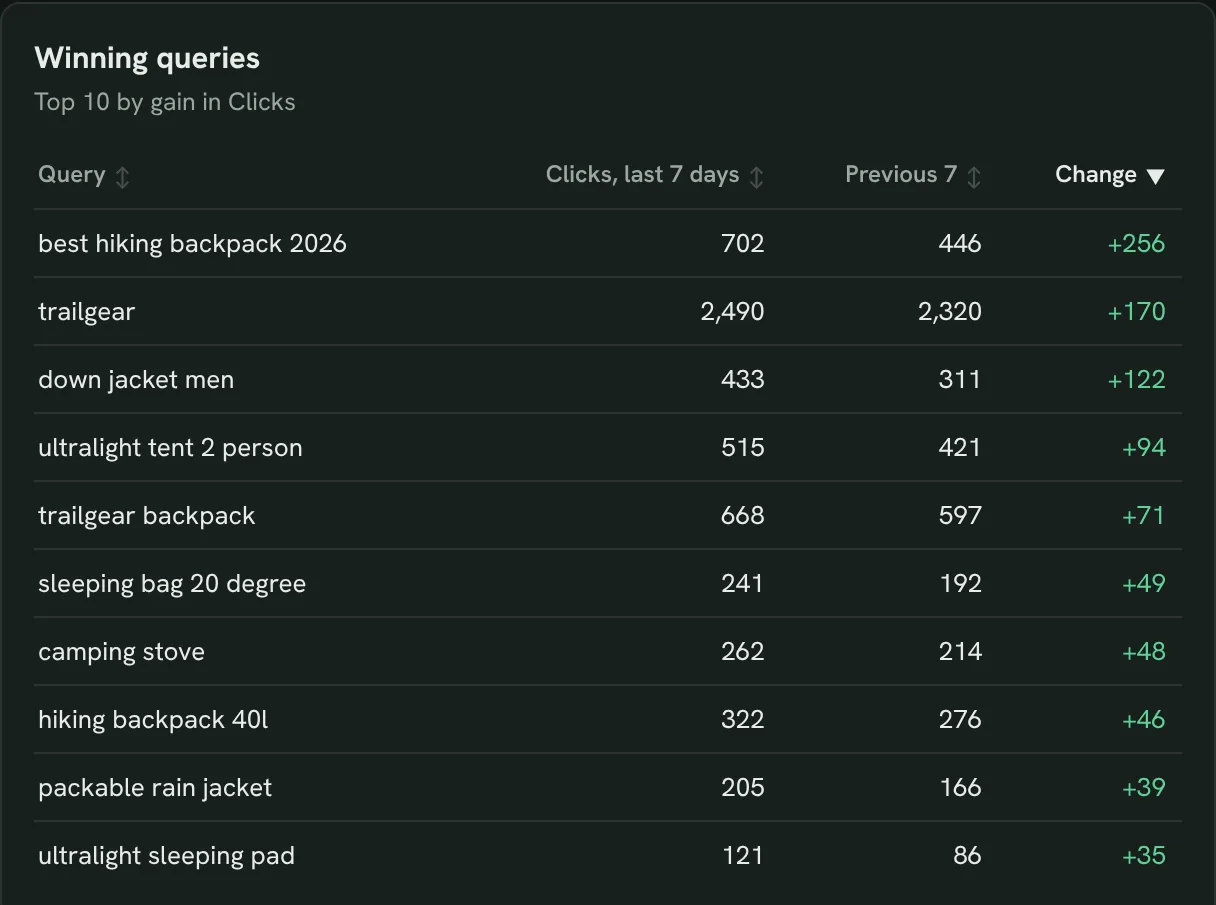
The 10 queries with the biggest gain in clicks, so you can point to what worked.
- Which searches brought more clicks?
- Are they brand or non-brand searches?
List the 10 queries with the biggest gain in clicks, last 7 days against the 7 days before.Also built for this: Keyword ranking dashboard template
Explain the queries that lost clicks
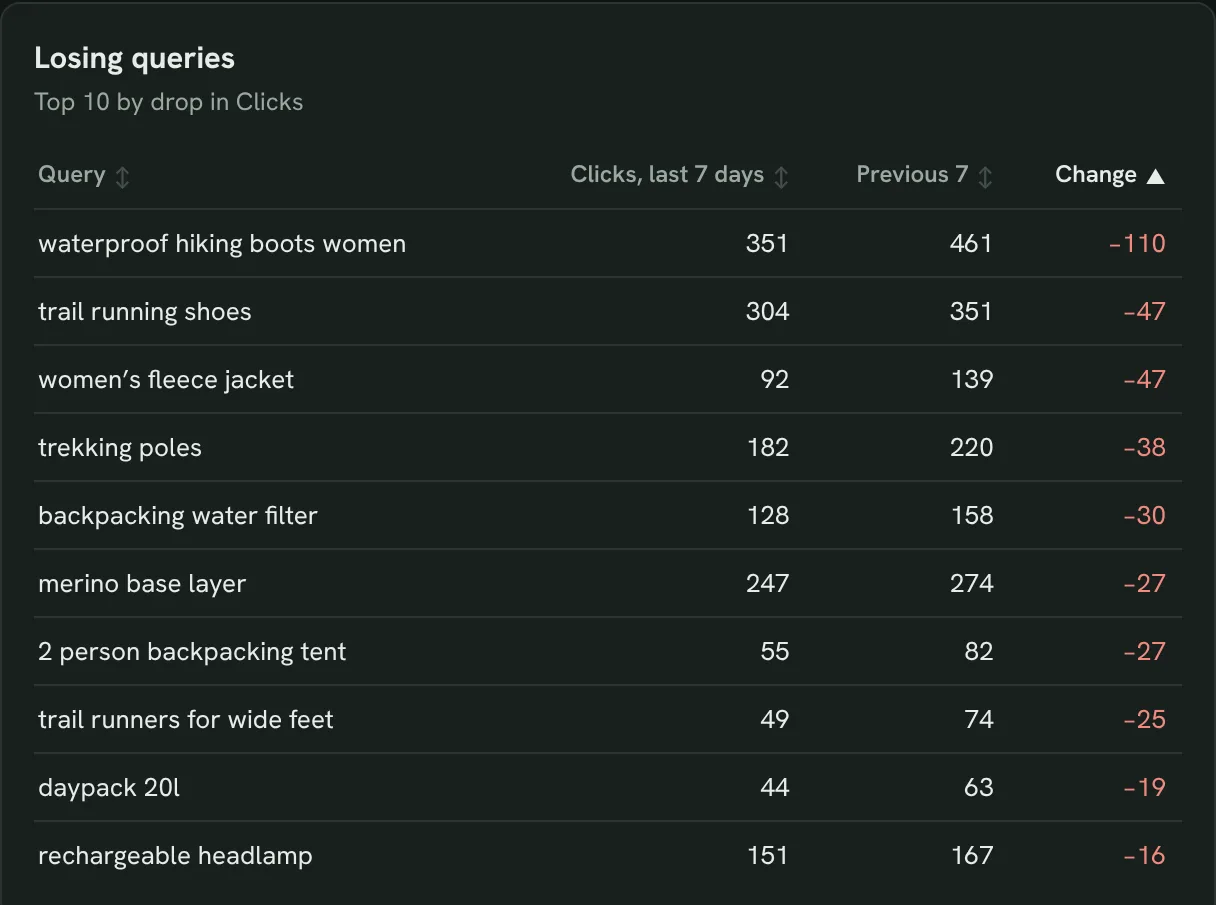
The 10 queries with the biggest drop in clicks, so you can explain them before the client asks.
- Which searches lost clicks?
- Is it a ranking drop or less demand?
List the 10 queries with the biggest drop in clicks, last 7 days against the 7 days before, with average position for each.Also built for this: Keyword ranking dashboard template
Show which pages brought more visits
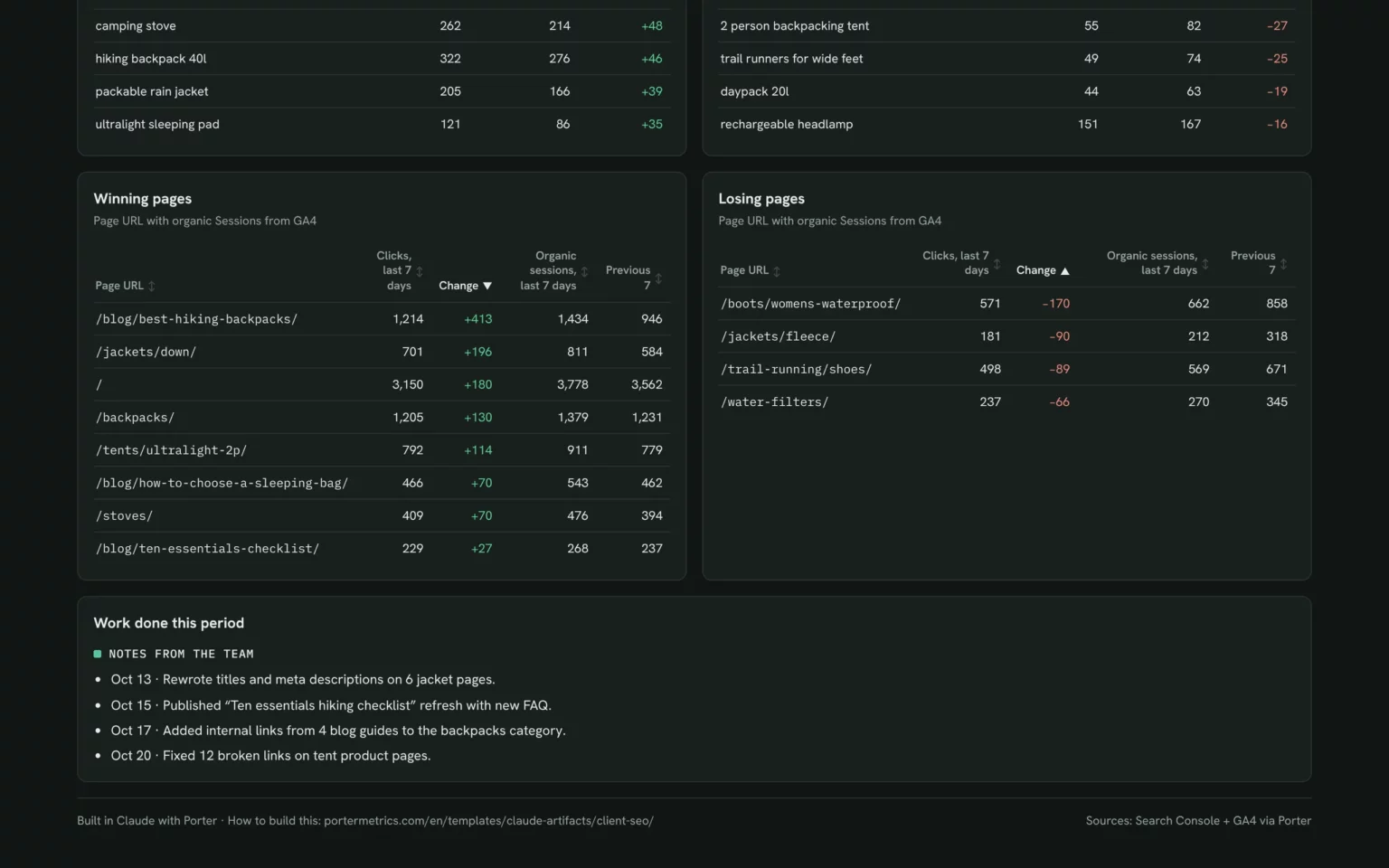
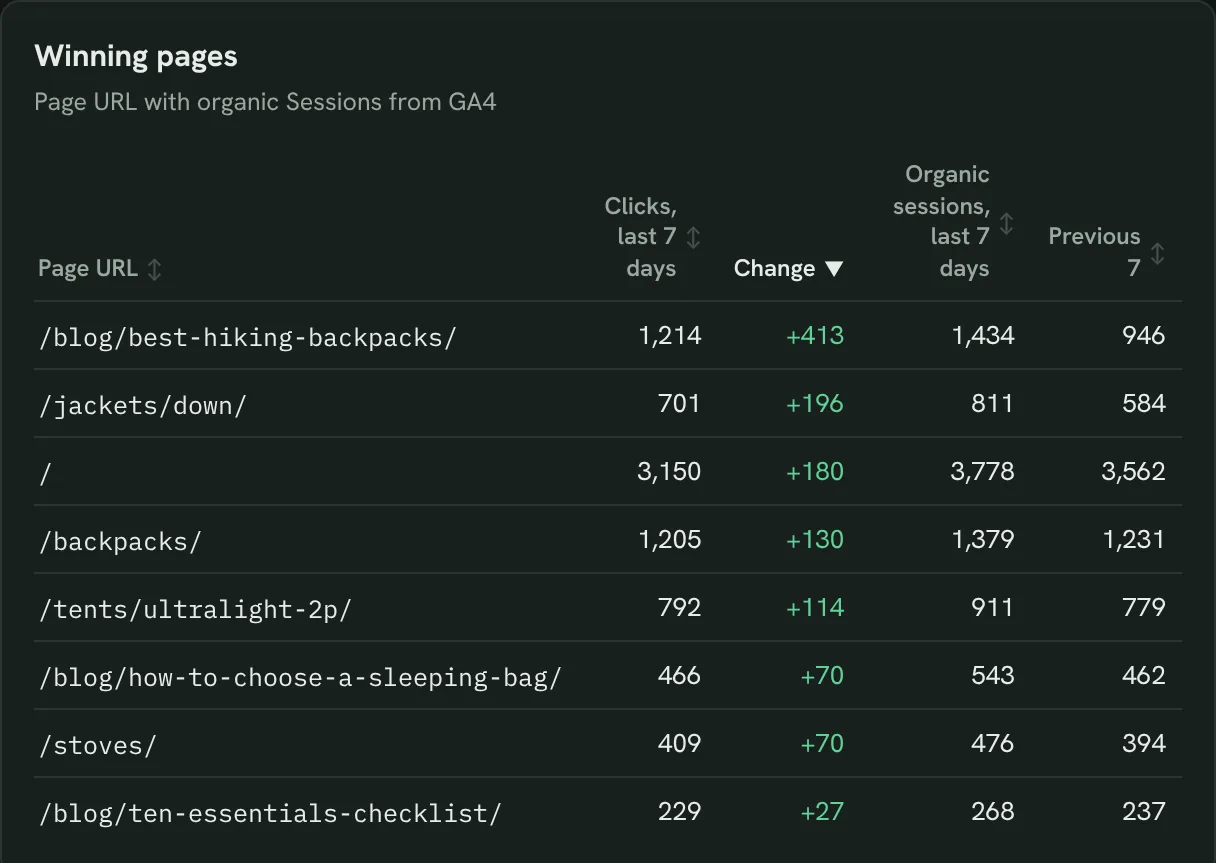
Pages with the biggest gain in clicks and organic sessions, so the client sees which content pays off.
- Which pages brought more visits?
- Did the pages we worked on improve?
List the 10 pages with the biggest gain in clicks, with GA4 organic sessions for each, last 7 days against the 7 days before.Also built for this: GA4 SEO dashboard template
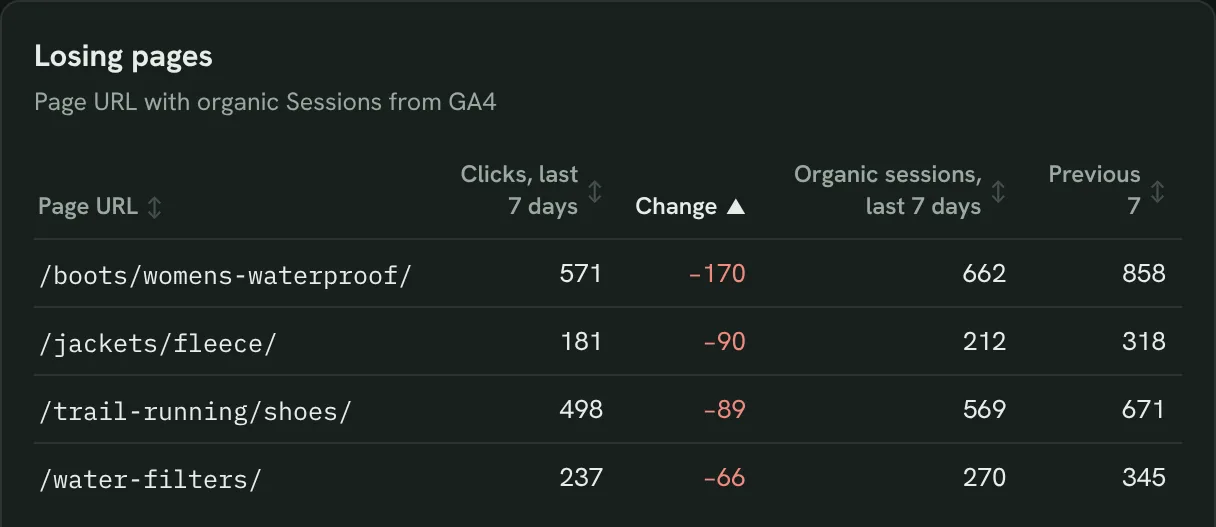
Find the pages that lost visits
Pages with the biggest drop in clicks and sessions, so you know what to fix next.
- Which pages lost the most visits?
- Do they share a section?
List the 10 pages with the biggest drop in clicks, with GA4 organic sessions for each, last 7 days against the 7 days before.Also built for this: Google Search Console dashboard template

Put your work next to the results
A dated list of what your team did this period, so the client connects the work to the numbers.
- What did the agency do this period?
- Which change came before which gain?
Add a section called Work done this period with these dated items: [your work log].Also built for this: Monthly SEO dashboard template
How to set up the client SEO report in Claude
You need access to the client’s Search Console and GA4 properties, a free Porter account and Claude Pro, Max, Team or Enterprise for Claude Dashboards. The whole setup takes about 10 minutes.
Connect Search Console and GA4 in Porter
Sign up free at Porter, open Data sources, connect Google Search Console and Google Analytics 4 and choose your property in each. The Search Console to Claude tutorial and the GA4 to Claude tutorial show each click.
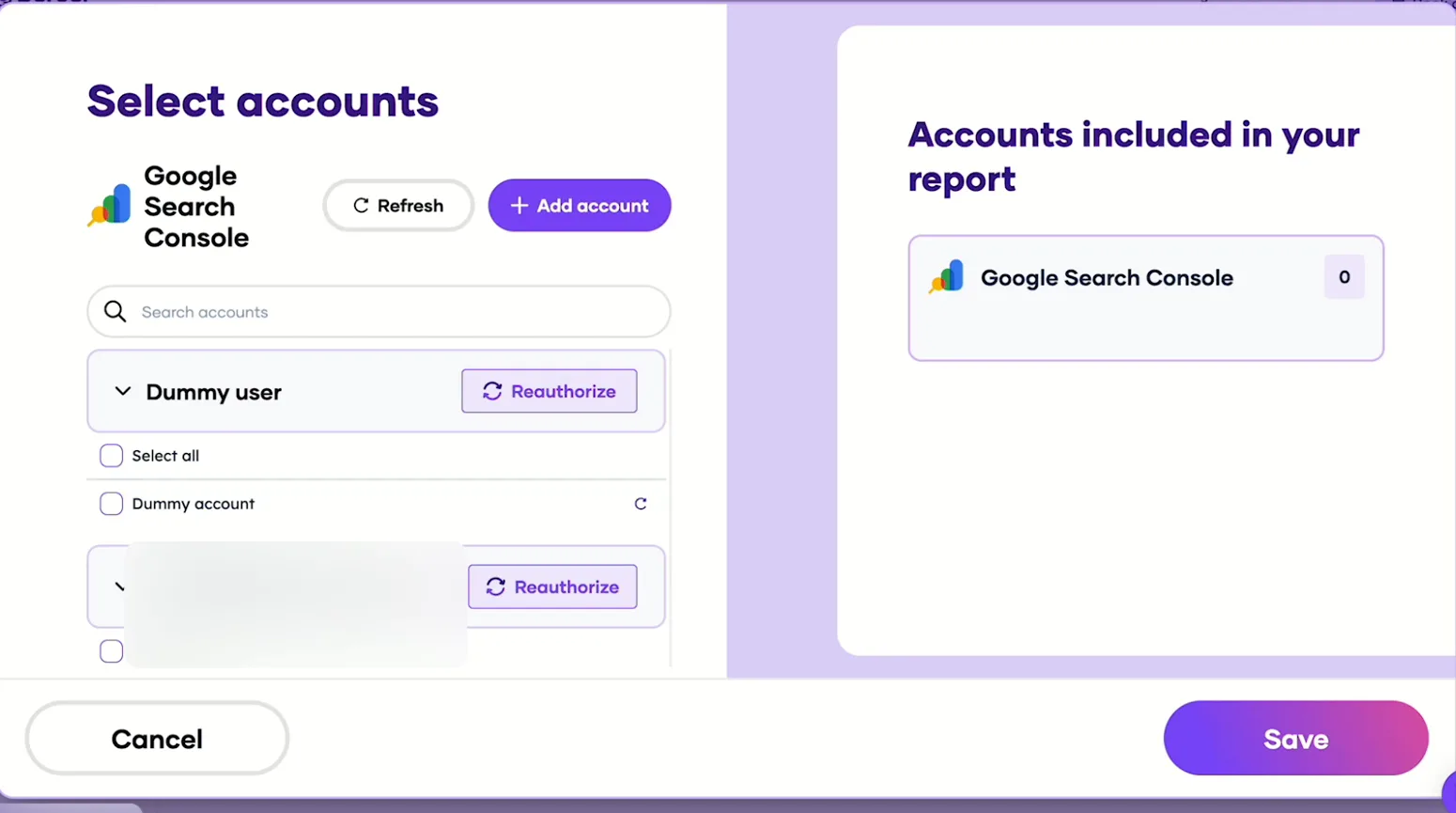
Pick the Search Console sites Claude can read, then save. Add Porter to Claude
In Claude, go to Customize → Connectors → Add custom connector, paste https://mcp.portermetrics.com/mcp and name it Porter Metrics. Click Continue, then sign in to Porter and allow access.
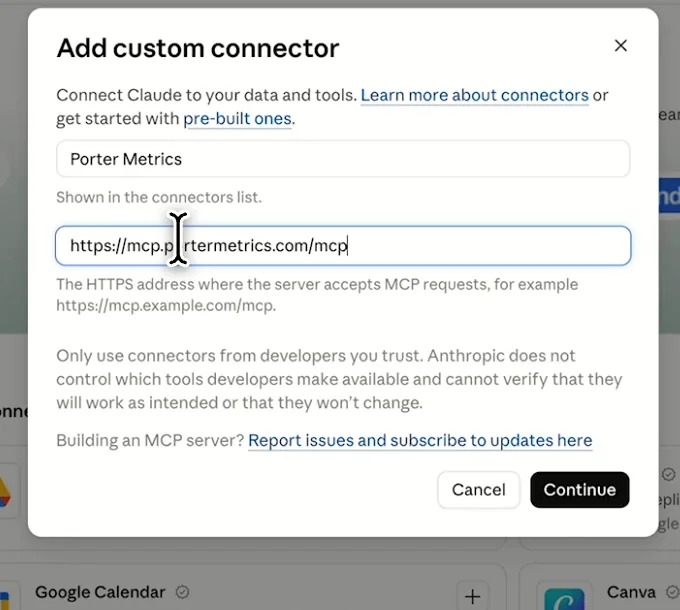
In Claude: Customize, Connectors, Add custom connector, then paste Porter’s MCP URL Paste the install prompt
Open a new chat in Claude, paste this prompt and replace the site and the goals in brackets. Claude reads both sources through Porter and builds the report.
Install promptDuplicate this Claude dashboard template and keep its layout, views and styling: https://claude.ai/artifact/6Cwm2aSubiqj6HfLRvzBau Then rebuild it with my own data through Porter: a client-ready SEO dashboard for [client site] for the last 14 days from Search Console and GA4: clicks, organic sessions and key events against these goals [goals], with impressions for context, last 7 days vs the 7 days before, daily clicks and organic sessions, the top 10 winning and losing queries and pages, and a Work done this period list with these items: [your work log]. Open in Claude with this prompt

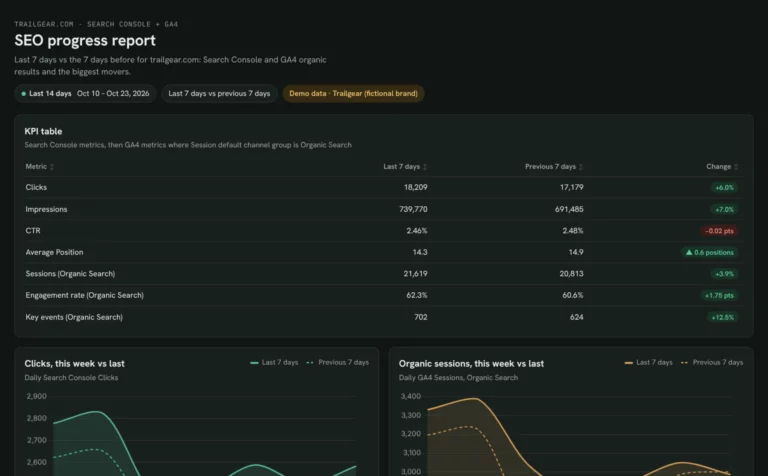
The first thing Claude builds: KPI cards against the client’s goals. Demo data shown.
Build a Google Search Console dashboard with Claude
Client SEO report fields and data
Clicks and impressions come from Search Console; sessions and key events come from GA4’s Organic Search channel. Porter reads 27 Search Console fields and 285 GA4 fields.
Top 5 client SEO KPIs to watch
Trailgear demo data · last 7 days vs the 7 before
- Clicks18,209101% of goal
The first number a client looks for. Compare it with the goal, not only with last week.
- Organic sessions21,619101% of goal
Clicks that became visits. If clicks grow and sessions don’t, check the landing pages.
- Key events702100% of goal
Visits that did something: the number that ties SEO to the client’s business.
- Impressions739.8K+7.0%
Shown for context. Rising impressions mean more reach before clicks follow.
- CTR2.46%vs 2.48%
Flat CTR while impressions grow usually means new, broader queries.
How the numbers are calculated
- Goal progress
- This period’s value ÷ the goal you set, as a percent.
- Change
- (This period − previous period) ÷ previous period.
- Organic sessions
- GA4 sessions where Session default channel group is Organic Search.
- Key events
- GA4 key events from Organic Search sessions.
- CTR
- Clicks ÷ impressions.
Data sources
Metrics
 Clicks
- Impressions
 Sessions
- Key events
Dimensions
- Date
- Query
- Page URL
- Session default channel group
- Landing page + query string
See all fields:Google Search Console · 27 fieldsGoogle Analytics 4 · 285 fields
What makes this client SEO report different
What you get that a client slide deck or a PDF export can’t give you.
Send it on your agency’s logo
Publish it as a Porter dashboard with white label, so clients see your brand.
Answer client questions during the call
Ask Claude why a page dropped and get the numbers in the same chat.
Set goals once, track them every period
Each refresh compares clicks, sessions and key events with the goals you set.
Report every client the same way
Run the same prompt for each client so every report has one layout.
Email it on a set day
Schedule the published dashboard to land in the client’s inbox.
Skip the copy-paste
Search Console and GA4 numbers refresh together, with no exports.
What the report includes
- KPI cards for clicks, organic sessions and key events with goal progress, plus impressions for context
- Daily clicks and organic sessions
- Winning and losing queries and pages
- A work done this period list you fill in
- Share by link, PDF and scheduled email once published in Porter
Related dashboard templates
 Claude
Monthly SEO dashboard template
Show month-on-month SEO results and the pages that moved them.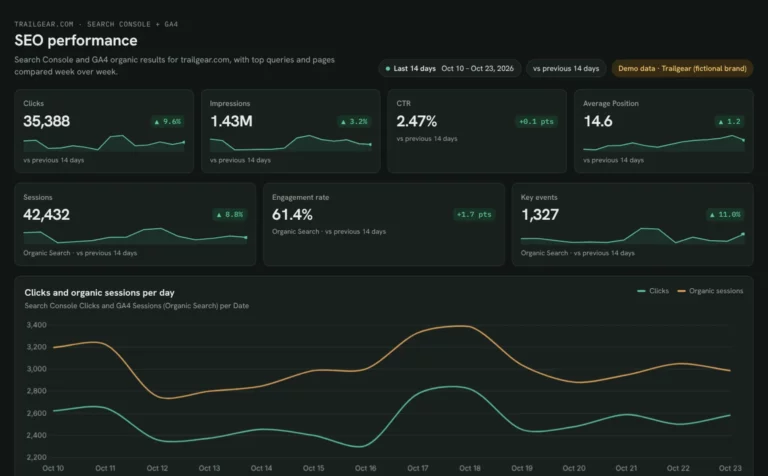 Claude
SEO dashboard template
See which Search Console clicks turn into GA4 sessions and key events.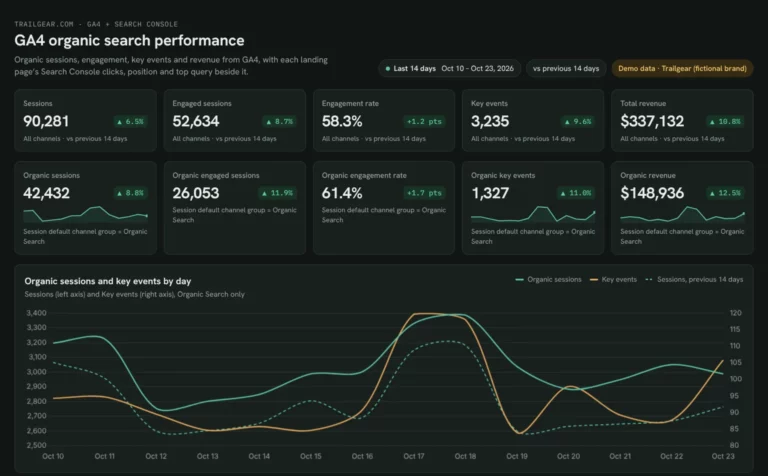 Claude
GA4 SEO dashboard template
See which landing pages bring organic sessions and key events.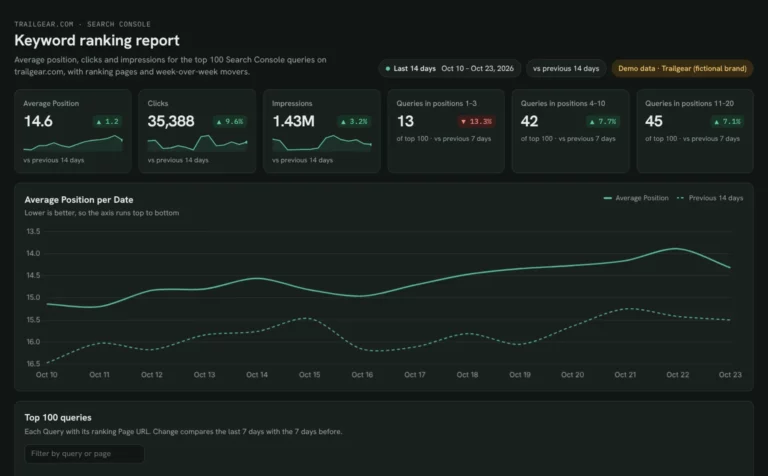 Claude
Keyword ranking dashboard template
Track which keywords reach page one and what moved this week.Browse more Claude dashboard templates
 Data Studio
 Google Sheets
 ChatGPT
Get your free client SEO report
Sign up free, connect the client’s Search Console and GA4 and paste the prompt. Their data fills the same layout as the demo.
Free plan · 14-day trial · No card needed