X AdsX Ads Data StudioGoogle Data Studio

Free X Ads connector for Data Studio

Connect your X Ads data to Google Data Studio (formerly Looker Studio) for free. Analyse Impressions, CTR, Spend, and Engagements across +891 fields. Built for marketing agencies — multi-account, white-label, automatic refresh by client, with no warehouse required — and every X Ads ad account field.

  • +891 fields — every X Ads field plus calculated metrics like Impressions, CTR, and Spend.
  • Multi-account, white-label, automatic refresh by client, with no warehouse required.
  • Send to Data Studio, Google Sheets, Claude, and BigQuery in one subscription.

No credit card required · 14-day free trial

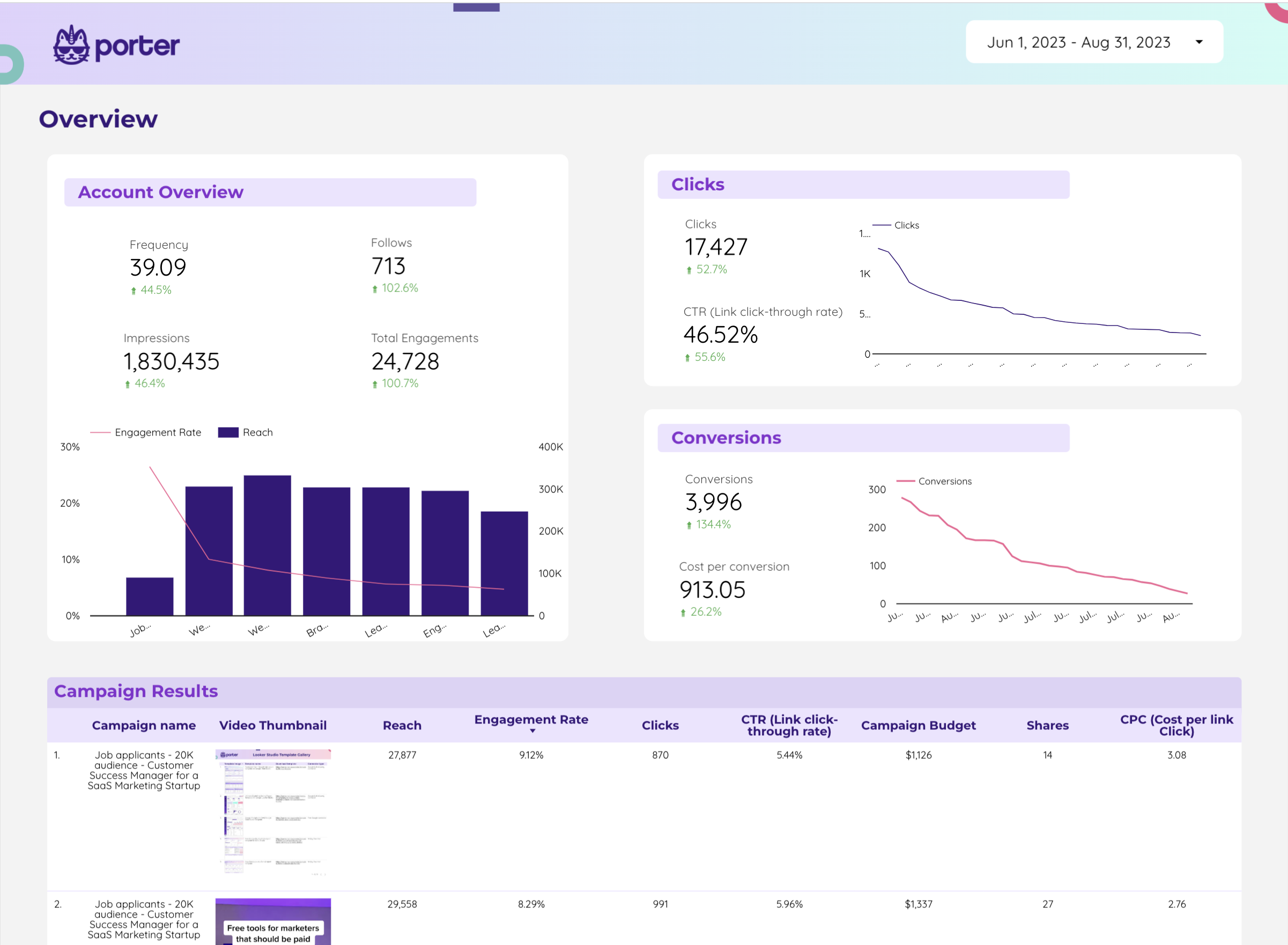
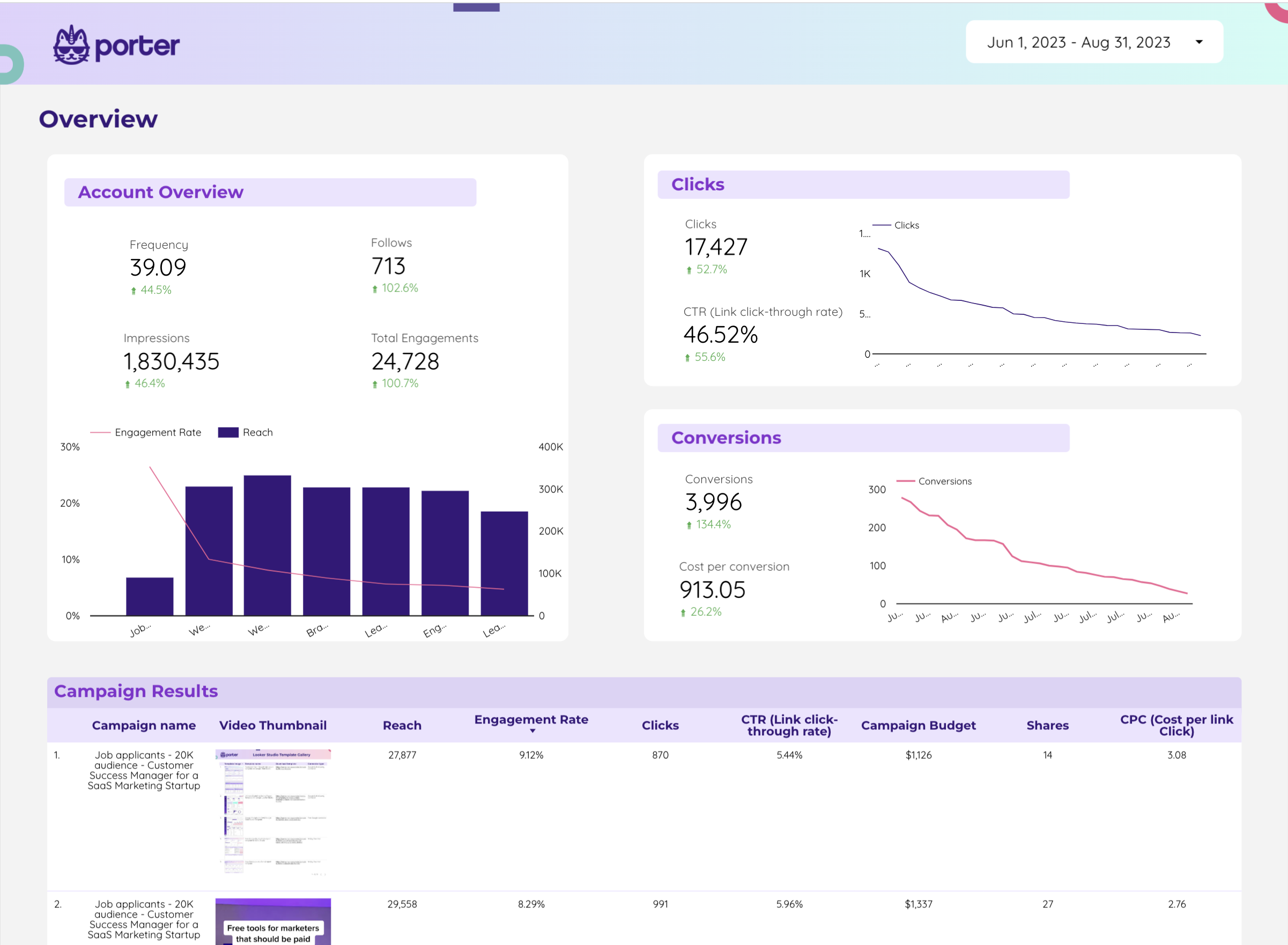
X Ads dashboard

Trusted by 1,600+ marketers and agencies in 60+ countries

G2 Momentum Leader badge G2 Best Estimated ROI badge G2 Best Relationship badge
Ogilvy Google Partner Loop Dapper Ture Vaulted
★★★★★   4.6 / 5 · 200+ reviews on G2
READY-MADE REPORTS

Launch a X Ads dashboard in minutes

Start with a pre-built X Ads report and customize it for your clients in Data Studio. No blank-page syndrome.

Twitter Ads Dashboard Example

Twitter Ads Dashboard Example

Pre-built Twitter Ads dashboard example for Data Studio.

View template →

Twitter Ads Dashboard

Twitter Ads Dashboard

Ready-to-use Twitter Ads dashboard template for Porter.

View template →
Twitter Ads Report

Twitter Ads Report

Marketing report template for Twitter Ads performance.

View template →
Twitter Ads Report for Data Studio by Porter

Twitter Ads Report for Data Studio by Porter

Data Studio report template for Twitter Ads by Porter Metrics.

View template →
Browse all X Ads templates →
Porter vs Others

Why marketers choose Porter

Porter is built for agencies that need speed, not infrastructure overhead.

Feature Porter
No-code marketing data warehouse
Others
Connectors & ETL
StorageNative Data Studio connector. No warehouse, no SQL, no extra bill. Your data flows directly into dashboards.Load data into a warehouse first, then query into Data Studio — extra cost, extra latency.
Data syncingAutomatic refresh by client. Each X Ads ad account syncs on its own schedule without scripts.Manual CSV exports or rigid ETL schedules that break when X Ads API limits change.
AttributionBlend X Ads with Facebook Ads, Google Ads, and LinkedIn Ads inside the same Data Studio dashboard.Siloed X Ads reports. Cross-channel ROI requires manual spreadsheet work.
Data blendingBlend data sources directly in Data Studio. No engineering team required.Join tables with SQL in a warehouse before visualizing — technical bottleneck for agencies.
DestinationsOne subscription sends X Ads data to Data Studio, Google Sheets, Claude, and BigQuery.Locked into one BI tool. Switching costs are high.
FEATURE CHECKLIST

X Ads connector feature checklist

Everything you need to report on X Ads at scale — no engineering required.

01

Multi-account management

Connect and manage multiple X Ads ad accounts from a single Porter workspace. Perfect for agencies with many clients.

02

891 fields and metrics

Access 156 dimensions and 735 metrics including Impressions, CTR, Spend, Engagements, CPM, and Link Clicks.

03

White-label reports

Deliver X Ads dashboards branded with your agency colors and domain. Clients never see Porter.

04

Automatic refresh by client

Set refresh schedules per ad account. Each client’s data updates automatically without manual exports.

05

OAuth 2.0 authentication

Secure, token-based login to X Ads. No password sharing. Revoke access instantly from Porter settings.

06

Live data sync

Porter queries the X Ads API on demand and caches results for fast Data Studio load times.

07

No warehouse required

Skip the database middleware. Porter is a native Data Studio connector — connect X Ads and start reporting in minutes.

08

Cross-channel blending

Combine X Ads with Facebook Ads, Google Ads, and LinkedIn Ads in one Data Studio dashboard for unified paid social ROI.

LOVED BY 1,500+ MARKETERS

What agencies say about Porter

GET STARTED IN MINUTES

How to connect X Ads to Data Studio

  1. Authorize your X Ads account

    Log in to Porter, select the X Ads connector, and authenticate with OAuth. Grant access to the ad accounts you want to report on.

  2. Select metrics and dimensions

    Pick from 891 fields across 8 categories — Performance, Engagement, Audience, Creative, and more. Porter handles the schema automatically.

  3. Build your Data Studio dashboard

    Open Data Studio, add the Porter X Ads connector, and start visualizing. Or duplicate a pre-built template to save time.

  4. Schedule automatic refresh

    Set daily or hourly refresh per ad account. Porter syncs new X Ads data automatically — no CSVs, no scripts.

  5. Share or white-label your report

    Send the Data Studio link to your client, or embed the dashboard white-labelled with your agency branding.

Full tutorial: How to connect X Ads to Data Studio →
EVERY FIELD YOU NEED

+891 X Ads fields in Data Studio

Porter exposes 156 dimensions and 735 metrics from the X Ads API — organized into 8 categories so you can build any report your clients ask for.

Account & Campaign Structure

Report at account, campaign, ad group, and ad level with full hierarchy fields.

Performance Metrics

Impressions, CTR, CPM, Billed Engagements, Reach, Link Clicks, and Conversion Rate.

Tweet & Engagement

Clicks, Engagements, Media Views, Likes, Replies, Retweets, Swipes, and Unfollows.

Audience & Targeting

Country, Device, Platform, Language, Gender, City, Age, Interest Category, and Keyword.

Time & Attribution

Date, Day, Week, Month, Quarter, Year, and custom time breakdowns for trend analysis.

Cost & Budget

Spend, Total Budget, Bid Amount, Cost Per Engagement, Cost Per Lead, and Cost Per App Click.

Account & Campaign Structure
  • Account ID
  • Account Name
  • Campaign Name
  • Campaign ID
  • Campaign Type
  • Campaign Objective
  • Campaign Budget
  • Ad Group Name
  • Ad Group ID
  • Ad Name
  • Ad Text
Performance Metrics
  • Impressions
  • CTR
  • CPM
  • Billed Engagements
  • Average Frequency
  • Total Audience Reach
  • Link Clicks
  • App Clicks
  • Conversion Rate
Tweet & Engagement
  • Clicks
  • Engagements
  • Engagement Rate
  • Media Views
  • Media Engagements
  • Likes
  • Replies
  • Retweets
  • Swipes
  • Votes
  • Unfollows
Audience & Targeting
  • Country
  • Device
  • Platform
  • Language
  • Gender
  • City
  • Age
  • DMA ID
  • Interest Category
  • Behavior ID
  • Keyword
Time & Attribution
  • Date
  • Day
  • Day of Week
  • Month
  • Quarter
  • Week
  • Year
  • Month and Year
  • Quarter and Year
  • Week and Year
Conversions & Events
  • Ad ID
Creative & Media
  • Media Creative Type
  • Media Creative Status
  • Media Creative ID
  • Media Creative Landing URL
  • Media URL
Cost & Budget
  • Spend
  • Ad Group Total Budget
  • Bid Amount
  • Cost Per Engagement
  • Cost Per Lead
  • Cost Per App Click
See all 891+ X Ads fields documentation →
Explore more

Other connectors & destinations

Porter supports 15+ data sources and 10+ destinations. Mix and match in one subscription, no extra seats or hidden per-destination fees.

COMMON ISSUES

Troubleshooting X Ads + Data Studio

Quick fixes for the most common X Ads connector issues reported by agencies.

IssueSolution
My X Ads data is not showing in Data StudioVerify your X Ads OAuth token is active in Porter settings. Ensure the authenticated user still has admin or analyst access to the ad account.
I see ‘No data available’ for some metricsThe X Ads API restricts certain metrics when specific dimensions are used. Try removing breakdowns like DMA ID or Behavior ID and retry.
Historical data looks incompleteX Ads API backfill varies by endpoint. Set your Data Studio date range within the last 13 months for the most reliable coverage.
Connector authorization keeps expiringRe-authorize the X Ads connection in Porter. If the token was revoked by an account admin, ask them to re-approve Porter access.
Metrics don’t match my X Ads dashboardAPI reporting can differ from the X Ads UI due to attribution windows and time zone settings. Align both to UTC for closest parity.
Can’t connect multiple X Ads ad accountsThe Starter plan includes one ad account. Upgrade to Pro or Agency to connect unlimited X Ads ad accounts and manage them by client.
Pricing

Start free. Pay per X Ads ad account

  • Unlimited 14-day free trialConnect any number of data source accounts — no credit card.
  • Free forever planPer account: up to 3 connected accounts with 30-day history.
  • Other destinations includedYour subscription sends data to Data Studio, Google Sheets, BigQuery, Slack and Claude/ChatGPT.
  • Unlimited usersNo extra cost per team member or seat.
Monthly Annual Save 17%

X Ads ad accounts

$12.5 /mo

Billed annually · /account

Destinations included
Claude
ChatGPT
Data Studio
Google Sheets
Slack
Zapier
Power BI
Start for free →

Unlimited 14-day free trial + Free forever plan

FREQUENTLY ASKED QUESTIONS

Common questions.

What X Ads metrics can I track in Data Studio with Porter?
You can track 735 metrics and 156 dimensions, including Impressions, CTR, Spend, Engagements, CPM, Link Clicks, Media Views, Likes, Retweets, Replies, and Conversion Rate. Full field list is available at portermetrics.com/en/connectors/fields/x-ads/.
How do I connect multiple X Ads accounts to Data Studio?
In Porter, authorize each X Ads ad account separately. Agency plans let you organize accounts by client and set per-account refresh schedules. All data feeds into one or multiple Data Studio dashboards.
Does Porter support historical X Ads data?
Yes. Porter backfills available X Ads API history, typically up to 13 months depending on the endpoint. Set your date range in Data Studio and Porter fetches the matching records automatically.
Can I combine X Ads data with Facebook Ads and Google Ads in one dashboard?
Yes. Porter supports cross-channel blending in Data Studio. Connect X Ads, Facebook Ads, Google Ads, and LinkedIn Ads, then build unified paid-social ROI reports without a warehouse.
How often does Porter refresh X Ads data in Data Studio?
You choose the schedule — hourly or daily per ad account. Porter syncs automatically in the background, so your Data Studio dashboards stay current without manual exports.
Is Porter’s X Ads connector free to use?
Porter offers a free trial. After that, you pay per X Ads ad account. There are no per-connector fees — one subscription covers Data Studio, Google Sheets, Claude, and BigQuery.
What X Ads objects are supported — campaigns, ad groups, creatives?
Porter supports Campaigns, Ad Groups, Ads, Promoted Tweets, Media Creatives, and Account-level data. You can report at any level and drill down from campaign to individual tweet performance.
Do I need a data warehouse to use Porter with X Ads and Data Studio?
No. Porter is a native Data Studio connector. Data flows directly from the X Ads API into your dashboards. No BigQuery, Snowflake, or Redshift required.
Start in under 5 minutes

Connect your X Ads to Data Studio

Stop exporting CSVs. Start automating X Ads reports.
No credit card · Cancel anytime · Used by 1,600+ marketers