ShopifyShopify Data StudioGoogle Data Studio

Free Shopify connector for Data Studio

Connect your Shopify data to Google Data Studio (formerly Looker Studio) for free. Analyse Total Sales, Orders, Average order value, and Gross Sales, with +153 fields, the easiest Shopify Data Studio connector to set up — no private apps, no tokens, no database middleware, and every Shopify store field.

  • +153 fields — every Shopify field plus calculated metrics (Total Sales, Orders, Average order value).
  • The easiest Shopify Data Studio connector to set up — no private apps, no tokens, no database middleware.
  • Send to Data Studio, Google Sheets, Claude, and BigQuery in one subscription.

No credit card required · Cancel anytime · Used by 1,600+ marketers

Shopify dashboard

Trusted by 1,600+ marketers and agencies in 60+ countries

G2 Momentum Leader badge G2 Best Estimated ROI badge G2 Best Relationship badge
Ogilvy Google Partner Loop Dapper Ture Vaulted
★★★★★   4.6 / 5 · 200+ reviews on G2
READY-MADE REPORTS

Launch a Shopify dashboard in minutes

Skip the blank canvas. Start with one of six pre-built Shopify dashboards built for Data Studio, then customize every chart to match your store.

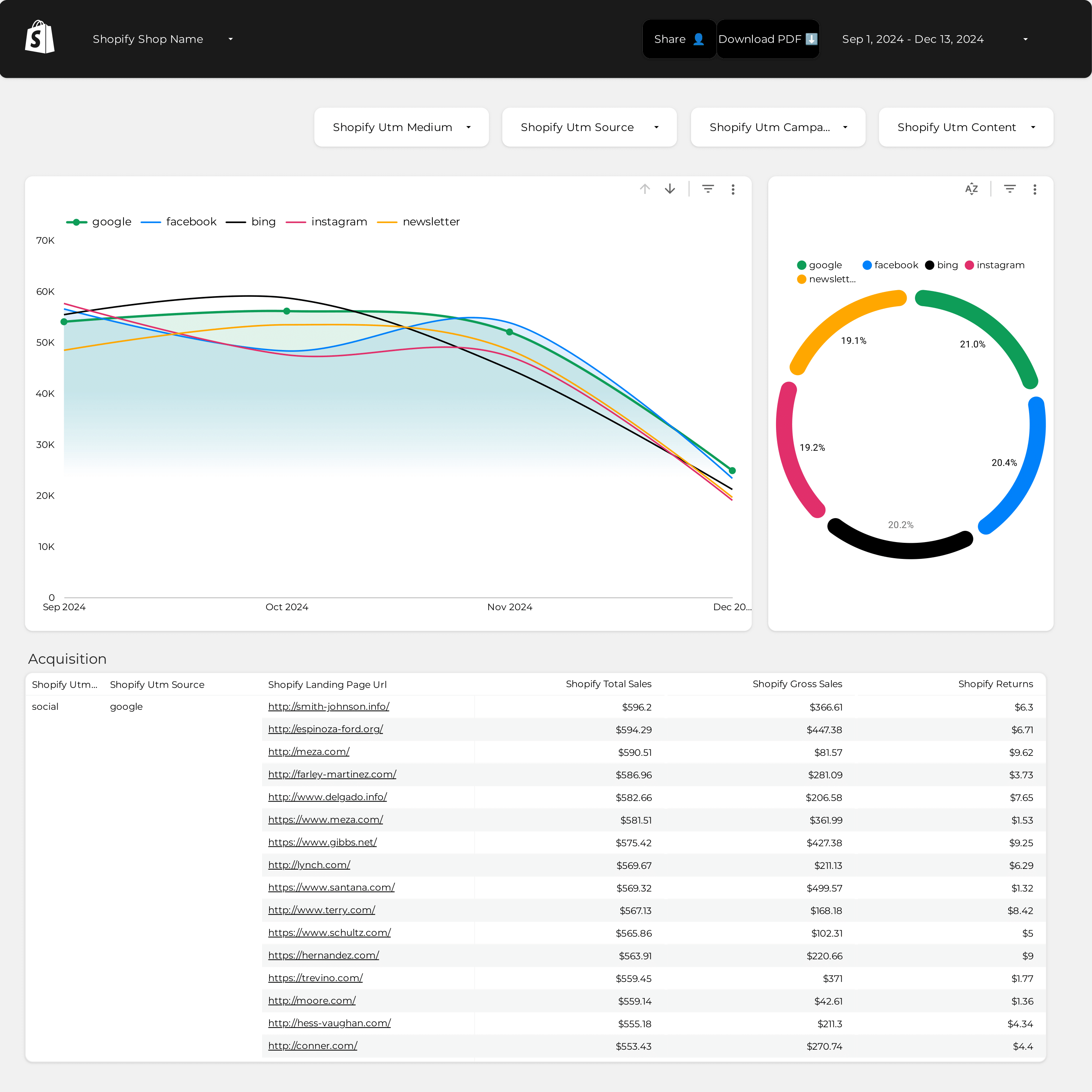
Shopify Attribution Dashboard Example

Shopify Attribution Dashboard Example

Track marketing acquisition and attribution across channels.

View template →
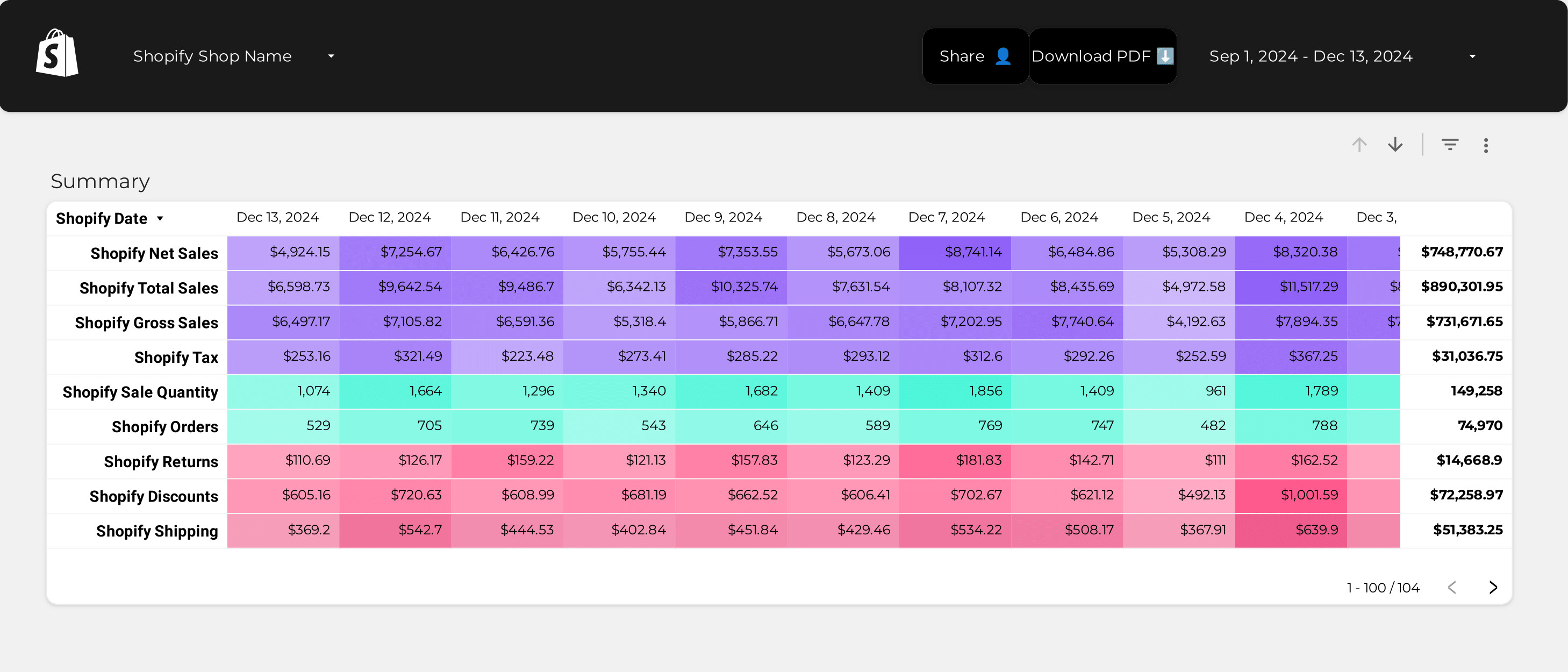
Shopify Kpis Dashboard Example

Shopify Kpis Dashboard Example

Monitor core KPIs like sales, orders, and average order value.

View template →
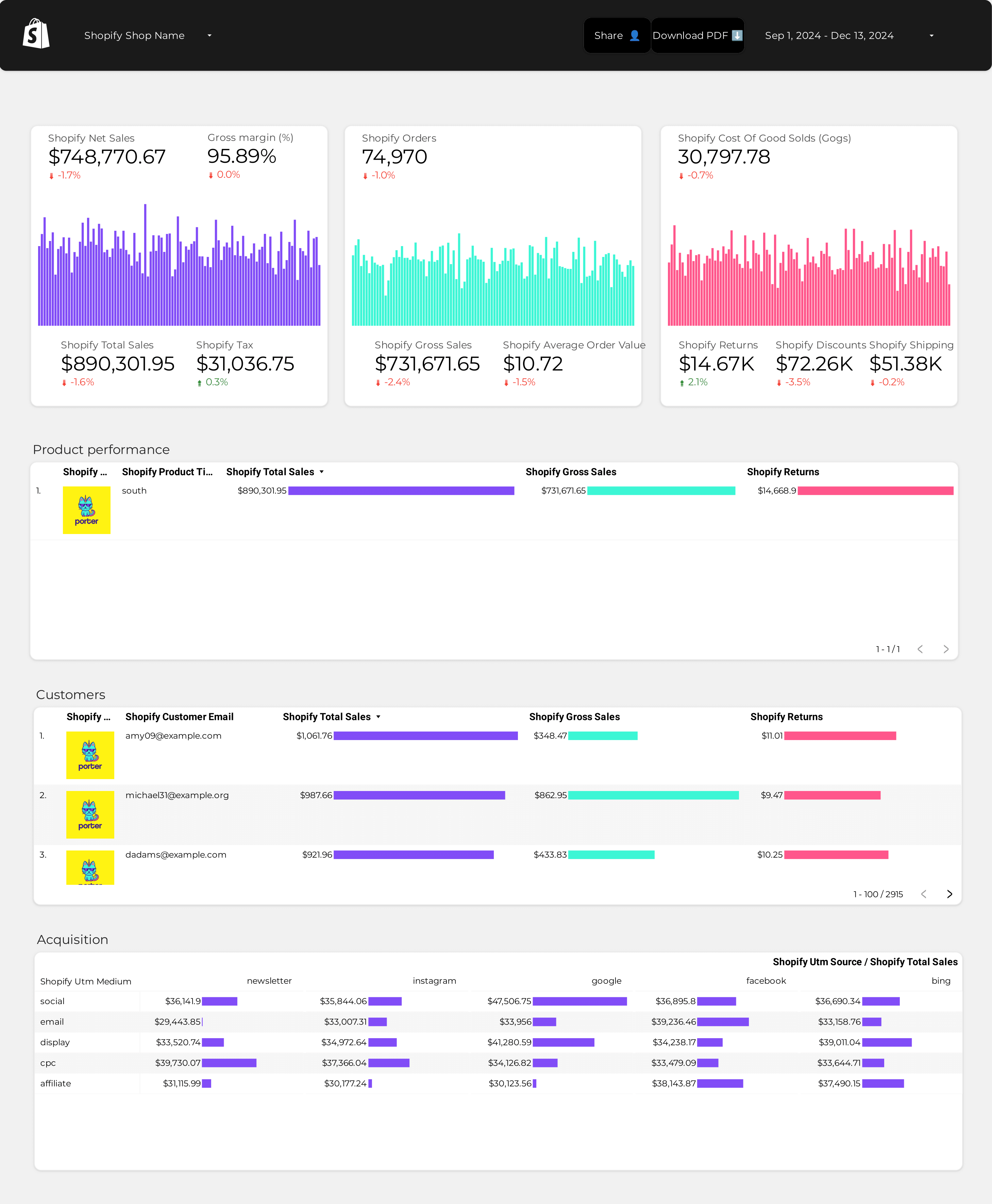
Shopify Store Performance Dashboard Example

Shopify Store Performance Dashboard Example

Full store performance overview with products and customers.

View template →
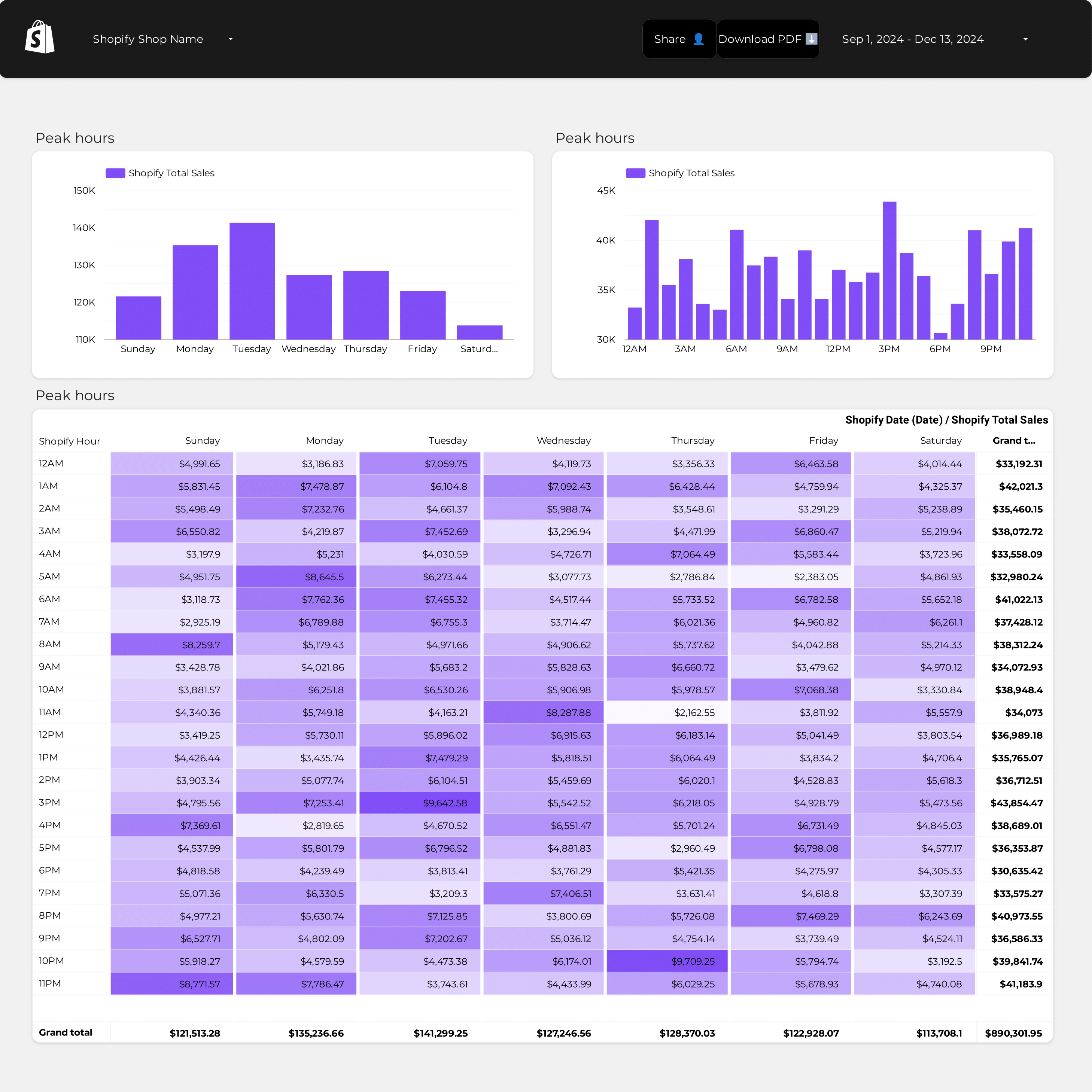
Shopify Dashboard Example

Shopify Dashboard Example

General-purpose Shopify dashboard for any reporting need.

View template →
Shopify Store Performance Dashboard

Shopify Store Performance Dashboard

Template-ready store performance with pre-configured charts.

View template →
Shopify Kpis Dashboard

Shopify Kpis Dashboard

KPI-focused template for monitoring sales and order metrics.

View template →
Browse all Shopify templates →
Porter vs Others

Why marketers choose Porter

Most connectors force you through a database middleman or private app setup. Porter connects Shopify directly to Data Studio — no tokens, no SQL, no infrastructure.

Feature Porter
No-code marketing data warehouse
Others
Connectors & ETL
StorageDirect API connection — Shopify talks straight to Data Studio with zero intermediate storageRequires a database or data warehouse to stage Shopify data before it reaches your dashboard
Data syncingAutomated hourly refresh with OAuth authentication; your metrics update while you sleepManual CSV exports or scheduled batch uploads that lag by hours
AttributionNative UTM Campaign, UTM Medium, UTM Source, Referrer URL, and Landing Page URL fields built inUTM and referral data scattered across separate tools
Data blendingBlend Shopify orders with Google Analytics 4, Facebook Ads, and Google Ads in the same Data Studio dashboardLimited to single-source reports or complex SQL joins
DestinationsOne subscription sends Shopify data to Data Studio, Google Sheets, Claude, and BigQueryLocked into one dashboard tool
FEATURE CHECKLIST

Shopify connector feature checklist

Everything you need to turn Shopify data into actionable dashboards — no engineering required.

01

153 Shopify fields

Pull 153 dimensions and metrics across six categories — Customers, Orders, Products, Shop Info, Time, and Sales — including calculated fields like Gross Profit and New Customers AOV.

02

No-code OAuth setup

Authorize your store in three clicks with Shopify’s standard OAuth flow. No private apps, no API tokens, no developer required.

03

Hourly data refresh

Your Shopify store data refreshes automatically every hour. No manual CSV uploads, no stale spreadsheets.

04

Multi-store support

Connect multiple Shopify stores to a single Data Studio dashboard. Roll up Total Sales and Orders across every brand you run.

05

Pre-built dashboard templates

Start reporting in 3.2 hours with six ready-made dashboards — Attribution, KPIs, Store Performance, and more.

06

UTM and referral tracking

Built-in UTM Campaign, UTM Medium, UTM Source, Referrer URL, and Landing Page URL fields so you can trace every order back to its source.

07

Secure token encryption

OAuth credentials are encrypted and never stored in plain text. Porter does not warehouse your order data.

08

Cross-platform blending

Combine Shopify sales with Google Analytics 4 sessions, Facebook Ads spend, and Google Ads clicks inside the same Data Studio report.

LOVED BY 1,500+ MARKETERS

Trusted by marketers who ship

Tutorial

How to connect Shopify to Data Studio

  1. Add the connector

    Open Data Studio, click Create > Data Source, and search for ‘Porter Metrics Shopify’ in the connector gallery.

  2. Authorize your store

    Click ‘Authorize’ and log in to your Shopify admin. Grant Porter read-only access to orders, products, and customers.

  3. Select your fields

    Choose from 153 Shopify fields — Sales, Orders, Customers, Products, and more — or load a pre-built template.

  4. Build your dashboard

    Drag fields into Data Studio charts, apply filters by date or product type, and share the report with your team.

  5. Set refresh schedule

    Pick hourly or daily auto-refresh so your dashboard stays current without manual updates.

Full tutorial: How to connect Shopify to Data Studio →
EVERY FIELD YOU NEED

+153 Shopify fields in Data Studio

Porter exposes 153 Shopify dimensions and metrics — 35 dimensions and 85 metrics across six core categories — so you can build any e-commerce report you need.

All 153 Shopify fields and more

Every dimension and metric you need, including calculated fields like Gross Profit and New Customers AOV.

Marketer-friendly field naming

Fields are named for humans, not engineers. No cryptic API column names.

Full order and customer granularity

Drill down to individual orders, customers, products, and SKUs with native granularity.

Built-in UTM attribution

UTM Campaign, Medium, Source, Referrer URL, and Landing Page URL fields ready out of the box.

Multi-store dashboard support

Connect multiple Shopify stores to one Data Studio report and roll up metrics across brands.

Automated hourly refresh

Your data stays current with hourly auto-refresh on paid plans — no manual uploads.

Customer
  • Cost Per Order
  • Customer Creation Date
  • Customer Display Name
  • Customer ID
  • Customer Total Spent
  • New Customers
  • Customer Email
  • Customer First Name
  • Customer Last Name
  • Customer Phone
  • Average Orders per Customer
  • COGS (Minus Refunds)
  • Customer Accepts Marketing
  • Customer Image
  • Customer Image URL
  • Customer Last Order Date
  • Customer Orders Count
  • Customer State
  • Customer Tags
  • Customer Tax Exempt
  • Customer Type
  • Customer Verified Email
  • Gross Profit
  • New Customers AOV
  • New Customers COGS
  • New Customers Gross Sales
  • New Customers Gross Sales %
  • New Customers Net Sales
  • New Customers Net Sales %
  • New Customer Orders
  • New Customers %
  • New Customers Total Sales
  • New Customers Total Sales %
  • Purchase Frequency
  • Repeat Customers
  • Repeat Customers AOV
  • Repeat Customers COGS
  • Repeat Customers Gross Profit
  • Repeat Customers Gross Sales
  • Repeat Customers Gross Sales %
  • Repeat Customers Net Sales
  • Repeat Customers Net Sales %
  • Repeat Customer Orders
  • Repeat Customers %
  • Repeat Customers Total Sales
  • Repeat Customers Total Sales %
  • 0$ Orders
Orders
  • Average order value
  • Order Creation Date
  • Order ID
  • Order Name
  • Orders
  • Shipping City
  • Shipping Country
  • Shipping Province
  • UTM Campaign
  • UTM Medium
  • UTM Source
  • Financial Status
  • Fulfillment Status
  • Landing Page URL
  • Order Tags
  • Referral Code
  • Referrer URL
  • Total Customers
  • Discount Code
  • Order Canceled Date
  • Channel
  • Channel app name
  • Order Closed Date
  • Order Current Total Weight
  • Order Is Closed
  • Order Is Confirmed
  • Order Is Edited
  • Order is Fully Paid
  • Order is Refundable
  • Is Test
  • Order Note
  • Order Payment Gateway Names
  • Order Processed Date
  • Order Requires Shipping
  • Order Taxes Estimated
  • Order Total Weight
  • Order Updated Date
  • Physical Location Name
  • Sale action type
  • Sale agreement reason
  • Sale line type
  • Number Of Sold Items
  • Shipping Address 1
Product
  • Product ID
  • Product Title
  • SKU
  • Variant Price
  • Product Tags
  • Product Type
  • Product Vendor
Shop Info
  • Shop ID
  • Shop Name
Time
  • Date
  • Date and Time
  • Month Day
  • Quarter
  • Week
  • Month and year
  • Quarter and year
  • Week and year
  • Day of week (Mon – Sun)
  • Hour
  • Month
  • Year
Sales
  • COGS
  • Discounts
  • Gross Sales
  • Net Sales
  • Returns
  • Shipping
  • Tax
  • Total Sales
  • Unknown Fees
See all 153+ Shopify fields documentation →
Explore more

Other connectors & destinations

Porter supports 15+ data sources and 10+ destinations. Mix and match in one subscription, no extra seats or hidden per-destination fees.

COMMON ISSUES

Troubleshooting Shopify + Data Studio

Quick fixes for the most common setup and refresh issues.

IssueSolution
My Shopify data is not showing in Data StudioMake sure you authorized the Porter connector with a staff account that has ‘Orders’ and ‘Products’ permissions. Re-authenticate from the Data Studio data source settings if the token expired.
I see ‘Data set configuration error’ after adding the connectorThis usually means no fields were selected during setup. Edit the data source, open the ‘Fields’ tab, and check at least one metric such as Total Sales or Orders.
UTM parameters are missing from my ordersUTM fields only populate when the order was placed via a tracked marketing link. Verify that UTM Source, UTM Medium, and UTM Campaign are present in the original Shopify order details.
My dashboard shows old data and won’t refreshCheck the refresh schedule in the Data Studio data source. Porter supports hourly refresh on paid plans; free plans refresh daily. You can also force a manual refresh from the connector menu.
Can I connect more than one Shopify store?Yes. Add a new data source for each store in the same Data Studio report. Each store counts as one account unit in your Porter subscription.
I get an ‘OAuth access denied’ messageEnsure you are the store owner or have staff permissions for ‘Orders’, ‘Customers’, and ‘Products’. If the store uses Shopify Plus, confirm that third-party app access is not restricted by your organization settings.
Pricing

Start free. Pay per Shopify store

  • Unlimited 14-day free trialConnect any number of data source accounts — no credit card.
  • Free forever planPer account: up to 3 connected accounts with 30-day history.
  • Other destinations includedYour subscription sends data to Data Studio, Google Sheets, BigQuery, Slack and Claude/ChatGPT.
  • Unlimited usersNo extra cost per team member or seat.
Monthly Annual Save 17%

Shopify stores

$12.5 /mo

Billed annually · /account

Destinations included
Claude
ChatGPT
Data Studio
Google Sheets
Slack
Zapier
Power BI
Start for free →

Unlimited 14-day free trial + Free forever plan

FAQ

Common questions.

How do I connect Shopify to Data Studio?
Add the Porter Metrics Shopify connector from the Data Studio gallery, authorize your store via OAuth, and select the fields you want to report on. The whole process takes under five minutes and requires no developer.
Is the Shopify Data Studio connector free?
Porter offers a free forever plan that includes one Shopify store, daily data refresh, and core metrics. Paid plans add hourly refresh, multi-store support, and advanced fields.
What Shopify data can I pull into Data Studio?
You can pull 153 fields across six categories: Customers, Orders, Products, Shop Info, Time, and Sales. That includes metrics like Total Sales, Orders, Average order value, Gross Sales, and dimensions like UTM Source, Product Title, and Order ID.
How often does Shopify data refresh in Data Studio?
Free plans refresh daily. Paid plans refresh hourly. You can also trigger a manual refresh at any time from the Data Studio data source menu.
Can I connect multiple Shopify stores to one dashboard?
Yes. Add a separate Porter data source for each store inside the same Data Studio report. You can blend them or keep them on separate pages.
Do I need a developer to set up the Shopify connector?
No. The setup is entirely no-code. You log in to Shopify through OAuth, pick your fields, and start building charts. No private apps, no API tokens, no SQL.
Is my Shopify data secure with third-party connectors?
Porter uses Shopify’s official OAuth 2.0 flow, encrypts all tokens, and does not store your transactional data. We request read-only permissions and never touch your payment information.
Can I blend Shopify data with Google Analytics or Facebook Ads?
Yes. Porter offers connectors for Google Analytics 4, Facebook Ads, Google Ads, and more. Add each as a separate data source in Data Studio and blend them on shared keys like date or campaign name.
Start in under 5 minutes

Connect your Shopify to Data Studio

Join 1,600+ marketers who report faster with Porter. No credit card, no developer, no setup fee.
No credit card · Cancel anytime · Used by 1,600+ marketers