Google AdsGoogle Ads->Data StudioGoogle Data Studio

Free Google Ads connector for Data Studio

Connect your Google Ads data to Google Data Studio (formerly Looker Studio) for free. Analyse Impressions, Clicks, Conversions, Cost, with +1,042 fields, Porter translates Google Ads API complexity into C-suite-ready business metrics — not just clicks, but CPA, ROAS, and budget pacing — without database middleware or daily CSV exports, and every Google Ads ad account field.

  • +1,042 fields — every Google Ads field plus calculated metrics like Impressions, Clicks, Conversions, Cost.
  • Porter translates Google Ads API complexity into C-suite-ready business metrics — CPA, ROAS, and budget pacing — without database middleware or daily CSV exports.
  • Send to Data Studio, Google Sheets, Claude, and BigQuery in one subscription.

No credit card required. Cancel anytime.

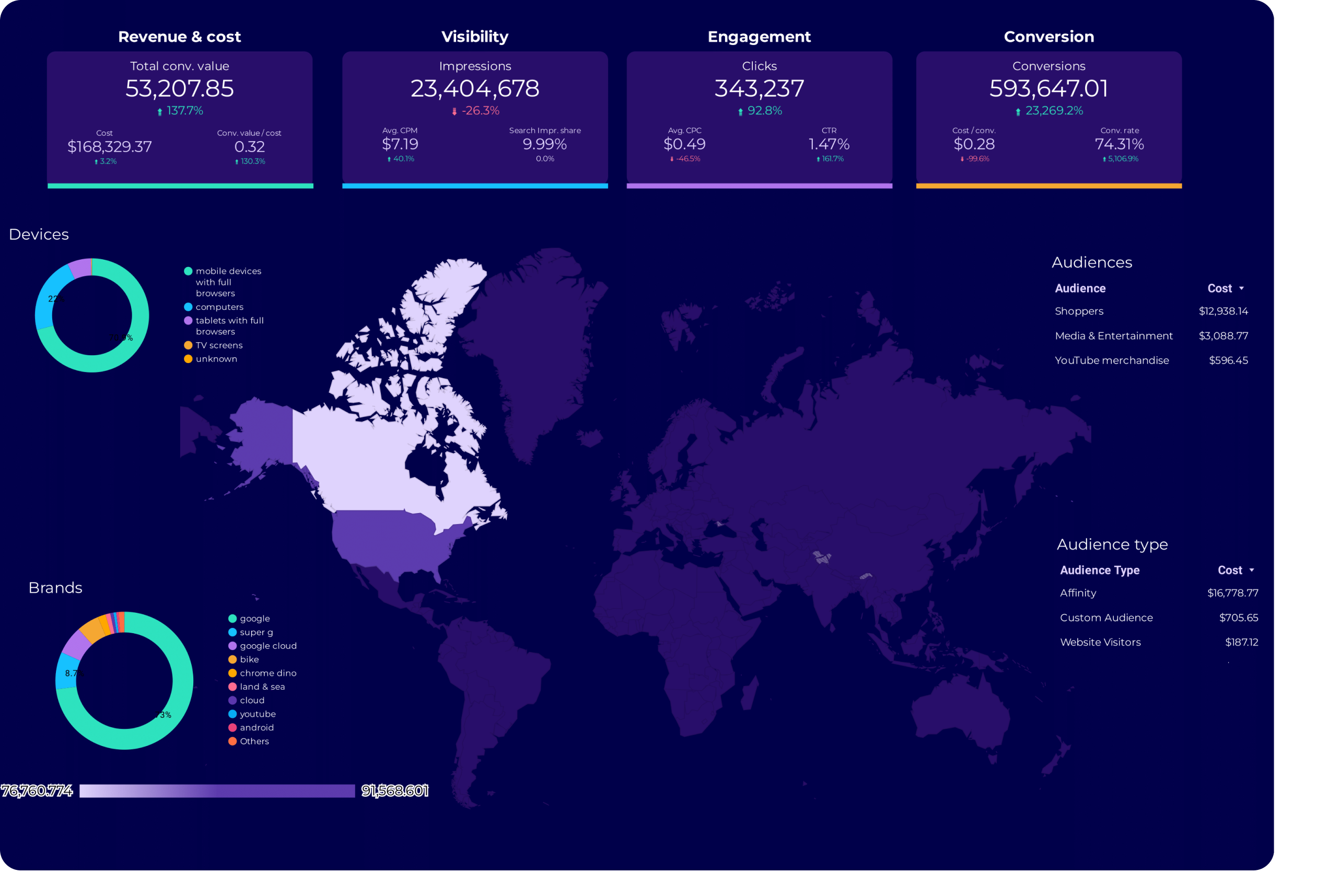
Google Ads dashboard

Trusted by 1,600+ marketers and agencies in 60+ countries

G2 Momentum Leader badgeG2 Best Estimated ROI badgeG2 Best Relationship badge
OgilvyGoogle PartnerLoopDapperTureVaulted
★★★★★   4.6 / 5 * 200+ reviews on G2
READY-MADE REPORTS

Launch a Google Ads dashboard in minutes

Skip the blank page. Pick a pre-built Google Ads dashboard, connect your ad account, and start analyzing in Data Studio within minutes.

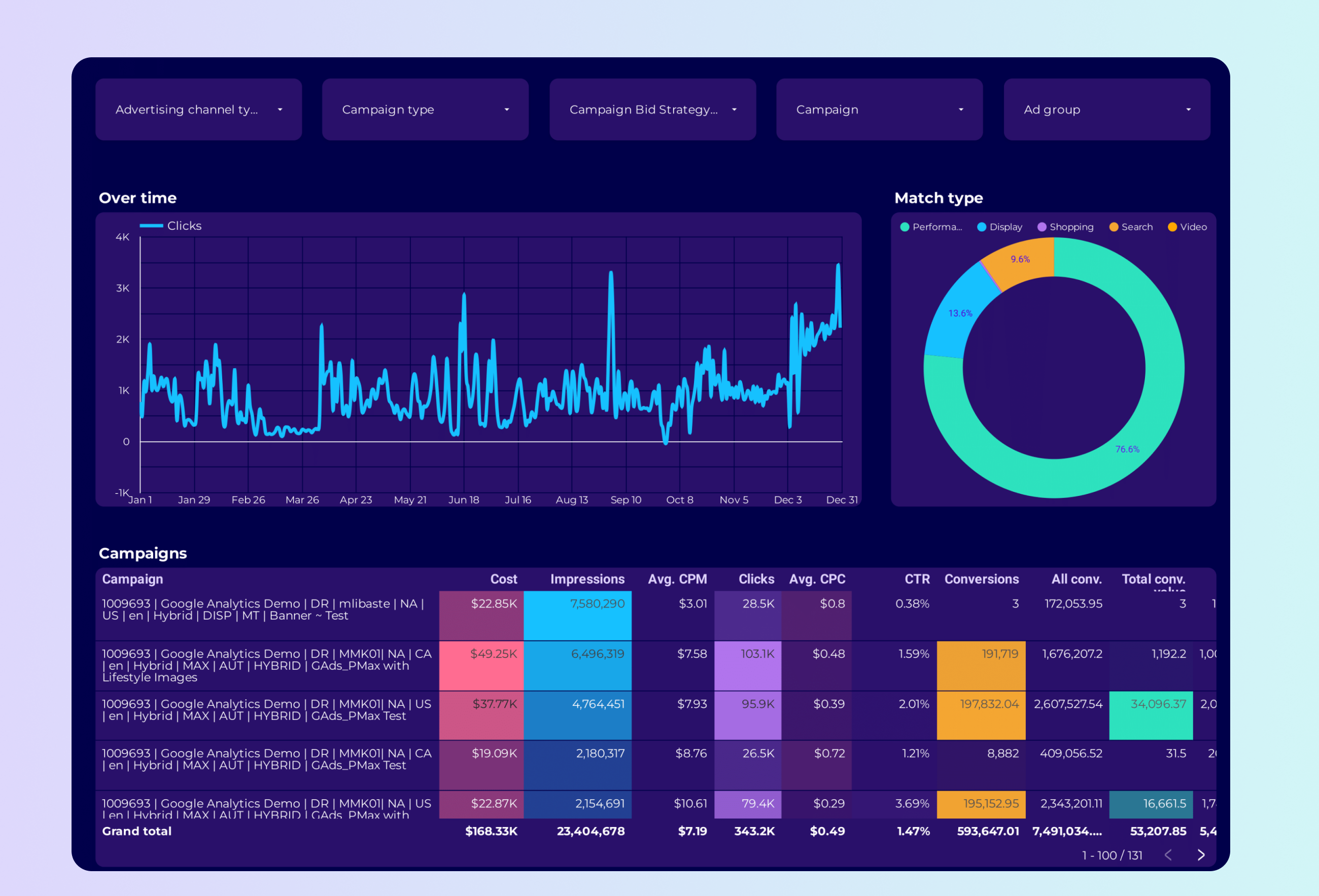
Google Ads PMax Dashboard

Google Ads PMax Dashboard

Performance Max campaign reporting with asset group and audience signal breakdowns.

View template ->
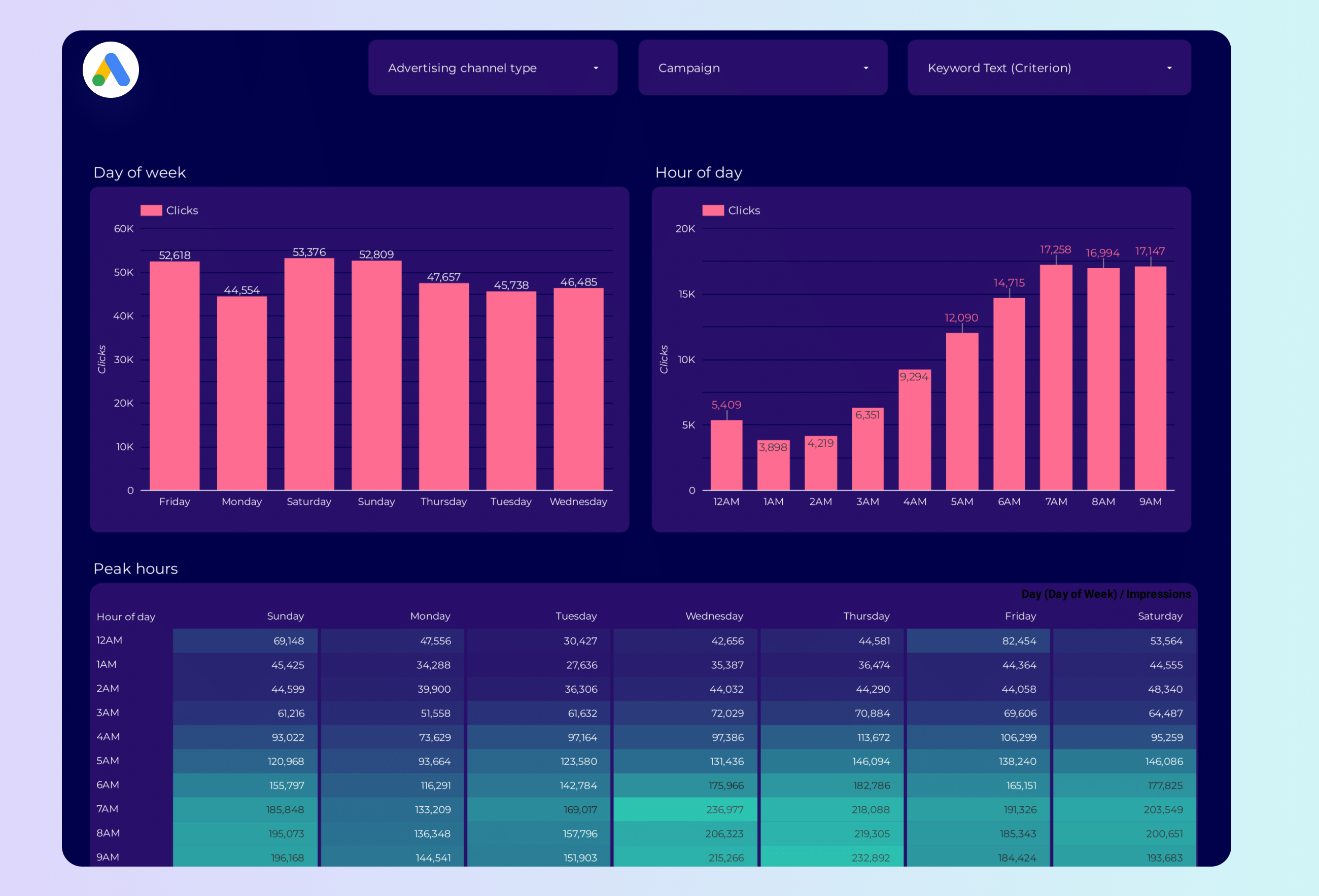
Google Ads Peak Hours Dashboard

Google Ads Peak Hours Dashboard

Identify your highest-converting hours and days to optimize ad scheduling.

View template ->
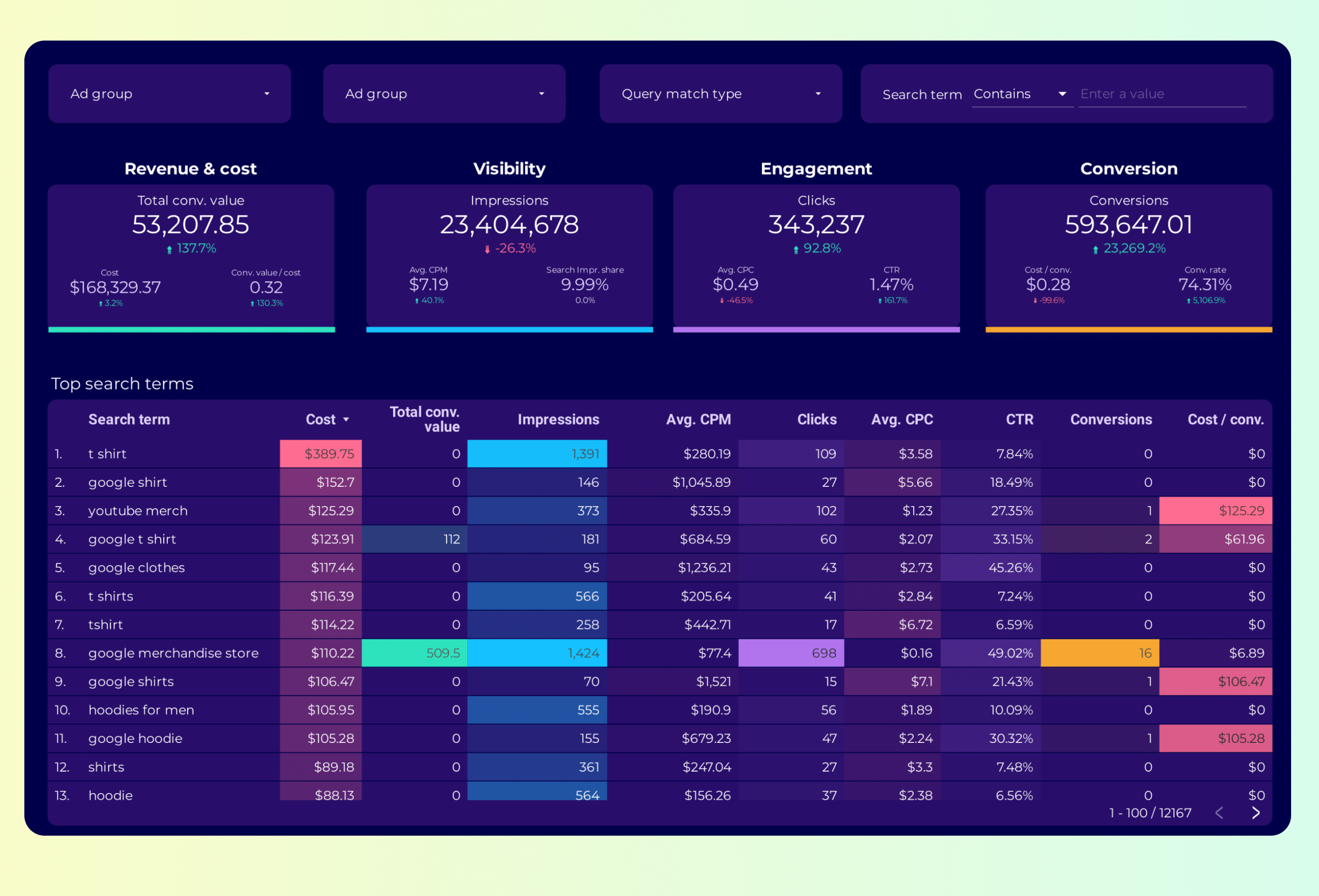
Google Ads Keyword Analysis Dashboard

Google Ads Keyword Analysis Dashboard

Deep-dive into keyword performance, match types, and search term reports.

View template ->
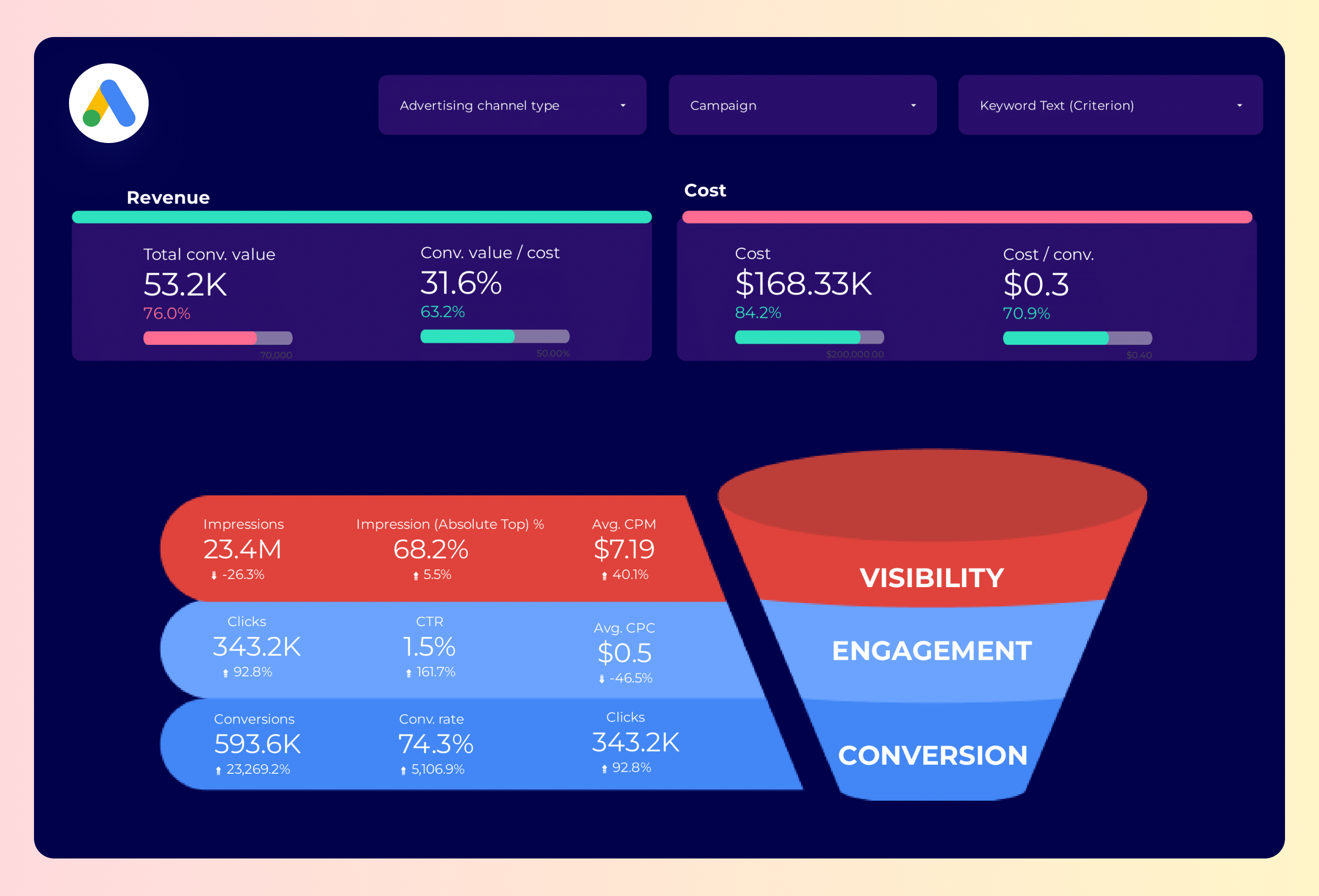
Google Ads Funnel Dashboard

Google Ads Funnel Dashboard

Full-funnel visualization from impression to conversion across campaigns.

View template ->
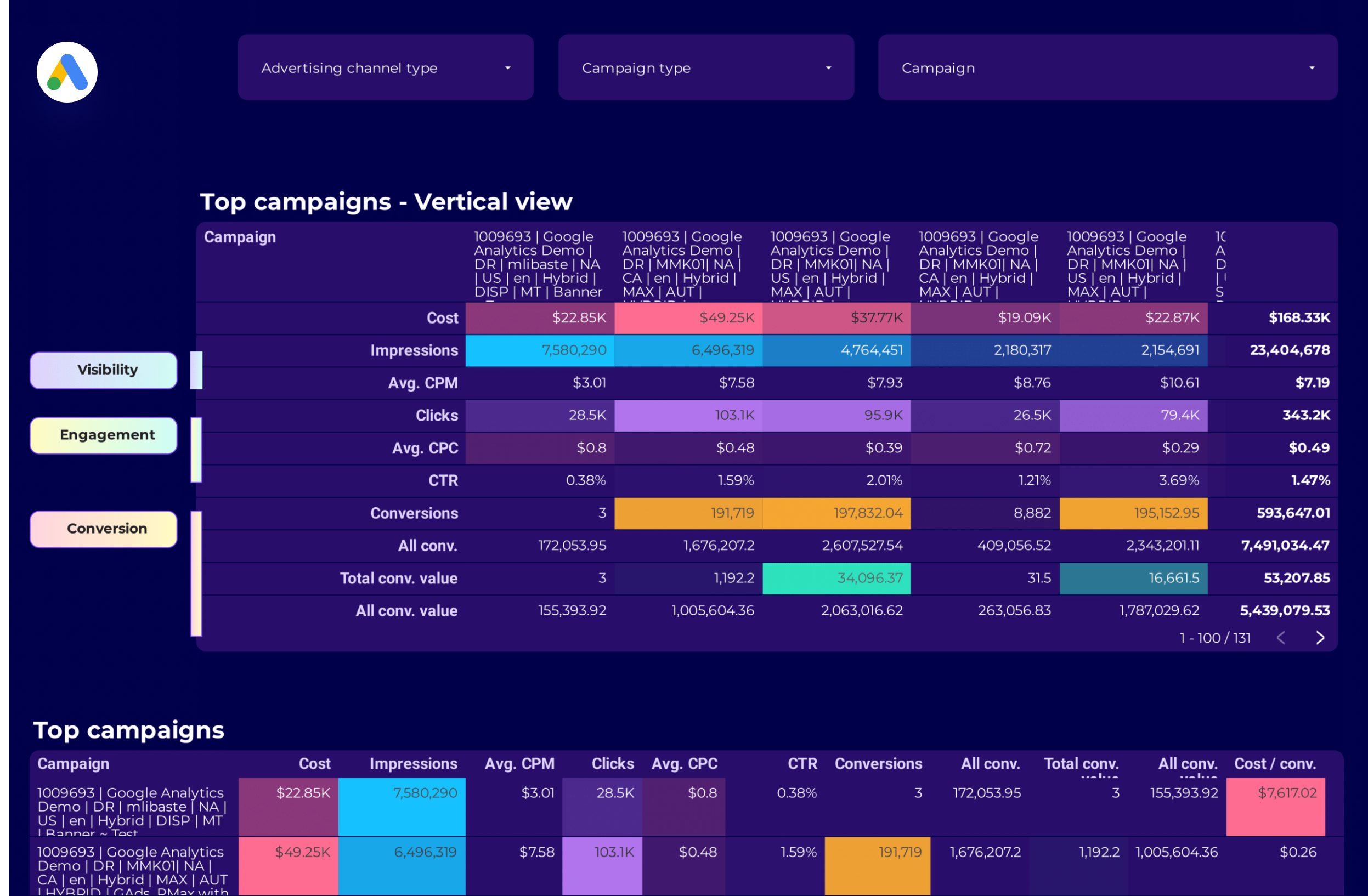
Google Ads Campaign Performance Dashboard

Google Ads Campaign Performance Dashboard

High-level campaign overview with budget pacing and goal tracking.

View template ->
Google Ads Audience Dashboard

Google Ads Audience Dashboard

Audience segment performance including demographics and remarketing lists.

View template ->
Browse all Google Ads templates ->
Porter vs Others

Why marketers choose Porter

Porter is built for marketers who need Google Ads data in Data Studio without engineering overhead.

FeaturePorter
No-code marketing data warehouse
Others
Connectors & ETL
StorageDoes not store your Google Ads credentials. Data flows directly to Data Studio with no middleware database required.Store credentials in a data warehouse or force you to build and maintain a middleware database.
Data syncingShows transparent sync schedules with clear last-update timestamps. Your Data Studio dashboards refresh on a schedule you control.Hide refresh latency behind vague ‘automatic’ labels or force manual CSV re-uploads.
AttributionBlends Google Ads with Facebook Ads, LinkedIn, GA4, and 100+ sources natively in the same Data Studio report.Make you build cross-channel blends manually with SQL or charge extra for each additional source.
Data blendingIncludes 100+ connectors in one subscription. Blend Google Ads with Shopify, HubSpot, or TikTok at no extra cost.Lock multi-source reporting behind tiered pricing — each new connector raises your bill.
DestinationsSends Google Ads data to Data Studio, Google Sheets, BigQuery, and Claude in parallel from the same pipeline.Lock you into a single BI tool. If you want Sheets or BigQuery, you rebuild the pipeline from scratch.
FEATURE CHECKLIST

Google Ads connector feature checklist

Everything you need to turn Google Ads data into actionable Data Studio dashboards.

01

1,042 Google Ads Fields

Access every dimension and metric from Account Name to Conv. Value / Cost, including calculated fields like ROAS and CPA.

02

One-Click OAuth Setup

Authorize your Google Ads ad account in seconds. No API keys, no CSV uploads, no engineering tickets.

03

MCC Account Support

Connect individual ad accounts or entire Manager Account hierarchies without artificial sub-account limits.

04

Scheduled Data Refresh

Your Data Studio dashboards update automatically on a schedule you control — no manual exports required.

05

Cross-Channel Blending

Merge Google Ads with Facebook Ads, LinkedIn, GA4, and 100+ other sources in a single Data Studio report.

06

Custom Metrics Builder

Build calculated KPIs like blended ROAS, cross-platform CPA, and budget pacing directly in Porter before sending to Data Studio.

07

Zero-Impression Entity Handling

Porter surfaces paused and zero-impression campaigns correctly, so your Data Studio reports match the Google Ads UI.

08

Multi-Destination Sync

Send the same Google Ads dataset to Data Studio, Google Sheets, BigQuery, and Claude without rebuilding pipelines.

LOVED BY 1,500+ MARKETERS

Trusted by marketers worldwide

Tutorial

How to connect Google Ads to Data Studio

  1. Authorize Your Google Ads Account

    Click ‘Add Source’ in Porter, select Google Ads, and sign in with your Google OAuth credentials. Individual ad accounts and MCC hierarchies are both supported.

  2. Select Metrics and Dimensions

    Choose from 1,042 fields across 11 categories — Campaign, Ad Group, Keyword, Conversions, Revenue, Geography, and more.

  3. Configure Refresh Schedule

    Set how often Porter fetches fresh data from the Google Ads API. Your Data Studio dashboards stay current without manual exports.

  4. Build Your Data Studio Report

    Open Data Studio, add Porter as a data source, and drop your Google Ads fields into charts, tables, and scorecards.

  5. Share and Automate

    Invite your team or clients to view the live dashboard. Changes in your Google Ads account reflect automatically on the next sync.

Full tutorial: How to connect Google Ads to Data Studio ->
EVERY FIELD YOU NEED

+1,042 Google Ads fields in Data Studio

Porter exposes 1,042 dimensions and metrics from the Google Ads API — normalized, human-readable, and ready to drop into Data Studio charts. Here are the 120 core fields organized by category.

All Google Ads fields and more

1,042 dimensions and metrics covering every entity in your account.

Marketer-friendly naming

Human-readable field names that match the Google Ads UI, not cryptic API labels.

Full granularity

Drill down from account level to campaign, ad group, keyword, and ad creative.

Calculated metrics built-in

ROAS, CPA, CTR, and conversion rates pre-calculated and ready to chart.

Cross-account rollups

Aggregate metrics across multiple Google Ads accounts in a single Data Studio report.

Historical depth

Access full historical data without arbitrary lookback windows or sampling.

Account & Campaign Structure
  • Account Name
  • Account ID
  • Account Status
  • Currency
  • Campaign
  • Campaign ID
  • Campaign Status
  • Campaign Serving Status
  • Channel Type
  • Start Date
  • End Date
Ad Group & Ad Structure
  • Ad Group
  • Ad Group ID
  • Ad Group Status
  • Ad Group Type
  • Ad Name
  • Ad ID
  • Ad Status
  • Ad Type
  • Ad Strength
  • Display URL
Performance Metrics
  • Impressions
  • Clicks
  • CTR
  • Cost
  • Avg CPC
  • Avg CPM
  • Avg Cost
  • Avg CPV
  • Avg CPE
  • Engagements
  • Engagement Rate
  • Interactions
  • Interaction Rate
  • Invalid Clicks
  • Invalid Click Rate
  • Organic Clicks
  • Organic Impressions
  • Search Impr. Share
  • Search Top IS
  • Search Abs. Top IS
Conversions & Revenue
  • Conversions
  • Conv. Rate
  • Cost / Conv.
  • Conv. Value
  • Value / Conv.
  • Conv. Value / Cost
  • All Conversions
  • All Conv. Value
  • Cost / All Conv.
  • View-Through Conv.
  • Cross-Device Conv.
  • Conv. Purchase
  • Conv. Add to Cart
  • Conv. Lead Form
  • Conv. Signup
  • Revenue
  • Gross Profit
  • Avg Order Value
  • Units Sold
  • Orders
Time & Attribution
  • Date
  • Day of Week
  • Day of Month
  • Month
  • Year
  • Week
  • Quarter
  • Year Week
  • Hour of Day
  • Month of Year
Geography & Device
  • Country
  • City
  • State
  • Region
  • Metro Area
  • Postal Code
  • Activity Country
  • Activity City
  • Device
  • Location Type
Audience & Search
  • Age
  • Gender
  • Search Term
  • Keyword
  • Match Type
  • New vs Returning
  • Audience
  • Audience ID
Bidding & Budget
  • Budget Amount
  • Budget Status
  • Bidding Strategy
  • Target CPA
  • Target ROAS
  • Ad Group Target CPA
  • Ad Group Target ROAS
  • CPC Bid
Video & Engagement
  • Video Views
  • Video View Rate
  • Video 25% Rate
  • Video 50% Rate
  • Video 75% Rate
  • Video 100% Rate
  • Gmail Forwards
Site Quality & Competitive
  • Bounce Rate
  • Avg Session Duration
  • Pages / Session
  • % New Sessions
  • Quality Score
  • LP Quality Score
  • Search Lost IS (Budget)
  • Search Lost IS (Rank)
Visibility & Calls
  • Active View Viewability
  • Avg Frequency
  • Active View Impressions
  • Active View CTR
  • Phone Calls
  • Phone Impressions
  • Call Duration
  • Phone-Through Rate
See all 1,042+ Google Ads fields documentation ->
Explore more

Other connectors & destinations

Porter supports 15+ data sources and 10+ destinations. Mix and match in one subscription, no extra seats or hidden per-destination fees.

COMMON ISSUES

Troubleshooting Google Ads + Data Studio

Quick fixes for the most common Google Ads connector issues.

IssueSolution
My Google Ads data isn’t refreshing in Data StudioCheck your sync schedule in Porter. If the connector shows an error, re-authorize your Google Ads OAuth connection — tokens expire after 6 months of inactivity.
Some campaigns show zero impressions in my reportZero-impression entities are valid in the Google Ads API. Porter includes them by default so your Data Studio totals match the Google Ads UI. Filter by Campaign Status = enabled if you want active-only data.
I hit a Google Ads API rate limitPorter batches requests and respects API quotas. If you manage many MCC sub-accounts, spread large historical backfills across multiple days instead of one bulk request.
Currency changed mid-campaign and my Cost totals look wrongPorter reports the currency as it was recorded at the time of each transaction. For unified currency reporting, use Data Studio’s calculated fields or filter by a single Currency dimension.
My OAuth connection keeps disconnectingGoogle OAuth tokens expire if the account password changes or 2FA is reset. Re-authenticate in Porter and ensure the Google Ads account hasn’t been removed from your Google user profile.
I can’t find Quality Score or Search Lost IS in Data StudioThese metrics live in the Site Quality & Competitive category. In Porter, select the field and sync it explicitly — some competitive metrics require active campaigns with sufficient impression volume to populate.
Pricing

Start free. Pay per Google Ads ad account

  • Unlimited 14-day free trialConnect any number of data source accounts — no credit card.
  • Free forever planPer account: up to 3 connected accounts with 30-day history.
  • Other destinations includedYour subscription sends data to Data Studio, Google Sheets, BigQuery, Slack and Claude/ChatGPT.
  • Unlimited usersNo extra cost per team member or seat.
MonthlyAnnual Save 17%

Google Ads ad accounts

$12.5/mo

Billed annually · /account

Destinations included
Claude
ChatGPT
Data Studio
Google Sheets
Slack
Zapier
Power BI
Start for free →

Unlimited 14-day free trial + Free forever plan

FAQ

Common questions.

How do I connect Google Ads to Data Studio?
Authorize your Google Ads account in Porter, select the metrics and dimensions you need from 1,042 available fields, and add Porter as a data source in Data Studio. Your data syncs automatically on the schedule you set.
What Google Ads metrics are available in Data Studio?
Porter exposes 1,042 fields including Impressions, Clicks, Conversions, Cost, CTR, CPC, ROAS, Quality Score, Search Lost IS, and full conversion value tracking. See the full field list at portermetrics.com/en/connectors/fields/google-ads/.
Can I blend Google Ads data with Facebook Ads and GA4?
Yes. Porter lets you merge Google Ads with Facebook Ads, LinkedIn, GA4, TikTok, and 100+ other sources in the same Data Studio report. Build unified attribution and cross-channel ROAS views without SQL.
How often does Google Ads data refresh in Data Studio?
Refresh frequency is configurable in Porter. Most users set hourly or daily syncs. The Google Ads API itself updates in near real-time, so your Data Studio dashboards reflect the latest campaign performance within minutes of each sync.
Does the connector support Google Ads Manager (MCC) accounts?
Yes. Porter supports both individual ad accounts and full MCC hierarchies without the 50-sub-account artificial limit mentioned in Google’s documentation.
Is the Google Ads to Data Studio connector free?
Porter offers a free trial. After that, pricing is based on the number of Google Ads ad accounts you connect and your total data volume. You can send data to Data Studio, Google Sheets, BigQuery, and Claude under the same plan.
What is the difference between Porter Metrics and Supermetrics or Coupler.io?
Porter does not store your Google Ads credentials, requires no database middleware, and includes 100+ connectors in one subscription. We also handle zero-impression entities correctly and support transparent refresh scheduling with multi-destination sync.
Why are some Google Ads campaigns showing zero impressions in my report?
The Google Ads API returns all entities, including paused and zero-impression campaigns. Porter surfaces them accurately so your Data Studio totals match the Google Ads UI. Add a Campaign Status filter if you want to exclude non-serving campaigns.
Start in under 5 minutes

Connect your Google Ads to ad spend

Connect your Google Ads account and start building dashboards in under 5 minutes.
No credit card * Cancel anytime * Used by 1,600+ marketers