Google Analytics 4Google Analytics 4 Data StudioGoogle Data Studio

Free Google Analytics 4 connector for Data Studio

Connect your Google Analytics 4 data to Google Data Studio (formerly Looker Studio) for free. Analyse Sessions, Total Users, Conversions, and Purchase Revenue, with +288 fields. Porter provides the most comprehensive GA4 Data Studio connector with 288 pre-mapped fields, ready-made dashboard templates, and automated reporting that eliminates manual setup and CSV exports. Access every Google Analytics 4 property field.

  • +288 fields — every Google Analytics 4 field plus calculated metrics (Sessions, Total Users, Conversions).
  • Porter provides the most comprehensive GA4 Data Studio connector with 288 pre-mapped fields, ready-made dashboard templates, and automated reporting that eliminates manual setup and CSV exports.
  • Send to Data Studio, Google Sheets, Claude, and BigQuery in one subscription.

No credit card required. 14-day free trial with full access to all 288 fields.

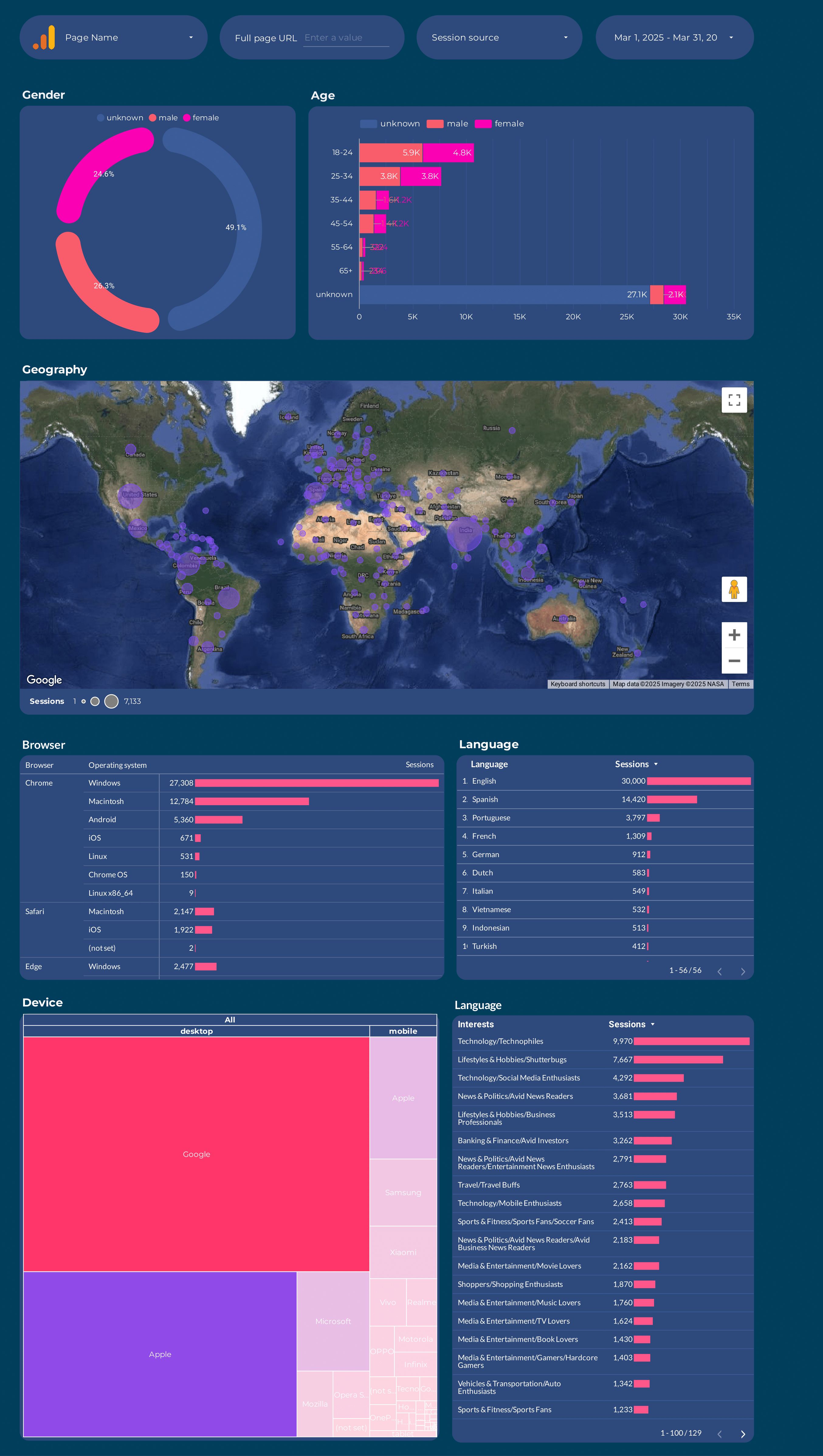
Google Analytics 4 dashboard

Trusted by 1,600+ marketers and agencies in 60+ countries

G2 Momentum Leader badge G2 Best Estimated ROI badge G2 Best Relationship badge
Ogilvy Google Partner Loop Dapper Ture Vaulted
★★★★★   4.6 / 5 · 200+ reviews on G2
READY-MADE REPORTS

Launch a Google Analytics 4 dashboard in minutes

Choose from 27 ready-made dashboard templates built specifically for Google Analytics 4. Each template loads pre-mapped fields so you start analysing traffic, conversions, and revenue in minutes.

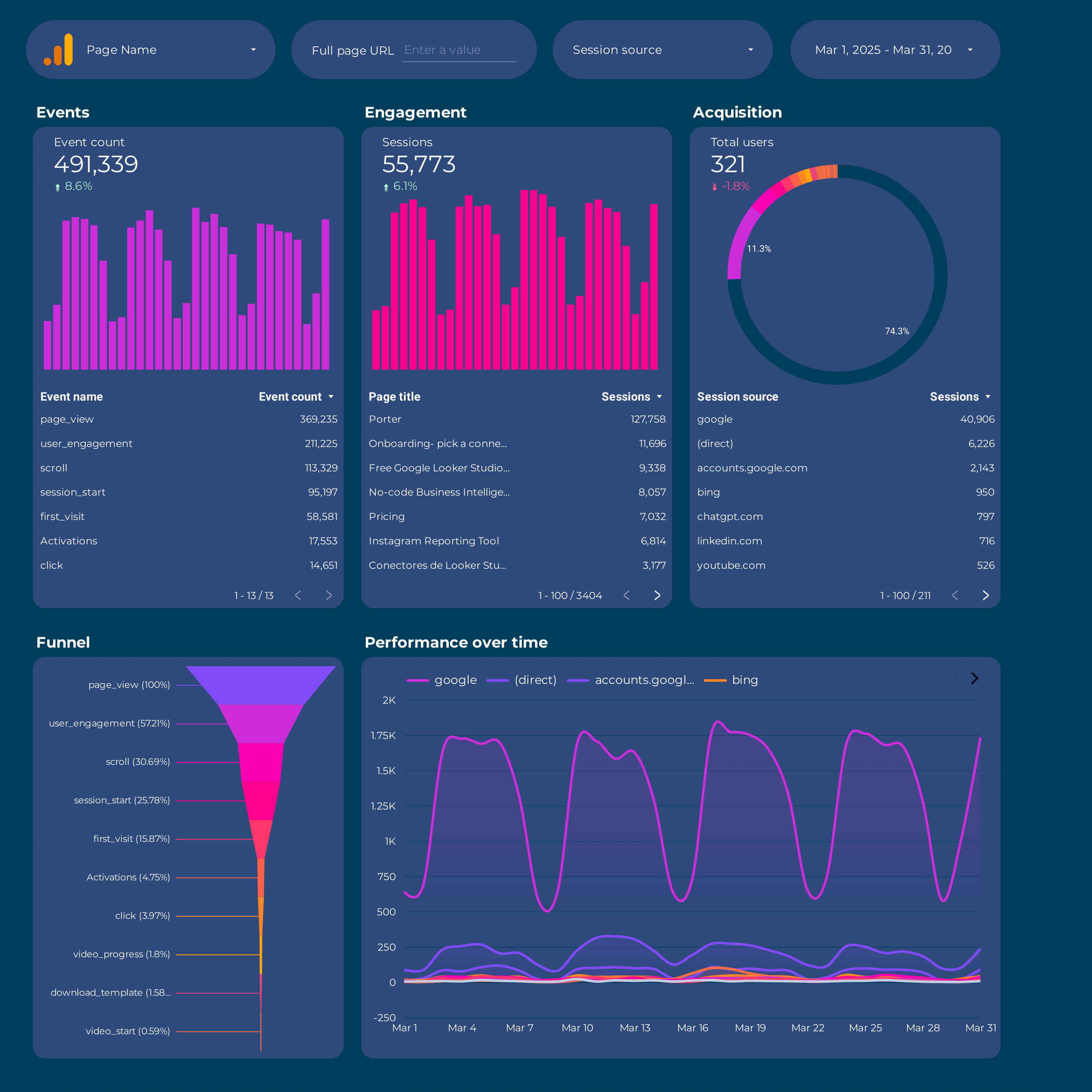
Google Analytics 4 Dashboard Example

Google Analytics 4 Dashboard Example

Overview dashboard with traffic, conversions, and revenue metrics.

View template →
Google Analytics 4 E-commerce Dashboard

Google Analytics 4 E-commerce Dashboard

Track purchases, revenue, cart behaviour, and product performance.

View template →
Google Analytics 4 Audience Dashboard

Google Analytics 4 Audience Dashboard

Analyse user demographics, acquisition channels, and engagement.

View template →
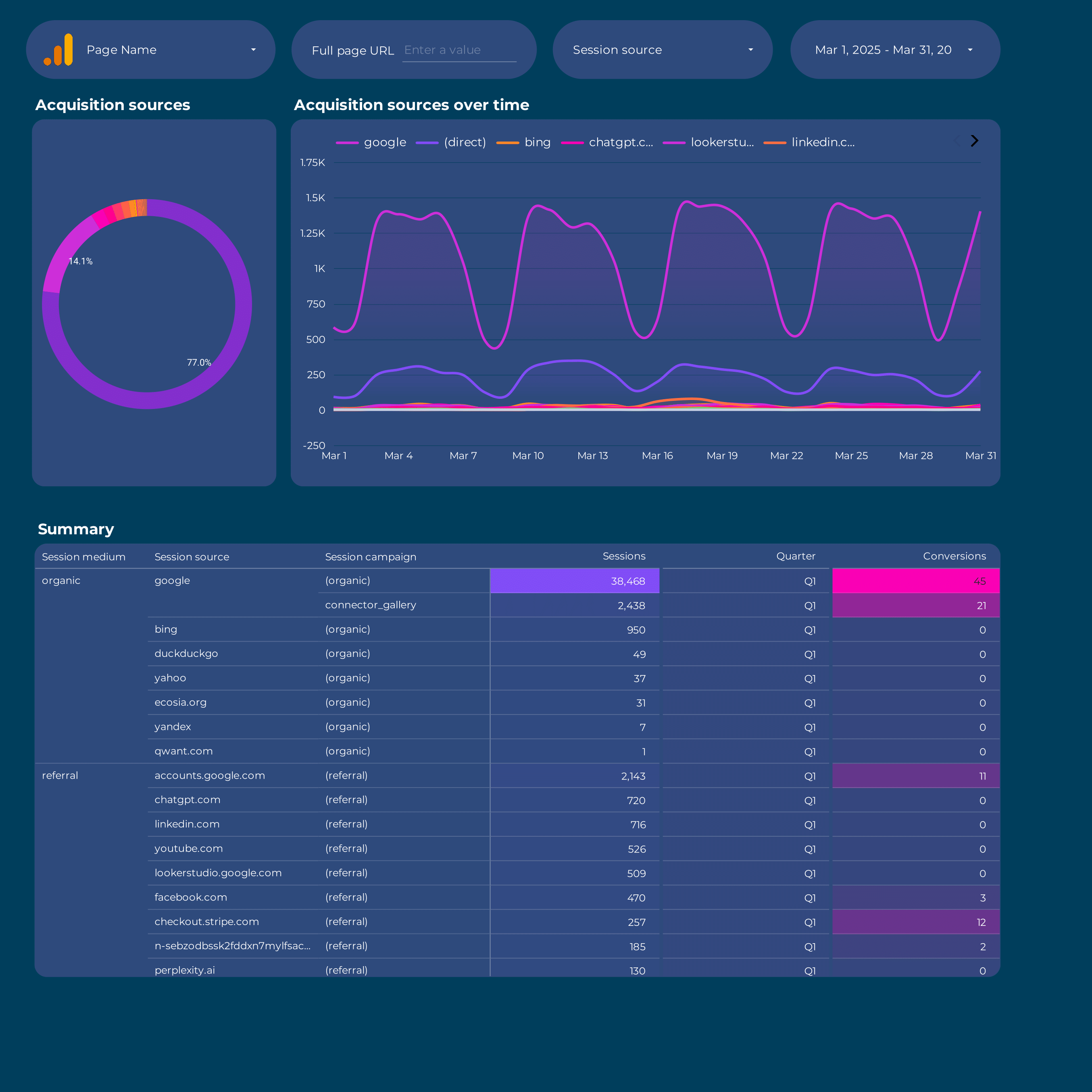
Google Analytics 4 Attribution Dashboard

Google Analytics 4 Attribution Dashboard

Measure campaign attribution and conversion paths across channels.

View template →
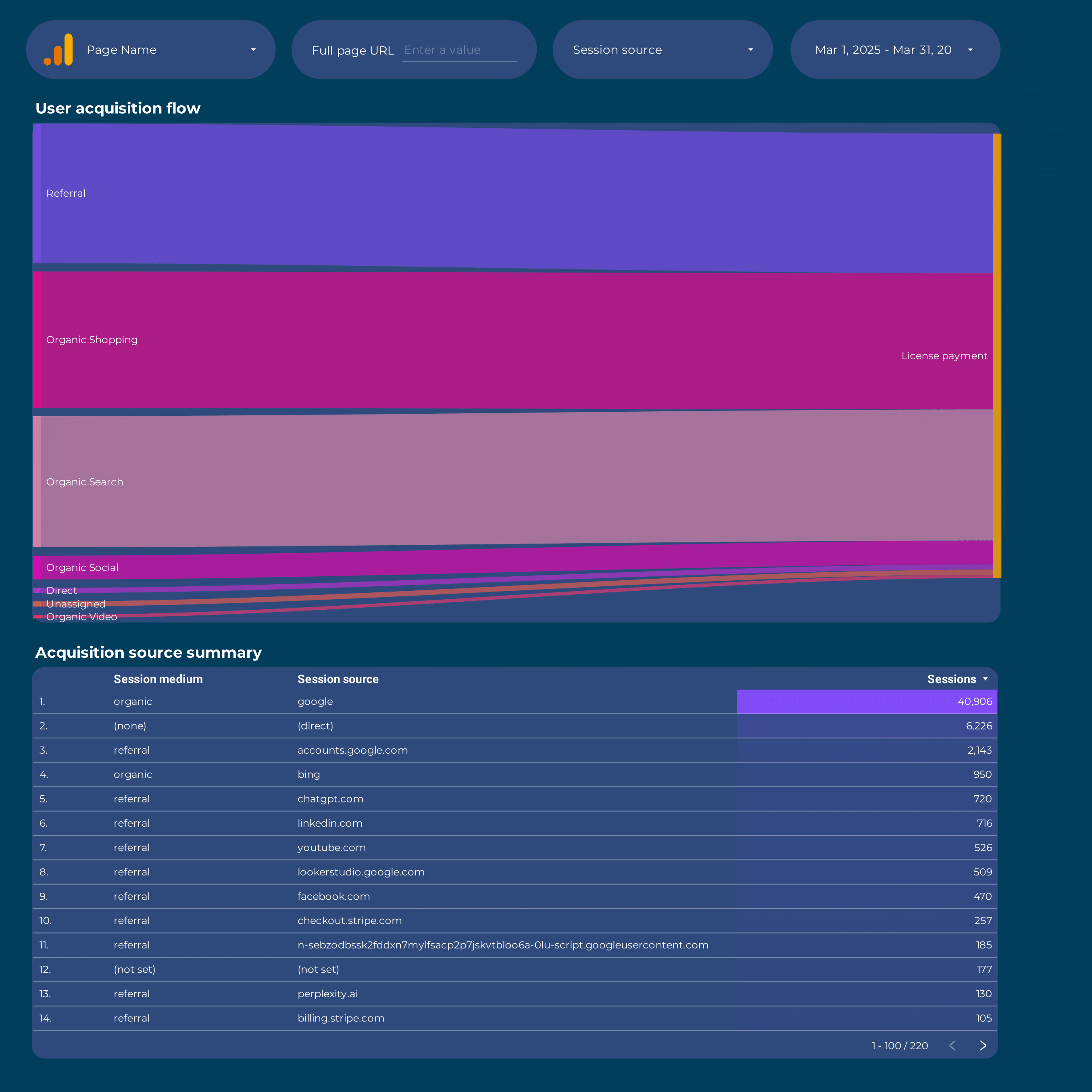
Google Analytics 4 Acquisition Dashboard

Google Analytics 4 Acquisition Dashboard

Monitor traffic sources, session quality, and channel performance.

View template →
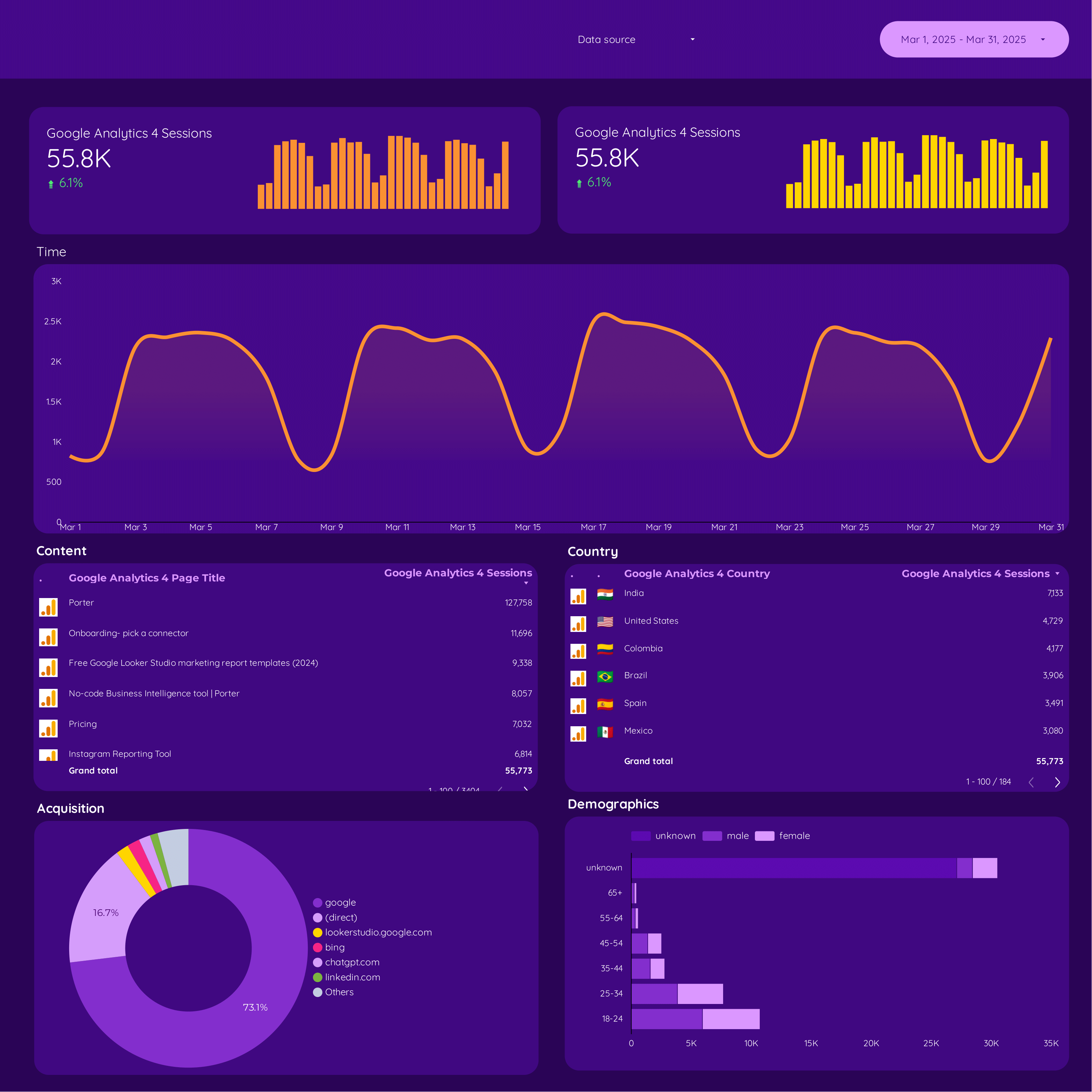
Google Analytics 4 Dashboard

Google Analytics 4 Dashboard

General-purpose dashboard with all core GA4 metrics and dimensions.

View template →
Browse all Google Analytics 4 templates →
Porter vs Others

Why marketing teams choose Porter over native GA4 connectors

Porter is a no-code marketing data warehouse. Compare how we handle storage, syncing, attribution, blending, and destinations against native connectors.

Feature Porter
No-code marketing data warehouse
Others
Connectors & ETL
StoragePorter maintains a full historical data warehouse with unlimited lookback and point-in-time recoveryNative connector caches only recent queries with no persistent storage
Data syncingPorter runs automated scheduled pipelines with live sync and refresh notificationsNative connector requires manual refresh triggers and shows stale data between updates
AttributionPorter maps 288 fields including first-user source, campaign ID, and creative ID for full-funnel attributionNative connector offers last-click session attribution without cross-channel paths
Data blendingPorter blends GA4 with Google Ads, Facebook Ads, Shopify, and 80+ sources in one queryNative connector restricts reports to GA4 data alone with no external joins
DestinationsPorter sends the same dataset to Data Studio, Google Sheets, BigQuery, and Claude simultaneouslyNative connector locks data inside Data Studio with no export option
FEATURE CHECKLIST

Google Analytics 4 connector feature checklist

Everything you get when connecting Google Analytics 4 to Data Studio through Porter.

01

288 Pre-Mapped Fields

Every GA4 dimension and metric is ready to use immediately, from Sessions and Total Users to Purchase Revenue and ROAS.

02

Real-Time Session Tracking

Monitor active users, engagement rates, and bounce rates as they happen across all your properties.

03

Ecommerce Revenue Metrics

Track Gross Purchase Revenue, ARPPU, ARPU, Cart-to-View Rate, and Purchase-to-View Rate out of the box.

04

Cross-Device Attribution

Break down performance by Device Category, Browser, Operating System, Platform, and Screen Resolution.

05

Secure OAuth Authentication

Connect with your Google account through standard OAuth flows. No password sharing or manual API key management.

06

Automated Data Sync

Eliminate CSV exports and manual refreshes. Porter syncs your GA4 data automatically on a schedule you control.

07

Multi-Destination Export

Send the same GA4 dataset to Data Studio, Google Sheets, BigQuery, and Claude without rebuilding connections.

08

Pre-Built Dashboard Templates

Launch faster with 27 ready-made templates for ecommerce, audience, acquisition, and attribution reporting.

LOVED BY 1,500+ MARKETERS

Trusted by agencies and in-house teams worldwide

Tutorial

How to connect Google Analytics 4 to Data Studio

  1. Create your Porter account

    Visit portermetrics.com and start a free trial. Select Google Analytics 4 as your data source from the connector library.

  2. Authorize your GA4 property

    Sign in with the Google account that owns your GA4 property. Grant Porter read-only access to the data you want to report.

  3. Select metrics and date range

    Choose from 288 available fields across 12 categories. Pick your dimensions, metrics, and reporting period in seconds.

  4. Sync and open Data Studio

    Porter automatically syncs your data and launches Data Studio with your GA4 connection pre-configured and ready to query.

  5. Apply a template or build custom

    Load one of 27 pre-built GA4 templates or create a custom dashboard from scratch using your selected fields.

Full tutorial: How to connect Google Analytics 4 to Data Studio →
EVERY FIELD YOU NEED

+288 Google Analytics 4 fields in Data Studio

Porter maps 288 Google Analytics 4 fields — 94 dimensions and 194 metrics — directly into Data Studio. Query everything from traffic sources to ecommerce revenue without manual configuration.

94 Dimensions

Traffic source, campaign, page, device, geography, audience, and platform breakdowns.

194 Metrics

Sessions, users, conversions, revenue, engagement, events, and ecommerce KPIs.

Pre-Mapped

No manual schema configuration. Every field is ready to drop into Data Studio.

Calculated Metrics

Computed fields like ROAS, Cart-to-View Rate, and Purchase-to-View Rate included.

Cross-Property

Query multiple GA4 properties in a single Data Studio report with unified dimensions.

Historical Lookback

Unlimited historical data retrieval with point-in-time recovery and scheduled syncs.

Property
  • Property ID
  • Property Name
Time
  • Date
  • Date + Hour
  • Day of Week
  • Month
  • Year
  • Hour
  • Week
  • Quarter
Traffic Source
  • Session Campaign
  • Session Source
  • Session Medium
  • Session Source / Medium
  • Session Channel Group
  • First User Source
  • First User Medium
  • First User Campaign
  • First User Channel Group
  • Session Google Ads Campaign
  • Session Google Ads Ad Group
  • Session Google Ads Keyword
  • Session Google Ads Network
Attribution & Campaigns
  • Campaign
  • Google Ads Campaign
  • Google Ads Ad Group
  • Google Ads Campaign ID
  • Google Ads Ad Group ID
  • Google Ads Creative ID
  • Medium
  • Source
  • Source / Medium
  • Default Channel Group
Page & Content
  • Page Title
  • Page Path
  • Page Views
  • Views per Session
  • Landing Page
  • Hostname
  • Page Referrer
  • Content Group
Platform & Device
  • Device Category
  • Browser
  • Operating System
  • OS Version
  • Platform
  • Screen Resolution
  • Device Brand
  • Language
  • App Version
Geography
  • City
  • Country
  • Region
  • Country ID
  • Continent
Audience & Demographics
  • Age
  • Gender
  • Active Users
  • New Users
  • Total Users
  • 7-Day Active Users
  • 28-Day Active Users
  • New / Returning
  • User Engagement
  • First-Time Purchasers
  • Total Purchasers
  • User Conversion Rate
  • First-Time Purchaser Conversion
  • DAU / MAU
  • Audience Name
  • Audience ID
Sessions & Engagement
  • Sessions
  • Avg Session Duration
  • Bounce Rate
  • Engaged Sessions
  • Engagement Rate
  • Session Conversion Rate
  • Sessions per User
Events & Conversions
  • Conversions
  • Event Count
  • Event Name
  • Events per Session
  • Event Value
Ecommerce & Revenue
  • Add to Carts
  • Checkouts
  • Ecommerce Purchases
  • Gross Purchase Revenue
  • Purchase Revenue
  • Transactions
  • Item Name
  • Item Category
  • Item Brand
  • Item List Name
  • Item Views
  • Item List Views
  • Items Added to Cart
  • Items Purchased
  • Refund Amount
  • Transaction ID
  • Shipping Amount
  • Tax Amount
  • Avg Purchase Revenue
  • ARPPU
  • ARPU
  • Total Revenue
Advertising Performance
  • Ad Clicks
  • Ad Cost
  • CPC
  • Cost per Conversion
  • Ad Impressions
  • Cart-to-View Rate
  • Purchase-to-View Rate
  • ROAS
  • Total Ad Revenue
  • Organic Search Clicks
  • Organic Search Impressions
  • Organic CTR
  • Purchaser Conversion Rate
  • Scrolled Users
  • Search Term
See all 288+ Google Analytics 4 fields documentation →
Explore more

Other connectors & destinations

Porter supports 15+ data sources and 10+ destinations. Mix and match in one subscription, no extra seats or hidden per-destination fees.

Troubleshooting

Common Google Analytics 4 connector issues

Quick fixes for the most frequent GA4 + Data Studio connection problems.

IssueSolution
Data Set Configuration Error when connecting GA4Verify you are signed into the correct Google account that has Admin or Editor access to the GA4 property. Re-authorize the connection in Porter and select the exact property from the dropdown.
Missing or incomplete ecommerce revenue dataEnsure ecommerce events (purchase, add_to_cart, begin_checkout) are properly implemented in your GA4 property. Check that Purchase Revenue and Gross Purchase Revenue metrics are selected in your Data Studio report.
Sampling and data thresholds affecting reportsGA4 applies data thresholds for small user counts. Increase your date range or aggregate dimensions to reduce threshold impact. Porter surfaces the sampling indicator so you know when it applies.
Date range and time zone mismatchesConfirm your GA4 property time zone matches your Data Studio report settings. Use the Date + Hour dimension to audit alignment and avoid end-of-day cutoff errors.
Slow dashboard load times with large date rangesLimit date ranges to 90 days for exploratory dashboards, or pre-aggregate data in Porter. Use filters and date range controls in Data Studio to reduce query volume.
Metrics not matching between GA4 interface and Data StudioGA4 and Data Studio may use different attribution models or session definitions. Ensure you are comparing the same dimensions, date ranges, and filters in both interfaces.
Pricing

Start free. Pay per Google Analytics 4 property

  • Unlimited 14-day free trialConnect any number of data source accounts — no credit card.
  • Free forever planPer account: up to 3 connected accounts with 30-day history.
  • Other destinations includedYour subscription sends data to Data Studio, Google Sheets, BigQuery, Slack and Claude/ChatGPT.
  • Unlimited usersNo extra cost per team member or seat.
Monthly Annual Save 17%

Google Analytics 4 properties

$12.5 /mo

Billed annually · /account

Destinations included
Claude
ChatGPT
Data Studio
Google Sheets
Slack
Zapier
Power BI
Start for free →

Unlimited 14-day free trial + Free forever plan

FAQ

Common questions.

Is Google Analytics 4 data different from Universal Analytics in Data Studio?
Yes. GA4 uses an event-based model instead of session-based tracking. Metrics like Bounce Rate are calculated differently, and GA4 offers predictive audiences and enhanced ecommerce events that Universal Analytics does not support in Data Studio.
What metrics are available through the GA4 connector?
Porter provides 288 fields including Sessions, Total Users, Conversions, Purchase Revenue, Engagement Rate, Bounce Rate, ARPPU, ROAS, and 194 other metrics plus 94 dimensions across 12 categories.
Do I need a Google Analytics 4 property to use this connector?
Yes. You must have an active GA4 property with data flowing through it. Porter connects directly to your property and cannot retrieve data from deprecated Universal Analytics properties.
How often does GA4 data refresh in Data Studio?
Porter offers automated scheduled syncs. You control the refresh frequency, and data is piped live into Data Studio without manual CSV uploads or connector re-authentication.
Can I blend GA4 data with other marketing platforms?
Yes. Porter supports native data blending. Combine GA4 with Google Ads, Facebook Ads, Shopify, and 80+ other sources in a single Data Studio dashboard.
Is the Porter GA4 connector free to use?
Porter offers a free trial with full access to the GA4 connector and all 288 fields. Paid plans scale by the number of properties and destinations you connect.
How do I fix the Data Set Configuration Error when connecting GA4?
Sign out of all Google accounts, then sign in with the account that has Admin access to your GA4 property. Re-authorize Porter and explicitly select the property from the dropdown list.
Start in under 5 minutes

Start building your GA4 Data Studio dashboard

Connect Google Analytics 4 to Data Studio in minutes. No credit card. No manual setup. 288 fields ready to use.
No credit card · Cancel anytime · Used by 1,600+ marketers