Google Analytics 4 connector for ChatGPT

Use Porter’s Google Analytics 4 connector for ChatGPT to see which channels, landing pages and AI assistants drive sessions and key events, then change property settings you confirm on Business, Enterprise or Edu.

  • Rank channels and sources by sessions and key events
  • Find landing pages that get visits but no engagement
  • Explain a traffic drop by channel and device
  • Match Search Console clicks with GA4 engagement per page
G2★★★★★Rated 4.6/5 on G2 (288 reviews, October 2026)

By Porter Metrics team · Last updated October 20, 2026

ChatGPTPorter connected
Show Sessions, Engaged sessions, Engagement rate and Key events by week for the last 4 full weeks.
Porter / Google Analytics 4 / Trailgear Demo✓ 4 rows
The week of Sep 28 had the highest engagement rate (64%) and the most key events (412).
WeekSessionsEng. rateKey events
Sep 1418.4K58%331
Sep 2119.2K60%356
Sep 2820.1K64%412
Oct 519.6K61%379
Demo data, Trailgear Demo account
285 GA4 fields
01Setup

How to connect Google Analytics 4 to ChatGPT

Porter’s Google Analytics 4 connector for ChatGPT takes 3 steps, and unlike Google’s server, it needs no Cloud project or Python. Sign in with Google in Porter and pick your properties, add one MCP URL to ChatGPT as a custom MCP server, then connect and ask. Screenshots are also in Porter’s step-by-step GA4 to ChatGPT tutorial.

What you need

  • A Google account with at least Viewer access to the GA4 property (Google Analytics roles and permissions), a free Porter account and a ChatGPT plan that supports custom MCP servers.
  • Custom MCP servers are in beta in ChatGPT on the web, so set up Porter and ask your questions from a browser. On Business, Enterprise or Edu, an admin or owner turns on developer mode, and then ChatGPT can also make the changes you confirm. On Pro, you turn on developer mode yourself, and ChatGPT reads and recommends (OpenAI’s guide to custom MCP apps).
  • Works in ChatGPT on the web (chatgpt.com, custom MCP servers in beta) and in Codex, with the same Porter MCP URL.
  1. Step 1: Connect Google Analytics in Porter

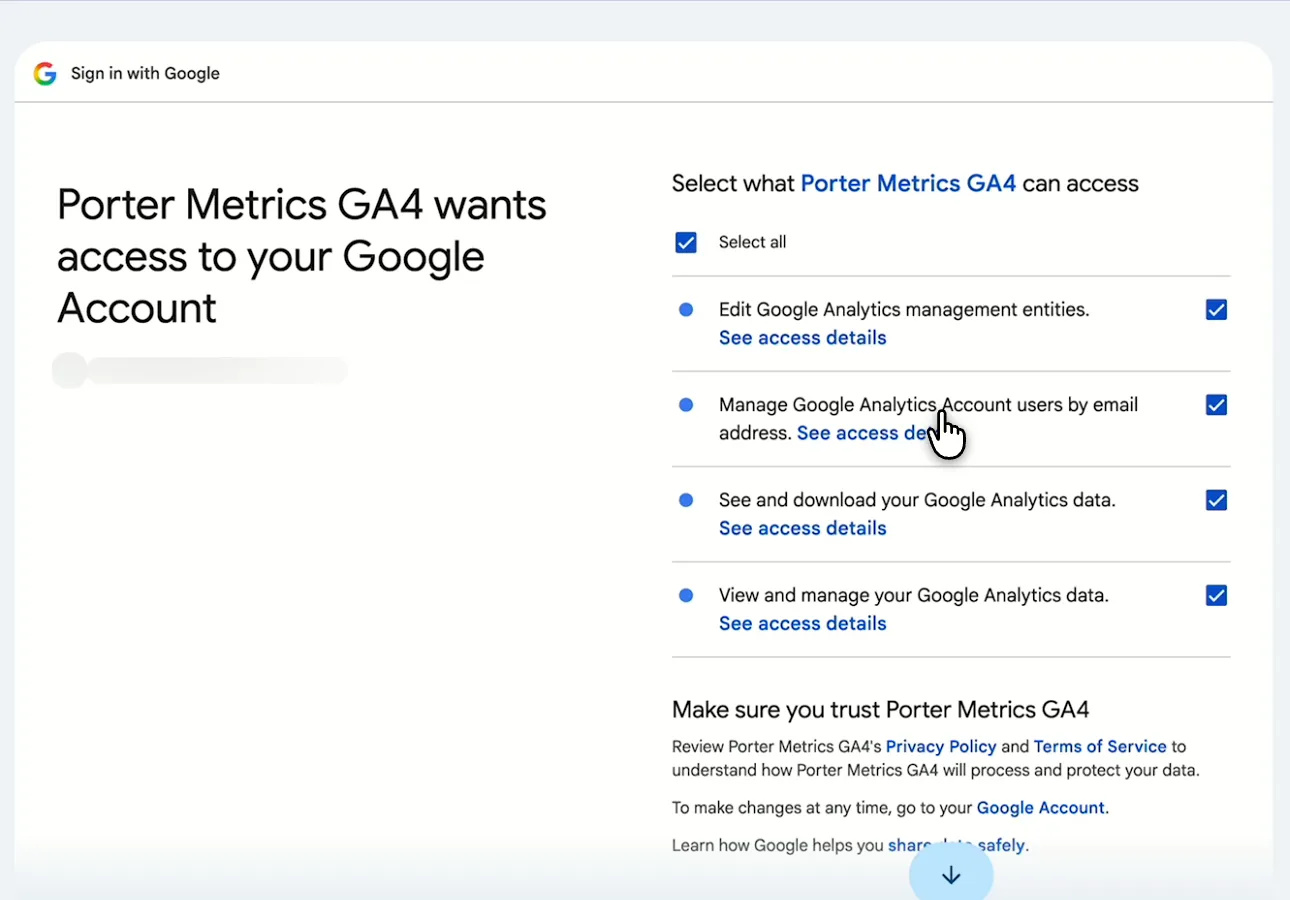
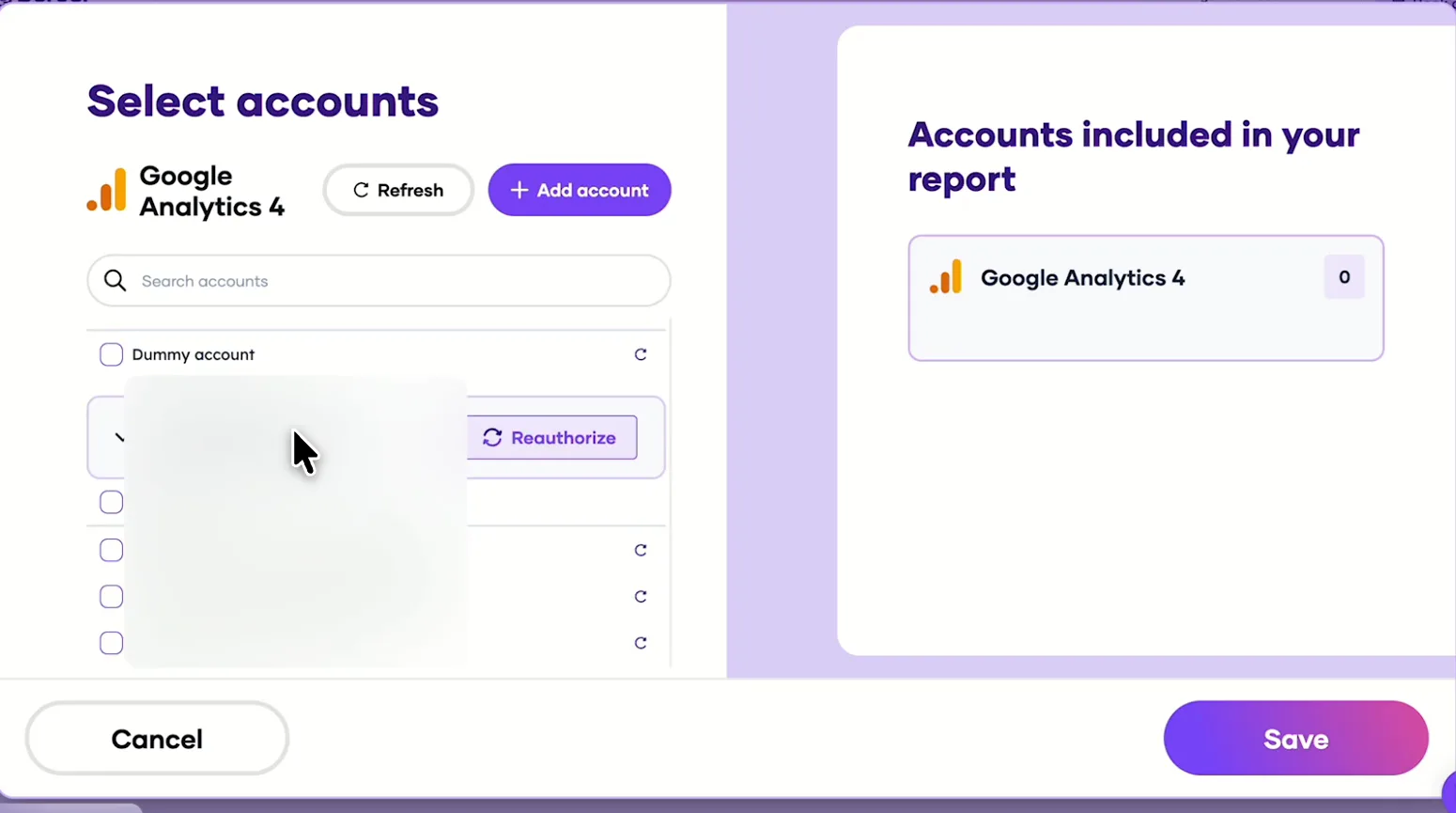
    Sign up free at Porter, then pick Google Analytics 4 as the source, sign in with Google and tick the access box. Select the properties ChatGPT should read, then pick ChatGPT as the destination.

  2. Step 2: Add the Google Analytics connector to ChatGPT

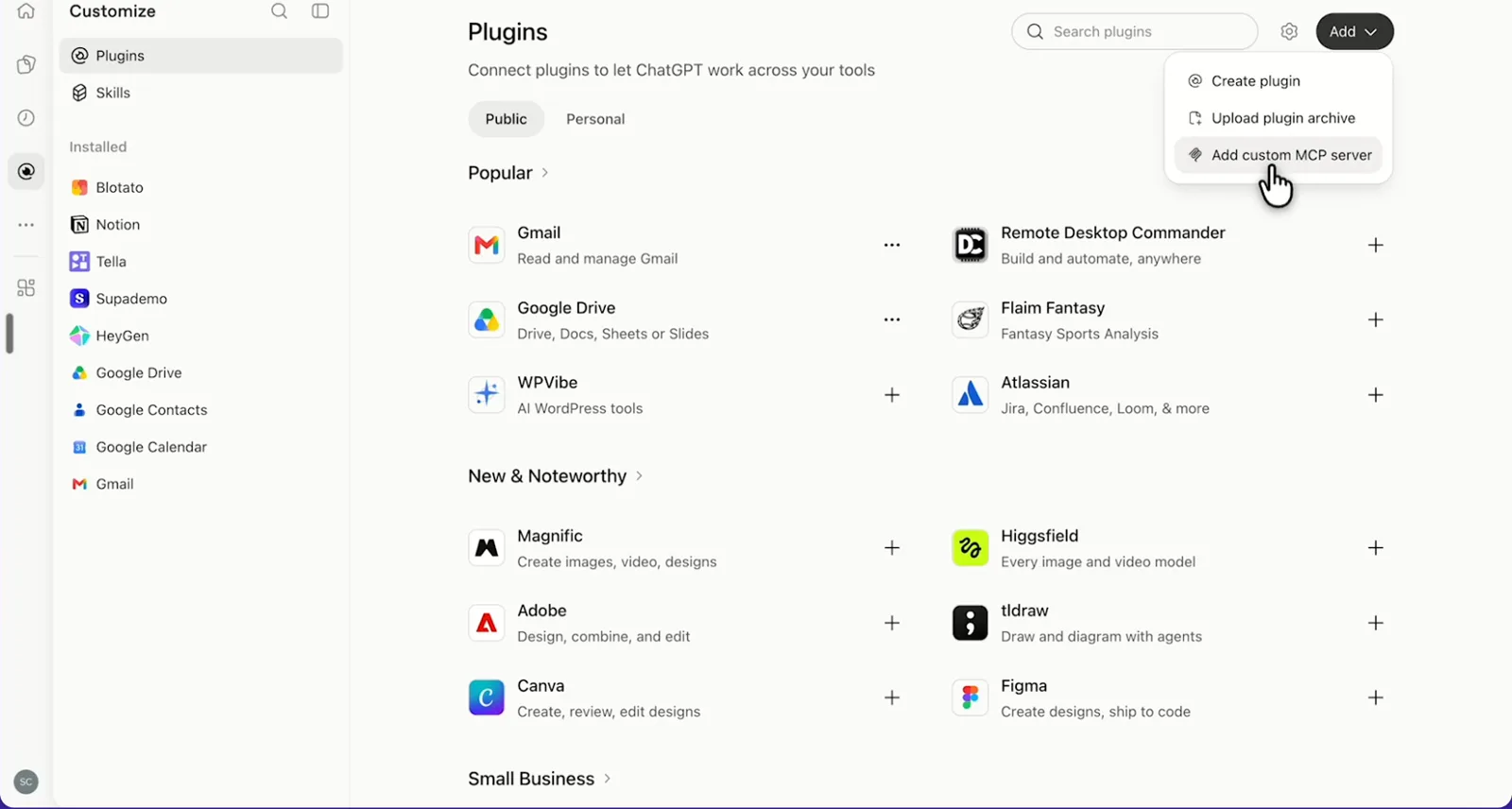
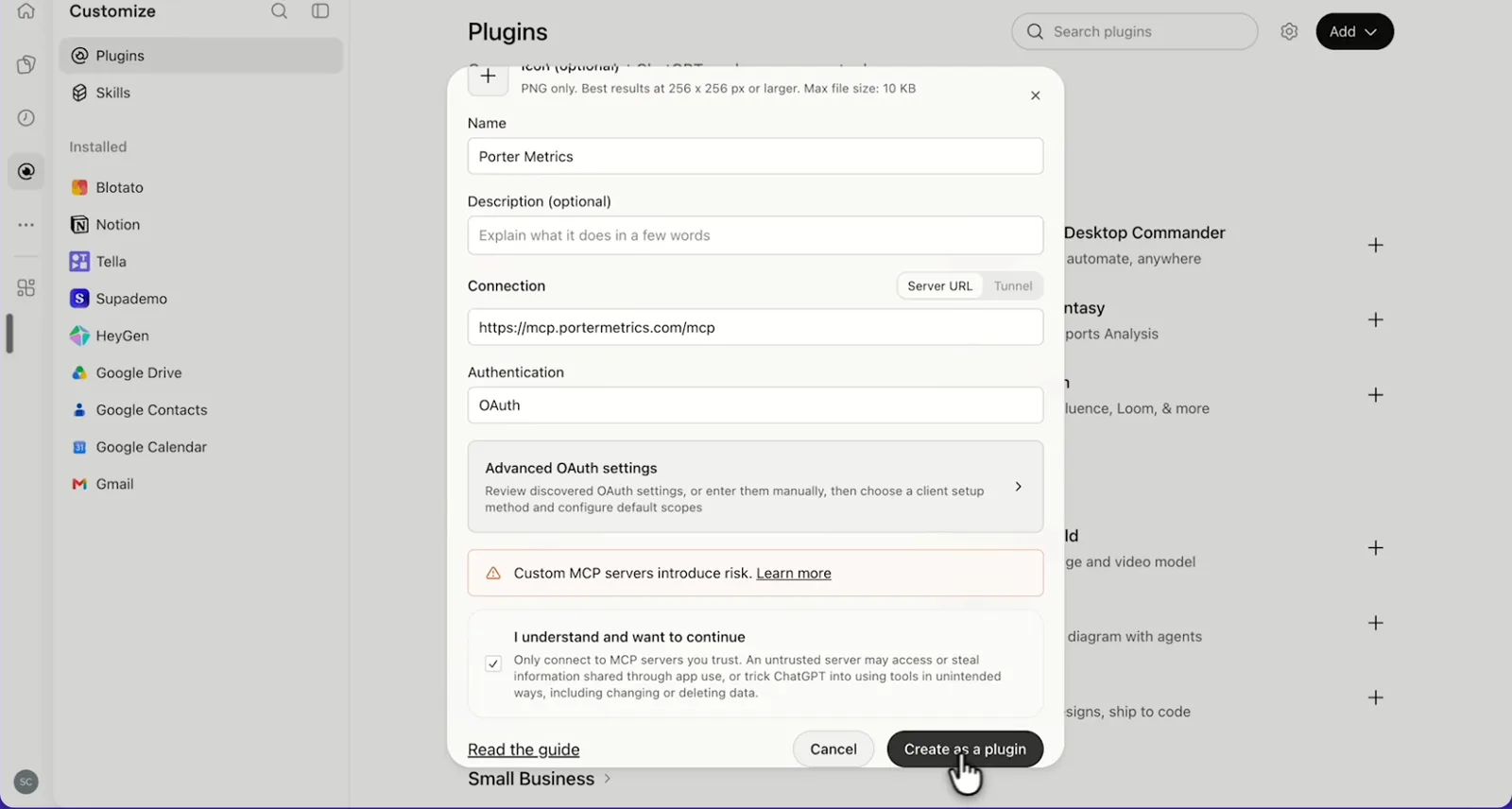
    In ChatGPT, open Customize › Plugins, click Add and choose Add custom MCP server. On Business, an admin does this from Workspace settings › Apps › Create. Name it Porter Metrics, paste this URL as the Server URL and keep OAuth as the authentication:

    MCP URL
    https://mcp.portermetrics.com/mcp

    Tick “I understand and want to continue”, then select Create as a plugin.

  3. Step 3: Ask ChatGPT about Google Analytics

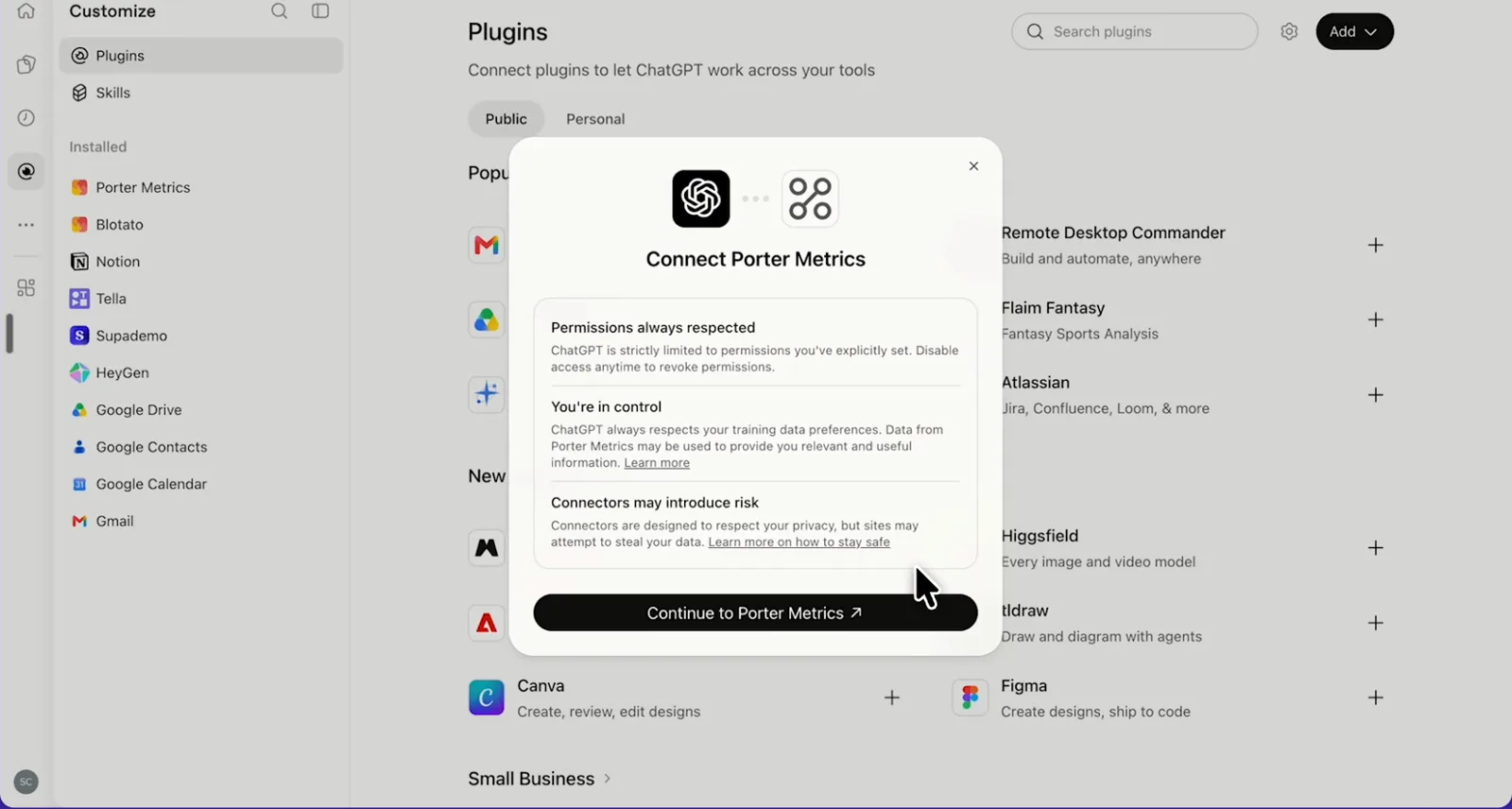
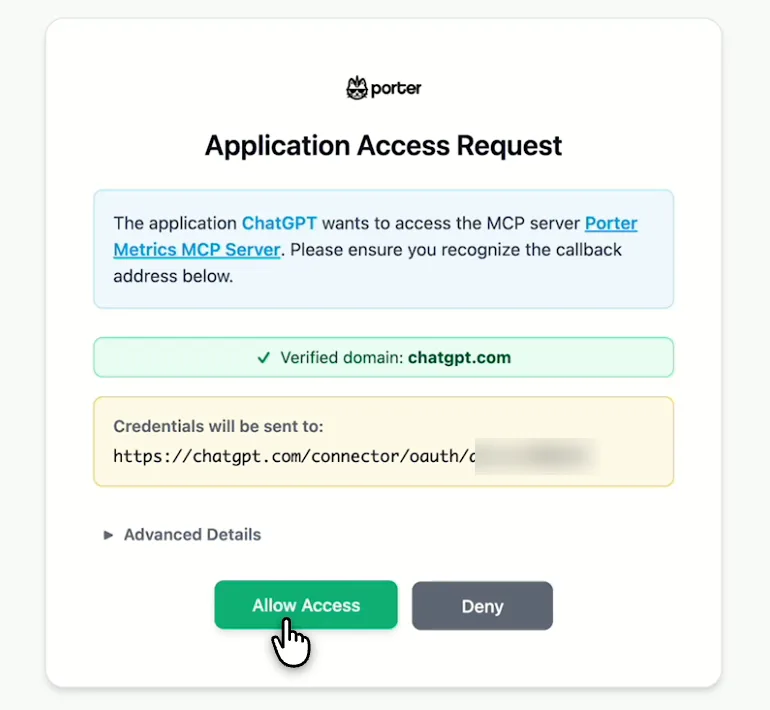
    Next, select Continue to Porter Metrics, sign in to Porter and click Allow Access. Then select Try in chat and paste this prompt:

    Prompt
    For my GA4 property, show Sessions, Engaged sessions, Engagement rate and Key events by Week for the last 4 full weeks, ending two days ago.

Guides and videos

app.portermetrics.com / create
Google screen where you tick the Google Analytics permissions for Porter Metrics GA4
First, sign in with Google and tick the Analytics permissions.
Porter's Select accounts window for Google Analytics 4 with demo properties
Then, pick the GA4 properties Claude can read and save.
ChatGPT's Plugins page with the Add menu open on Add custom MCP server
In ChatGPT, open Customize, then Plugins, and choose Add custom MCP server.
ChatGPT's Add custom MCP server form with the name Porter Metrics, Porter's MCP URL and OAuth filled in
Then, paste Porter's MCP URL, keep OAuth, tick the box and select Create as a plugin.
ChatGPT's Connect Porter Metrics window with the Continue to Porter Metrics button
Next, ChatGPT asks you to continue to Porter Metrics to sign in.
Porter's Application Access Request screen asking you to let ChatGPT use the Porter MCP server
Finally, sign in to Porter and select Allow Access.
If you prefer video, watch the whole Google Analytics 4 to ChatGPT setup (1:43, no sound).
Interactive walkthrough, so you can click along here
02Use cases and prompts

What you can ask ChatGPT

Each use case comes with a prompt to copy, the fields it uses from the GA4 fields list and who it’s for. The prompts ask for period totals and end two days ago, because GA4 keeps processing recent data. On Business, Enterprise or Edu, ChatGPT can also make the changes you confirm; on Pro it reads and recommends.

Can ChatGPT show which channels and sources bring sessions with key events?

The problemOrganic sessions are up, key events are flat, and the monthly report still lists channels by sessions alone.

What ChatGPT doesChatGPT ranks last month’s default channel groups and source / medium pairs by sessions, engaged sessions, engagement rate and key events. It also adds key events per session, then names the channels that grew sessions without growing key events.

What you getYou stop judging channels by traffic alone, and the budget talk starts from the channels whose visitors actually do something.

Prompt
For my GA4 property, show last month's Sessions, Engaged sessions, Engagement rate and Key events by Session default channel group, then the top 15 Session source / medium pairs. Add key events per session and compare each row with the month before. Which channels grew sessions but not key events?

For: in-house marketing leads · agency account managers · performance marketers

Fields used: Session default channel groupSession source / mediumSessionsEngaged sessionsEngagement rateKey eventsMonth and year

Can ChatGPT find landing pages that get visits but no engagement?

The problemA landing page pulls steady traffic every week, and most visitors leave before a second event fires.

What ChatGPT doesChatGPT lists your top landing pages by sessions, including engagement rate, average session duration and key events. It flags pages with more sessions than the median but an engagement rate below the site average. In other words, those pages are losing visits you already earned.

What you getYou get the pages to fix first in one answer instead of a sorted export and a pivot table.

Prompt
For my GA4 property, list the top 25 landing pages by Sessions for the last 30 days ending two days ago, grouped by path without URL parameters. Show Engagement rate, Average session duration and Key events, and flag pages with sessions above the median and engagement rate below the site average. Tell me what share of sessions has a (not set) landing page.

For: SEO and content marketers · growth marketers

Fields used: Landing page + query stringSession default channel groupSessionsEngagement rateAverage session durationKey events

Can ChatGPT tell why my traffic dropped?

The problemTraffic dipped mid-week and nobody can say which channel moved, while the Traffic acquisition report only shows that it happened.

What ChatGPT doesChatGPT pulls daily sessions for the last 28 days and flags days more than two standard deviations from the 7-day average. It breaks those days down by channel and device to find the segment that moved, then writes a short summary you can send.

What you getYou can answer “what happened on Tuesday” with a channel and a device, then the weekly note gets drafted in the same chat.

Prompt
For my GA4 property, pull daily Sessions, Engaged sessions and Key events for the last 28 days ending two days ago. Flag days more than 2 standard deviations from the 7-day rolling average, then break each flagged day down by Session default channel group and Device category and tell me which segment caused the change. Treat missing days as 0.
Then ask
Prompt
Turn this into a 5-line weekly summary for my team with the three biggest changes.

For: in-house marketing leads · agency account managers (weekly client check)

Fields used: DateSessionsEngaged sessionsKey eventsSession default channel groupDevice category

Can ChatGPT show which events fire, and on which pages?

The problemA form event was renamed in the last site release, and the key event it fed may have stopped counting without anyone noticing.

What ChatGPT doesChatGPT lists the key events set up on your property. Then it shows event counts and key events by event name and page path for the last 30 days. It also flags key events that never fired and events firing on pages they shouldn’t.

What you getThe tracking audit you’d do in DebugView and Admin, one event at a time, then turns into a single list of fixes.

Prompt
List the key events set up on my GA4 property. Then show Event count and Key events by Event name for the last 30 days, and the top 10 Page path values for each key event. Flag any key event with zero events and any event that fires on more than 50 different pages.

For: marketing analysts · marketing ops · agencies onboarding a client

Fields used: Event nameEvent countKey eventsPage path
Action: conversion_list, customdimension_list

Can ChatGPT show how much traffic AI assistants send?

The problemLeadership asks how much traffic AI search brings, but GA4 has no channel for it, so the answer hides inside Referral.

What ChatGPT doesChatGPT filters sessions by AI assistant source (chatgpt.com, perplexity.ai, claude.ai, gemini.google.com, copilot). It shows monthly sessions, engagement rate and key events for each assistant, as well as the landing pages they send people to.

What you getYou get both a monthly AI-traffic line and the pages AI assistants cite, without building a custom channel group first.

Prompt
For my GA4 property, show Sessions, Engagement rate and Key events by Session source and Month and year for the last 6 months, only for sources containing chatgpt, perplexity, claude, gemini or copilot. Then list the top 10 landing pages for these sessions. How does their engagement rate compare with Organic Search?

For: SEO and AI-search (GEO) marketers · content leads

Fields used: Session sourceSession source / mediumSessionsEngagement rateKey eventsLanding page + query stringMonth and year

Can ChatGPT show which products sell and where buyers drop off?

The problemProduct pages get views and add to carts look fine, but purchases still lag, and no single GA4 report shows where people stop.

What ChatGPT doesIf your property tracks ecommerce, ChatGPT ranks items by items viewed, added to cart and purchased, with item revenue. It then shows add to carts, checkouts and ecommerce purchases by channel, with the drop-off between steps.

What you getThe products and channels that leak at checkout show up side by side, so merchandising and channel fixes start from the same table.

Prompt
For my GA4 property, list the top 20 items by Item revenue for the last 30 days with Items viewed, Items added to cart and Items purchased. Flag items with many views and few purchases.
Then ask
Prompt
Now show Add to carts, Checkouts, Ecommerce purchases and Purchase revenue by Session default channel group for the same dates, with the drop-off rate between each step.

For: e-commerce and DTC managers

Fields used: item-scoped: Item nameItems viewedItems added to cartItems purchasedItem revenueevent-scoped: Session default channel groupAdd to cartsCheckoutsEcommerce purchasesPurchase revenue

Do my top Search Console pages engage once people land?

The problemSearch Console says a guide wins more clicks every month, but GA4 alone can’t tell you whether those visitors stay.

What ChatGPT doesWhen Search Console is also connected in Porter, ChatGPT matches your top 20 pages by Search Console clicks with their GA4 organic sessions, engagement rate and key events. It flags pages that win clicks but lose visitors.

What you getRankings and engagement sit in one table, so you know whether a page needs a better snippet or a better page.

Prompt
Using Google Search Console and GA4, list my top 20 pages by Clicks for the last 28 days ending two days ago, with Impressions and Average Position. Next to each, show GA4 Sessions, Engagement rate and Key events for the same landing page path, Organic Search only, one hostname. Flag pages with high clicks and engagement rate below 50%.

For: SEO managers · content marketers · agency SEO leads

Fields used: Landing page + query stringHostnameSession default channel groupSessionsEngagement rateKey eventsPage URLClicksImpressionsAverage Position

Can ChatGPT mark key events or add custom dimensions?

The problemThe sign-up event fires all month, but nobody marked it as a key event, so the key events column shows zero.

What ChatGPT doesChatGPT lists events that fire but aren’t key events and suggests which ones to mark. On Business, Enterprise or Edu, Porter’s actions can also mark an event as a key event, register an event parameter as a custom dimension and create an audience.

What you getAdmin fixes you’d otherwise click through one property at a time start from a list of the events that matter.

Prompt
List events on my GA4 property from the last 30 days that aren't key events, with Event count. Suggest which ones should be key events and why. After I confirm, mark generate_lead as a key event and register plan_type as an event-scoped custom dimension.

For: marketing ops · agencies managing many properties

Fields used: Event nameEvent count
Actions: conversion_list · conversion_create · customdimension_list · customdimension_create · audience_create
03Why Porter

Why Porter for Google Analytics 4 in ChatGPT

Porter gives ChatGPT your GA4 properties as ready-made fields and setting changes you confirm, with nothing to host. Prefer free, open-source code with funnel reports, run on your own computer? Google’s official Google Analytics MCP server does that (Google Analytics MCP source code on GitHub), and it can run next to Porter.

✓

One URL, nothing to host

Sign in with Google in Porter and add one MCP URL to ChatGPT on the web. There’s no Cloud project, Python or credentials to manage.

⊞

285 ready-made fields

ChatGPT reads 285 fields plus your custom dimensions and metrics, as well as realtime reports and property settings, so standard GA4 questions need no exploration first.

⚙

Changes you confirm

On Business, Enterprise or Edu, ChatGPT marks key events, adds custom dimensions and metrics, creates audiences and manages data streams, Google Ads links and user access, each after you confirm. On Pro it reads and recommends.

Aa

GA4 next to Search Console and Google Ads

Ask about GA4 next to Search Console, Google Ads, Shopify and 20+ more sources from all ChatGPT connectors in the same chat.

↻

One connection, every destination

The same GA4 properties also feed Claude, Data Studio and BigQuery (GA4 to BigQuery connector) at no extra cost.

✓

History back to your first data

GA4 explorations cut user-level data after 2 or 14 months of retention. Porter reads standard reports instead, which that setting doesn’t cut, so ChatGPT gets your traffic, pages and events back to the property’s first data on paid plans.

⊞

Live dashboards, not only chat answers

Ask ChatGPT for a dashboard and Porter’s AI dashboards publish it at its own link, synced automatically and ready to share. Official MCP servers answer inside the chat and stop there.

04Dashboard

Dashboard template

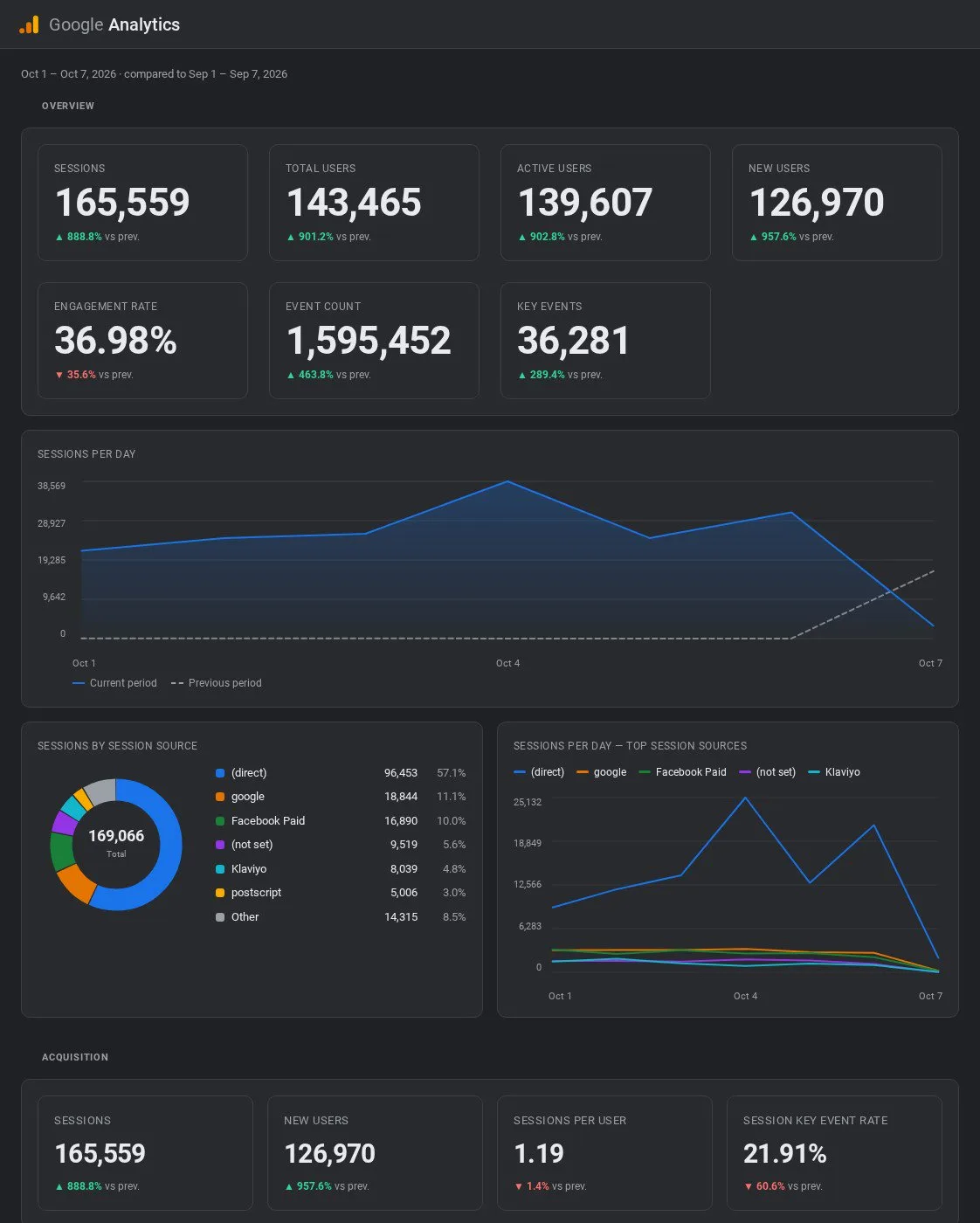
Porter’s free GA4 dashboard templates show sessions, users and engagement as well as channels and key events in one view. ChatGPT can also build the same view live from your property. Either ask for it in chat, or copy a template for a shared Data Studio report your team opens every week.

AI dashboards

Build a live Google Analytics 4 dashboard from the chat

Describe the dashboard in one sentence and Porter builds it. A client-ready dashboard in minutes, with no chart dragging and no BI tool to learn. Ask ChatGPT:

Prompt
Build a live Google Analytics 4 dashboard for my account with the last 30 days, the main KPIs and a weekly trend.
Live URLEach dashboard at its own link: no login, no app, no download
Auto-syncFresh Google Analytics 4 data, nobody re-exports each period
Scheduled deliveryEmail or PDF sends on a set day
White labelYour logo and branding for clients
Sharing permissionsView or edit access per person
05Pricing

Pricing

You can start free, since Porter’s Google Analytics 4 connector for ChatGPT comes with every plan. Use the calculator for your number of accounts, or see Porter pricing for every plan.

What you get

  • Free plan: never expires, with unlimited connected accounts and the last 15 days of data in ChatGPT (30 days in Data Studio and Sheets)
  • Reporting: from $12.50 per account a month billed annually, or $15 month to month for one account
  • Billing: each GA4 property counts as one account, with volume discounts and no per-seat fee
  • Changes: 1 AI credit per completed change you confirm on Business, Enterprise or Edu; failed tasks are free, and the Free plan includes 100 credits a month
  • Trial: 14 days of full access, no card

Price calculator

$33.33/mo$6.67 per account

An account is one ad account, Stripe account, store, page or GA4 property. The Free plan never expires and has unlimited accounts, with the last 15 days of data in AI chats.

06Data and actions

Google Analytics 4 data and actions in ChatGPT

The Google Analytics 4 connector gives ChatGPT 285 fields (86 metrics, 199 dimensions), as well as your property's custom dimensions and metrics. It also gets 32 actions to read reports and manage settings. Fields include sessions, users, engagement and events, as well as traffic sources, pages, ecommerce, technology and geography. The full list of GA4 fields has every label and ID.

GA4 renamed conversions to key events in 2024 (GA4 Data API changelog), so ask ChatGPT for key events.

The 12 Google Analytics fields ChatGPT uses most

FieldWhat it's for
SessionssessionsVolume of visits
Total users · New userstotalUsers · newUsersAudience size; ask for period totals, never add up days
Engagement rate · Engaged sessionsengagementRate · engagedSessionsQuality of visits (rate returns as a fraction)
Key eventskeyEventsGoal completions you mark in GA4
Session default channel groupsessionDefaultChannelGroupOrganic Search, Paid Search, Direct, Referral and more
Session source / mediumsessionSourceMediumFor example google / organic or chatgpt.com / referral
Landing page + query stringlandingPagePlusQueryStringFirst page of a session
Page path · Page titlepagePath · pageTitleContent performance
Event name · Event counteventName · eventCountTracking audits
Average session durationaverageSessionDurationTime on site, in seconds
Purchase revenue · Ecommerce purchasespurchaseRevenue · ecommercePurchasesStore results; needs ecommerce tracking
Device category · CountrydeviceCategory · countrySegments by device and location

Can ChatGPT change Google Analytics settings?

On Business, Enterprise and Edu plans, yes, after you confirm. ChatGPT can mark an event as a key event or change how it counts, as well as create custom dimensions, custom metrics and audiences. It can also create, rename or delete data streams, create or update properties, link or unlink Google Ads accounts, and add, change or remove user access.

Reading reports never changes your property. Tags, events and collected data stay in GA4 Admin and Google Tag Manager, where you edit them as usual. On Pro, ChatGPT reads the property and lists the changes for you to make in GA4 Admin.

How fresh is Google Analytics data in ChatGPT?

Porter queries GA4 live, so ChatGPT sees today's partial data. GA4 keeps processing recent days, so the newest numbers can still move. Standard reports also go back to your property's first data. The free plan reads the last 15 days in ChatGPT (30 days in Data Studio and Sheets), while paid plans have no cap.

Product stats

WhatGoogle Analytics 4 connector
Fields285 (86 metrics, 199 dimensions), plus your custom dimensions and metrics
Actions32, to read reports and manage property settings
ChatGPT plansReads on Pro; reads and changes you confirm on Business, Enterprise and Edu (web, beta)
FreshnessLive query to GA4, today's partial data included
HistoryBack to your property's first data on paid plans; the last 15 days in ChatGPT on the Free plan (30 days in Data Studio and Sheets)
Data retentionGA4's 2- or 14-month retention cuts explorations; Porter reads standard reports, which it doesn't cut
Quota200,000 core tokens a day and 40,000 an hour per standard property; most requests cost 10 or fewer
Question sizeUp to 9 dimensions and 12 metrics per question
AccessGoogle OAuth; Viewer role to read, Editor role to change settings

See all 285 Google Analytics 4 fields

07Security

Is it safe?

Yes. Reading data through Porter's Google Analytics 4 connector for ChatGPT never changes your property, since only a confirmed change does. ChatGPT makes changes only on Business, Enterprise or Edu, and shows each one before Porter makes it. Porter uses the Google access you grant at sign-in, so it only sees the properties your account can open.

How changes get approved

ChatGPT asks you to confirm changes based on the app's permissions and holds back some high-risk actions for extra care. Some changes are permanent: deleting a data stream breaks every tag that sends to its measurement ID, while removing a key event stops it counting.

Removing a user or unlinking Google Ads is also permanent, while a deleted property goes to GA4's trash first. Each completed change also uses one AI credit.

What the connector needs from Google Analytics

Porter signs in with your Google account through Google OAuth. Reports need at least the Viewer role on the property, and changing settings needs the Editor role (Google Analytics roles and permissions). If you skip the access box at sign-in, the property won't appear. In that case, reconnect in Porter and tick it.

Will ChatGPT use up your Google Analytics API quota?

Rarely. Google gives a standard property 200,000 core tokens a day and 40,000 an hour, while most requests cost 10 tokens or fewer (GA4 Data API limits and quotas). However, long ranges and many dimensions cost more.

Questions with age, gender or audiences are capped at 120 an hour per property, while Analytics 360 gets ten times the token quota.

08FAQ

FAQ

Before connecting GA4 to ChatGPT, marketers usually ask about MCP, Universal Analytics, several properties, realtime data, Claude, other Google MCPs and Data Studio. The last three answers help when numbers look off.

What is MCP in data analytics?

MCP (Model Context Protocol) is an open standard that lets an AI assistant such as ChatGPT call tools in other apps. For analytics, an MCP server such as Porter's turns your question into a GA4 report request and returns the rows. ChatGPT then answers from your live GA4 data instead of a pasted export.

Is Google Analytics discontinued, and does this work with Universal Analytics?

No. Google Analytics continues as GA4, which replaced Universal Analytics, and Google ended access to UA data starting the week of July 1, 2024 (Google's notice that GA4 replaced Universal Analytics). Porter reads your GA4 properties, so ChatGPT answers from the data GA4 collects.

Can I connect several GA4 properties as an agency?

Yes. Select several GA4 properties when you connect Porter, then ask ChatGPT to compare them in one table or one summary. Each property is billed as one account, while one Porter subscription covers every client property you manage, with unlimited users on paid plans.

Can ChatGPT read GA4 realtime data?

Yes, in chat. ChatGPT can run a GA4 realtime report through Porter on the last minutes of activity. For example, active users by page or by country right now. Realtime data isn't saved in Porter reports or dashboards, so ask ChatGPT whenever you need a fresh look during a launch or campaign.

Can I use Porter in Claude too?

Yes. Porter's MCP URL, the same one behind the Google Analytics 4 connector for ChatGPT, also works in Claude as a custom connector, with the same Porter account and properties. See Porter's Google Analytics 4 connector for Claude for the Claude setup and what it covers.

Is there a Google Ads or Search Console MCP for ChatGPT too?

Yes. Porter also connects Google Ads and Google Search Console to ChatGPT the same way it connects GA4, with the same MCP URL. Add the Google Ads connector for ChatGPT or the Search Console connector in Porter, then ask about them next to GA4 in one chat.

I already send GA4 to Looker Studio with Porter. Do I need to reconnect for ChatGPT?

No. A GA4 property connected in Porter feeds every Porter destination at no extra cost. That includes both ChatGPT and the GA4 connector for Data Studio (formerly Looker Studio). Just add Porter's MCP URL to ChatGPT as a custom MCP server, then ask your first question.

Troubleshooting

Why don't ChatGPT's numbers match the GA4 interface?

ChatGPT's GA4 numbers through Porter differ from the interface for a few reasons. Users don't add up across days, so ask for the period total, and recent days are still processing. Days with no data are missing rather than 0, rates come back as fractions (0.45 means 45%), and dates follow your property's time zone.

Why are some GA4 rows missing, "(other)" or "unknown"?

GA4 hides rows under its privacy thresholds, such as age, gender, interests and small segments, and you can't turn that off (Google's note on GA4 data thresholds). Very large reports can be sampled or roll rare values into "(other)" (Google's note on GA4 data sampling). Use longer date ranges for thresholded data, but fewer dimensions or shorter ranges for large reports.

Why does a GA4 question fail or return no data?

A GA4 question fails through Porter when it asks for more than 9 dimensions or 12 metrics. It also fails when it mixes item and order fields, or asks for Conversions and Key events together. No data usually means either your Google account lacks Viewer access, or the property wasn't ticked at sign-in. Reconnect GA4 in Porter, then ask ChatGPT again.


09Next

More ChatGPT connectors

Porter connects GA4 to more than ChatGPT, and ChatGPT to more than GA4. Each page below lists the fields, prompts and limits for that source or destination. Either add your next source to the same chat, or send GA4 to a warehouse.

Not only ChatGPT. Send Google Analytics 4 data anywhere

The same Porter account and connection also send Google Analytics 4 data to these destinations, at no extra cost.

Try the connector in ChatGPT

Add the Google Analytics 4 connector to ChatGPT in 3 steps, then ask your first question today. For example, which channels bring key events, what caused a traffic drop, or how much traffic AI assistants send. The free plan includes the MCP, and the 14-day trial also needs no card.

Free forever plan · 14-day full trial · No card

In-house marketing leads: the "why did traffic drop" question gets a channel and a date in one chat instead of a morning in Explore.

Agencies: every client property answers the same prompt, while the weekly summary arrives as a draft.

SEO and content teams: both landing-page engagement and AI-assistant traffic come back in one chat, page by page.