Google Ads connector for Claude

Use Porter’s Google Ads connector for Claude to analyze campaigns, search terms, cost and ROAS, then change budgets, bids and keywords after you approve.

  • Find search terms that waste spend and block them as negatives
  • Check if a campaign is limited by budget or by ad rank
  • Compare target ROAS with actual ROAS, and Performance Max with Search
  • Roll up every client account into one weekly report
G2★★★★★Rated 4.6/5 on G2 (288 reviews, October 2026) · 1,042 Google Ads fields · 56 Google Ads actions · MCP included on the Free plan

By Porter Metrics team · Last updated October 19, 2026

ClaudePorter connected
List search terms from my Search campaigns in the last 30 days with more than 10 Clicks and 0 Total conversions.
Porter / Google Ads / Trailgear Demo✓ 4 rows
4 search terms spent $412 with no conversions. “free hiking boots” alone cost $187. Want me to add them as exact-match negatives?
Search termClicksCost
free hiking boots64$187
hiking boots repair31$96
boot size chart27$71
used trail shoes18$58
Demo data, Trailgear Demo account
1,042 Google Ads fields
01Setup

How to connect Google Ads to Claude

Porter’s Google Ads connector for Claude takes 3 steps and no code. Connect your account in Porter with your Google sign-in, add Porter’s MCP URL to Claude as a custom connector, then sign in and ask. If you want screenshots or the Claude Code setup, see Porter’s guide on how to connect Google Ads to Claude. MCP (Model Context Protocol) is the open standard Claude uses to connect to tools such as Porter.

Before you start

  • You need a Google user with access to your ad accounts, as well as a free Porter account and any Claude plan. If Claude should make changes, that user needs Standard or Admin access, because those are the only Google Ads access levels that can edit campaigns.
  • Custom connectors work in Claude, Cowork and Claude Desktop on Free, Pro, Max, Team and Enterprise plans, but Free allows only one custom connector. On Team and Enterprise, an Owner adds Porter first (Anthropic’s guide to custom connectors in Claude). If you work in Claude Code, follow the same Porter guide.
  • Works in Claude.ai, Claude Desktop, Cowork and Claude Code, with any Claude model, from Opus to Sonnet and Haiku.
  1. Step 1: Connect Google Ads in Porter

    Sign up free at Porter, pick Google Ads as the source and then sign in with Google. Select your ad accounts, then pick Claude as the destination.

  2. Step 2: Add the Google Ads connector to Claude

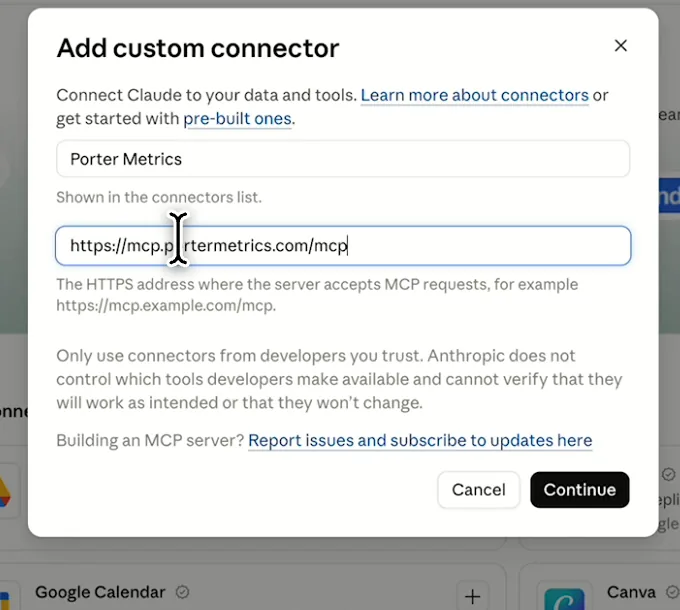
    Then, in Claude’s connector settings, click Add custom connector, name it Porter Metrics and paste this URL:

    MCP URL
    https://mcp.portermetrics.com/mcp
  3. Step 3: Ask Claude about Google Ads

    Sign in with the Google account linked to Porter, approve access, and then paste this prompt:

    Prompt
    Rank my Google Ads campaigns by Conv. value / cost for the last 7 full days and flag any campaign whose Cost rose more than 20% versus the 7 days before.

Guides and videos

app.portermetrics.com / create
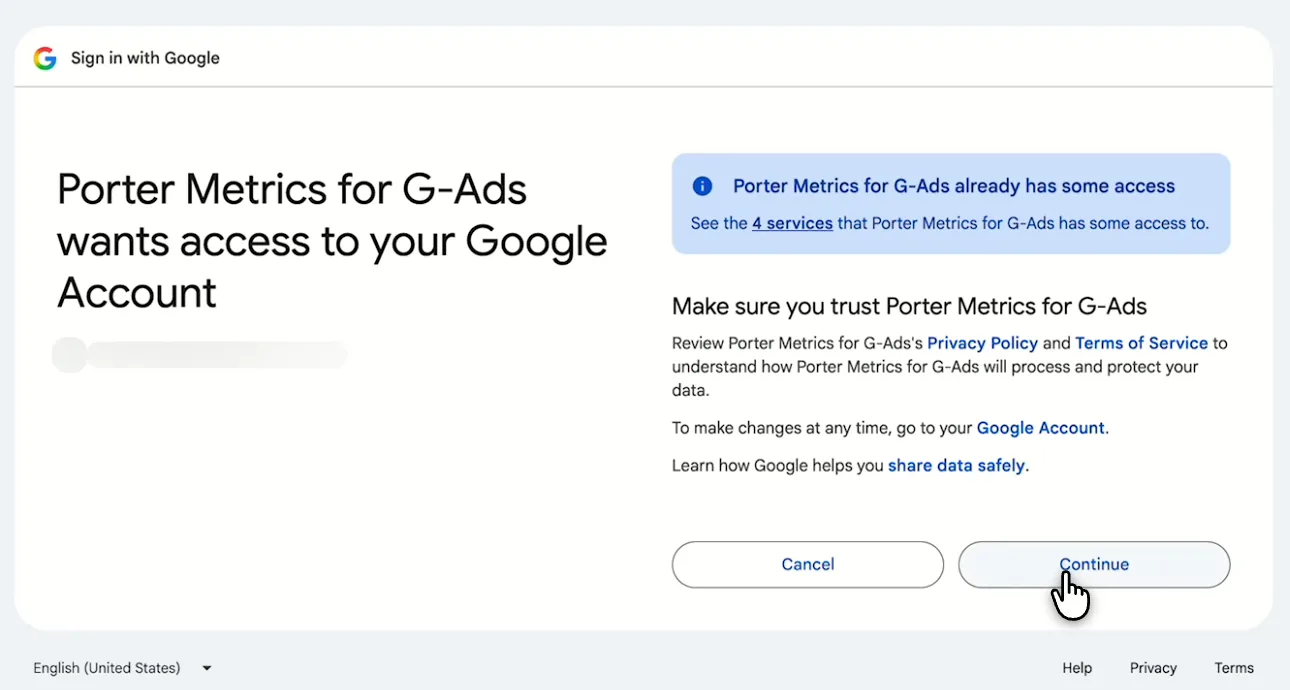
Google screen asking you to let Porter Metrics for Google Ads access your Google account
First, sign in with Google and allow Porter Metrics access.
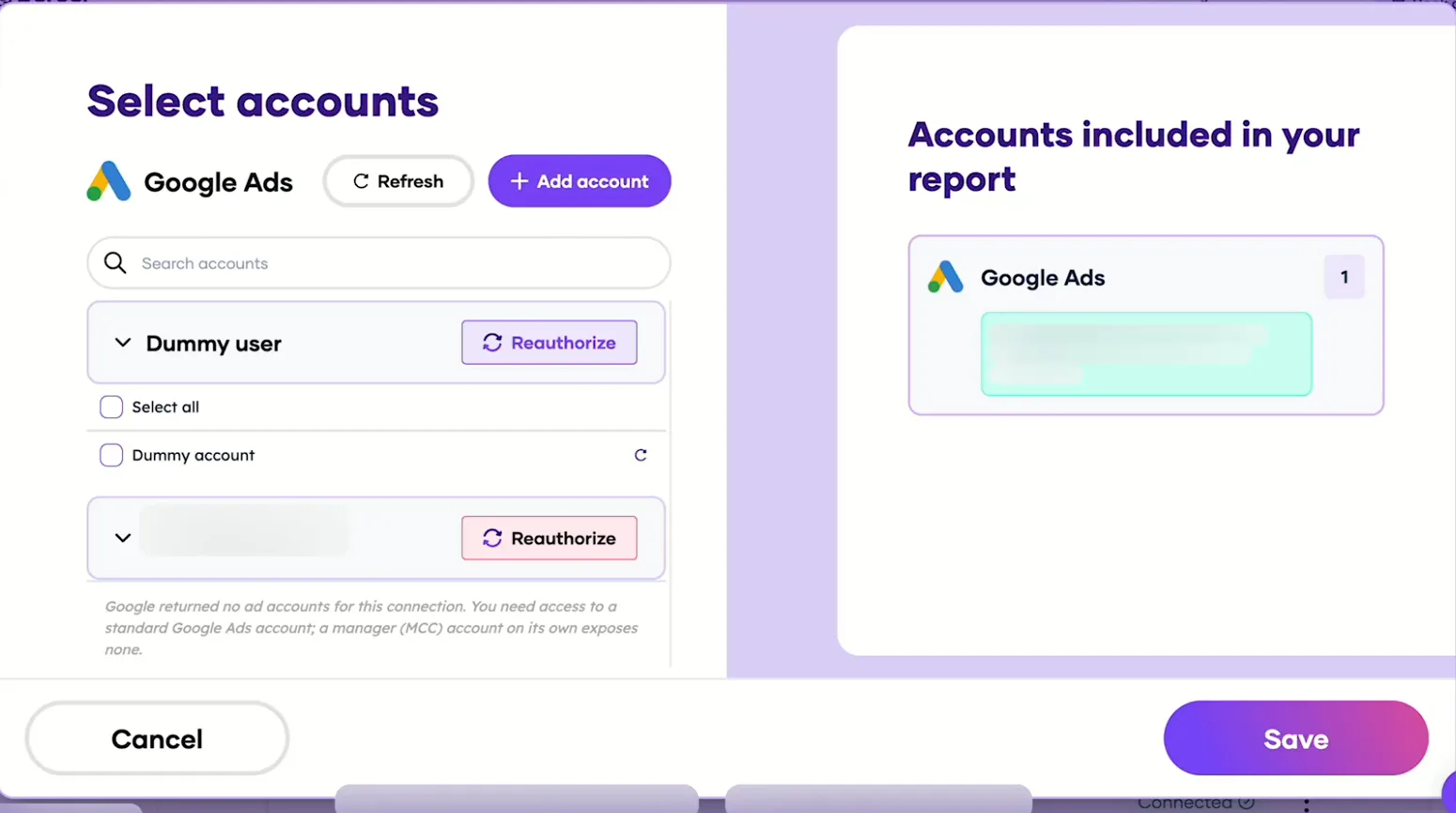
Porter's Select accounts window for Google Ads with a demo account ready to save
Then, pick the Google Ads accounts Claude can read and save.
Claude's Add custom connector window with the name Porter Metrics and Porter's MCP URL filled in
Then, in Claude, add a custom connector with Porter's MCP URL.
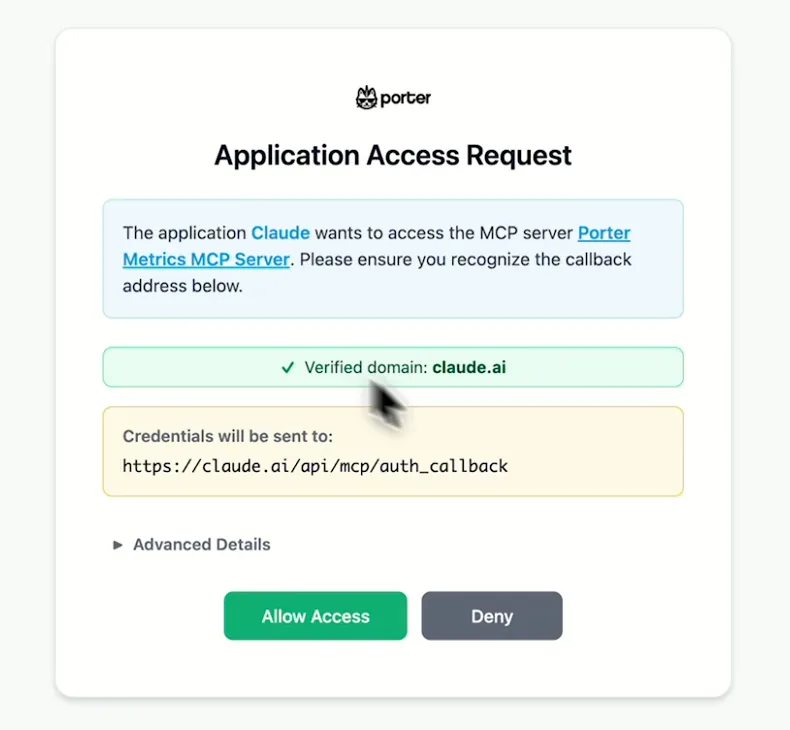
Porter's Application Access Request screen asking you to let Claude use the Porter MCP server
When Claude asks, sign in to Porter and select Allow Access.
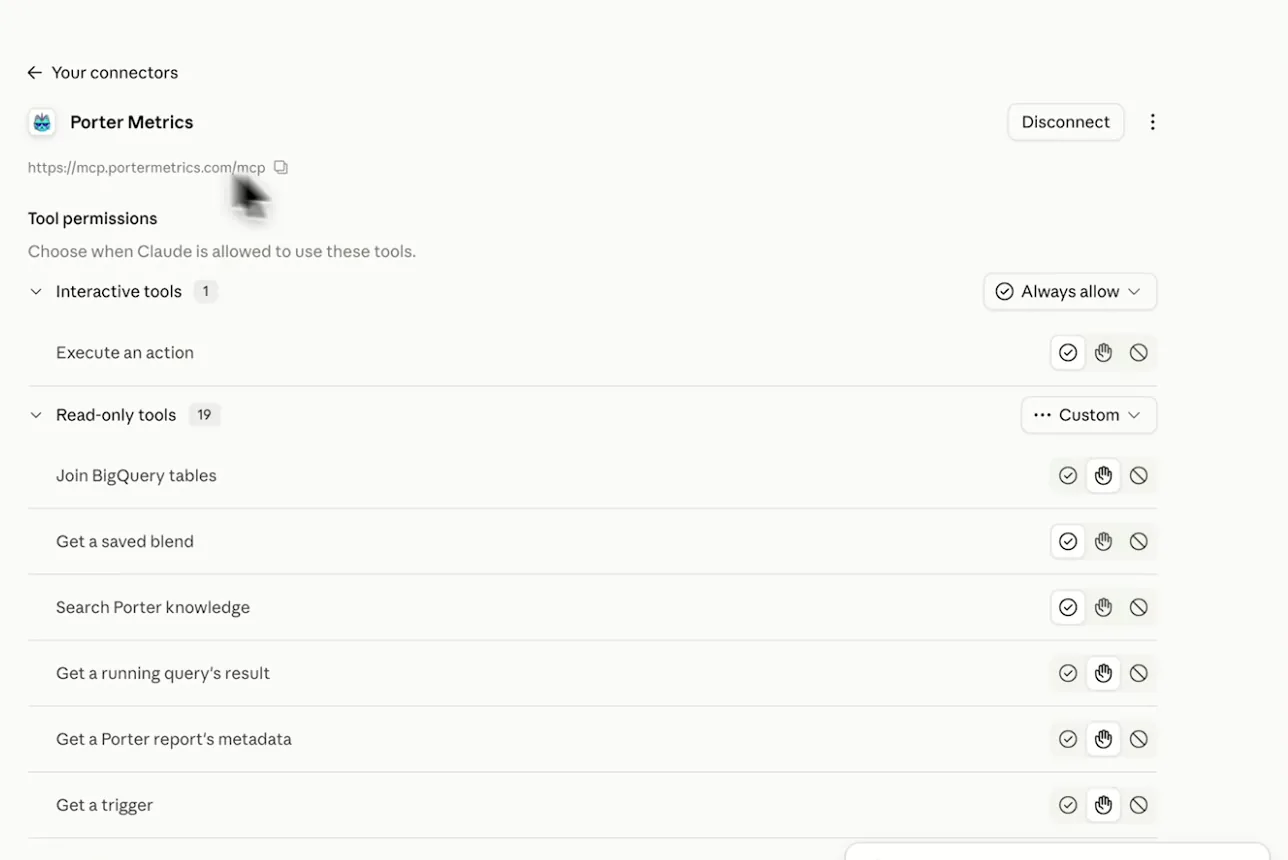
Porter Metrics listed as a connected connector in Claude with its read-only tools
After that, Porter shows as connected, so you can ask your first question.
If you prefer video, watch the whole Google Ads to Claude setup (1:40, no sound).
Interactive walkthrough, so you can click along here
02Use cases and prompts

What you can ask Claude

Each of these 8 common jobs comes with a prompt to copy, the Google Ads fields Claude can read for it and who it’s for. The prompts skip the fields that failed in Porter’s tests, so you can paste them as written.

Can Claude find search terms that waste spend?

The problemCost keeps climbing on queries that never convert, but you only catch them when you finally open the search terms report.

What Claude doesClaude lists search terms with clicks and cost but no conversions, then adds the ones you pick as negative keywords in their ad groups. It works on your Search campaigns, where Google reports every search term.

What you getYou skip the search-term export and the copy-paste into the negatives list, and the queries stop costing you as soon as you block them.

Prompt
List search terms from my Search campaigns in the last 30 days with more than 10 Clicks and 0 Total conversions. Show Campaign, Ad group, Search term status, Search keyword match type and Cost, sorted by Cost.
Then ask
Prompt
Show me the 5 worst as exact-match negatives for their ad groups, and add them after I confirm.

For: in-house PPC managers · agencies · e-commerce marketers

Fields used: Search termSearch term statusSearch keyword match typeCampaignAd groupClicksCostTotal conversions
Action: keyword_create (negative, ad group level)

Can Claude tell if a campaign is limited by budget or by ad rank?

The problemImpression share slipped, and you can’t tell if the fix is more budget or better bids and ads.

What Claude doesFor each campaign, Claude splits lost impression share into budget and rank, then shows that next to the current and recommended budget. It can also change the daily budget. It reads Google’s capped share values as bounds rather than exact numbers.

What you getYou settle budget-or-rank per campaign before you move money, so you don’t raise budgets where ad rank is the real limit.

Prompt
For my Search campaigns in the last 30 days, show Campaign, Search Impr. share, Search Lost IS (budget), Search Lost IS (rank), Budget Amount, Recommended Budget Amount, Cost and Conv. value / cost. Don't add up shares across campaigns. Which campaigns are limited by budget and which by rank?
Then ask
Prompt
Raise the daily budget of the most budget-limited campaign by 15%. Show me the change first.

For: in-house PPC managers · agencies

Fields used: CampaignSearch Impr. shareSearch Lost IS (budget)Search Lost IS (rank)Budget AmountRecommended Budget AmountCostConv. value / cost
Action: budget_update

Can Claude check target ROAS against actual ROAS?

The problemYour value-bidding campaigns keep missing target ROAS, but lowering the target feels like a guess.

What Claude doesFor each campaign, Claude shows bid strategy and target next to actual Conv. value / cost, then updates the target if you ask. It also flags campaigns with too few conversions for value bidding (Porter’s guidance: 15–30 conversions in 30 days).

What you getBecause target, actual ROAS and conversion volume sit in one table, you can tell whether to move the target or wait for more data.

Prompt
For each campaign in the last 30 days, show Campaign, Campaign Bid Strategy Type, Target ROAS, Campaign Max Conv. Value Target ROAS, Conversions value, Total conversions, Cost and Conv. value / cost. Flag campaigns more than 20% below target.
Then ask
Prompt
Lower the target ROAS by 10% on the two campaigns furthest below target, after I confirm.

For: e-commerce marketers · in-house PPC managers

Fields used: CampaignCampaign Bid Strategy TypeTarget ROASCampaign Max Conv. Value Target ROASConversions valueTotal conversionsCostConv. value / cost
Action: campaign_update

Can Claude find low Quality Score keywords and say what to fix?

The problemQuality Scores are low across the account, but checking three components keyword by keyword eats an afternoon.

What Claude doesClaude lists keywords with a Quality Score under 5, their three components and cost, then names the weakest component. It reads Quality Score per keyword for the last 30 days.

What you getYou get a fix order for the keywords that spend the most, so ad copy and landing page work goes where the money is.

Prompt
For the last 30 days, list each Search keyword (Criterion) with Keyword quality score below 5, Historical creative quality score, Historical landing page quality score, Historical search predicted CTR, Clicks and Cost. One row per keyword; don't add up Quality Scores. For the 20 with the most Cost, which component should I fix first?

For: in-house PPC managers · agencies

Fields used: Search keyword (Criterion)Keyword quality scoreHistorical creative quality scoreHistorical landing page quality scoreHistorical search predicted CTRClicksCost

Can Claude analyze Performance Max campaigns?

The problemPerformance Max takes more of the budget, but the app tells you little about where it goes.

What Claude doesClaude compares Performance Max with Search on cost, conversions and ROAS per campaign. Then it lists each Performance Max campaign with the same metrics, so you see which ones carry the spend.

What you getYou can judge whether Performance Max earns its budget next to Search, using the numbers Google does share.

Prompt
For the last 30 days, compare my campaigns by Advertising channel type: Cost, Total conversions, Conversions value and Conv. value / cost, Performance Max next to Search. Then list each Performance Max Campaign with the same metrics.

For: e-commerce marketers · agencies

Fields used: Advertising channel typeCampaignCostTotal conversionsConversions valueConv. value / cost

Can Claude explain why CPA jumped?

The problemCPA jumped overnight, someone touched the account, but nobody remembers what changed.

What Claude doesClaude lists the account’s recent changes, then lines them up by date with daily cost per conversion. It runs one query for the change history and one for the daily metrics.

What you getThe change log and daily CPA meet in one answer, so the team talk starts from a date and a change, not a hunch.

Prompt
List every change in my Google Ads account in the last 14 days with Change Date, Change Resource Type, Resource Change Operation, Changed Fields and Change Client Type. Then, separately, show daily Cost, Total conversions and Cost / conv. for the same days. Which change most likely moved CPA?

For: in-house PPC managers · agencies · B2B marketers

Fields used: Change DateChange Resource TypeResource Change OperationChanged FieldsChange Client TypeDateCostTotal conversionsCost / conv.

Can Claude build one weekly Google Ads report across all accounts?

The problemMonday mornings go to pulling the same numbers from every client account, then pasting them into one sheet.

What Claude doesClaude rolls up every connected account in one table, compares exact date ranges and then drafts a client summary. It groups by Date, so each week matches your exact Monday to Sunday range.

What you getThe roll-up you used to copy and paste becomes one prompt, so each client email starts from a flagged list and a draft.

Prompt
For every Google Ads account I've connected, show Account name / description, Customer ID, Cost, Total conversions, Cost / conv., Conv. value / cost and CTR for {Monday date}–{Sunday date} versus the 7 days before. Flag accounts where Cost / conv. rose more than 20%.
Then ask
Prompt
Write a 3-line summary per flagged account I can paste into a client email.

For: agencies

Fields used: Account name / descriptionCustomer IDDateCostTotal conversionsCost / conv.Conv. value / costCTR

Can Claude research Google Ads keywords and build a Search campaign?

The problemLaunching a new Search campaign still means a Keyword Planner tab, a spreadsheet and ad groups entered by hand.

What Claude doesClaude pulls keyword ideas with volume and bid estimates. Then it builds the budget, campaign, ad groups, keywords and a responsive search ad, including location and language targeting.

What you getResearch and build happen in one chat, so you spend your time reviewing the structure instead of typing it into the app.

Prompt
Get keyword ideas for 'running shoes for flat feet' in the United States with search volume and top-of-page bid estimates, and group them into 3 ad groups.
Then ask
Prompt
Create a paused Search campaign with a $40 daily budget, those 3 ad groups, phrase-match keywords and one responsive search ad each, targeting the United States in English.

For: in-house PPC managers · agencies · B2B marketers

Actions: keyword_ideas_generate · geo_target_search · budget_create · campaign_create · campaign_criterion_create_locations · campaign_criterion_create_languages · adgroup_create · keyword_create · ad_create
03Why Porter

Why Porter for Google Ads in Claude

Porter gives Claude your Google Ads account as ready-made fields and safe actions, with nothing to host. Prefer free, read-only GAQL queries in your own Cloud project? Google’s official MCP server does that, and you can run both.

✓

Changes only after you approve

Claude reads 1,042 fields and changes budgets, bids, keywords and campaigns through 56 actions, asking before every change. New campaigns start paused.

⊞

One URL, nothing to host

Sign in with Google in Porter and add one MCP URL to Claude. There’s no Cloud project, developer token or config file to manage.

⚙

Every account in one chat

Read every connected ad account, including those under a manager (MCC), and roll them up in one answer for client reports.

Aa

Years of history in one answer

Google keeps 37 months of daily data and 11 years of monthly totals. On paid plans Porter reads both, so Claude compares this quarter with years back in one answer. The last 30 days come live, older ranges from Porter’s stored copy.

↻

Paid next to organic and revenue

Ask about Google Ads next to GA4, Search Console, Meta Ads or Stripe in the same chat, so ROAS meets real revenue.

✓

Ready-made skills

Copy skills such as the negative keywords skill into Claude to run the same audit every week.

⊞

Live dashboards, not only chat answers

Ask Claude for a dashboard and Porter’s AI dashboards publish it at its own link, synced automatically and ready to share. Official MCP servers answer inside the chat and stop there.

04Dashboard

Dashboard template

Want a shared view instead of a Claude chat? Porter also fills the free SEM Dashboard template in Data Studio (formerly Looker Studio). It uses the Google Ads to Data Studio connector. You see impressions, clicks, cost, conversions, CTR, CPC, CPM and ROAS by campaign, ad group, keyword, device and location.

AI dashboards

Build a live Google Ads dashboard from the chat

Describe the dashboard in one sentence and Porter builds it. A client-ready dashboard in minutes, with no chart dragging and no BI tool to learn. Ask Claude:

Prompt
Build a live Google Ads dashboard for my account with the last 30 days, the main KPIs and a weekly trend.
Live URLEach dashboard at its own link: no login, no app, no download
Auto-syncFresh Google Ads data, nobody re-exports each period
Scheduled deliveryEmail or PDF sends on a set day
White labelYour logo and branding for clients
Sharing permissionsView or edit access per person
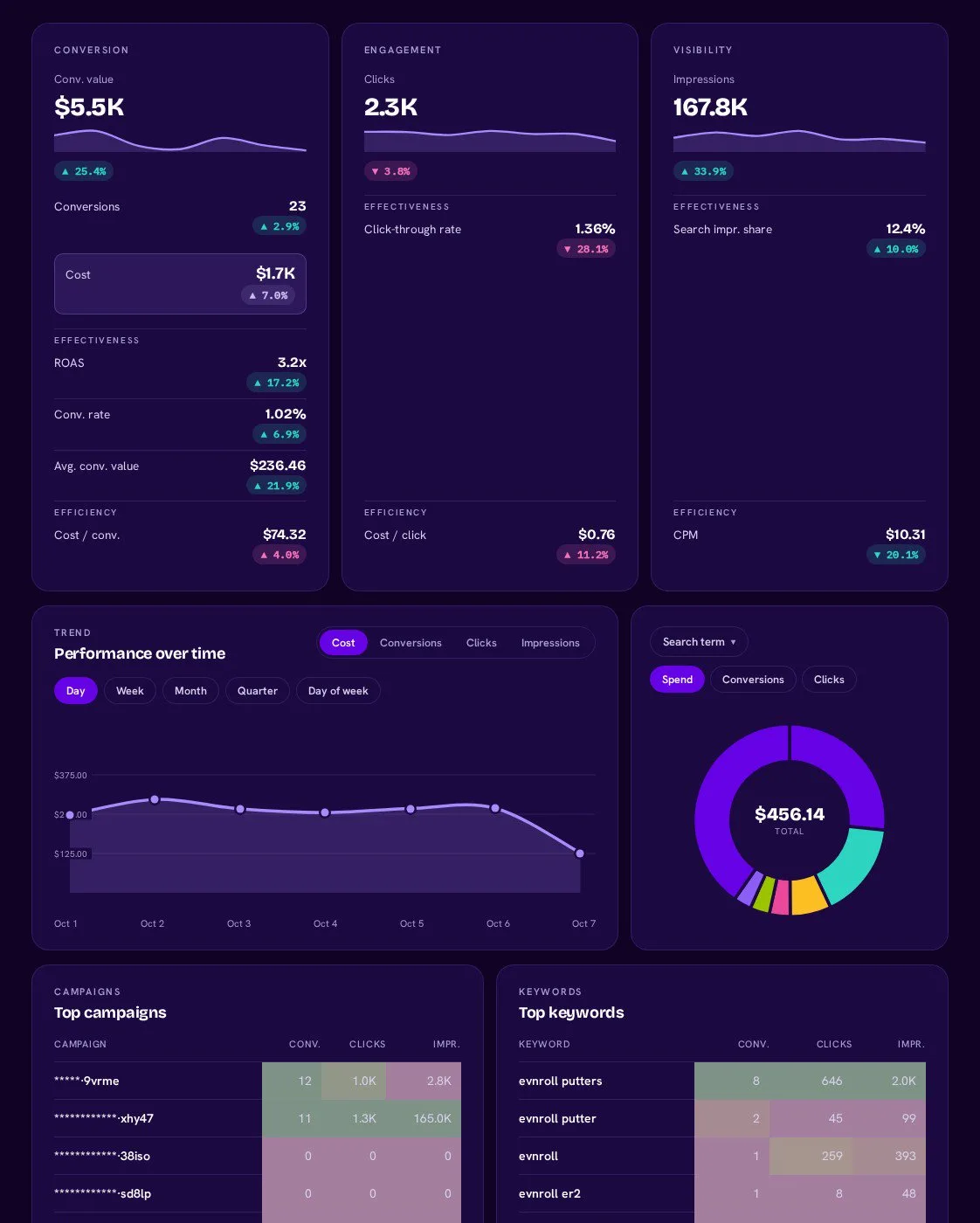
Google-Ads AI dashboard template built with Porter Metrics AI dashboards
Template

The Google Ads AI dashboard template

Built with Porter's AI dashboards on a real account. Open it live, then ask Claude to make one like it for your account.

Open the live Google Ads dashboard

05Pricing

Pricing

You can start free, since the Free plan includes Porter’s Google Ads connector for Claude. Use the calculator for your number of accounts, or see Porter pricing for every plan.

What you get

  • Free plan: never expires, with unlimited connected accounts and the last 15 days of data in Claude (30 days in Data Studio and Sheets)
  • Reporting: from $12.50 per account a month billed annually, or $15 month to month for one account
  • Billing: each ad account counts as one, and a manager account (MCC) isn’t billed
  • Changes: 1 AI credit per completed change; failed tasks are free, and the Free plan includes 100 credits a month
  • Trial: 14 days of full access, no card

Price calculator

$33.33/mo$6.67 per account

An account is one ad account, Stripe account, store, page or GA4 property. The Free plan never expires and has unlimited accounts, with the last 15 days of data in AI chats.

06Data and actions

Google Ads data and actions in Claude

The Google Ads connector gives Claude 1,042 fields (252 metrics, 790 dimensions), from account down to search term. It also adds 56 actions to read and change the account. The 12 fields below answer most questions, while the full Google Ads fields list has every label and id.

The 12 Google Ads fields Claude uses most

FieldWhat it's for
Search termsearch_termThe query people typed; finds wasted spend
Costcost_microsSpend, returned in currency units despite the id
Total conversionsconversionsConversions from primary actions only
Conv. value / costconversion_value_per_costROAS per campaign, ad group or keyword
Cost / conv.cost_per_conversionCPA
Search Lost IS (budget)search_budget_lost_impression_shareReach lost to budget
Search Lost IS (rank)search_rank_lost_impression_shareReach lost to ad rank
Keyword quality scorehistorical_quality_score1–10 per keyword, last 30 days
Search keyword match typekeyword_info_match_typeMatch type next to search terms
Campaign Bid Strategy Typecampaign_bidding_strategy_typeWhat Smart Bidding optimizes for
Conversions (by Conv. Date)conversions_by_conversion_dateMatches the app's "by conv. time" columns
Change Datechange_event_change_dateWhen an account change happened, last 30 days

Can Claude pause, edit or create Google Ads campaigns?

Yes. Claude pauses, edits, creates and removes campaigns, ad groups, keywords, budgets and ads. Removals are permanent, so Claude asks before each one.

TypeCountExamples
Read13Campaigns, ad groups, ads, keywords, budgets, targeting, audiences, keyword ideas
Create32Budgets, campaigns, ad groups, keywords and negatives, responsive search ads, Demand Gen, App and Shopping ads, Performance Max asset groups, assets, targeting
Update5Campaign status, bidding and targets; budget amount; ad group status and bids; keyword status and bid; ad status
Remove6Campaigns, ad groups, keywords, budgets, targeting (permanent)

How far back can Claude read Google Ads data?

Google keeps daily data for 37 months and monthly data for 11 years, per the Google Ads data retention policy. Paid Porter plans keep whatever Google returns, while the Free plan covers the last 15 days in Claude (30 days in Data Studio and Sheets). Change history covers 30 days (Google Ads API change history limit), and Quality Score the last 30 days.

Product stats

WhatGoogle Ads connector
Fields1,042 (252 metrics, 790 dimensions)
Actions56: 13 read, 32 create, 5 update, 6 remove
FreshnessLast 30 days live; older ranges from Porter's stored copy
HistoryWhatever Google keeps on paid plans: 37 months daily, 11 years monthly; the last 15 days in Claude on the Free plan
Change historyLast 30 days
API quotaGoogle meters per Cloud project: 15,000 operations a day on Basic access

See all 1,042 Google Ads fields

07Security

Is it safe?

Yes. The Google Ads connector for Claude connects through Google OAuth, so Porter only sees the accounts your Google user can access. Removing a campaign, ad group, keyword or budget is permanent, so Claude asks first and you check each removal before you approve it.

What the connector needs from Google Ads

When you connect, Porter signs in with your Google account and requests the Google Ads API OAuth scope. After that, it reads and writes only on the accounts you connect, and you can revoke access anytime from Porter or your Google account.

How you approve changes

Claude asks before every change. New campaigns and creatives start paused, so nothing serves until you turn it on. Status, budget and bid changes can be reverted with another change. Each completed change uses 1 AI credit.

Will Google ban my account for using an MCP?

No, because Porter calls the official Google Ads API with OAuth, the path Google documents for this. Porter's guide on Google Ads ban risk also covers what does get accounts banned.

Instead, the real limit is API quota, which Google meters per Google Cloud project. Explorer access allows 2,880 operations a day on production accounts, Basic 15,000 and Standard unlimited, plus 1 keyword-idea request per second (Google Ads API quotas).

08FAQ

FAQ

These answers cover what the rest of the page doesn't, such as what an MCP is, manager accounts, campaign types, ad copy and ChatGPT. The last three help when numbers or queries in Claude look wrong, and Porter's setup guide for Claude has more fixes.

What is a Google Ads MCP?

A Google Ads MCP is a server that lets Claude query, and sometimes change, a Google Ads account, so you ask instead of exporting reports. Google's official server is free, open source and read-only, but you host it. Porter's Google Ads connector for Claude is hosted instead: one URL, 1,042 fields, and changes only after you approve.

Does Porter work with manager (MCC) accounts?

Yes, as long as you sign in with a Google user that reaches the ad accounts through the manager. Then pick the accounts under it. Claude reads and writes on those child accounts, while Porter sends the manager ID for you.

Claude reads the ad accounts linked under the manager, so link at least one to see its data.

Which campaign types can Claude create?

Claude can create Search, Performance Max and Demand Gen campaigns end to end. Shopping needs a linked Merchant Center, while App campaigns create their ad group automatically. For video, Claude builds a Demand Gen campaign with a video ad, because Google creates Video campaigns only in the Google Ads app. If you skip location and language, the campaign targets everywhere.

Can Claude write and publish ad copy?

Yes. Claude reads your Responsive Search Ad Headlines and Descriptions, then creates new responsive search ads. Each ad takes 3–15 headlines of up to 30 characters and 2–4 descriptions of up to 90.

It also adds sitelinks, callouts and structured snippets. To change ad text, it creates a new ad with your edits and pauses the old one.

Can I use Porter in ChatGPT too?

Yes. Porter's MCP URL, the same one behind the Google Ads connector for Claude, also works in ChatGPT as a custom connector. Then ChatGPT can read your campaigns and manage budgets through Porter.

Porter's tutorial also shows how to connect Google Ads to ChatGPT step by step, including the ChatGPT menu path.

Troubleshooting

Why don't Claude's numbers match Google Ads?

Ask for exact dates and use Conversions (by Conv. Date), and Claude's numbers line up with the Google Ads app. Presets like "yesterday" resolve on UTC, not your account's time zone.

Conversions also count on the click date, while that field matches "by conv. time". Finally, impression share reports 0.0999 for anything under 10% (Google's impression share reporting ranges).

Why does Claude say "The remote connector reported an error"?

Remove the field that breaks a Google Ads rule or shorten the date range, then ask again. Porter returns this generic error for those queries. Common causes: Cost or Clicks next to Conversion Name, or change history older than 30 days. A retired field such as URL Expansion Opt-out or feed fields also triggers it.

Why does Claude list my accounts but return no data?

Reconnect Google Ads in Porter and allow Google Ads access. Claude lists accounts but returns no data when your Google sign-in to Porter finished without granting that access, so every query asks you to reconnect. If you reach the account through a manager, check that your Google user still has access to that child account.


09Next

More Claude connectors

Porter connects Google Ads to more than Claude, and Claude to more than Google Ads. Browse all Claude connectors or open one of the other ad platforms below, since each page lists the fields, prompts and limits for that platform.

Not only Claude. Send Google Ads data anywhere

The same Porter account and connection also send Google Ads data to these destinations, at no extra cost.

Try it on your own account

Set up the Google Ads connector for Claude in 3 steps, then ask your first question today. For example, find wasted search terms, check budget against ad rank or draft a new Search campaign. The Free plan includes the MCP and unlimited connected accounts, while the 14-day trial needs no card.

Free plan · 14-day trial · No card needed

In-house PPC managers: the search-term check and the budget call happen in one chat instead of across a stack of exports.

Agencies: one prompt covers every connected client account, and the weekly summary also arrives as a draft.

E-commerce marketers: ROAS against target for each campaign, whenever you ask, with the target change in the same chat.