





Trusted by 1,600+ marketing teams and agencies


What you can do with this keyword research template
Eight jobs this template does. Click one to see its view, then paste its prompt into Claude.
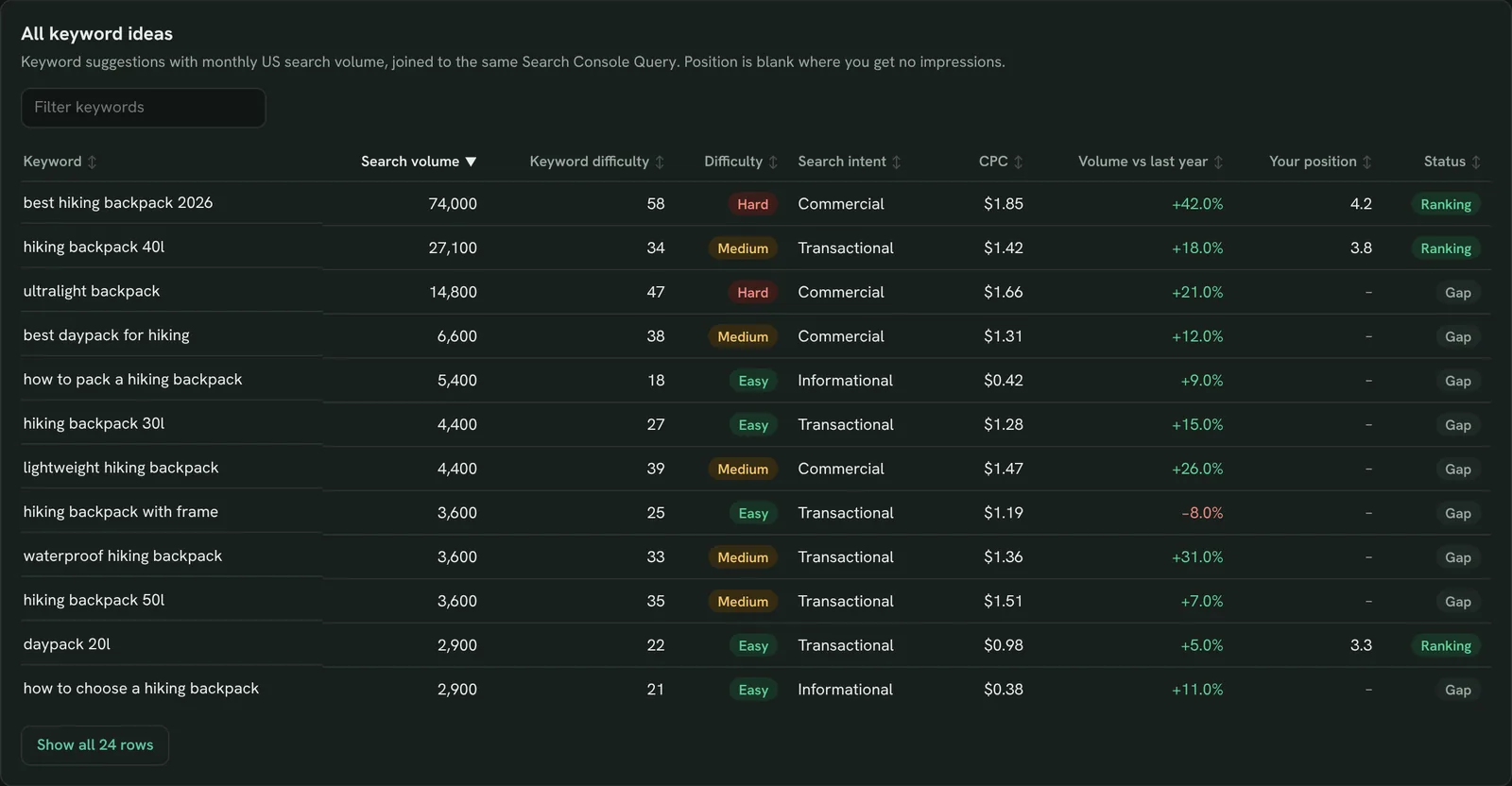
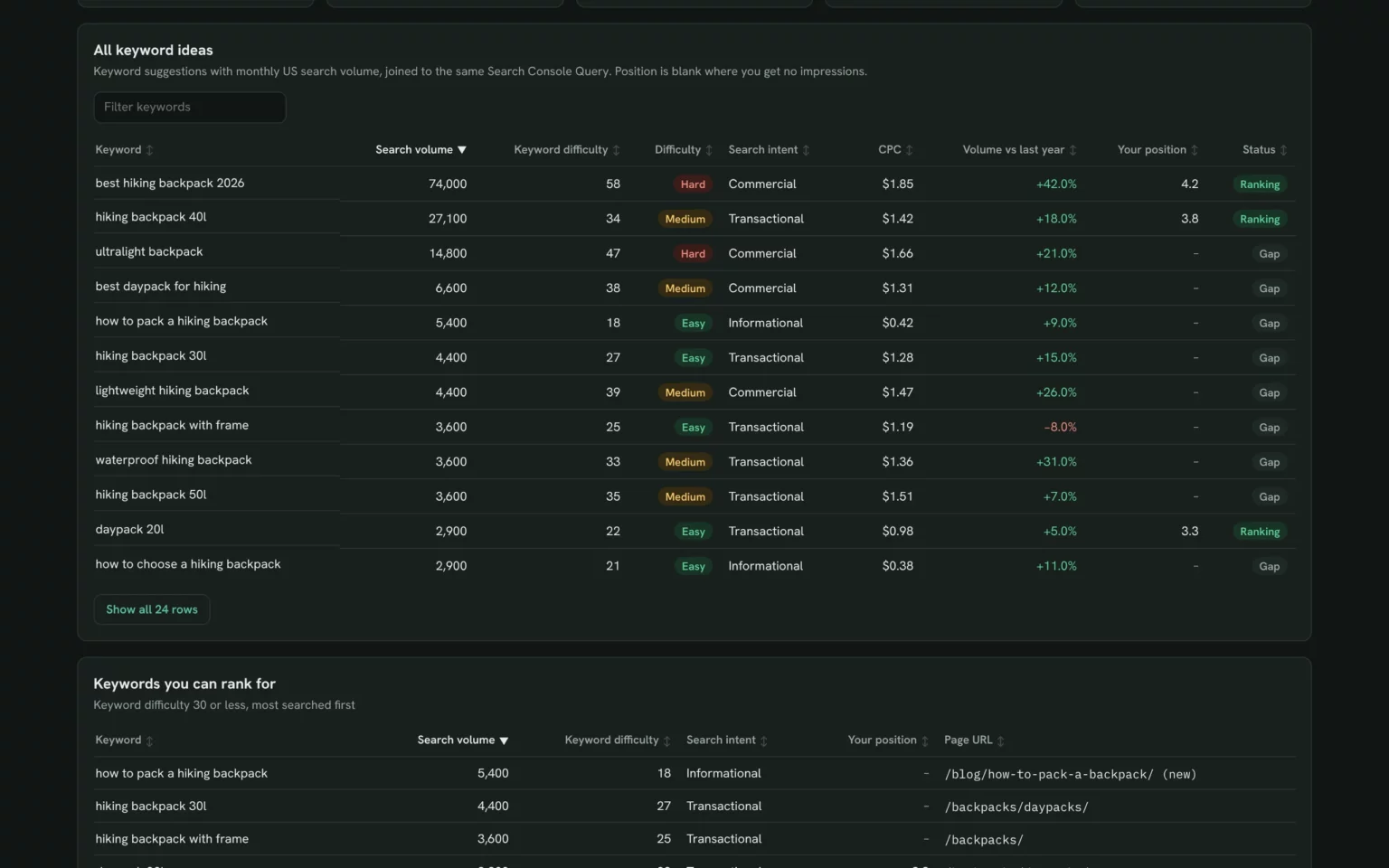
Find keyword ideas from one seed
Every idea around your seed with volume, difficulty, intent and CPC, so the list starts full, not blank.
- What do people search around my product?
- Which ideas get the most searches?
Find keyword ideas for [seed keyword] in [country] with search volume, keyword difficulty, intent and CPC, most searched first.
Find keywords you can rank for
Ideas with keyword difficulty of 30 or less, so you start where a new page can reach page one.
- Which ideas are easy to rank for?
- Which of them get real volume?
From those ideas, list the ones with keyword difficulty 30 or less, with volume, intent and my current position.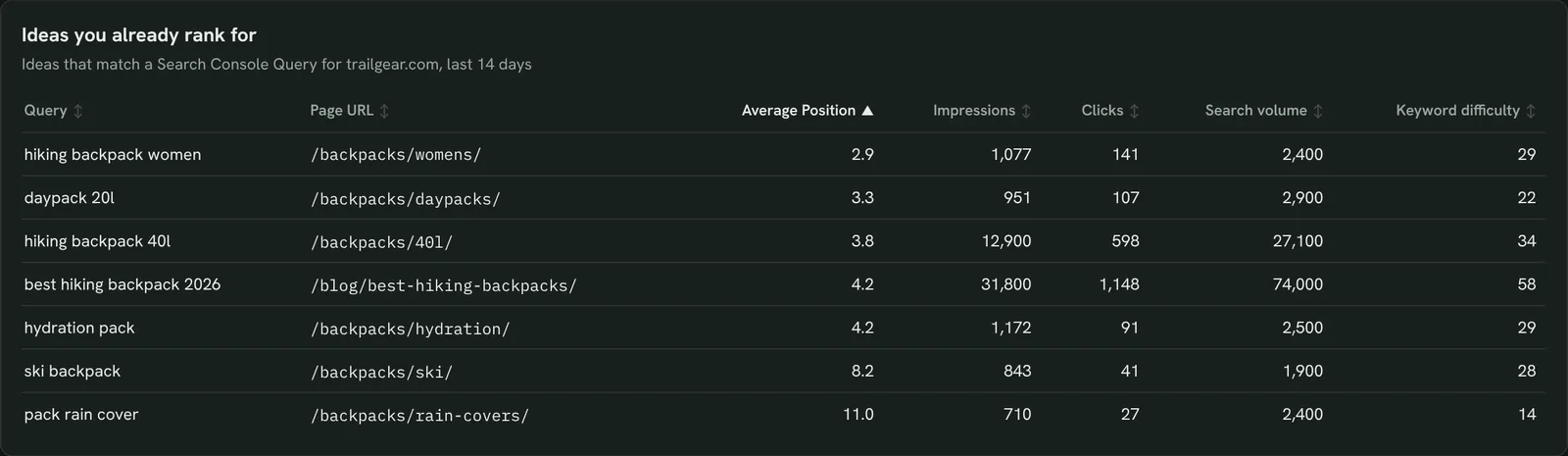
See which ideas you already rank for
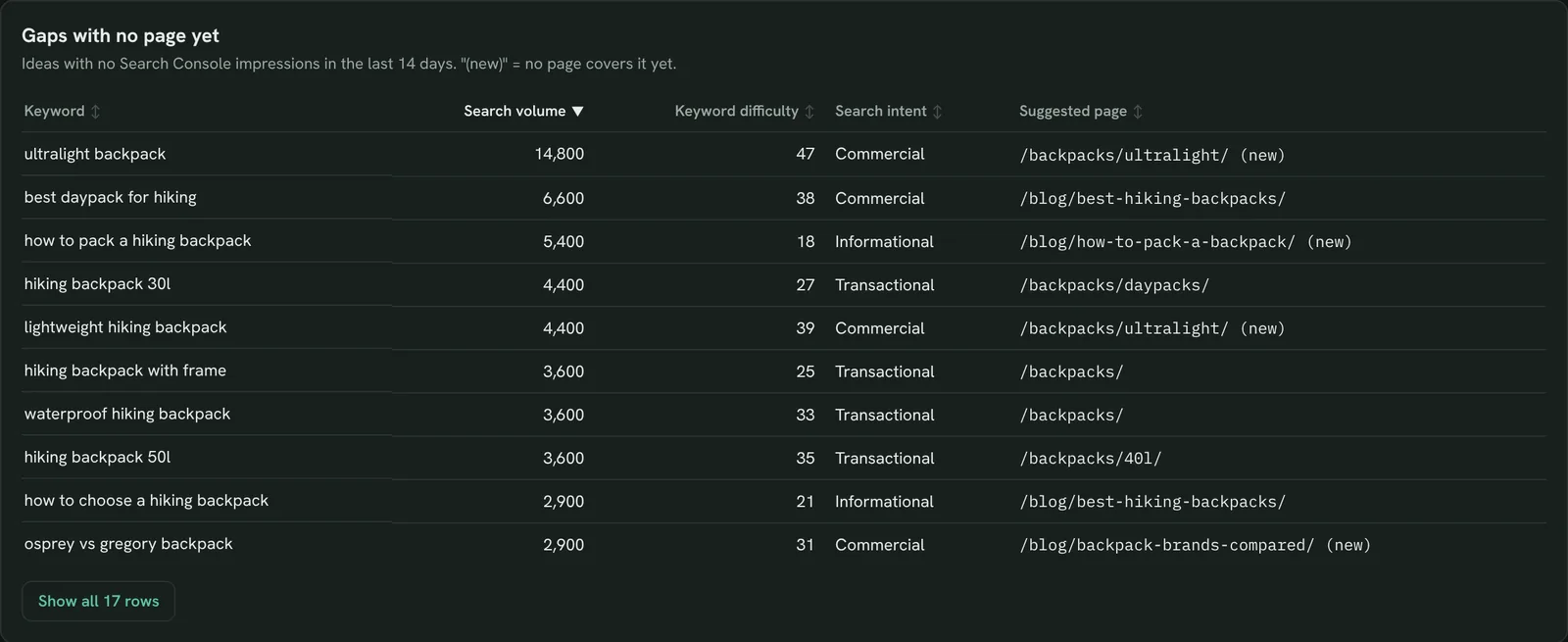
Ideas that match a Search Console query, with your position and page, so you improve before you write new.
- Which ideas already bring impressions?
- Which page ranks for each?
Match the ideas to my Search Console queries for [site] for the last 14 days, with average position, impressions, clicks and page.Also built for this: Keyword ranking dashboard template
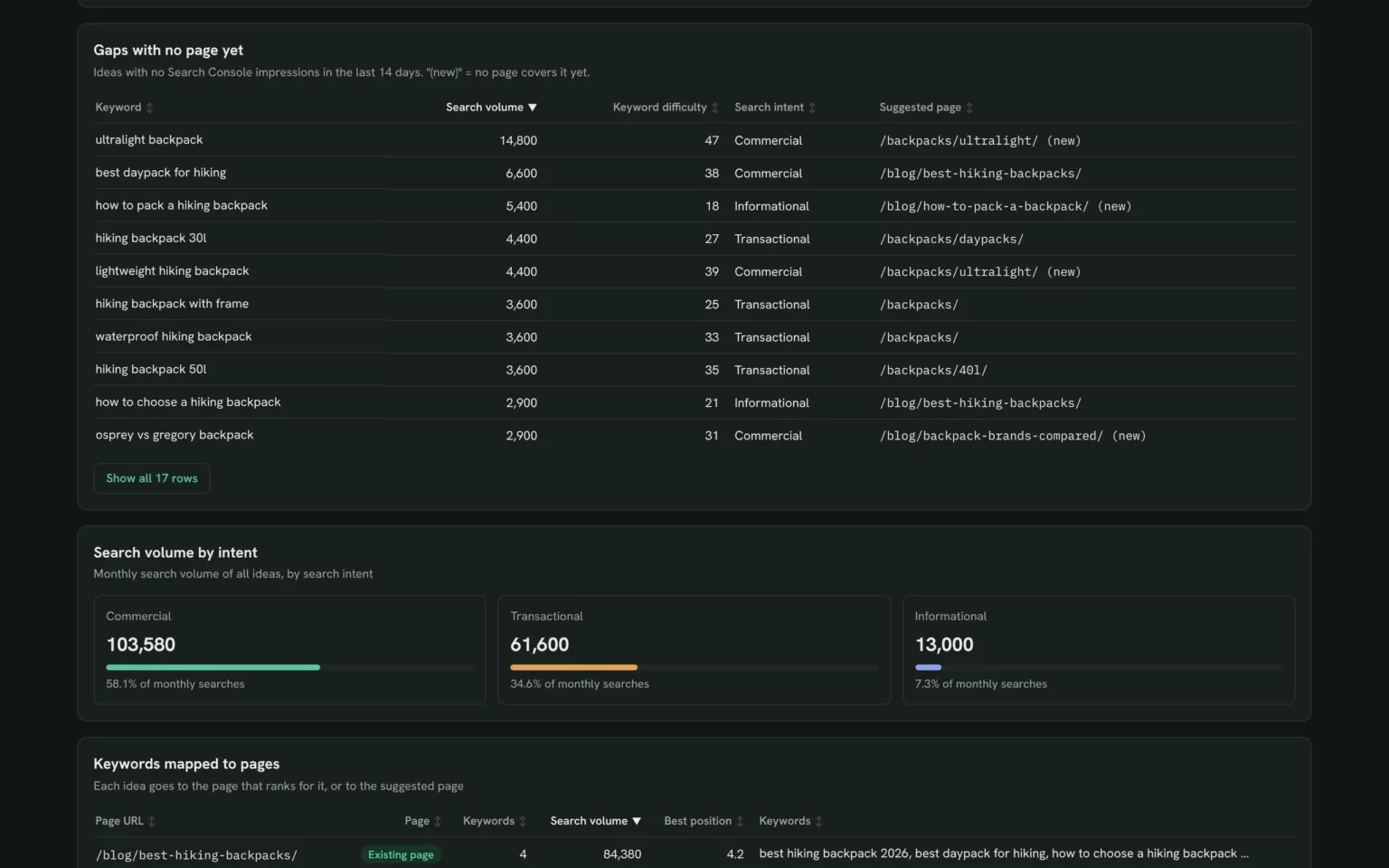
Find gaps with no page yet
Ideas with no impressions on your site, so you see the demand no page covers.
- Which searches do we miss entirely?
- Which gap has the most volume?
List ideas with no Search Console impressions for [site] in the last 14 days, with volume, difficulty and intent.
Group keywords by search intent
Search volume split by commercial, transactional and informational intent, so the plan has the right mix of pages.
- Is demand mostly buying or learning?
- How big is the informational side?
Split the ideas by search intent and show total monthly volume for each.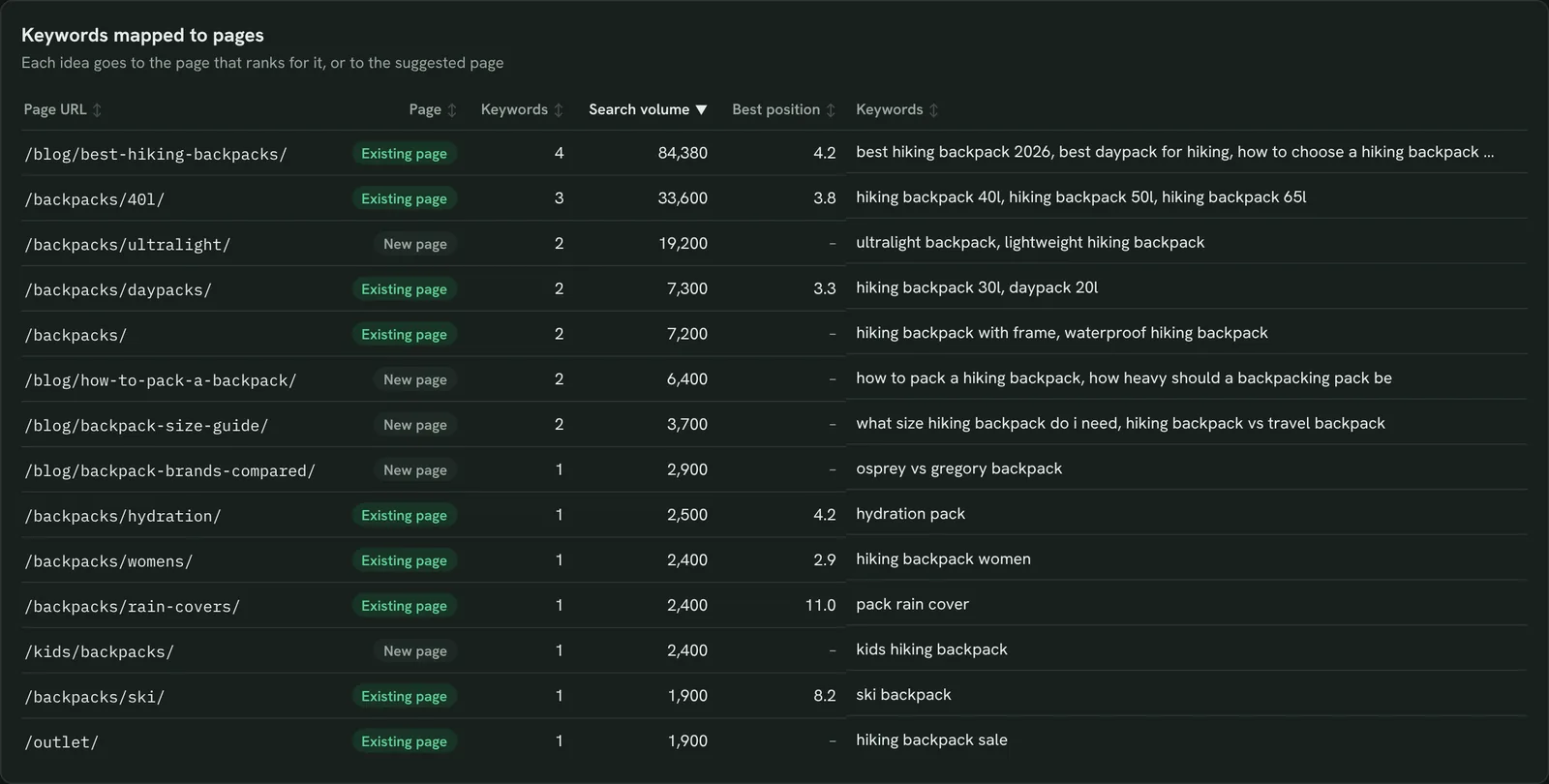
Map keywords to the right page
Each idea assigned to the page that ranks for it or a suggested one, so two pages don’t chase the same search.
- Which page should target each idea?
- Which ideas need a new page?
Assign each idea to the page that ranks for it, or suggest one, and show keywords and volume per page.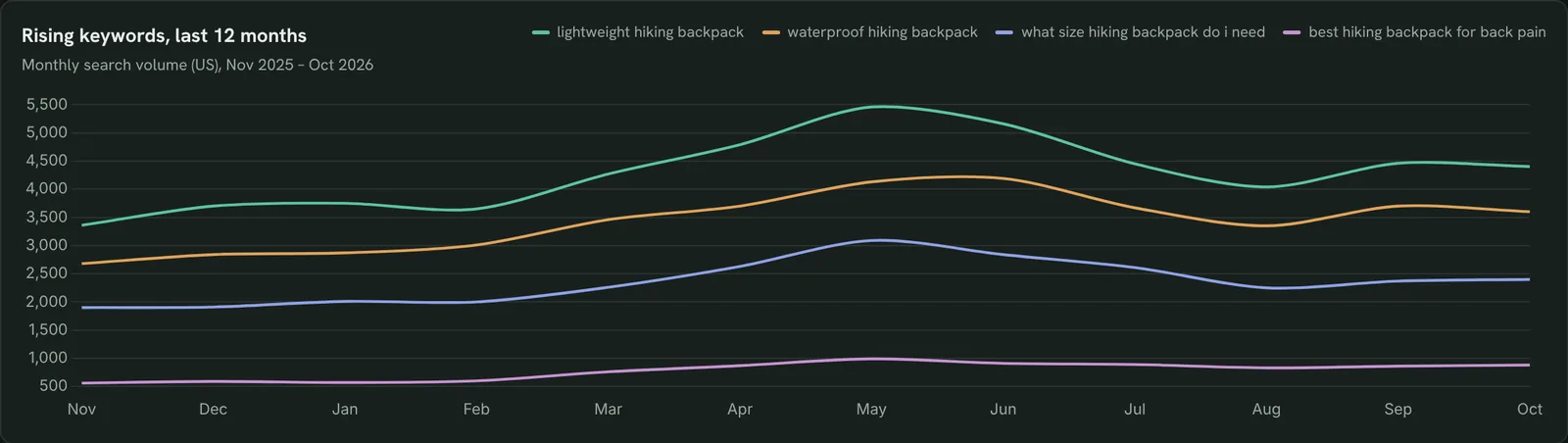
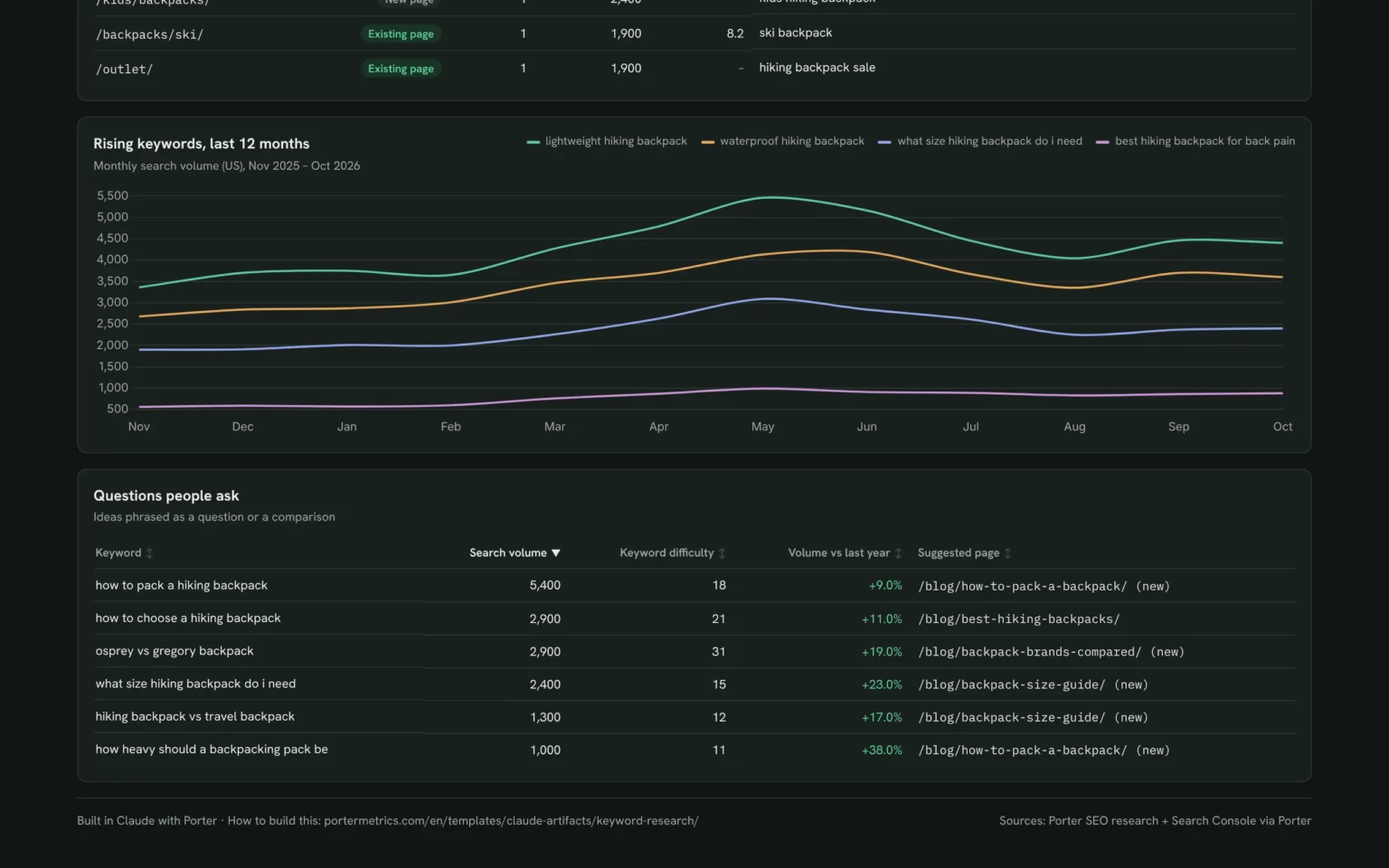
Spot keywords that are rising
Twelve months of search volume for the fastest-growing ideas, so you publish before the peak.
- Which ideas grew most this year?
- When is the seasonal peak?
Chart monthly search volume for the last 12 months for the 4 ideas that grew most year over year.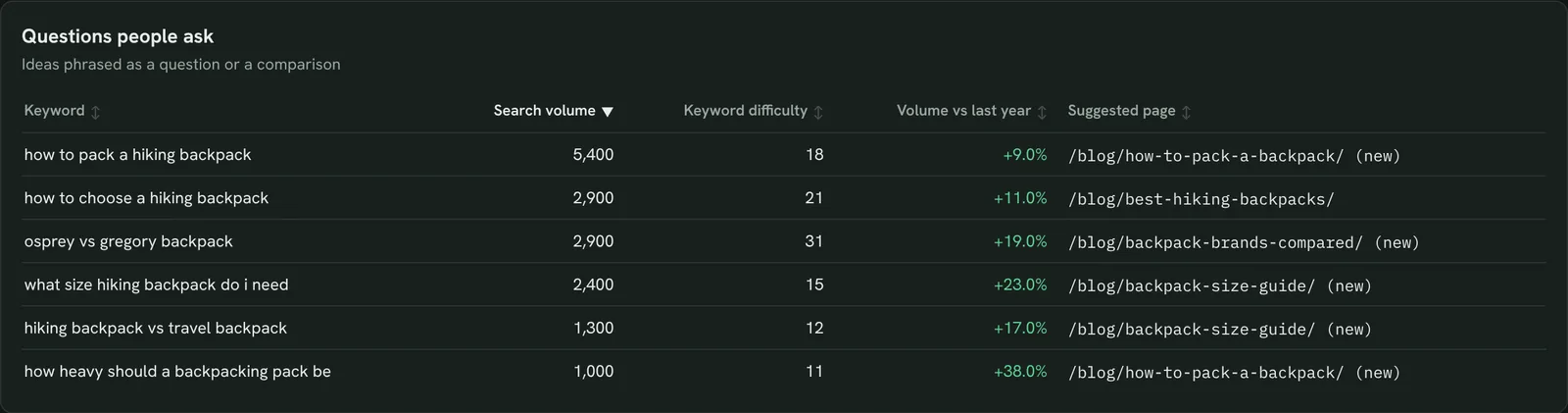
Find the questions people ask
Ideas phrased as questions or comparisons, so you know what guides and FAQs to write.
- What do people ask before they buy?
- Which comparisons do they search?
List ideas that start with how, what, why or contain vs, with volume, difficulty and trend.Also built for this: Google Search Console dashboard template
How to set up the keyword research template in Claude
You need a Search Console property, a free Porter account and Claude Pro, Max, Team or Enterprise for Claude Dashboards. Setup takes about 10 minutes.
Connect Search Console in Porter
Sign up free at Porter, open Data sources, pick Google Search Console and choose your property. Porter SEO research needs no account: it looks up any keyword. The Search Console to Claude tutorial shows each click.
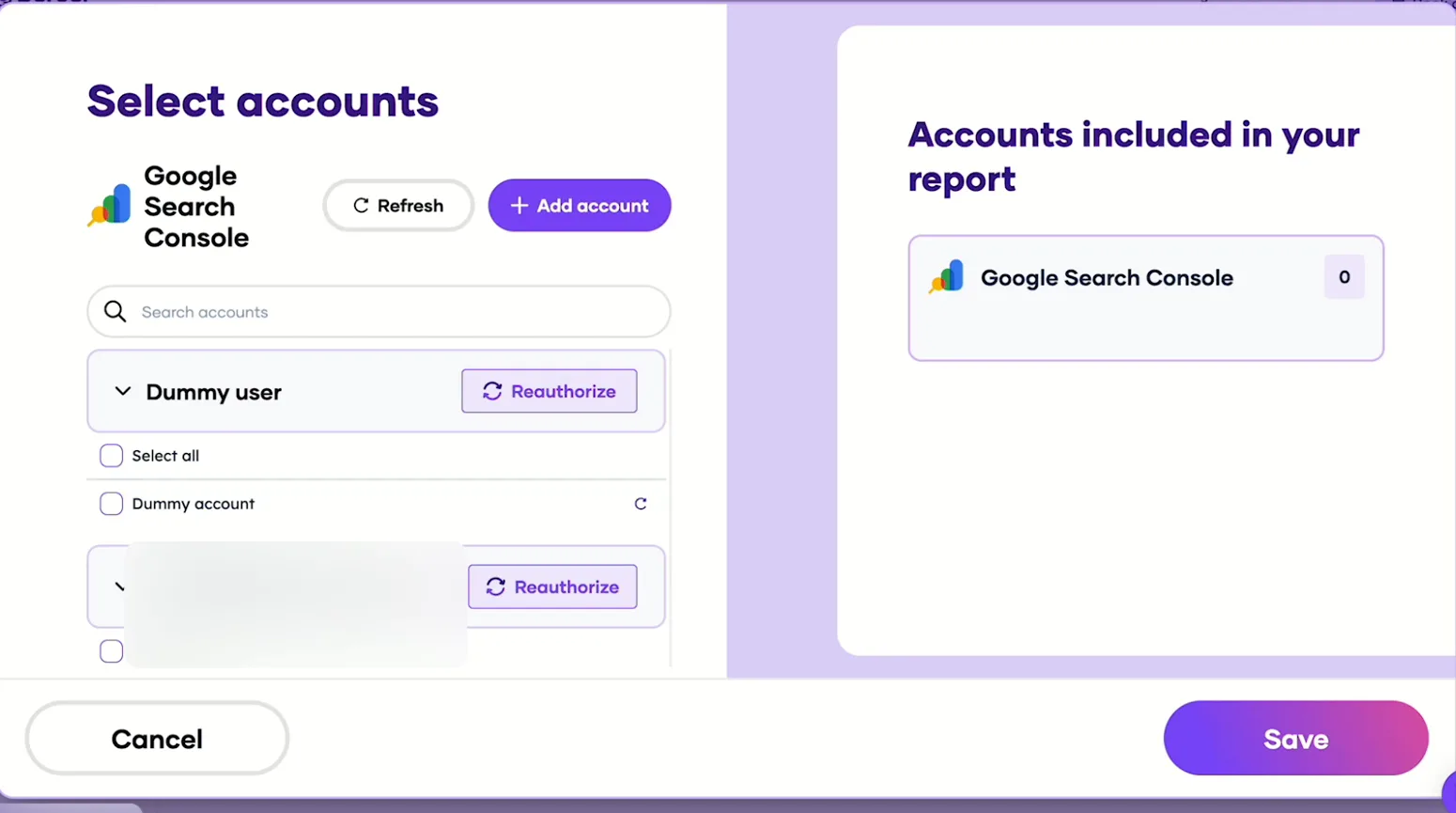
Pick the Search Console sites Claude can read, then save. Add Porter to Claude
In Claude, go to Customize → Connectors → Add custom connector, paste https://mcp.portermetrics.com/mcp and name it Porter Metrics. Click Continue, then sign in to Porter and allow access.
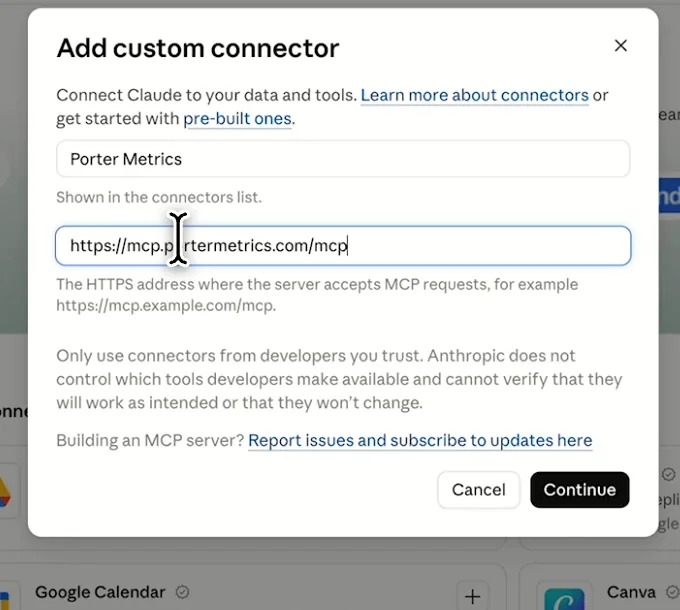
In Claude: Customize, Connectors, Add custom connector, then paste Porter’s MCP URL Paste the install prompt
Open a new chat in Claude, paste this prompt and replace the seed, country and site in brackets. Claude pulls the ideas, matches them to Search Console and builds the template.
Install promptDuplicate this Claude dashboard template and keep its layout, views and styling: https://claude.ai/artifact/ST2FMUPNVopF3rzus3Bi5c Then rebuild it with my own data through Porter. Find keyword ideas for [seed keyword] in [country] with search volume, keyword difficulty, intent, CPC and 12 months of volume, and match them to my Search Console queries for [site] for the last 14 days. Build a dashboard: KPI cards for ideas, total volume, average difficulty, ideas I rank for and gaps; all ideas with my position; ideas with difficulty 30 or less; ideas I rank for with page, impressions and clicks; gaps with no impressions; volume by intent; ideas per page; the 4 fastest-rising ideas by month; and question keywords. Open in Claude with this prompt
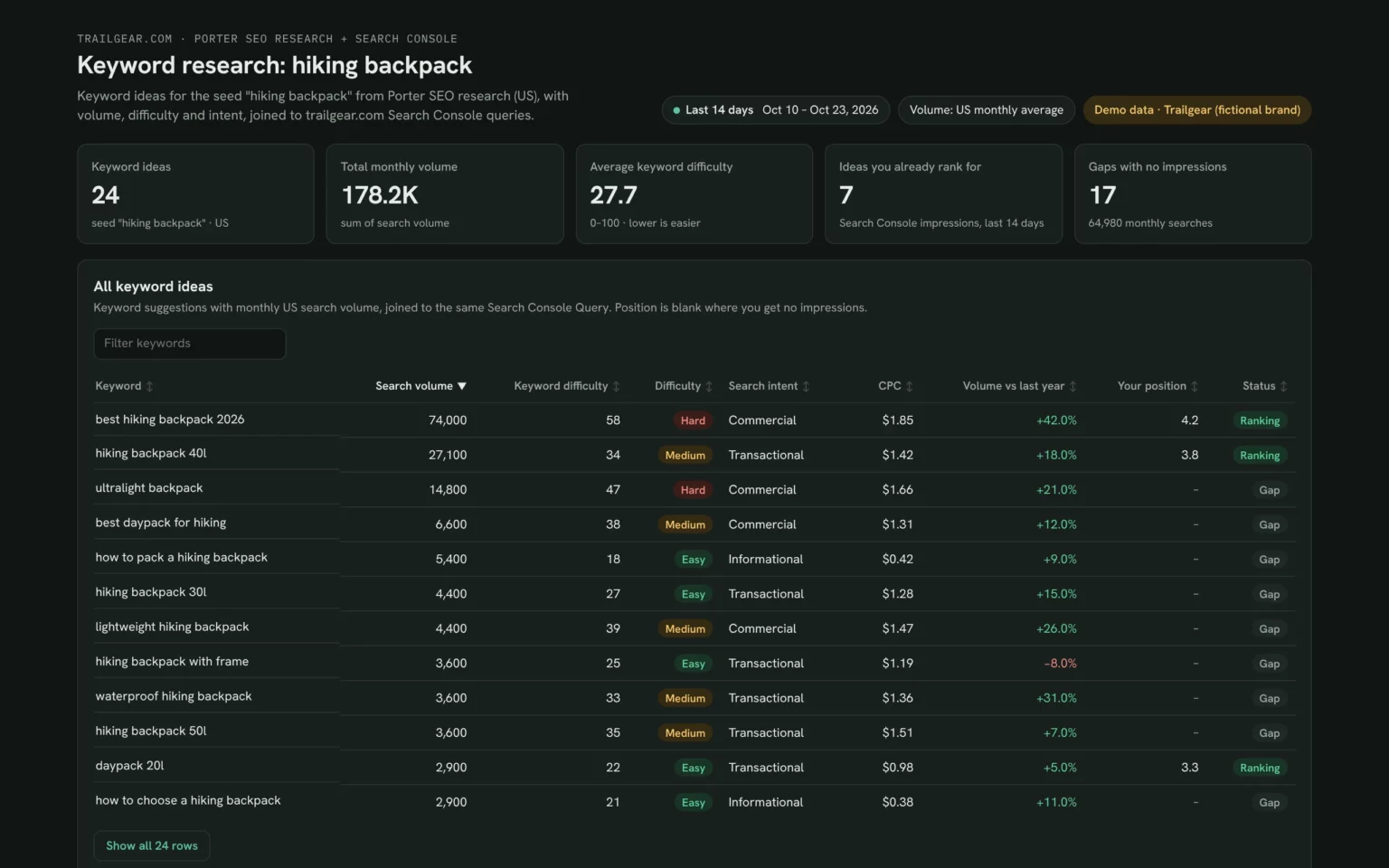
What Claude builds: KPI cards and every idea for your seed keyword and site. Demo data shown.
Build a Google Search Console dashboard with Claude
Keyword research fields and data
The template matches Porter SEO research keyword ideas to Search Console queries on the same text. Porter reads 27 Search Console fields.
Top 5 keyword research KPIs to watch
Trailgear demo data · US volumes, Search Console last 14 days
- Keyword ideas24seed “hiking backpack”
Under 20 ideas means the seed is too narrow; try a broader one.
- Total monthly volume178.2K3 intents
The size of the topic. Compare seeds before you pick a cluster to build.
- Average keyword difficulty27.713 easy ideas
Above 50 on a young site, start with the easy ideas first.
- Ideas you already rank for7of 24 ideas
Pages here can grow with a refresh before you write anything new.
- Gaps with no impressions1764,980 searches
Demand no page covers. The biggest gaps go first on the content plan.
How the numbers are calculated
- Search volume
- Average monthly Google searches in the country you pick.
- Keyword difficulty
- 0–100 estimate of how hard the top 10 is to reach; 30 or less counts as easy.
- Already rank for
- The idea matches a Search Console query with impressions, last 14 days.
- Gap
- No Search Console impressions for that idea in the last 14 days.
- Volume vs last year
- Last month’s volume vs the same month a year earlier.
Data sources
Metrics
 Search volume
- Keyword difficulty
- CPC
- Monthly searches
 Impressions
- Clicks
- Average Position
Dimensions
- Keyword
- Search intent
- Query
- Page URL
See all fields:Google Search Console · 27 fields
What makes this keyword research template different
Keyword research sheets start blank and don’t know your site. This one fills itself and shows where you rank.
Skip the blank spreadsheet
Volume, difficulty and intent come in for every idea.
See your rank beside every idea
Search Console adds your position and page to each row.
Ask for more ideas in the same chat
Try another seed or country and Claude adds the rows.
Recheck volumes any month
Ask Claude to refresh the list; no new export needed.
Share the plan by link
Writers and clients open the same live list, no tool seat needed.
Send clients the plan on your logo
Publish it in Porter and email it on the day you choose.
What the dashboard includes
- KPI cards for ideas, volume and difficulty
- All ideas, easy wins and ideas you rank for
- Gaps, intent split and keyword-to-page map
- Rising keywords and question keywords
Related dashboard templates
 Claude
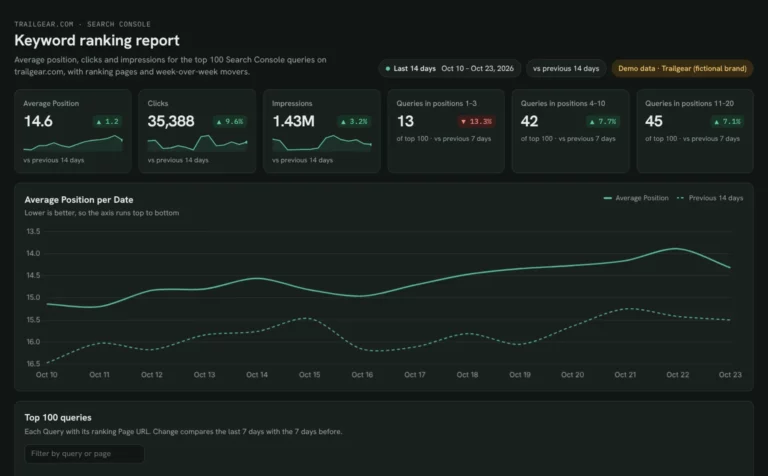
Keyword ranking dashboard template
Track which keywords reach page one and what moved this week.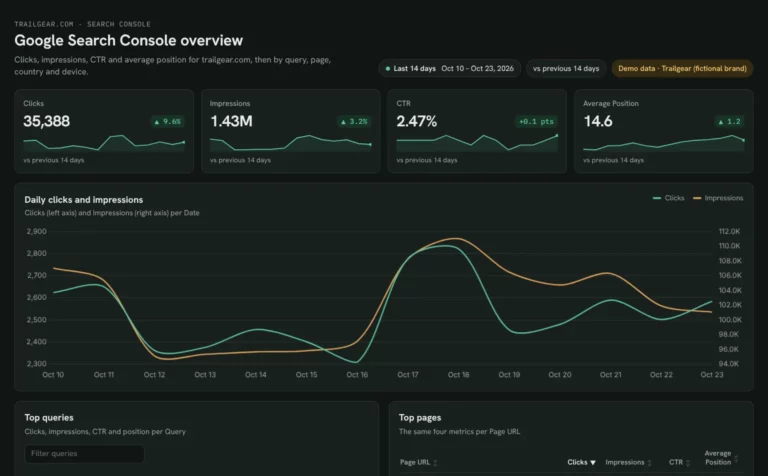 Claude
Google Search Console dashboard template
Find queries close to page one and fix low CTR by page and device.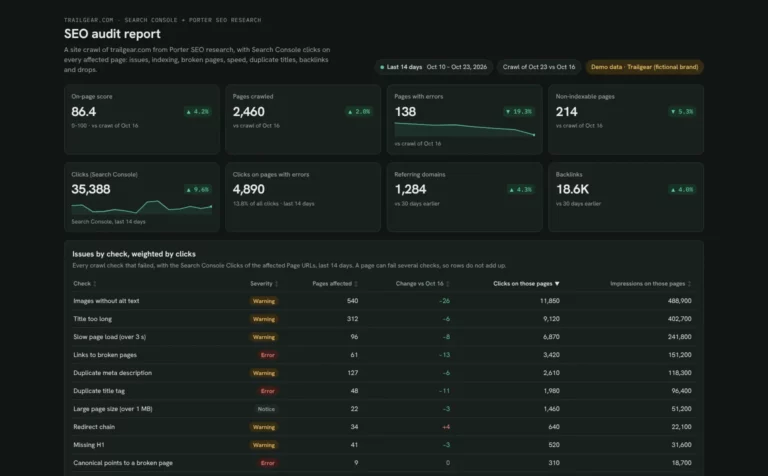 Claude
SEO audit report template
Fix the site issues that cost the most clicks, from broken pages to slow top pages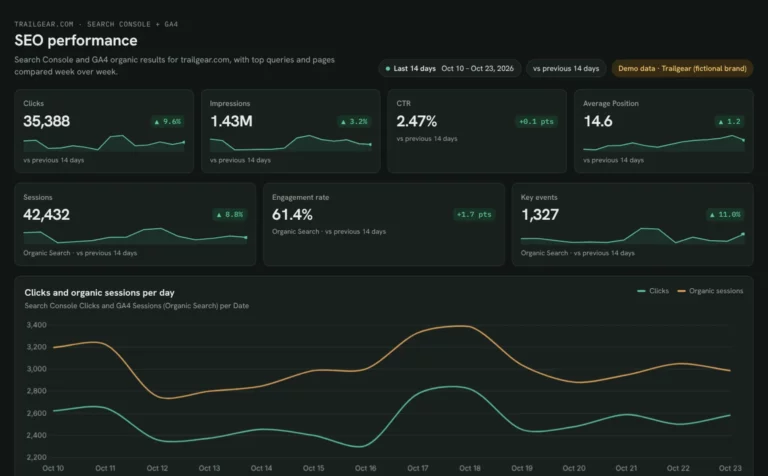 Claude

SEO dashboard template
See which Search Console clicks turn into GA4 sessions and key events.Browse more Claude dashboard templates
By data source
Search ConsoleSEO KPI dashboardSEO monitoring dashboardWeekly SEO reportSEM dashboardWeb analytics dashboard
 Data Studio
 Google Sheets
 ChatGPT
Get your free keyword research template
Sign up free, connect Search Console and paste the prompt with your seed keyword. Your own ideas fill the same layout as the demo.
Free plan · 14-day trial · No card needed