

GA4 (Google Analytics 4) connector for Claude Code

Use Porter’s Google Analytics 4 connector for Claude Code to pull sessions, channels, landing pages and key events into your terminal, then turn them into files, scripts and scheduled reports in your own project.

  • Save GA4 data by channel as CSV in your repo
  • Rank landing pages by sessions and key events
  • Flag unusual days in traffic
  • Run a weekly GA4 report from a script
G2★★★★★Rated 4.6/5 from 288 G2 reviews (October 2026) · Used by 1,600+ marketing teams and agencies

By · Last updated November 26, 2026

Claude Codeporter connected
Show last month’s Sessions and Key events by Session default channel group and save it to reports/ga4-channels.csv
porter / Google Analytics 4 / Trailgear Demo✓ 4 rows
Saved reports/ga4-channels.csv. Organic Search brings the most sessions; Paid Social has the fewest key events per session.
ChannelSessionsKey events
Organic Search42,1801,264
Direct18,930702
Paid Search11,470598
Paid Social9,820141
Demo data, Trailgear Demo account
285 GA4 fields
01Setup

How to connect Google Analytics 4 to Claude Code

Connecting Google Analytics 4 to Claude Code takes 3 steps and no API keys: connect your GA4 properties in Porter with Google, add Porter’s MCP server to Claude Code with one command, then sign in from /mcp and ask. The same server also works in Cursor, VS Code and Codex, as Porter’s Google Analytics 4 MCP server page shows. Using the Claude app instead? See the GA4 (Google Analytics 4) connector for Claude.

Before you start

  • You need Claude Code installed (Anthropic’s Claude Code overview), a free Porter account and a Google account with at least Viewer access to the GA4 property.
  • Works with any Claude model in Claude Code, from Opus to Sonnet and Haiku.
  1. Step 1: Connect Google Analytics 4 in Porter

    Sign up free at Porter, pick Google Analytics 4 as the source and sign in with Google. Tick every property you want Claude Code to read.

  2. Step 2: Add Porter to Claude Code

    In your terminal, run this command. It adds Porter for every project on your machine; drop --scope user to add it to the current project only.

    Terminal
    claude mcp add --transport http --scope user porter https://mcp.portermetrics.com/mcp

    Or, inside Claude Code, install Porter’s plugin, which adds the server and Porter’s skill together: /plugin marketplace add portermetrics/porter, then /plugin install porter-metrics@portermetrics.

  3. Step 3: Sign in and ask

    Start claude, type /mcp, pick porter and sign in with the Google account you use in Porter. When porter shows as connected, paste this prompt:

    Prompt
    Which GA4 properties can you see? For the last 28 days ending two days ago, show Sessions and Key events by Session default channel group and save it to reports/ga4-channels.csv.

Guides and videos

app.portermetrics.com / create
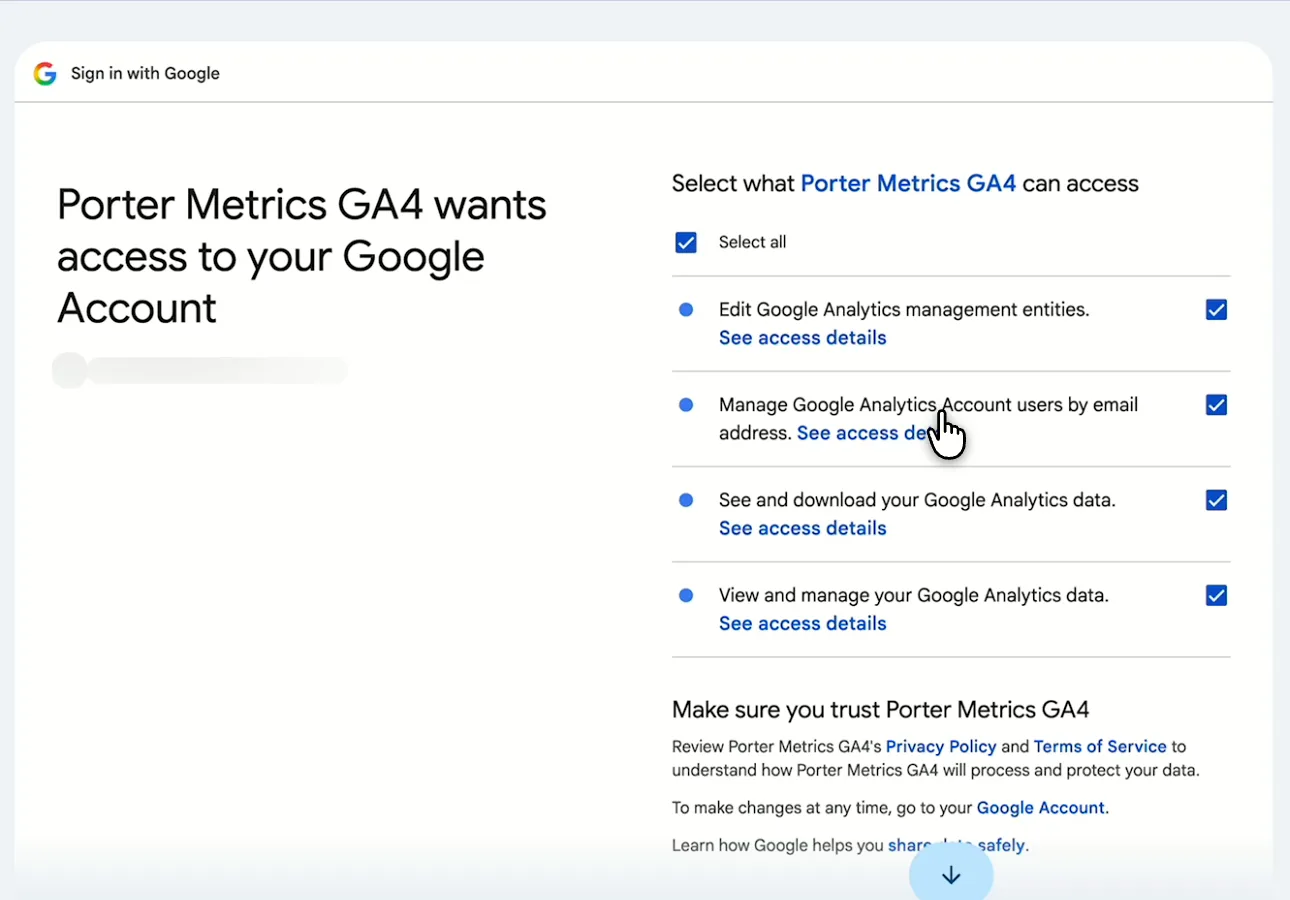
Google screen where you tick the Google Analytics permissions for Porter Metrics GA4
First, sign in with Google and tick the Analytics permissions.
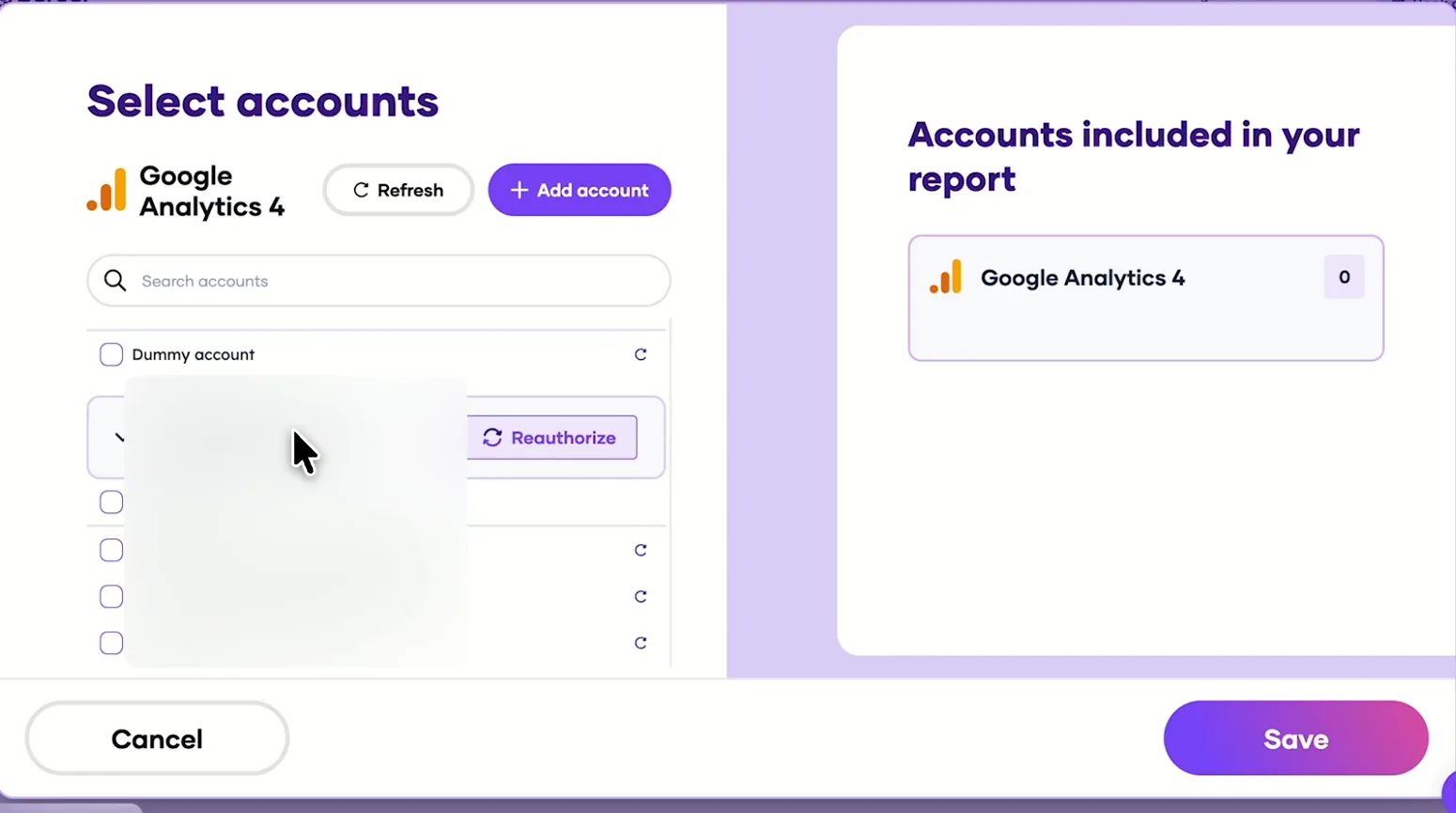
Porter's Select accounts window for Google Analytics 4 with demo properties
Then, pick the GA4 properties Claude can read and save.
$ claude mcp add --transport http --scope user porter https://mcp.portermetrics.com/mcp

$ claude mcp list
porter: https://mcp.portermetrics.com/mcp (HTTP)
Then, add Porter's MCP server from your terminal.
> /mcp
porter · needs authentication → Authenticate

> Which Google Analytics 4 accounts can you see?
● porter - list_accounts (MCP)
Trailgear Demo
After you sign in from /mcp, Claude Code lists your Google Analytics 4 accounts.
02Use cases and prompts

What you can do in Claude Code

Claude Code works inside your project, so Google Analytics 4 answers can become files, scripts and dashboards instead of chat replies. Each use case has a prompt to copy and uses the Google Analytics 4 fields Porter reads.

Can Claude Code export GA4 data?

The problemGA4 explorations are slow to rebuild and awkward to export.

What Claude Code doesClaude Code pulls Sessions, Engaged sessions, Engagement rate and Key events by Session default channel group through Porter and writes them to a CSV.

What you getA clean channel file in your repo, ready for a model or a teammate.

Prompt
For my GA4 property, pull last month’s Sessions, Engaged sessions, Engagement rate and Key events by Session default channel group and save it as data/ga4-channels.csv.
Which landing pages bring the most sessions and key events?

The problemLanding page reports in GA4 mix URL parameters and need cleanup.

What Claude Code doesClaude Code lists the top landing pages by Sessions, groups them by path without parameters and adds Key events.

What you getA landing page ranking you can act on.

Prompt
For my GA4 property, list the top 25 landing pages by Sessions for the last 30 days ending two days ago, grouped by path without URL parameters, with Key events, and save it to reports/ga4-landing.csv.

Can Claude Code spot unusual days in GA4?

The problemA tracking break or a traffic spike can sit unnoticed for weeks.

What Claude Code doesClaude Code pulls daily Sessions, Engaged sessions and Key events and flags days far from the usual range.

What you getA short list of days to check, before they skew a monthly report.

Prompt
For my GA4 property, pull daily Sessions, Engaged sessions and Key events for the last 28 days ending two days ago, flag days more than 2 standard deviations from the mean and save them to reports/ga4-anomalies.csv.

Can I schedule a GA4 report with Claude Code?

The problemBuilding a GA4 exploration for last week versus the week before takes longer than reading it.

What Claude Code doesclaude -p runs on a schedule and compares Sessions, Engaged sessions and Key events by Session default channel group.

What you getreports/ga4-weekly.md showing which channels brought more engaged traffic this week.

Prompt
claude -p "Compare last week with the week before in GA4: Sessions, Engaged sessions and Key events by Session default channel group. Write it to reports/ga4-weekly.md" --allowedTools "mcp__porter" "Write"

Can Claude Code combine GA4 with my ad platforms?

The problemKey events live in GA4 and spend lives in each ad platform.

What Claude Code doesClaude Code pulls Key events by channel from GA4 and spend from your connected ad platforms through the same server, then works out cost per key event.

What you getCost per key event by channel in one file.

Prompt
For the last 30 days, pull GA4 Key events by Session default channel group and spend from every ad platform I connected, and write cost per key event by channel to reports/ga4-cost.csv.
03Why Porter

Why Porter for Google Analytics 4 in Claude Code

Google offers its own Analytics MCP server, which runs on your machine and needs a Google Cloud project and credentials first. Porter needs only a Google sign-in and puts GA4 next to Search Console, your ad platforms and 30+ other sources behind the same server.

✓

One server for all your sources

The same porter server answers about GA4, Meta Ads, Google Ads, GA4 and Shopify, so one script can pull every channel.

⊞

Every property in one place

Porter reads every GA4 property your Google user can see, so one prompt can compare sites or clients.

⚙

No Cloud project or credentials

You sign in with Google in Porter and in Claude Code. There is no Google Cloud project, service account or local server to maintain.

↻

Hosted dashboards when a file isn’t enough

Ask for a Porter AI dashboard and it is published at its own link, synced automatically and ready to share with a client.

04Dashboard

Dashboard template

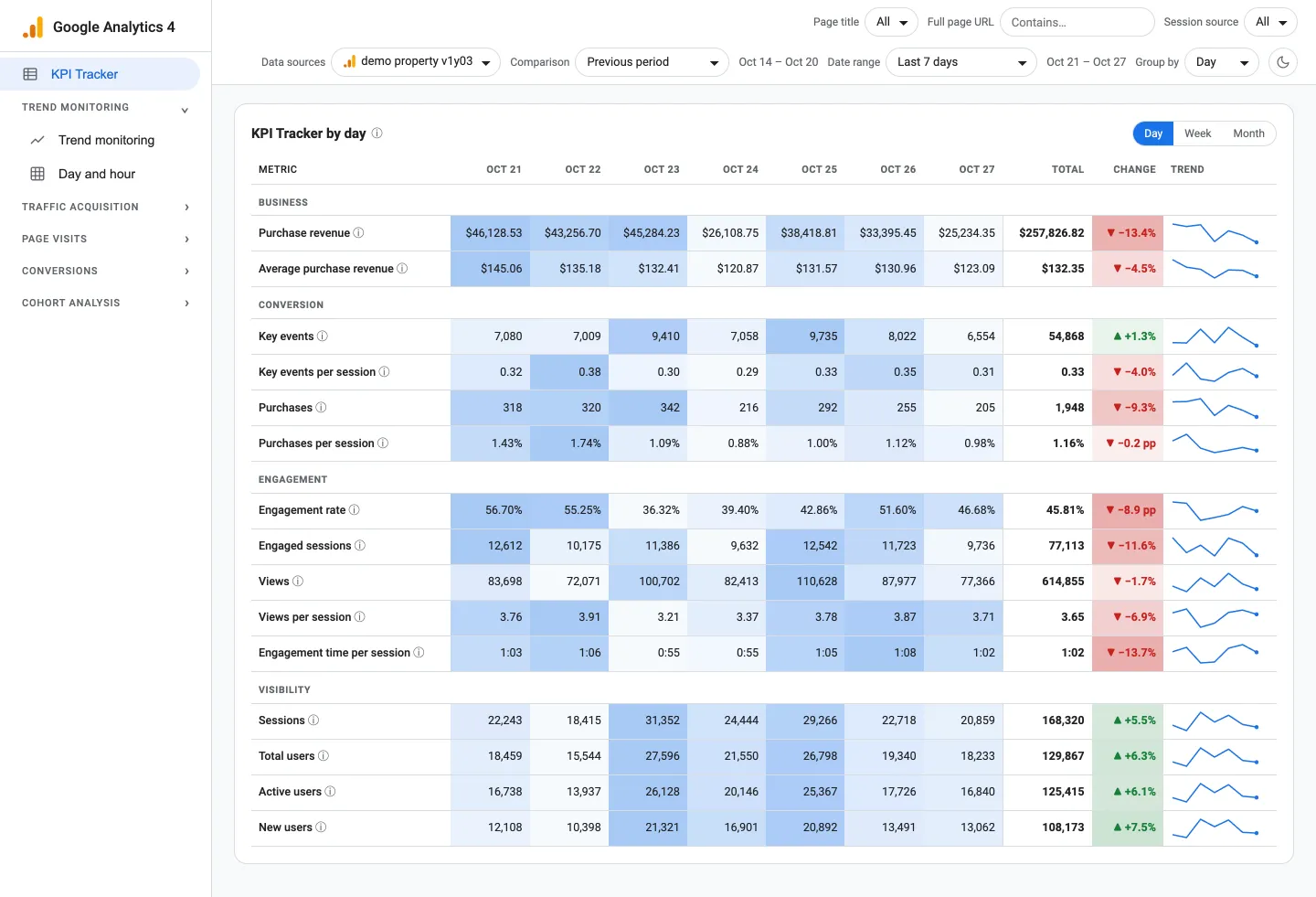
Porter’s free GA4 dashboard template shows sessions, users and engagement as well as channels and key events in one view. Claude can also build the same view live from your property. Either ask for it in chat, or copy a template for a shared Data Studio report your team opens every week.

AI dashboards

Build a live Google Analytics 4 dashboard from your terminal

Describe the dashboard in one sentence and Porter builds it. A client-ready dashboard in minutes, with no chart dragging and no BI tool to learn. Ask Claude Code:

Prompt
Build a live Google Analytics 4 dashboard for my account with the last 30 days, the main KPIs and a weekly trend.
Live URLEach dashboard at its own link: no login, no app, no download
Auto-syncFresh Google Analytics 4 data, nobody re-exports each period
Scheduled deliveryEmail or PDF sends on a set day
White labelYour logo and branding for clients
Sharing permissionsView or edit access per person
Google Analytics 4 dashboard template by Porter
Template

The Google Analytics 4 AI dashboard template

Start from a ready-made GA4 (Google Analytics 4) layout, or run the prompt above in Claude Code and Porter publishes the dashboard at its own link.

05Pricing

Pricing

You can start free, since Porter’s Google Analytics 4 connector for Claude comes with every plan. Use the calculator for your number of accounts, or see Porter pricing for every plan.

Free plan

$0, and it never expiresUnlimited connected accounts, the last 15 days of data in Claude (30 in Data Studio and Sheets) and 100 AI credits a month.

Start free

What you get

  • Reporting: from $12.50 per account a month billed annually, or $15 month to month for one account
  • Billing: each GA4 property counts as one account, with volume discounts and no per-seat fee
  • Changes: 1 AI credit per completed change; failed tasks are free, and the Free plan includes 100 credits a month
  • Trial: 14 days of full access, no card

Price calculator

$33.33/mo$6.67 per account

An account is one ad account, Stripe account, store, page or GA4 property. The Free plan never expires and has unlimited accounts, with the last 15 days of data in AI chats.

06Data and actions

Google Analytics 4 data and actions in Claude Code

The Google Analytics 4 connector gives Claude 285 fields (86 metrics, 199 dimensions), as well as your property's custom dimensions and metrics. It also gets 32 actions to read reports and manage settings. Fields include sessions, users, engagement and events, as well as traffic sources, pages, ecommerce, technology and geography. The full list of GA4 fields has every label and ID.

GA4 renamed conversions to key events in 2024 (GA4 Data API changelog), so ask Claude for key events.

The 12 Google Analytics fields Claude uses most

FieldWhat it's for
SessionssessionsVolume of visits
Total users · New userstotalUsers · newUsersAudience size; ask for period totals, never add up days
Engagement rate · Engaged sessionsengagementRate · engagedSessionsQuality of visits (rate returns as a fraction)
Key eventskeyEventsGoal completions you mark in GA4
Session default channel groupsessionDefaultChannelGroupOrganic Search, Paid Search, Direct, Referral and more
Session source / mediumsessionSourceMediumFor example google / organic or chatgpt.com / referral
Landing page + query stringlandingPagePlusQueryStringFirst page of a session
Page path · Page titlepagePath · pageTitleContent performance
Event name · Event counteventName · eventCountTracking audits
Average session durationaverageSessionDurationTime on site, in seconds
Purchase revenue · Ecommerce purchasespurchaseRevenue · ecommercePurchasesStore results; needs ecommerce tracking
Device category · CountrydeviceCategory · countrySegments by device and location

Can Claude change Google Analytics settings?

Yes. Claude can mark an event as a key event or change how it counts, as well as create custom dimensions, custom metrics and audiences. It can also create, rename or delete data streams, and create or update properties. It can link or unlink Google Ads accounts, as well as add, change or remove user access.

Reading reports never changes your property. Tags, events and collected data stay in GA4 Admin and Google Tag Manager, where you edit them as usual.

How fresh is Google Analytics data in Claude?

Porter queries GA4 live, so Claude sees today's partial data. GA4 keeps processing recent days, so the newest numbers can still move. Standard reports also go back to your property's first data. The free plan reads the last 15 days in Claude (30 days in Data Studio and Sheets), while paid plans have no cap.

Product stats

WhatGoogle Analytics 4 connector
Fields285 (86 metrics, 199 dimensions), plus your custom dimensions and metrics
Actions32, to read reports and manage property settings
FreshnessLive query to GA4, today's partial data included
HistoryBack to your property's first data on paid plans; the last 15 days in Claude on the Free plan (30 days in Data Studio and Sheets)
Data retentionGA4's 2- or 14-month retention cuts explorations; Porter reads standard reports, which it doesn't cut
Quota200,000 core tokens a day and 40,000 an hour per standard property; most requests cost 10 or fewer
Question sizeUp to 9 dimensions and 12 metrics per question
AccessGoogle OAuth; Viewer role to read, Editor role to change settings

See all 285 Google Analytics 4 fields

07Security

Is it safe?

Yes. Reading data through Porter's Google Analytics 4 connector for Claude Code never changes your property, since only a confirmed change does. For any change, Claude shows what it will do and asks before Porter makes it. Porter uses the Google access you grant at sign-in, so it only sees the properties your account can open.

How changes get approved

Some changes are permanent, so Claude asks before each one. Deleting a data stream breaks every tag that sends to its measurement ID, while removing a key event stops it counting.

Removing a user or unlinking Google Ads is also permanent, while a deleted property goes to GA4's trash first. Each completed change also uses one AI credit.

What the connector needs from Google Analytics

Porter signs in with your Google account through Google OAuth. Reports need at least the Viewer role on the property, and changing settings needs the Editor role (Google Analytics roles and permissions). If you skip the access box at sign-in, the property won't appear. In that case, reconnect in Porter and tick it.

Will Claude use up your Google Analytics API quota?

Rarely. Google gives a standard property 200,000 core tokens a day and 40,000 an hour, while most requests cost 10 tokens or fewer (GA4 Data API limits and quotas). However, long ranges and many dimensions cost more.

Questions with age, gender or audiences are capped at 120 an hour per property, while Analytics 360 gets ten times the token quota.

08FAQ

FAQ

Answers on setup, scope, scripts and credits, plus fixes for the most common Claude Code errors with Google Analytics 4. Setup questions every source shares, like where Claude Code saves the server and how to share it with your team, are in the Claude Code hub FAQ.

Can the GA4 report include ad spend?

Yes. Connect Google Ads or Meta Ads in Porter and ask for spend next to Sessions by channel. Claude Code writes both to one file, so cost and traffic sit side by side.

Why do prompts end two days ago?

GA4 can take up to two days to finish processing, so prompts on this page end two days ago to compare complete days.

Do Claude Code questions use Porter credits?

Reading GA4 data uses no AI credits, so questions and reports on this page are free on every plan.

Troubleshooting

Why does /mcp show porter as needing authentication?

Claude Code adds the server before you sign in. Pick porter in /mcp, choose Authenticate and sign in with the Google account you use in Porter.

Why does my claude -p script stop and ask for permission?

Scripts can’t answer permission prompts. Pass the tools the script may use, for example --allowedTools "mcp__porter" "Write", so Claude Code can read Porter and save files without stopping.

Why does Claude Code see my property but return no data?

Usually the Google user lacks access to that property, or the date range starts before the property collected data. Check access in GA4 under Admin, then Property access management.

09Next

More Claude connectors

Porter connects GA4 to more than Claude, and Claude to more than GA4. Each page below lists the fields, prompts and limits for that source or destination. Either add your next source to the same chat, or send GA4 to a warehouse. To tie GA4 sessions to email and CRM results, add the Klaviyo MCP connector for Claude or the HubSpot MCP connector for Claude.

Not only Claude. Send Google Analytics 4 data anywhere

The same Porter account and connection also send Google Analytics 4 data to these destinations, at no extra cost.

Try the connector in Claude Code

Porter’s GA4 connector for Claude Code takes one command, so your first channel file can land in your project today. Start with a CSV, then rank landing pages or schedule a weekly script.

Free plan · 14-day trial · No card needed

Marketing analysts: GA4 data lands in your repo as clean files, ready for your own models.

SEO specialists: landing pages and Search Console join in one table.

Agencies: one script builds the weekly report for every client property.