



 Google Sheets
→
Google Sheets
→
 Anthropic Claude
Conector de GOOGLE SHEETS a Claude (MCP)
Envía datos de marketing en tiempo real de Google Sheets a Anthropic Claude para que pueda leer, analizar y escribir respuestas de vuelta en tus hojas de cálculo compartidas.
- +500 campos de Google Sheets más métricas calculadas: cada dimensión y desglose que reporta Google Sheets.
- Tus datos de Google Sheets ya están en Porter: sin nuevos conectores, sin exportaciones CSV, sin pipelines duplicados que mantener.
- Cruza el gasto de campañas de Google Sheets con los ingresos de Google Analytics 4 para calcular el ROAS combinado real sin fusiones manuales.
Plan gratuito para siempre · Prueba completa de 14 días · Sin tarjeta de crédito

Confiado por más de 1,600 marketers y agencias en más de 60 países









Cómo conectar Google Sheets a Claude
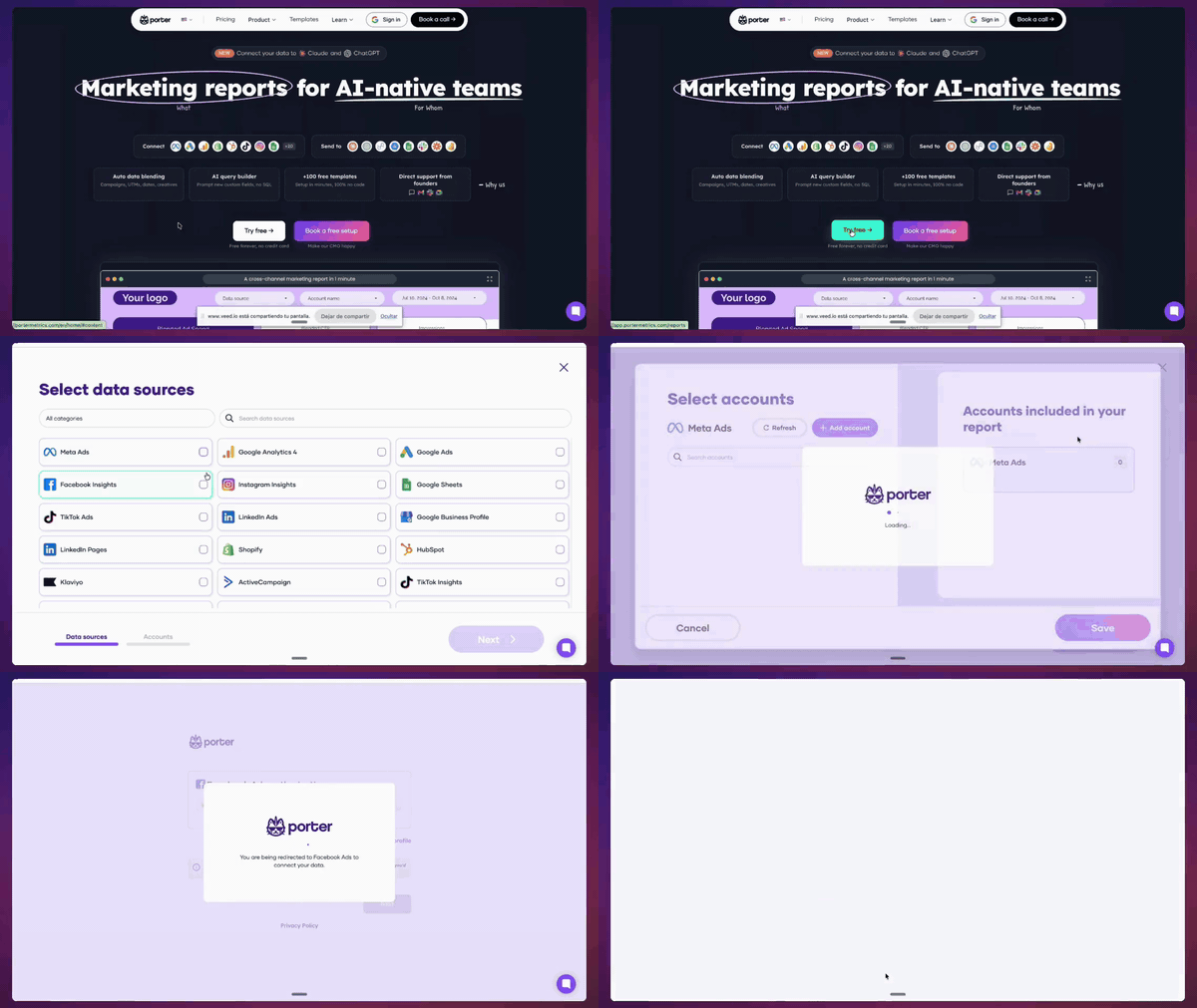
-
Conecta Google Sheets a Porter
Inicia sesión en Porter con tu cuenta de Google Sheets y otorga acceso de solo lectura. Toma 2 minutos — sin ingeniería, sin exportaciones.
-
Elige tu cuenta
Selecciona una o mezcla múltiples hojas de cálculo en una sola fuente de datos — útil para agencias que gestionan varios clientes.
-
Añade Porter MCP a Claude
En Claude, pega la URL
https://mcp.portermetrics.com/mcpcomo un conector personalizado. Sin JSON-RPC, sin servidores locales. -
Autoriza a Claude a leer Porter
Un clic. Claude ahora tiene acceso de solo lectura a tus datos de Google Sheets a través de Porter — mismo alcance que tu cuenta de Porter.
-
Pregunta a Claude en lenguaje natural
“Abre mi Google Sheets y lista Campaign Name, Spend, Conversions y Cost per Conversion ordenados por el Spend más alto de este mes.” Claude devuelve una tabla filtrada en segundos.
+500 campos de Google Sheets, listos para Anthropic Claude
Cada campo en Google Sheets Manager — más métricas calculadas, cada ventana de atribución y URLs de vista previa creativa — accesibles para Claude bajo demanda.
Todos los campos nativos (y más)
500 campos en total — cada campo nativo de Google Sheets más métricas calculadas que no se ofrecen de forma nativa.
Cada desglose
Segmenta por cada dimensión que reporta Google Sheets — fecha, hora, fuente, geografía, dispositivo y más.
Datos enriquecidos — más allá de las métricas brutas
URLs, IDs, valores brutos y metadatos — Claude puede razonar sobre rendimiento más contexto en la misma respuesta.
Nombres amigables para marketers
Campos nombrados exactamente como en Google Sheets (p. ej. “Costo” no cost_micros). Claude los entiende de forma nativa.
Granularidad completa
Hora, día, semana, mes, año — más cada dimensión que reporta Google Sheets.
Mezcla cross-canal
Mismo estándar de nomenclatura de campos en todos los conectores de Porter — Claude puede unir Google Sheets con GA4, BigQuery u otras fuentes en un solo prompt.
Prompts listos para copiar y pegar de Google Sheets × Claude
Añade Porter MCP a Claude (pega https://mcp.portermetrics.com/mcp), abre una nueva conversación y pega cualquier prompt de abajo.
Budget Pacing Tracker
Open the 'Budget Tracker' tab in my Google Sheet. For each Campaign Name, compare total Spend in the last 30 days against the Monthly Budget column. Flag any campaign projected to exceed 100% of budget before month-end, and list them in order of urgency with current Cost per Conversion. Output as a ranked table with columns: Campaign Name, Spend MTD, Budget Remaining, Days Left, Projected Overspend %.Cross-Channel ROAS Comparison
In the 'Cross-Channel Summary' tab, filter data from the last 30 days. Group by channel (Meta, Google, LinkedIn) using Campaign Name prefixes. Calculate total Spend, total Conversions, and average Cost per Conversion for each channel. Write a 3-bullet summary of which channel has the best return and which needs attention, then output a comparison table with Channel, Spend, Conversions, CPA, and a ROAS score.Weekly Client Performance Summary
Using the last 7 days of data in the 'Performance' tab, write a short client update paragraph that mentions total Impressions, total Clicks, average CTR, and total Conversions. Identify the top-performing Campaign Name by Conversions and one metric that dropped week-over-week. Keep it under 100 words, formatted for copy-paste into a client email or Slack message.Creative Fatigue Detector
In the 'Creative Performance' tab, group rows by Campaign Name for the last 14 days. For each campaign, calculate CTR (Clicks / Impressions) and Cost per Conversion for Week 1 (days 1-7) versus Week 2 (days 8-14). Flag any campaign where CTR dropped more than 20% week-over-week or Cost per Conversion rose more than 25%. Output a table with Campaign Name, Week 1 CTR, Week 2 CTR, CTR Change %, Week 1 CPA, Week 2 CPA, and a fatigue alert flag.Attribution Comparison by Campaign
In the 'Attribution' tab, compare the last 30 days of data. For each Campaign Name, calculate total Spend, total Conversions, and Cost per Conversion. Then compare these numbers against the same campaign's data from the previous 30-day period. Flag campaigns where Conversions dropped more than 15% while Spend stayed flat or increased. Output a ranked list with Campaign Name, Period 1 Conversions, Period 2 Conversions, Change %, Spend Change %, and a recommended action.Multi-Account Agency Rollup
In the 'Agency Rollup' tab, filter the last 7 days. Group rows by client using the first segment of Campaign Name (e.g., 'ClientA_'). For each client, calculate total Spend, total Impressions, total Clicks, total Conversions, and CPC (Spend / Clicks). Compute CTR (Clicks / Impressions) for each client. Output a client scorecard table with Client, Spend, Impressions, Clicks, CTR, CPC, Conversions, and a status flag (green/yellow/red) based on whether Conversions met the prior week's average.Daily Anomaly Detection
In the 'Daily Metrics' tab, look at the last 30 days of data. For each Campaign Name, calculate the trailing 7-day average for Spend, Cost per Conversion, and Conversions. Compare yesterday's values against these averages. Highlight any campaign where Spend moved more than 20% up or down, Cost per Conversion moved more than 20%, or Conversions changed more than 25%. Output a ranked alert table with Campaign Name, Metric, Yesterday Value, 7-Day Average, Change %, and a suggested cause.Automated Budget Alert Trigger
In the 'Budget Tracker' tab, evaluate the last 7 days of Spend per Campaign Name. For each campaign, calculate the daily run rate and project it forward to month-end. Compare projected total Spend against the Monthly Budget. Create an alert list of campaigns projected to exceed 90% of budget within 5 days or 100% within 10 days. Include current Cost per Conversion and flag whether the campaign is accelerating or decelerating spend. Output as a priority-ranked table with Campaign Name, Projected Month-End Spend, Budget, Days Until 90%, and Alert Level.Audience Overlap Scanner
In the 'Audience Analysis' tab, filter the last 14 days. Group Campaign Names by audience segment (use the second segment of the name, e.g., 'Segment_Retargeting'). For each segment, calculate total Impressions, total Clicks, CTR, and total Conversions. Identify segments that appear in multiple campaigns with high overlap (similar Impressions and Clicks across campaigns). Flag segments where CTR differs by more than 30% between campaigns. Output an overlap matrix with Segment, Campaign A, Campaign B, Impressions A, Impressions B, CTR A, CTR B, and Overlap Risk.Video Drop-Off Analysis
In the 'Video Performance' tab, filter the last 30 days for campaigns with 'Video' in the Campaign Name. Calculate total Impressions, Clicks, CTR, and Conversions for each video campaign. Compare Week 1 (days 1-7) versus Week 4 (days 22-30) performance. Flag video campaigns where Impressions stayed flat or grew but CTR dropped more than 20% or Conversions dropped more than 25% over the month. Output a drop-off report with Campaign Name, Week 1 Impressions, Week 4 Impressions, Week 1 CTR, Week 4 CTR, Week 1 Conversions, Week 4 Conversions, Drop-Off Flag, and a recommended next step.Seguridad de MCP de Google Sheets
Porter se autentica en Google Sheets con el alcance de solo lectura que ya aprobaste para tus reportes. Anthropic Claude consulta Porter — no Google Sheets directamente — por lo que cada conversación tiene limitación de tasa y se almacena en caché del lado de Porter. Sin nuevos permisos, sin riesgo de bloqueo.
- Alcance OAuth: solo lectura. Porter nunca solicita permisos de escritura en tu cuenta de Google Sheets.
- Las herramientas MCP son de solo lectura. Los 6 métodos que Claude puede llamar solo obtienen datos — sin ediciones de campañas, sin cambios de presupuesto.
- Consciente de los límites de tasa. Porter almacena en caché las respuestas de la API con retroceso exponencial (1s → 2s → 4s → 8s) para respetar los límites de Google Sheets.
- Barreras de cuota por cuenta. Porter pausa las consultas antes de alcanzar el 80% de las cuotas horarias de Google Sheets.
- TLS 1.3 en tránsito, cifrado en reposo. Tokens almacenados en bóveda cifrada, cumplimiento GDPR.
- Revocable en un clic. Desconecta desde el panel de Porter o elimina el conector MCP en cualquier momento.
- Herramientas auditadas. El MCP expone 6 métodos de solo lectura:
get_blend_id,list_accounts,list_categories,list_data_sources,list_fields,query_data.
Cumplimiento GDPR · Más de 1,600 marketers confían en Porter con sus datos de Google Sheets.
Empieza gratis. Paga por cuenta de fuente de datos
- +500 campos de Google SheetsCada campo nativo más métricas calculadas: accesibles para Claude en lenguaje natural.
- Todas las ventanas de atribuciónCompara 1d-click, 7d-click, 28d-click y 1d_click+1d_view lado a lado desde una sola conexión.
- Mismo plan, cada destinoEnvía a Anthropic Claude, ChatGPT, Looker Studio, Google Sheets, BigQuery y Slack — una sola suscripción.
- Usuarios ilimitadosSin costo extra por miembro del equipo o asiento.
Número de hojas de cálculo de Google Sheets
Facturado anualmente · $12.5/cuenta






Prueba gratuita ilimitada de 14 días + Plan gratuito para siempre
Otros conectores y destinos
Porter soporta más de 15 fuentes de datos y más de 10 destinos. Mezcla y combina en una sola suscripción — sin asientos extra ni tarifas ocultas por destino.






Preguntas sobre Google Sheets + Anthropic Claude
¿Qué es MCP y cómo conecta Google Sheets a Claude?
¿Necesito habilidades técnicas o programación para configurar esto?
¿Conectar mi cuenta de Google Sheets hará que sea bloqueada?
¿Puedo crear o editar campañas desde Claude, o es esto de solo lectura?
Ya uso Porter para reportes de Google Sheets — ¿necesito reconectar?
¿Cuánto cuesta la integración MCP de Google Sheets?
Chatea con tus datos de Google Sheets en Claude
Tus datos de Google Sheets ya viven en Porter. Habilita MCP y empieza a preguntarle a Claude sobre campañas, creatividades y ROAS — sin nuevas integraciones, sin tokens, sin servidores. Obtén acceso conversacional en vivo a todos los 500 campos de Google Sheets incluyendo vistas previas creativas, cada ventana de atribución y mezclas multi-cuenta.
Plan gratuito para siempre · Prueba completa de 14 días · Sin tarjeta de crédito