





Trusted by 1,600+ marketing teams and agencies


What you can do with this Microsoft Ads dashboard
Seven jobs this dashboard does. Click one to see its view on demo data, then paste its prompt into the same Claude chat.
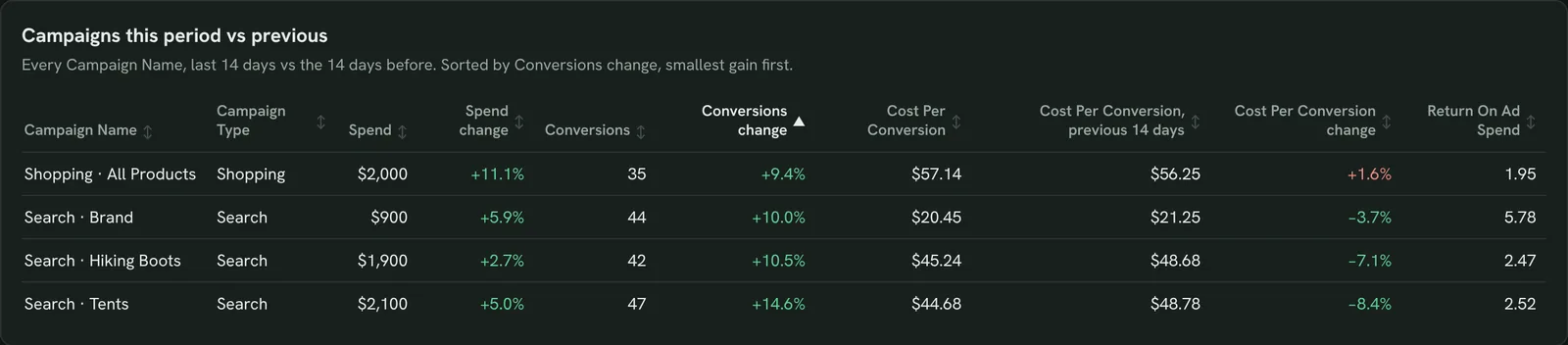
Spot campaigns going off track
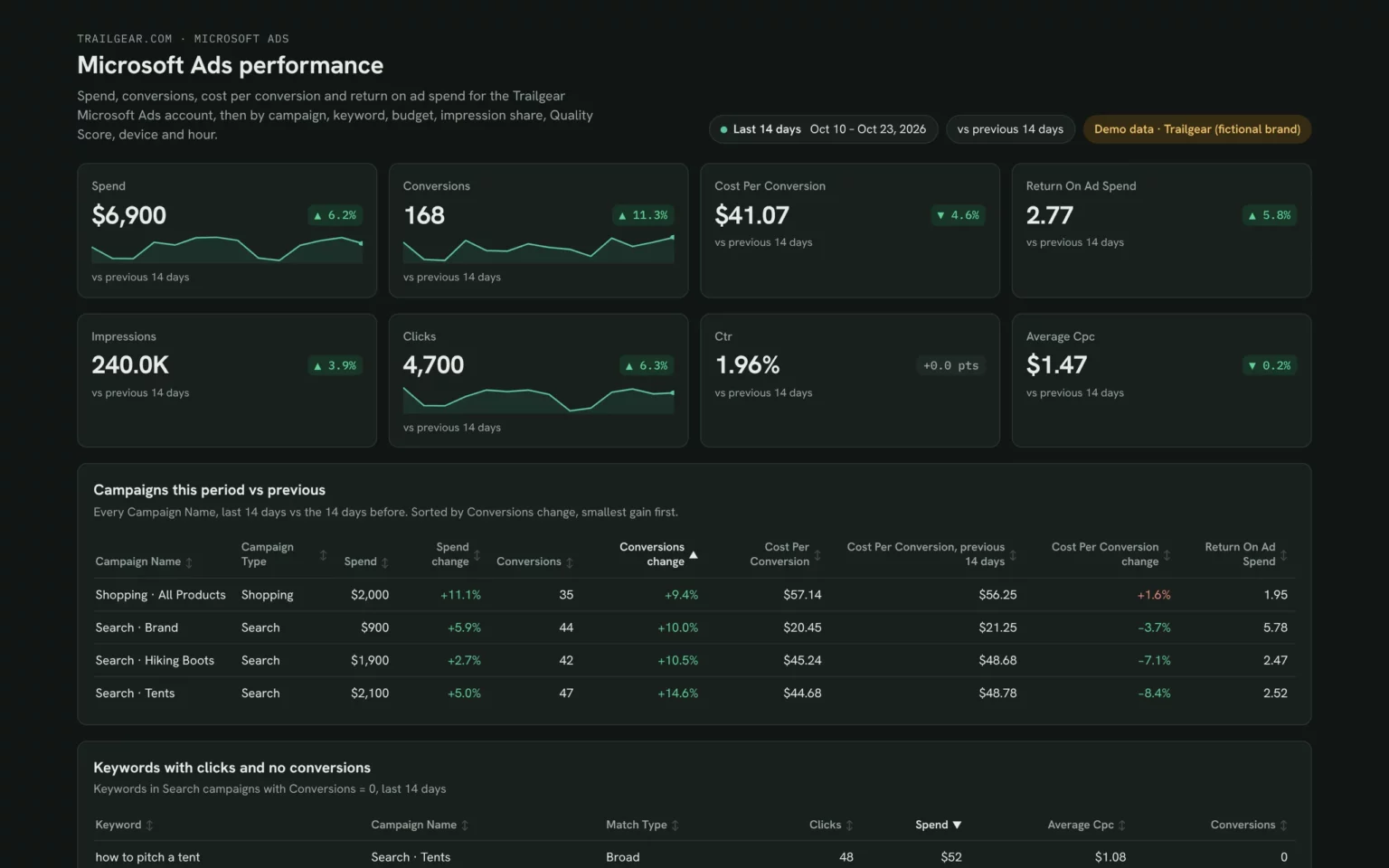
Each campaign’s spend, conversions and cost per conversion against the 14 days before, so you catch the one that got pricier.
- Which campaigns spend more for fewer conversions?
- Whose cost per conversion went up?
Compare Spend, Conversions and Cost Per Conversion by Campaign Name for the last 14 days with the 14 days before.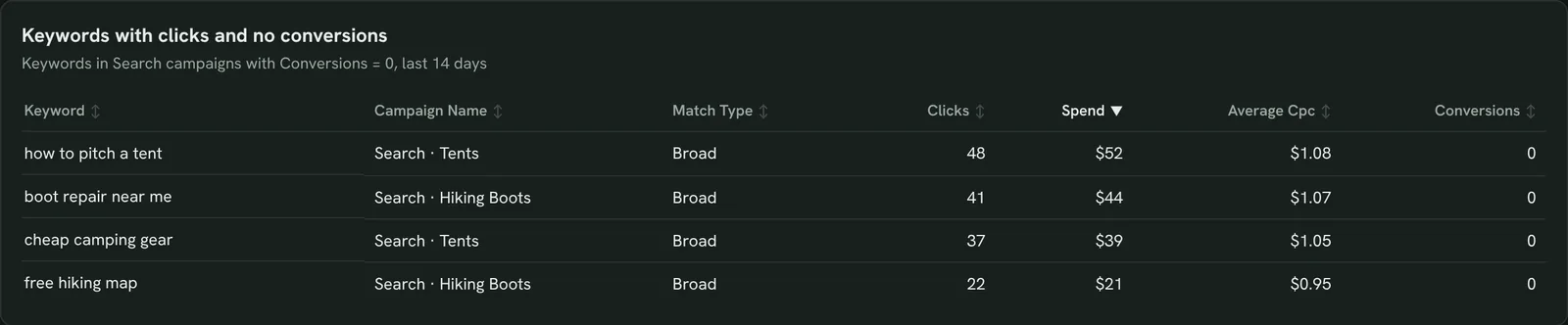
Find keywords that waste spend
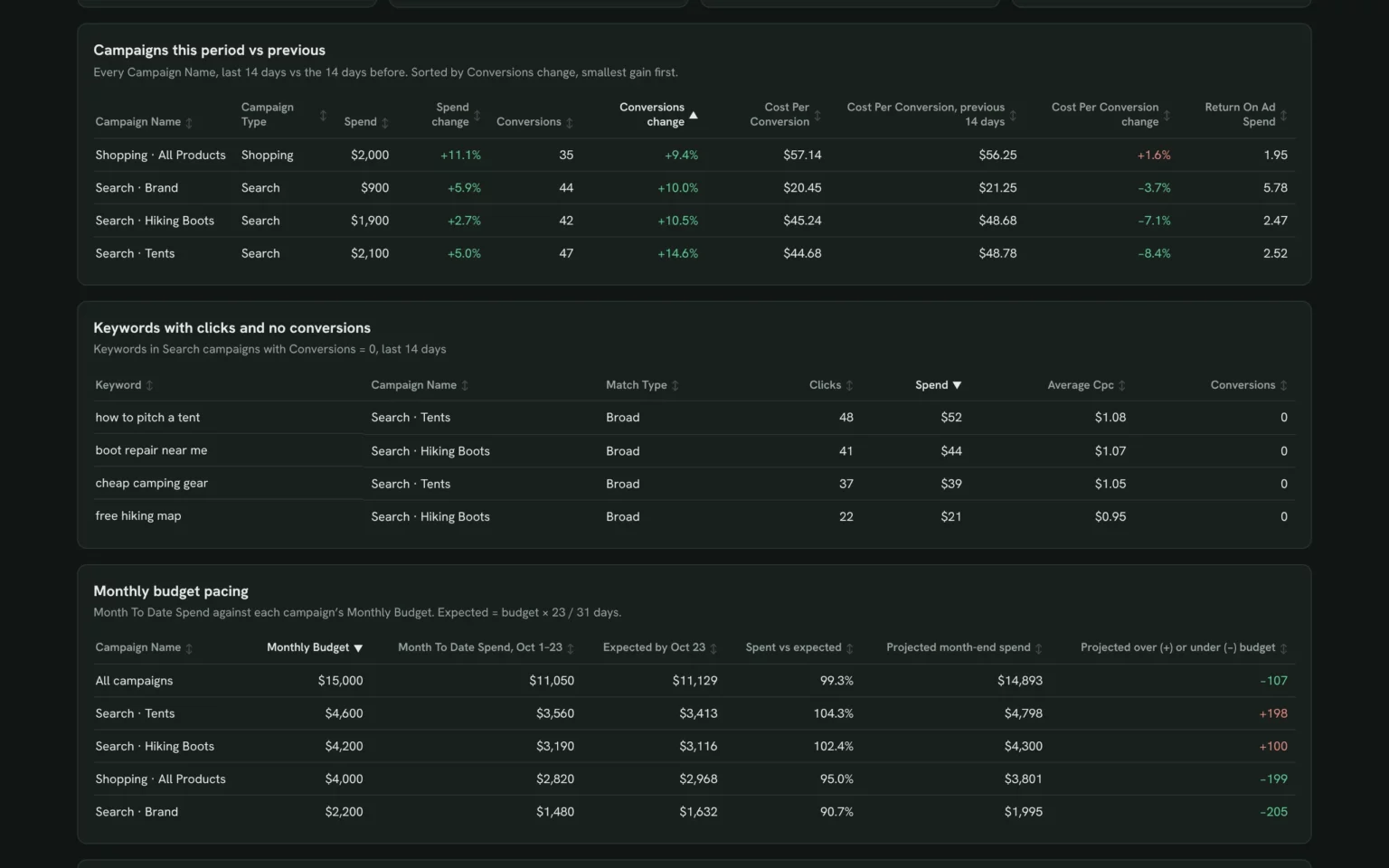
Keywords with clicks and no conversions, so you know which ones to pause or add as negatives.
- Which keywords got clicks and no conversions?
- Which broad match terms drift off topic?
List keywords with Clicks and 0 Conversions in the last 14 days, by Spend, with Campaign Name and Match Type.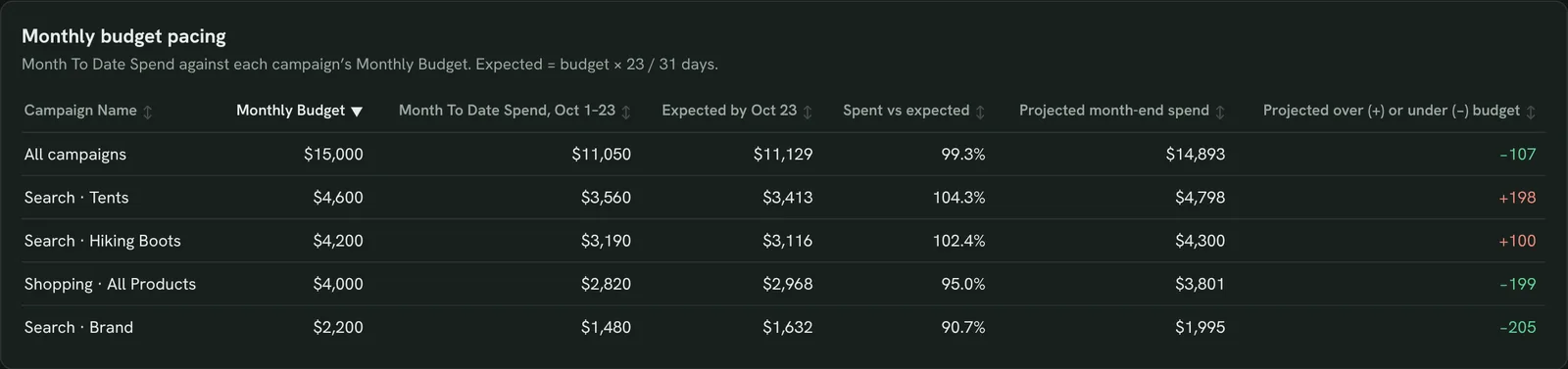
Track spend against the monthly budget
Month-to-date spend against each campaign’s Monthly Budget, so you shift money before one runs out early.
- Are we on pace for the month?
- Which campaigns will end over budget?
Show Monthly Budget, Month To Date Spend and projected month-end spend per Campaign Name.
See where you lose impression share
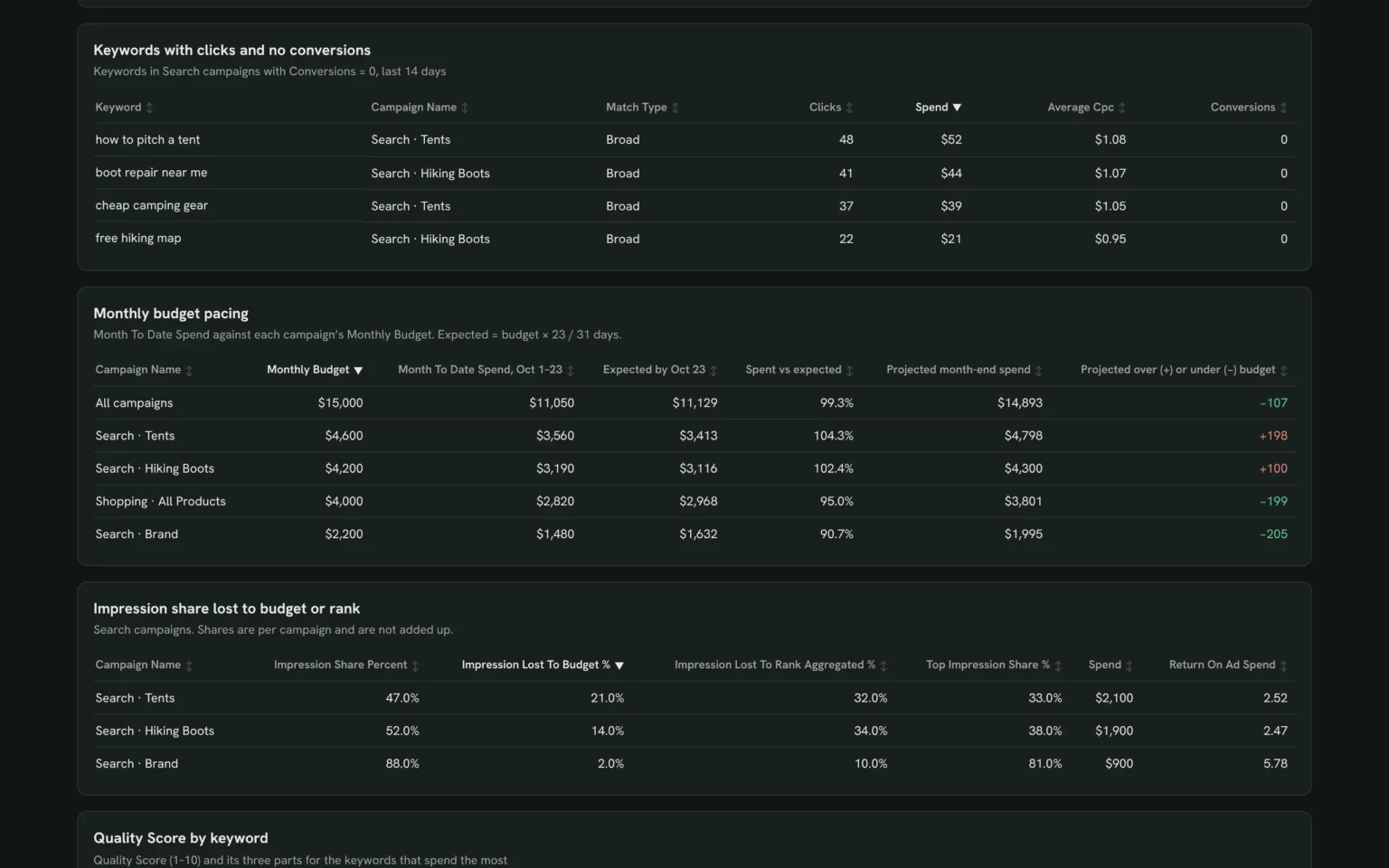
Searches each campaign missed on budget or rank, so you know whether to add budget or raise bids.
- Which campaigns run out of budget?
- Where do we lose on ad rank?
Show Impression Share Percent, Impression Lost To Budget %, Impression Lost To Rank Aggregated % and Top Impression Share % by Campaign Name for the last 14 days.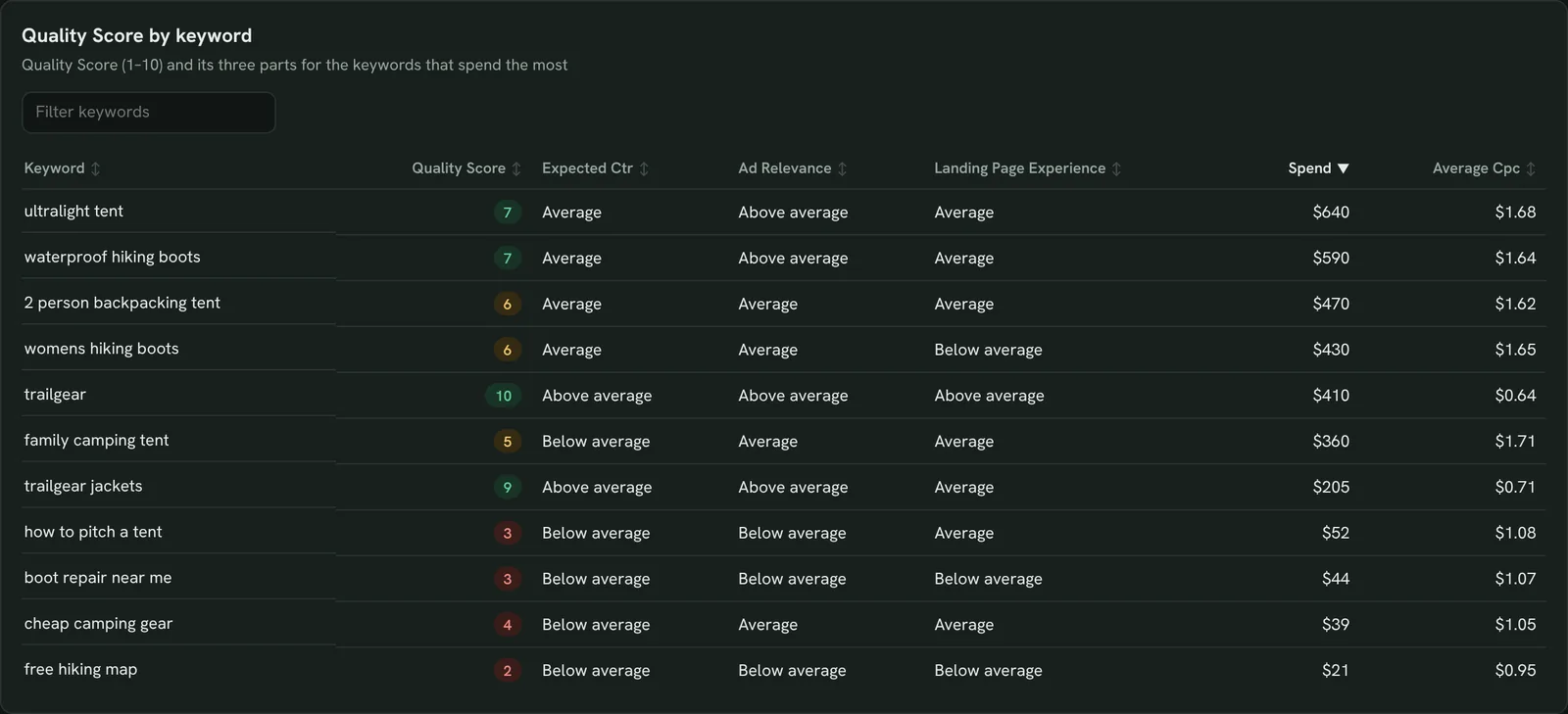
Fix low Quality Score keywords
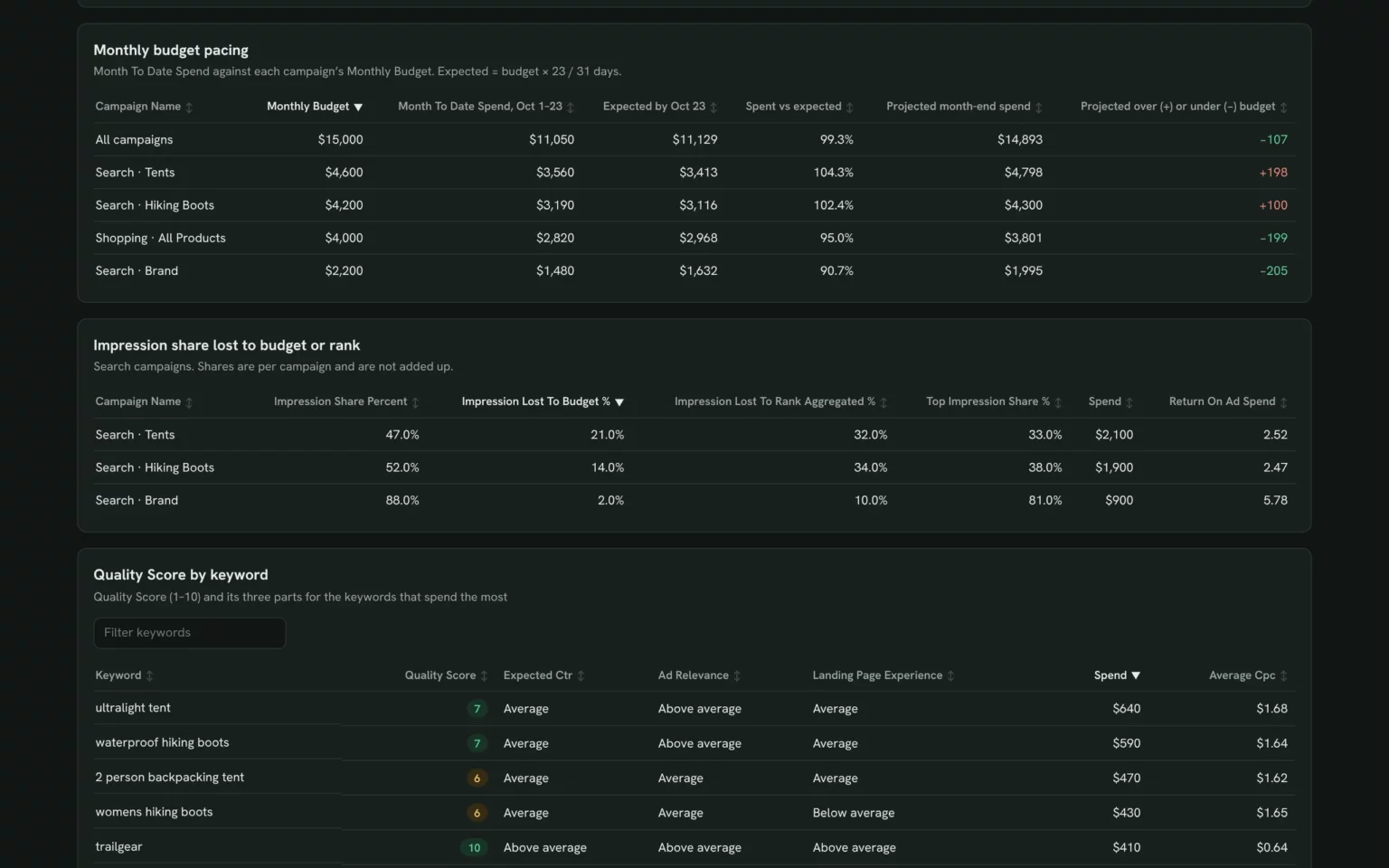
Quality Score with its three parts per keyword, so you know whether to fix the ad or the landing page.
- Which costly keywords score below 5?
- Is the ad or the landing page the weak part?
Show Quality Score, Expected Ctr, Ad Relevance and Landing Page Experience by Keyword, sorted by Spend.
Compare computers, phones and tablets
Conversion rate and cost per conversion by device, so you can set device bid adjustments.
- Do phone clicks convert as well as desktop?
- Which device got more expensive?
Show Spend, Ctr, Conversions, Conversion Rate and Cost Per Conversion by Device Type for the last 14 days.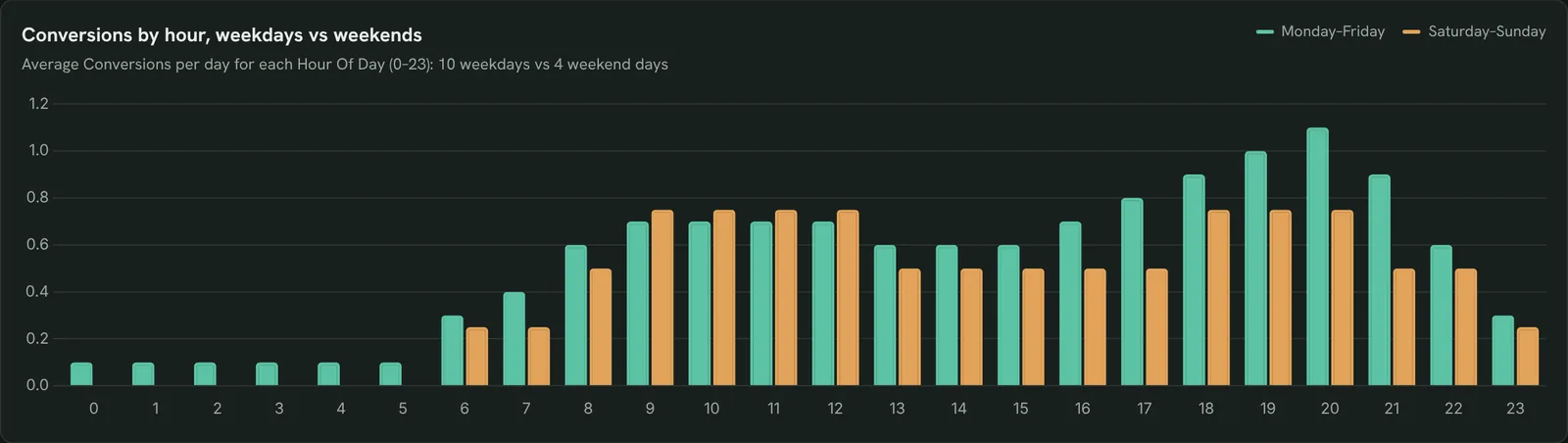
Find the hours that convert
Average conversions per hour, weekdays against weekends, so you can set an ad schedule.
- Which hours bring the most conversions?
- Do weekends follow a different pattern?
Chart average Conversions per Hour Of Day for the last 14 days, weekdays vs weekends.How to set up the Microsoft Ads dashboard in Claude
You need a Microsoft Advertising account your Microsoft login can open, a free Porter account and Claude Pro, Max, Team or Enterprise. Setup takes about 8 minutes.
Connect Microsoft Ads in Porter
Sign up free at Porter, open Data sources, pick Microsoft Ads, click Add account, sign in with Microsoft and select your ad accounts. The Microsoft Ads to Claude tutorial shows each click.
Add Porter to Claude
In Claude, go to Customize → Connectors → Add custom connector, paste https://mcp.portermetrics.com/mcp and name it Porter Metrics. Click Continue, then sign in to Porter and allow access.
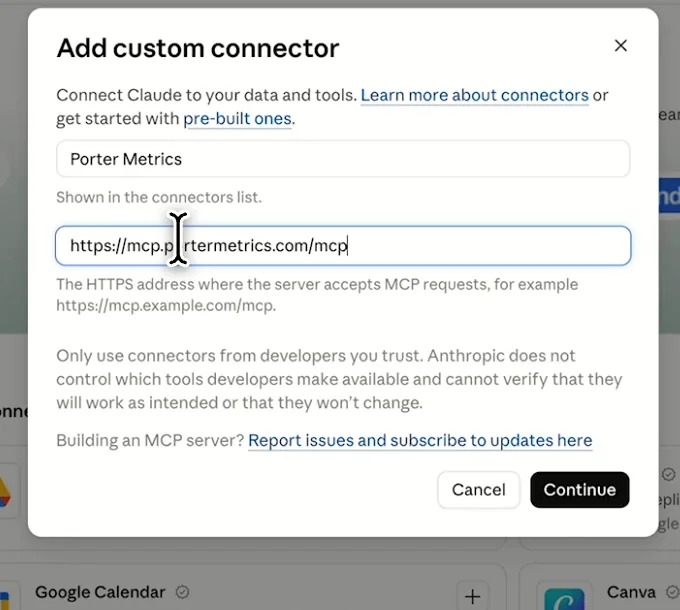
In Claude: Customize, Connectors, Add custom connector, then paste Porter’s MCP URL Paste the install prompt
Open a new chat in Claude, paste this prompt and replace the account in brackets with your own. Comparisons with the previous 14 days need the trial or a paid plan.
Install promptDuplicate this Claude dashboard template and keep its layout, views and styling: https://claude.ai/artifact/Q1wByMzgJLYMAwr2Ka6yJ7 Then rebuild it with my own data through Porter: a Microsoft Ads dashboard for [account] for the last 14 days: KPI cards for Spend, Conversions, Cost Per Conversion, Return On Ad Spend, Impressions, Clicks, Ctr and Average Cpc; a Campaign Name table with Campaign Type, Spend, Conversions and Cost Per Conversion; keywords with Clicks and 0 Conversions; Monthly Budget vs Month To Date Spend per campaign; Impression Share Percent, Impression Lost To Budget % and Impression Lost To Rank Aggregated % by campaign; Quality Score, Expected Ctr, Ad Relevance and Landing Page Experience by Keyword; results by Device Type; and Conversions by Hour Of Day, weekdays vs weekends. Open in Claude with this prompt
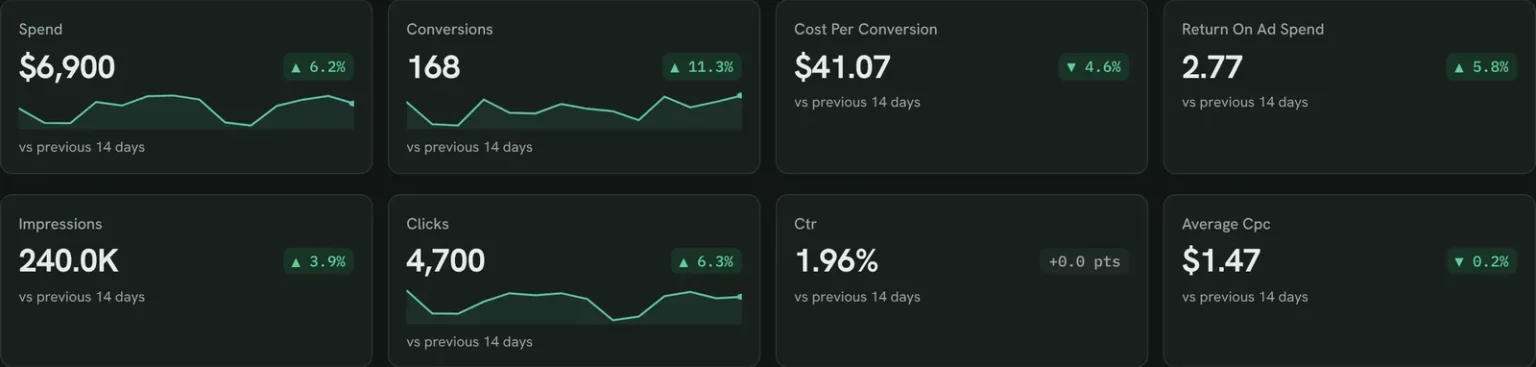
The first thing Claude builds: KPI cards for your own account. Demo data shown.
How to connect Microsoft Ads to Claude
Microsoft Ads fields and data
The template reads 20 of the 412 Microsoft Ads fields Porter offers, from campaign, keyword, budget and hourly reports.
Top 5 Microsoft Ads KPIs to watch
Trailgear demo data · last 14 days vs the 14 before
- Spend$6,900+6.2%
Rising faster than conversions means a campaign or keyword is leaking money.
- Conversions168+11.3%
If they drop while spend holds, check the campaign table first.
- Cost Per Conversion$41.07−4.6%
A campaign far above your target is the first one to cut or fix.
- Return On Ad Spend2.77+5.8%
Below 1, a campaign earns less than it costs.
- Impression Lost To Budget %21%Search · Tents
High on a profitable campaign means more budget should pay back.
How the numbers are calculated
- Cost Per Conversion
- Spend ÷ Conversions.
- Return On Ad Spend
- Revenue ÷ Spend.
- Impression Lost To Budget %
- Share of eligible impressions missed because the budget ran out.
- Budget pacing
- Month To Date Spend ÷ days passed × days in the month.
- Change
- (This period − previous) ÷ previous.
Data sources
Metrics
 Spend
- Impressions
- Clicks
- Ctr
- Average Cpc
- Conversions
- Cost Per Conversion
- Revenue
- Return On Ad Spend
- Conversion Rate
- Monthly Budget
- Month To Date Spend
- Impression Share Percent
- Impression Lost To Budget %
- Impression Lost To Rank Aggregated %
- Top Impression Share %
- Quality Score
- Expected Ctr
- Ad Relevance
- Landing Page Experience
Dimensions
- Date
- Campaign Name
- Campaign Type
- Keyword
- Match Type
- Device Type
- Hour Of Day
See all fields:Microsoft Ads · 412 fields
What makes this Microsoft Ads dashboard different
What you get that the Microsoft Advertising interface or an exported report can’t give you.
Ask the next question in the same chat
See cost per conversion jump, then ask Claude which keywords caused it.
Pause a keyword without opening Microsoft Advertising
Claude pauses keywords or changes budgets once you approve.
Put Microsoft Ads next to Google Ads
Add Google Ads to compare both search platforms in one table.
See what happens after the click
Add GA4 to see the sessions and sales each campaign brings.
Send clients a report on your logo
Publish it in Porter and email it on the day you choose.
Share it without account access
Anyone with the Porter link sees the numbers.
What the dashboard includes
- KPI cards against the previous period
- Campaign, keyword and budget pacing tables
- Impression share and Quality Score by keyword
- Results by device and conversions by hour
Related dashboard templates
 Claude

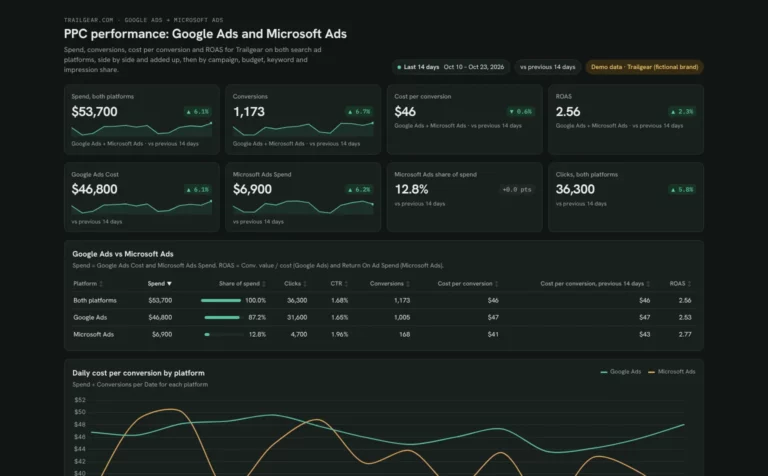
PPC dashboard template
Compare Google Ads and Microsoft Ads spend and cost per conversion side by side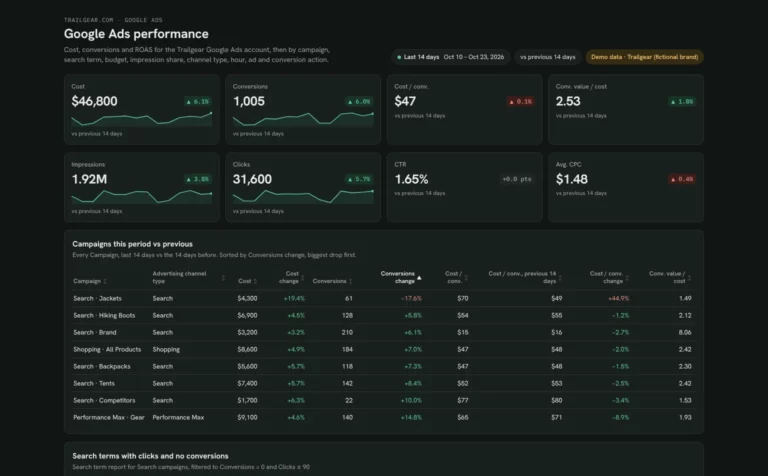 Claude
Google Ads dashboard template
Find search terms that waste spend and see which campaigns are limited by budget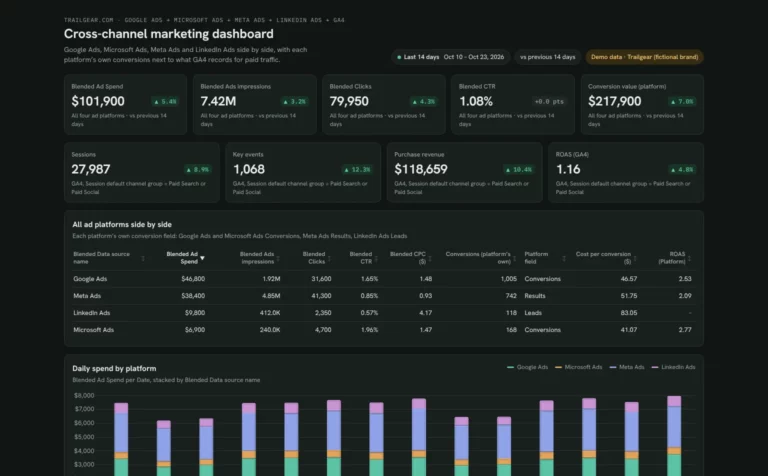 Claude


Cross-channel marketing dashboard template
Compare spend, CPA and ROAS across your ad platforms next to GA4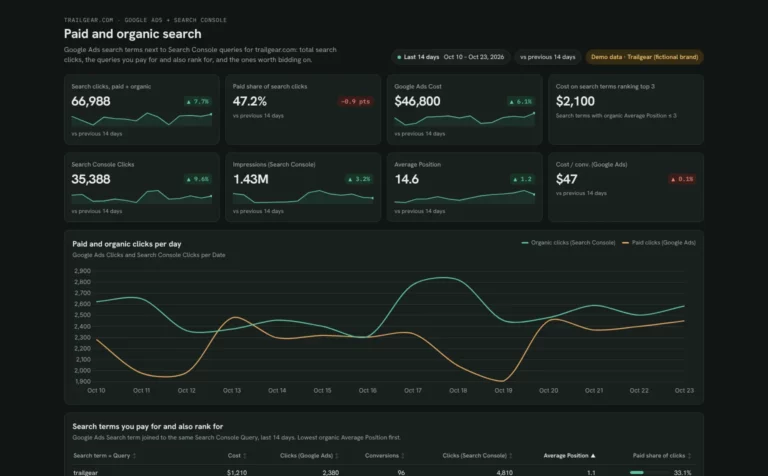 Claude

SEM dashboard template
Find search terms you pay for but already rank for, and queries worth bidding onBrowse more Claude dashboard templates
By data source
Microsoft AdsCross-channel marketing dashboard
Get the Microsoft Ads template in other tools
 Data Studio
 ChatGPT
Get your free Microsoft Ads dashboard
Sign up free, connect Microsoft Ads and paste the prompt. Your own data fills the same layout as the demo.
Free plan · 14-day trial · No card needed