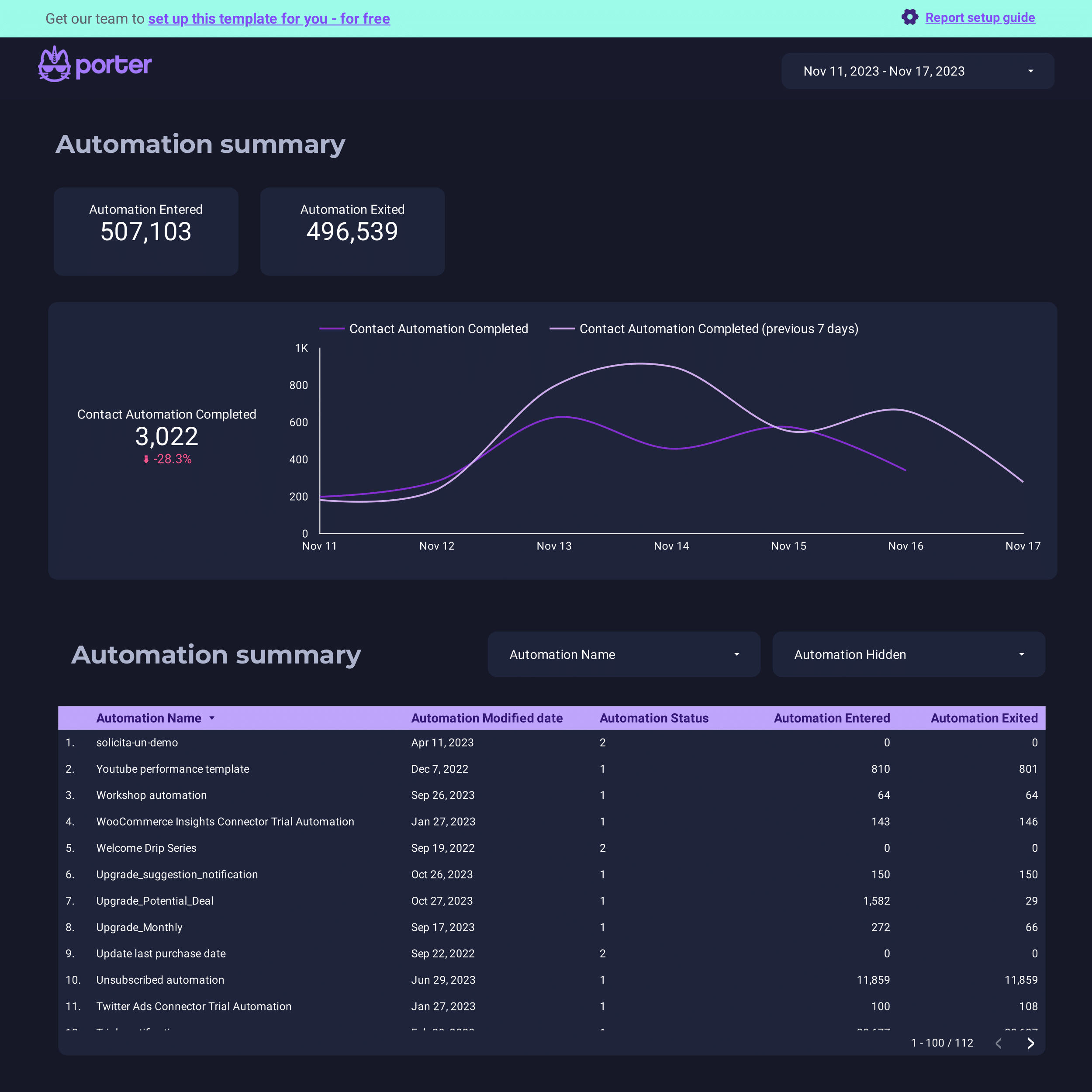
ActiveCampaign Dashboard
Pre-built email marketing and CRM pipeline dashboard for ActiveCampaign.
View template → ActiveCampaign
→
ActiveCampaign
→
 Google Data Studio
Connect your ActiveCampaign data to Google Data Studio (formerly Looker Studio) for free. Analyse Sends, Opens, Link Clicks, and Deal Value, with +206 fields, the only native ActiveCampaign Data Studio connector with pre-built dashboards for email, CRM, and pipeline reporting that requires zero coding or database middleware, and every ActiveCampaign account field.
No credit card required · 14-day free trial · Cancel anytime
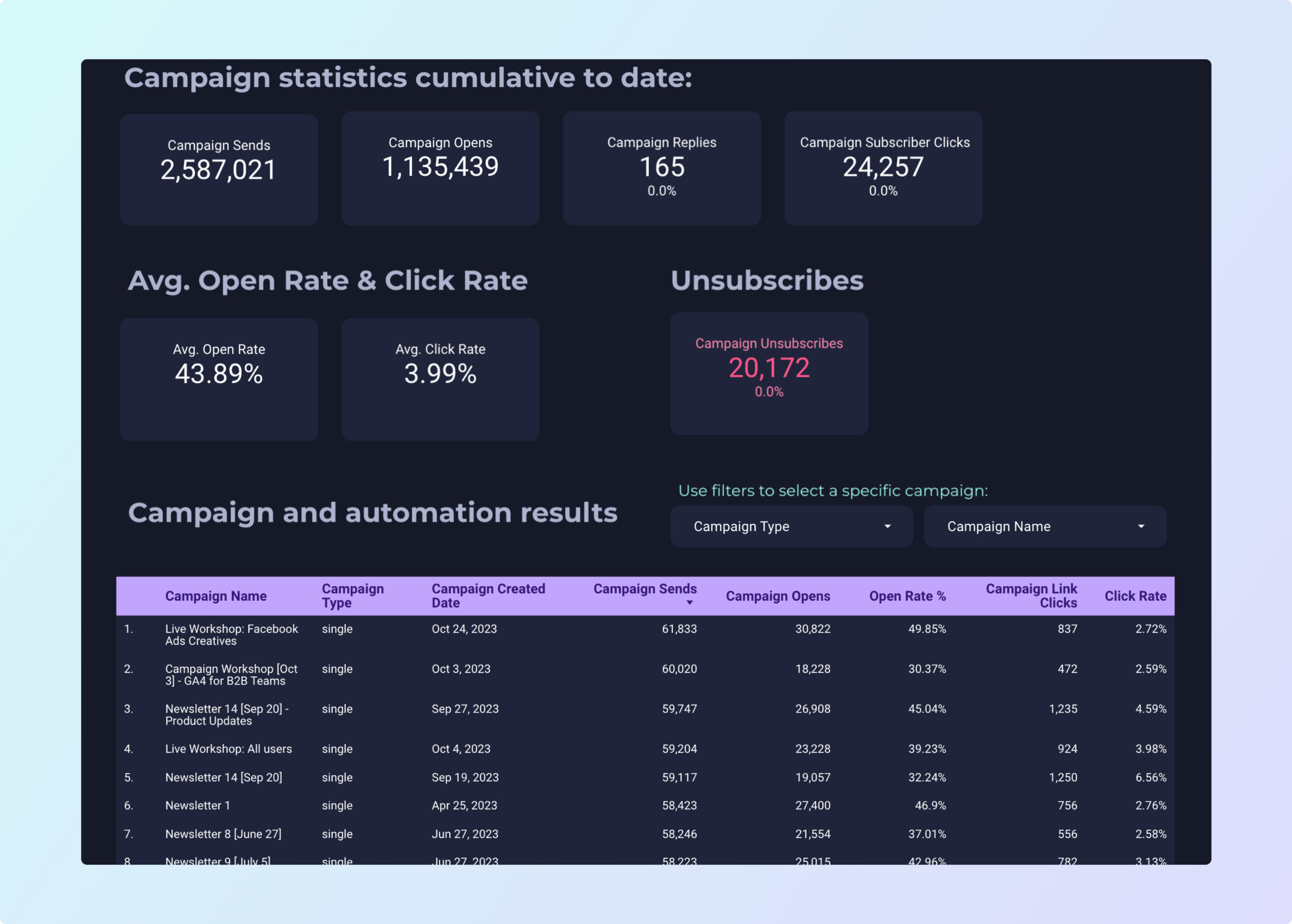
Start reporting immediately with pre-built dashboards designed for email marketing and CRM pipeline analysis.
Pre-built email marketing and CRM pipeline dashboard for ActiveCampaign.
View template →Ready-to-use report template for ActiveCampaign email and CRM metrics.
View template →Porter replaces middleware, manual exports, and complex ETL with a direct, no-code connector built for marketers.
| Feature | Porter No-code marketing data warehouse |
Others Connectors & ETL |
|---|---|---|
| Storage | Direct cloud sync — no storage layer to configure or pay for separately | Requires your own data warehouse or Google Sheets as a middleman |
| Data syncing | OAuth-connected live sync that refreshes automatically and adapts to ActiveCampaign API updates | Manual CSV exports or scheduled ETL pipelines that break when schemas change |
| Attribution | Blend ActiveCampaign sends and opens with Google Ads, Facebook Ads, and Shopify data in the same Data Studio dashboard | Email metrics isolated from ad and sales data |
| Data blending | Pre-joined datasets across campaigns, contacts, deals, and automations — ready to chart immediately | Requires SQL joins or third-party tools to merge campaign, contact, and deal data |
| Destinations | One subscription sends ActiveCampaign data to Data Studio, Google Sheets, Claude, and BigQuery simultaneously | Single destination per connector; extra cost for each additional export |
Everything you need to build professional email marketing and CRM reports in Data Studio — no engineering required.
Campaign sends, opens, clicks, contact demographics, deal value, pipeline stages, automation flow, and more — all normalized and ready to use.
Track Sends, Opens, Link Clicks, bounces, and unsubscribes out of the box with no configuration required.
Report on Deal Value, Stage, Win Probability, and Activity Count to monitor sales health in real time.
Measure how many contacts Entered and Exited each automation workflow, plus completion rates.
Connect securely with your ActiveCampaign credentials — no API keys to copy, store, or rotate manually.
Dashboards refresh automatically so your reports always reflect the latest campaigns, contacts, and deals.
No database middleware, SQL, or engineering resources needed. Point, click, and build.
Combine ActiveCampaign email metrics with ad platforms and e-commerce data in unified Data Studio reports.
LOVED BY 1,500+ MARKETERS
Log into ActiveCampaign, go to Settings > Developer, and copy your API URL and Key.
In Porter, choose ActiveCampaign, paste your API credentials, and authorize the connection.
Select from 206 fields across campaigns, contacts, deals, and automations to populate your Data Studio report.
Apply the ActiveCampaign Dashboard or Report template to skip setup and start analyzing immediately.
Publish to Data Studio, share with your team, or schedule automated email deliveries.
Report on every dimension and metric that matters — from campaign sends to deal value — with 206 normalized fields across 10 data categories.
206 dimensions and metrics covering campaigns, contacts, deals, automations, forms, tags, and account data.
Field names are normalized and human-readable so anyone on your team can build reports without memorizing API schemas.
Break down by campaign, contact, deal stage, automation, list, tag, or date — no pre-aggregation required.
Sends, Opens, Link Clicks, Bounces, Unsubscribes, and more are computed and ready to chart immediately.
Deal Value, Stage, Win Probability, Activity Count, and status fields for complete sales reporting.
Entered, Exited, and completion metrics for every automation workflow in your account.
Porter supports 15+ data sources and 10+ destinations. Mix and match in one subscription, no extra seats or hidden per-destination fees.
Quick fixes for the most common ActiveCampaign Data Studio connector problems.
| Issue | Solution |
|---|---|
| My ActiveCampaign data isn’t showing up in Data Studio | Verify your API URL and Key in ActiveCampaign Settings > Developer, then re-authenticate in Porter. Ensure the account has at least one campaign or contact. |
| I get an API rate limit error when refreshing | Porter handles ActiveCampaign rate limits automatically with exponential backoff. If the error persists, reduce the number of concurrent reports or contact support. |
| Some deal fields appear blank or outdated | ActiveCampaign’s API may not return deal custom fields in all plans. Verify your plan supports CRM API access, then refresh the connector cache in Porter. |
| My automation metrics don’t match ActiveCampaign’s dashboard | Automation ‘Entered’ and ‘Exited’ counts in Porter reflect API snapshots at sync time. Small differences are normal due to timing; schedule hourly sync for closer alignment. |
| I can’t find the contact custom fields I need | Standard custom fields are available as dimensions. If a field is missing, check that it is published and visible in ActiveCampaign, then re-sync the field list in Porter. |
| The connector shows ‘authentication failed’ | Regenerate your API Key in ActiveCampaign Settings > Developer and update it in Porter. API keys can expire if the account password was recently changed. |
ActiveCampaign accounts
Billed annually · $12.5/account







Unlimited 14-day free trial + Free forever plan
Build email marketing and CRM pipeline dashboards in minutes. No credit card required.