Shopify connector for Claude Code

Use Porter’s Shopify connector for Claude Code to pull orders, sales, products and customers into your terminal, then turn them into files, scripts and scheduled reports in your own project.

  • Save Shopify sales as CSV in your repo
  • Rank products by net sales and gross profit
  • Track new and repeat customers by month
  • Join store sales with your ad spend
G2★★★★★Rated 4.6/5 from 288 G2 reviews (October 2026) · Used by 1,600+ marketing teams and agencies

By · Last updated November 26, 2026

Claude Codeporter connected
Compare last week with the week before for my Shopify store and save it to reports/shopify-week.csv
porter / Shopify / Trailgear Demo✓ 4 rows
Saved reports/shopify-week.csv. Net Sales rose 8%, but Returns grew faster.
MetricLast weekWeek before
Orders412386
Gross Sales$38,240$35,110
Net Sales$33,960$31,420
Returns$2,310$1,640
Demo data, Trailgear Demo account
Orders, products and inventory
01Setup

How to connect Shopify to Claude Code

Connecting Shopify to Claude Code takes 3 steps and no API keys: connect your Shopify stores in Porter with your Shopify store, add Porter’s MCP server to Claude Code with one command, then sign in from /mcp and ask. The same server also works in Cursor, VS Code and Codex, as Porter’s Shopify MCP server page shows. Using the Claude app instead? See the Shopify connector for Claude.

Before you start

  • You need Claude Code installed (Anthropic’s Claude Code overview), a free Porter account and a Shopify store where you can approve app installs.
  • Works with any Claude model in Claude Code, from Opus to Sonnet and Haiku.
  1. Step 1: Connect Shopify in Porter

    Sign up free at Porter, pick Shopify as the source and sign in with your Shopify store. Tick every store you want Claude Code to read.

  2. Step 2: Add Porter to Claude Code

    In your terminal, run this command. It adds Porter for every project on your machine; drop --scope user to add it to the current project only.

    Terminal
    claude mcp add --transport http --scope user porter https://mcp.portermetrics.com/mcp

    Or, inside Claude Code, install Porter’s plugin, which adds the server and Porter’s skill together: /plugin marketplace add portermetrics/porter, then /plugin install porter-metrics@portermetrics.

  3. Step 3: Sign in and ask

    Start claude, type /mcp, pick porter and sign in with the Google account you use in Porter. When porter shows as connected, paste this prompt:

    Prompt
    Which Shopify stores can you see? Compare last full week with the week before: Orders, Gross Sales, Discounts, Returns and Net Sales, and save it to reports/shopify-week.csv.

Guides and videos

app.portermetrics.com / create
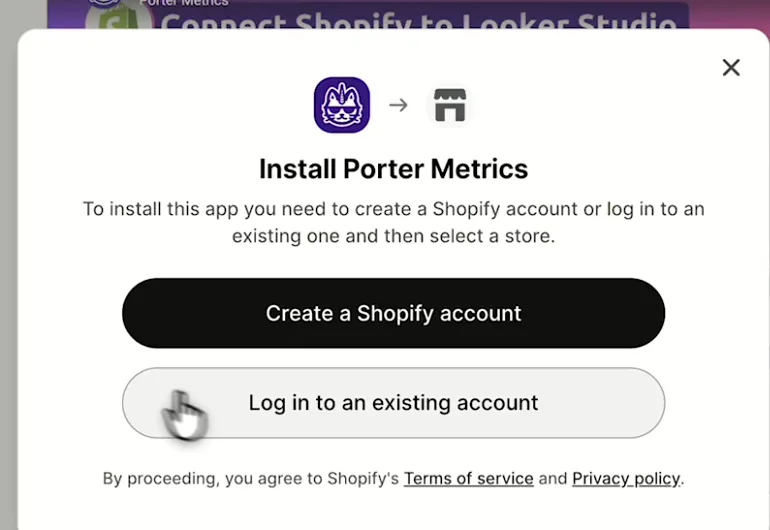
Shopify dialog to install Porter Metrics and log in to an existing account
First, install the Porter Metrics app and log in to your store.
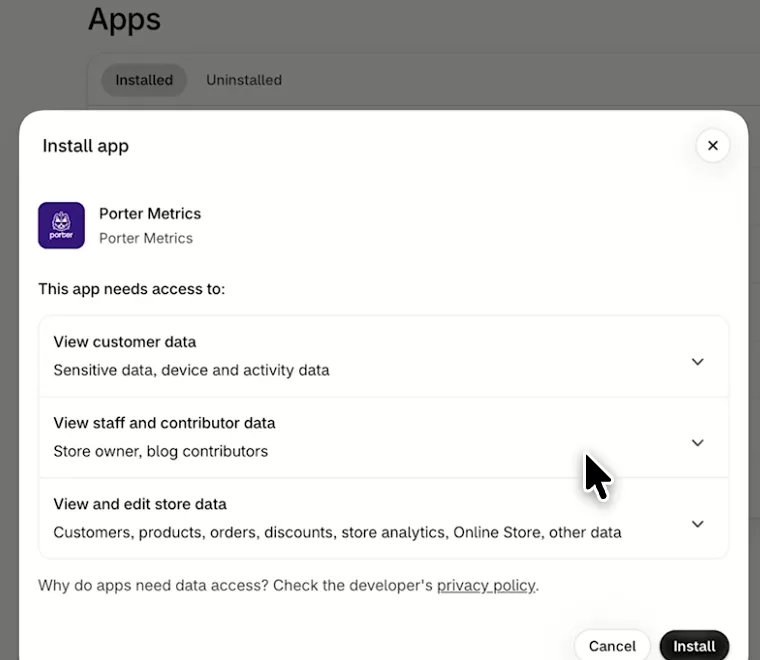
Shopify Install app dialog listing the data Porter Metrics can access
Then, review Porter Metrics’ access and select Install.
$ claude mcp add --transport http --scope user porter https://mcp.portermetrics.com/mcp

$ claude mcp list
porter: https://mcp.portermetrics.com/mcp (HTTP)
Then, add Porter's MCP server from your terminal.
> /mcp
porter · needs authentication → Authenticate

> Which Shopify accounts can you see?
● porter - list_accounts (MCP)
Trailgear Demo
After you sign in from /mcp, Claude Code lists your Shopify accounts.
02Use cases and prompts

What you can do in Claude Code

Claude Code works inside your project, so Shopify answers can become files, scripts and dashboards instead of chat replies. Each use case has a prompt to copy and uses the Shopify fields Porter reads.

Can Claude Code export Shopify sales?

The problemShopify reports download one view at a time and need cleanup.

What Claude Code doesClaude Code pulls Orders, Gross Sales, Discounts, Returns and Net Sales through Porter and writes them to a CSV in your project.

What you getA clean sales file in your repo, ready for a model or a teammate.

Prompt
For the last 12 full weeks, by week, pull Orders, Gross Sales, Discounts, Returns and Net Sales from Shopify and save it as data/shopify-weekly.csv.

Which products earn the most gross profit?

The problemBest sellers by revenue aren’t always the ones that make money.

What Claude Code doesClaude Code ranks Product Title by Net Sales with Number Of Sold Items, COGS and Gross Profit.

What you getA product list ranked by what you keep, not only what you sell.

Prompt
For the last 90 days, rank Product Title by Net Sales with Product Type, Number Of Sold Items, COGS and Gross Profit, and save it to reports/shopify-products.csv.

Are repeat customers growing?

The problemShopify shows totals, not how new and repeat buyers change month to month.

What Claude Code doesClaude Code pulls New Customers and Repeat Customers by month and writes the trend.

What you getA monthly retention file you can chart.

Prompt
By Month and year for the last 6 months, show New Customers, Repeat Customers and Repeat Customers %, and save it to reports/shopify-customers.csv.

Can I schedule a Shopify report with Claude Code?

The problemShopify analytics compares periods, but the weekly note on orders, order value and returns still gets typed up by hand.

What Claude Code doesEach Monday claude -p compares Orders, Net Sales, Average order value and Returns for your store across the two weeks.

What you getreports/shopify-weekly.md with sales, order value and returns in one place.

Prompt
claude -p "Compare last week with the week before for my Shopify store: Orders, Net Sales, Average order value and Returns. Write it to reports/shopify-weekly.md" --allowedTools "mcp__porter" "Write"

Can Claude Code compare Shopify sales with my ad spend?

The problemAd platforms report their own revenue, which rarely matches what your store sold.

What Claude Code doesClaude Code pulls daily Net Sales from Shopify and daily spend from your connected ad platforms through the same server and works out blended ROAS.

What you getROAS on real store revenue, not each platform’s own count.

Prompt
For the last 30 days, pull daily Shopify Net Sales and daily spend from Meta Ads and Google Ads, and write daily blended ROAS to reports/blended-roas.csv.
03Why Porter

Why Porter for Shopify in Claude Code

Shopify’s own developer tools are built for building apps, not for marketing reports. Porter connects your store with one app approval and puts Shopify next to your ad platforms and 30+ other sources behind the same server.

✓

One server for all your sources

The same porter server answers about Shopify, Meta Ads, Google Ads, GA4 and Shopify, so one script can pull every channel.

⊞

Changes only after you approve

Claude Code can make changes through Porter where the platform allows them, and each change waits for your yes.

⚙

No custom app or access token

You approve Porter in Shopify and sign in with Google in Claude Code. There is no custom app, Admin API token or webhook to maintain.

↻

Hosted dashboards when a file isn’t enough

Ask for a Porter AI dashboard and it is published at its own link, synced automatically and ready to share with a client.

04Dashboard

Dashboard template

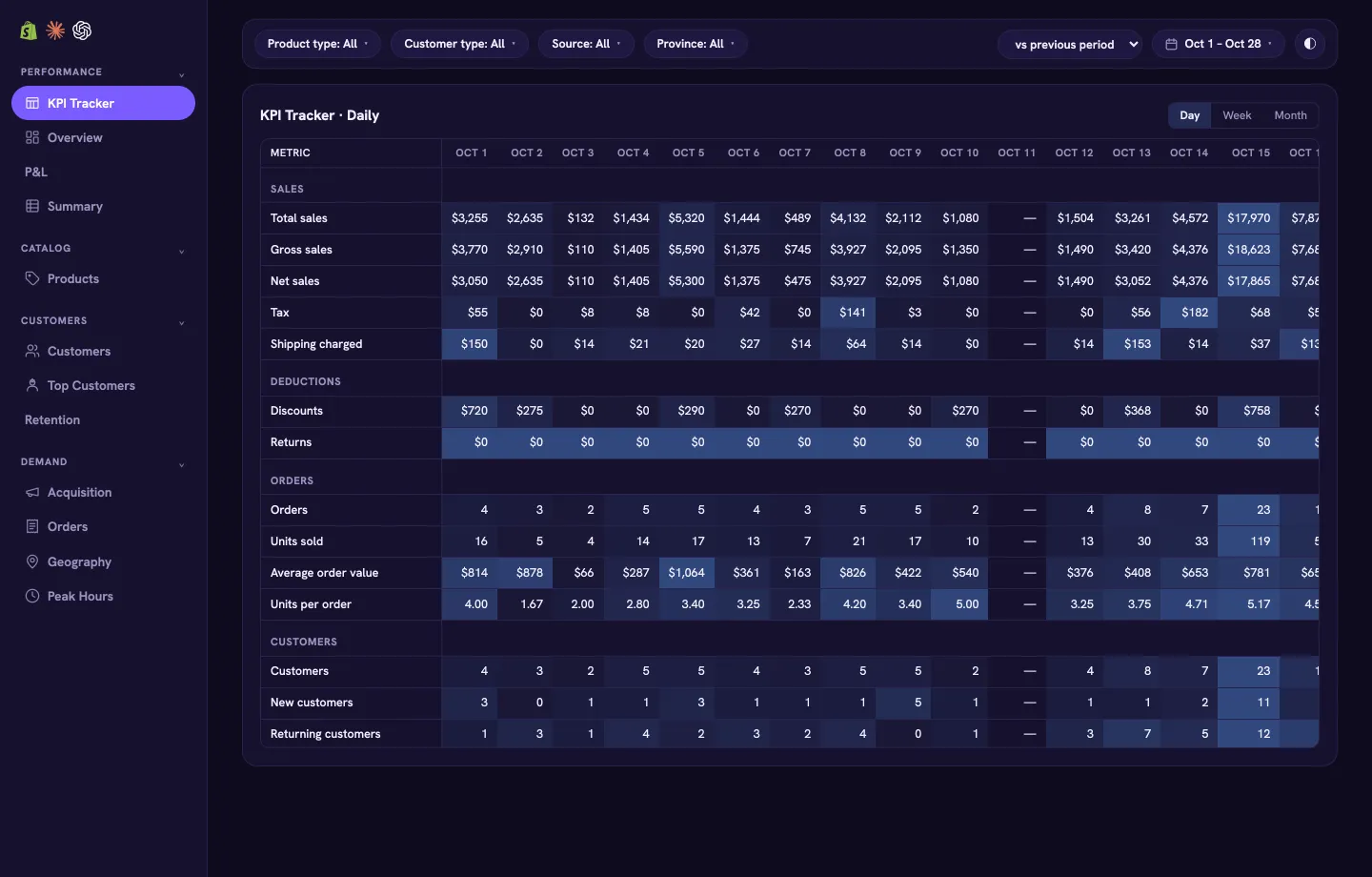
Through the Shopify connector, Claude builds a sales overview as one live view: orders, net sales, AOV, new vs returning customers and top products. When the team needs the same report every week in a shared link, start from Porter’s free Shopify dashboard templates, which track the same numbers.

AI dashboards

Build a live Shopify dashboard from your terminal

Describe the dashboard in one sentence and Porter builds it. A client-ready dashboard in minutes, with no chart dragging and no BI tool to learn. Ask Claude Code:

Prompt
Build a live Shopify dashboard for my account with the last 30 days, the main KPIs and a weekly trend.
Live URLEach dashboard at its own link: no login, no app, no download
Auto-syncFresh Shopify data, nobody re-exports each period
Scheduled deliveryEmail or PDF sends on a set day
White labelYour logo and branding for clients
Sharing permissionsView or edit access per person
Shopify dashboard template by Porter
Template

The Shopify AI dashboard template

Start from Porter’s official Shopify dashboard template, or run the prompt above in Claude Code and Porter publishes the dashboard at its own link.

05Pricing

Pricing

You can start free, since Porter’s Shopify connector for Claude comes with every plan. Use the calculator for your number of accounts, or see Porter pricing for every plan.

What you get

  • Free plan: never expires, with unlimited connected accounts and the last 15 days of data in Claude (30 days in Data Studio and Sheets)
  • Reporting: from $12.50 per account a month billed annually, or $15 month to month for one account
  • Billing: each Shopify store counts as one account, with volume discounts and no per-seat fee
  • Changes: 1 AI credit per completed change; failed tasks are free, and the Free plan includes 100 credits a month
  • Trial: 14 days of full access, no card

Price calculator

$33.33/mo$6.67 per account

An account is one ad account, Stripe account, store, page or GA4 property. The Free plan never expires and has unlimited accounts, with the last 15 days of data in AI chats.

06Data and actions

Shopify data and actions in Claude Code

Through the Shopify connector, Claude gets 164 fields, from gross sales down to net sales, total sales, COGS and gross profit. They also cover first-time and returning customers, products, discount codes, channels and tracked sources, plus live Shopify Analytics and store actions. Every label, ID and category is also in the full list of Shopify fields.

The 12 Shopify fields Claude uses most

Discounts and Returns are negative, as in Shopify.

FieldWhat it's for
OrdersordersOrder count
Gross Sales · Discounts · Returns · Net Salesgross_sales_order · discounts_order · returns_order · net_sales_orderThe sales ladder, as in Shopify's sales report
Total Salestotal_sales_orderNet sales + tax + shipping (no duties or fees)
Average order valueaverage_order_valueShopify's AOV formula
COGS · Gross Profitcost_of_good_solds · gross_profitMargin; needs a unit cost on each variant
Customer Typecustomer_typeFirst-time or Returning
New Customers · Repeat Customers · Repeat Customers %new_customers · returning_customers · returning_customers_ratioRetention
Product Title · Product Type · SKUproduct_title · product_type · skuProduct mix
Number Of Sold Itemssale_quantityUnits sold
Discount Codediscount_codePromotions
Channel · UTM Source · UTM Campaignorder_channel · utm_source · utm_campaignWhere orders come from
Shop Nameshop_nameComparing stores

Can Claude change Shopify products, inventory and discounts?

Yes. Claude creates products as drafts, updates products and variants, adds images, archives or publishes products and changes up to 50 products' status at once. It also sets inventory at a location, builds collections, creates percentage or fixed-amount discount codes and edits Online Store pages.

Other Admin API changes, such as order edits and tags, customers, draft orders and metafields, run as a GraphQL mutation, which is permanent, so Claude shows it to you first. Shopify limits how much any app can change by query cost and plan, so a big batch runs as several calls (Shopify's API rate limits).

Refunds, gift cards, staff and themes stay in your Shopify admin, where you handle them as usual.

How fresh is Shopify data in Claude, and how far back?

Claude sees your orders from the start of Porter's history for your store, which differs per store, up to yesterday in date presets. Live Shopify Analytics, however, adds today as a partial day.

Orders older than 60 days need Shopify's approved scope for full order history (Shopify's read_all_orders scope). Days and hours also follow your store's time zone. The free plan reads 15 days in AI chats (30 days in Data Studio and Sheets).


Product stats

WhatShopify connector
Fields164 per sale line, plus live Shopify Analytics (ShopifyQL)
ActionsProducts, variants, inventory, collections, discount codes and pages, after you approve; up to 50 products per status change
FreshnessStored orders up to yesterday in date presets; live Shopify Analytics adds today as a partial day
HistoryFrom Porter's start date for your store, which differs per store; orders older than 60 days need Shopify's read_all_orders scope; 30 days on the Free plan, 15 in AI chats
Rate limitsShopify limits changes by query cost and plan, so big batches run as several calls
AccessPorter's Shopify app, approved on each store; customer names and emails need Shopify's protected data approval

See all 164 Shopify fields

07Security

Is it safe?

Yes. When Claude reads through the Shopify connector, nothing in your store changes. Claude shows you every change first (a product, a stock count, a discount code), then runs it only when you approve. Porter connects through an app you approve in Shopify, so it sees only what that access allows.

How Claude asks before changing Shopify

Claude asks before writing, and new products start as drafts. Deleting a variant, publishing a product or creating a page is permanent, so archive products when you might want them back.

A stock update checks the count first and stops if it changed after Claude read it. Each completed change also uses one AI credit.

What the connector needs from Shopify

Someone who can approve app installs on the store approves Porter's Shopify app. Each store is its own account. COGS also needs the "View cost" product permission.

Customer names, emails and phones are protected customer data, so Shopify shares them once that access is approved (Shopify's protected customer data requirements). If a question returns reauth_required, finish the store authorization in Porter. If you uninstall the app, access stops at once.

08FAQ

FAQ

Answers on setup, scope, scripts and credits, plus fixes for the most common Claude Code errors with Shopify. Setup questions every source shares, like where Claude Code saves the server and how to share it with your team, are in the Claude Code hub FAQ.

Can I add Meta Ads spend to the Shopify report?

Yes. Connect Meta Ads in Porter and ask for Amount spent next to Net Sales. Claude Code reads both through one server and writes them to the same file, so you can see spend against sales.

Can I report several stores together?

Yes. Each store connects as its own account in Porter, so Claude Code can report them one row per Shop Name or one at a time.

Do Claude Code questions use Porter credits?

Reading Shopify data uses no AI credits. Each completed change, such as a change, uses 1 credit, and every Porter account gets 100 free credits a month.

Troubleshooting

Why does /mcp show porter as needing authentication?

Claude Code adds the server before you sign in. Pick porter in /mcp, choose Authenticate and sign in with the Google account you use in Porter.

Why does my claude -p script stop and ask for permission?

Scripts can’t answer permission prompts. Pass the tools the script may use, for example --allowedTools "mcp__porter" "Write", so Claude Code can read Porter and save files without stopping.

Why are COGS and Gross Profit empty?

Shopify fills them only when products have a cost per item. Add costs to your products in Shopify, then ask again.

09Next

More Claude connectors

Shopify numbers make more sense when they sit next to your ad, site and email data. Porter brings each of those into Claude through the same MCP URL as the Shopify connector. Then add the ones your store sells through from all Claude connectors, or hand a client a ready-made Shopify report from a template.

Not only Claude. Send Shopify data anywhere

The same Porter account and connection also send Shopify data to these destinations, at no extra cost.

Try the connector in Claude Code

Porter’s Shopify connector for Claude Code takes one command, so your first sales file can land in your project today. Start with a CSV, then rank products by profit or schedule a weekly script.

Free plan · 14-day trial · No card needed

E-commerce marketers: store sales meet ad spend in one file from the terminal.

Growth marketers: new and repeat customers get tracked month by month.

Agencies: one script builds the weekly report for every client store.