Facebook Public Data connector for Claude

Use Porter’s Facebook Public Data connector for Claude to track rival Pages, their posts and reactions, and audit their live ads from the Meta Ad Library.

  • Compare rival Facebook Pages side by side
  • Rank a rival’s posts by engagement
  • Audit a brand’s live ads from the Meta Ad Library
  • Set your own Page’s Insights next to rivals in one chat
G2★★★★★Rated 4.6/5 from 288 G2 reviews (October 2026)

By Porter Metrics team · Last updated October 19, 2026

ClaudePorter connected
For these 4 competitor Facebook Pages, show Page Followers and Page Talking About Count.
Porter / Facebook Public Data / Trailgear Demo✓ 4 rows
Summit Outfitters has the most followers, but Ridgeline Gear has more people talking about it this week.
PageFollowersTalking about
Summit Outfitters182K2,140
Ridgeline Gear96K3,870
Northtrail Co.58K910
Basecamp Supply41K650
Demo data, Trailgear Demo account
Watch the setupHow to connect Facebook Public Data to ClaudePorter Metrics on YouTube
156 Facebook Public Data fields
01Setup

Connect Facebook Public Data to Claude

Setting up the Facebook Public Data connector for Claude takes 3 steps, with no code because Porter hosts the server. Sign in to Facebook in Porter, add Porter’s MCP URL to Claude as a custom connector, then name the Pages to track. Claude can read any public Page. See Porter’s guide to connecting Facebook Public Data to Claude.

What you need before you start

  • Any Facebook account (it only signs Porter in to Meta), the rival Page’s username, URL or numeric ID, as well as a free Porter account.
  • Custom connectors work in Claude, Cowork and Claude Desktop on the Free, Pro, Max, Team and Enterprise plans, although Free allows one (Anthropic’s guide to custom connectors).
  1. Step 1: Sign in to Facebook in Porter

    Sign up free at Porter, then pick the Facebook Public Data connector as the source and sign in with Facebook. Then pick Claude as the destination.

  2. Step 2: Add the Facebook connector to Claude

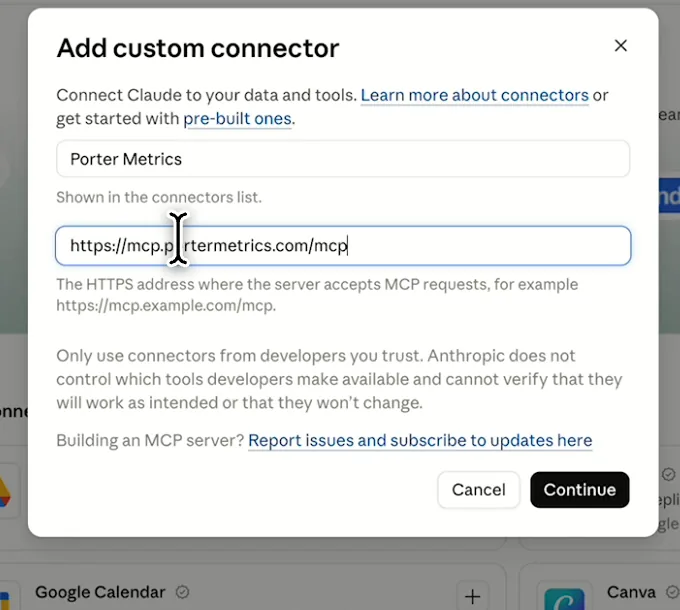
    When you add the Facebook Public Data connector to Claude, open “+” → Connectors → Manage connectors → “+” → Add custom connector. Then name it Porter Metrics, paste this URL, select Add and sign in:

    MCP URL
    https://mcp.portermetrics.com/mcp
  3. Step 3: Add rival Pages, then ask

    Then paste your rivals’ Page URLs. If a vanity username fails, use the numeric Page ID.

    Prompt
    Add these Facebook Pages to my Facebook Public Data connection: {Page URL 1}, {Page URL 2}, {Page URL 3}. Then show Page Profile Name, Page Followers and Page Talking About Count for each.

Guides and videos

app.portermetrics.com / create
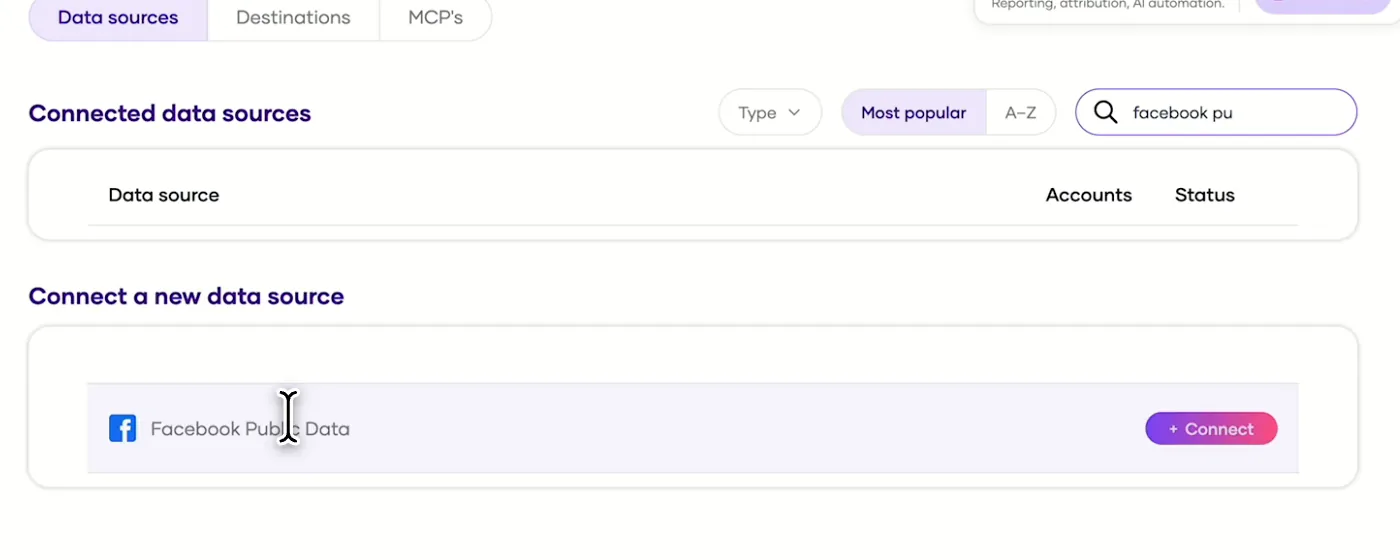
Porter's Connect a new data source list with Facebook Public Data ready to connect
First, find Facebook Public Data in Porter and select Connect.
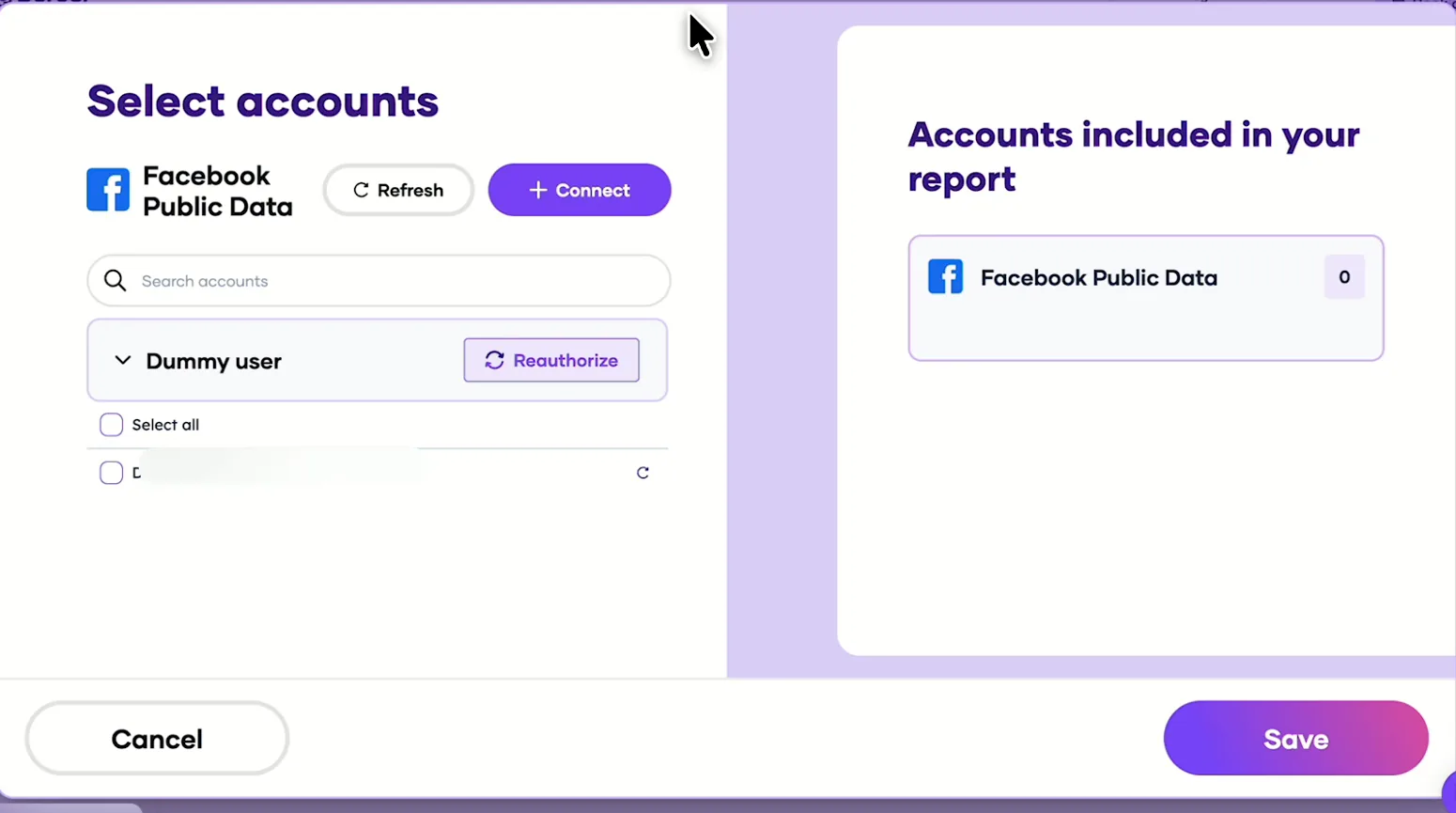
Porter's Select accounts window for Facebook Public Data with a demo user
Then sign in with Facebook, pick the profile and save.
Claude's Add custom connector window with the name Porter Metrics and Porter's MCP URL filled in
Then, in Claude, add a custom connector with Porter's MCP URL.
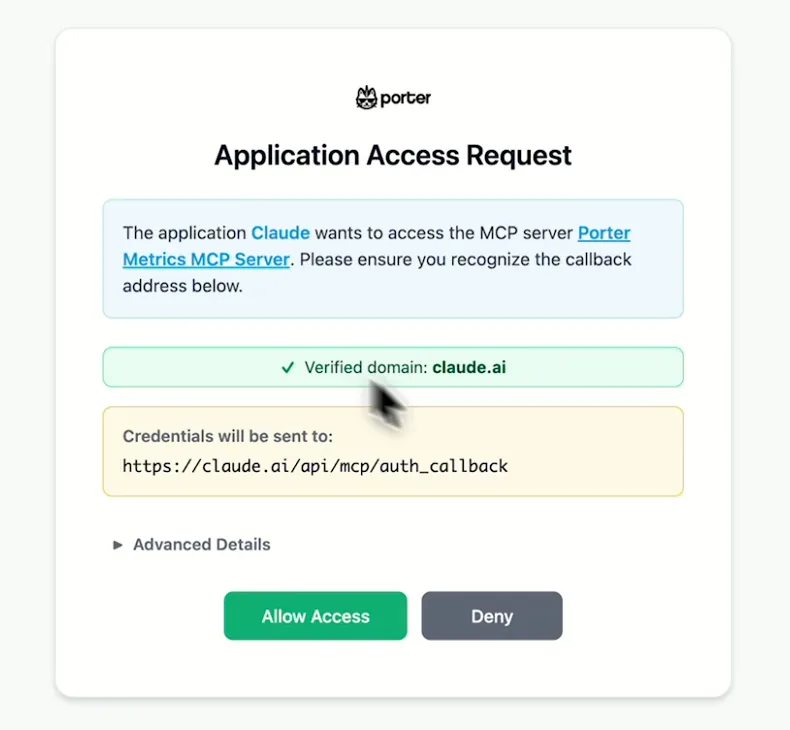
Porter's Application Access Request screen asking you to let Claude use the Porter MCP server
When Claude asks, sign in to Porter and select Allow Access.
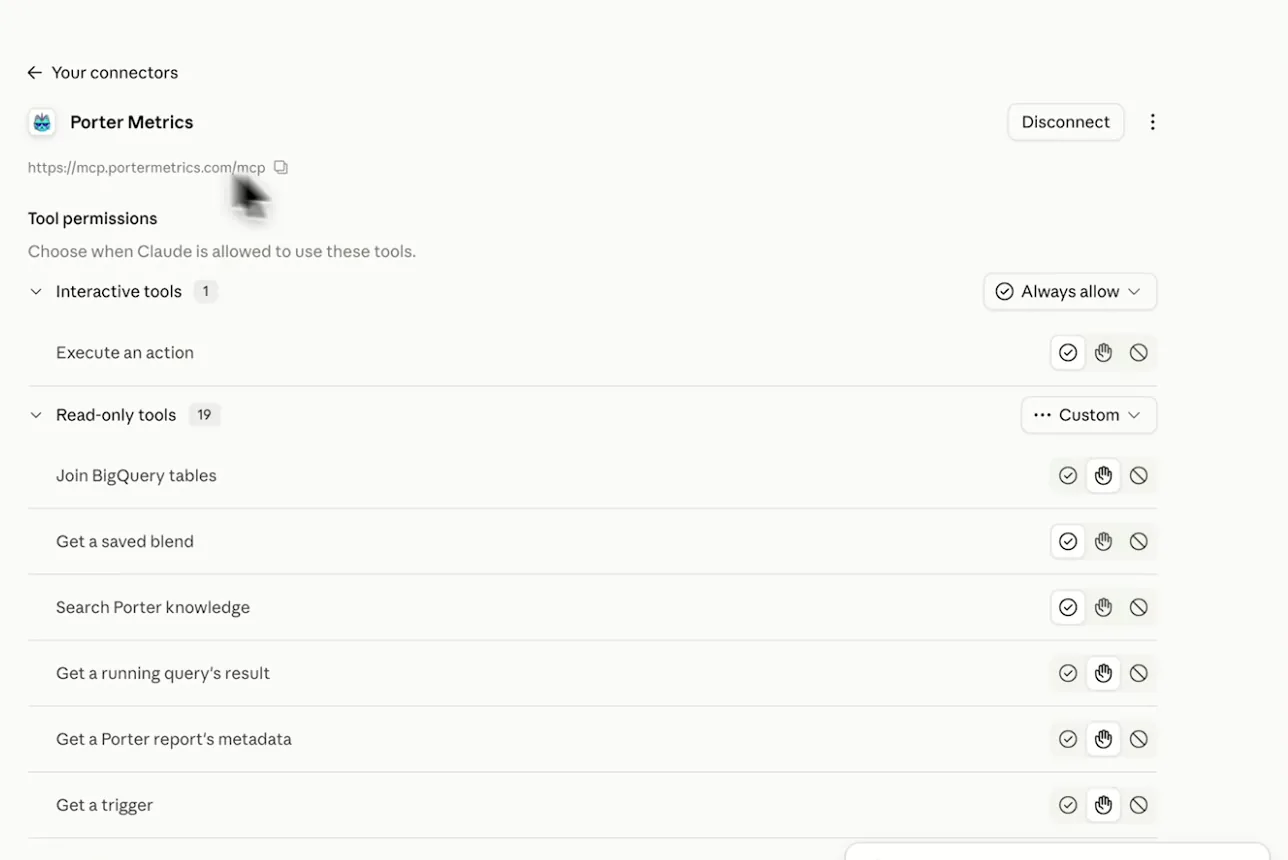
Porter Metrics listed as a connected connector in Claude with its read-only tools
After that, Porter shows as connected, so you can ask your first question.
If you prefer video, watch the whole Facebook Public Data to Claude setup (1:37, no sound).
Interactive walkthrough, so you can click along here
02Use cases and prompts

What you can ask Claude

Each use case comes with a prompt to copy, the fields it uses from the Facebook Public Data fields list (or the audit actions) and who it’s for.

Can Claude compare competitors' Facebook Pages side by side?

The benchmark sheet you rebuild before every pitch or quarterly review turns into one prompt.

Prompt
For these Facebook Pages: {Page 1}, {Page 2}, {Page 3}, {Page 4}, {Page 5}, show Page Profile Name, Page Category, Page Verification Status, Page Followers, Page Talking About Count, Page Rating Count and Page Checkins in one table, ranked by Page Followers. Then rank them by Page Talking About Count as a share of Page Followers and tell me which Page punches above its size.

For: social media managers · agency strategy teams (one table per client category) · local business marketers

Fields used: Page Profile NamePage CategoryPage Verification StatusPage FollowersPage Talking About CountPage Rating CountPage Checkins

Can Claude show which rival posts did best?

Your next content brief starts from what actually worked for a rival, not from a guess.

Prompt
For {Competitor Page}, list posts created in the last 90 days with Post Creation Date, Post Content type, the first 80 characters of Post Message, Link to Post, Post engagements, Post Reactions Count, Post Comments and Post Shares Count. Rank by Post engagements and tell me what the top 10 have in common: format, topic and weekday.

For: social media managers · content strategists · agency pitch teams

Fields used: Post IDPost Creation DatePost Content typePost MessageLink to PostPost engagementsPost Reactions CountPost CommentsPost Shares Count

Can Claude show when and how often rivals post?

You pick posting days and times from what works for your rivals rather than a generic best-time chart.

Prompt
For {Page 1}, {Page 2} and {Page 3}, show Posts count and Post engagements by Post Page Name and Week for the last 12 weeks. Then show the same by Day of week (Mon - Sun) and Hour of day, with Post engagements divided by Posts count. Day 0 is Sunday and hours are UTC: convert them to {your time zone}.

For: content strategists · social media managers · agency social teams

Fields used: Post Page NameWeekDay of week (Mon – Sun)Hour of dayPosts countPost engagements

Can Claude show how people react to their posts?

You learn which topics turned people against a rival before you post something similar.

Prompt
For {Competitor Page}, posts from the last 60 days: show Post Creation Date, the first 80 characters of Post Message, Post Likes, Post Reactions Love, Post Reactions Haha, Post Reactions Wow, Post Reactions Sad, Post Reactions Angry, Post Reactions Count and Post Comments. Flag posts where Sad plus Angry are more than 10% of Post Reactions Count and say what those posts have in common.

For: brand and PR teams · community managers · agency strategy teams

Fields used: Post Creation DatePost MessagePost LikesPost Reactions LovePost Reactions HahaPost Reactions WowPost Reactions SadPost Reactions AngryPost Reactions CountPost Comments

Can Claude analyze a competitor's Facebook ads from the Meta Ad Library?

One shareable report then replaces an afternoon of screenshots for your creative team.

Prompt
Audit {Brand}'s live Meta ads from the Ad Library ({Ad Library link}). Tell me how many unique creatives are running, the split of static images, voiced videos and silent videos, the hooks and angles that repeat, the offers and calls to action, and where the ads send traffic. Then publish the report.

For: performance marketers · creative strategists · agency pitch teams

Actions: meta_ads_research.run_audit · enrich_creatives · view_creative · publish_report (not Facebook Public Data fields)
03Why Porter

Why Porter for Facebook Public Data in Claude

Competitor Facebook data has no official MCP, since Meta’s Ads MCP server lists no tools for other brands’ Pages, posts or the Ad Library (as of October 2026). For your own ad results, Meta’s server or Porter’s Meta Ads connector for Claude fits better. You can run both in the same chat.

✓

Rival Pages without their login

Your own Facebook login reads any public Page, so the competitor doesn’t approve anything. Page and post data come from Meta’s Graph API, not a scraper.

⊞

Ad Library audits with a report

Name a brand, website or Ad Library link. Porter pulls its active Facebook and Instagram ads, transcribes voiced videos, groups hooks and offers, then publishes a hosted report.

⚙

156 ready-made fields

Claude gets Page details, today’s counts and public posts with reactions, comments, shares and engagements, plus Page search by name.

Aa

Your own Page in the same chat

Add Porter’s Facebook Insights connector to put your own reach and views next to rivals, or bring in Instagram, GA4 and other Porter sources.

↻

Reads everything, changes nothing

Claude looks up Pages, reads counts and posts, and runs Ad Library audits. Your Facebook account and every Page stay exactly as they are, and you can remove Porter’s Facebook access anytime.

✓

Hosted, and not only for Claude

Porter hosts the server, so there’s no code. The same tracked Pages also work in ChatGPT, Claude Code and Data Studio.

04Dashboard

Dashboard template

Porter’s free Facebook competitor dashboard template puts rival Pages and their top posts in one view, in the same way Claude builds it live. Either open the template and pick your rival Pages, or just ask Claude in chat.

For client-ready layouts, see Porter’s Facebook competitors report templates instead.
05Pricing

Pricing

You can start free, since Porter’s Facebook Public Data connector for Claude comes with every plan. Use the calculator for your number of accounts, or see Porter pricing for every plan.

What you get

  • Free plan: the MCP, unlimited connected accounts and 30 days of history (15 days in AI chats)
  • Reporting: from $12.50 per account a month billed annually, or $15 month to month for one account
  • Billing: each competitor Page you track counts as one account, with volume discounts and no per-seat fee
  • No credits needed: Claude’s Facebook Public Data questions are reads, so they use no AI credits
  • Trial: 14 days of full access, no card

Price calculator

$33.33/mo$6.67 per account

An account is one ad account, Stripe account, store, page or GA4 property. The Free plan has unlimited accounts with 30 days of history.

06Data and actions

Public Facebook data Claude can use

The Facebook Public Data connector gives Claude 156 fields on rival Pages, as well as Page search by name. Page fields include followers, people talking about it, ratings, check-ins and category, while post fields cover message, format, date, reactions, comments, shares and engagements. If you need more, see all 156 fields.

The 12 Facebook data fields Claude uses most

FieldWhat it's for
Page Followerspage_followersToday's audience; compare Pages
Page Talking About Counttalking_about_countPeople talking about the Page this week
Page Rating Count · Page Checkinsrating_count · checkinsLocal and retail rivals
Page Profile Name · Page Category · Page Verification Statusprofile_name · category · verification_statusLabel and group Pages
Post Message · Post Creation Date · Post Content type · Link to Postmessage · created_date · content_type · link_to_postWhat was posted, when and in which format
Post engagementspost_engagementsReactions, comments and shares together
Post Reactions Count · Post Comments · Post Shares Countreactions_count · comments · shares_countRanking posts
Post Reactions Love · Post Reactions Angryreactions_love · reactions_angryReaction mix
Posts count · Day of week (Mon - Sun) · Hour of dayposts_count · day_of_week · hourWhen rivals post
Likes per post (Posts) · Comments per post (Posts) · Shares per post (Posts)likes_per_post · comments_per_post · shares_per_postComparing Pages that post at different volumes
Post Page Namepage_nameSeveral Pages in one question
Page Username · Page IDusername · page_idIdentifying a Page

Can Claude change a rival's public Facebook data?

Porter reads competitor Pages: Claude looks up Pages, reads counts and public posts, then runs Ad Library audits. The only thing it creates is the audit report inside Porter, and every Facebook Page stays exactly as its owner set it.

How fresh is the data, and how far back?

Page counts and post reactions, comments and shares come live from Meta when you ask, so the same post shows higher numbers later. Page counts show today's numbers, and in Porter's tests posts went back to 2020.

Product stats

WhatFacebook Public Data connector
Fields156 on rival Pages and posts, plus Page search by name
ActionsMeta Ad Library audit: run the audit, enrich creatives, view a creative, publish the report
FreshnessLive from Meta when you ask, so counts keep growing after you ask
HistoryPage counts are today's only; posts went back to 2020 in Porter's tests
PostsA ranked selection of each Page's posts, not every post
AccessOne Facebook login for every Page you track, through Meta's Page Public Content Access
Not availableReach, views, follower history, comment text and competitor ad spend

See all 156 Facebook Public Data fields

07Security

Is reading public Facebook data allowed?

Yes, for public data. Porter's Facebook Public Data connector for Claude uses Meta's Page Public Content Access feature, which Meta grants following App Review and business verification. Meta allows it "to analyze and/or display posts and engagement on Pages", so the competitor doesn't have to approve anything.

Does Porter scrape Facebook instead of using the API?

No, page and post data come from Meta's Graph API rather than a scraper. Ads also come from Meta's public Ad Library.

What the Facebook Public Data connector needs

It needs just one Facebook login (OAuth), since that covers every Page you track. If it expires, say after a password change, reconnect Facebook in Porter.

08FAQ

FAQ

These answers cover your own Page, Instagram and Google ads, ChatGPT and Claude Code, as well as Data Studio. The last three help when numbers differ, a Page fails or data won't combine.

Can I compare my own Page with competitors?

Yes. Add your own Page to Porter's public Page connection, then Claude compares it with your rivals like any other public Page. For its reach, views and follower history, use Porter's Facebook Insights connector for Claude in the same chat instead.

Does the Ad Library audit cover Instagram and Google ads?

Yes for Instagram. Porter's Ad Library audit pulls a brand's active Facebook and Instagram ads together, because Meta's Ad Library lists both. Google Search, YouTube and Display ads sit outside Meta's Ad Library, so check those in Google's Ads Transparency Center.

Does Porter work in ChatGPT and Claude Code?

Yes, Porter's Facebook Public Data connector works in ChatGPT and Claude Code as well as Claude, with the same Porter account and tracked Pages. Porter's guide to connect Facebook Public Data to ChatGPT covers the ChatGPT setup, while the Claude tutorial covers Claude Code.

I already use Porter with Looker Studio. Do I need to reconnect?

No, the Pages you track in Porter feed every Porter destination, including Claude and the Data Studio connector (formerly Looker Studio), at no extra cost. Just add Porter's MCP URL to Claude as a custom connector, then ask.

Troubleshooting

Why don't the numbers match Facebook?

When Claude's numbers through Porter differ from what Facebook shows on the Page, it's usually for a few reasons. Post Likes is one reaction type, while Facebook shows all reactions. Counts also keep growing after you ask. Talking About covers the past week, times are in UTC, while reshared posts show the engagement on the share rather than the original.

Why does a Page return an error?

Use the numeric Page ID or Page URL instead of the vanity username, which is the usual reason a competitor Page fails. If every Page fails, reconnect Facebook in Porter, since your login has expired.

Why can't Claude combine Page and post data?

Ask for Page counts in one question and posts in another, and Claude joins the two answers into one table. Meta's API serves Page counts and post data separately, so Porter returns them as two answers you can combine in the same chat.


09Next

More Claude connectors

Porter also connects Claude to other social sources, each with its own prompts, fields and limits. Either start with these, or browse Porter's MCP servers for marketing data to use the same sources in other AI clients.

Try the Facebook connector in Claude

As soon as the Facebook Public Data connector is in Claude, your weekly check on rival Pages becomes one question. Then ask who posts most, which posts took off and what ads a brand is running. After that, brief your team from the answer in the same chat.

Free forever plan · 14-day full trial · No card

Social media managers: both rival Pages and top posts in one table.

Agencies: open every pitch with a one-prompt competitor benchmark instead of a spreadsheet.

Creative strategists: both a rival's hooks and offers in one report.