




- Step 1
Connect your Google Ads, Meta Ads, Microsoft Ads and GA4 data
Sign in to Porter with the same Google account and add Google Ads, Meta Ads, Microsoft Ads and GA4 as data sources. It takes about a minute.
Connect Google Ads, Meta Ads, Microsoft Ads and GA4 in PorterStep-by-step guide: Google Ads to Claude or Meta Ads to Claude or Microsoft Ads to Claude or GA4 to Claude.
- Step 2
Open your AI
 Open Claude with the prompt
Opens a new chat with the prompt below typed in. First time? Add Porter as a connector in Claude.
Open ChatGPTFirst time? Add Porter as a connector in ChatGPT.
- Step 3
Paste this prompt
Swap the words in [brackets] for your own, then send it.
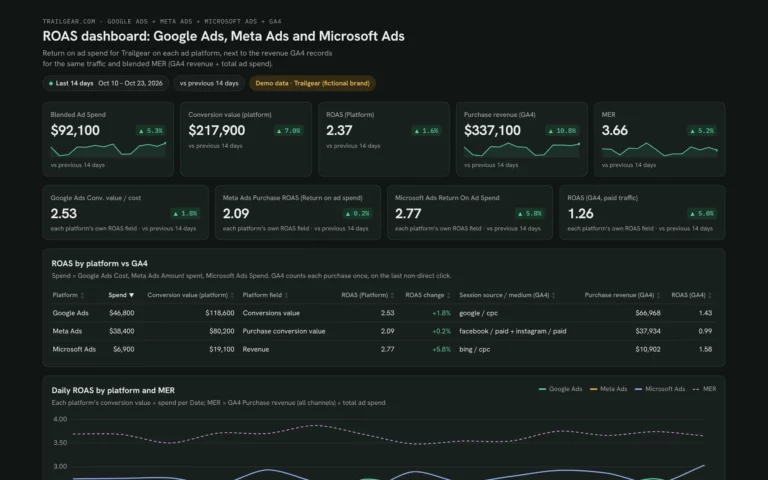
Template promptDuplicate this Claude dashboard template and keep its layout, views and styling: https://claude.ai/artifact/SkDeerWRyTXgnPAJ5UNgFT Then rebuild it with my own data through Porter: a ROAS dashboard for [brand] for the last 14 days from Google Ads, Meta Ads, Microsoft Ads and GA4: KPI cards for total ad spend, conversion value, ROAS, GA4 Purchase revenue and MER (GA4 Purchase revenue ÷ total ad spend); each platform's own ROAS (Google Ads Conversions value ÷ Cost, Meta Ads Purchase ROAS, Microsoft Ads Return On Ad Spend) next to GA4 Purchase revenue by Session source / medium; daily ROAS per platform and MER; every campaign's ROAS against a break-even ROAS of [2.0]; share of spend vs share of GA4 revenue; and MER by week.
What you’ll get
Your ROAS dashboard in Claude, built on your own data, like this demo. Ask follow-up questions in the same chat.
Want to share it with your team or clients?
A Claude dashboard is built for you, in your chat. When a team or client needs to open it, a Porter dashboard is built for sharing (Anthropic’s guide to sharing artifacts).
| Claude Dashboards | Porter dashboard | |
|---|---|---|
| Your data | Each viewer connects their own data | Connect once, and your team uses that connection |
| Who can open it | Viewers need a Claude account | Viewers don’t need a Claude subscription |
| Permissions | Shared from Claude, by plan | Editor or viewer access for each person |
| Size | Claude’s file size limits apply | Hosted at its own link, refreshes itself |
Back to the ROAS dashboard templateAll Claude dashboard templates