Microsoft Ads (Bing Ads) connector for ChatGPT

Use Porter’s Microsoft Ads connector for ChatGPT to ask about campaigns, keywords, spend and budgets, then pause, edit or build Search campaigns you confirm on Business, Enterprise or Edu.

  • Find keywords that spend without converting
  • Pace campaign budgets before month-end
  • Compare Microsoft Ads with Google Ads in one table
  • Roll up every client account in one report
G2★★★★★Rated 4.6/5 from 288 G2 reviews (October 2026)

By Porter Metrics team · Last updated October 20, 2026

ChatGPTPorter connected
Show Spend, Clicks and Conversions Qualified by Campaign Name for the last 7 full days.
Porter / Microsoft Ads / Trailgear Demo✓ 4 rows
Brand – Exact brings the most conversions at the lowest cost. Generic – Broad spent $640 for 9 conversions.
Campaign NameSpendConv. Qualified
Brand – Exact$41048
Shopping – Boots$53031
Generic – Broad$6409
Competitors$2206
Demo data, Trailgear Demo account
412 Microsoft Ads fields
01Setup

How to connect Microsoft Ads to ChatGPT

Porter’s Microsoft Ads connector for ChatGPT takes 3 steps, with no code, Azure app or developer token. Connect your ad accounts in Porter with Microsoft sign-in, add one MCP URL to ChatGPT as a custom MCP server and ask. See how to connect Microsoft Ads to ChatGPT for screenshots. MCP (Model Context Protocol) is the open standard ChatGPT uses to connect to tools.

Before you start

  • You need a Microsoft Advertising login to your ad accounts, as well as a free Porter account and a ChatGPT plan that supports custom MCP servers.
  • Custom MCP servers are in beta in ChatGPT on the web, so set up Porter and ask your questions from a browser. On Business, Enterprise or Edu, an admin or owner turns on developer mode, and then ChatGPT can also make the changes you confirm. On Pro, you turn on developer mode yourself, and ChatGPT reads and recommends (OpenAI’s guide to custom MCP apps).
  • Works in ChatGPT on the web (chatgpt.com, custom MCP servers in beta) and in Codex, with the same Porter MCP URL.
  1. Step 1: Connect Microsoft Ads in Porter

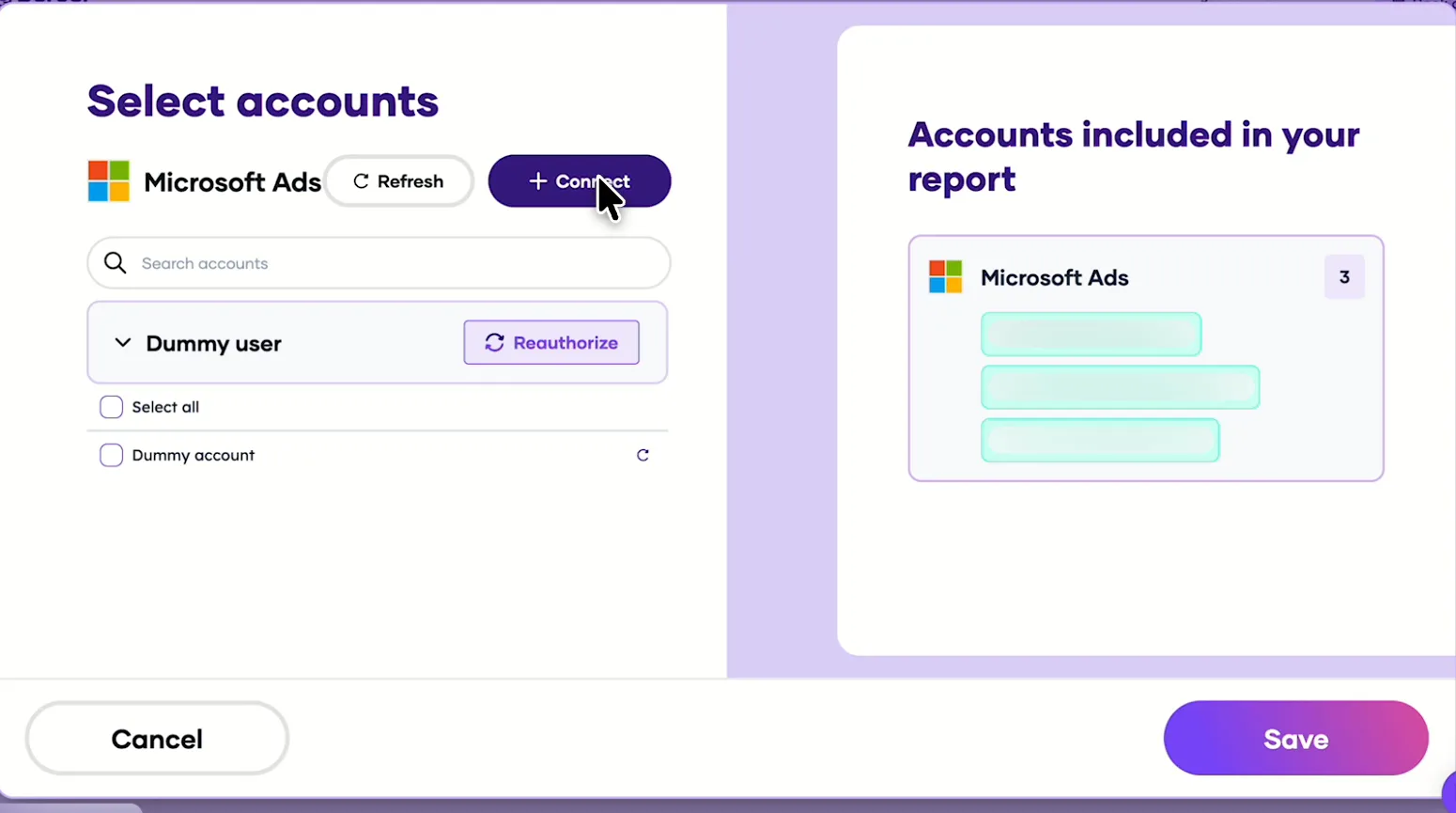
    Sign up free at Porter, pick Microsoft Ads as the source and then sign in with Microsoft. Tick the ad accounts ChatGPT should read, then pick ChatGPT as the destination.

  2. Step 2: Add the Microsoft Ads connector to ChatGPT

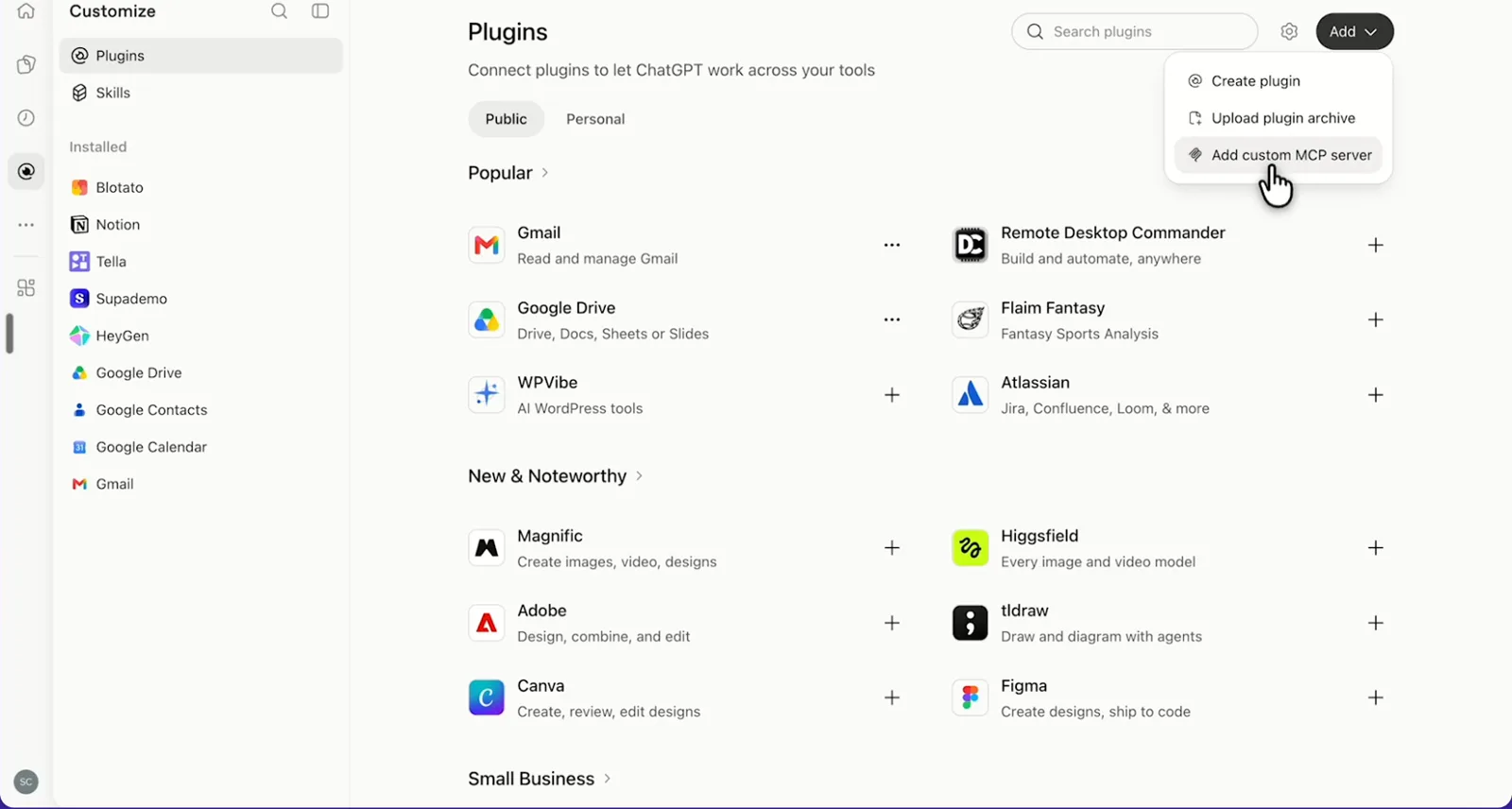
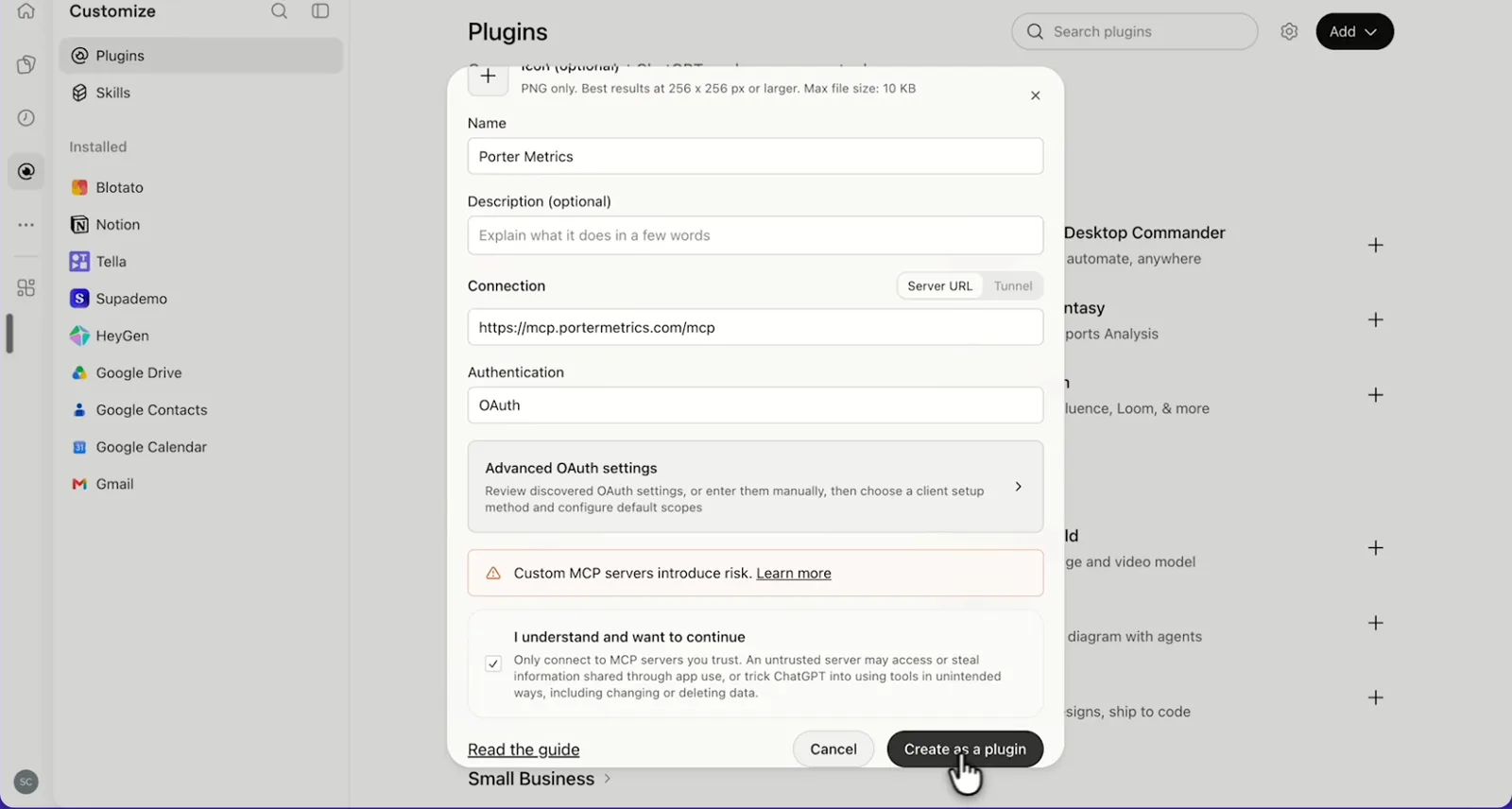
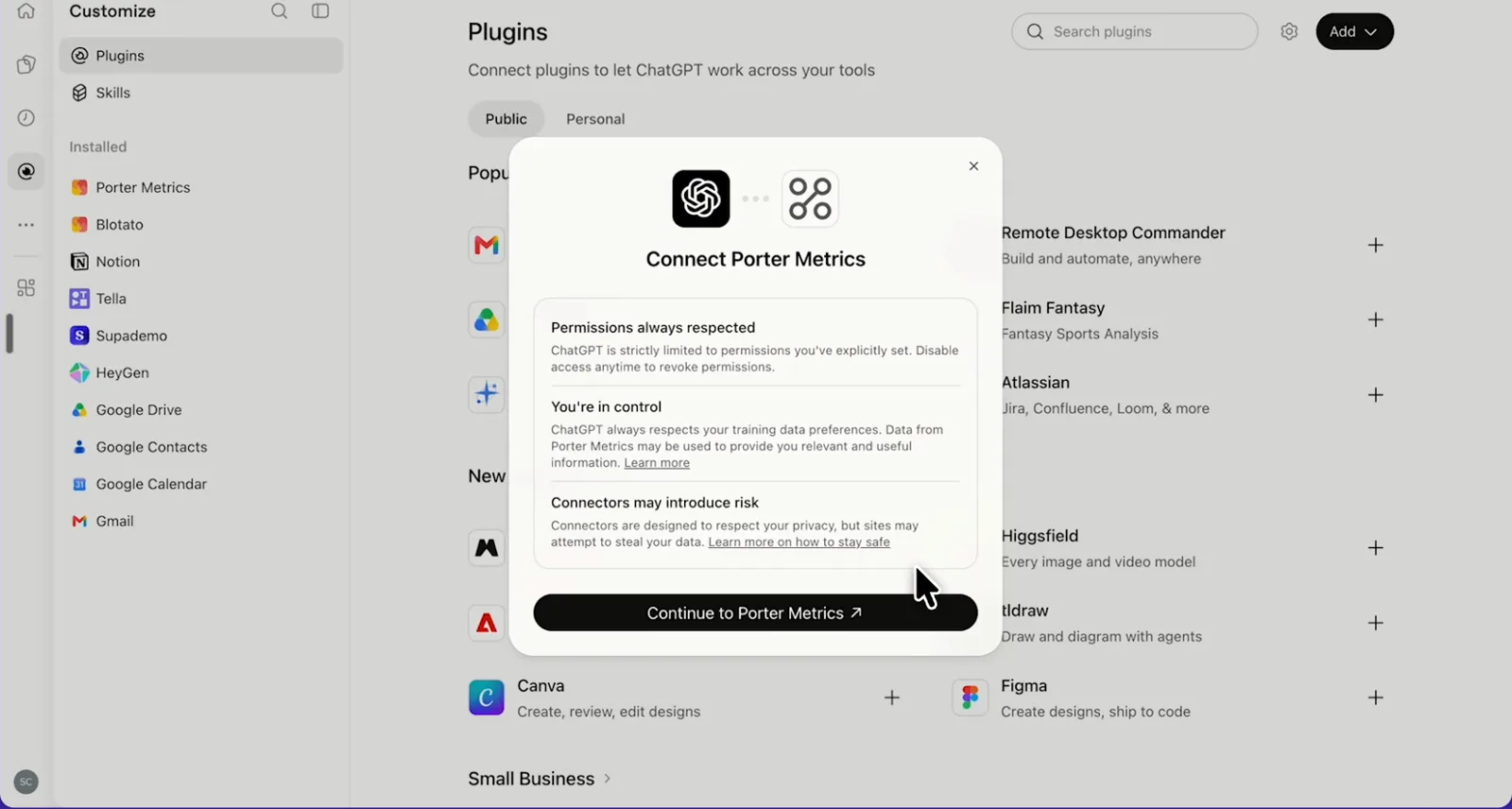
    Then, in ChatGPT, open Customize › Plugins, click Add and choose Add custom MCP server. On Business, an admin does this from Workspace settings › Apps › Create. Name it Porter Metrics, paste this URL as the Server URL and keep OAuth as the authentication:

    MCP URL
    https://mcp.portermetrics.com/mcp

    Tick “I understand and want to continue”, then select Create as a plugin.

  3. Step 3: Ask ChatGPT about Microsoft Ads

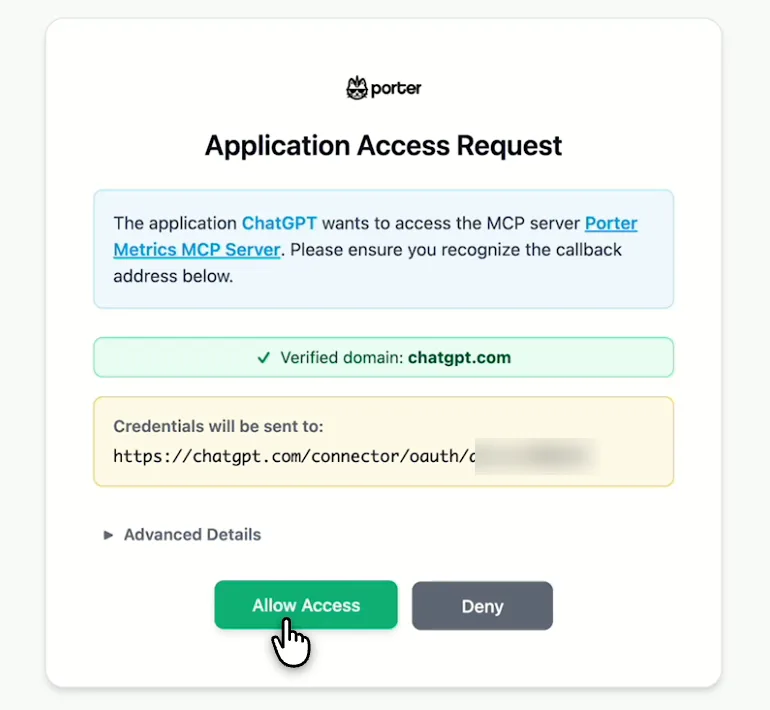
    Next, select Continue to Porter Metrics, sign in to Porter and click Allow Access. Then select Try in chat and paste this prompt:

    Prompt
    List my Microsoft Ads accounts and show Spend, Clicks and Conversions Qualified by Campaign Name for the last 7 full days.

Guides and videos

app.portermetrics.com / create
Porter's Select accounts window for Microsoft Ads with a demo account and the Connect button
First, in Porter, open Microsoft Ads and select Connect.
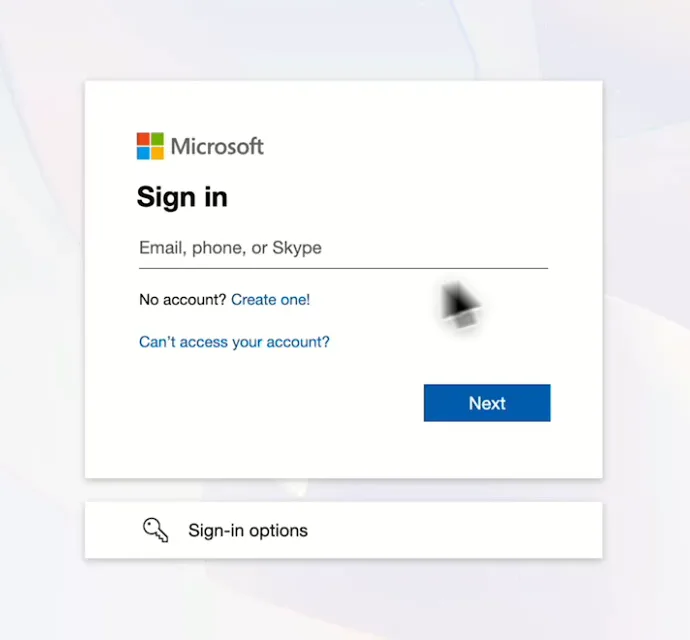
Microsoft sign-in screen you see when you connect Microsoft Ads to Porter
Then, sign in with your Microsoft account.
ChatGPT's Plugins page with the Add menu open on Add custom MCP server
In ChatGPT, open Customize, then Plugins, and choose Add custom MCP server.
ChatGPT's Add custom MCP server form with the name Porter Metrics, Porter's MCP URL and OAuth filled in
Then, paste Porter's MCP URL, keep OAuth, tick the box and select Create as a plugin.
ChatGPT's Connect Porter Metrics window with the Continue to Porter Metrics button
Next, ChatGPT asks you to continue to Porter Metrics to sign in.
Porter's Application Access Request screen asking you to let ChatGPT use the Porter MCP server
Finally, sign in to Porter and select Allow Access.
If you prefer video, watch the whole Microsoft Ads to ChatGPT setup (1:20, no sound).
Interactive walkthrough, so you can click along here
02Use cases and prompts

What you can ask ChatGPT

Each use case comes with a prompt to copy, the fields it uses from the Microsoft Ads fields list and who it’s for. The prompts use Conversions Qualified and skip fields that failed in Porter’s tests, such as impression share. On Business, Enterprise or Edu, ChatGPT can also make the changes you confirm; on Pro it reads and recommends.

Can ChatGPT find keywords that spend without converting?

The problemKeywords brought over with Google Import keep spending, but nobody has checked them since the import.

What ChatGPT doesChatGPT ranks keywords by spend with zero conversions, then shows their match type and cost per conversion. After that, it pauses them or lowers their bid once you confirm.

What you getYou skip the keyword report export and the zero-conversion filter, so the spend moves to keywords that convert.

Prompt
For the last 30 days, show Campaign Name, Ad Group Name, Keyword, Match Type, Spend, Clicks, Conversions Qualified and Cost Per Conversion. List keywords with Spend above $50 and 0 Conversions Qualified, highest Spend first.
Then ask
Prompt
Pause the 5 keywords with the highest Spend from that list after I confirm, and show me each change first.

For: in-house PPC managers · agencies

Fields used: Campaign NameAd Group NameKeywordMatch TypeSpendClicksConversions QualifiedCost Per Conversion
Action: keyword_update (status, bid)

Can ChatGPT pace budgets before month-end?

The problemBy mid-month, some campaigns are on track to blow through their monthly budget while others will leave money unspent.

What ChatGPT doesChatGPT reads daily spend, month-to-date spend and monthly budget per campaign, then projects month-end spend from the last 7 days. It can also change a campaign’s daily budget.

What you getThe month-end projection you’d build in a spreadsheet becomes one answer, including the budget fix in the same chat.

Prompt
This month, by Date and Campaign Name, show Daily Spend, Month To Date Spend and Monthly Budget. Using the last 7 days' average Daily Spend, which campaigns will finish above or below Monthly Budget, and by how much?
Then ask
Prompt
Lower the daily budget of the campaign most likely to overspend so it lands on Monthly Budget. Show me the new amount first.

For: agencies · in-house PPC managers · small businesses

Fields used: DateCampaign NameDaily SpendMonth To Date SpendMonthly Budget
Action: campaign_update (daily budget)

Can ChatGPT compare with Google Ads in one table?

The problemMicrosoft Ads usually gets whatever budget is left after Google, but nobody can say whether it deserves more.

What ChatGPT doesYou also add the Google Ads connector for ChatGPT in Porter. ChatGPT then puts spend, clicks, conversions and cost per conversion for both engines side by side by campaign. Each engine counts conversions its own way, so compare cost per conversion rather than totals.

What you getYou can make the case for moving budget between engines from one table instead of two exports.

Prompt
Compare my Microsoft Ads and Google Ads accounts for the last 30 days: spend, clicks, conversions and cost per conversion by platform and campaign name. Which campaigns are cheaper per conversion on Microsoft Ads?

For: agencies · in-house PPC managers

Fields used: blend fields amount_spentclicksconversionscampaign_nameaccount_name (both connectors)SpendClicksConversions QualifiedCampaign Name

Can ChatGPT roll up every client's account in one report?

The problemEvery client has a Microsoft Ads account, so the Monday check means switching accounts in the UI one at a time.

What ChatGPT doesChatGPT queries every connected account in one call, including Account Name as a column. Then it compares this week with last week and drafts one note per client.

What you getThe account-by-account check becomes one table, so each client note starts from the accounts that moved.

Prompt
For every connected Microsoft Ads account, show Account Name, Spend, Clicks, Conversions Qualified, Cost Per Conversion and Return On Ad Spend for the last 7 full days versus the 7 days before. Flag accounts where Cost Per Conversion rose more than 20%.

For: agencies · multi-brand in-house teams

Fields used: Account NameTime PeriodSpendClicksConversions QualifiedCost Per ConversionReturn On Ad Spend
Action: account_list

Can ChatGPT build a Search campaign from a brief?

The problemNew campaigns tend to reach Microsoft Ads last, typed in by hand after the Google ones are live.

What ChatGPT doesChatGPT drafts a Search campaign, including a daily budget, ad groups, and Broad, Phrase or Exact keywords. It also writes responsive search ads with 3–15 headlines (30 characters) and 2–4 descriptions (90), then creates it all once you confirm. You then add ad extensions, audiences and image assets in the Microsoft Advertising UI.

What you getYou review a full draft instead of entering ad groups, keywords and headlines one by one.

Prompt
Build a paused Microsoft Ads Search campaign called 'Spring Sale – Search' with a $40 daily budget: 2 ad groups, 10 Phrase and Exact keywords each, and one responsive search ad per ad group with 8 headlines and 3 descriptions pointing to {URL}. Show me everything before you create it.

For: agencies · in-house PPC managers · small businesses

Actions: campaign_create · adgroup_create · keyword_create · ad_create · read-back campaign_list · ad_list
03Why Porter

Why Porter for Microsoft Ads in ChatGPT

Porter gets ChatGPT reading and changing your Microsoft Ads account in 3 steps, next to your other marketing sources. If you only need reads and can register an Azure app, Microsoft’s free Microsoft Advertising MCP server may fit better. You can run both.

✓

No Azure app or developer token

Sign in with Microsoft and add one MCP URL to ChatGPT on the web. Porter adds the developer token itself, so there’s no Azure app registration or redirect URI to set up.

⊞

Read and change campaigns

ChatGPT reads 412 fields and, on Business, Enterprise or Edu, makes the campaign, ad group, keyword and responsive search ad changes you confirm. On Pro it reads and recommends. New campaigns, ad groups and ads start paused.

⚙

412 fields named like your reports

Fields use the names from the Microsoft Advertising UI, such as Conversions Qualified and Month To Date Spend, so your prompts read like your reports.

Aa

Google Ads and GA4 in the same chat

Ask about Microsoft Ads next to Google Ads, GA4, Meta Ads and other Porter sources in one answer, with no separate integration for each engine.

↻

Every client account in one question

One Microsoft login brings in every ad account it can see. ChatGPT then queries them together, with Account Name as a column.

✓

One connection, every destination

The same Porter MCP URL works in Claude, and the same Microsoft Ads accounts can also feed Data Studio and BigQuery.

⊞

Today's data, with its refresh time

Microsoft needs up to 2 hours for clicks and 3 for conversions. Porter’s answers cover up to today and show when the data last refreshed, so ChatGPT reads today’s spend and clicks and you know how recent they are.

⚙

Live dashboards, not only chat answers

Ask ChatGPT for a dashboard and Porter’s AI dashboards publish it at its own link, synced automatically and ready to share. Official MCP servers answer inside the chat and stop there.

04Dashboard

Dashboard template

Start from a ready-made Microsoft Ads template, or ask ChatGPT to build a live one with AI dashboards.

AI dashboards

Build a live Microsoft Ads dashboard from the chat

Describe the dashboard in one sentence and Porter builds it. A client-ready dashboard in minutes, with no chart dragging and no BI tool to learn. Ask ChatGPT:

Prompt
Build a live Microsoft Ads dashboard for my account with the last 30 days, the main KPIs and a weekly trend.
Live URLEach dashboard at its own link: no login, no app, no download
Auto-syncFresh Microsoft Ads data, nobody re-exports each period
Scheduled deliveryEmail or PDF sends on a set day
White labelYour logo and branding for clients
Sharing permissionsView or edit access per person

Or start from a template

05Pricing

Pricing

You can start free, since Porter’s Microsoft Ads connector for ChatGPT comes with every plan. Use the calculator for your number of accounts, or see Porter pricing for every plan.

What you get

  • Free plan: never expires, with unlimited connected accounts and the last 15 days of data in ChatGPT (30 days in Data Studio and Sheets)
  • Reporting: from $12.50 per account a month billed annually, or $15 month to month for one account
  • Billing: each Microsoft Ads ad account counts as one account the first time a question returns its data, with volume discounts and no per-seat fee
  • Changes: 1 AI credit per completed change you confirm on Business, Enterprise or Edu; failed tasks are free, and the Free plan includes 100 credits a month
  • Trial: 14 days of full access, no card

Price calculator

$33.33/mo$6.67 per account

An account is one ad account, Stripe account, store, page or GA4 property. The Free plan never expires and has unlimited accounts, with the last 15 days of data in AI chats.

06Data and actions

Microsoft Ads data and actions in ChatGPT

The Microsoft Ads connector gives ChatGPT 412 fields across campaigns, ad groups, keywords, ads, budgets, devices, age, gender and location. It also adds 20 actions to list, create, edit, pause and delete them, while the Microsoft Ads fields list has every label and ID.

The 12 Microsoft Ads fields ChatGPT uses most

FieldWhat it's for
Time PeriodTimePeriodDay-by-day trends
Account NameAccountNameRolling up many ad accounts
Campaign NameCampaignNameRanking campaigns
Ad Group NameAdGroupNameAd group breakdowns
KeywordKeywordKeyword spend and waste
Match TypeMatchTypeBroad vs Phrase vs Exact
SpendSpendCost behind every efficiency metric
ClicksClicksTraffic
Conversions QualifiedConversionsQualifiedThe current conversions column
Cost Per ConversionCostPerConversionCPA (cost per conversion)
Return On Ad SpendReturnOnAdSpendROAS (revenue per ad dollar)
Month To Date SpendMonthToDateSpendBudget pacing

Can ChatGPT pause, edit or create Microsoft Ads campaigns?

On Business, Enterprise and Edu plans, ChatGPT creates, edits, pauses and deletes campaigns, ad groups, keywords and responsive search ads after you confirm. For a new keyword text or match type, it adds the new keyword and pauses the old one. On Pro, ChatGPT reads the account and lists the changes for you to make in Microsoft Advertising.

How fresh is the data, and how far back?

Clicks reach Microsoft's reports within about 2 hours, while conversions arrive within 3 (Microsoft's reporting delays). Microsoft keeps 36 months of daily data (Microsoft's report data retention periods), while Porter's paid plans have no history cap.

Product stats

WhatMicrosoft Ads connector
Fields412 across campaigns, ad groups, keywords, ads, budgets, devices, age, gender and location
Actions20 to list, create, edit, pause and delete campaigns, ad groups, keywords and responsive search ads
ChatGPT plansReads on Pro; reads and changes you confirm on Business, Enterprise and Edu (web, beta)
FreshnessLive query; answers cover up to today and show the last refresh time; clicks arrive about 2 hours late, conversions about 3
History36 months of daily data and 6 months of hourly data from Microsoft; no cap on Porter's paid plans
SpeedReports time out after about 200 seconds, so ask for fewer metrics per question
AccessMicrosoft sign-in; changes need Advertiser Campaign Manager or higher
Not availableSearch terms report, impression share, ad extensions, audiences, image and video assets

See all 412 Microsoft Ads fields

07Security

Is it safe?

Yes, the Microsoft Ads connector for ChatGPT uses Microsoft's own sign-in, and Microsoft requires multi-factor authentication for apps such as Porter (Microsoft's multi-factor authentication requirement). Deletes are permanent, so check each one before you confirm it.

How you confirm changes

ChatGPT asks you to confirm changes based on the app's permissions and holds back some high-risk actions for extra care. New campaigns, ad groups and responsive search ads are created paused, so nothing serves until you turn it on, and partial failures are reported item by item.

Status, budget and bid changes can also be reverted.

What the connector needs from Microsoft Ads

Porter needs a Microsoft sign-in to your ad accounts, then adds the developer token itself. Under Microsoft Advertising user roles, Viewer can see reports while Advertiser Campaign Manager can edit campaigns.

ChatGPT's changes therefore need Advertiser Campaign Manager or higher. You can also revoke Porter's access any time.

08FAQ

FAQ

These answers cover the Bing Ads name, Claude, manager accounts and the conversions column. The last three help when numbers, accounts or questions look wrong in ChatGPT.

Is Microsoft Ads the same as Bing Ads?

Yes, Bing Ads is the former name of Microsoft Ads, and Porter reads the whole account in ChatGPT. Search ads run on Microsoft Bing, AOL, Yahoo, DuckDuckGo and Ecosia, while audience ads use MSN, Microsoft Edge and Outlook.com, across the Microsoft Advertising Network.

Can I use Porter in Claude too?

Yes. Porter's MCP URL, the same one behind the Microsoft Ads connector for ChatGPT, also works in Claude as a custom connector, with the same Porter account and ad accounts. See Porter's Microsoft Ads connector for Claude for the Claude setup and what it covers.

Can I connect several Microsoft Ads accounts or a manager account?

Yes, one Microsoft login brings every ad account it can see into Porter, across customers, and ChatGPT then queries them together. Each ad account counts toward your Porter plan the first time a question returns its data, so you pay only for accounts ChatGPT uses.

Which Microsoft Ads conversions column does ChatGPT use?

ChatGPT uses Conversions Qualified, since it's the current conversions column in Porter. Microsoft deprecated the older Conversions and All Conversions columns in 2022 and also says their values may be inaccurate (Microsoft's campaign report columns). When you compare with the Microsoft Advertising UI, name Conversions Qualified.

Troubleshooting

Why don't ChatGPT's numbers match Microsoft Ads?

ChatGPT's numbers can differ from the Microsoft Advertising UI for 3 common reasons. Conversions Qualified and All Conversions Qualified count different goals, so compare the same column. Also, Microsoft's reports default to Pacific time for "today" unless a time zone is set. Finally, recent hours or invalid-traffic credits can still change.

Why can't ChatGPT see my Microsoft Ads account?

Sign in again with a Microsoft user that has a role on that account. This usually fixes it, since the cause is a login with no role there or an expired sign-in. Ask ChatGPT about that one account by name, and Porter returns a re-connect link.

Why did a Microsoft Ads question time out?

Ask for fewer metrics and keep one report type per question. Porter's report stops after about 200 seconds, and impression share fields and very wide field lists cause most timeouts. Check impression share in the Microsoft Advertising UI.


09Next

More ChatGPT connectors

Porter brings many sources into ChatGPT, and also sends Microsoft Ads to more places than ChatGPT. Browse all ChatGPT connectors or open a related page below:

Not only ChatGPT. Send Microsoft Ads data anywhere

The same Porter account and connection also send Microsoft Ads data to these destinations, at no extra cost.

Try the connector in ChatGPT

When you use the Microsoft Ads connector for ChatGPT, your first question is 3 steps away. For example, ask ChatGPT which keywords waste spend, which campaigns will miss their monthly budget or which ad groups need new keywords. Then confirm each fix in the same chat.

Free plan · 14-day trial · No card needed

In-house PPC managers: wasted keywords and month-end pacing, one question each.

Agencies: one prompt covers every client account, including the Monday check.

Small businesses: a Search campaign goes from brief to draft in one chat, then waits paused for your review.