WooCommerce connector for Claude

Use Porter’s WooCommerce connector for Claude to see net sales, refunds, coupons and stock, then update products, stock and coupons after you approve.

  • Track what the store kept after refunds and discounts
  • Find best-sellers about to run out, then update stock
  • Find costly coupons and set an expiry date
  • Compare store revenue with Meta Ads spend by day
G2★★★★★Rated 4.6/5 on G2 (288 reviews, October 2026)

By Porter Metrics team · Last updated October 19, 2026

ClaudePorter connected
Show total sales, net sales, total orders and total refunds for last month.
Porter / WooCommerce / Trailgear Demo✓ 4 rows
Last month: $62.4K in sales from 718 orders; refunds took back $2.1K.
MetricLast month
Total sales$62.4K
Net sales$57.9K
Total orders718
Total refunds$2.1K
Demo data, Trailgear Demo account
414 WooCommerce fields
01Setup

How to connect WooCommerce to Claude

Porter’s WooCommerce connector for Claude takes three steps, with nothing to install on your store: no plugin, feature flag, Node.js or config file. Add a REST API key to Porter, add one MCP URL to Claude as a custom connector, then ask. Claude Code is also covered in Porter’s step-by-step guide to connecting Porter to Claude.

What you need before you start

  • You need a WooCommerce store, an admin who can create a REST API key, as well as a free Porter account.
  • Any Claude plan works, since custom connectors run in Claude, Cowork and Claude Desktop on Free, Pro, Max, Team and Enterprise. Free, though, allows one (Anthropic’s guide to custom connectors in Claude).
  • Works in Claude.ai, Claude Desktop, Cowork and Claude Code, with any Claude model, from Opus to Sonnet and Haiku.
  1. Step 1: Connect your store in Porter

    Before you connect, add a key in WooCommerce → Settings → Advanced → REST API (WooCommerce’s guide to REST API keys). Sign up free at Porter, pick WooCommerce as the source and connect your store with that key, then pick Claude as the destination.

  2. Step 2: Add the connector to Claude

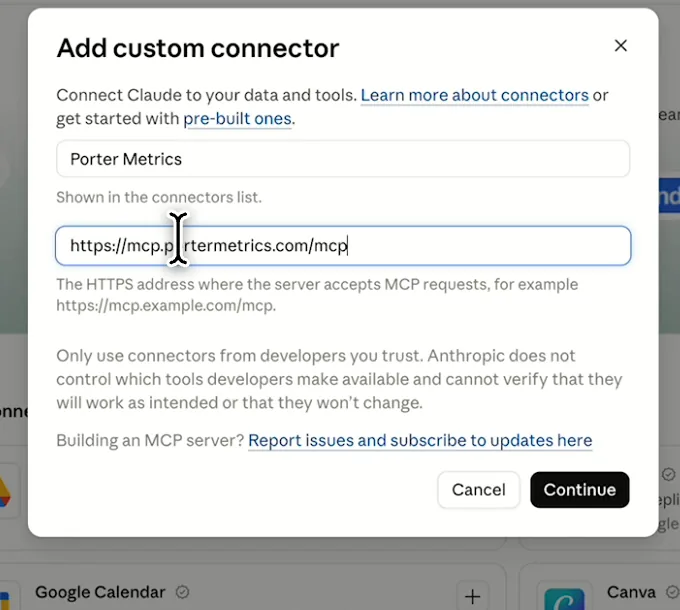
    In Claude, go to “+” → Connectors → Manage connectors → Add custom connector. Then name it Porter Metrics and paste this URL:

    MCP URL
    https://mcp.portermetrics.com/mcp
  3. Step 3: Ask Claude about WooCommerce

    Sign in with Porter, then ask:

    Prompt
    For my WooCommerce store, show Report total sales, Report net sales, Report total orders and Report total refunds for last month.
app.portermetrics.com / create

Create: WooCommerce to Claude

Sign in: WooCommerce

Select the accounts Claude can use.

Claude's Add custom connector window with the name Porter Metrics and Porter's MCP URL filled in
Then, in Claude, add a custom connector with Porter's MCP URL.
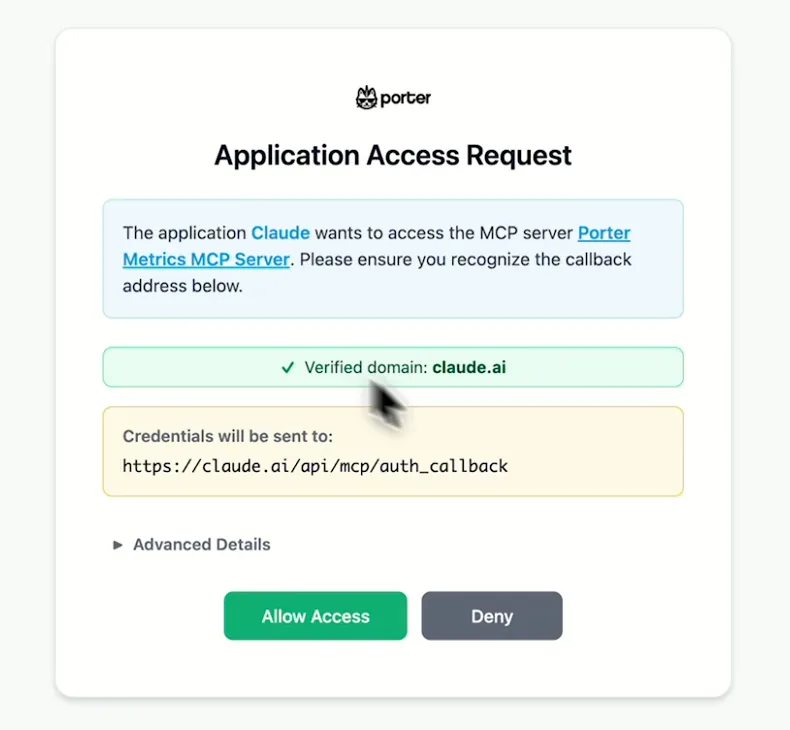
Porter's Application Access Request screen asking you to let Claude use the Porter MCP server
When Claude asks, sign in to Porter and select Allow Access.
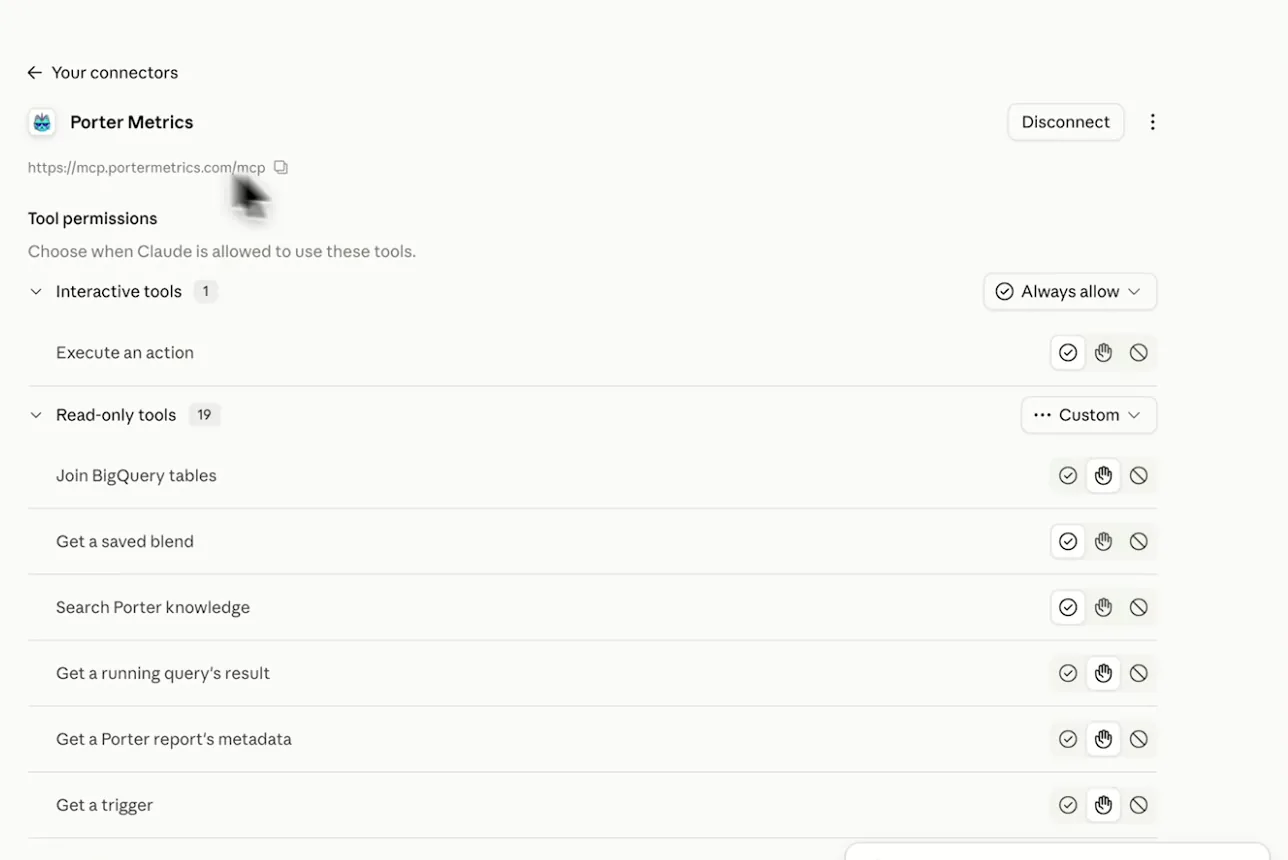
Porter Metrics listed as a connected connector in Claude with its read-only tools
After that, Porter shows as connected, so you can ask your first question.
02Use cases and prompts

What you can ask Claude

Each use case comes with a prompt to copy, the fields it uses from the WooCommerce fields list and who it’s for. Sales, refunds, coupons and stock are read live.

Can Claude show what I kept this month after refunds and discounts?

The problemGross sales look healthy on the dashboard, but nobody can say what the store kept once refunds and coupon discounts come off.

What Claude doesClaude pulls your sales report for this month and the same days last month: gross sales, net sales, refunds, discounts, orders and items. It works out AOV and the change, then shows how much order value sits in pending, on-hold or failed orders.

What you getMonth-end starts from one comparison table instead of an orders export and a pivot table, and the stuck orders are already listed.

Prompt
For my WooCommerce store, compare this month to date with the same days last month: Report total sales, Report net sales, Report total refunds, Report total discount, Report total orders and Report total items. Calculate AOV as Report total sales divided by Report total orders and show the % change.
Then ask
Prompt
Now list Order grand total and the number of orders by Order status for this month, and tell me how much is pending, on-hold or failed.

For: store owners · e-commerce managers · WooCommerce agencies (one report per client store)

Fields used: Report total salesReport net salesReport total refundsReport total discountReport total ordersReport total itemsOrder grand totalOrder statusOrder creation date

Can Claude find best-sellers that are about to run out?

The problemThe first sign a top product ran out is a customer email asking when it’s back.

What Claude doesClaude ranks products by units sold in the period, including each one’s current stock quantity and stock status. It also flags best-sellers that are low or out. Then it updates the stock count you give it.

What you getReorders start from sales pace instead of a guess, and the new count goes into WooCommerce without opening the product.

Prompt
List my top 20 WooCommerce products by Report top sellers quantity for the last 30 days. Add Product SKU, Product stock quantity and Product stock status for each, and flag any with fewer than 14 days of stock at the last 30 days' pace.
Then ask
Prompt
Set the stock of SKU TSHIRT-BLK-M to 120. Show me the change before you send it.

For: e-commerce managers · store owners

Fields used: Report top sellers titleReport top sellers quantityReport top sellers product IDProduct nameProduct SKUProduct stock quantityProduct stock status
Actions: product_list · product_update · variation_update

Can Claude show which coupons cost most and whether to end them?

The problemLast season’s coupon codes are still live, and nobody remembers which ones were supposed to end.

What Claude doesClaude lists each coupon’s type, amount, usage count, usage limit and expiry. It then adds up the discount and order value on orders that used each code. Finally, it flags the costly ones and sets an expiry date or usage limit.

What you getYou end the codes that give away the most per $100 of orders instead of opening each coupon screen.

Prompt
For the last 90 days, group my WooCommerce orders by Order coupon line code and show the number of orders, Order total discount and Order grand total for each. Add Coupon discount type, Coupon amount of discount, Coupon usage count, Coupon usage limit and Coupon expiration date, and rank codes by discount given per $100 of order value.
Then ask
Prompt
Make coupon SUMMER20 expire at the end of this month. Show me the change first.

For: store owners · e-commerce managers · WooCommerce agencies

Fields used: Order coupon line codeOrder total discountOrder grand totalOrder IDCoupon codeCoupon discount typeCoupon amount of discountCoupon usage countCoupon usage limitCoupon expiration date
Actions: coupon_list · coupon_update

Can Claude tell why customers are asking for refunds?

The problemRefunds pile up after a launch, but each reason is buried in its own order.

What Claude doesClaude groups last month’s refunds by reason with the refunded amount and count, then lists the products named in those refunds. It also points to the reasons and products that cost the most.

What you getE-commerce managers get one list of what to fix first, instead of reading orders one by one.

Prompt
Show my WooCommerce refunds for last month grouped by Refund reason, with the total Refund amount and number of refunds for each. Then list the Refund line item name and Refund line item sku values under the top 3 reasons.

For: e-commerce managers · store owners · retention marketers

Fields used: Refund reasonRefund amountRefund creation dateRefund line item nameRefund line item sku

Does my store revenue follow my Meta Ads spend?

The problemMeta Ads reports a strong week, while the WooCommerce orders screen looks a lot like the week before.

What Claude doesWhen Meta Ads is also connected in Porter, Claude puts WooCommerce order revenue and order count by day next to Meta Ads amount spent. It works out revenue per dollar spent, then flags days where revenue didn’t follow spend.

What you getConnect the Meta Ads connector for Claude in Porter first, and budget calls rest on store revenue instead of the ad platform’s own report.

Prompt
For the last 30 days, show WooCommerce Order grand total and number of orders by Date, counting only completed and processing orders, next to Meta Ads Amount spent by Date. Add revenue per $1 spent and flag the 5 days where revenue moved against spend.

For: performance marketers · store owners · WooCommerce agencies

Fields used: Order grand totalOrder IDOrder statusDateAmount spentDate
03Why Porter

Why Porter for WooCommerce in Claude

Porter gives Claude your WooCommerce sales reports, refunds, coupons and customers through one URL, with nothing installed on the store. If you’re a developer building custom abilities on your own WordPress site, extend WooCommerce’s MCP and the WordPress MCP Adapter instead.

✓

Nothing to install on your store

Connect with a WooCommerce REST API key, then add one MCP URL to Claude. There’s no plugin, feature flag, Node.js proxy or config file to set up.

⊞

Sales reports, refunds and coupons

Claude reads net sales, top sellers, refunds by reason, coupons and customers. WooCommerce’s own MCP, a developer preview as of October 2026, covers products and orders only.

⚙

Changes only after you approve

Claude shows each change to products, stock, orders, coupons or customers and asks first. Nothing runs until you approve it, refunds included.

Aa

Every order your store keeps, live

WooCommerce’s REST API reads orders straight from your store database. Porter calls your store on every question and stores nothing, so Claude sees every order your store keeps, with no sync delay.

↻

Store data next to GA4 and Meta Ads

Ask about WooCommerce next to GA4, Meta Ads and 30+ more Porter sources in one chat, so revenue sits beside the traffic and ads behind it.

✓

One connection, every destination

The same Porter account and connected stores also work in ChatGPT and Claude Code, so you never reconnect a store for each AI tool.

⊞

Every client store, one subscription

Agencies keep every client store under one Porter subscription and ask one question across all of them, with the store as a column.

⚙

Live dashboards, not only chat answers

Ask Claude for a dashboard and Porter’s AI dashboards publish it at its own link, synced automatically and ready to share. Official MCP servers answer inside the chat and stop there.

04Dashboard

Dashboard template

Start from a ready-made WooCommerce template, or ask Claude to build a live one with AI dashboards.

AI dashboards

Build a live WooCommerce dashboard from the chat

Describe the dashboard in one sentence and Porter builds it. A client-ready dashboard in minutes, with no chart dragging and no BI tool to learn. Ask Claude:

Prompt
Build a live WooCommerce dashboard for my account with the last 30 days, the main KPIs and a weekly trend.
Live URLEach dashboard at its own link: no login, no app, no download
Auto-syncFresh WooCommerce data, nobody re-exports each period
Scheduled deliveryEmail or PDF sends on a set day
White labelYour logo and branding for clients
Sharing permissionsView or edit access per person

Or start from a template

05Pricing

Pricing

You can start free, since Porter’s WooCommerce connector for Claude comes with every plan. Use the calculator for your number of accounts, or see Porter pricing for every plan.

What you get

  • Free plan: never expires, with unlimited connected accounts and the last 15 days of data in Claude (30 days in Data Studio and Sheets)
  • Reporting: from $12.50 per account a month billed annually, or $15 month to month for one account
  • Billing: each WooCommerce store counts as one account, with volume discounts and no per-seat fee
  • Changes: 1 AI credit per completed change; failed tasks are free, and the Free plan includes 100 credits a month
  • Trial: 14 days of full access, no card

Price calculator

$33.33/mo$6.67 per account

An account is one ad account, Stripe account, store, page or GA4 property. The Free plan never expires and has unlimited accounts, with the last 15 days of data in AI chats.

06Data and actions

WooCommerce data and actions in Claude

Through the WooCommerce connector, Claude reads 414 fields live from your store: sales reports, orders and line items, refunds, coupons, customers, products, variations and reviews. Porter also has 32 actions to look up and change orders, products, coupons and customers. Finally, labels and IDs are in the full list of WooCommerce fields.

The 12 WooCommerce fields Claude uses most

These 12 fields answer most store questions, including the use cases above.

FieldWhat it's for
Report net saleswoocommerce_report_net_salesNet sales for a period
Report total saleswoocommerce_report_total_salesGross sales for a period
Report total orderswoocommerce_report_total_ordersOrders; the AOV denominator
Report total refundswoocommerce_report_total_refundsRefunded in the period
Report top sellers quantity · Report top sellers titlewoocommerce_report_top_sellers_quantity · woocommerce_report_top_sellers_titleUnits sold by product
Period report sales · Datewoocommerce_date_report_total_sales · woocommerce_dateSales trend by day
Order grand totalwoocommerce_order_grand_totalOrder value
Order statuswoocommerce_order_statusPending, processing, on-hold, completed, cancelled, refunded, failed
Order coupon line codewoocommerce_order_coupon_line_codeCoupons used per order
Refund reason · Refund amountwoocommerce_refund_reason · woocommerce_refund_amountWhy and how much was refunded
Product stock quantity · Product stock statuswoocommerce_product_stock_quantity · woocommerce_product_stock_statusStock now
Is a paying customer?woocommerce_is_paying_customerRegistered buyers who have paid

What can Claude change in WooCommerce?

Claude can create and update products and variations, as well as stock, categories, orders, coupons and customers. It can also create refunds, and delete orders, products, variations, categories, customers and coupons.

Porter sends each change on its own, even though WooCommerce's batch endpoints take up to 100 objects (WooCommerce REST API docs). Store settings, payment gateways, shipping zones, tax and order notes stay in your WordPress admin.

Product stats

WhatWooCommerce connector
Fields414, from sales reports, orders and line items, refunds, coupons, customers, products, variations and reviews
Actions32, to look up and change orders, products, coupons and customers, each after you approve
FreshnessRead live from your store on every question
HistoryEvery order your store keeps, read live; 30 days on the Free plan, 15 in AI chats
Changes per callOne at a time, each shown before it runs
AccessWooCommerce REST API consumer key and secret, one per store
Store needsWooCommerce 3.5+, WordPress 4.4+ and pretty permalinks

See all 414 WooCommerce fields

07Security

Is it safe?

Yes, with 2 safeguards. Claude talks to Porter's WooCommerce connector rather than to your store directly. And Claude shows each change and asks before Porter sends it. Reads change nothing, your REST API key stays in Porter, and if you revoke the key in WooCommerce, access stops.

How Claude asks before changing WooCommerce

Nothing runs until you approve it, refunds included. Deleting with force is permanent, and customers and categories skip the trash, so check each delete before you approve it. Each completed change also uses one AI credit.

What the connector needs from WooCommerce

Porter needs a WooCommerce REST API consumer key and secret, one key per store. The store also needs WooCommerce 3.5+, WordPress 4.4+ and pretty permalinks. If a store has no HTTPS, it must use OAuth 1.0a (WooCommerce's REST API requirements).

In addition, firewalls must let /wp-json/wc/v3/ through. Orders and customers carry names, emails and addresses (WooCommerce's data privacy notice for MCP), so share access only with people who need it.

08FAQ

FAQ

Store owners usually ask about WordPress, other platforms, other AI tools, chatbots and running several stores before they connect. Then come 2 fixes, for numbers that don't match WooCommerce and a store Claude can't reach.

Is there a WordPress MCP for Claude?

Yes. The WordPress MCP Adapter turns WordPress abilities into MCP tools, and WooCommerce's own MCP is built on it. However, it's for developers working on their own site. Porter brings store data to Claude instead: sales reports, orders, refunds, coupons and stock, with nothing installed.

Is there a Shopify MCP for Claude?

Yes. Porter's Shopify connector for Claude works the same way, so one MCP URL covers both platforms. If you sell on both, connect both stores in Porter and Claude puts their sales side by side in one table.

Does it work in ChatGPT and Claude Code?

Yes. The WooCommerce connector works in ChatGPT and Claude Code, with the same Porter account and connected stores. One store connected in Porter feeds every Porter destination, so you never reconnect it for each AI tool.

Does this add a Claude chatbot to my store?

No. Porter connects your WooCommerce data to your own Claude account, so you can ask questions and make changes from the chat. Shoppers never see Claude, since nothing is added to your storefront, theme or checkout. Instead, Claude answers only you and your team.

Can I connect several stores?

Yes. Each WooCommerce store is its own account in Porter, so it's billed as one store. Claude then compares them in one table with the store as a column. Agencies also keep every client store under one Porter subscription and ask one question across all of them.

Troubleshooting

Why don't Claude's numbers match WooCommerce?

WooCommerce Analytics leaves out pending payment, cancelled and failed orders by default and dates sales by Date Paid (WooCommerce's Analytics settings guide). Porter, however, reads the REST sales report, which counts processing, on-hold and completed orders. Older orders need Import Historical Data, Analytics may need Clear Analytics Cache, and Claude should use site-timezone dates rather than GMT.

Why can't Claude reach my store?

Before anything else, check that the site runs on HTTPS with pretty permalinks. Make sure Cloudflare, Wordfence, Sucuri or your host isn't blocking /wp-json/wc/v3/, and that the REST API key still exists. If the key was revoked, create a new one and reconnect the store in Porter.

09Next

More Claude connectors

Porter brings more than WooCommerce into Claude. Email, traffic and ad data from all Claude connectors reach the same chat through the same MCP URL as the WooCommerce connector. That puts store revenue next to what drives it, including email and ads. Connect the sources your store already sells through, then ask across all of them.

Not only Claude. Send WooCommerce data anywhere

The same Porter account and connection also send WooCommerce data to these destinations, at no extra cost.

Try the connector in Claude

Your first question is 3 steps away. Add a REST API key in Porter and one URL in Claude, then ask what the store kept or which coupons cost too much. The free plan also includes the WooCommerce connector for Claude.

Free forever plan · 14-day full trial · No card

Store owners: what the store kept this month is one question instead of an export.

E-commerce managers: reorders as well as coupon cuts rest on sales pace and discount cost.

WooCommerce agencies: client stores sit in one table, ready for the monthly report.