


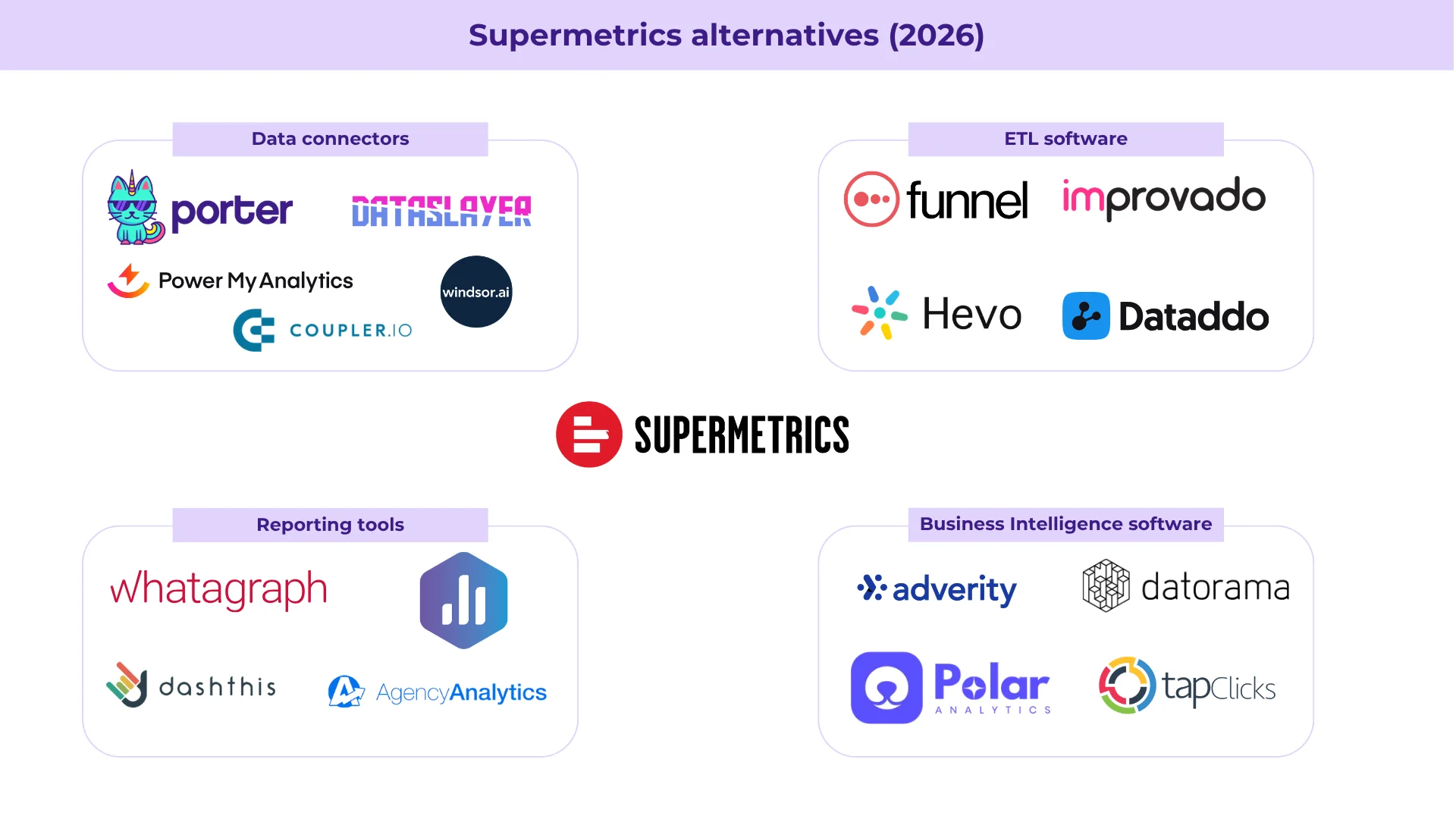
The best Supermetrics alternatives in 2026 are Porter Metrics, Funnel.io, Windsor.ai, Improvado, Whatagraph, AgencyAnalytics, Dataslayer, Coupler.io, Power My Analytics, and Databox. Teams switch from Supermetrics mainly because of rising prices, complex per-destination pricing, and slow customer support. Most alternatives on this list offer simpler pricing and start between $15–$50/month, compared to Supermetrics’ $37–$499/month range.
At Porter we’ve seen marketing teams switch from Supermetrics mainly over pricing, especially when customer support doesn’t match those price increases. One mid-sized agency told us they were asked to renew Supermetrics for BigQuery at $35k/year: the same usage that already cost them ~$15k/year with us.
Supermetrics is a market leader with over $89.5M in annual revenue, comparable only to Funnel.io. A natural way to keep growing is raising prices and reserving dedicated support for larger clients. So it makes sense for many marketers to look for alternatives that do the same job with better support and simpler pricing.
Disclosure: I’m Juan, founder of Porter Metrics, a Supermetrics alternative with 6+ years in the market. Every claim in this article is based on public data and verifiable facts so you can make an objective comparison.
Why look for a Supermetrics alternative
Marketing teams look for Supermetrics alternatives because:
due to their market leadership, not an improved service
repeatedly reported on G2 Crowd and Trustpilot
that take too long to resolve
Supermetrics has added over 150 connectors and more destinations: data visualization tools, data warehouses, API, MCP to connect to AI chats, and uniquely, project management tools like Monday.com as a data destination (a feature only shared by Coupler.io on this list).
Their prices increase over time and aren’t obvious with Google Sheets or Looker Studio when you buy a few connections. You’ll notice them when you need other destinations like data warehouses, or when the number of data sources and accounts scales, especially for larger brands and agencies.
This is why marketing teams and agencies look for alternatives that might be more affordable or simply more simple to manage and scale.
Supermetrics is the market-leading marketing data connector for marketing reporting, but it is not necessarily the best fit for every team. Here is why:
1. Higher, complex pricing
Supermetrics’ pricing depends on several variables at once. Here’s what each plan includes and what each add-on costs (source: supermetrics.com/pricing, verified March 2026):
| What’s included | Starter ($37/mo) | Growth ($199/mo) | Pro ($499/mo) |
|---|---|---|---|
| Annual price (20% off) | $348/year | $1,908/year | $4,788/year |
| Destinations | 1 | 1 | 1 |
| Data sources | 3 | 7 | 10 |
| Accounts per source | 3 | 7 | 10 |
| Users | 1 | 2 | 3 |
| Refresh frequency | Weekly | Daily | Hourly |
| Data transformations (custom metrics, custom dimensions) | Not included | Not included | Not included |
| Storage | Not available | Not available | +$499/mo ($399/mo annual) |
| API / MCP rows | 50,000 rows/mo | 250,000 rows/mo | 500,000 rows/mo |
| Workspace access | Not included | Not included | Not included |
On top of the base plan, Supermetrics charges for add-ons:
| Add-on | Cost per unit | Limit |
|---|---|---|
| Additional destination | $37/mo (Starter), $187/mo (Growth/Pro) | Up to 3 on Starter, 2 on Growth, 4 on Pro |
| Additional data source | $37/mo | Up to 5 on Starter, 12 on Growth, 15 on Pro |
| Additional accounts per source | $13/mo per account | Up to 10 on Starter, 15 on Growth, 20 on Pro |
| Additional user | $37/mo (Starter), $124/mo (Growth), $99/mo (Pro) | Up to 3 on Starter, 5 on Growth, 5 on Pro |
Note: Supermetrics shows annual prices by default on their pricing page.
| What works | What to watch out for |
|---|---|
| Base plans are affordable for low volume: Google Sheets or Looker Studio with few sources at reasonable prices | Data warehouses require Enterprise: BigQuery, Snowflake, and Redshift need a sales call and custom pricing |
| All connectors included: premium connectors no longer exist, every connector is available on any plan. Always check the current pricing page | API/MCP rows are limited: 50k rows/mo (Starter), 250k (Growth), 500k (Pro). Not unlimited |
| API and MCP access from Starter: available on all plans, useful for AI integrations | No data transformations on Starter, Growth, or Pro: custom metrics and custom dimensions are Enterprise only |
| Hourly refresh on Pro: faster data updates for teams that need near real-time reporting | Storage is a paid add-on: only on Pro at +$499/mo ($399/mo annual). Not available on Starter or Growth |
| Annual renewal surprises: customers report price increases at renewal, or being forced into annual commitments to keep their current price |
In comparison: Porter Metrics has one pricing variable: data source accounts, starting at $15/month per account. All destinations, data transformations, storage, unlimited API rows, and unlimited users included in every plan.
2. Customer support
What Supermetrics has done well: they’ve invested in hiring. Based on their LinkedIn page (497 associated members), around 43% of the company is in support or customer-facing roles:
- Support: 69 members (13.9%)
- Customer Success: 146 members (29.4%)
- Other roles: 282 members (56.7%)
Estimated from LinkedIn keyword filters. Not exact, but directional.
However, Customer Success (29.4%) typically focuses on onboarding and retention for larger accounts. The reactive support team handling day-to-day tickets is closer to 14%.
What users report: on Trustpilot, Supermetrics scores 1.8/5. On G2, support is one of the top negative themes:
- Email or chat only, with response times from days to weeks
- Users report being ghosted after reporting bugs
- No video call support, even on higher-tier plans
At Porter Metrics: customers get a dedicated Slack channel with direct access to founders and developers. Bugs go straight to engineering, not a ticket queue.
3. Data quality and connector reliability
All connectors have speed and stability risks:
- APIs change without notice
- Tokens expire
- Platforms update permissions
Destinations have their own risks too:
- Looker Studio can go slow
- Google Sheets has row limits and API scan timeouts
- These issues stack on top of the connector’s own API limitations
Many of these factors are outside of the control of any connector tool, including Supermetrics or Porter.
Supermetrics has a critical limitation because of their pricing: storage, data warehouse destinations, and data transformations to build custom metrics and dimensions are only available on the Enterprise plan.
- CRM and e-commerce connectors are unusable on lower plans: connectors like Shopify, HubSpot, and Klaviyo have APIs that are slow and hit rate limits as soon as you run a few queries. You need to run them on top of a data warehouse and backfill their data in a tool like Google BigQuery to make them work.
- No data transformations: when fields don’t bring the data as you expect it, or the data is incomplete, or you need to calculate a new metric, or you need to clean your data with a custom field, or you want to blend your data outside Looker Studio, you have to do it manually inside the destination (like Looker Studio or Google Sheets). This is less reliable, harder to automate, and slower than having transformations at the connector level. On Starter, Growth, or Pro plans, there is no other option.
Porter Metrics includes data blending, storage, and custom metrics and dimensions on all plans, so you can clean your data, calculate new metrics, and troubleshoot these issues yourself.
Here are specific examples of these limitations:
| Connector | The issue | Supermetrics | Porter Metrics |
|---|---|---|---|
 Shopify Shopify |
Shopify’s GraphQL API is limited to 100 points/second on standard plans. A query like products or customers this month can break or take over 1 minute. The REST API (legacy) is even slower at 2 requests/second with a 40-request bucket. | Connector cannot handle slow queries. Requires external storage (Enterprise only) to work around API limits. | Built-in storage in BigQuery. You can run Shopify directly on Looker Studio without hitting API limits. |
 HubSpot HubSpot |
HubSpot’s API is limited to 100 requests per 10 seconds on Free/Starter plans (190 on Pro/Enterprise). The Search API is even stricter. CRMs with many contacts or deals hit these limits fast and data doesn’t return. | Without storage (Enterprise only), data is incomplete for large CRMs. | Automatically stores and backfills deals, contacts, and company data, so you don’t run into these limits. |
 Klaviyo Klaviyo |
Klaviyo’s API uses a tiered rate limit system. Heavy endpoints are limited to 1 request/second burst and 15 requests/minute sustained (XS tier). Even lighter endpoints cap at 75 requests/second burst. | Without storage (Enterprise only), data is limited and slow for accounts with many profiles or events. | Storage included. Complete data access without hitting API rate limits. |
 Meta Ads Meta Ads |
Multiple conversion attribution windows exist for the same campaign (7-day click, 28-day click, 1-day view, 7-day view, etc.). You need all of them to compare performance accurately. | Only one attribution window per connection. You need to create multiple connections to see different windows. | Only tool that includes all conversion attribution windows in the same connection. |
 Instagram Stories Instagram Stories |
Stories data expires after 24 hours in the API. If you don’t store it immediately, it’s gone forever. | Data deleted after 24h, not recoverable. | Stores Stories data from day one, nothing is lost. |
Supermetrics versus alternatives: quick comparison
In this section we compare Supermetrics and its alternatives across three areas:
- Pricing comparison: free forever plans, pricing models, and a side-by-side price comparison for tools with similar structures
- Connectors and destinations: number of data source integrations and where each tool can send data (Looker Studio, Google Sheets, BigQuery, Power BI, etc.)
- Features to look for: data blending, transformations, built-in storage, alerts, AI features, and API access
Pricing comparison
Free forever plans
Several data connector platforms offer permanent free plans, not just trials. Here’s how they compare:
| Platform | Connectors | Accounts | Users | Destinations | Key Limitation |
|---|---|---|---|---|---|
 Porter Metrics Porter Metrics |
Any | 3 | Unlimited | All | 30-day data history |
 Windsor.ai Windsor.ai |
Any | 1 | 1 | All | 1 source · 5M MAR · 1 user |
 Dataslayer Dataslayer |
Any | 1 | 1 | 1 | Manual daily refresh · 1 user |
 Databox Databox |
Selected | — | 3 | 1 dashboard | Daily refresh · 11-mo history · No API/Zapier/spreadsheets |
 Coupler.io Coupler.io |
Any | 1 | 1 | 1 | No auto-refresh · 100 rows/run · 1 active data flow |
 Whatagraph Whatagraph |
Selected | 5 | Unlimited | Reports only (no BigQuery/Looker Studio) | Essential integrations only · No white-label · No automated emails |
* “Users” means different things depending on the tool. ETL tools like Porter Metrics, Windsor.ai, and Dataslayer send data to destinations like Looker Studio or Google Sheets, which manage their own user access. For these tools, a “user” is someone who connects data sources. Reporting tools like Whatagraph, Databox, and AgencyAnalytics have built-in dashboards, so “users” includes both who connects data and who views reports.
* Whatagraph calls them “source credits.” 1 source credit = 1 connected platform account (e.g., 1 Facebook Ads account = 1 credit). Same concept other tools call “connected accounts.”
All plans and pricing models
Each tool charges differently. This table lists the entry, mid, and top plan as shown on each tool’s public pricing page. Prices are monthly (billed monthly) unless noted.
| Tool | Pricing model | Entry | Mid | Top / Enterprise | Free plan | Trial |
|---|---|---|---|---|---|---|
 Supermetrics Supermetrics |
Per destination + per source + per account + per user | $37/mo Starter: 3 sources, 1 dest, weekly refresh |
$199/mo Growth: 7 sources, 1 dest, daily refresh |
$499/mo+ Pro/Enterprise: 10+ sources, BigQuery, custom metrics |
No | 14 days |
| Porter Metrics |
Per data source account. All destinations, users, and features included | $15/mo 1 account, all destinations, all features |
$40/mo 5 accounts, all destinations |
Custom BigQuery, unlimited sources |
Yes | 14 days |
 Funnel.io Funnel.io |
Per connector tier. Annual contracts | ~$200/mo Starter: 121 connectors |
~$800/mo Business: 579 connectors |
Custom Enterprise: 590 connectors, dedicated support |
No | 14 days |
| Windsor.ai |
Per data sources + accounts + destination tasks | $23/mo Basic: 3 sources, 75 accounts, 5 dest. tasks |
$118/mo Standard: 7 sources, 75 accounts, unlimited tasks |
$299/mo Plus: 10 sources, 200 accounts, unlimited tasks |
Yes | 30 days |
| Whatagraph |
Per source credits (1 credit = 1 connected account). Integrations tiered by plan | ~$270/mo Start: 20 credits, Essential integrations only |
~$675/mo Boost: 50 credits, Advanced integrations, white-label |
Custom Max: 100+ credits, Premium integrations |
Yes | No |
| Databox |
Per source ($7/ea extra). 1 source = 1 account/property. Own platform only | $199/mo Pro: 3 sources (=3 accounts), hourly sync, Genie AI, goals |
$499/mo Growth: + datasets, data blending, anomaly detection, forecasts |
$999/mo Premium: 50 sources, 15-min sync, OKRs, white-label, specialist |
Yes | 14 days |
 AgencyAnalytics AgencyAnalytics |
Per client campaign. Own platform only | $59/mo Freelancer: 5 clients |
$179/mo Agency: 10 clients |
$349/mo Agency Pro: 15 clients |
No | 14 days |
| Dataslayer |
Per source + per account + per destination (mirrors Supermetrics) | $39/mo Starter: 3 sources, 3 accounts, 1 dest, daily |
$139/mo Advanced: 7 sources, 50 accounts, hourly, AI + blending |
$419/mo Pro: 10 sources, 100 accounts, hourly + custom |
Yes | 15 days |
| Coupler.io |
Per account ($5.99/ea extra). Workflow-based ETL. Raw tables, user builds joins/appends | $32/mo Starter: 3 accounts, 1 dest, daily, 5K rows/query |
$132/mo Active: 15 accounts, 3 dests, daily, unlimited rows, transformations |
$259/mo Pro: 50 accounts, unlimited dests, hourly, workspaces |
Yes | 7 days |
 Power My Analytics Power My Analytics |
Per account (across all sources). Extra: $14.95/ea (Business), $4.95/ea (Pro) | $49.95/mo Business: 5 sources, 5 accounts, Looker Studio only |
$199.95/mo Pro: unlimited sources, 10 accounts, Looker + Sheets + Excel |
From $295/mo Enterprise: all destinations, 100+ accounts, Sovereign DWH |
Sample data only | 14 days |
 Improvado Improvado |
Per data volume (rows/year). Annual contracts only. Unlimited connectors/accounts | ~$3,400/mo* Growth: 200M rows/yr, 2x daily, 1 MCDM, 2 dests |
~$5,000+/mo* Advanced: 600M rows/yr, 4x daily, unlimited dests |
Custom Enterprise: 1B rows/yr, custom sync, dedicated CSM |
No | Demo only |
Prices as of March 2026. Billed monthly unless noted. Annual billing typically saves 15-20%. *Improvado prices estimated from a 2024 proposal made to a marketing agency; actual prices vary by contract. Databox and AgencyAnalytics only report inside their own platforms.
Price vs. data sources: tools with per-account pricing
This chart compares Supermetrics, Windsor.ai, Dataslayer, and Power My Analytics because they follow the same pricing structure: fixed tiers based on the number of data sources and accounts per source. They even offer remarkably similar tier sizes, as if the others are replicating Supermetrics’ model at a lower price. Porter Metrics is not included because its structure is different: it doesn’t count data sources, only the number of connected accounts. Bubble size represents accounts included in each plan.
Annual
Supermetrics
Windsor.ai
Dataslayer
Power My Analytics
Few
Medium
Many
Integrations: Connectors and destinations
Connectors are what let you automatically pull data from your marketing and business platforms. Destinations are where that data goes: visualization tools (Looker Studio, Power BI, Tableau), spreadsheets (Google Sheets, Excel), or data warehouses (BigQuery, Snowflake, Redshift). AI integrations are covered in the features section below.
ETL tools like Supermetrics, Funnel.io, Windsor.ai, and Fivetran focus on having more connectors and more destinations, including data warehouses like Redshift and Snowflake that are typically used by data engineers, not marketers. Reporting tools like Whatagraph, Databox, and AgencyAnalytics have their own built-in dashboards, so they compete on connectors and reporting experience, not destinations. Porter Metrics focuses on marketing teams specifically, with fewer connectors and destinations (Looker Studio, Google Sheets, BigQuery), but built for marketers who don't need engineer-level ETL infrastructure.
| Tool | Connectors | Destinations |
|---|---|---|
| Supermetrics |
150+ | 19 |
| Porter Metrics |
25+ | 4 |
| Funnel.io |
590 | 28 |
| Windsor.ai |
325+ | 15+ |
| Whatagraph |
62 | Own platform + 5 |
| Databox |
130+ | Own platform + 3 |
| AgencyAnalytics |
85+ | Own platform + 3 |
| Dataslayer |
51 | 13 |
| Coupler.io |
400+ | ~20 |
| Power My Analytics |
75+ | 9 |
| Improvado |
500+ | 15+ |
Connector counts are based on each tool's official integrations page.
Destinations across tools
Where each tool can send your data. Reporting tools (Whatagraph, Databox, AgencyAnalytics) have their own built-in dashboards, so destinations don't apply to them the same way.
| Tool | Data Visualization | Spreadsheets | Data Warehouse / Database | |||||
|---|---|---|---|---|---|---|---|---|
 Looker Looker |
 Power BI Power BI |
 Tableau Tableau |
 Sheets Sheets |
.svg/960px-Microsoft_Office_Excel_(2019–2025).svg.png) Excel Excel |
 BigQuery BigQuery |
 Snowflake Snowflake |
 Redshift Redshift |
|
| Supermetrics |
✓ | ✓ | — | ✓ | ✓ | ✓ | ✓ | ✓ |
| Porter Metrics |
✓ | ✓ | — | ✓ | — | ✓ | — | — |
| Funnel.io |
✓ | ✓ | ✓ | ✓ | ✓ | ✓ | ✓ | ✓ |
| Windsor.ai |
✓ | ✓ | ✓ | ✓ | ✓ | ✓ | ✓ | ✓ |
| Whatagraph |
✓ | — | — | ✓ | ✓ | ✓ | — | — |
| Databox |
— | — | — | ✓ | ✓ | — | — | — |
| AgencyAnalytics |
✓ | — | — | ✓ | ✓ | — | — | — |
| Dataslayer |
✓ | ✓ | — | ✓ | ✓ | ✓ | ✓ | ✓ |
| Coupler.io |
✓ | ✓ | ✓ | ✓ | ✓ | ✓ | ✓ | ✓ |
| Power My Analytics |
✓ | — | — | ✓ | ✓ | ✓ | ✓ | — |
| Improvado |
✓ | ✓ | ✓ | ✓ | ✓ | ✓ | ✓ | ✓ |
Based on each tool's official documentation. Destination counts only include data visualization tools, spreadsheets, and data warehouses/databases (excluding AI tools, APIs, and MCP). Some destinations may require higher-tier plans.
Features to look for
Beyond connectors and destinations, these are the features that differentiate marketing data tools. Most tools offer some version of these, but the depth and availability vary.
Data blending
Combining data from multiple sources into a single view. For example, merging Meta Ads spend with Shopify revenue to calculate ROAS, or combining Google Ads and LinkedIn Ads to see total ad spend by campaign. Without blending, you'd need to manually join data in spreadsheets or SQL.
Data transformations
Custom metrics, calculated fields, renamed dimensions, and formulas applied to your data before it reaches the destination. This lets you clean, fix, or enrich raw data without touching a spreadsheet. Examples: creating a "Cost per Lead" metric from spend ÷ conversions, or renaming campaign UTMs to readable names.
Built-in storage
Some APIs (like Shopify or HubSpot) return large datasets that need a data warehouse to work properly. Tools with built-in storage handle this for you. Tools without it require you to set up your own BigQuery or Snowflake instance, which usually means involving a data engineer.
Alerts and notifications
Automated messages when something changes: a campaign overspends, traffic drops, or a data sync fails. Can be delivered via email, Slack, or in-app. Useful for catching issues before they show up in a weekly report.
AI features
Natural language queries ("show me top campaigns last week"), AI-generated summaries, anomaly detection, and forecast modeling. These are becoming standard across tools, though the depth varies. Some offer full AI analysts, others just a query builder.
API access
A programmatic way to pull or push data from the tool itself. With AI coding tools like Claude Code and Cursor, any marketer can now connect a tool's API to their own workflows and AI agents, no developer required. A well-documented API is becoming essential: it lets you automate reports, feed data into custom dashboards, or build AI-powered analysis pipelines that go far beyond the tool's built-in features.
Some tools also offer MCP (Model Context Protocol) to connect AI assistants like ChatGPT or Claude directly to your data. However, its long-term value is uncertain: MCP servers consume tokens just by being connected (each tool description loads into the AI's context), and a well-documented API already lets AI agents do the same thing more efficiently. If a tool has a solid API with good documentation, an AI agent can query it directly without needing an MCP layer.
The 10 best Supermetrics alternatives in 2026
Porter Metrics
Cross-Channel Marketing Reports & AI Automation
Porter Metrics is a no-code marketing reporting tool to measure marketing performance towards bottom-line, revenue and profit metrics across all your marketing channels, products, clients, and campaigns. No scripts or additional tools required. It connects your ad platforms (Meta Ads, Google Ads, TikTok Ads, LinkedIn Ads, Microsoft Ads), social media, SEO tools, CRMs (HubSpot, Klaviyo, ActiveCampaign), and e-commerce (Shopify, Amazon) to destinations like Looker Studio and Google Sheets, at a fraction of what Supermetrics charges.
Unlike Supermetrics and most competitors that charge per destination, Porter Metrics includes all destinations in every plan: Looker Studio, Google Sheets, Power BI, BigQuery, Slack, and Zapier. All plans include unlimited users, no additional usage fees, and +100 Looker Studio templates installable in one click.
Key differentiators:
- Automatic data blending: Porter combines data across all your connected sources automatically: dates, campaign names, UTM parameters, spend, impressions, clicks, conversions, and revenue are already unified. No table creation, no field mapping, no SQL. Used by +1,500 marketing teams in 60 countries.
- Best HubSpot and Shopify ETL integration: APIs from CRMs like HubSpot and e-commerce platforms like Shopify have strict rate limits (a limited number of requests per second). When a live connector tries to pull data directly from these APIs to build a report, it easily hits those limits: the report loads slowly, times out, or breaks entirely. Porter solves this by automatically managing backfills of historical data and storing them in a built-in BigQuery data warehouse. When you connect HubSpot or Shopify, Porter pre-loads and caches all your data so reports are fast and reliable from the start. With every other ETL tool on this list (Supermetrics, Windsor, Dataslayer), the user would need to set up their own BigQuery instance and manage that process manually. Funnel and Power My Analytics offer managed storage, but only on enterprise plans at much higher prices. Porter includes it on every plan.
- AI Workflow Builder for alerts, chat, and automation: A native Workflow Builder that lets you create marketing alerts and notifications using natural language, integrated natively with Slack and Zapier. Trigger alerts when a campaign overspends, traffic drops, or any metric crosses a threshold, all without code. Beyond alerts, Porter also lets you chat with your data using AI and automate tasks directly on your connected platforms (for example, pausing a Meta campaign, updating a Shopify product, or adjusting a Google Ads budget). Not just read your data: act on it.
You can also create custom metrics and dimensions using natural language (AI-powered), which are then written directly to your BigQuery table.
- All destinations included on every plan (Looker Studio, Sheets, Power BI, BigQuery, Slack, Zapier)
- Automatic data blending across sources: no table setup, no field mapping, no SQL
- Best HubSpot and Shopify ETL on this list: automatic managed BigQuery storage solves API rate limit issues that break live connectors. Data is pre-loaded and cached so reports are fast and reliable from the start, on every plan
- AI Workflow Builder for alerts, notifications, chat with data, and task automation (pause campaigns, update products, adjust budgets) directly on connected platforms via Slack and Zapier
- Largest gallery of Looker Studio templates in the market, with multi-source combinable templates installable in one click
- Fewest connectors on this list (~25 vs. 150+ on Supermetrics, 325+ on Windsor, 590 on Funnel). If you need data from a platform Porter doesn't cover, you'd have to use Google Sheets as a workaround or connect via BigQuery
- Fewer destinations than most competitors. Porter supports Looker Studio, Google Sheets, Power BI, and BigQuery. No Tableau, no Snowflake, no Redshift, no Amazon S3, no FTP. If your team uses Tableau or Snowflake, Porter is not an option
- Built exclusively for marketers (social media, PPC, e-commerce, CRM). Not a general-purpose data pipeline. If you need non-marketing integrations (databases, project management tools, finance platforms), tools like Windsor or Coupler.io cover far more ground
- No SQL editor. Everything is managed through natural language, visual interface, and AI. Developers or data analysts who prefer writing SQL queries directly will find Porter limiting compared to tools like Funnel, Windsor, or Dataslayer that expose raw data and SQL access
- Not SOC2 Type 2 certified yet. Porter offers NDAs and client-owned BigQuery as alternatives, but for organizations that require SOC2 compliance as a hard requirement, Windsor (SOC2 + HIPAA) or Funnel (SOC2 + GDPR) are better options
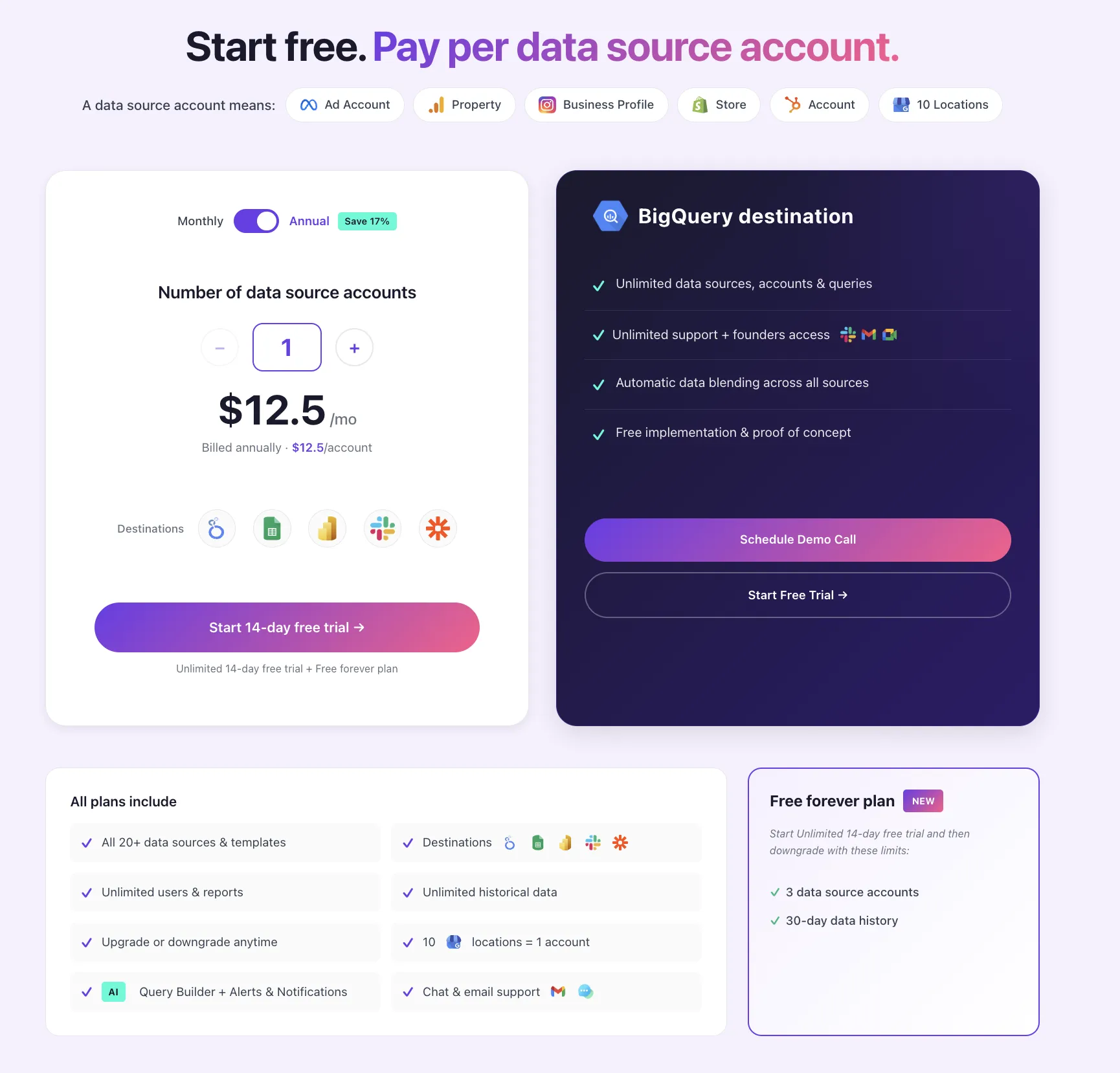
Porter Metrics Pricing (source: portermetrics.com/pricing, verified March 2026)
Pay per data source account. All destinations included. Price per account decreases as you add more.
📖 Read more: Porter Metrics full review · Porter Metrics alternatives · Browse 100+ Looker Studio templates · YouTube tutorials
Funnel.io
Enterprise Marketing ETL
 4.5 on G2 (74 reviews)
📊 590 connectors (121 on Starter plan)
🕐 Public pricing, but demo required to start
Funnel.io is the other market leader alongside Supermetrics in marketing data infrastructure. With $131M+ in funding (Balderton Capital, Eight Roads Ventures, Stena Sessan), ~$70M in estimated annual revenue, and ~400 employees, Funnel is the most well-funded tool on this list. It uses a data warehouse-first architecture: all your marketing data flows through Funnel's managed warehouse before reaching destinations like Looker Studio, Google Sheets, or your own BigQuery/Snowflake instance.
Key differentiators:
- Data warehouse-first architecture: All data is stored in Funnel's managed warehouse before being sent to destinations. This means Looker Studio and Google Sheets reports load significantly faster than direct API connectors, because the data is pre-cached. The tradeoff: there's always a delay (seconds to minutes) before new data is available, and there's no direct-to-API option for real-time freshness like Porter Metrics or Supermetrics live connectors offer.
- Visual data transformation layer: Funnel lets you map fields across sources, create table joins, build custom metrics, and normalize data (e.g., currency conversions) through a visual interface. However, this requires understanding data join/union logic: you need to know which fields to map, how tables relate, and how to structure your data model. It's a no-code tool, but it's built for technical marketers or data analysts, not for marketers who expect a plug-and-play experience.
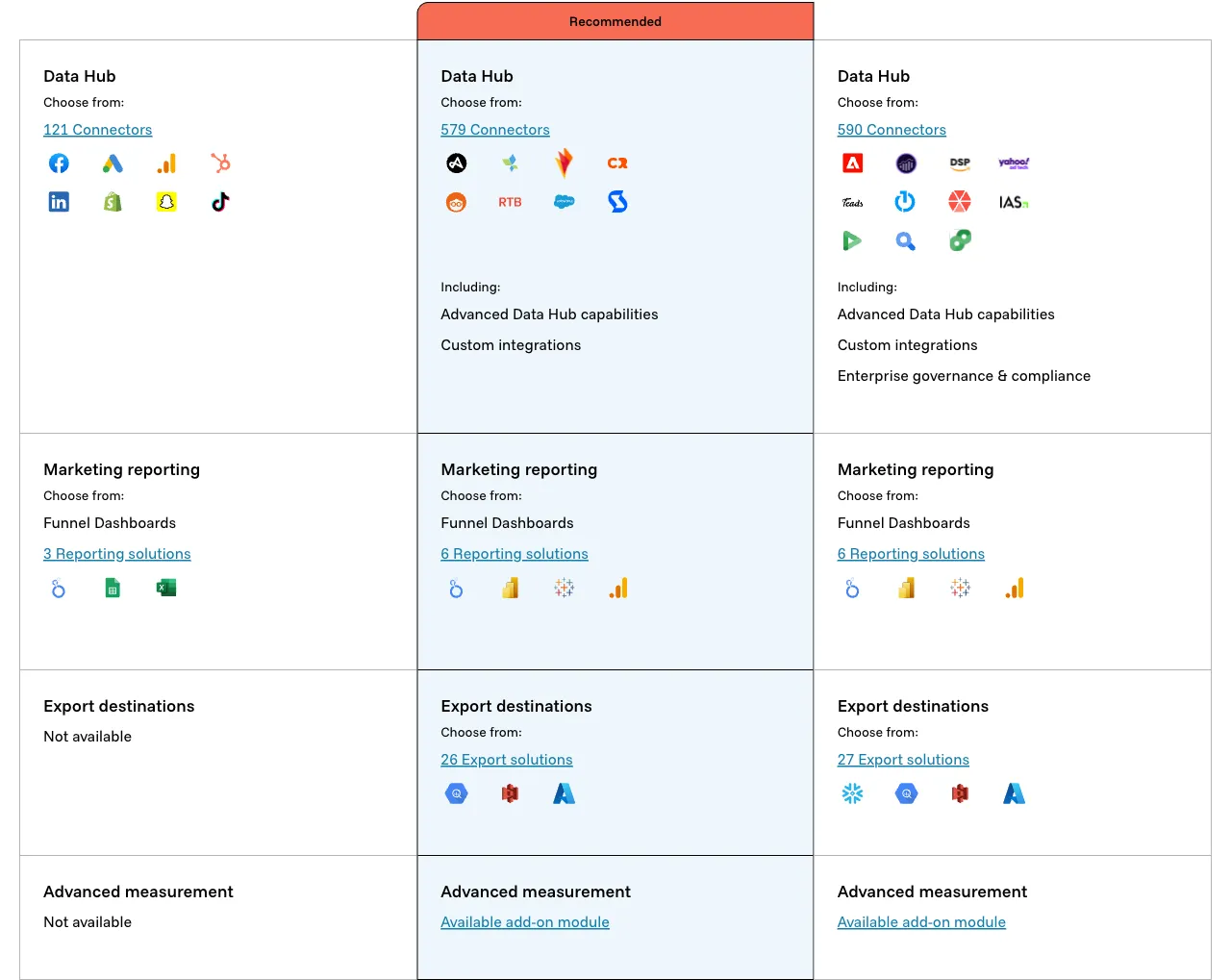
- 590 connectors across 3 tiers: Likely the broadest connector coverage among marketing-focused tools (Starter: 121, Business: 579, Enterprise: 590). Part of why Funnel has so many integrations is that their high-value annual contracts allow them to build custom connectors for enterprise clients on demand, which then become available to other users. This is a model that only works at Funnel's price point.
- 590 connectors across tiers, the widest marketing-specific connector coverage after Improvado (500+)
- Reports in Looker Studio and Sheets load noticeably faster than direct API connectors because data is pre-cached in Funnel's warehouse
- Visual transformation layer for custom metrics, field mapping, and cross-channel normalization (e.g., currency conversions, unified campaign naming)
- GDPR compliant and SOC2 certified, which meets enterprise security requirements
- Managed data warehouse included, so there's no need to set up your own BigQuery or Snowflake
- Highest price among all alternatives: starts at ~$200/mo, requires booking a demo to start, and likely annual contracts only with no self-service signup
- Complex even for technical marketers: setting up a connection requires mapping fields to tables, configuring joins between sources, and understanding data union logic. It's not plug-and-play
- Data warehouse-first means no real-time data: there's always a delay before data is available, unlike live connectors from Porter Metrics or Supermetrics that can query APIs directly
- $131M+ in VC funding creates pressure to grow revenue aggressively. Customers report price increases at renewal and being pushed into annual commitments
- Enterprise-focused: pricing, onboarding, and product complexity are designed for large teams with data analysts, not SMBs or small agencies
Funnel.io Pricing (source: funnel.io/pricing, verified March 2026)
Funnel shows public starting prices but requires a demo to sign up. No self-service. Previously used a Flexpoints (usage-based) model, now uses fixed tier pricing. Annual contracts likely required.
📖 Read more: Funnel.io full review · Funnel.io alternatives
Windsor.ai
Affordable No-Code ETL
Windsor.ai is a no-code ETL tool for marketing data. Think of it as a simplified, much cheaper version of Fivetran focused on marketing. Founded in 2017 in Zurich, Switzerland, it was acquired by team.blue in January 2026 (a European digital services group valued at ~€5B that also owns Metricool). With ~30 employees and 5,000+ customers across 120 countries, Windsor has built 325+ connectors and 15+ destinations at a fraction of the cost of enterprise alternatives.
Note: Windsor.ai is often described online as a "marketing attribution software," but this is outdated. They originally started with multi-touch attribution in 2017 but pivoted to become a full ETL and data aggregation platform. Attribution is no longer their core focus.
Key differentiators:
- Ultra-competitive pricing at scale: As a bootstrapped company (now backed by team.blue), Windsor can keep prices far below VC-funded competitors. The Basic plan at $23/mo gives you 3 data sources and 75 accounts, which is a volume of accounts that would cost significantly more on Supermetrics or Funnel. The tradeoff is in data quality and stability (see cons).
- Native Power BI and Tableau integrations: Windsor is one of the few marketing data tools with direct integrations to both Power BI and Tableau. Most competitors (including Porter Metrics and AgencyAnalytics) don't offer native Tableau connectors. Windsor also has native MCP integrations for AI chat tools.
- External authentication for agencies: You can share a link with a client so they connect their own data sources without giving you login credentials. This is useful for agencies that need access to client accounts without managing passwords.
- Ultra-competitive pricing: 75 accounts across 3 data sources for $23/mo, one of the cheapest options for high account volumes
- 325+ connectors and 15+ destinations including native Power BI and Tableau integrations (rare among marketing data tools)
- Free forever plan (1 data source, 1 account, 5M rows) plus a 30-day trial with broader access
- Bootstrapped, now part of team.blue with no VC pressure to raise prices aggressively
- All connectors available on all plans (no premium connectors locked behind higher tiers)
- SOC2 and HIPAA compliant, which is uncommon at this price point. As a European company (now under team.blue), Windsor meets strict EU data regulations by default
- Data quality and stability concerns: users with heavy BigQuery usage report that connectors can break or return inconsistent data. It's cheap, but less reliable than Funnel or Fivetran
- Raw data output: data from platforms is not well-transformed, so users need SQL knowledge or technical skills to clean and transform data in their destination
- Basic, flat, technical interface: users must choose schemas, select fields, and map them to destinations manually. It's not designed for marketers expecting plug-and-play like Looker Studio
- Destination Tasks are a hidden limitation: each table synced to a destination = 1 task. The Basic plan ($23/mo) only allows 5 destination tasks, which limits how many tables you can create
- Limited data backfill to BigQuery: scheduling only lets you pull 60 days or 6 months of historical data, unlike Porter Metrics where you can choose any date range
- Shopify connector is free because without a data warehouse layer it's barely functional. Shopify's API is too slow for live queries
Windsor.ai Pricing (source: windsor.ai/pricing, verified March 2026)
Pricing is per data source and accounts. All connectors and destinations available on all plans. Monthly prices shown; annual billing saves ~15–20%.
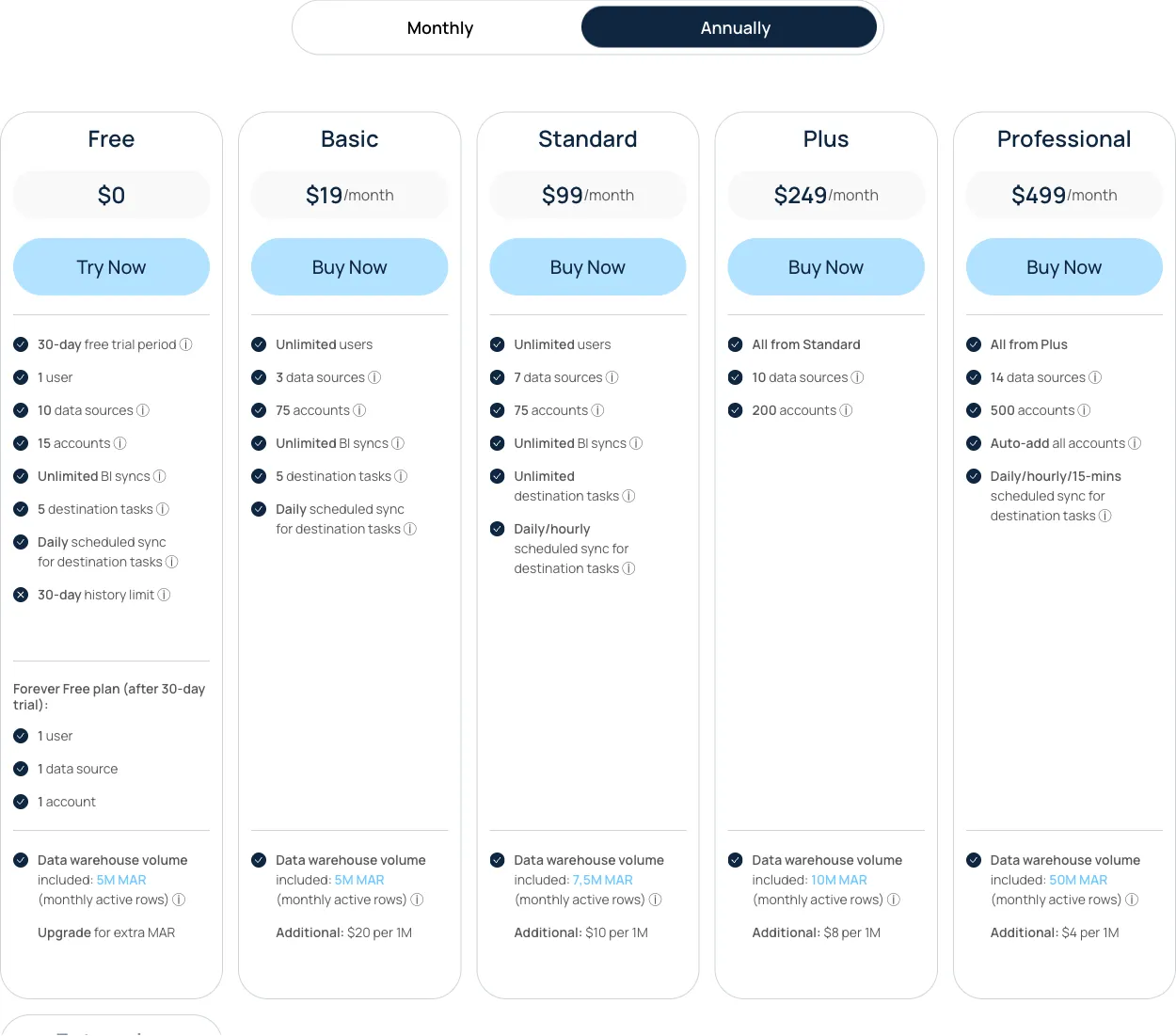
Also available: Professional plan at $599/mo (14 sources, 500 accounts, 15-min refresh, no sync limitations). 30-day trial gives broader access before dropping to free tier limits.
📖 Read more: Windsor.ai full review · Windsor.ai alternatives
Improvado
Enterprise Marketing ETL
Improvado is an enterprise marketing ETL platform with professional services built in. Founded in 2015 in San Diego, CA, it has ~100 employees and ~$34M in funding from Bessemer Venture Partners, Nexus Venture Partners, and 500 Startups. Its customers include Activision, ASUS, Chewy, Mattel, L'Oreal, Yamaha, and Monster Energy.
Improvado is built around six pillars: Connect (500+ sources), Extract (40,000+ metrics and dimensions with no limits on accounts or historical data), Load (multiple data warehouse destinations in parallel), Govern (campaign compliance monitoring), Transform (four different toolkits from SQL to natural language), and Discover (dashboards and AI-powered insights). The platform stores data internally in a ClickHouse data warehouse before loading it to customer destinations.
Unlike self-service tools on this list, Improvado operates as a technology + professional services package. Every plan includes a dedicated Customer Success Manager, onboarding, training, implementation, monthly calls, quarterly business reviews, and professional services credits (5 credits = 1 hour of expert time). Credits can be spent on custom connector development (50-100 credits), dashboard builds (150-500 credits), or managed services (20-800 credits/month).
Pricing context: Improvado does not publish prices. All plans are annual contracts, book-a-demo only. Based on a 2024 proposal made to a client, the list price for the Growth plan was $80,000/year ($6,667/month), with multi-year discounts bringing it to ~$34,000-$41,000/year (~$2,850-$3,400/month). All plans include unlimited connectors, unlimited accounts, and unlimited report types. This makes Improvado the most expensive tool on this list by far, but it bundles professional services that the others charge separately for or don't offer at all.
Key features:
- Marketing Common Data Model (MCDM): Pre-built transformation recipes that automatically normalize and map metrics across platforms into a unified schema. For example, "Cost" in Google Ads and "Spend" in Meta Ads become the same field automatically. Available recipes: Paid Social, Paid Search, Organic Social, SEO, eCommerce, Paid Ads + GA4 (joined via UTMs), Programmatic, Email Marketing, and Mobile Analytics. This is the enterprise equivalent of automatic data blending: instead of the user mapping fields manually, the MCDM handles it. The number of MCDM recipes included depends on the plan (1 on Growth, 2 on Advanced, 4 on Enterprise).
- Cerebro (Data Governance): An AI-powered compliance monitoring engine with 250+ pre-built rules. It scans campaigns across all platforms and enforces naming conventions (auto-detects patterns, flags violations, suggests AI-powered fixes, and syncs corrections back to ad platforms after approval). It also runs budget pacing (daily spend tracking with overspend/underspend alerts), campaign QA before launch (checks targeting, creative assignment, budget alignment), and KPI benchmarking (CPA and ROAS threshold alerts with anomaly detection). This is not just alerts: it is a full rule engine that can write corrections back to the ad platforms.
- Four transformation toolkits: (1) ANSI-SQL via dbt + GitHub for full technical control, (2) Natural language processing where you describe what you want and AI generates and executes the query, (3) MCDM pre-built recipes (described above), and (4) Professional Services where Improvado's team builds custom transformations for you. Teams can use all four simultaneously.
- AI Agent: A natural language chat interface for asking questions about marketing data, generating charts and dashboards from prompts, scheduling automated reports, and running anomaly detection. You can choose between OpenAI, Anthropic Claude, or Google Gemini as the underlying model. Only metadata (column and table names) is shared with the LLM. Actual marketing data stays within Improvado's secure perimeter (hosted on Microsoft Azure with ISO 27001, SOC 2, PCI DSS certifications).
- Insights & Action Pulse: AI-generated weekly performance summaries with predictive recommendations on where to increase or decrease spend. Tailored to specific KPIs at any granularity level (campaign, creative, channel). Included as 8 insight templates per plan.
- Custom connector development with SLA: Improvado builds new API connectors on request within 4 weeks of confirming feasibility (costs 50-100 credits per connector). Other providers on this list also build custom connectors, but Improvado formalizes this with contractual SLAs as part of the enterprise agreement.
- Workspaces: Physical data segregation for different departments, brands, regions, or clients. Data is isolated between workspaces but can be unified through cross-workspace transformations for organization-level reporting.
- 500+ connectors with 40,000+ metrics and dimensions. No limits on accounts, historical data, or data granularity per source. The deepest extraction coverage on this list
- MCDM recipes automate cross-platform data normalization for enterprise use cases (Paid Social, Paid Search, SEO, eCommerce, Programmatic, GA4 joins via UTMs). Removes the need for manual field mapping at scale
- Cerebro governance engine: 250+ pre-built rules for naming conventions, budget pacing, campaign QA, and KPI monitoring. Can write corrections back to ad platforms after human approval. The only tool on this list with a dedicated compliance layer
- Professional services included in every plan: dedicated CSM, onboarding, training, implementation, monthly calls, quarterly business reviews, and credits for custom work
- 4.5/5 on G2 with 370+ reviews. Quality of support score: 9.4/10 (top 5% on G2)
- SOC 2 Type II, HIPAA, GDPR, CCPA compliant. Geo-restricted data processing (US or EU residency). SSO/SAML support. 6 distinct user roles with full audit trail
- Enterprise customers: Activision, ASUS, Chewy, Mattel, L'Oreal, Yamaha, Monster Energy
- Multiple data warehouse destinations in parallel: BigQuery (managed or self-hosted), Snowflake, Redshift, S3, Databricks, PostgreSQL, MySQL, Azure SQL, ClickHouse, SAP HANA, Google Cloud Storage, SFTP
- Most expensive tool on this list by far. Based on a 2024 proposal made to a marketing agency, the list price for the Growth plan was $80,000/year. Negotiated multi-year contracts bring it to ~$34,000-$41,000/year (~$2,850-$3,400/month). Even at discounted rates, this is 10-20x the cost of tools like Porter Metrics, Dataslayer, or Windsor
- Annual contracts only, book-a-demo only. No self-service, no monthly billing, no free trial, no free plan. You cannot evaluate the product without going through a sales process
- Implementation takes approximately 2 months. This is not a tool you set up in an afternoon. Onboarding, data modeling, transformation setup, and dashboard configuration require dedicated time from both your team and Improvado's
- Native dashboards are basic and not client-ready according to independent reviews. For polished reports, you need to push data to Looker Studio, Tableau, or Power BI. The internal visualization layer is better suited for quick internal views
- Credits are consumed quickly: a custom connector costs 50-100 credits, a dashboard build costs 150-500 credits, and managed services cost 20-800 credits/month. The Growth plan includes only 240 credits/year (equivalent to 48 hours of professional services)
- AI Agent can automate campaign actions (pause ads, adjust budgets) on ad platforms and write back to Salesforce via MCP. Some of these write-back features are new and still being rolled out, so availability may vary by platform
- BI tools (Looker Studio, Tableau, Power BI) connect through the data warehouse, not directly from Improvado. This adds latency compared to live connectors like Porter Metrics or Supermetrics that push data directly to Looker Studio
- Overkill for small and mid-size teams. If you manage fewer than 50 ad accounts or spend less than $100,000/month on ads, the complexity and cost of Improvado are unlikely to be justified
Improvado Pricing (source: improvado.io/pricing + 2024 proposal made to a marketing agency, verified March 2026)
No public prices. Annual contracts only, book-a-demo required. All plans include unlimited connectors, accounts, and report types. Pricing is volume-based (by rows/year), not by number of data sources. Professional services credits included (5 credits = 1 hour). Below are the three tiers with price context from a 2024 proposal made to a marketing agency.
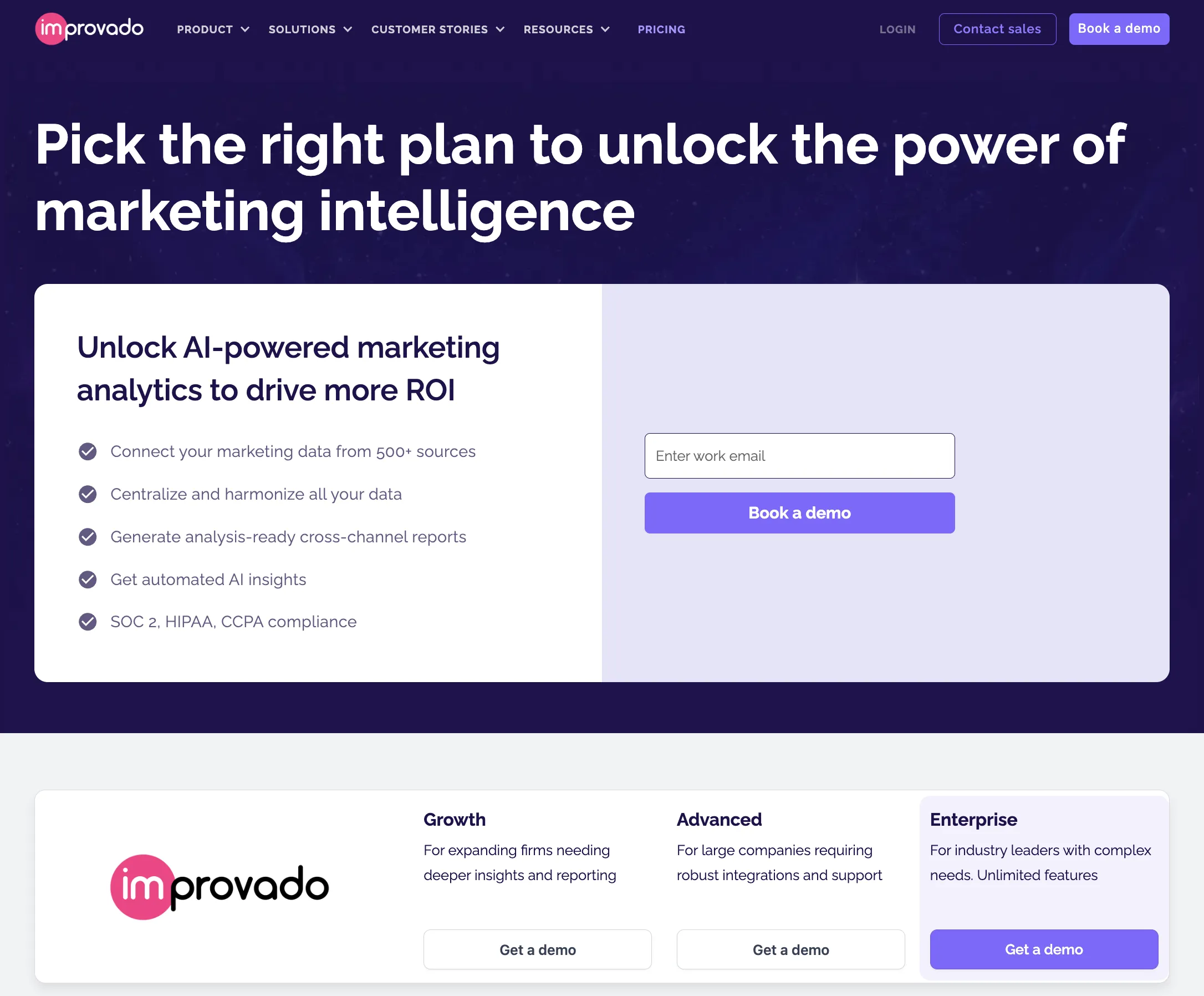
*Estimated from a 2024 proposal made to a marketing agency (list price $80,000/year for Growth). Multi-year contracts negotiate 49-64% discounts. Actual prices vary by data volume, features, and contract length. Credit usage: custom connectors (50-100), dashboard builds (150-500), managed services (20-800/mo).
Whatagraph
AI-First Reporting Platform
Whatagraph is a marketing reporting platform with its own built-in dashboards, data blending, and a strong AI layer. Founded in 2015 by three brothers in Lithuania (now headquartered in Amsterdam), it has ~63 employees, ~$9.8M in funding (Inventure, Open Circle Capital), and ~2,500 customers. Whatagraph recently relaunched with a much more modern, AI-first interface, a significant upgrade from previous versions.
While Whatagraph can send data to Looker Studio and BigQuery, its focus is its own reporting platform. It competes with AgencyAnalytics for agency client reporting, but adds data blending and transformation features that make it closer to a hybrid between a reporting tool and a lightweight ETL. We've heard from people in the space that Whatagraph tried to move upmarket to compete with Funnel.io for enterprise clients, but hasn't been able to match the depth that dedicated ETL tools offer at that level.
Key differentiators:
- Whatagraph IQ, AI-first reporting: Their AI layer lets you create complete multi-tab reports from a text prompt, generate auto-updating performance summaries, build widgets conversationally, and auto-generate branded themes from a logo upload. On Boost plans and above, IQ+ adds self-healing widgets (auto-fixes broken metrics), custom AI dimensions, and personalized summaries with brand voice. This is one of the deepest AI integrations in any reporting tool on this list.
- Data blending with visual mapping: Whatagraph lets you create "source groups" to blend data across integrations and sync them to BigQuery. Like Funnel, you need to map fields and create table connections manually (it's not automatic like Porter Metrics), but the visual interface makes it more accessible than writing SQL.
- Generous free plan: 5 source credits, unlimited users, unlimited reports with Essential integrations. This is one of the most generous free tiers among reporting platforms, letting agencies test the product with real client data before committing.
- AI-first reporting with Whatagraph IQ: create reports from prompts, auto-generated summaries, chatbot for data questions, and self-healing widgets on higher plans
- Beautiful, modern interface, recently relaunched with a significantly improved UX that's more intuitive than previous versions
- Data blending and transformation features: source groups, custom metrics, field mapping, which are features that most reporting-only tools like AgencyAnalytics don't offer
- Generous free plan: 5 source credits, unlimited users and reports with Essential integrations
- 62 in-house managed integrations, fewer than ETL tools but maintained by their own team for better reliability
- Key integrations locked behind higher tiers: HubSpot, Shopify, Salesforce, ActiveCampaign, BigQuery, Ahrefs, and Amazon Advertising are Advanced (Boost, €624/mo) or Premium (Max, custom) only, while tools like Porter Metrics include all integrations on every plan
- Data blending requires manual field mapping: you need to understand join logic, map fields across sources, and create table connections. It's not automatic, but accessible, though still technical
- Alerts are time-based only (notifications), not event-based: you can schedule weekly or daily reports, but you can't trigger alerts when a specific event occurs (e.g., "notify me when ad spend exceeds $500"). Porter Metrics' Workflow Builder supports real event-based triggers
- Grid-based dashboard limits layout flexibility compared to Looker Studio's freeform canvas, so you're constrained to a grid structure for widget placement
- Pricing is high for what you get: Start plan at €249/mo (~$270) for 20 source credits with only Essential integrations. Monthly billing is significantly more expensive than annual
- Tried to move upmarket to compete with Funnel.io for enterprise, but hasn't matched the depth of dedicated ETL tools. It's best suited for mid-size agencies, not enterprise data teams
Whatagraph Pricing (source: whatagraph.com/pricing, verified March 2026)
Whatagraph charges by source credits (1 credit = 1 connected platform account). Integrations are tiered: Essential (all plans), Advanced (Boost+), and Premium (Max only). Key Advanced/Premium integrations include HubSpot, Shopify, Salesforce, ActiveCampaign, BigQuery, Ahrefs, and Amazon Advertising.
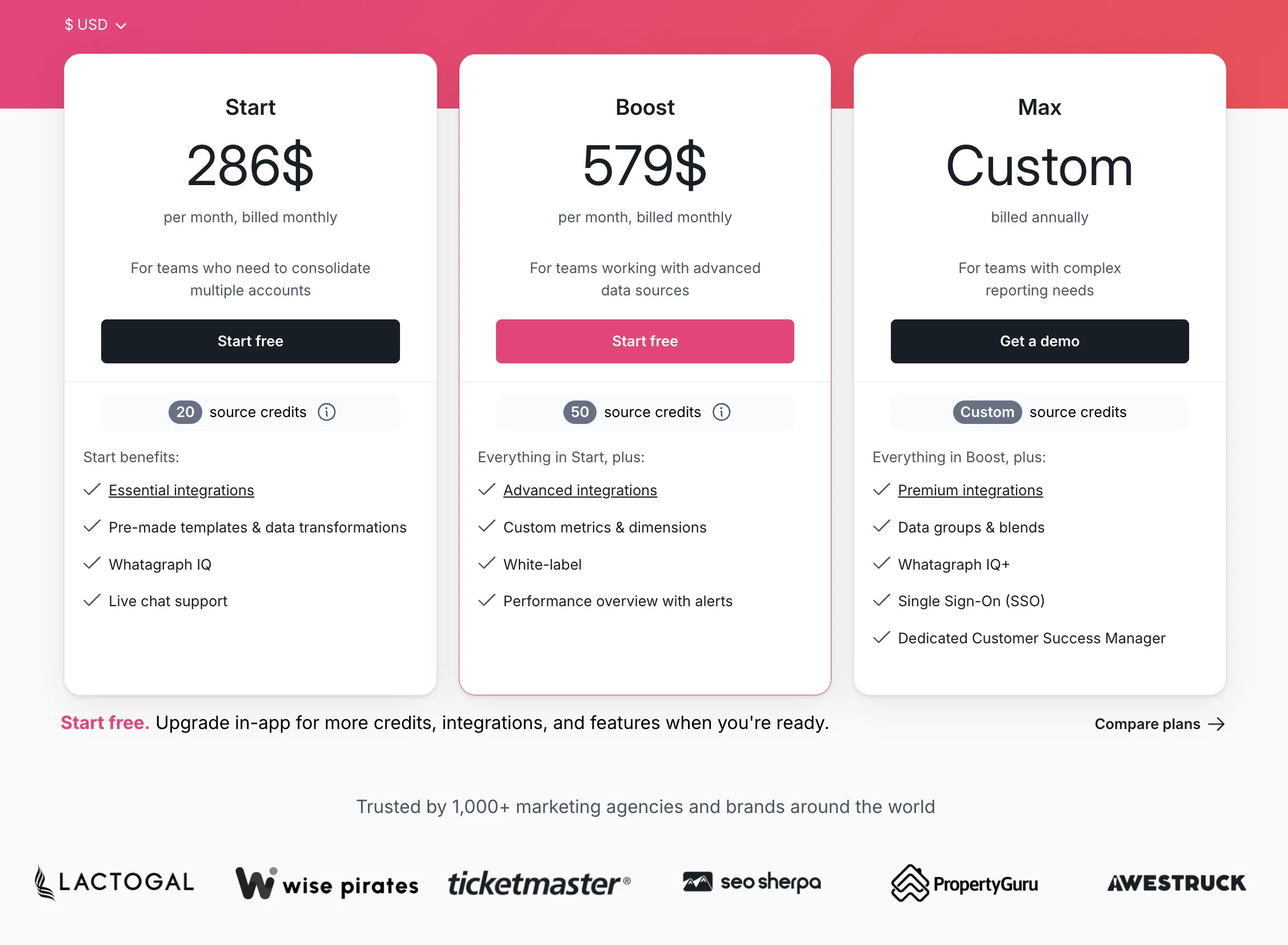
Annual billing saves ~20–35%: Start €199/mo, Boost €399/mo. Whatagraph's pricing page defaults to annual pricing.
📖 Read more: Whatagraph full review · Whatagraph alternatives
AgencyAnalytics
Agency Client Reporting
AgencyAnalytics is a reporting platform (not an ETL tool or data connector) built specifically for marketing agencies. Founded in 2010 in Toronto, Canada, it's a bootstrapped, 100% employee-owned company with ~145 employees and an estimated ~$15.7M in annual revenue. Unlike Supermetrics or Porter Metrics, AgencyAnalytics is not a connector that sends data to Looker Studio or Google Sheets. It has its own built-in dashboard and reporting interface where agencies create, customize, and share reports with clients.
We've seen clients leave Porter Metrics and Looker Studio for AgencyAnalytics because it's significantly easier and more intuitive. These tend to be agencies that need simple, visual client reports and presentations, not teams that need custom metrics, deep data granularity, or cross-source transformations. For simple client reporting, AgencyAnalytics is genuinely one of the best options available.
Key differentiators:
- Easiest reporting experience for agencies: The interface is designed for non-technical agency marketers. You can build a white-labeled client report in minutes, with pre-built templates, drag-and-drop widgets, and Smart Reports that auto-generate in ~11 seconds. It's easier than Looker Studio, Whatagraph, or any BI tool on this list.
- Client portal with messaging: Clients get a branded login where they can view live dashboards, select date ranges, and chat directly with the agency team. The messaging integrates with Intercom, Zendesk, HubSpot, and HelpScout, so client communication stays centralized around the data instead of scattered across email threads. This is the closest thing to a "data intranet" for agency clients.
- Agency management beyond reporting: Everything is organized by client project: accounts, reports, dashboards, and a lightweight task management system. Also includes goal and budget tracking (monitor campaign spend vs. targets across channels), alerts (threshold-based notifications when metrics spike or drop), and industry benchmarks comparing client performance against medians from 150,000+ real campaigns.
- Built-in SEO tools: Includes rank tracking, site auditing, and backlink monitoring directly in the platform. Most competitors require separate SEO tools (SEMrush, Ahrefs) as data sources, while AgencyAnalytics has native SEO capabilities, available as an add-on (~$42/mo per 500 keywords).
- Easiest, most intuitive reporting interface for agencies. We've seen clients switch from Looker Studio specifically because AgencyAnalytics is simpler to set up and use
- Client portal with integrated messaging: clients log into a branded dashboard and chat directly with the agency, so communication stays around the data, not in separate email threads
- Built-in goal/budget tracking, alerts, and industry benchmarks (150,000+ campaigns), features that ETL tools and connectors don't offer natively
- Pricing per client, not per account: 1 client with 5 connected accounts (Meta, Google Ads, GA4, Search Console, Instagram) = 1 client on your plan
- 100% employee-owned, bootstrapped, with aligned incentives with customers, no VC-driven price hikes
- Limited data granularity: tables only allow breakdown by one dimension at a time (e.g., by campaign OR by ad set, but not both together), which is a significant limitation for detailed performance analysis that connectors like Porter Metrics handle natively
- Integration quality can be fragile: in conversations with people who have worked at the company, we've heard that some connectors can be slow, return incomplete data, or break. The user experience is polished, but the underlying data layer has known limitations
- No data transformation capabilities: no custom dimensions, no regex to clean URLs, no formula-based fields. What the API returns is what you get. For anything beyond that, you need a separate tool
- Not a data connector: your data lives inside AgencyAnalytics' platform only. You can't send it to Looker Studio, BigQuery, or your own data warehouse (database connectors for MySQL/BigQuery exist as paid add-ons, but it's not the core product)
- Costs scale at $20/month per additional client beyond your plan's included clients. An agency with 30 clients on the Agency plan (10 included) would pay $179 + (20 × $20) = $579/mo
AgencyAnalytics Pricing (source: agencyanalytics.com/pricing, verified March 2026)
Pricing is per client (1 client = 1 business you manage, regardless of how many accounts are connected). Annual billing saves ~20%.
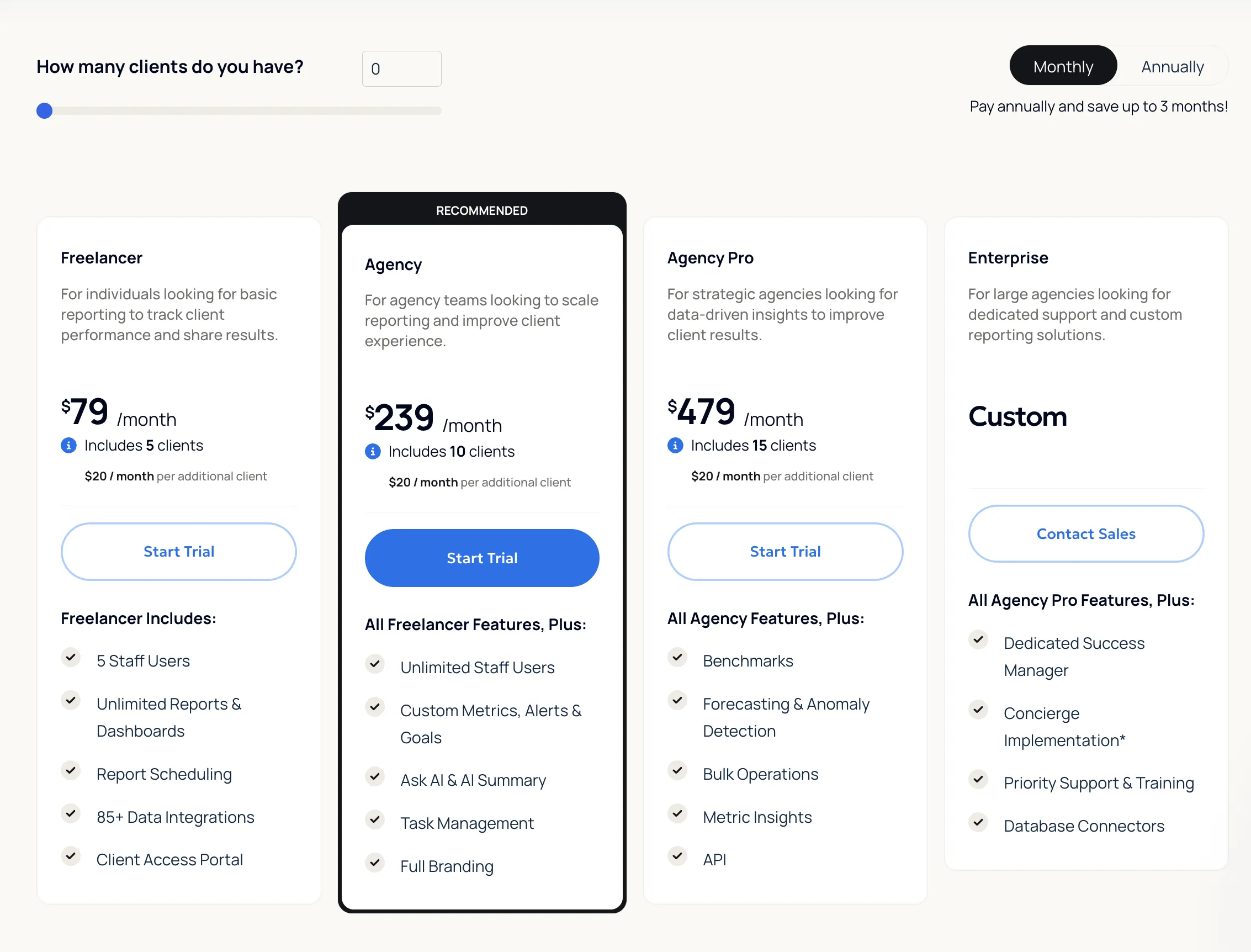
Add-ons: Rank Tracker (~$42/mo per 500 keywords), Database Connectors (MySQL, BigQuery) at custom pricing.
📖 Read more: AgencyAnalytics full review · AgencyAnalytics alternatives
Dataslayer
Budget Supermetrics Alternative
Dataslayer is the most direct Supermetrics clone on this list. Founded in 2020 in Madrid, Spain, it's a bootstrapped company with ~18 employees and an estimated ~$2M in annual revenue. Its pricing structure, plan tiers (3/7/10 data sources), per-destination model, and add-on system are nearly identical to Supermetrics, but at a lower price point. Where Supermetrics' Starter costs $37/mo, Dataslayer's starts at $39/mo with more accounts included. It scores an impressive 4.8/5 on G2 (295 reviews, 88% five-star), making it the highest-rated tool on this list.
Key differentiators:
- Cheaper Supermetrics alternative with the same structure: Dataslayer mirrors Supermetrics' pricing model (per data source + per account + per destination + add-ons) but at lower prices across every tier. If you're used to Supermetrics and just want to pay less for the same setup, Dataslayer is the most straightforward swap. The tradeoff: the product strategy is based on copying Supermetrics' model, not on original features or differentiation.
- API Query Manager: A technical feature that lets you create custom API queries and route data to Power BI, Tableau, or any platform that accepts API connections. This is more technical than drag-and-drop, but it gives Dataslayer broader destination coverage than what the standard connector list shows.
- Marketing Mix Modeling (Morpheus): A separate AI-powered product built on PyMC (Bayesian modeling) that measures the contribution of each marketing channel to sales and runs budget simulations. This is only useful for large brands spending $100,000+/month on ads. Most small and mid-size teams won't need it. Available as a custom-priced add-on.
- Highest G2 rating on this list: 4.8/5 with 295 reviews (88% five-star). Users consistently praise ease of use and support
- Cheaper than Supermetrics at every tier while mirroring the same pricing structure, making it the easiest direct swap for teams already on Supermetrics
- API Query Manager for routing data to Power BI, Tableau, or any API-compatible tool, with broader destination reach than most connectors
- Live chat support with fast response times, a recurring positive theme in G2 reviews
- Marketing Mix Modeling (Morpheus) for large advertisers, a unique offering not available from other tools on this list
- Product strategy is based on copying Supermetrics: same pricing structure, same tiers, same add-on model, with limited original differentiation beyond being cheaper
- No built-in storage: relies entirely on direct API calls, which means connectors like Shopify or HubSpot can be slow or break for large datasets. No data warehouse layer to buffer this
- Data blending and AI features only available from the Advanced plan ($139/mo), while Porter Metrics includes data blending on all plans
- Enterprise destinations (BigQuery, Snowflake, Redshift) have strict row limits: 5K rows/mo on Starter, 100K on Advanced, 2M on Pro, while core destinations (Sheets, Looker Studio) get unlimited rows
- Data blending requires manual field mapping: users must map metrics and dimensions across sources themselves, unlike Porter Metrics where fields are pre-combined automatically
- Only 1 core destination per plan (like Supermetrics), so additional destinations require add-ons. Porter Metrics includes all destinations on every plan
Dataslayer Pricing (source: dataslayer.ai/new-pricing, verified March 2026)
Pricing mirrors Supermetrics' structure: per data source, per account, per destination, with add-ons. Only 1 core destination (Sheets, Looker Studio, Excel, or Power BI) per plan. Enterprise destinations (BigQuery, Snowflake, Redshift) have row limits. Bundle discounts: 10% for 2 destinations, 15% for 3+. Annual billing saves ~20%.
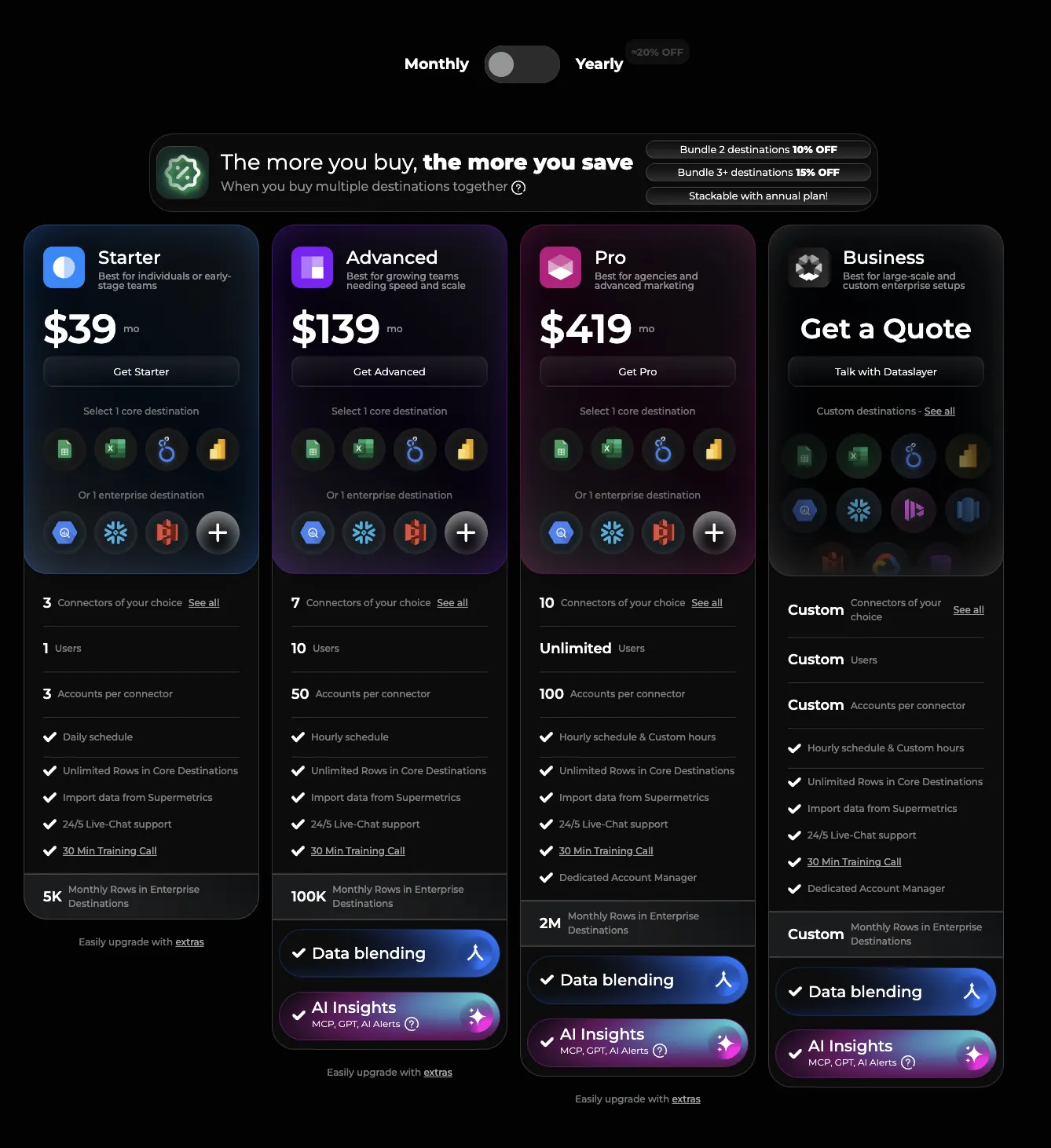
Free plan available (1 connector, 1 account, 1 destination, manual refresh). Marketing Mix Modeling (Morpheus) available as a separate custom-priced product for large advertisers ($100K+/mo ad spend).
📖 Read more: Dataslayer full review · Dataslayer alternatives
Coupler.io
General-Purpose Data Automation
Coupler.io is a general-purpose workflow-based ETL tool (not marketing-specific) built by Railsware, a bootstrapped product studio from Poland/Ukraine (~200 employees, ~$17M in total revenue). Launched in 2019 as "Airtable Importer" for Google Sheets, it evolved into a full data integration platform with 400+ sources and ~20 destinations. Unlike Supermetrics or Porter Metrics which focus on marketing data, Coupler covers project management (ClickUp, Airtable, Asana), customer service (ServiceNow, Typeform), time tracking, and finance (QuickBooks, Xero, Stripe) alongside marketing platforms. SOC 2 certified and GDPR compliant.
Coupler works differently from marketing connectors like Porter Metrics or Supermetrics. Instead of drag-and-drop fields in a dashboard, the user builds data flows as workflows: connect a source, get a raw table, then manually filter, join (combine tables side by side), or append (stack tables on top of each other) to create the output you need. Each integration delivers independent tables per endpoint. This means the user has to understand data modeling concepts (join types, append logic, field mapping) to combine data across sources. In tools like Porter Metrics, this is already solved automatically: dates, campaigns, UTMs, and metrics across all sources are pre-combined without any configuration.
This workflow architecture is why Coupler has 400+ integrations: each connector is "lighter" because it just delivers raw tables from API endpoints without pre-building relationships between them. The tradeoff is more flexibility in what data you can pull, but more work for the user to make it useful.
Key differentiators:
- Broadest destination coverage on this list: Looker Studio, Power BI, Tableau, Google Sheets, Excel, BigQuery, Snowflake, PostgreSQL, Redshift, Monday.com, ClickUp, CSV, and API. The Monday.com and ClickUp integrations as destinations are unique (only Supermetrics also has Monday.com as a destination among the tools on this list).
- 400+ integrations (not marketing-specific): Covers CRM, project management, databases, finance, and more. If you need to pull data from non-marketing sources that other tools don't cover, Coupler likely has it.
- SOC 2 + GDPR compliant: Enterprise-grade compliance at a bootstrapped price point, similar to Windsor.ai.
- Broadest destination coverage: Looker Studio, Power BI, Tableau, BigQuery, Snowflake, Redshift, PostgreSQL, Monday.com, ClickUp, Google Sheets, Excel, CSV, and API
- 400+ integrations covering marketing, CRM, project management, databases, and finance. Goes far beyond marketing-only tools
- Monday.com and ClickUp as data destinations: unique among alternatives on this list (only Supermetrics also offers Monday.com)
- SOC 2 certified and GDPR compliant at a bootstrapped price point
- Free plan available (1 account, 1 destination, 100 rows, manual refresh)
- API destination allows connecting data to AI tools (ChatGPT, Claude) and any API-compatible platform
- User must model data from scratch: each integration delivers raw, independent tables. The user has to manually filter, join, and append tables to combine data across sources. This requires understanding data modeling concepts that marketing connectors like Porter Metrics handle automatically
- No pre-built relationships between data: for example, combining HubSpot contacts with deals and companies requires manual joins. In Porter Metrics, these relationships are already built into the connector
- Row limits on lower plans: Starter ($32/mo) is capped at 5,000 rows per query. This is a limitation that most ETL competitors (Porter, Windsor, Dataslayer) do not have on their entry plans
- Data transformations (joins, appends, filters) are NOT available on the Starter plan ($32/mo). You can only get raw tables without any combining or filtering. Transformations start at Active ($132/mo)
- Automations (webhooks to trigger data flows from external events) are only available on the Pro plan ($259/mo)
- Not marketing-specific: no report templates, no automatic campaign/UTM matching, no pre-combined cross-channel metrics. You get raw data and build everything yourself
- No white-label or agency-specific features
- Data is not live: tables refresh on a schedule (daily on Starter/Active, hourly on Pro). Not real-time connectors that update on demand
Coupler.io Pricing (source: coupler.io/pricing, verified March 2026)
Pricing is per connected account (same definition as Porter Metrics: 1 account = 1 property/connection). Extra accounts cost $5.99/mo. Annual billing saves ~25%.
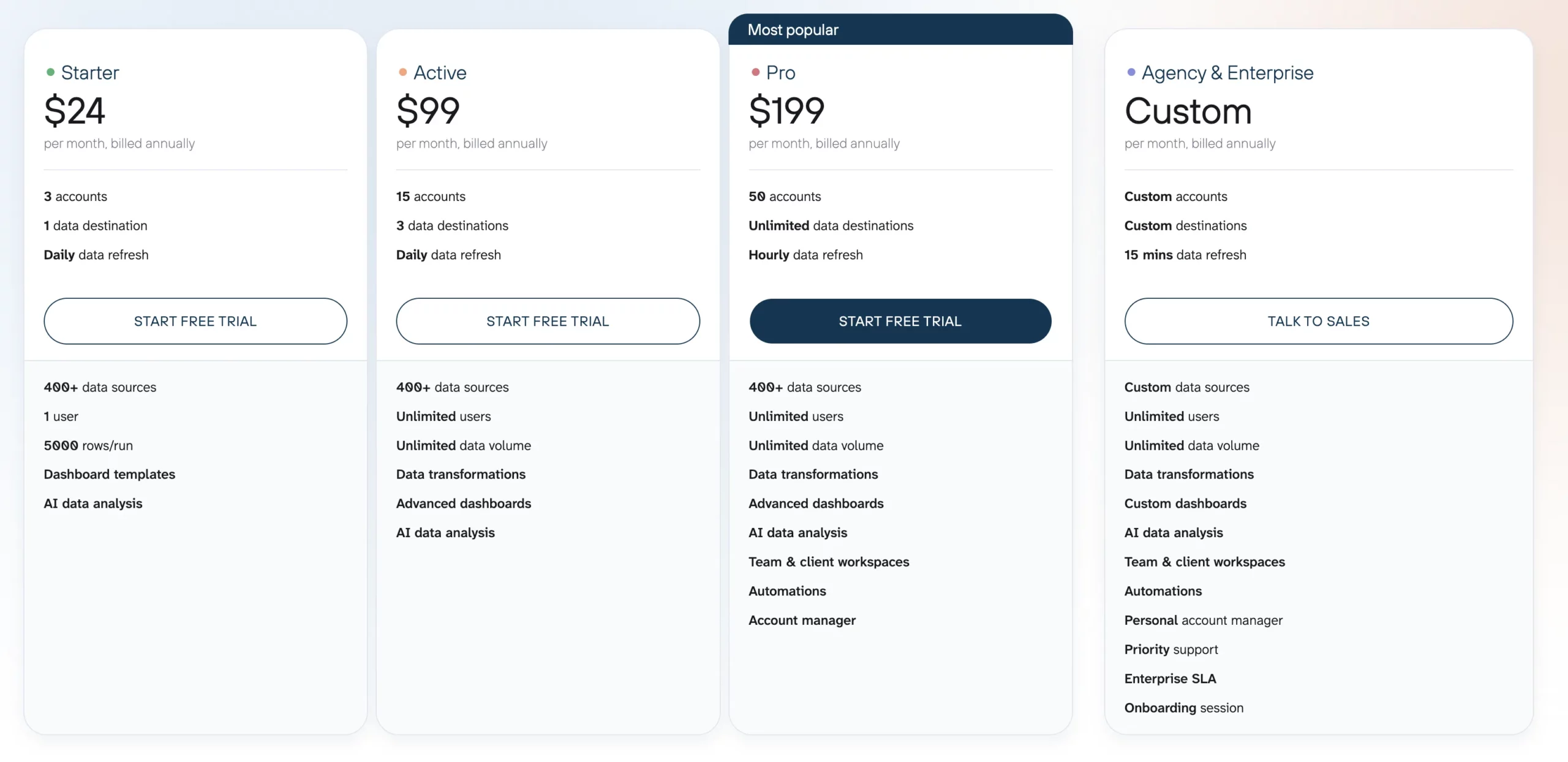
Free plan available (1 account, 1 destination, 100 rows/query, manual refresh only). Additional accounts: $5.99/mo each.
Power My Analytics
US-Focused PPC & E-commerce
Power My Analytics is a no-code marketing data connector founded in 2011 in Maitland, Florida. It's a bootstrapped company with ~15 employees, one of the oldest tools on this list. Originally built as an internal tool by a web analytics consulting agency, it grew into a standalone product. It holds ISO 27001 (2023) and SOC 2 (2024) certifications. PMA was a strong Supermetrics competitor 4–5 years ago, but tools like Porter Metrics, Dataslayer, and Windsor.ai have since surpassed it in pricing, data transformation, and feature depth. PMA remains strongest for US-based PPC and e-commerce teams that need reliable connectors to Looker Studio, Sheets, and Excel.
Key differentiators:
- Developer-friendly destinations: In addition to Looker Studio, Sheets, and Excel, PMA supports Amazon S3, FTP, Snowflake, SQL databases (Azure SQL, MySQL, PostgreSQL), and BigQuery. These destinations are more developer-oriented, but give PMA broader reach than most marketing connectors.
- Data Builder for blending: A no-code tool to combine data from multiple sources into a single table. However, it's limited: field selections are narrow (e.g., only ~20 GA4 metrics vs. 100+ available in the API), no pre-combined fields (unlike Porter Metrics where campaign/date fields are auto-matched), and date range options are rigid (28 days, 30 days, this week, etc., with no custom ranges).
- Sovereign Data Warehouse (Enterprise only): Enterprise clients can get a dedicated, isolated data warehouse where the client owns the data, rather than shared infrastructure. This is similar to Supermetrics' managed data warehouse on their Enterprise plan. Important for compliance but not available on standard plans.
- 75+ connectors with strong coverage for US-focused PPC and e-commerce platforms
- Developer-friendly destinations: Amazon S3, FTP, Snowflake, SQL databases, which is broader than most marketing connectors
- ISO 27001 + SOC 2 certified, providing enterprise-grade compliance for a bootstrapped tool
- Automatic backfill of historical data upon connection, no manual setup needed
- Pro plan offers volume discounts: extra accounts cost $4.95 each (vs. $14.95 on Business plan)
- No Google Sheets as a data source: if a connector you need isn't available, you can't use a spreadsheet to fill the gap. Porter Metrics, for example, supports Google Sheets as a source so users can blend custom data with connector data
- Data Builder is limited in practice: GA4 shows ~20 metrics (vs. 100+ in the API), no auto-combined fields for campaigns/dates across sources, and rigid date ranges (28 days, 30 days, this week, with no custom ranges)
- Business plan ($49.95/mo) only gives access to Looker Studio. Sheets and Excel require the Pro plan at $199.95/mo
- 5 accounts total on Business plan (not 5 per source), and extra accounts cost $14.95 each, so 15 accounts would cost ~$200/mo
- Free plan is sample data only (demo dashboards for students), not usable for real business data, unlike genuine free plans from Porter Metrics, Windsor, or Dataslayer
- Pricing is less competitive than newer alternatives: for the same ~$200/mo, Dataslayer offers 7 sources + 50 accounts, and Windsor offers 10 sources + 200 accounts
- API access is locked to the Custom/Enterprise plan (contact sales), so most users on Business or Pro won't have it
- Hourly data refreshes are also Custom-only. Business and Pro plans don't specify refresh frequency, and since PMA uses a pre-data warehouse layer, refresh delays are likely but undisclosed
Power My Analytics Pricing (source: powermyanalytics.com/pricing, verified March 2026)
Pricing is per account across all sources (not per source). Business plan limited to Looker Studio only. Pro unlocks Sheets + Excel. Enterprise/Custom for BigQuery, SQL, S3, Snowflake, FTP. Annual billing saves ~16%. Extra accounts: $14.95/each on Business, $4.95/each on Pro.
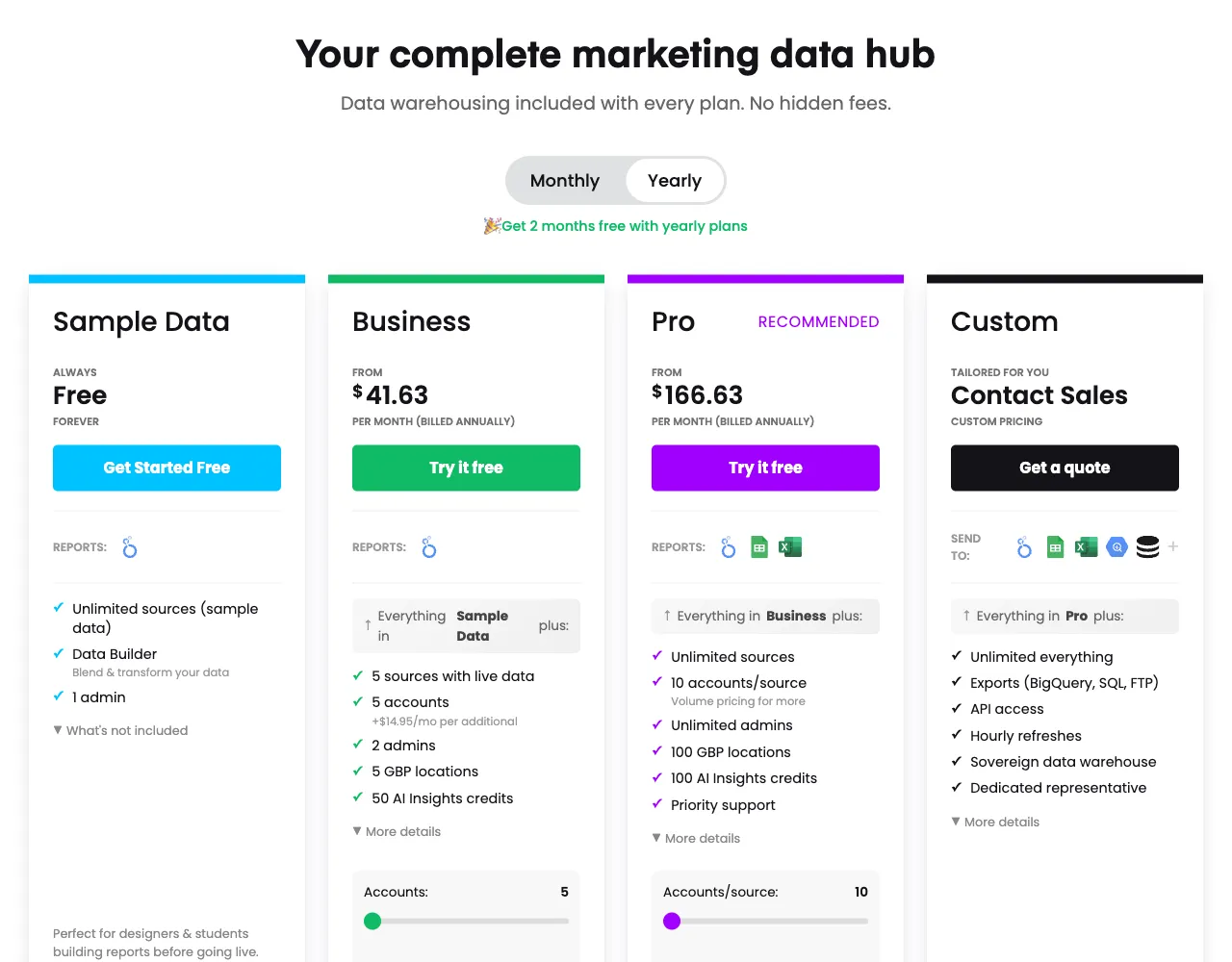
Free plan available but uses sample data only (not real client data). Max accounts: Business 15 (~$200/mo), Pro 100 (~$645/mo). 50–100 AI Insights credits depending on plan.
📖 Read more: Power My Analytics full review · Power My Analytics alternatives
Databox
SMB Goal Tracking & Dashboards
Databox is a reporting and analytics platform with its own built-in dashboards, founded in 2012 in Boston, MA. It has ~160 employees, ~$5.3M in funding (Entree Capital, Founder Collective, Techstars), and ~1,600 customers. Unlike ETL tools that send data to external destinations, Databox wants to be the single source of truth for your business data: everything comes into Databox, and you build, analyze, and share reports inside their platform. It is the only tool on this list with separate plan tiers for businesses and agencies.
Databox has been around since 2012 and has accumulated many features: goal tracking, OKRs, AI analysis (Genie), client overviews for agencies, forecast modeling, and anomaly detection. As a legacy platform, it has made a significant effort to modernize its connectors, but the depth of each integration (number of fields, breakdown dimensions, flexibility for custom metrics) has historically been more limited than dedicated ETL tools. For example, ad creative breakdowns were added much later than competitors. For simple visual dashboards and goal tracking, Databox is excellent. When users need more flexible data combinations and custom reporting, an ETL solution tends to be superior.
Important pricing note: Databox defines "data source" differently than ETL tools. In Databox, 1 data source = 1 connection to 1 specific property (for example, one Google Analytics property or one Facebook Ads account). In ETL tools like Porter Metrics, Supermetrics, or Windsor, "data source" means the platform itself (Google Analytics as a whole), and "accounts" are the individual properties within it. This means Databox's "3 data sources included" is equivalent to "3 accounts" in ETL terminology, making direct price comparisons misleading if you don't account for this difference.
Key differentiators:
- Databases as data sources (not just destinations): Unlike most tools on this list that treat BigQuery, MySQL, and PostgreSQL as destinations to send data to, Databox treats them as sources to pull data from. Google Sheets and Excel are also available as sources. This means if you have external data in a database or spreadsheet that Databox's native connectors don't cover, you can still bring it in and combine it with your marketing data.
- Goal tracking and OKRs: Native goal and OKR tracking lets you set company, team, and individual objectives linked directly to live data from 130+ integrations. Progress updates automatically, with notifications when goals are on track, at risk, or off track. OKRs are only available on the Premium plan ($999/mo) or as an add-on ($200/mo).
- Genie (AI analyst): An AI chatbot that creates metrics, dashboards, and visualizations from text prompts. It analyzes trends, spots anomalies, explains performance drivers, and gives recommendations. Available on all paid plans. Currently in early access.
- Forecast modeling and anomaly detection: Unique among the tools on this list. Only available from the Growth plan ($499/mo) and up.
- Client overview for agencies: A dashboard that groups accounts by client for global monitoring. ETL tools can replicate this by combining data in a warehouse, but Databox offers a dedicated visual interface out of the box.
- Datasets (data transformation layer): Available from the Growth plan, Datasets let you create custom tables with raw data, apply filters, calculate new columns (metrics and dimensions), and drill down into the raw data behind any metric. This is Databox's answer to ETL-style data transformation, though it is more rigid than what dedicated ETL tools offer.
- Databases and spreadsheets as input sources: BigQuery, MySQL, PostgreSQL, Google Sheets, and Excel can all be used as data sources (not just destinations). This makes Databox a central hub where you can combine marketing data with external business data
- Goal tracking and OKRs linked to live data from 130+ integrations. Automatic progress updates, risk notifications, and strategy map views. The only tool on this list with native OKR tracking
- Forecast modeling and anomaly detection: unique among the tools on this list (available from the Growth plan)
- AI analyst (Genie): create dashboards from prompts, ask questions about your data in natural language, get performance explanations. Available on all paid plans, including API access on the free plan
- Free plan includes API access, which is unusual. 3 users, 3 data sources, 1 dashboard, 10 custom metrics, daily sync. Not prominently advertised but still available
- Hourly data refresh on all paid plans. Data is already stored in Databox's internal warehouse, so dashboards load fast
- Strong HubSpot and Shopify integrations. Databox has invested significantly in making these connectors deeper than many of their other integrations
- Separate pricing tiers for businesses and agencies: the only tool on this list with dedicated agency plans optimized for volume and agency-specific features
- Mobile app for dashboard access on the go
- "Data source" means something different here: 1 data source in Databox = 1 connection to 1 property (like one GA4 property). In ETL tools, "data source" means the platform itself. So Databox's "3 data sources included" is equivalent to "3 accounts" in ETL pricing. Extra sources cost $7/mo each regardless of plan
- Connector depth is limited compared to ETL tools: fewer fields, fewer breakdown dimensions. For example, ad creative breakdowns were added much later than competitors like Porter Metrics or Supermetrics
- Data transformation (Datasets, blending, filters, calculated columns) is only available from the Growth plan at $499/mo. The Pro plan at $199/mo allows custom metrics but not data blending or transformation
- Data lives inside Databox only. No native export to Looker Studio, Power BI, or external data warehouses. If you leave Databox, your historical data stays behind
- Many differentiating features are locked behind expensive tiers or add-ons: OKRs ($200/mo add-on or Premium at $999/mo), white-label ($250/mo add-on or Premium), advanced security and activity logs ($100/mo add-on or Premium), 15-minute refresh ($18/mo add-on or Premium), fiscal calendar ($50/mo add-on or Premium)
- ETL tools offer live data directly from APIs, while Databox always goes through its internal warehouse. The fastest refresh is 15 minutes (Premium only), while ETL connectors like Porter Metrics or Supermetrics can show real-time data
- Benchmarks feature (anonymous performance comparisons) is being deprecated on April 6, 2026, removing what was once a unique differentiator
Databox Pricing for Businesses (source: databox.com/pricing, verified March 2026)
Pro and Growth plans start with 3 data sources; Premium includes 50 (remember: 1 data source = 1 account/property, not 1 platform). Extra sources cost $7/mo each. Separate agency plans available with lower per-source pricing ($2.40/mo each). Prices shown are monthly billing. Annual billing saves ~20%.
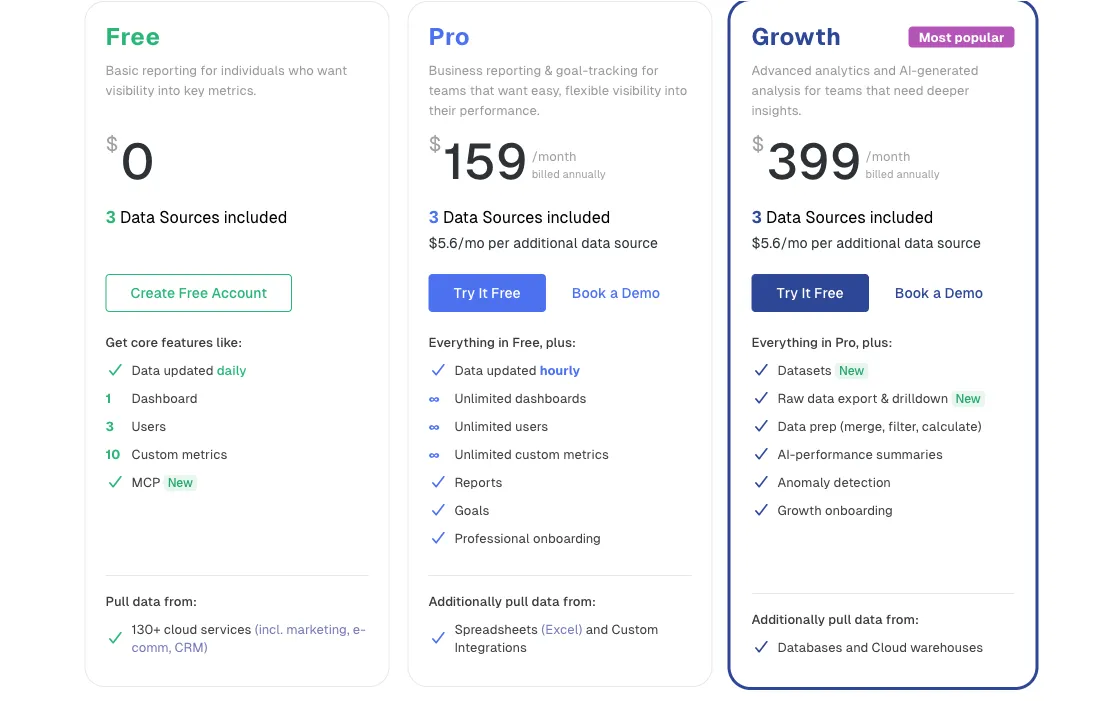
Add-ons available on Pro/Growth: white-label ($250/mo), OKRs ($200/mo), dedicated specialist ($200/mo), advanced security ($100/mo), fiscal calendar ($50/mo), 15-min refresh ($18/mo).
Agency plans are priced separately and reward volume: extra data sources cost $2.40/mo each (vs $7/mo on business plans). Agency Starter includes 5 client accounts with client performance overview, scheduling, and Google Sheets from the first plan. Agency Pro adds unlimited client accounts and branding removal (white-label remains a paid add-on). This makes Databox significantly more competitive for agencies managing many accounts than the business pricing suggests.
Not sure which tool is right for you?
Read our guide on how to choose a marketing reporting tool, or jump straight to the Supermetrics full review to understand what you're comparing against.
If you're already using Looker Studio, browse our 100+ free Looker Studio templates to get started in minutes.
Frequently asked questions
Porter Metrics starts at $15/month per data source account. Windsor.ai, Dataslayer, Coupler.io, Whatagraph, and Databox offer free plans with limited features. Power My Analytics starts at $49.95/month. In comparison, Supermetrics starts at $37/month monthly ($29/month billed annually) for just 1 destination, 3 data sources, and weekly refreshes, making most of these alternatives significantly cheaper and less restrictive.
Yes. Windsor.ai, Dataslayer, Coupler.io, Whatagraph, and Databox all offer free plans, though they come with limitations on data volume and features. Other tools not covered in this article, like Fivetran, also offer free tiers. For a full-featured experience, Porter Metrics offers a 14-day free trial with access to all connectors plus a free forever plan.
Improvado leads with 500+ connectors (plus 40,000+ metrics and dimensions), followed by Funnel.io with 590 and Coupler.io with 400+ (though Coupler is general-purpose, not marketing-specific). Windsor.ai has 325+ and Supermetrics offers 150+. However, most marketing teams only use 5-15 connectors, so tools like Porter Metrics provide more than enough at a significantly lower cost.
Porter Metrics is the best option for agencies: it includes white-label reports, pre-built Looker Studio templates, and pricing starting at $15/month per data source account. All destinations (Looker Studio, Google Sheets, Power BI, BigQuery, etc.) are included in the price. For agencies wanting an all-in-one reporting platform, AgencyAnalytics (starting at $59/mo for 5 clients) is also a strong choice. Read our guide on how to choose a marketing reporting tool for more details.
Yes. Porter Metrics, Dataslayer, Funnel.io, Windsor.ai, and Power My Analytics all offer native Looker Studio connectors. Porter Metrics is specifically built around the Looker Studio ecosystem and includes 100+ pre-built Looker Studio templates to get started immediately, including templates for PPC reporting, social media, digital marketing, and e-commerce funnels.
The most common reasons are per-destination pricing (each destination like Looker Studio or Google Sheets is a separate purchase), no white-label or agency features, a G2 support score of 7.8 (below category average), and limited functionality on the Starter plan. Read our full Supermetrics review for a detailed breakdown. Many teams find they can get more value from alternatives that include all destinations in one price.
Yes. Supermetrics uses a per-destination pricing model, meaning Google Sheets, Looker Studio, Excel, and BigQuery are each separate subscriptions. If you need data in multiple destinations, you'll pay for each one separately. Alternatives like Porter Metrics include all destinations in every plan.
Most alternatives support a parallel setup: connect your data sources to the new tool while keeping Supermetrics active until you verify the data matches. Tools like Porter Metrics can be set up in under 5 minutes with no coding required. Once you're satisfied, simply cancel your Supermetrics subscription.
They serve different segments. Supermetrics is better for individual marketers who work in Google Sheets and need affordable data connectors. Funnel.io is better for enterprise teams needing advanced ETL and data warehouse pipelines. However, for most agencies and marketing teams, Porter Metrics offers a better value than both: with simpler setup, lower pricing, and agency-specific features like white-labeling.
The best free alternatives to Supermetrics are: Porter Metrics (free plan + 14-day full trial), Databox (free for up to 3 data sources), Windsor.ai (free plan for basic use), Dataslayer (free plan with limited features), and Whatagraph (free plan with 5 source credits). Other tools not in this list, like Fivetran and Triple Whale, also offer free tiers. For agencies needing full features, Porter Metrics' paid plans start at $15/month: significantly cheaper than Supermetrics' $37/month Starter plan (which is limited to 1 destination and weekly refreshes).
If you're using Supermetrics' Growth plan ($199/mo monthly) for two destinations (e.g., Looker Studio + Google Sheets), you're paying $398/month or $4,776/year. Porter Metrics includes all destinations in every plan: starting at $15/month per data source account. An agency with 10 accounts would pay $150/month total vs. $398/month+ with Supermetrics for the same setup. That's a saving of nearly $3,000/year for a modest account count.
For small businesses, the top choices are: Porter Metrics ($15/mo, all destinations included, no coding), Power My Analytics ($49.95/mo, strong US PPC/e-commerce connectors), Databox (free plan + $199/mo Pro with AI insights), and Windsor.ai (free plan for light usage). Avoid enterprise-oriented tools like Improvado: they require annual contracts, custom pricing, and ~2 months of onboarding that's overkill for small teams.