YouTube connector for Claude

Use Porter’s YouTube connector for Claude to ask about your channel’s analytics: views, watch time, likes, comments and subscribers by day, where the views come from, Shorts against long videos, and your top videos for any date range.

  • Rank your top videos by views and watch time
  • See which traffic sources bring the views
  • Compare Shorts with long videos
  • Follow subscribers gained and lost day by day
G2★★★★★Rated 4.6/5 on G2 (288 reviews, October 2026)

By Porter Metrics team · Last updated November 4, 2026

ClaudePorter connected
Show my channel’s views and watch time for the last 3 days YouTube has published.
Porter / YouTube / Demo Channel✓ 3 rows
The last day YouTube has published is Oct 31. Views peaked on Oct 30 at 3,412.
DayViewsMinutes watched
Oct 292,9865,120
Oct 303,4125,874
Oct 312,7414,655
Demo data, Demo Channel
34 YouTube fields
01Setup

How to connect YouTube to Claude

YouTube connects to Claude through Porter in 3 steps, with no code and no server to run. Sign in with Google in Porter and pick your channel, add Porter’s MCP URL to Claude as a custom connector, then ask your first question. MCP (Model Context Protocol) is the open standard Claude uses to read data from tools such as Porter.

What you need before you start

  • You need the Google account that owns or manages the YouTube channel, because YouTube only shows channel analytics to its owner. Porter asks Google for read-only access to your YouTube data and YouTube Analytics: you never share a password. Add a free Porter account and any Claude plan: Free through Enterprise add custom connectors, and Free allows one (Anthropic’s guide to custom connectors in Claude).
  • Works in Claude.ai, Claude Desktop, Cowork and Claude Code, with any Claude model, from Opus to Sonnet and Haiku.
  1. Step 1: Connect YouTube in Porter

    In Porter, choose Create, then Claude, then YouTube. Sign in with Google, accept the read-only permissions and pick the channel Claude can use. Each channel is one connection.

  2. Step 2: Add the connector to Claude

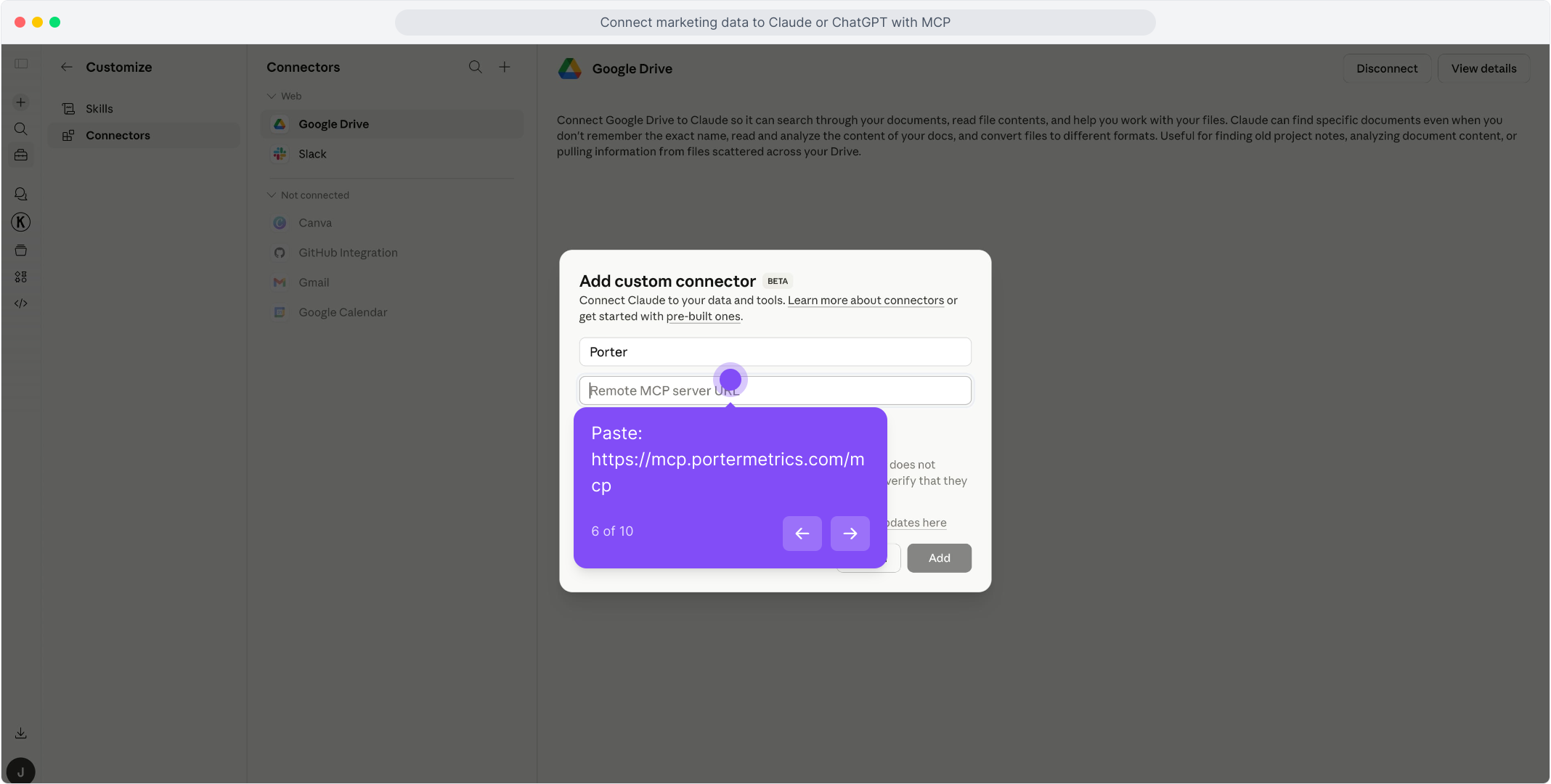
    In Claude, open Customize, then Connectors, and choose + Add, then Add custom connector. Name it Porter and paste this URL:

    MCP URL
    https://mcp.portermetrics.com/mcp
  3. Step 3: Ask Claude about YouTube

    Sign in to Porter, then try:

    Prompt
    Using YouTube, show my channel's views and estimated minutes watched for the last 3 days YouTube has published.
app.portermetrics.com / create

Create: YouTube to Claude

Sign in with Google

Select the channel Claude can use.

Porter's MCP URL pasted into the Remote MCP server field of Claude's custom connector dialog

Claude

Using Porter / YouTube …

Demo data
02Use cases and prompts

What you can ask Claude

Each use case comes with a prompt to copy, the fields it uses from the YouTube fields list and who it’s for. YouTube publishes each day of channel analytics about three days later, so the daily prompts ask for the days YouTube has published, not for yesterday.

Which videos brought the most views?

The problemYouTube Studio ranks videos one screen at a time, so a monthly report means copying titles and numbers into a sheet by hand.

What Claude doesClaude reads your top videos for the date range, ranked by views, with each video’s current title, link, publish date, minutes watched, average percentage viewed and subscribers gained.

What you getThe month’s best videos in one table, with the ones that kept viewers watching and the ones that brought subscribers.

Prompt
Using YouTube, list my 20 most viewed videos over the last 30 days YouTube has published, with video title, video URL, video published date, views, estimated minutes watched, average percentage viewed and subscribers gained. Tell me which videos were published inside that range.

For: YouTube creators · content marketers · agencies

Fields used: Video TitleVideo URLVideo Published DateViewsEstimated Minutes WatchedAverage Percentage ViewedSubscribers Gained

Where do the views come from?

The problemViews go up or down and nobody knows whether search, suggested videos or outside links moved them.

What Claude doesClaude reads views and minutes watched by traffic source, day by day, and compares one period with the one before.

What you getThe sources that grew and the ones that fell, so you know whether to work on titles for search or on links from outside YouTube.

Prompt
Using YouTube, show views and estimated minutes watched by traffic source for the last 28 days YouTube has published, and compare each source with the 28 days before. Rank the sources by the change in views.

For: YouTube creators · SEO and content teams

Fields used: Traffic SourceDateViewsEstimated Minutes Watched

How do Shorts compare with long videos?

The problemShorts bring views fast, but it is hard to tell whether they also bring watch time and subscribers or only inflate the totals.

What Claude doesClaude splits views, minutes watched, likes and subscribers gained by content type (Shorts, videos and live streams), week by week. Summed over content types, views match the channel total.

What you getWhat each format really brings to the channel, so the next month’s plan follows the numbers.

Prompt
Using YouTube, show views, estimated minutes watched, likes and subscribers gained by content type for the last 8 weeks YouTube has published, week by week. Tell me which format brings the most subscribers per 1,000 views.

For: YouTube creators · social media managers

Fields used: Content TypeDateViewsEstimated Minutes WatchedLikesSubscribers Gained

Is the channel gaining subscribers?

The problemThe subscriber count moves slowly, so a week that lost more subscribers than it gained goes unnoticed.

What Claude doesClaude reads subscribers gained and subscribers lost by day next to views, and works out the net change for each week.

What you getThe weeks where the channel grew or shrank, and the days with unusual losses to check against what you published.

Prompt
Using YouTube, show subscribers gained, subscribers lost and views by week for the last 90 days YouTube has published, with the net subscriber change per week. List the days where subscribers lost were more than double the daily average.

For: YouTube creators · brand managers · agencies

Fields used: DateSubscribers GainedSubscribers LostViews

Do subscribers or new viewers watch more?

The problemA channel can grow on views from people who never come back, and the totals don’t say who is watching.

What Claude doesClaude splits views and minutes watched between subscribed and unsubscribed viewers, day by day, and works out minutes per view for each group.

What you getHow much of the channel depends on its subscribers, and whether new viewers stay long enough to become one.

Prompt
Using YouTube, show views and estimated minutes watched by subscribed status for the last 30 days YouTube has published. Work out minutes per view for subscribed and unsubscribed viewers and the share of views from subscribers.

For: YouTube creators · content strategists

Fields used: Subscribed StatusDateViewsEstimated Minutes Watched
03Why Porter

Why Porter for YouTube in Claude

Porter puts your YouTube channel in the same Claude connector as your ads, analytics and social sources, so a question about views can include the campaigns and posts around them. Reading your analytics only needs Google’s read-only permissions.

✓

YouTube’s delay, stated

YouTube publishes a day of channel analytics about three days later. Porter reads up to the last published day, and a missing recent day means not processed yet, not zero views.

⊞

YouTube next to your other channels

Ask about YouTube next to Instagram, TikTok, GA4, Google Ads and other sources from all Claude connectors in the same chat, through one Porter URL, with date as a clean key.

⚙

Averages kept as averages

Average view duration and average percentage viewed are averages, so Porter never adds them up across days. Totals such as views, likes and subscribers add up normally.

Aa

34 ready-made fields

Claude gets 34 named YouTube fields, including the channel by day, six daily breakdowns and your top videos for the range, each with its definition.

↻

One URL, nothing to host

Sign in with Google and add one MCP URL to Claude. There is no export to download from YouTube Studio and no warehouse to keep in sync.

✓

Live dashboards, not only chat answers

Ask Claude for a dashboard and Porter’s AI dashboards publish it at its own link, synced automatically and ready to share.

04Dashboard

Dashboard template

Ask Claude to build a live YouTube dashboard with AI dashboards, or browse Porter’s templates for other sources.

AI dashboards

Build a live YouTube dashboard from the chat

Describe the dashboard in one sentence and Porter builds it. A client-ready dashboard in minutes, with no chart dragging and no BI tool to learn. Ask Claude:

Prompt
Build a live YouTube dashboard for my channel with the last 30 days YouTube has published: views, estimated minutes watched, subscribers gained and lost with a weekly trend, views by traffic source and my top 10 videos.
Live URLEach dashboard at its own link: no login, no app, no download
Auto-syncFresh YouTube data, nobody re-exports each period
Scheduled deliveryEmail or PDF sends on a set day
White labelYour logo and branding for clients
Sharing permissionsView or edit access per person

Or start from a template

05Pricing

Pricing

You can start free, since Porter’s YouTube connector for Claude comes with every plan. Use the calculator for your number of accounts, or see Porter pricing for every plan.

What you get

  • Free plan: never expires, with unlimited connected accounts and the last 15 days of data in Claude (30 days in Data Studio and Sheets)
  • Reporting: from $12.50 per account a month billed annually, or $15 month to month for one account
  • Billing: each YouTube channel counts as one account, with volume discounts and no per-seat fee
  • No credits needed: Claude's YouTube analytics questions are reads, so they use no AI credits
  • Trial: 14 days of full access, no card

Price calculator

$33.33/mo$6.67 per account

An account is one ad account, Stripe account, store, page or GA4 property. The Free plan never expires and has unlimited accounts, with the last 15 days of data in AI chats.

06Data and actions

YouTube data Claude can use

Claude reads your channel by day, six daily breakdowns (traffic source, device, operating system, subscribed status, content type and playback location) and your top videos for the date range, with all 34 fields in the YouTube fields list. One question reads one breakdown at a time: to cross traffic source with device, ask for each and let Claude compare them.

12 YouTube fields Claude uses most

FieldWhat it's for
Dateyoutube_dateThe day, as YouTube Analytics reports it
Viewsyoutube_viewsViews; the days add up to YouTube's total for the period
Estimated Minutes Watchedyoutube_estimated_minutes_watchedWatch time in minutes, rounded by YouTube each day
Average View Duration (s)youtube_average_view_durationAverage length of a view; an average, never summed
Average Percentage Viewedyoutube_average_view_percentageShare of a video watched per view; an average
Subscribers Gained · Subscribers Lostyoutube_subscribers_gained · youtube_subscribers_lostSubscriber change per day
Likes · Comments · Sharesyoutube_likes · youtube_comments · youtube_sharesEngagement per day
Traffic Sourceyoutube_traffic_source_typeHow viewers reached the video: search, suggested, external…
Content Typeyoutube_content_typeShorts, videos or live streams
Subscribed Statusyoutube_subscribed_statusWhether the viewer was subscribed
Video Title · Video URLyoutube_video_title · youtube_video_urlThe video's current title and its link
Video Published Dateyoutube_video_published_atWhen the video went live, to count videos per period

Product stats

WhatYouTube connector
Fields34 in 10 groups: 16 dimensions and 18 metrics
TablesChannel by day; daily breakdowns by traffic source, device, operating system, subscribed status, content type and playback location; top videos for the range
FreshnessUp to the last day YouTube has published, about 3 days back; the last week's figures can still drop slightly
Top videosUp to the 200 most viewed videos of the range, for the whole range rather than by day
BreakdownsOne per question; content type adds up to the channel's views exactly, the others land slightly below
AccessGoogle sign-in as the channel owner, with read-only YouTube and YouTube Analytics permissions; one channel per connection
Not includedAge and gender, video by day, and videos below the top 200 of the range

See all 34 YouTube fields

07Security

Is it safe?

Yes. Porter's YouTube connector for Claude reads your channel analytics with the read-only permissions you accept on Google's sign-in screen. With those permissions Porter cannot upload, edit or delete anything on your channel.

Google's own sign-in

You sign in on Google's page and accept read-only access to YouTube and YouTube Analytics. You never give Porter your password, and you can remove Porter's access from your Google account at any time.

Analytics, read when you ask

Claude queries Porter, not YouTube directly. Porter asks YouTube Analytics for the fields and dates in your question and returns them to Claude.

What the connector needs from Google

A sign-in with the Google account that owns or manages the channel, because YouTube only shows channel analytics to its owner. Each channel you pick is one connection.

08FAQ

FAQ

Before connecting YouTube to Claude through Porter, creators and marketers usually ask about several channels, combining breakdowns, videos by day and other AI tools. After those come 4 fixes: missing recent days, recent views that drop, breakdowns that don't add up and averages that look wrong.

Can I connect several YouTube channels?

Yes. Connect each channel in Porter; each one bills as one data source account, and you name the channel you mean when you ask Claude.

Can I cross two breakdowns, like traffic source by device?

No. YouTube serves one breakdown per question, so Porter keeps each breakdown in its own daily table. Ask for traffic source and device separately and let Claude compare the answers. A breakdown also serves fewer metrics than the channel by day, so ask for likes, comments and subscribers on the channel as a whole.

Can I see each video day by day?

No. YouTube does not serve video by day, so the top videos table covers the whole date range you ask for: one row per video, up to the 200 most viewed. Titles and thumbnails are the videos' current ones, and a deleted or private video keeps its metrics but has no title.

Does Porter's YouTube connection work in other AI tools?

Yes. The same Porter account and connection work in any AI tool that supports MCP, with the same channel and fields.

Troubleshooting

Why are the last days missing?

YouTube publishes a day of channel analytics about three days later: on September 28, 2026 at 16:23 UTC the last day available was September 25. A missing recent day means YouTube has not processed it yet, not zero views, so a report for yesterday comes back empty.

Why did last week's views go down?

Figures for the most recent days can still drop slightly after YouTube publishes them, most likely because YouTube removes invalid views after the fact. In one channel measured on October 1, 2026, views had dropped by 1, 23 and 110 on days that were already 6 to 11 days old. Treat the last week as provisional.

Why doesn't a breakdown add up to the channel's views?

YouTube leaves a small unclassified remainder out of most breakdowns. Content type adds up to the channel's views exactly; traffic source, device, subscribed status, playback location and operating system land slightly below. In the channel measured, out of 80,235 views, traffic source added up to 80,212 and operating system to 79,672, about 0.7% below.

Why do average view duration and percentage viewed look wrong?

They are averages, so adding them across days gives a meaningless number: 28 days of average view duration summed to 3,916 seconds while the real average was 144. Porter averages them instead, but a simple average of days can differ slightly from YouTube Studio's figure for the period, which weighs each day by its views. A Short that plays in a loop can also show more than 100% viewed.

09Next

More Claude connectors

YouTube views make more sense next to your other social channels and the traffic and campaigns around them, and Porter brings each of those sources in through the same MCP URL. Add the ones you report on, or browse all Claude connectors:

Not only Claude

The same Porter account and connection work in any AI tool that supports MCP, at no extra cost.

Try it on your own channel

Connect YouTube to Claude through Porter and ask which videos brought the most views, where the views come from and whether the channel is gaining subscribers. Setup takes one Google sign-in, and the free plan includes the YouTube connector for Claude.

Free plan · 14-day trial · No card needed

YouTube creators: top videos, traffic sources and subscribers from one question.

Content marketers: Shorts against long videos, week by week.

Agencies: every client channel next to its ads and social accounts in one chat.