












SEO Dashboard
Pre-built SEO dashboard with Clicks, CTR, Impressions, and Average Position.
View template → Google Search Console
→
Google Search Console
→
 Google Data Studio
Connect your Google Search Console data to Google Data Studio (formerly Looker Studio) for free. Analyze Clicks, CTR, Impressions, and Average Position, with +26 fields, connect Google Search Console to Data Studio in three clicks with no code, multi-property support, and pre-built SEO templates, and every Google Search Console property field.
No credit card required. Free 14-day trial.
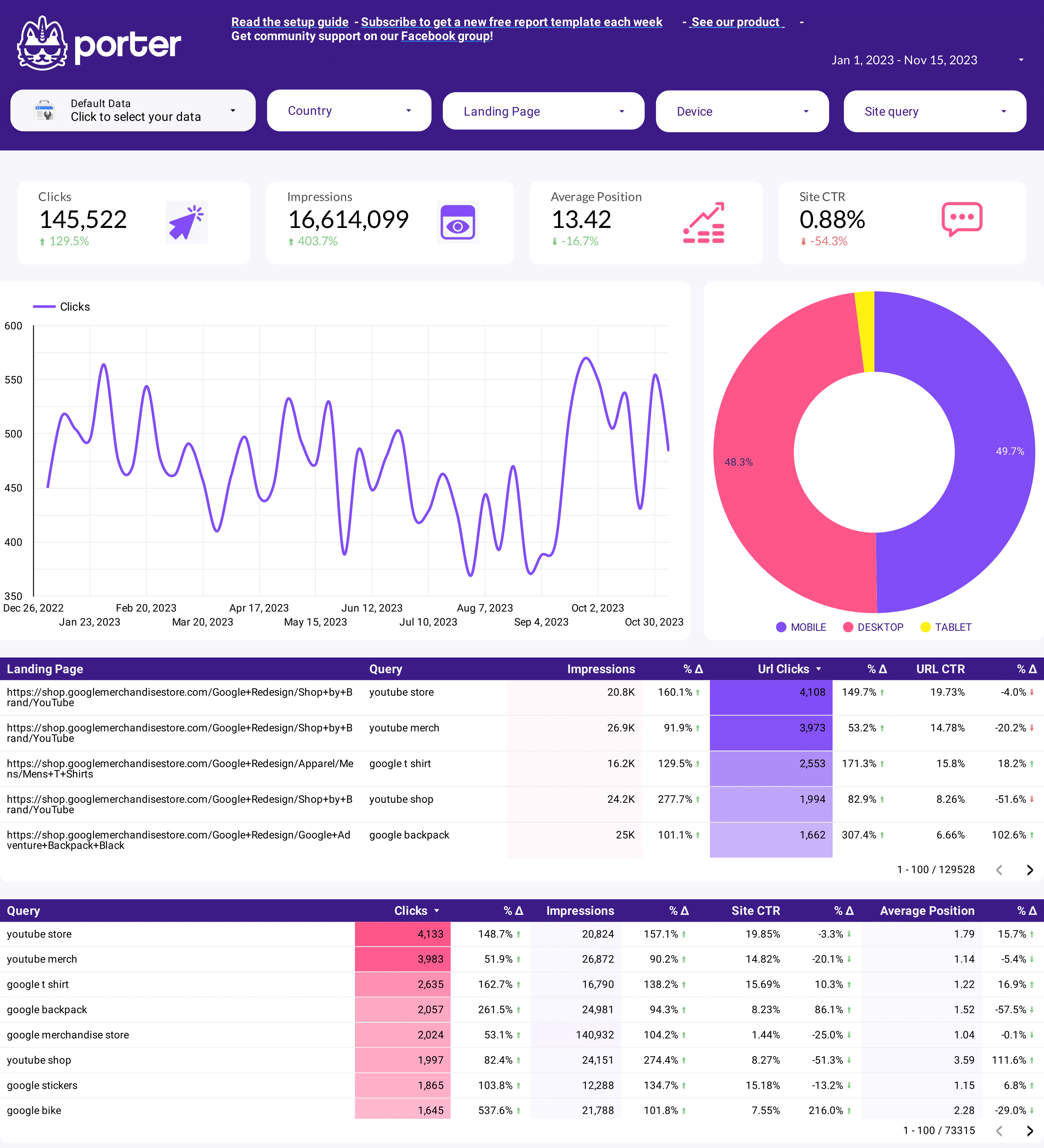
Start with a pre-built SEO dashboard instead of building from scratch. These templates include the exact metrics and breakdowns agencies and in-house SEOs use daily.
Pre-built SEO dashboard with Clicks, CTR, Impressions, and Average Position.
View template →Example SEO dashboard showing real-world search performance reporting.
View template →The only GSC connector built for agencies and SEO teams
| Feature | Porter No-code marketing data warehouse |
Others Connectors & ETL |
|---|---|---|
| Storage | Keep historical GSC data in Porter’s warehouse so you can reconnect or switch destinations without losing months of search performance history | Store data only in Data Studio; lose historical data if you disconnect |
| Data syncing | Sync multiple Google Search Console properties in one subscription with automatic refreshes — no rebuilding connectors per client | Manual refreshes or limited auto-sync windows; multi-property requires duplicate connectors |
| Attribution | Blend Google Search Console metrics with Google Ads, Shopify, HubSpot, or BigQuery in the same Data Studio report to tie search performance to revenue | GSC data isolated from ad spend, CRM, or revenue data |
| Data blending | Pre-join GSC data with other sources inside Porter before it reaches Data Studio — cleaner reports, faster load times | Blend limited to Data Studio native joins; complex calculated fields required |
| Destinations | Send the same GSC dataset to Data Studio, Google Sheets, Claude, and BigQuery from one connector — no re-authentication per destination | Data Studio only; export to Sheets or BigQuery requires separate tools or manual CSV exports |
Everything you need to build professional SEO dashboards in Data Studio.
Connect multiple Google Search Console properties under one Porter account. Roll up search performance across all your websites or keep client data separate — your choice.
Choose between Site Impression (property-level) and URL Impression (page-level) tables per property. Use both in the same dashboard for complete coverage.
Break down Clicks, Impressions, CTR, and Average Position by Web, Image, Video, News, Discover, and Google Search — all available as filterable dimensions.
Pull Query, Page URL, and Search Appearance fields to see which keywords drive traffic and which landing pages rank — no manual CSV exports.
Authorize your Google account in one click. Porter uses standard OAuth scopes — no API keys, no service accounts, no developer console setup.
Your Data Studio dashboards update on a schedule you set. Stop manually re-exporting GSC CSVs every Monday morning.
Start with the SEO Dashboard or SEO Dashboard Example templates. Every chart, table, and filter is pre-mapped to real Google Search Console fields.
Combine Google Search Console data with Google Ads, Google Analytics, Shopify, or BigQuery in Porter before sending to Data Studio — one unified report.
LOVED BY 1,500+ MARKETERS
Create a free Porter account. No credit card required to connect your first Google Search Console property.
Click Connect, choose Google Search Console, and grant OAuth access. Porter requests read-only access to your search performance data.
Pick the website property you want to report on. If you manage multiple properties, you can add more later from the same account.
Select Site Impression for property-level reporting or URL Impression for page-level detail. You can create separate data sources for each.
Launch the SEO Dashboard template in Data Studio, or build a custom report from scratch with 26 available fields.
Every standard Google Search Console dimension and metric is available, organized into 6 categories. No calculated fields required — just connect and report.
Every standard dimension and metric from Google Search Console, ready to use in Data Studio without calculated fields.
Field names are clean and intuitive — no cryptic API labels. Build reports faster with human-readable dimensions.
Drill down from property-level to page-level, by query, device, country, and search type — all in one connector.
Segment by Web, Image, Video, News, Discover, and Google Search with dedicated filterable dimensions.
Date, Day of Week, Month, Quarter, Week, Year, and more — pre-formatted for trend analysis and period comparisons.
Roll up data across all your GSC properties or keep them separate. One subscription covers every website you manage.
Porter supports 15+ data sources and 10+ destinations. Mix and match in one subscription, no extra seats or hidden per-destination fees.
Fix the most common Google Search Console connector issues in minutes.
| Issue | Solution |
|---|---|
| My Data Studio impressions do not match Google Search Console exactly | Data Studio and GSC round timestamps differently, and filters applied in Data Studio may exclude rows that GSC includes in its UI totals. Ensure your date range, search type filter, and device breakdown match exactly. Use Site Impression for closest alignment to the GSC Performance report. |
| I cannot connect multiple Google Search Console properties to one Data Studio report | With Porter, add each property as a separate data source in the same account, then blend them in Data Studio or pre-aggregate in Porter. The native connector requires one connector per property and manual blending. |
| I am unsure whether to use Site Impression or URL Impression | Use Site Impression for property-level totals that match the GSC Performance chart. Use URL Impression for page-level analysis — which landing pages rank for which queries. Most SEO dashboards need both. |
| My dashboard data seems stale or delayed | Google Search Console data is typically fresh within 24–48 hours. In Porter, check your sync schedule and timezone settings. If you need real-time data, note that GSC itself does not provide sub-hourly updates. |
| I do not see Discover or Google News data in my report | Select the Search Type: Discover and Search Type: Google News dimensions from the Metadata category. These are available as separate filterable fields in Porter — make sure your data source includes the Metadata category. |
| Some queries show as ‘Anonymous’ or ‘(not provided)’ | This is Google Search Console behavior for AI Mode and AI Overviews traffic, plus privacy-thresholded queries. Porter passes through exactly what GSC provides. Report on landing pages and search types instead of individual queries for these segments. |
Google Search Console properties
Billed annually · $12.5/account






Unlimited 14-day free trial + Free forever plan
Build SEO dashboards that turn search data into decisions. No code, no credit card, no setup fees.








