Facebook InsightsFacebook Insights Data StudioGoogle Data Studio

Free Facebook Insights connector for Data Studio

Connect your Facebook Insights data to Google Data Studio (formerly Looker Studio) for free. Analyse Page likes, Total reach, Post engagements, and Page video views across +277 fields — the only connector that bundles Facebook Insights, Facebook Ads, and Instagram data in one account with ready-to-use templates — covering every Facebook Insights page field.

  • +277 fields — every Facebook Insights field plus calculated metrics including Page likes, Total reach, and Post engagements.
  • The only connector that bundles Facebook Insights, Facebook Ads, and Instagram data in one account with ready-to-use templates.
  • Send to Data Studio, Google Sheets, Claude, and BigQuery in one subscription.

Free forever plan · No credit card

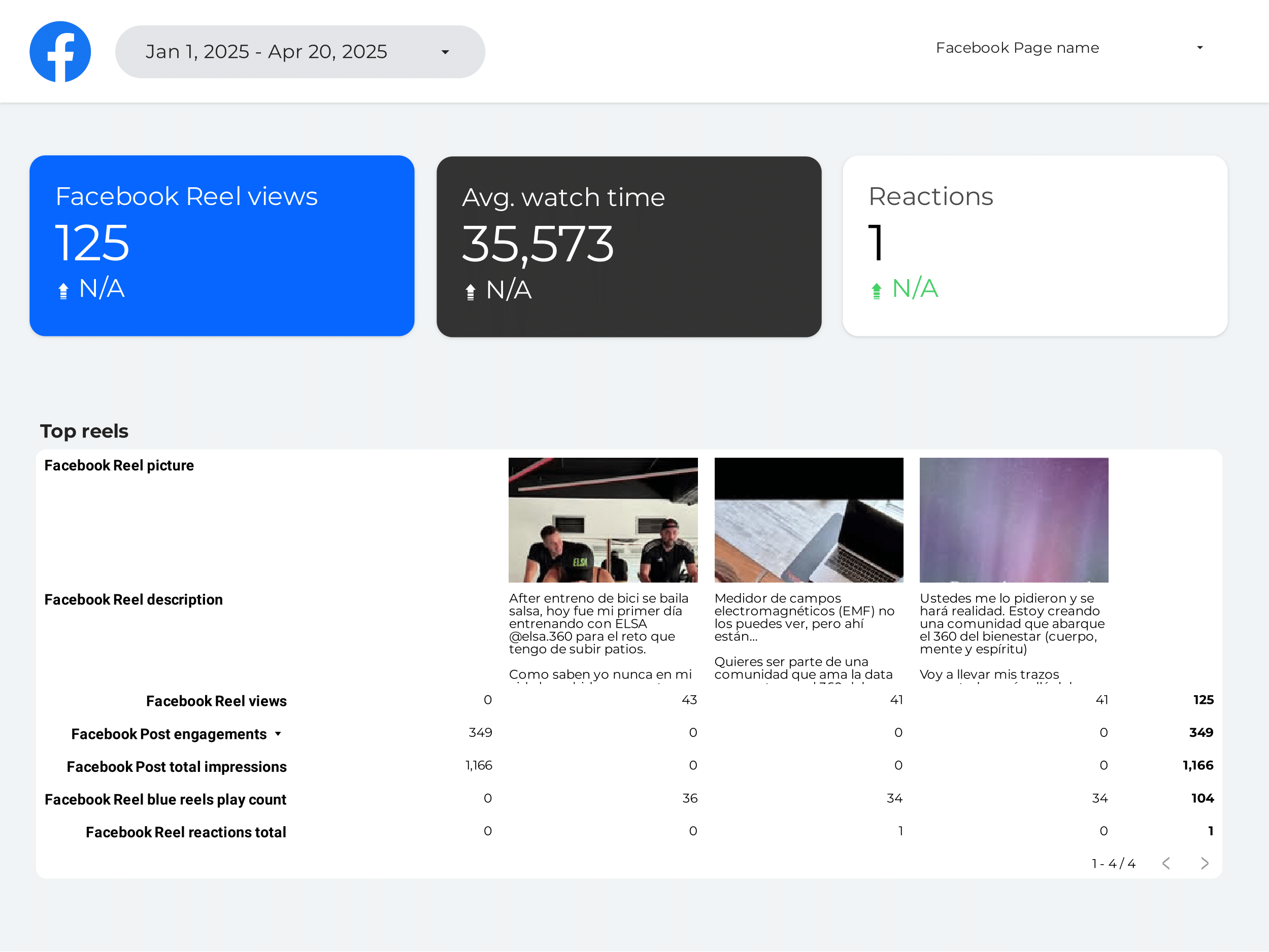
Facebook Insights dashboard

Trusted by 1,600+ marketers and agencies in 60+ countries

G2 Momentum Leader badge G2 Best Estimated ROI badge G2 Best Relationship badge
Ogilvy Google Partner Loop Dapper Ture Vaulted
★★★★★   4.6 / 5 · 200+ reviews on G2
READY-MADE REPORTS

Launch a Facebook Insights dashboard in minutes

Choose from 36 ready-made templates built for social media managers and marketing teams tracking organic Facebook page performance. Each dashboard is pre-configured with the metrics that matter most — no setup required.

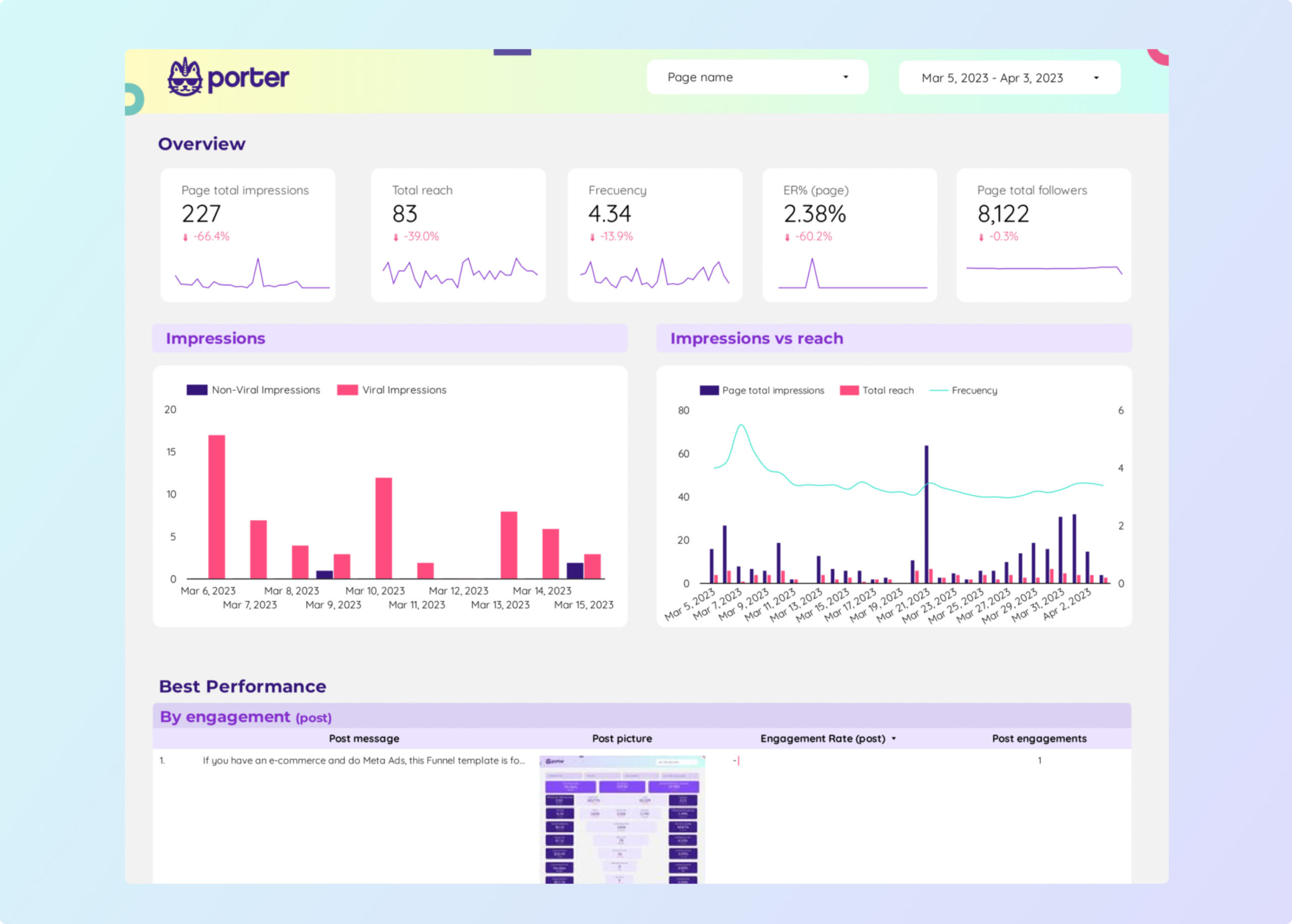
Facebook Insights Dashboard Example

Facebook Insights Dashboard Example

Pre-built example dashboard showing organic Facebook page metrics and engagement trends.

View template →
Facebook Insights Dashboard

Facebook Insights Dashboard

Full dashboard template for tracking Facebook page performance and audience growth.

View template →
Facebook Insights Report

Facebook Insights Report

Marketing report template for organic social media reporting with Facebook Insights data.

View template →
Facebook Insights Report for Data Studio

Facebook Insights Report for Data Studio

Data Studio report template designed specifically for Facebook Insights organic data.

View template →
Facebook Insights Report for Data Studio

Facebook Insights Report for Data Studio

Overview report template for Facebook Insights in Data Studio with key organic metrics.

View template →

Facebook Insights Reporting Tool

Reporting tool solution for automated Facebook Insights dashboards and scheduled reports.

View template →
Browse all Facebook Insights templates →
WHY PORTER

Why social media teams choose Porter over manual exports and middleware

Porter is a no-code marketing data warehouse built for Facebook Insights reporting. Other connectors stop at pipes — Porter also handles storage, blending, and destinations.

FeaturePorter
No-code marketing data warehouse
Others
Connectors & ETL
StorageDirect API-to-Data Studio pipeline — no storage layer, no ETL scriptsRequires data warehouses, spreadsheet middleware, or database connectors
Data syncingLive sync with configurable refresh — set it once, never export againManual CSV exports from Meta Business Suite or batch ETL pipelines
AttributionFacebook Insights + Facebook Ads + Instagram in one account, one subscriptionOrganic and paid social data split across separate tools and bills
Data blendingNative blending with Google Analytics, Shopify, and 80+ sources inside Data StudioComplex SQL joins or third-party ETL platforms to blend sources
DestinationsData Studio, Google Sheets, BigQuery, and Claude in one subscriptionLocked to a single BI tool or spreadsheet
Compare Porter vs other connectors →
FEATURE CHECKLIST

Facebook Insights connector feature checklist

That is what makes the Porter Metrics Data Studio connector for Facebook Insights better.

01

277 fields across 13 categories

From Page growth and reach to Post engagement, Reels performance, and Reviews — every Facebook Insights metric and dimension available.

02

36 ready-to-use templates

Pre-built dashboards for organic social reporting. Load your data and publish in minutes, not hours.

03

Bundle Insights + Ads + Instagram

The only connector that bundles Facebook Insights, Facebook Ads, and Instagram data in one account with ready-to-use templates.

04

Post and Reel-level breakdowns

Track engagement by individual posts, videos, and Reels. See which content formats drive the most reach.

05

OAuth read-only security

Porter requests read-only permissions and never stores your Facebook credentials or page data.

06

Live data sync

Automatic refresh on your schedule. Stop manually exporting CSVs from Meta Business Suite.

07

Native Data Studio blending

Mix Facebook Insights with Google Analytics, Shopify, TikTok, or any other Porter source in the same report.

08

Free forever plan

Start with one Facebook page at no cost. Upgrade when you need more accounts, faster refresh, or deeper history.

LOVED BY 1,500+ MARKETERS

What other marketers say about Porter

GET STARTED IN MINUTES

How to connect Facebook Insights to Data Studio

  1. Add the Porter connector from the Data Studio gallery

    Search for ‘Porter Metrics’ in the Google Data Studio connector gallery and select the Facebook Insights integration.

  2. Authorize your Facebook account

    Sign in with Facebook and grant read-only permissions. Porter never stores your credentials.

  3. Select your Facebook Pages

    Choose one or multiple Pages to include in your report. You can add or remove Pages anytime.

  4. Configure the data source and create your report

    Pick your date range, metrics, and dimensions. Data Studio will generate your first chart automatically.

  5. Apply a Porter template

    Browse 36 ready-made templates and apply one to build a complete dashboard in seconds.

Full tutorial: How to connect Facebook Insights to Data Studio →
EVERY FIELD YOU NEED

+277 Facebook Insights fields in Data Studio

Access 277 metrics and dimensions across 13 categories. From Page-level reach to individual Reel performance, every Facebook Insights field is available in Data Studio.

All Facebook Insights fields and more

Access every field available in Facebook Insights — over 277 in total — plus calculated metrics for cross-channel blending.

Marketer-friendly naming

We name fields exactly as in Meta Business Suite, so social media managers find them instantly.

Full granularity

Segment by Page, Post, Reel, demographics, geography, device, and time — every breakdown supported by Facebook.

Organic + paid in one place

Blend Facebook Insights organic data with Facebook Ads and Instagram in the same Data Studio report.

Reels and video metrics

Track Reel views, length, reactions, and social actions alongside traditional post and page metrics.

Reviews and ratings

Include Page review data — ratings, reviewer names, and recommendation types — in your reporting.

Page Information
  • Page ID
  • Page name
  • Page profile picture
  • Page profile picture url
Time & Date
  • Date
  • Day of week
  • Hour of day
  • Month
  • Week
  • Year
  • Month and year
  • Week and year
  • Quarter
  • Quarter and year
Geography & Demographics
  • City
  • Country code
  • Country name
  • Country icon
  • Country icon url
Page Audience & Growth
  • Page likes
  • Page total followers
  • Page new followers
  • Page new followers (Unique)
  • Page new unfollows
  • Page new unfollows (Unique)
  • Page new likes
  • Page unlikes
Page Reach & Impressions
  • Page total impressions
  • Organic Impressions
  • Paid impressions
  • Viral Impressions
  • Non-Viral Impressions
  • Total reach
  • Organic reach
  • Paid reach
  • Viral reach
  • Non-viral reach
  • Page fans online
  • Page unique views logged-in
Page Engagement
  • Page Engaged Users
  • Page Engagements
  • Page consumptions
  • Page consumptions unique
  • Positive Actions
  • Page Negative Actions
  • Page negative actions unique
  • Page messages new conversations unique
  • Page messages total messaging connections
  • Page places checkin total
Page Reactions
  • Page actions: Like
  • Page actions: Love
  • Page actions: Haha
  • Page actions: Wow
  • Page actions: Sad
  • Page actions: Anger
Post Performance
  • Post ID
  • Post Date
  • Post name
  • Post type
  • Posts count
  • Post engagements
  • Post engagement rate
  • Post shares
  • Post Comments Count
  • All Post Comments
  • Total impressions of posts
  • Organic impressions of posts
  • Paid impressions of posts
  • Viral impressions of posts
  • Non-viral impressions of posts
  • Total reach of posts
  • Organic reach of posts
  • Paid reach of posts
  • Viral reach of posts
  • Non-viral reach of posts
Post Reactions & Clicks
  • Post reactions
  • Post actions: Like
  • Post actions: Love
  • Post actions: Haha
  • Post actions: Wow
  • Post actions: Sad
  • Post actions: Anger
  • Post Clicks
Post Video
  • Post video views
  • Post video 10 sec views
  • Post video 10 sec unique views
  • Post video organic 10 sec views
  • Post video paid 10 sec views
  • Post video 10 sec autoplayed views
  • Post video 10 sec clicked to play views
  • Post video 10 sec sound on views
  • Post average time video viewed
  • Post video organic views time
Page Video
  • Page video views
  • Page video unique views
  • Page video organic views
  • Page video paid views
  • Page video autoplayed views
  • Page video clicked to play views
  • Page video views 10s
  • Page video views 10s unique
  • Page video organic 10 sec views
  • Page video paid 10 sec views
  • Page video 30 sec views
  • Page video unique 30 sec views
Reels
  • Reel ID
  • Reel title
  • Reel creation time
  • Reel views
  • Reel length
  • Reel reactions total
  • Reel post impressions unique
  • Reel post video avg time watched
  • Reel post video social actions
  • Reel permalink URL
Reviews
  • Review created date
  • Reviewer name
  • Reviewer id
  • Review rating
  • Recommendation type
See all 277+ Facebook Insights fields documentation →
Explore more

Other connectors & destinations

Porter supports 15+ data sources and 10+ destinations. Mix and match in one subscription, no extra seats or hidden per-destination fees.

COMMON ISSUES

Troubleshooting Facebook Insights + Data Studio

Most setups work on the first try. If they don’t, here are the six issues we see most often.

IssueSolution
I don’t see my Facebook Pages in the connectorVerify that your Facebook account has an Admin or Editor role on the Page. Re-authorize the connector and ensure you granted Page-level permissions during OAuth.
My demographics data shows ‘No data’Facebook requires minimum activity thresholds before demographic breakdowns appear. Ensure your Page has sufficient recent engagement and wait 24–48 hours for data to populate.
Reports are not refreshing automaticallyCheck your Data Studio data source refresh schedule. If you have exceeded Facebook’s API rate limits, wait one hour and retry. Upgrade to a paid plan for higher refresh quotas.
OAuth or permission errorsRemove the Porter app from Facebook Business Integrations and reconnect. Make sure you select all Pages you need during authorization.
My Reels data is incompleteFacebook’s API has limited Reels support. Confirm the Reel is published and public. Private, scheduled, or draft Reels may not appear in Insights data.
Historical data only goes back 37 monthsFacebook Insights API limits historical data to approximately 37 months. Porter fetches the maximum available range automatically. Data beyond this limit requires manual upload.
Pricing

Start free. Pay per Facebook Insights page

  • Unlimited 14-day free trialConnect any number of data source accounts — no credit card.
  • Free forever planPer account: up to 3 connected accounts with 30-day history.
  • Other destinations includedYour subscription sends data to Data Studio, Google Sheets, BigQuery, Slack and Claude/ChatGPT.
  • Unlimited usersNo extra cost per team member or seat.
Monthly Annual Save 17%

Facebook Insights pages

$12.5 /mo

Billed annually · /account

Destinations included
Claude
ChatGPT
Data Studio
Google Sheets
Slack
Zapier
Power BI
Start for free →

Unlimited 14-day free trial + Free forever plan

FREQUENTLY ASKED QUESTIONS

Common questions.

Is the Facebook Insights connector for Data Studio free?
Yes. Porter offers a free-forever plan that includes one Facebook page, standard refresh rates, and full access to all 277 fields. Upgrade when you need more pages, faster refresh, or additional destinations like BigQuery.
What Facebook permissions do I need to connect Insights data?
You need an Admin or Editor role on the Facebook Page you want to connect. Porter requests read-only permissions through Facebook OAuth and never stores your login credentials.
Can I connect multiple Facebook Pages to one Data Studio report?
Yes. You can select multiple Pages during setup and blend them in a single report. Each Page counts toward your account limit based on your Porter plan.
How far back can I pull Facebook Insights historical data?
The Facebook Insights API provides approximately 37 months of historical data. Porter automatically fetches the full available range for every metric and dimension.
Does the connector include Facebook Ads data or only organic Insights?
This connector covers organic Facebook Insights data. However, Porter bundles Facebook Ads and Instagram connectors in the same account and subscription, so you can blend organic and paid social data in one Data Studio report.
Why is my Facebook Insights demographics data showing ‘No data’?
Facebook suppresses demographic breakdowns until a Page reaches minimum activity thresholds. If your Page is new or has low engagement, demographic fields may return empty. Data typically appears within 24–48 hours of reaching the threshold.
How often does Facebook Insights data refresh in Data Studio?
Refresh frequency depends on your Porter plan. Free plans include daily refresh. Paid plans offer hourly or near-real-time refresh. You can also trigger manual refreshes anytime in Data Studio.
Can I use Porter templates with Facebook Insights data?
Yes. Porter provides 36 templates designed for Facebook Insights. Apply any template to your data source and it will auto-map the correct metrics and dimensions.
Start in under 5 minutes

Connect your Facebook Insights to Data Studio today.

Join 1,600+ marketers and agencies reporting Facebook Insights in Data Studio with Porter.
No credit card · Cancel anytime · Used by 1,600+ marketers