





VTEX connector for Claude

Use Porter’s VTEX connector for Claude to ask about your store’s orders, best-selling SKUs, sales channels and stock per warehouse, counted on your store’s own calendar.

  • Track daily net sales from invoiced orders
  • See how much cancelled orders inflate gross sales
  • Rank SKUs, brands and categories by line revenue
  • List the SKUs out of stock in each warehouse
G2★★★★★Rated 4.6/5 on G2 (288 reviews, October 2026)

By Porter Metrics team · Last updated October 20, 2026

ClaudePorter connected
Show yesterday's invoiced orders and order value by sales channel, with the average order value for each.
Porter / VTEX / Trailgear Demo✓ 3 rows
The main store brought in $21,340 from 184 invoiced orders, while the marketplace channel had the highest average order value.
Sales channelOrdersOrder valueAOV
Main store184$21,340$116
Marketplace52$6,760$130
B2B9$1,035$115
Demo data, Trailgear Demo account
36 VTEX fields
01Setup

How to connect VTEX to Claude

VTEX connects to Claude through Porter in 3 steps, with no code and no server to run. Enter your VTEX account name, App Key and App Token in Porter, add Porter's MCP URL to Claude as a custom connector, then ask your first question. MCP (Model Context Protocol) is the open standard Claude uses to read data from tools such as Porter.

What you need before you start

  • You need your VTEX account name and an application key: an App Key and its App Token, generated in your VTEX admin with a role that can read orders, the catalog and inventory. The account name is the first part of your store's VTEX address, as in yourstore.myvtex.com; you can also paste the admin URL and Porter keeps the name. Add a free Porter account and any Claude plan: Free through Enterprise add custom connectors, and Free allows one (Anthropic's guide to custom connectors in Claude).
  • Works in Claude.ai, Claude Desktop, Cowork and Claude Code, with any Claude model, from Opus to Sonnet and Haiku.
  1. Step 1: Connect VTEX in Porter

    In Porter, choose Create, then Claude, then VTEX, and enter your account name, App Key and App Token. All three are needed: none of them reads anything on its own.

  2. Step 2: Add the connector to Claude

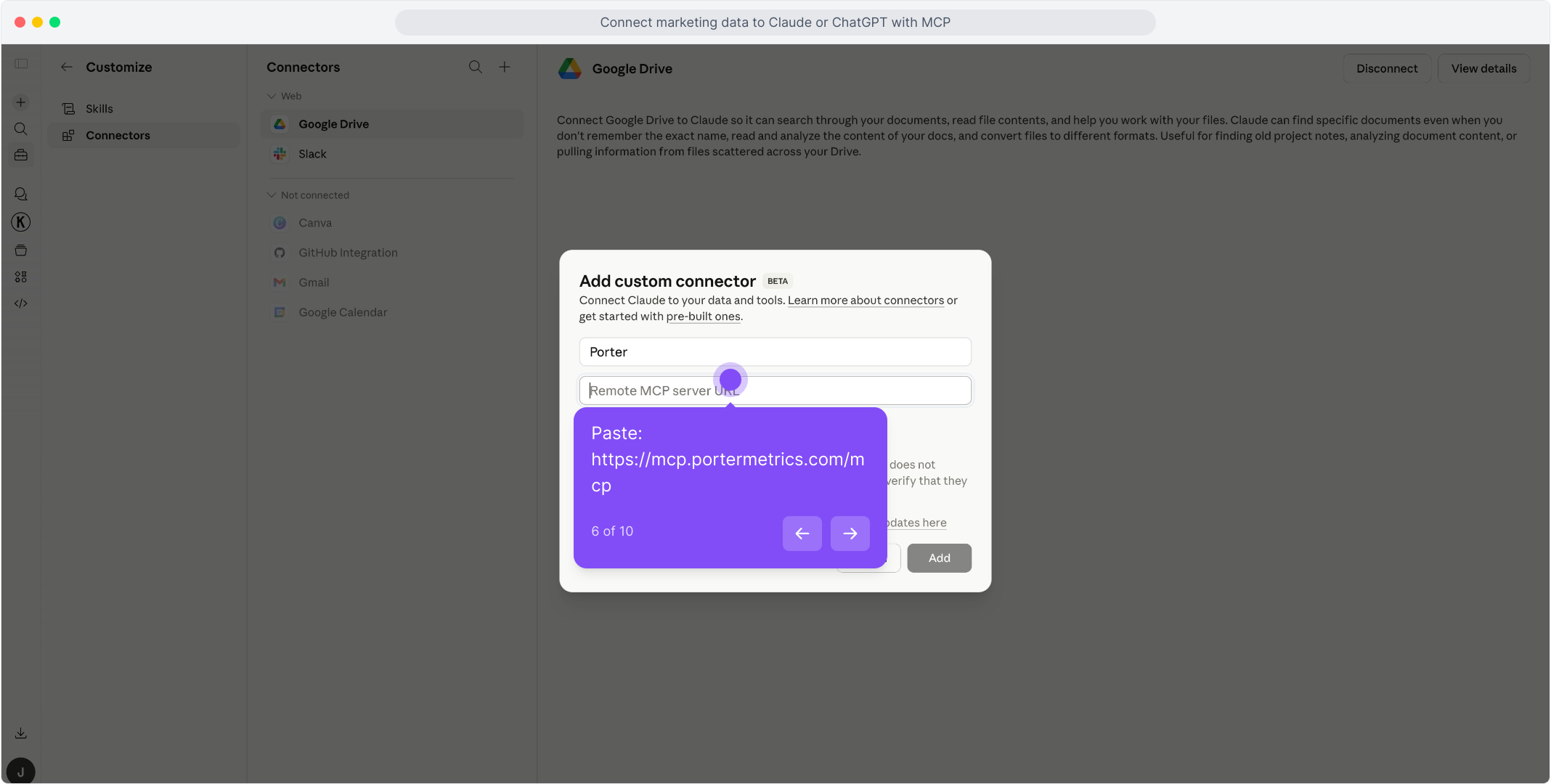
    In Claude, open Customize, then Connectors, and choose + Add, then Add custom connector. Name it Porter and paste this URL:

    MCP URL
    https://mcp.portermetrics.com/mcp
  3. Step 3: Ask Claude about VTEX

    Sign in to Porter, then try:

    Prompt
    Using VTEX, show yesterday's invoiced orders and order value by sales channel, with the average order value for each.
app.portermetrics.com / create

Create: VTEX to Claude

Account name, App Key, App Token

Select the store Claude can use.

Porter's MCP URL pasted into the Remote MCP server field of Claude's custom connector dialog

Claude

Using Porter / VTEX …

Demo data
02Use cases and prompts

What you can ask Claude

Each use case comes with a prompt to copy, the fields it uses from the VTEX fields list and who it's for. VTEX counts cancelled orders in its sales totals, so the prompts ask for invoiced orders whenever they mean net sales.

What did the store really sell each day?

The problemThe daily sales number includes orders that were later cancelled, so it never matches what was actually billed.

What Claude doesClaude reads Orders, Order Value and Units by Order Date and keeps only orders whose Order Status is invoiced. Order Date is your store's local day, taken from the time zone of each sales channel.

What you getA daily net sales series that matches the VTEX admin day by day, with average order value worked out as Order Value divided by Orders.

Prompt
For the last 30 days, show invoiced Orders, Order Value and Units by Order Date from VTEX. Add the average order value for each day as Order Value divided by Orders, and tell me which day sold the most.

For: ecommerce managers · DTC marketers · agencies

Fields used: Order DateOrder StatusOrdersOrder ValueUnits

How much do cancelled orders inflate gross sales?

The problemGross sales look healthy in the weekly report, and nobody knows how much of that never turned into an invoice.

What Claude doesClaude breaks last month's Orders and Order Value down by Order Status, from invoiced and handling to canceled, and shows each status's share of the total.

What you getYou see how far gross sales overstate net sales before the number goes into a report.

Prompt
Break down last month's VTEX Orders and Order Value by Order Status. Show each status's share of the total, and tell me how much higher gross sales are than invoiced sales.

For: ecommerce managers · marketing analysts

Fields used: Order StatusOrdersOrder Value

Which SKUs, brands and categories sell the most?

The problemThe best-seller list comes from an orders export that has to be split into lines and pivoted by hand.

What Claude doesClaude reads order lines: Line Revenue is selling price times quantity, after item discounts, and Line List Value is the same line at list price. Brand and Category come with each line, as sold.

What you getA ranked list of what sold, with the average discount per SKU, without exporting a single report.

Prompt
Using VTEX order lines from the last 30 days, list the top 20 SKUs by Line Revenue for invoiced orders, with SKU Name, Brand, Category, Quantity Sold and Line List Value. Add the average discount per SKU as 1 minus Line Revenue divided by Line List Value.
Then ask
Prompt
For the same 30 days, total Line Revenue by Brand for invoiced orders, and show each brand's share.

For: ecommerce managers · merchandisers · performance marketers

Fields used: SKU NameBrandCategoryQuantity SoldLine RevenueLine List ValueOrder Status

Which sales channels and payment methods bring in the most?

The problemThe marketplace, the main store and the B2B channel all report into one VTEX account, and the split lives in the admin, filter by filter.

What Claude doesClaude totals invoiced Orders and Order Value by Sales Channel and by Payment Methods. An order paid with two methods shows both names, separated by commas.

What you getYou see which channel brings the biggest baskets before deciding where the next promotion runs.

Prompt
For the last 90 days, show VTEX invoiced Orders and Order Value by Sales Channel, then by Payment Methods. Which channel has the highest average order value?

For: ecommerce managers · marketing ops

Fields used: Sales ChannelPayment MethodsOrdersOrder ValueOrder Status

Which SKUs are out of stock, and in which warehouse?

The problemA campaign keeps sending traffic to products that cannot be shipped from the warehouse that serves them.

What Claude doesClaude reads today's stock per SKU and warehouse: Stock On Hand, Stock Reserved and Stock Available, which is on hand minus reserved. SKUs VTEX marks with Unlimited Stock are left out, since their quantities mean nothing.

What you getA list of SKUs to pause in your ads or restock, warehouse by warehouse.

Prompt
From VTEX inventory, list every SKU with zero Stock Available in any warehouse, leaving out SKUs with Unlimited Stock. Show SKU Name, Warehouse, Stock On Hand and Stock Reserved.

For: ecommerce managers · performance marketers

Fields used: SKU NameWarehouseStock AvailableStock On HandStock ReservedUnlimited Stock
03Why Porter

Why Porter for VTEX in Claude

Porter puts your VTEX store in the same Claude connector as your ad, analytics and email sources, so a question about sales can include the campaigns that drove them. Porter reads VTEX live and only reads: nothing in your store changes.

✓

Your store's calendar

VTEX stores order dates in UTC. Porter dates every order in the time zone of its sales channel, so yesterday's sales in Claude are yesterday's sales in your admin.

⊞

VTEX next to your ads

Ask about VTEX sales next to Meta Ads, Google Ads, GA4 and other sources from all Claude connectors in the same chat, through one Porter URL.

⚙

Read-only, nothing changes

Claude reads orders, the catalog and inventory. It cannot edit an order, a price or a stock level, and you can revoke the app key in VTEX at any time.

Aa

36 ready-made fields

Claude gets 36 named VTEX fields in 4 groups, from order totals and order lines to SKUs and stock per warehouse, each with its definition.

↻

One URL, nothing to host

Enter your account name, App Key and App Token in Porter and add one MCP URL to Claude. There is no export to schedule and no warehouse to keep in sync.

✓

Live dashboards, not only chat answers

Ask Claude for a dashboard and Porter's AI dashboards publish it at its own link, synced automatically and ready to share.

04Dashboard

Dashboard template

Start from a ready-made VTEX template, or ask Claude to build a live one with AI dashboards.

AI dashboards

Build a live VTEX dashboard from the chat

Describe the dashboard in one sentence and Porter builds it. A client-ready dashboard in minutes, with no chart dragging and no BI tool to learn. Ask Claude:

Prompt
Build a live VTEX dashboard for my account with the last 30 days, the main KPIs and a weekly trend.
Live URLEach dashboard at its own link: no login, no app, no download
Auto-syncFresh VTEX data, nobody re-exports each period
Scheduled deliveryEmail or PDF sends on a set day
White labelYour logo and branding for clients
Sharing permissionsView or edit access per person

Or start from a template

05Pricing

Pricing

You can start free, since Porter’s VTEX connector for Claude comes with every plan. Use the calculator for your number of accounts, or see Porter pricing for every plan.

What you get

  • Free plan: never expires, with unlimited connected accounts and the last 15 days of data in Claude (30 days in Data Studio and Sheets)
  • Reporting: from $12.50 per account a month billed annually, or $15 month to month for one account
  • Billing: each VTEX store counts as one account, with volume discounts and no per-seat fee
  • No credits needed: Claude's VTEX questions are reads, so they use no AI credits
  • Trial: 14 days of full access, no card

Price calculator

$33.33/mo$6.67 per account

An account is one ad account, Stripe account, store, page or GA4 property. The Free plan never expires and has unlimited accounts, with the last 15 days of data in AI chats.

06Data and actions

VTEX data Claude can use

Claude reads VTEX as four tables: orders, order lines, the SKU catalog and inventory per warehouse, with all 36 fields in the VTEX fields list. Each table answers its own questions. Product Name lives in the catalog, so it does not combine with Line Revenue in one question; SKU Name, Brand and Category come on every order line and do.

12 VTEX fields Claude uses most

FieldWhat it's for
Order Valuevtex_order_valueOrder total: items, shipping, tax and discounts
Ordersvtex_ordersNumber of orders; AOV is Order Value ÷ Orders
Order Statusvtex_order_statusinvoiced, canceled, handling, ready-for-handling…
Order Datevtex_creation_dateThe store's local day, from the sales channel's time zone
Sales Channelvtex_sales_channel_nameThe VTEX sales channel (trade policy)
Line Revenuevtex_line_revenueSelling price × quantity, after item discounts
Line List Valuevtex_line_list_valueList price × quantity, before discounts
SKU Namevtex_sku_nameThe SKU, on order lines, the catalog and inventory
Brandvtex_brand_nameBrand of the product, as sold on the line
Categoryvtex_category_nameMost specific category of the product
Stock Availablevtex_available_quantityOn hand minus reserved, per SKU and warehouse
Warehousevtex_warehouse_nameThe VTEX warehouse holding the stock

Product stats

WhatVTEX connector
Fields36 in 4 groups: 22 dimensions and 14 metrics
TablesOrders, order lines, SKU catalog and inventory per warehouse
DatesThe store's local day, by sales channel time zone
SnapshotsCatalog and inventory are today's, whatever the date range
ActionsReads only; your VTEX store stays as you set it
SpeedVTEX lists at most 30 pages of orders per request, so Porter splits long ranges; a month of a large store takes a while the first time
AccessAccount name, App Key and App Token; one store per connection
Not includedCustomers (Master Data) and catalog list prices

See all 36 VTEX fields

07Security

Is it safe?

Yes. Porter's VTEX connector for Claude only reads: orders, the catalog and inventory, through the App Key and App Token you provide. Orders, prices and stock in VTEX stay exactly as you set them.

Give Porter its own app key

Generate an application key just for Porter, so you can revoke it in the VTEX admin without touching your other integrations. Its role needs to read orders, the catalog and inventory, and nothing more.

Customer data stays out

Porter does not read customer names, emails, documents or shipping addresses from your orders. Customers in Master Data are not part of this connector.

What the connector needs from VTEX

Your account name, an App Key and its App Token. Each set connects one store, and none of the three works without the others.

08FAQ

FAQ

Before connecting VTEX to Claude through Porter, ecommerce teams usually ask about several stores, customers, time zones and other AI tools. After those come 4 fixes: totals that don't match the admin, a slow first question, an old date range and lost access.

Can I connect several VTEX stores?

Yes. Each store connects with its own account name, App Key and App Token, and bills as one data source account. Agencies add every client's store the same way and name the store when they ask.

Does Porter read VTEX customers?

Not in this version. Customers live in VTEX Master Data, which this connector does not read, and Porter leaves out the customer name, email and address that come with each order.

Which time zone does Claude use for VTEX orders?

Your store's. VTEX keeps order dates in UTC, and Porter dates each order in the time zone its sales channel declares. If a channel declares a zone Porter does not map yet, Claude gets an error naming it instead of orders moved to the wrong day.

Does Porter's VTEX connection work in other AI tools?

Yes. The same Porter account and connection work in any AI tool that supports MCP, with the same store and fields.

Troubleshooting

Why don't the totals match the VTEX admin?

Usually for one of three reasons. VTEX counts cancelled orders in sales totals until you filter by order status, so ask for invoiced orders for net sales. Order Value includes shipping and tax, while Line Revenue does not. And a day in Porter is the store's local day, not the UTC day.

Why is the first VTEX question slow?

VTEX lists at most 30 pages of orders per request, so Porter splits a long date range into smaller ones and then reads each order. A month of a large store can take a while the first time. Catalog and inventory questions read every SKU, so they are slower than order questions.

Why does Claude refuse a date range that is too old?

VTEX ignores the date filter for periods before the oldest order it still keeps and answers with recent orders instead. Porter checks every order against the dates you asked for and returns an error rather than recent orders labelled with old dates.

Why did Claude lose access to VTEX?

VTEX rejected the App Key and App Token twice in a row, for example because the key was revoked. Generate a new key pair in the VTEX admin and reconnect it in Porter. If VTEX answers 403 instead, the key works but its role cannot read that data.

09Next

More Claude connectors

VTEX sales make more sense next to the campaigns and traffic behind them, and Porter brings each of those sources in through the same MCP URL. Add the ones your store reports on, or browse all Claude connectors:

Not only Claude. Send VTEX data anywhere

The same Porter account and connection also send VTEX data to these destinations, at no extra cost.

Try it on your own store

Connect VTEX to Claude through Porter and ask what the store really sold, which SKUs led and what is out of stock. Setup takes your account name, an App Key and its App Token, and the free plan includes the VTEX connector for Claude.

Free plan · 14-day trial · No card needed

Ecommerce managers: daily net sales, by channel, from one question.

Merchandisers: best sellers by SKU, brand and category, with their discounts.

Performance marketers: the out-of-stock SKUs to pause before the next campaign.