Snapchat Ads connector for Claude

Use Porter’s Snapchat Ads connector for Claude to ask about spend, swipe ups, video, purchases and app installs by campaign, ad squad and ad, counted on your ad account’s own calendar.

  • Track daily spend, impressions and swipe ups by campaign
  • Find the campaigns that sell, with purchases and their value
  • Compare video completions and screen time ad by ad
  • Count app installs by ad squad, on iOS and Android
G2★★★★★Rated 4.6/5 on G2 (288 reviews, October 2026)

By Porter Metrics team · Last updated October 27, 2026

ClaudePorter connected
Show last week’s Snapchat Ads spend, swipe ups and swipe-up rate by campaign.
Porter / Snapchat Ads / Demo Ad Account✓ 3 rows
Spring Sale spent the most, $1,240, while Retargeting had the best swipe-up rate at 1.05%.
CampaignSpendSwipe upsSwipe-up rate
Spring Sale$1,2403,2960.80%
App Install$8601,5480.62%
Retargeting$4101,3121.05%
Demo data, Demo Ad Account
108 Snapchat Ads fields
01Setup

How to connect Snapchat Ads to Claude

Snapchat Ads connects to Claude through Porter in 3 steps, with no code and no Snapchat developer app. Sign in with Snapchat in Porter, add Porter’s MCP URL to Claude as a custom connector, then ask your first question. MCP (Model Context Protocol) is the open standard Claude uses to read data from tools such as Porter.

What you need before you start

  • You need a Snapchat login that can see your ad accounts, as a member of their organization in Snapchat Business Manager. Add a free Porter account and any Claude plan: Free through Enterprise add custom connectors, and Free allows one (Anthropic’s guide to custom connectors in Claude).
  • Works in Claude.ai, Claude Desktop, Cowork and Claude Code, with any Claude model, from Opus to Sonnet and Haiku.
  1. Step 1: Connect Snapchat Ads in Porter

    In Porter, choose Create, then Claude, then Snapchat Ads, and sign in with Snapchat. Porter lists every ad account of every organization your Snapchat login belongs to; pick the ones Claude can use.

  2. Step 2: Add the connector to Claude

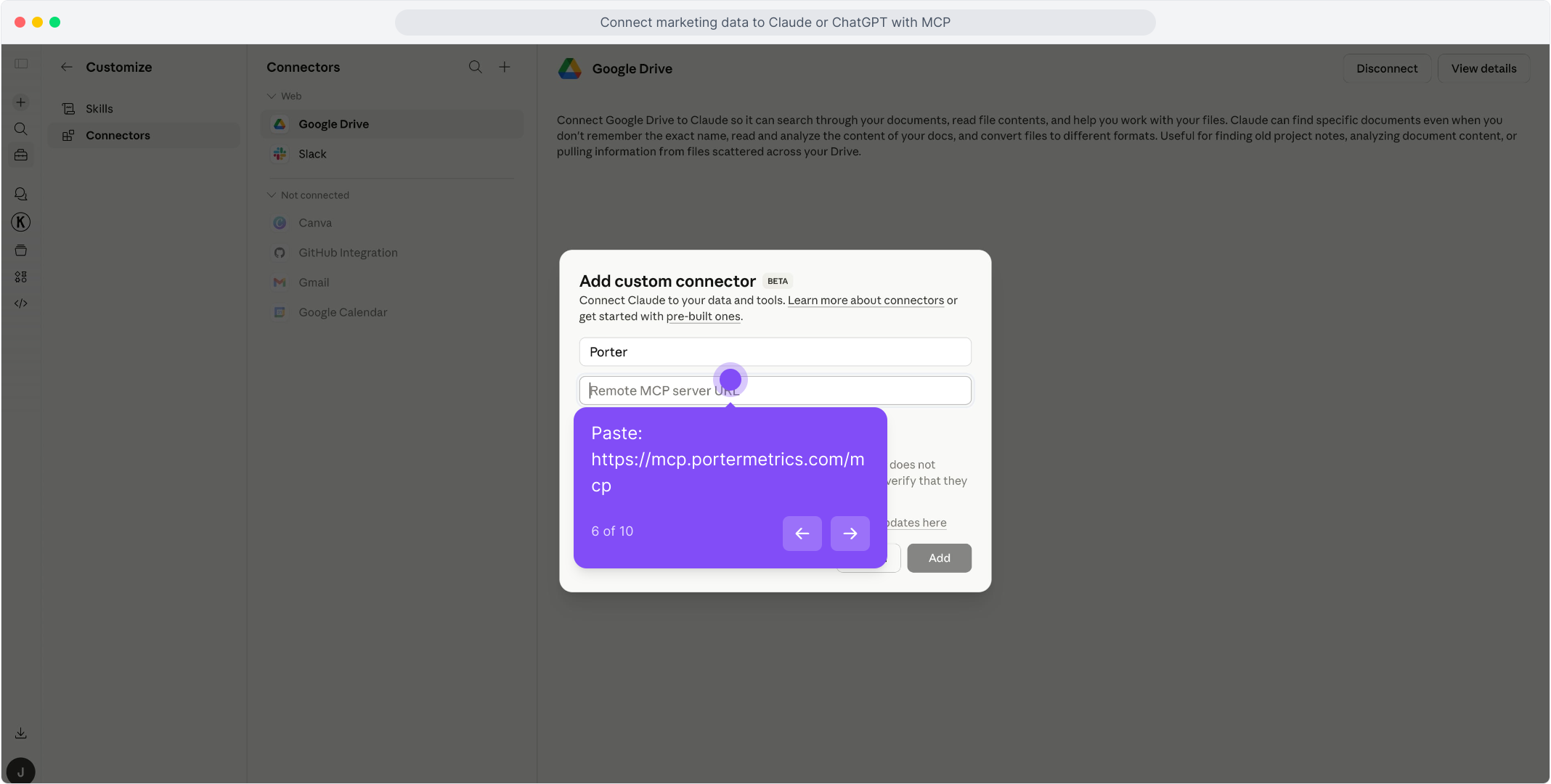
    In Claude, open Customize, then Connectors, and choose + Add, then Add custom connector. Name it Porter and paste this URL:

    MCP URL
    https://mcp.portermetrics.com/mcp
  3. Step 3: Ask Claude about Snapchat Ads

    Sign in to Porter, then try:

    Prompt
    Using Snapchat Ads, show Spend, Impressions and Swipe Ups by Campaign Name for the last 7 full days. Calculate CPM and the swipe-up rate yourself.
app.portermetrics.com / create

Create: Snapchat Ads to Claude

Sign in with Snapchat

Select the ad accounts Claude can use.

Porter's MCP URL pasted into the Remote MCP server field of Claude's custom connector dialog

Claude

Using Porter / Snapchat Ads …

Demo data
02Use cases and prompts

What you can ask Claude

Each use case comes with a prompt to copy, the fields it uses from the Snapchat Ads fields list and who it’s for. Swipe Up Rate and the average screen time are averages of each row, so the prompts ask Claude to work rates out from the totals instead of adding them up.

What did each campaign really cost?

The problemSpend sits in one place, impressions and swipe ups in another, and CPM gets worked out by hand in a spreadsheet.

What Claude doesClaude reads Spend, Impressions and Swipe Ups by Campaign Name and works out CPM and the swipe-up rate from the totals, rather than averaging daily rates. Spend comes in your ad account’s currency, named in the Currency field.

What you getA ranked list of campaigns by spend, with the ones whose CPM is out of line flagged before the next budget call.

Prompt
Using Snapchat Ads, show me the last 30 days by Campaign Name with Spend, Impressions and Swipe Ups. Tell me which Currency the spend is in, calculate CPM and the swipe-up rate yourself, rank campaigns by spend, and point out any campaign whose CPM is more than double the account median.

For: performance marketers · agencies · paid social managers

Fields used: Campaign NameSpendImpressionsSwipe UpsCurrency

Which campaigns sell, not just deliver?

The problemA campaign with cheap impressions looks like a winner until you see that it sold nothing.

What Claude doesClaude puts Purchases and Purchases Value next to Spend for each campaign. Conversions use Snapchat’s default attribution, 28 days after a swipe and 1 day after a view, and Porter asks for it explicitly so a change of default does not move the numbers.

What you getThe campaigns ranked by return on spend, with the ones that spend the most and sell the least at the top of the list.

Prompt
For the last 14 days, list my Snapchat Ads campaigns with Spend, Purchases and Purchases Value. Work out the cost of each purchase and the return on spend, rank the campaigns by return on spend, and flag the ones that spent the most while selling the least.

For: performance marketers · ecommerce managers · agencies

Fields used: Campaign NameSpendPurchasesPurchases Value

Where does the funnel lose people?

The problemPixel events from view content to purchase are reported one by one, so the drop between steps never shows up in one view.

What Claude doesClaude lines up View Content, Add to Cart, Start Checkout and Purchases for each campaign and works out the share that reaches each step. Each of the 26 conversion events also comes with its value.

What you getThe step where each campaign loses the most people, so the fix goes to the landing page, the cart or the checkout.

Prompt
Show me last week's Snapchat Ads funnel by Campaign Name: View Content, Add to Cart, Start Checkout and Purchases. Work out the share that reaches each step and tell me where each campaign loses the most people.

For: ecommerce managers · performance marketers

Fields used: Campaign NameView ContentAdd to CartStart CheckoutPurchases

Which ads do people actually watch?

The problemEvery ad gets impressions, and nothing says which ones people watched to the end and which they swiped past.

What Claude doesClaude reads Impressions, Video Views, Video Completions and Screen Time ad by ad, with Spend next to them, and works out the completion rate as Video Completions divided by Video Views.

What you getThe ads to scale and the ones to replace, ranked by how long people watched them.

Prompt
Give me last month's Snapchat Ads at ad level: Ad Name, Impressions, Video Views, Video Completions, Screen Time and Spend. Work out the completion rate as Video Completions divided by Video Views, then show me the five ads people watch to the end most and the five they skip.
Then ask
Prompt
For those ten ads, add the 25%, 50% and 75% video quartiles so I can see where people drop off.

For: creative strategists · paid social managers

Fields used: Ad NameImpressionsVideo ViewsVideo CompletionsScreen Time (ms)Spend

What does each app install cost?

The problemApp campaigns report installs, but the split between iOS and Android and the cost per install live in different screens.

What Claude doesClaude totals Installs, iOS Installs and Android Installs by Ad Squad Name, with Spend, and works out the cost per install for each ad squad.

What you getThe ad squads that bring installs cheapest, platform by platform, before the next budget shift.

Prompt
For the last 30 days, show my Snapchat Ads ad squads with Spend, Installs, iOS Installs and Android Installs. Work out the cost per install for each ad squad and tell me which platform is cheaper.

For: app marketers · user acquisition managers

Fields used: Ad Squad NameSpendInstallsiOS InstallsAndroid Installs
03Why Porter

Why Porter for Snapchat Ads in Claude

Porter puts Snapchat Ads in the same Claude connector as your other ad, analytics and ecommerce sources, so one question can compare Snapchat with the rest of your media plan. Porter reads Snapchat live and only reads: nothing in your ad accounts changes.

✓

Totals that add up

Campaign, ad squad and ad totals add up to your ad account’s spend, day by day. Porter also asks Snapchat for every ad with delivery, so a busy month is not cut short at 200 ads.

⊞

Snapchat next to your other ads

Ask about Snapchat Ads next to Meta Ads, TikTok Ads, Google Ads, GA4 and other sources from all Claude connectors in the same chat, through one Porter URL.

⚙

Read-only, nothing changes

Claude reads delivery stats, names and statuses. It cannot create, edit or pause a campaign, an ad squad or an ad.

Aa

108 ready-made fields

Claude gets 108 named Snapchat Ads fields, 92 metrics and 16 dimensions, at campaign, ad squad and ad level, each with its definition.

↻

Your account’s own day

Each day is the ad account’s day, in its time zone, and spend comes in its currency to the cent. Yesterday in Claude is yesterday in Snapchat.

✓

Live dashboards, not only chat answers

Ask Claude for a dashboard and Porter’s AI dashboards publish it at its own link, synced automatically and ready to share.

04Dashboard

Dashboard template

Ask Claude to build a live Snapchat Ads dashboard with AI dashboards, or start from one of Porter’s templates.

AI dashboards

Build a live Snapchat Ads dashboard from the chat

Describe the dashboard in one sentence and Porter builds it. A client-ready dashboard in minutes, with no chart dragging and no BI tool to learn. Ask Claude:

Prompt
Build a live Snapchat Ads dashboard for my ad account with the last 30 days of spend, impressions, swipe ups and purchases by campaign, and a weekly trend.
Live URLEach dashboard at its own link: no login, no app, no download
Auto-syncFresh Snapchat Ads data, nobody re-exports each period
Scheduled deliveryEmail or PDF sends on a set day
White labelYour logo and branding for clients
Sharing permissionsView or edit access per person

Or start from a template

05Pricing

Pricing

You can start free, since Porter’s Snapchat Ads connector for Claude comes with every plan. Use the calculator for your number of accounts, or see Porter pricing for every plan.

What you get

  • Free plan: never expires, with unlimited connected accounts and the last 15 days of data in Claude (30 days in Data Studio and Sheets)
  • Reporting: from $12.50 per account a month billed annually, or $15 month to month for one account
  • Billing: each Snapchat ad account counts as one account, with volume discounts and no per-seat fee
  • No credits needed: Claude's Snapchat Ads questions are reads, so they use no AI credits
  • Trial: 14 days of full access, no card

Price calculator

$33.33/mo$6.67 per account

An account is one ad account, Stripe account, store, page or GA4 property. The Free plan never expires and has unlimited accounts, with the last 15 days of data in AI chats.

06Data and actions

Snapchat Ads data Claude can use

Claude reads Snapchat Ads as three daily tables, by campaign, by ad squad and by ad, with all 108 fields in the Snapchat Ads fields list. Porter picks the coarsest table that has every field you ask for: asking for Ad Name reads the ad table, asking only for Campaign Name and Spend reads the campaign one. Names and statuses are today's, also for deleted entities.

12 Snapchat Ads fields Claude uses most

FieldWhat it's for
SpendspendSpend in the ad account's currency, exact to the cent
ImpressionsimpressionsTimes the ads were shown
Swipe UpsswipesSwipe ups on the ads
Swipe Up Rateswipe_up_percentSwipe ups per impression, an average of the row
Video Viewsvideo_viewsVideo views as Snapchat counts them
Video Completionsview_completionVideos watched to the end
Screen Time (ms)screen_time_millisTotal time the ads were on screen
Purchasesconversion_purchasesPurchase events, with Snapchat's default attribution
Purchases Valueconversion_purchases_valueValue of those purchases
Installstotal_installsApp installs, iOS and Android together
Campaign Namecampaign_nameToday's name, also for deleted campaigns
DatedateThe ad account's own day, in its time zone

Product stats

WhatSnapchat Ads connector
Fields108 in 3 groups: 16 dimensions and 92 metrics
TablesCampaign, ad squad and ad, one row per day
DatesThe ad account's own day, in its time zone
FreshnessSnapchat closes a day 48 hours later, so the last two days can still change
Conversions26 events with their value; 28 days after a swipe, 1 day after a view
ActionsReads only; your campaigns stay as you set them
AccessSnapchat sign-in; every ad account of every organization you belong to
Not includedReach, frequency and unique users; age, gender, country and device breakdowns

See all 108 Snapchat Ads fields

07Security

Is it safe?

Yes. Porter's Snapchat Ads connector for Claude only reads: delivery stats, and the names and statuses of campaigns, ad squads and ads. Campaigns, budgets and ads in Snapchat stay exactly as you set them.

Snapchat's own sign-in

Porter connects with Snapchat's OAuth sign-in and the Marketing API permission you approve. It sees only the ad accounts your Snapchat login can already see.

Reporting, not management

The connector reads reporting only. It cannot create, edit, pause or delete a campaign, an ad squad or an ad, and it does not touch your audiences or creatives.

What the connector needs from Snapchat

A Snapchat login that is a member of the organization that owns your ad accounts in Snapchat Business Manager. One sign-in covers every ad account that login can reach.

08FAQ

FAQ

Before connecting Snapchat Ads to Claude through Porter, marketing teams usually ask about several ad accounts, reach, attribution and other AI tools. After those come 4 fixes: recent days that change, a missing campaign, an empty answer and lost access.

Can I connect several Snapchat ad accounts?

Yes. One Snapchat sign-in lists every ad account of every organization your login belongs to, and each ad account bills as one data source account. Agencies name the ad account when they ask, and Claude can compare accounts side by side. Accounts in different currencies should not be added together: each row says its currency.

Does the connector include reach and frequency?

No. Reach, frequency and unique users count distinct people, so they cannot be added up across days, and Porter leaves them out rather than give a wrong total. Age, gender, country and device breakdowns are not part of this version either.

Which attribution does Claude use for Snapchat conversions?

Snapchat's default: 28 days after a swipe and 1 day after a view, counted on the day of the conversion. Porter asks for it on every request, so a change of default does not move your numbers. Attribution only moves conversions: spend, impressions and swipe ups stay the same.

Does Porter's Snapchat Ads connection work in other AI tools?

Yes. The same Porter account and connection work in any AI tool that supports MCP, with the same ad accounts and fields.

Troubleshooting

Why do the last two days change?

Snapchat closes a day 48 hours later, so the numbers for yesterday and the day before can still move. For a report that must not change, leave out the last two days.

Why is a campaign missing from the answer?

Snapchat only returns campaigns, ad squads and ads that delivered in the dates you asked for. A campaign with no delivery in that range does not show up, not even with zeros.

Why does Claude return no rows?

Porter reads Snapchat live, so no rows almost always means no delivery in that range: an ad account still pending, or with no active campaigns. Try a range where you know ads ran.

Why did Claude lose access to Snapchat Ads?

Snapchat stopped accepting the sign-in, for example because access was revoked. Sign in with Snapchat again in Porter to reconnect.

09Next

More Claude connectors

Snapchat Ads makes more sense next to the rest of your media plan and the sales it drives, and Porter brings each of those sources in through the same MCP URL. Add the ones you report on, or browse all Claude connectors:

Not only Claude. Use Snapchat Ads in any AI tool

The same Porter account and connection also work in any AI tool that supports MCP, at no extra cost.

Try it on your own ad accounts

Connect Snapchat Ads to Claude through Porter and ask where the budget went, which campaigns sell and which ads people watch. Setup takes one Snapchat sign-in, and the free plan includes the Snapchat Ads connector for Claude.

Free plan · 14-day trial · No card needed

Performance marketers: spend, CPM and purchases by campaign, from one question.

Creative strategists: the ads people watch to the end, and the ones they skip.

App marketers: installs and their cost by ad squad, on iOS and Android.