

Google Ads connector for Claude Code

Use Porter’s Google Ads connector for Claude Code to pull search terms, campaigns and conversions into your terminal, then turn them into files, scripts and scheduled reports in your own project.

  • Save search terms and campaign data as CSV in your repo
  • Build negative keyword lists from wasted spend
  • Run a weekly Google Ads report from a script
  • Join ad spend with the sales files already in your project
G2★★★★★Rated 4.6/5 from 288 G2 reviews (October 2026) · Used by 1,600+ marketing teams and agencies

By · Last updated November 26, 2026

Claude Codeporter connected
Find search terms from the last 30 days with Cost over $50 and no Conversions, and save them to reports/negatives.csv
porter / Google Ads / Trailgear Demo✓ 4 rows
Saved reports/negatives.csv with 4 search terms. free hiking maps spent the most with no conversions.
Search termCostConversions
free hiking maps$184.200
tent repair near me$96.400
how to pitch a tent$71.100
trailgear jobs$58.300
Demo data, Trailgear Demo account
1,042 Google Ads fields
01Setup

How to connect Google Ads to Claude Code

Connecting Google Ads to Claude Code takes 3 steps and no API keys: connect your Google Ads accounts in Porter with Google, add Porter’s MCP server to Claude Code with one command, then sign in from /mcp and ask. The same server also works in Cursor, VS Code and Codex, as Porter’s Google Ads MCP server page shows. Using the Claude app instead? See the Google Ads connector for Claude.

Before you start

  • You need Claude Code installed (Anthropic’s Claude Code overview), a free Porter account and access to the Google Ads account with the Google user you sign in with. Changes need Standard or Admin access.
  • Works with any Claude model in Claude Code, from Opus to Sonnet and Haiku.
  1. Step 1: Connect Google Ads in Porter

    Sign up free at Porter, pick Google Ads as the source and sign in with Google. Tick every Google Ads account you want Claude Code to read.

  2. Step 2: Add Porter to Claude Code

    In your terminal, run this command. It adds Porter for every project on your machine; drop --scope user to add it to the current project only.

    Terminal
    claude mcp add --transport http --scope user porter https://mcp.portermetrics.com/mcp

    Or, inside Claude Code, install Porter’s plugin, which adds the server and Porter’s skill together: /plugin marketplace add portermetrics/porter, then /plugin install porter-metrics@portermetrics.

  3. Step 3: Sign in and ask

    Start claude, type /mcp, pick porter and sign in with the Google account you use in Porter. When porter shows as connected, paste this prompt:

    Prompt
    Which Google Ads accounts can you see? For the last 7 full days, rank my campaigns by Conv. value / cost and save the table to reports/gads-roas.csv.

Guides and videos

app.portermetrics.com / create
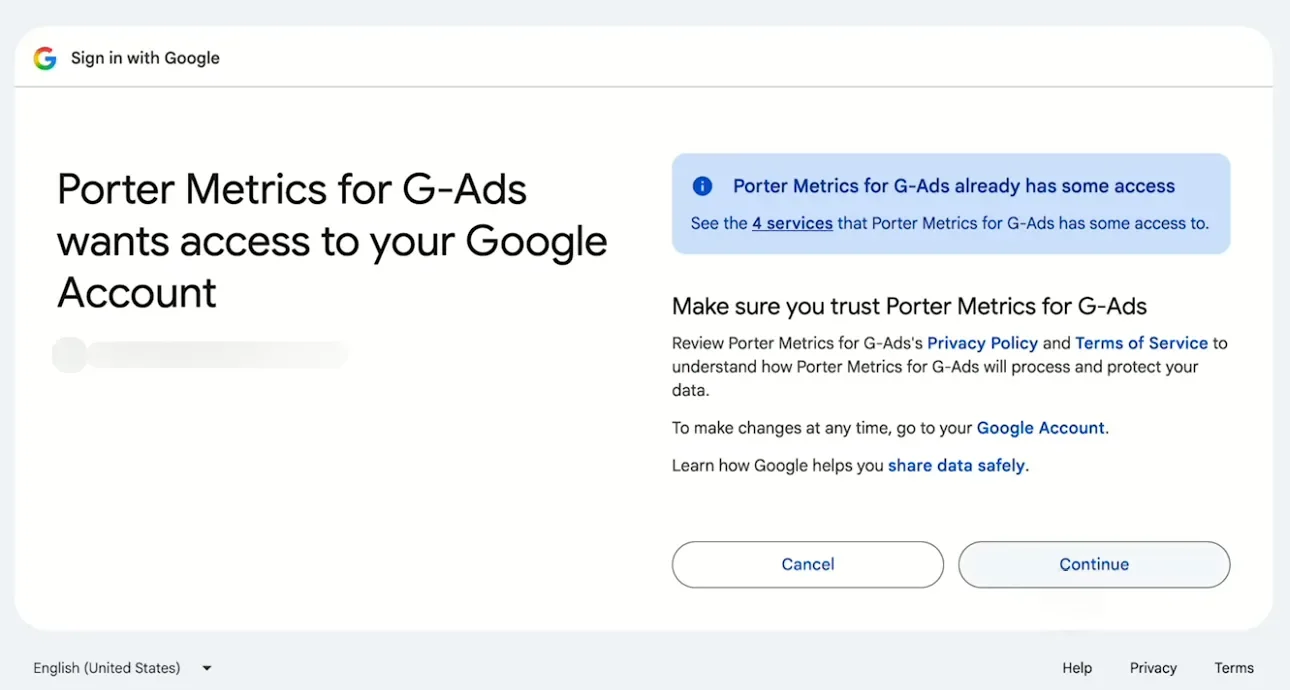
Google screen asking you to let Porter Metrics for Google Ads access your Google account
First, sign in with Google and allow Porter Metrics access.
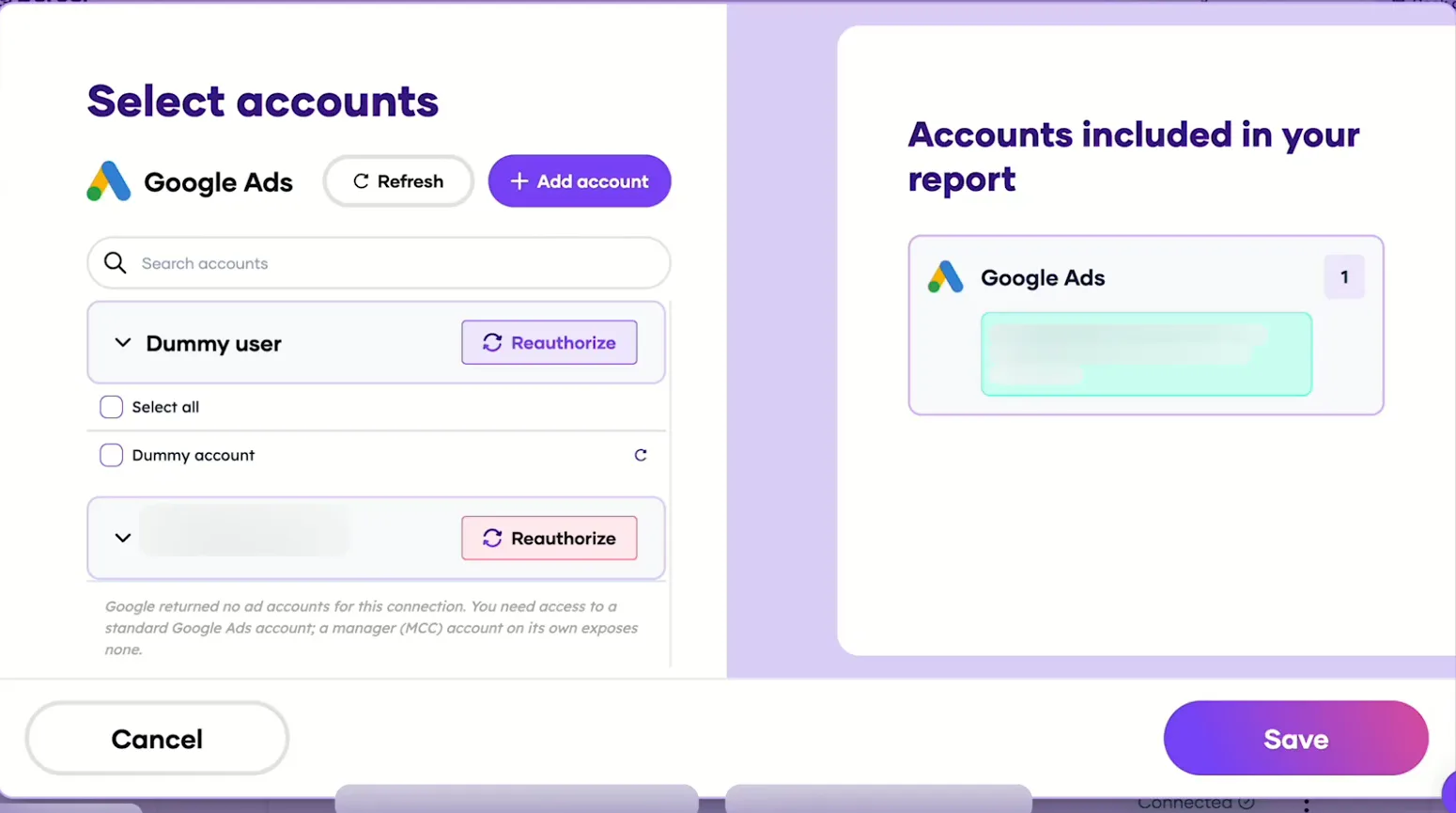
Porter's Select accounts window for Google Ads with a demo account ready to save
Then, pick the Google Ads accounts Claude can read and save.
$ claude mcp add --transport http --scope user porter https://mcp.portermetrics.com/mcp

$ claude mcp list
porter: https://mcp.portermetrics.com/mcp (HTTP)
Then, add Porter's MCP server from your terminal.
> /mcp
porter · needs authentication → Authenticate

> Which Google Ads accounts can you see?
● porter - list_accounts (MCP)
Trailgear Demo
After you sign in from /mcp, Claude Code lists your Google Ads accounts.
02Use cases and prompts

What you can do in Claude Code

Claude Code works inside your project, so Google Ads answers can become files, scripts and dashboards instead of chat replies. Each use case has a prompt to copy and uses the Google Ads fields Porter reads.

Can Claude Code export Google Ads search terms?

The problemThe search terms report is long, and exporting it every week means the same clicks in Google Ads.

What Claude Code doesClaude Code pulls Search term with Campaign, Ad group, Cost, Clicks and Conversions through Porter and writes it to a CSV in your project.

What you getA fresh search terms file you can filter, diff and share without opening Google Ads.

Prompt
For the last 30 days, by Search term, Campaign and Ad group, pull Cost, Clicks and Conversions from Google Ads and save it as data/search-terms-30d.csv.

Can Claude Code find wasted spend in search terms?

The problemSearch terms that spend and never convert hide deep in the report.

What Claude Code doesClaude Code filters search terms by Cost and Conversions, groups them by theme and writes a negative keyword list you can review.

What you getA ready list of negatives, with the spend each one wasted.

Prompt
Find search terms from the last 30 days with Cost over $50 and no Conversions, group them by theme and save a negative keyword list to reports/negatives.md.
Then ask
Prompt
Add the terms I approve from reports/negatives.md as negative keywords in their ad groups. Ask me before each change.

Can I schedule a Google Ads report with Claude Code?

The problemThe Monday check means opening each Google Ads account, setting last week and comparing Cost / conv. by hand.

What Claude Code doesA scheduled claude -p run pulls Cost, Conversions, Cost / conv. and Conv. value / cost for every campaign, last week against the week before.

What you getreports/gads-weekly.md, a short summary of which campaigns got cheaper or pricier per conversion.

Prompt
claude -p "Compare last week with the week before for every Google Ads campaign: Cost, Conversions, Cost / conv. and Conv. value / cost. Write a short summary to reports/gads-weekly.md" --allowedTools "mcp__porter" "Write"

Can Claude Code spot campaigns losing impressions to budget?

The problemA campaign that converts well can still miss searches because its budget runs out early.

What Claude Code doesClaude Code reads Search Impr. share and Search Lost IS (budget) by campaign next to Cost / conv. and flags the efficient campaigns that are capped.

What you getA short list of campaigns where more budget would buy more conversions.

Prompt
For the last 14 days, by Campaign, show Cost, Conversions, Cost / conv., Search Impr. share and Search Lost IS (budget). Flag campaigns with Search Lost IS (budget) over 20% and Cost / conv. below the account average, and save them to reports/budget-capped.csv.

Can Claude Code combine Google Ads with my sales data?

The problemYour real revenue sits in a CSV or database export that Google Ads never sees.

What Claude Code doesClaude Code reads the file in your project, pulls Google Ads Cost for the same days and joins them by date or UTM Campaign.

What you getROAS on your own revenue numbers, without uploading your sales data anywhere.

Prompt
Read data/orders.csv, sum revenue by day and utm_campaign, then pull daily Google Ads Cost by UTM Campaign for the same dates and write ROAS by campaign to reports/gads-roas.csv.

Can Claude Code report across Google Ads accounts?

The problemAgencies open each client account one by one to build the same report.

What Claude Code doesPorter reads every Google Ads account you connected, so Claude Code can loop through them and write one file per account.

What you getOne report per client from a single prompt.

Prompt
For each Google Ads account I connected, write last month’s Cost, Conversions, Cost / conv. and Conv. value / cost by Campaign to reports/clients/{Account name / description}.md.
03Why Porter

Why Porter for Google Ads in Claude Code

Google’s own Google Ads MCP server also works in Claude Code, but it runs on your machine and needs a Google Cloud project and an OAuth client first (Porter’s Google Ads MCP page compares both). Porter needs only a Google sign-in and adds 30+ other marketing sources behind the same server.

✓

One server for all your sources

The same porter server answers about Google Ads, Meta Ads, GA4, Search Console and Shopify, so one script can pull every channel.

⊞

Changes only after you approve

Claude Code can add negatives, pause campaigns and change budgets through Porter, and each change waits for your yes.

⚙

No Cloud project or OAuth client

You sign in with Google in Porter and in Claude Code. There is no Google Cloud project, OAuth client or local server to maintain.

↻

Hosted dashboards when a file isn’t enough

Ask for a Porter AI dashboard and it is published at its own link, synced automatically and ready to share with a client.

04Dashboard

Dashboard template

Want a shared view instead of a Claude chat? Porter also fills the free SEM Dashboard template in Data Studio (formerly Looker Studio). It uses the Google Ads to Data Studio connector. You see impressions, clicks, cost, conversions, CTR, CPC, CPM and ROAS by campaign, ad group, keyword, device and location.

AI dashboards

Build a live Google Ads dashboard from your terminal

Describe the dashboard in one sentence and Porter builds it. A client-ready dashboard in minutes, with no chart dragging and no BI tool to learn. Ask Claude Code:

Prompt
Build a live Google Ads dashboard for my account with the last 30 days, the main KPIs and a weekly trend.
Live URLEach dashboard at its own link: no login, no app, no download
Auto-syncFresh Google Ads data, nobody re-exports each period
Scheduled deliveryEmail or PDF sends on a set day
White labelYour logo and branding for clients
Sharing permissionsView or edit access per person
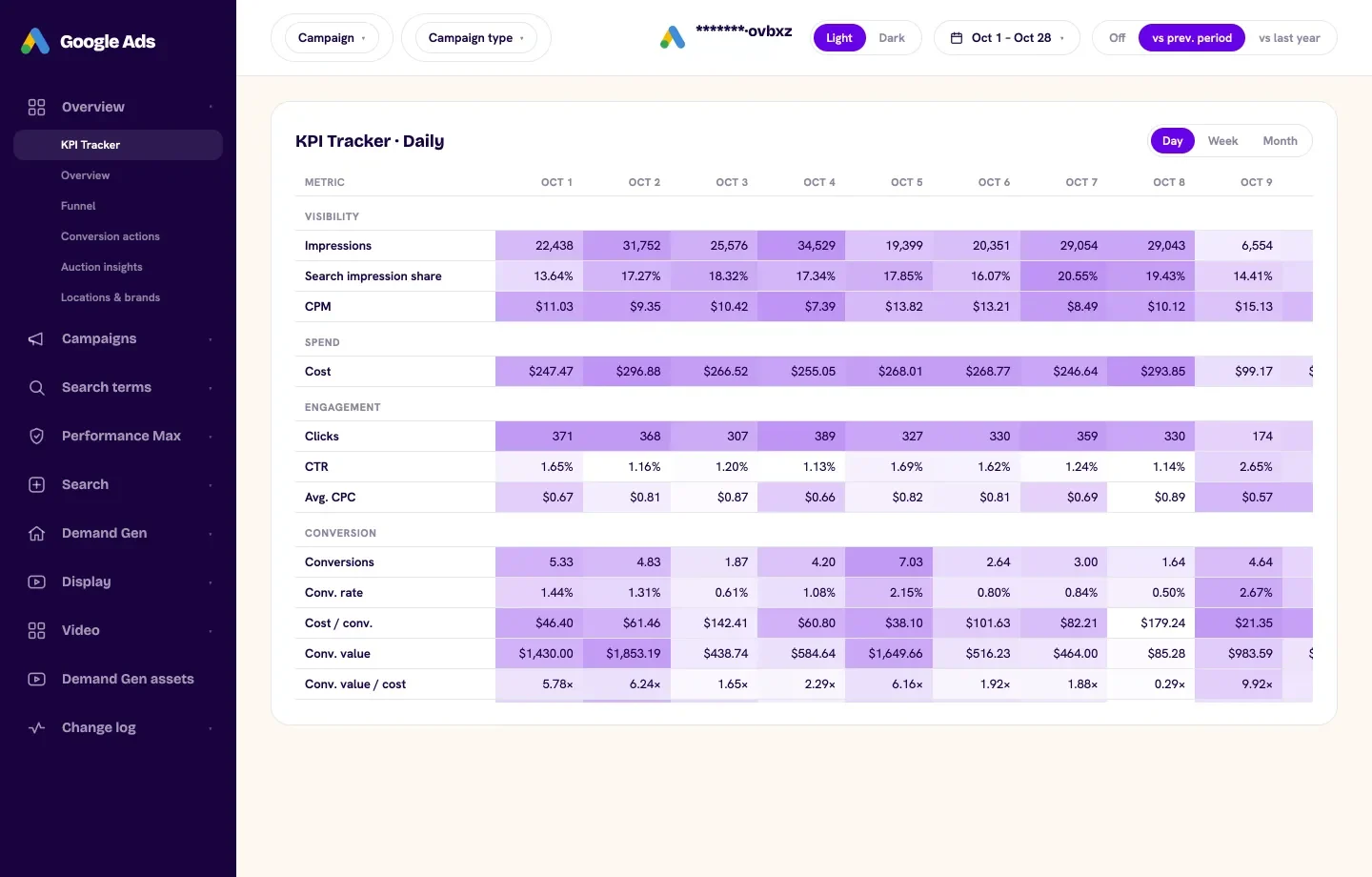
Google Ads dashboard template by Porter
Template

The Google Ads AI dashboard template

Start from Porter’s official Google Ads dashboard template, or run the prompt above in Claude Code and Porter publishes the dashboard at its own link.

05Pricing

Pricing

You can start free, since the Free plan includes Porter’s Google Ads connector for Claude. Use the calculator for your number of accounts, or see Porter pricing for every plan.

Free plan

$0, and it never expiresUnlimited connected accounts, the last 15 days of data in Claude (30 in Data Studio and Sheets) and 100 AI credits a month.

Start free

What you get

  • Reporting: from $12.50 per account a month billed annually, or $15 month to month for one account
  • Billing: each ad account counts as one, and a manager account (MCC) isn’t billed
  • Changes: 1 AI credit per completed change; failed tasks are free, and the Free plan includes 100 credits a month
  • Trial: 14 days of full access, no card

Price calculator

$33.33/mo$6.67 per account

An account is one ad account, Stripe account, store, page or GA4 property. The Free plan never expires and has unlimited accounts, with the last 15 days of data in AI chats.

06Data and actions

Google Ads data and actions in Claude Code

The Google Ads connector gives Claude 1,042 fields (252 metrics, 790 dimensions), from account down to search term. It also adds 56 actions to read and change the account. The 12 fields below answer most questions, while the full Google Ads fields list has every label and id.

The 12 Google Ads fields Claude uses most

FieldWhat it's for
Search termsearch_termThe query people typed; finds wasted spend
Costcost_microsSpend, returned in currency units despite the id
Total conversionsconversionsConversions from primary actions only
Conv. value / costconversion_value_per_costROAS per campaign, ad group or keyword
Cost / conv.cost_per_conversionCPA
Search Lost IS (budget)search_budget_lost_impression_shareReach lost to budget
Search Lost IS (rank)search_rank_lost_impression_shareReach lost to ad rank
Keyword quality scorehistorical_quality_score1–10 per keyword, last 30 days
Search keyword match typekeyword_info_match_typeMatch type next to search terms
Campaign Bid Strategy Typecampaign_bidding_strategy_typeWhat Smart Bidding optimizes for
Conversions (by Conv. Date)conversions_by_conversion_dateMatches the app's "by conv. time" columns
Change Datechange_event_change_dateWhen an account change happened, last 30 days

Can Claude pause, edit or create Google Ads campaigns?

Yes. Claude pauses, edits, creates and removes campaigns, ad groups, keywords, budgets and ads. Removals are permanent, so Claude asks before each one.

TypeCountExamples
Read13Campaigns, ad groups, ads, keywords, budgets, targeting, audiences, keyword ideas
Create32Budgets, campaigns, ad groups, keywords and negatives, responsive search ads, Demand Gen, App and Shopping ads, Performance Max asset groups, assets, targeting
Update5Campaign status, bidding and targets; budget amount; ad group status and bids; keyword status and bid; ad status
Remove6Campaigns, ad groups, keywords, budgets, targeting (permanent)

How far back can Claude read Google Ads data?

Google keeps daily data for 37 months and monthly data for 11 years, per the Google Ads data retention policy. Paid Porter plans keep whatever Google returns, while the Free plan covers the last 15 days in Claude (30 days in Data Studio and Sheets). Change history covers 30 days (Google Ads API change history limit), and Quality Score the last 30 days.

Product stats

WhatGoogle Ads connector
Fields1,042 (252 metrics, 790 dimensions)
Actions56: 13 read, 32 create, 5 update, 6 remove
FreshnessLast 30 days live; older ranges from Porter's stored copy
HistoryWhatever Google keeps on paid plans: 37 months daily, 11 years monthly; the last 15 days in Claude on the Free plan
Change historyLast 30 days
API quotaGoogle meters per Cloud project: 15,000 operations a day on Basic access

See all 1,042 Google Ads fields

07Security

Is it safe?

Yes. The Google Ads connector for Claude Code connects through Google OAuth, so Porter only sees the accounts your Google user can access. Removing a campaign, ad group, keyword or budget is permanent, so Claude asks first and you check each removal before you approve it.

What the connector needs from Google Ads

When you connect, Porter signs in with your Google account and requests the Google Ads API OAuth scope. After that, it reads and writes only on the accounts you connect, and you can revoke access anytime from Porter or your Google account.

How you approve changes

Claude asks before every change. New campaigns and creatives start paused, so nothing serves until you turn it on. Status, budget and bid changes can be reverted with another change. Each completed change uses 1 AI credit.

Will Google ban my account for using an MCP?

No, because Porter calls the official Google Ads API with OAuth, the path Google documents for this. Porter's guide on Google Ads ban risk also covers what does get accounts banned.

Instead, the real limit is API quota, which Google meters per Google Cloud project. Explorer access allows 2,880 operations a day on production accounts, Basic 15,000 and Standard unlimited, plus 1 keyword-idea request per second (Google Ads API quotas).

08FAQ

FAQ

Answers on setup, scope, scripts and credits, plus fixes for the most common Claude Code errors with Google Ads. Setup questions every source shares, like where Claude Code saves the server and how to share it with your team, are in the Claude Code hub FAQ.

Can the weekly script add GA4 sessions?

Yes. Connect GA4 in Porter too and ask for Sessions by Session default channel group in the same prompt. Claude Code reads both sources through one Porter server and writes them to the same report.

Does it work with manager (MCC) accounts?

Yes. Sign in to Porter with a Google user that has access to the manager account, then tick the client accounts you want Claude Code to read.

Is this the same as Google’s official Google Ads MCP?

No. Google’s server runs locally and needs a Google Cloud project and OAuth client. Porter’s server is hosted, so you only sign in with Google. You can add both to Claude Code.

Do Claude Code questions use Porter credits?

Reading Google Ads data uses no AI credits. Each completed change, such as pausing a campaign, uses 1 credit, and every Porter account gets 100 free credits a month.

Troubleshooting

Why does /mcp show porter as needing authentication?

Claude Code adds the server before you sign in. Pick porter in /mcp, choose Authenticate and sign in with the Google account you use in Porter.

Why does my claude -p script stop and ask for permission?

Scripts can’t answer permission prompts. Pass the tools the script may use, for example --allowedTools "mcp__porter" "Write", so Claude Code can read Porter and save files without stopping.

Why does Claude Code see my accounts but return no data?

Usually the Google user has no access to that account, or the date range has no activity. Check the user’s access in Google Ads under Admin, then ask again with a range that had spend.

09Next

More Claude connectors

Porter connects Google Ads to more than Claude, and Claude to more than Google Ads. Browse all Claude connectors or open one of the other ad platforms below, since each page lists the fields, prompts and limits for that platform. Running Reddit or Apple campaigns too? Add the Reddit Ads MCP connector for Claude or the Apple Ads MCP connector for Claude.

Not only Claude. Send Google Ads data anywhere

The same Porter account and connection also send Google Ads data to these destinations, at no extra cost.

Try the connector in Claude Code

Porter’s Google Ads connector for Claude Code takes one command, so your first search terms file can land in your project today. Start with a CSV, then turn it into a negatives list or a weekly script.

Free plan · 14-day trial · No card needed

PPC managers: search terms, negatives and budget caps get checked from the terminal, then fixed after your yes.

Agencies: one script builds the Monday report for every client account.

Marketing ops and analysts: Google Ads data lands in your repo as clean files, ready for your own models.