Shopify connector for Claude

Use Porter’s Shopify connector for Claude to see what sold, what made money and what’s running low, then make the store changes you approve.

  • Compare last week’s net sales and AOV with the week before
  • Rank products by net sales and gross profit
  • Track new versus returning customers and what each group spends
  • Check Shopify net sales against Meta Ads spend by day
G2★★★★★Rated 4.6/5 on G2 (288 reviews, October 2026)

By Porter Metrics team · Last updated October 19, 2026

ClaudePorter connected
For my Shopify store, show Orders, Net Sales and Average order value by week for the last 4 full weeks.
Porter / Shopify / Trailgear Demo✓ 4 rows
The week of Sep 28 had the highest net sales ($48.2K) and the biggest orders on average ($91).
WeekOrdersNet salesAOV
Sep 14462$38.9K$84
Sep 21488$41.5K$85
Sep 28530$48.2K$91
Oct 5501$43.0K$86
Demo data, Trailgear Demo account
Watch the setupHow to connect Shopify to Claude (no code)Porter Metrics on YouTube
Orders, products and inventory
01Setup

How to connect Shopify to Claude

Three steps, no code, no custom app: sign in with Shopify, add one URL as a custom connector, then ask. Screenshots, Claude Code and other routes for the Shopify connector are also in the step-by-step Shopify to Claude tutorial. MCP (Model Context Protocol) is the open standard Claude uses to connect to tools like Porter.

What you need before you start

  • You need a Shopify store where you can approve app installs, as well as a free Porter account and any Claude plan. If you want margins, set product costs in Shopify. Your staff account also needs the “View cost” permission for products (Shopify’s staff permission for product costs).
  • Every Claude plan, from Free to Enterprise, can add custom connectors in Claude, Cowork and Claude Desktop. Free, however, is limited to one (Anthropic’s guide to custom connectors in Claude). Claude Code also has its own section in the Porter tutorial.
  1. Step 1: Connect Shopify in Porter

    Sign up free at Porter, pick Shopify as the source, sign in with Shopify and then approve Porter’s app. Select the stores Claude should read, then pick Claude as the destination.

  2. Step 2: Add the connector to Claude

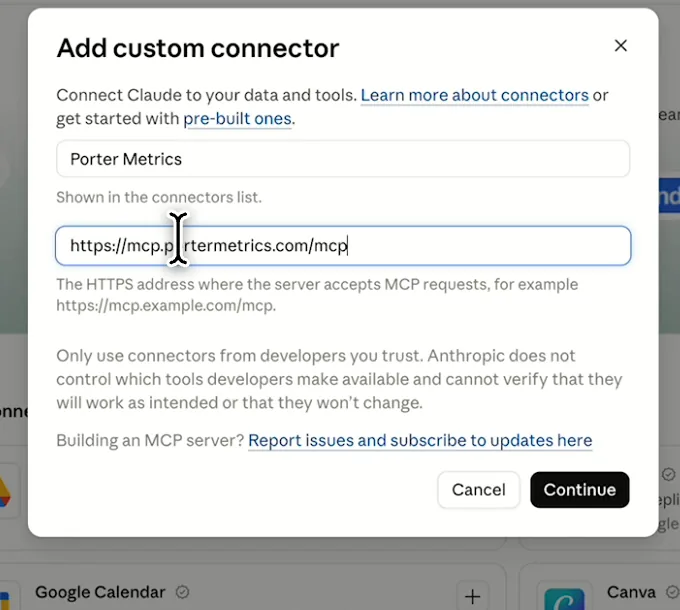
    Go to Customize, then Connectors, and choose + Add, then Add custom connector. Then call it Porter Metrics and paste this URL:

    MCP URL
    https://mcp.portermetrics.com/mcp
  3. Step 3: Ask Claude about Shopify

    Sign in with the Porter account that holds your stores, then try this:

    Prompt
    For my Shopify store, show Orders, Net Sales and Average order value by Week for the last 4 full weeks.

Guides and videos

app.portermetrics.com / create
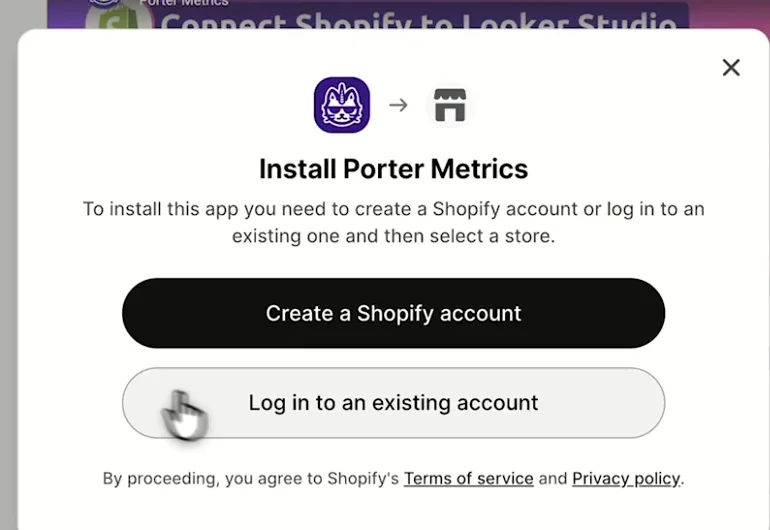
Shopify dialog to install Porter Metrics and log in to an existing account
First, install the Porter Metrics app and log in to your store.
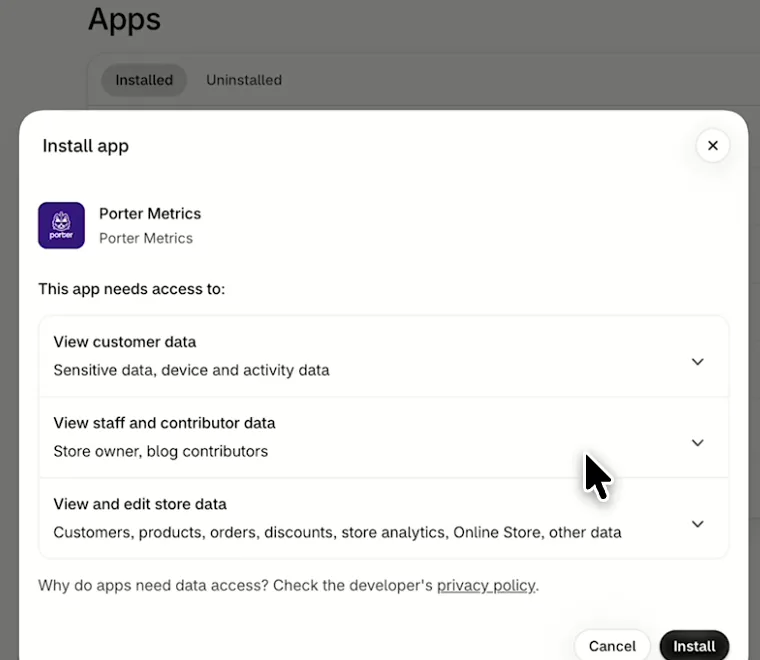
Shopify Install app dialog listing the data Porter Metrics can access
Then, review Porter Metrics' access and select Install.
Claude's Add custom connector window with the name Porter Metrics and Porter's MCP URL filled in
Then, in Claude, add a custom connector with Porter's MCP URL.
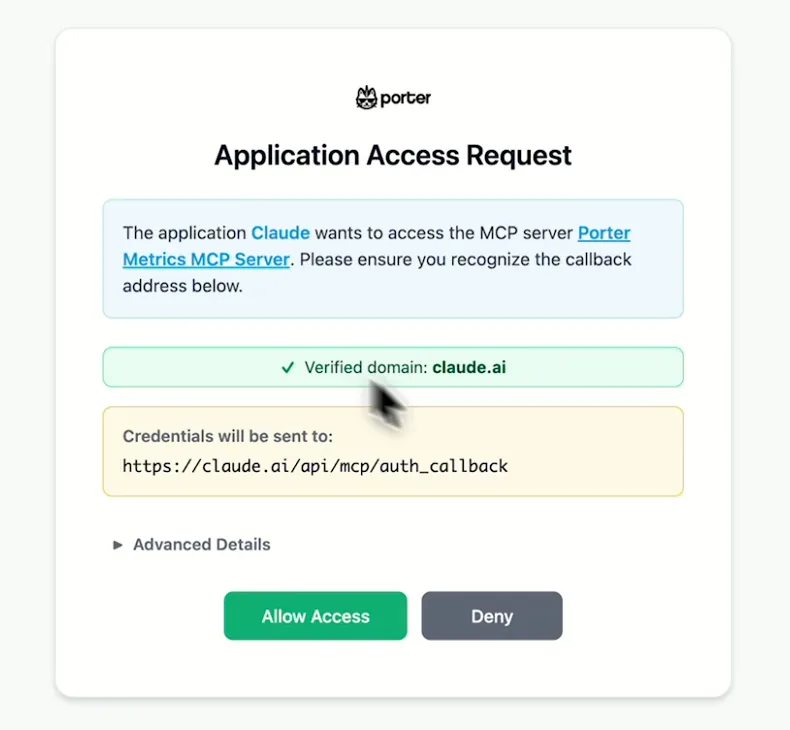
Porter's Application Access Request screen asking you to let Claude use the Porter MCP server
When Claude asks, sign in to Porter and select Allow Access.
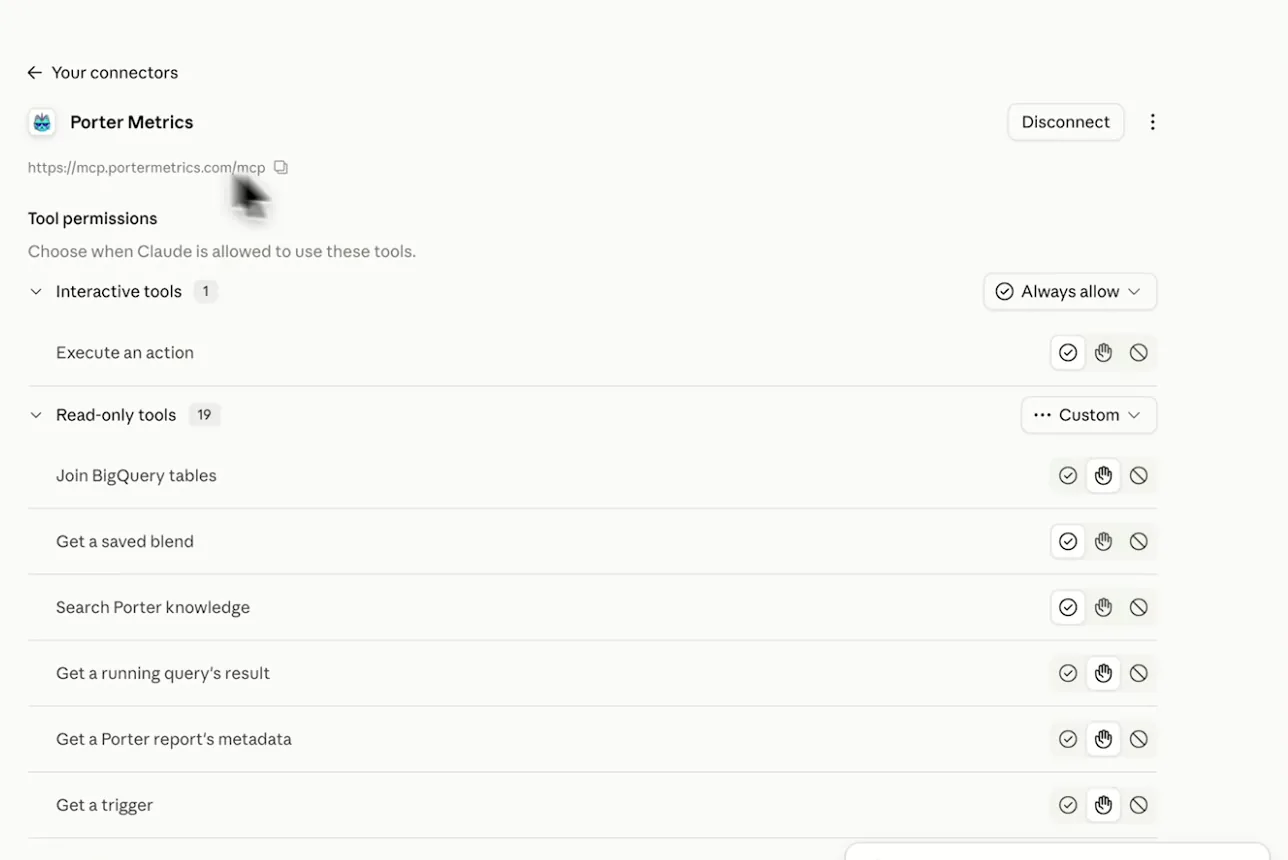
Porter Metrics listed as a connected connector in Claude with its read-only tools
After that, Porter shows as connected, so you can ask your first question.
If you prefer video, watch the whole Shopify to Claude setup (1:51, no sound).
Interactive walkthrough, so you can click along here
02Use cases and prompts

What you can ask Claude

Each use case comes with a prompt to copy, the fields it uses from the Shopify fields list and who it’s for. Discounts and returns come back as negative numbers, as in Shopify, while date presets end yesterday.

Can Claude compare this week with last week?

The weekly recap arrives as one table with the takeaways already written instead of 2 exported date ranges pasted side by side.

Prompt
Compare last full Week with the week before for my Shopify store: Orders, Gross Sales, Discounts, Returns, Net Sales and Average order value, with % change. Break it down by Day of week (Mon – Sun), flag any day where Net Sales fell more than 15%, and finish with 3 takeaways.
Then ask
Prompt
Do the same for every Shopify store I've connected, one row per Shop Name.

For: DTC founders · e-commerce managers · e-commerce agencies (one report per client store)

Fields used: WeekDay of week (Mon – Sun)OrdersGross SalesDiscountsReturnsNet SalesAverage order valueShop Name

Can Claude show which products sell most and which make money?

You plan promotions on margin, not just revenue rank, and you get a list of variants still missing a cost in Shopify.

Prompt
For the last 90 days, rank Product Title by Net Sales with Product Type, Number Of Sold Items, COGS and Gross Profit. List separately any product where COGS is 0, because its unit cost is missing.

For: e-commerce managers · DTC founders · merchandisers

Fields used: Product TitleProduct TypeNumber Of Sold ItemsNet SalesCOGSGross Profit

Are repeat customers growing, and what do they spend?

You can tell whether growth came from new buyers or returning ones before you set next quarter’s retention budget.

Prompt
By Month and year for the last 6 months, show New Customers, Repeat Customers, Repeat Customers %, New Customers AOV, Repeat Customers AOV, New Customers Net Sales and Repeat Customers Net Sales. Flag any month where Repeat Customers % dropped more than 5 points.

For: retention marketers · DTC founders · e-commerce agencies

Fields used: Month and yearNew CustomersRepeat CustomersRepeat Customers %New Customers AOVRepeat Customers AOVNew Customers Net SalesRepeat Customers Net Sales

Can Claude tell which discount codes win new customers or cut margin?

You pick the next promotion from what each code did for new customers, then the code goes live without a trip to the Discounts page.

Prompt
For the last 60 days, group orders by Discount Code: Orders, Gross Sales, Discounts, Returns and Net Sales, split by Customer Type. Rank codes by Net Sales and flag codes where most orders come from Returning customers.
Then ask
Prompt
Create a 15% code WELCOME15 for first orders over $50, valid for 30 days. Show me the code settings before you create it.

For: e-commerce managers · retention marketers · DTC founders

Fields used: Discount CodeOrdersGross SalesDiscountsReturnsNet SalesCustomer Type
Action: discount_create (percentage or fixed amount)

Can Claude show which channels and sources bring my Shopify orders?

You see which sources bring first orders rather than just traffic, without building a marketing report by hand.

Prompt
For the last 30 days, show Orders, Net Sales and New Customers by Channel. Then, for Online Store orders only, break Net Sales down by UTM Source and UTM Campaign and list the top 10.

For: performance marketers · e-commerce managers · e-commerce agencies

Fields used: ChannelUTM SourceUTM CampaignOrdersNet SalesNew Customers

Can Claude find low stock and update the stock count?

The restock list comes straight from sales pace, and then the received count goes into Shopify from the same chat.

Prompt
List variants with fewer than 10 units available, with SKU, Variant Title, units sold in the last 30 days (Number Of Sold Items) and days of stock left at that pace. Sort by days left.
Then ask
Prompt
Set SKU CANDLE-VAN to 40 units at the Main warehouse, reason: received. Show me the change before you make it.

For: merchandisers and operations · DTC founders

Fields used: SKUVariant TitleNumber Of Sold ItemsInventory Quantity (variant_inventory_quantity, variant level only)
Actions: product_list · inventory_list · inventory_set

Can Claude show my conversion rate and which days convert best?

You learn which weekdays to schedule launches and emails on, and can check the math with Porter’s Shopify conversion rate calculator.

Prompt
Using live Shopify Analytics, show Sessions, Orders and Conversion rate by day for the last 30 days, and tell me which weekdays convert best.

For: e-commerce managers · DTC founders

Action: analytics_query (ShopifyQL)

Are your Meta Ads bringing net sales and new customers?

You see whether Meta’s good weeks show up in Shopify’s net sales, instead of trusting Meta’s ROAS alone.

Prompt
For the last 30 days by Date, show Shopify Net Sales, Orders and New Customers next to Meta Ads Amount spent and Purchase ROAS (Return on ad spend). Add Amount spent ÷ New Customers and Net Sales ÷ Amount spent, and flag days where Meta's ROAS rose but Shopify Net Sales fell.

For: performance marketers · DTC founders · e-commerce agencies

Fields used: DateNet SalesOrdersNew CustomersAmount spentPurchase ROAS (Return on ad spend)
03Why Porter

Why Porter for Shopify in Claude

Porter is built for analysis across stores and channels, with stored order history and COGS and gross profit on every order line. If you run one store and mostly edit products or look up orders, Shopify’s own connector for Claude is free and enough. You can run both.

✓

Profit and repeat buyers, ready to ask

Claude gets 164 stored fields per sale line, with COGS, gross profit and repeat-customer metrics already there, plus live Shopify Analytics through ShopifyQL.

⊞

Several stores in one question

Each store is one account in Porter, and Claude compares them in one answer with Shop Name as a column, including the regional stores of one brand.

⚙

Shopify next to your ads

Ask about Shopify net sales next to Meta Ads, Google Ads, GA4, Klaviyo and 30+ more sources in the same chat. Shopify’s own connector reads Shopify only.

Aa

Store changes you approve

Claude updates products, variants, inventory, collections, discount codes and pages, and shows each change first. New products start as drafts, while refunds, gift cards, staff and themes stay with you in the Shopify admin.

↻

One URL, nothing to host

Sign in with Shopify in Porter and add one MCP URL to Claude. The same stores also feed ChatGPT, Data Studio, Google Sheets and BigQuery.

04Dashboard

Dashboard template

Through the Shopify connector, Claude builds a sales overview as one live view: orders, net sales, AOV, new vs returning customers and top products. When the team needs the same report every week in a shared link, start from Porter’s free Shopify dashboard templates, which track the same numbers.

Open the Shopify dashboard template

05Pricing

Pricing

You can start free, since Porter’s Shopify connector for Claude comes with every plan. Use the calculator for your number of accounts, or see Porter pricing for every plan.

What you get

  • Free plan: the MCP, unlimited connected accounts and 30 days of history (15 days in AI chats)
  • Reporting: from $12.50 per account a month billed annually, or $15 month to month for one account
  • Billing: each Shopify store counts as one account, with volume discounts and no per-seat fee
  • Changes: 1 AI credit per completed change; failed tasks are free, and the Free plan includes 100 credits a month
  • Trial: 14 days of full access, no card

Price calculator

$33.33/mo$6.67 per account

An account is one ad account, Stripe account, store, page or GA4 property. The Free plan has unlimited accounts with 30 days of history.

06Data and actions

Shopify data and actions in Claude

Through the Shopify connector, Claude gets 164 fields, from gross sales down to net sales, total sales, COGS and gross profit. They also cover first-time and returning customers, products, discount codes, channels and tracked sources, plus live Shopify Analytics and store actions. Every label, ID and category is also in the full list of Shopify fields.

The 12 Shopify fields Claude uses most

Discounts and Returns are negative, as in Shopify.

FieldWhat it's for
OrdersordersOrder count
Gross Sales · Discounts · Returns · Net Salesgross_sales_order · discounts_order · returns_order · net_sales_orderThe sales ladder, as in Shopify's sales report
Total Salestotal_sales_orderNet sales + tax + shipping (no duties or fees)
Average order valueaverage_order_valueShopify's AOV formula
COGS · Gross Profitcost_of_good_solds · gross_profitMargin; needs a unit cost on each variant
Customer Typecustomer_typeFirst-time or Returning
New Customers · Repeat Customers · Repeat Customers %new_customers · returning_customers · returning_customers_ratioRetention
Product Title · Product Type · SKUproduct_title · product_type · skuProduct mix
Number Of Sold Itemssale_quantityUnits sold
Discount Codediscount_codePromotions
Channel · UTM Source · UTM Campaignorder_channel · utm_source · utm_campaignWhere orders come from
Shop Nameshop_nameComparing stores

Can Claude change Shopify products, inventory and discounts?

Yes. Claude creates products as drafts, updates products and variants, adds images, archives or publishes products and changes up to 50 products' status at once. It also sets inventory at a location, builds collections, creates percentage or fixed-amount discount codes and edits Online Store pages.

Other Admin API changes, such as order edits and tags, customers, draft orders and metafields, run as a GraphQL mutation, which is permanent, so Claude shows it to you first. Shopify limits how much any app can change by query cost and plan, so a big batch runs as several calls (Shopify's API rate limits).

Refunds, gift cards, staff and themes stay in your Shopify admin, where you handle them as usual.

How fresh is Shopify data in Claude, and how far back?

Claude sees your orders from the start of Porter's history for your store, which differs per store, up to yesterday in date presets. Live Shopify Analytics, however, adds today as a partial day.

Orders older than 60 days need Shopify's approved scope for full order history (Shopify's read_all_orders scope). Days and hours also follow your store's time zone. The free plan reads 15 days in AI chats (30 days of history).

Product stats

WhatShopify connector
Fields164 per sale line, plus live Shopify Analytics (ShopifyQL)
ActionsProducts, variants, inventory, collections, discount codes and pages, after you approve; up to 50 products per status change
FreshnessStored orders up to yesterday in date presets; live Shopify Analytics adds today as a partial day
HistoryFrom Porter's start date for your store, which differs per store; orders older than 60 days need Shopify's read_all_orders scope; 30 days on the Free plan, 15 in AI chats
Rate limitsShopify limits changes by query cost and plan, so big batches run as several calls
AccessPorter's Shopify app, approved on each store; customer names and emails need Shopify's protected data approval

See all 164 Shopify fields

07Security

Is it safe?

Yes. When Claude reads through the Shopify connector, nothing in your store changes. Claude shows you every change first (a product, a stock count, a discount code), then runs it only when you approve. Porter connects through an app you approve in Shopify, so it sees only what that access allows.

How Claude asks before changing Shopify

Claude asks before writing, and new products start as drafts. Deleting a variant, publishing a product or creating a page is permanent, so archive products when you might want them back.

A stock update checks the count first and stops if it changed after Claude read it. Each completed change also uses one AI credit.

What the connector needs from Shopify

Someone who can approve app installs on the store approves Porter's Shopify app. Each store is its own account. COGS also needs the "View cost" product permission.

Customer names, emails and phones are protected customer data, so Shopify shares them once that access is approved (Shopify's protected customer data requirements). If a question returns reauth_required, finish the store authorization in Porter. If you uninstall the app, access stops at once.

08FAQ

FAQ

Store owners and agencies ask about 5 things before connecting: several stores, other AI tools, Data Studio reports, new stores and Sidekick. Then come 3 fixes, for numbers that don't match Shopify, blank customer names and gross profit that looks too high.

Can I connect several stores, like an agency?

Yes. Each Shopify store is one account in Porter, billed as one, and Claude compares them in one answer with Shop Name as a column. Regional stores of one brand, such as EU, UK and US, are separate stores, so each one shows up as its own row.

Does it work in ChatGPT and Claude Code?

Yes. The Shopify connector works in ChatGPT and Claude Code with the same Porter account and stores. Here's how to connect Shopify to ChatGPT. Theme and app developers who want the Shopify CLI inside Claude Code use Shopify's AI Toolkit instead.

I already send Shopify to Looker Studio with Porter. Do I need to reconnect for Claude?

No. One connected store feeds every Porter destination, including the Shopify connector for Data Studio, Google Sheets and Shopify to BigQuery, at no extra cost. Add Porter's MCP URL to Claude, sign in with the same Porter account, then ask about the stores you already connected.

Can Claude build a new store for me?

Porter works with the stores you already run, and Shopify's own connector for Claude can generate storefront previews that you claim as a new store. When that store takes orders, connect it to Porter to analyze its sales, profit and customers next to your other stores.

Is this the same as Shopify Sidekick?

No. Shopify Sidekick is the AI assistant inside your Shopify admin, and it shows you changes to review before applying them. Porter brings your Shopify data into Claude instead, next to your other stores and channels. You can also use both: Sidekick in the admin, Claude for analysis across sources.

Troubleshooting

Why don't Claude's numbers match Shopify?

Filter by Channel first, since Porter adds up every channel from online store to POS and draft orders. Split multi-currency stores by currency and compare complete days, since date presets end yesterday. Porter's Total Sales also leaves out duties and fees, Discounts and Returns are negative, hours follow the store's time zone, and AOV uses Shopify's formula.

Why are customer names or emails blank?

Ask Claude by Customer ID or Customer Type, such as first-time versus returning customers, order counts or spend per customer ID. Shopify treats customer names, emails, phones and addresses as protected customer data, and shares them with an app once that access is approved.

Why does gross profit look too high?

Set each variant's cost in Shopify, and make sure your staff account has the "View cost" product permission. Variants without a unit cost count as 0 COGS, so margins read near 100% for those products. Then ask Claude to list products with COGS of 0 to find the gaps that are left.


09Next

More Claude connectors

Shopify numbers make more sense when they sit next to your ad, site and email data. Porter brings each of those into Claude through the same MCP URL as the Shopify connector. Then add the ones your store sells through from all Claude connectors, or hand a client a ready-made Shopify report from a template.

Try the connector in Claude

Ask Claude what sold, what made money and what's about to run out, for one store or all of them. Setup is one sign-in and one URL. The free plan also includes the Shopify connector for Claude, and the trial needs no card.

Free forever plan · 14-day full trial · No card

Store owners: the Monday numbers, margins and low-stock list come from one chat instead of several Shopify reports.

E-commerce managers: you decide promotions and restocks on profit and sales pace, and make the change in Shopify from the same answer.

E-commerce agencies: every client store answers one prompt, so the weekly report starts from a comparison table.