







TL;DR
To connect Shopify to Claude via MCP: copy mcp.portermetrics.com/mcp, go to Claude.ai, open Connectors → Manage connectors → Add custom connector, paste the URL, and sign in. From there, ask Claude anything about your Shopify store, orders and products in plain English.
Once connected, you can automate your Shopify reporting and analysis — ask questions about your data, build dashboards, trigger alerts, or ship client-ready reports like the one below.
Prerequisites
- A Porter Metrics account with your Shopify store connected (free tier is enough to try it end-to-end)
- A Claude account — the free plan works for Claude Web; a Pro subscription is needed for Claude Code and Desktop MCP features
- Admin or standard access to the Shopify stores you want to connect
Connect Shopify to Claude with MCP
For this tutorial we’re going with the MCP method. Here’s a quick explainer of what MCP is and why it’s the best path for Shopify.
MCP (Model Context Protocol) is the open standard that lets AI tools like Claude, ChatGPT, Claude Code and others access and use external APIs — the things that make tools like Shopify work under the hood. Instead of building a custom integration for every AI tool you use, you install one MCP and every compatible AI gets access to the same data.
Four reasons MCP wins for Shopify:
- 📋 Copy-paste setup — No tokens, no scripts, no developer help — literally paste one URL into Claude and you’re done.
- 🔌 Works with every AI tool — Claude, Claude Code, ChatGPT, Cursor, Antigravity, Lovable, Vercel v0, Zapier. One MCP URL, every tool that speaks the protocol.
- 🔀 20+ sources in one connection — Porter’s MCP ships Shopify plus Google Ads, GA4, Meta Ads, HubSpot, Klaviyo, Google Sheets and 20+ more. Query and blend them all in a single conversation.
- 🎛️ Perfect granularity — Spreadsheets lock you into the columns you exported. MCP hits Shopify’s Admin API directly — so you can filter by product type, break down by channel or customer tags, and add new dimensions on the fly without rebuilding tables.
1. Connect your Shopify data to Porter
Porter sits between Shopify’s Admin API and Claude. It handles OAuth, rate limiting, pagination and all the plumbing so Claude only ever sees clean, structured data.
Sign up for Porter. Create a free account at portermetrics.com. The free tier is enough to run this full workflow end-to-end.
Connect your Shopify store. In Porter, click Create → pick Claude as the destination → select Shopify as the source → sign in with Shopify to grant access to your stores.
Select your stores. Choose the Shopify stores you want Claude to query. When you select multiple stores under a single connection, Porter automatically blends their data together so you can query them as one.
Optional: enable automatic BigQuery storage if you’re connecting multiple stores with large data volumes. This keeps Claude’s responses fast even at scale.
2. Connect the MCP to Claude
Porter’s MCP URL is what you paste into Claude. Once added, Claude can query Shopify data on demand in any conversation.
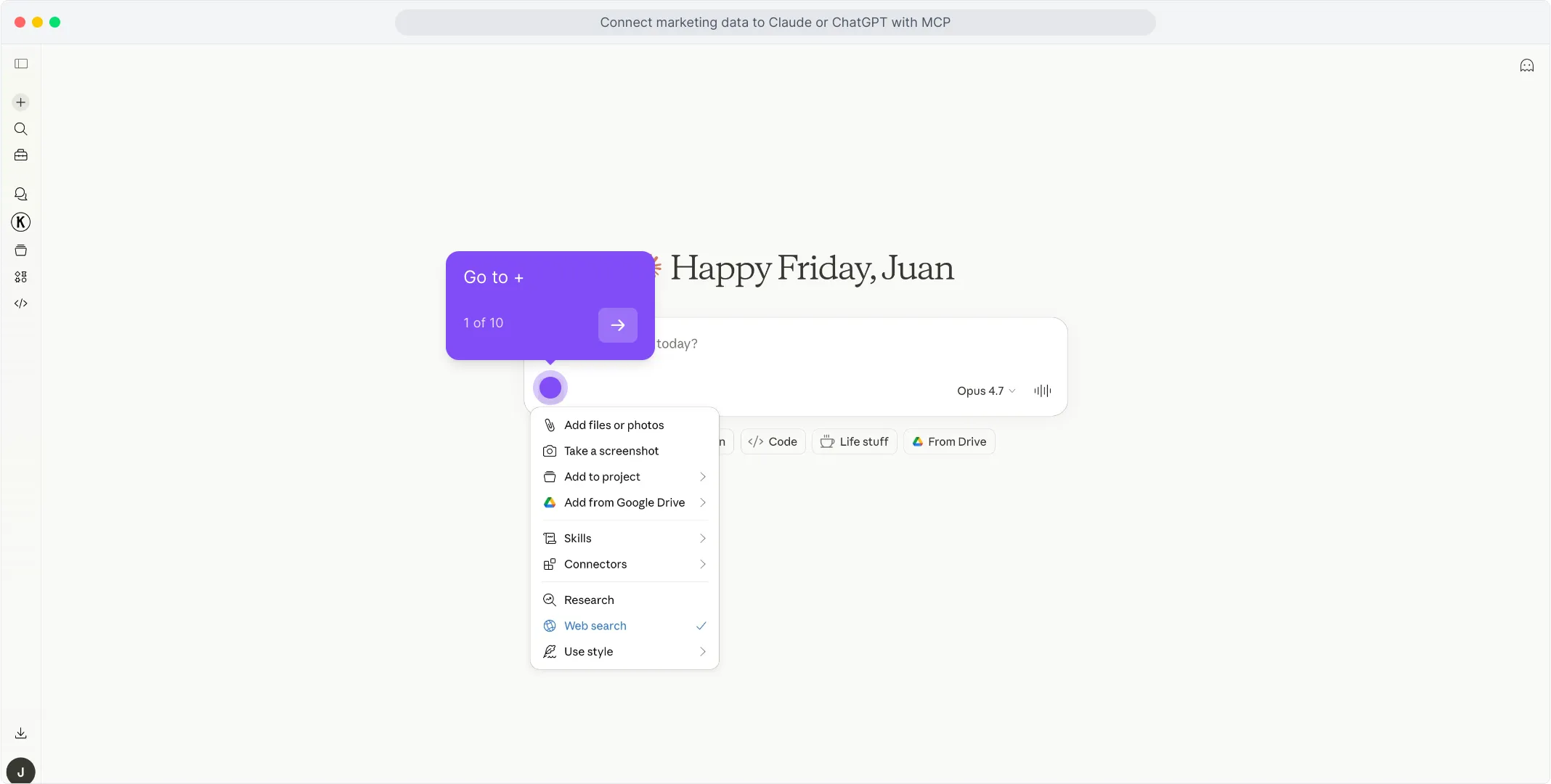
Go to claude.ai and click the + icon in the chat input to open the tools menu. !Click the + icon in the Claude chat input
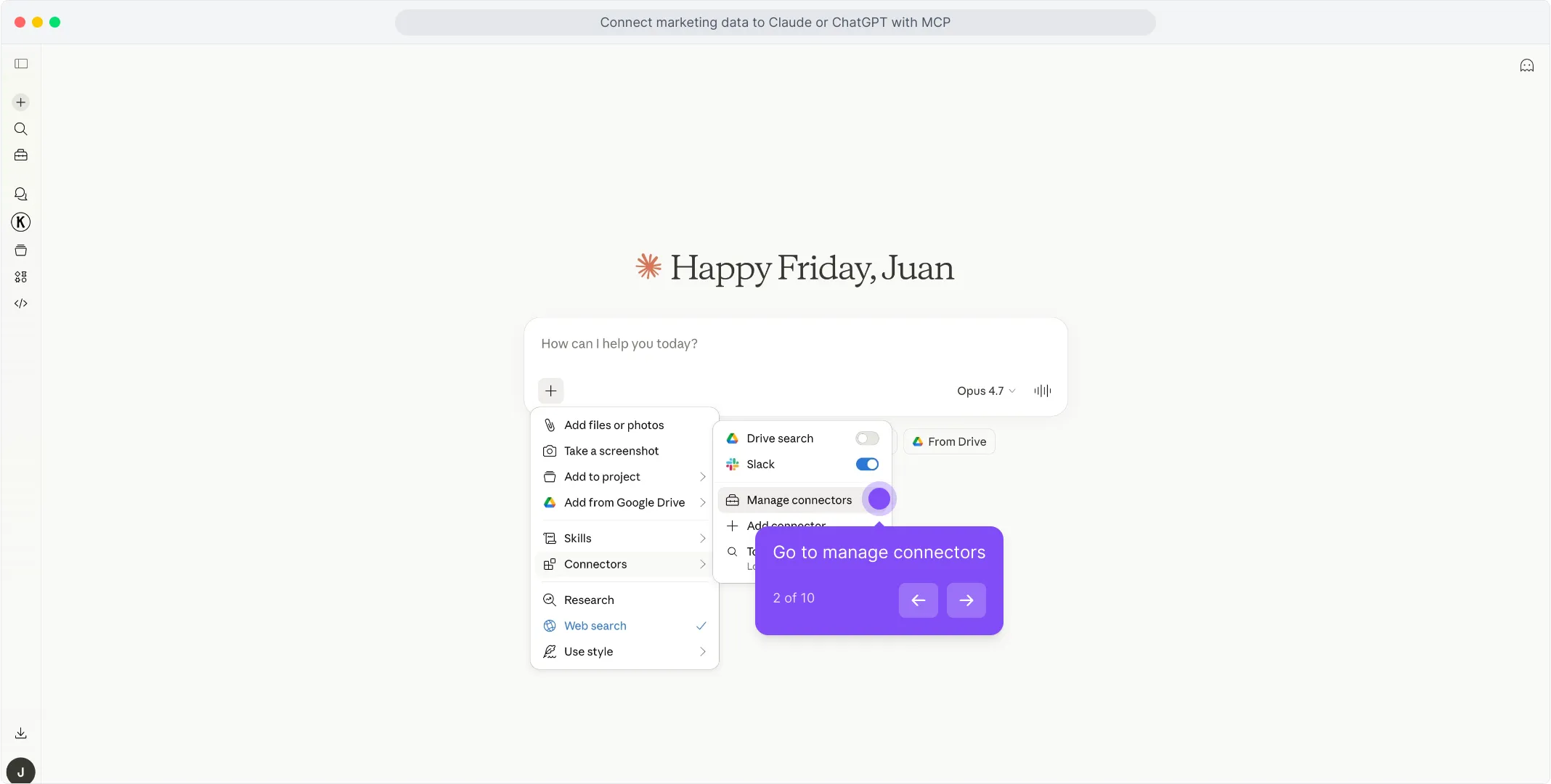
In the menu that opens, hover over Connectors and click Manage connectors. !Hover Connectors and click Manage connectors
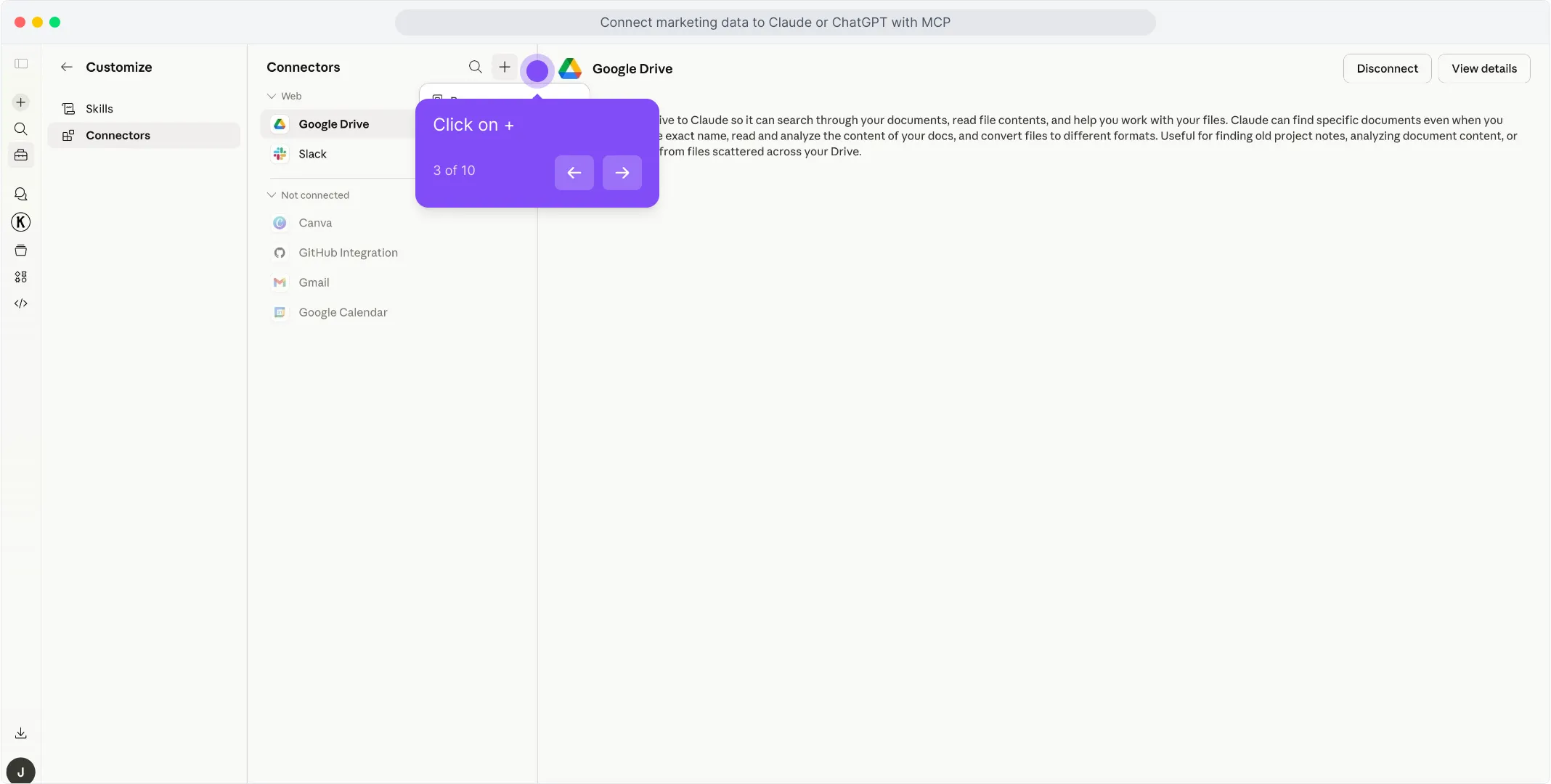
In the Connectors panel, click the + button at the top of the list to start adding a new connector. !Click + at the top of the Connectors panel
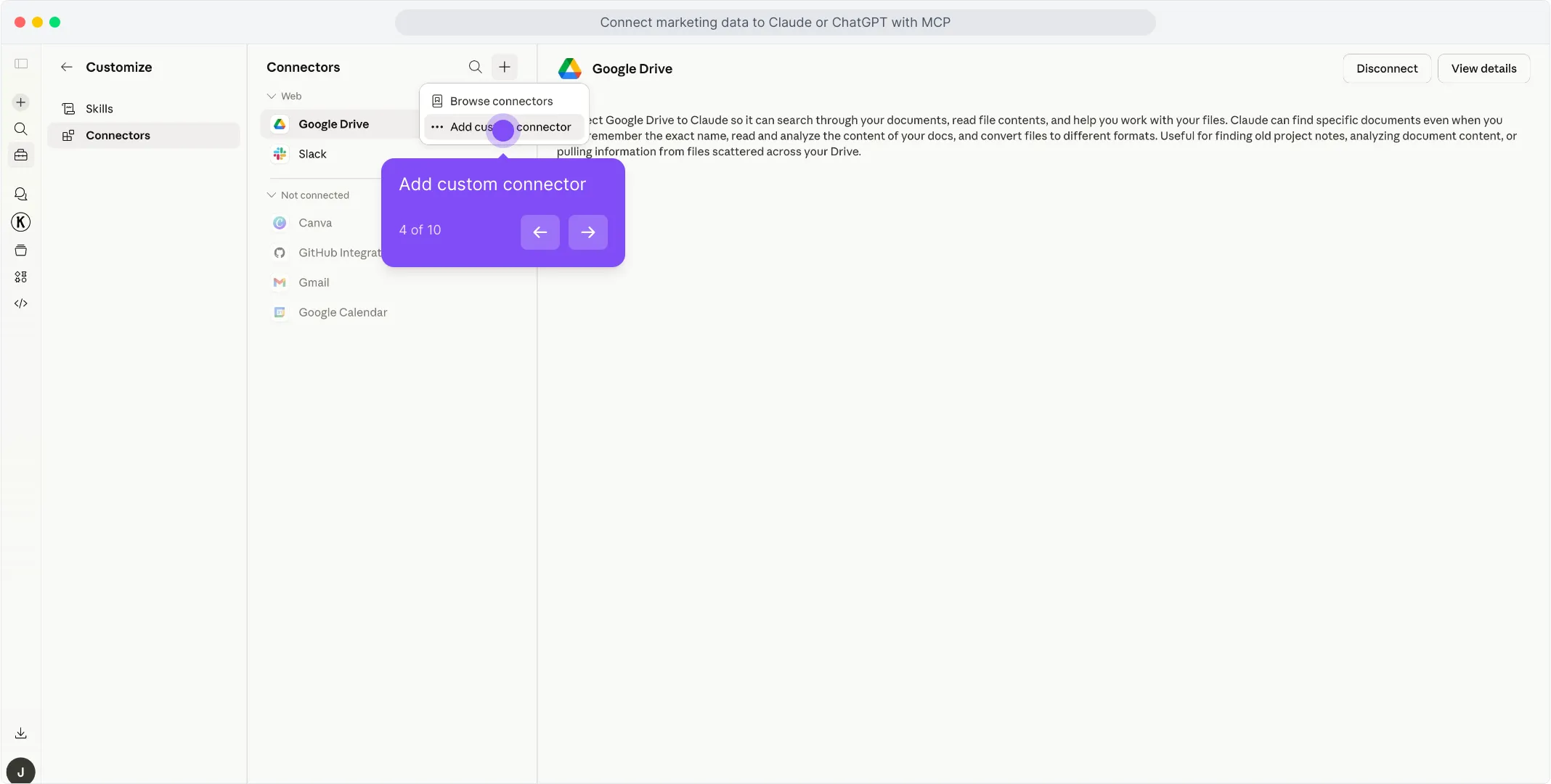
Pick Add custom connector from the dropdown that appears. !Select Add custom connector from the dropdown
A dialog opens with the name and URL fields. Type Porter in the first field to name the connector. !Type Porter in the connector name field
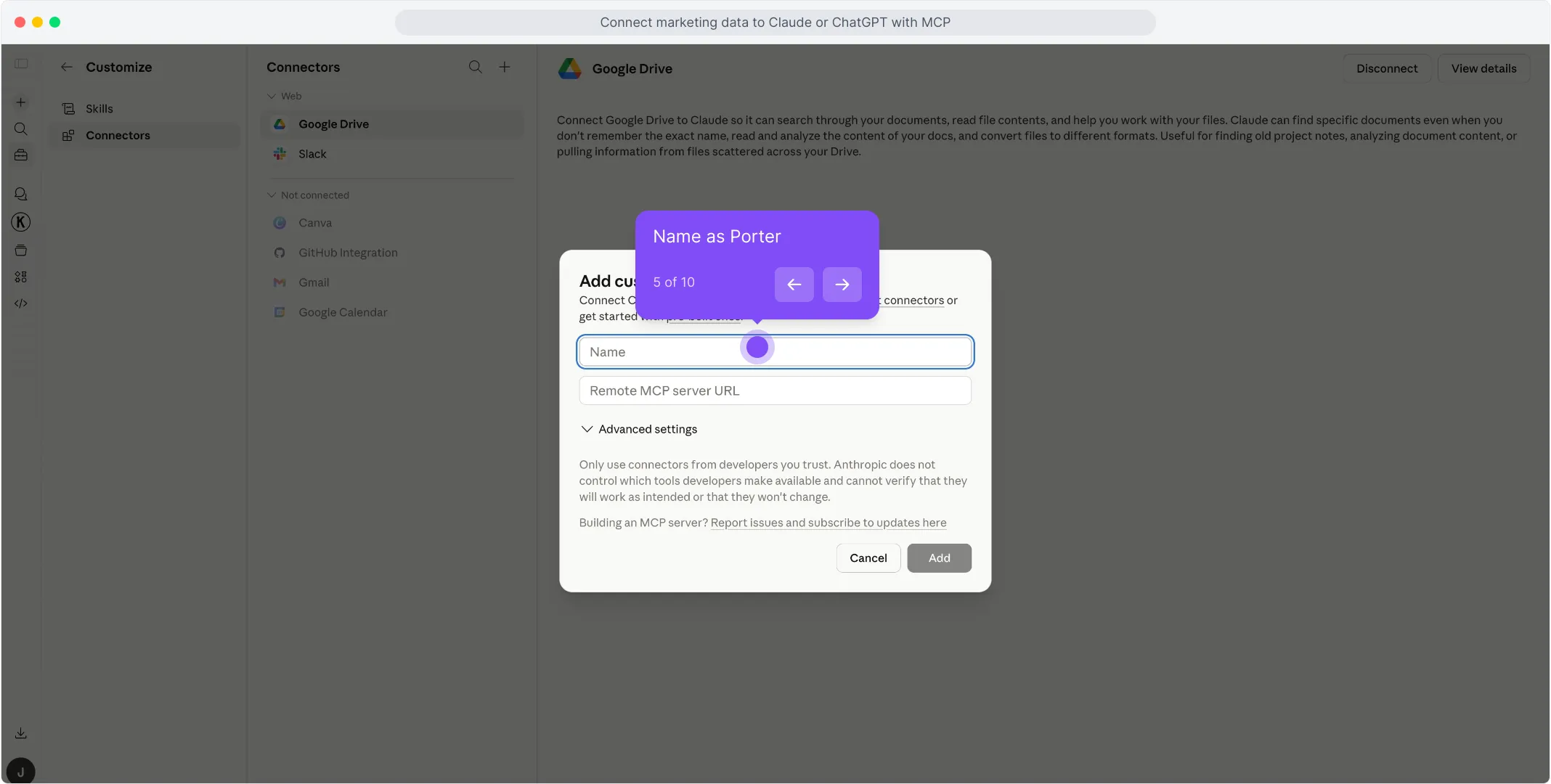
In the second field, paste https://mcp.portermetrics.com/mcp. Leave the advanced settings alone. !Paste the Porter MCP URL into the Remote MCP server field
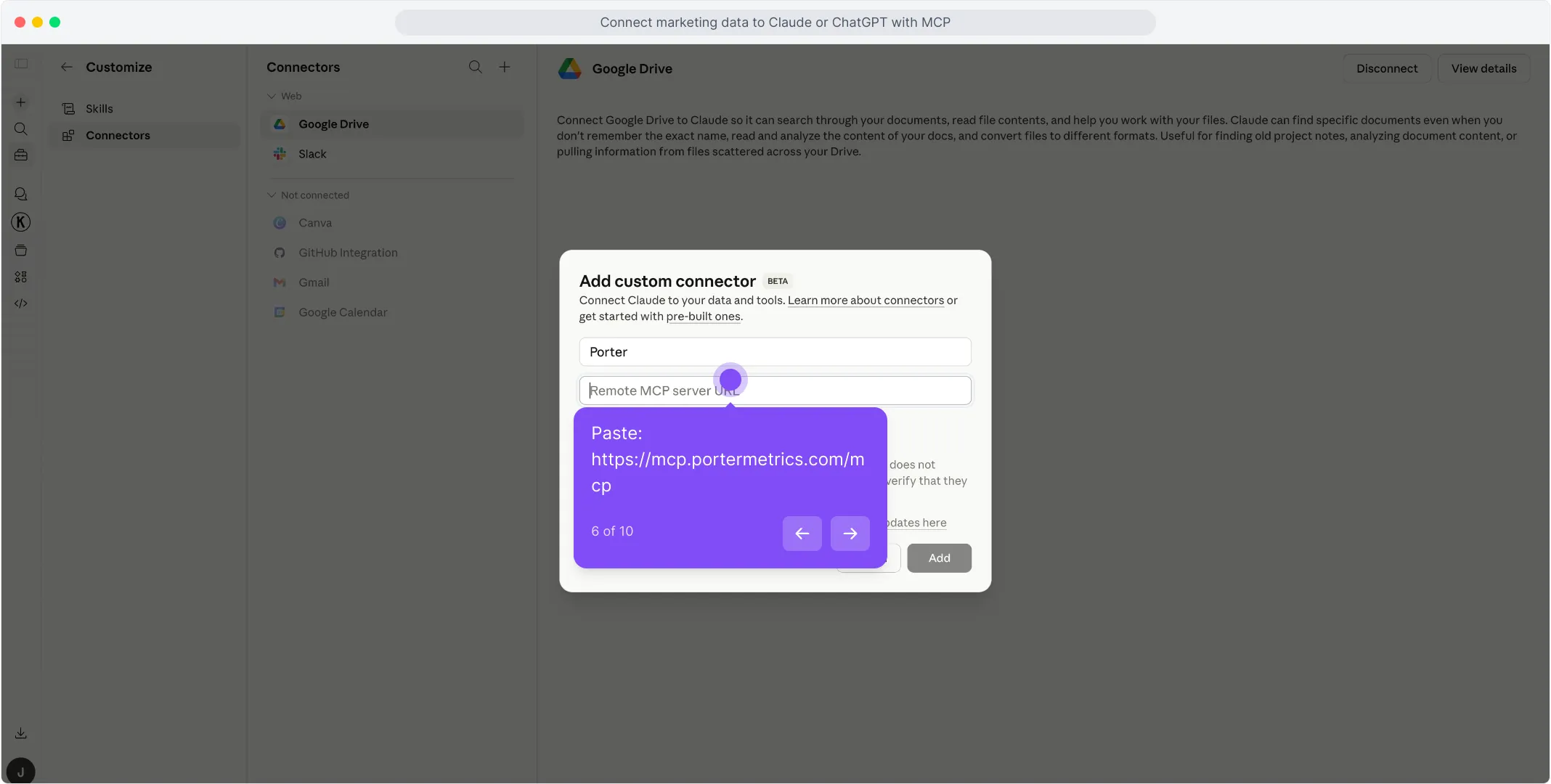
Click Add at the bottom right of the dialog. Claude opens a sign-in window — use the same Google account linked to your Porter workspace and approve access. !Click Add on the custom connector dialog
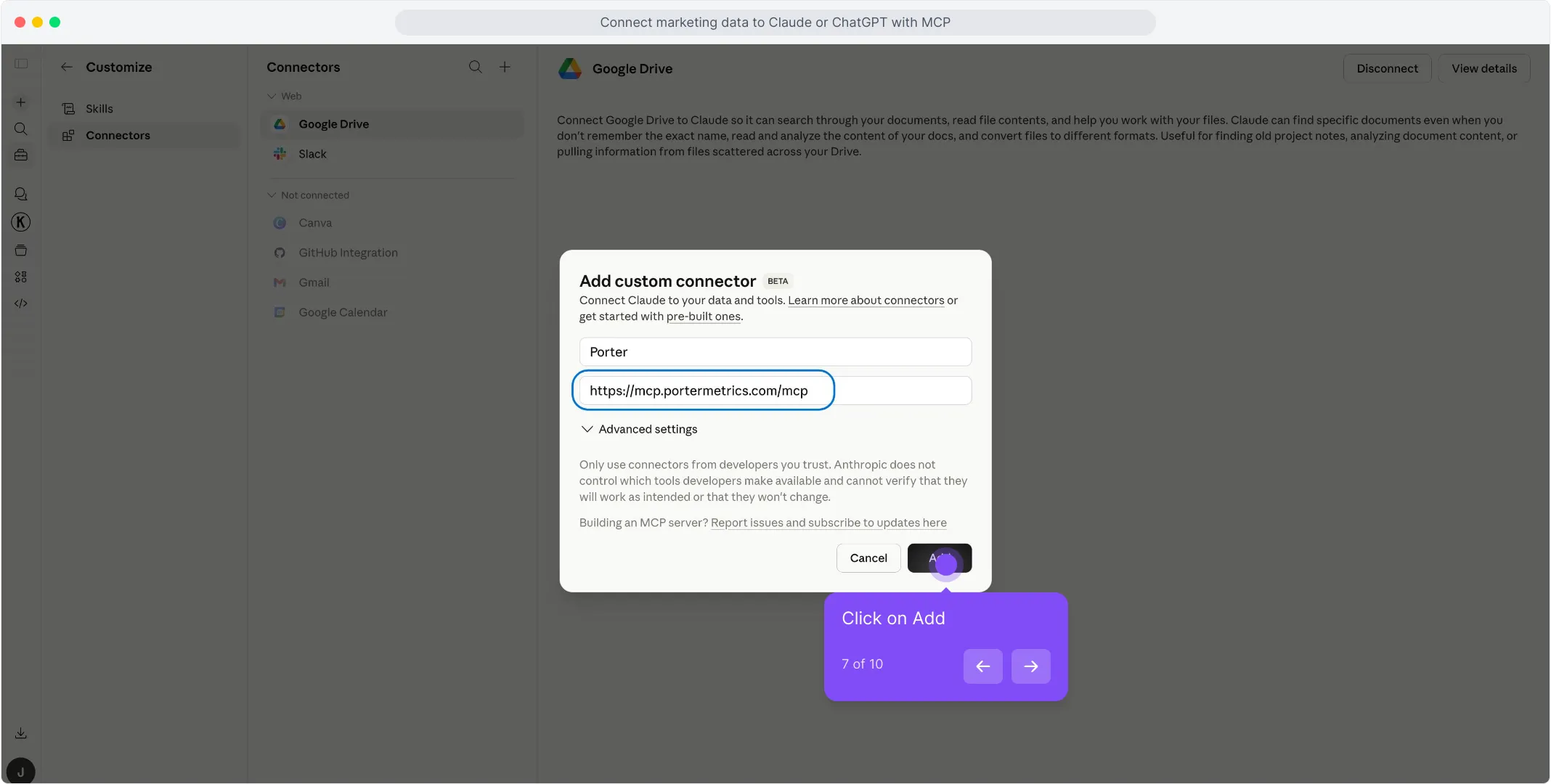
Once the authorization finishes, you’ll see Porter’s read-only tools appear in the connectors panel. You’re ready to start asking questions. !Porter read-only tools visible in the Claude connectors panel
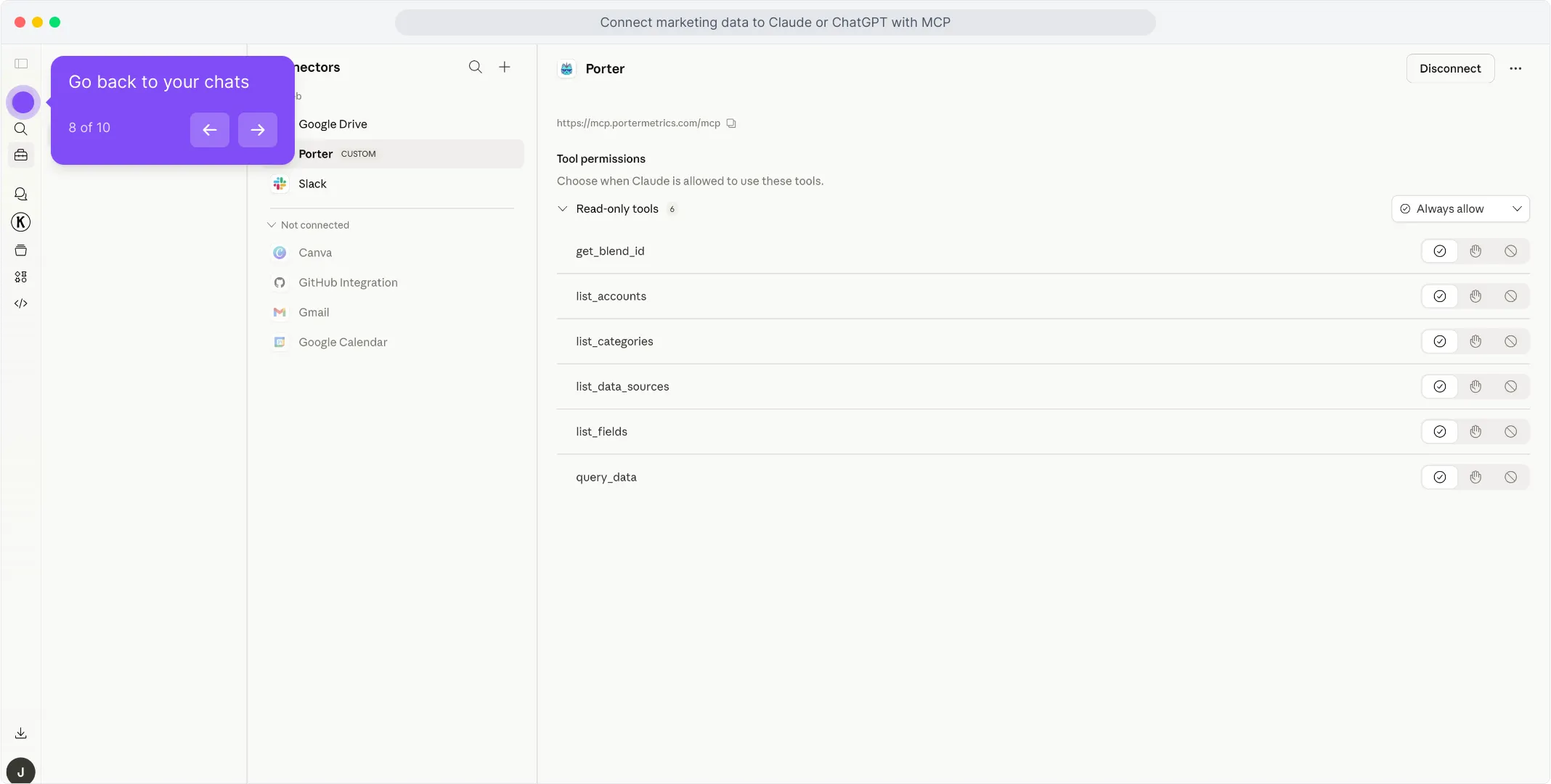
For a fuller walkthrough with screenshots at every step, see the Porter MCP tutorial.
3. Start building questions and dashboards
With Porter connected, open a new Claude chat and ask anything about your Shopify in plain English. Claude calls Porter behind the scenes, pulls live data from Shopify, and answers with tables, charts, or summaries.
Try one of these to verify the setup is working:
For a full catalogue of copy-paste prompts organized by use case (agencies, DTC brands, e-commerce teams, cross-channel), jump to the prompts section below.
Alternative ways to connect Shopify to Claude
MCP is the path we just walked through — and the one we recommend for most marketers. But it’s not the only way to get Shopify data in front of Claude. The most common alternatives are Shopify’s direct API (or its official MCP if it has one), a live Google Sheets bridge, and BigQuery for scale. Each has its trade-offs — pick the one that fits how your team already works.
- 🔌 Shopify’s direct API (or official MCP) — Talk to Shopify’s Admin API yourself, or install Shopify’s native MCP if one exists. Maximum control, but you handle auth, rate limits and pagination — and you only get one source.
- 📊 Google Sheets — Live Sheet or one-off CSV upload. Auditable, familiar, faster for big exports — but aggregation happens in the Sheet, not the API.
- 🗄️ Google BigQuery — For large stores or agencies running multi-store analysis. BigQuery aggregates; Claude only queries pre-built summaries.
Via Shopify’s direct API (or official MCP)
If you’re building a product around Shopify — or you’re a developer who’d rather own every layer of the integration — the most direct path is talking to Shopify’s Admin API yourself, or installing the official Shopify MCP (if one exists). Shopify ships an official AI Toolkit with MCP server support, but it requires developer setup and Admin API credentials. You’ll need to follow Shopify’s rate limits & quotas and request a Developer Token / API access where applicable. Either way, you skip Porter entirely and call Shopify from your own code or from Claude Code with raw HTTP requests.
The trade-off to know. Going direct gives you maximum control and the freshest possible data — every endpoint, every parameter, no abstraction layer in between. But you’re now responsible for OAuth flows, refresh tokens, rate limits, pagination, schema changes, and error retries. And critically, you only get one source. The moment you also want Google Ads, GA4 or Meta Ads in the same conversation, you’re back to building (or stitching together) more integrations.
When this makes sense: engineering teams that need a single source with full control, products that ship Shopify data as a feature (where you own the integration anyway), or one-off scripts where you don’t mind writing the auth and pagination code yourself. For marketers who want to ask questions in plain English and blend Shopify with the rest of their stack in a single conversation, the Porter MCP path is dramatically less work.
Via Google Sheets (live Sheet or manual CSV)
If your team already lives in Google Sheets — or you want a paper trail before Claude touches anything — feed Shopify into a Sheet, then let Claude read the Sheet. You can automate the Shopify → Sheets pipeline with Porter so it refreshes daily, or do one-off CSV exports from Shopify’s native UI for static analysis.
The trade-off to know. With the MCP path, Claude calls Shopify’s API directly and Shopify does the filtering and aggregation on its side — clean and deterministic. With the Sheets path, Claude aggregates inside the Sheet itself, which can introduce hallucinations on totals, averages, and joins when you have thousands of rows. The upside is speed: for very large date ranges or historical analysis, a pre-built Sheet is dramatically faster than live API calls.
When this makes sense: finance teams that want to review numbers before Claude acts on them, agencies already delivering client reports in Sheets, historical analysis across years of data, or any case where you care more about speed than real-time freshness.
Read the full Sheets tutorial →Via Google BigQuery (for scale)
This is the path most people overlook — and it’s the one that saves you when your Shopify store gets serious. A single large merchant or an agency managing 10+ stores will hit API rate limits and latency problems querying Claude directly. Claude will literally tell you it’s taking too long or timing out on big pulls.
BigQuery fixes that. You load Shopify data into BigQuery tables on a schedule, then connect BigQuery to Claude — either through a BigQuery MCP or via Claude Code with SQL queries. Instead of asking Claude to pull raw Shopify data, you let BigQuery aggregate into small, optimized tables, and Claude only queries the summarized output. Scale problem solved.
When this makes sense: enterprise stores with thousands of orders, agencies running multi-store analysis across 10+ clients, or any team already using BigQuery as a data warehouse. Porter loads Shopify (and 25+ other sources) directly into BigQuery so you don’t have to build your own ETL.
Read the full BigQuery tutorial →Connecting Shopify to Claude Code
Most marketers lump Claude and Claude Code together and miss the biggest advantage of the entire MCP ecosystem. They’re not the same tool — and the difference matters enormously once you start working with Shopify data seriously.
Claude is a chat interface. You ask a question, Claude pulls live data through the MCP, answers, maybe builds a quick dashboard inside the conversation. Great for one-off analysis. The problem: everything is ephemeral. Want to refresh the dashboard tomorrow? You regenerate it from scratch. Want the same report every Monday? You re-ask the question every Monday.
Claude Code is Claude running inside your computer’s terminal. Because it has access to your filesystem, runtime, and other developer tools, it doesn’t just answer questions — it can build real software. Persistent scripts, scheduled routines, HTML apps, internal dashboards, integrations that run 24/7 without your input. Once it’s connected to Porter’s MCP for Shopify, a whole category of work becomes possible.
What Claude Code unlocks that Claude alone cannot
This is where the MCP ecosystem pays off most. Because Claude Code can combine Porter’s MCP with other MCPs — Firecrawl for web scraping, Airtable for structured data, Notion for wikis, Vercel for deployment, Slack and Gmail for delivery — you’re no longer querying data. You’re building tools.
🛠️ Build your own profitability dashboard Stack: Porter MCP + Vercel MCP (or Cloudflare Pages, Netlify) Feed Claude Code your Shopify targets and goals — reorder thresholds, low-stock alerts, shipping delays — and ask it to generate a custom profitability dashboard for each client. It builds the HTML, pulls live data, deploys to a URL. No Shopify Reports embed to break when the vendor changes pricing, no template constraints. The dashboard updates automatically because it queries Porter’s MCP on every page load. Best for: agencies that want white-label client dashboards without Looker or Data Studio dependencies.
🔍 Full competitor + performance monitoring Stack: Porter MCP + Firecrawl MCP Combine your own Shopify performance from Porter with competitor product listings and pricing from Shopify App Store scraped via Firecrawl. Claude Code stitches both into a weekly competitive intelligence report — your numbers next to their product ratings and pricing tiers, with an LLM summary on top of what changed week over week. Runs on cron, lands in your inbox every Monday morning. Best for: in-house teams that need market context, not just internal numbers.
📚 Internal marketing wiki with live metrics Stack: Porter MCP + Airtable MCP (or Notion MCP) Use Airtable or Notion as the schema, Porter as the data source. Claude Code keeps every page populated with current Gross Sales, Net Sales, and Average Order Value for every store — no stale screenshots, no copy-paste from Excel. New hires read one wiki entry and have full context on a client’s account. Best for: agencies and ops teams onboarding analysts or rotating account managers frequently.
🔔 24/7 alerts on inventory, shipping delays, and low AOV Stack: Porter MCP + Slack MCP (or Gmail MCP) A Claude Code routine on cron pulls Shopify via Porter, evaluates thresholds — inventory drops below 10 units, AOV falls 15% below trailing 30-day average — and pushes Slack or Gmail alerts the moment something crosses the line. You stop checking dashboards reactively; the dashboard checks itself and tells you when to look. Best for: any team that’s ever discovered a problem 48 hours too late because nobody opened the report.
Bottom line: Claude is for quick questions and ad-hoc dashboards. Claude Code is for building apps, live dashboards, alerts, and actual tools — anything you want to run on its own without re-asking. Same Porter MCP URL works in both, so you don’t pick once and lock in.
Use cases — what you can actually do once Shopify is connected to Claude
Getting the connection right is half the battle. The real value shows up in what you do next. Here are the use cases Porter users build around their Shopify data — from simple Q&A to full client-facing workflows.
1. Chat and ask questions directly
The simplest use case — and still the one 80% of marketers start with. Open Claude, ask a question, get an answer grounded in live data.
It’s the fastest way to replace a daily Shopify admin check-in. But chat is table stakes — the interesting use cases come next.
2. Blend Shopify with your revenue data (Meta Ads, Google Ads, Klaviyo)
This is where a 360° view gets real. When you connect Shopify and your revenue source (Meta Ads for acquisition, Google Ads for search, Klaviyo for email revenue), Claude can map products and orders to actual repeat purchases or new customer acquisition — using UTMs, order names, and customer emails — and give you attribution that no platform-side number can.
Claude handles the UTMs, order names, and customer emails mapping and joins. You get a client-ready attribution report that no single platform can generate on its own.
3. Automated alerts and notifications on Slack or Gmail
With Claude Code you can turn Shopify monitoring into a routine that runs on its own. Hook Porter’s MCP (for the data) together with a Slack or Gmail MCP (for delivery), then write a Claude Code scheduled task that pulls performance every morning and pings you only when something actually needs attention.
No dashboards, no daily check-ins. The report comes to you — and only when it matters.
4. Client-ready presentations with live data (Gamma, HTML, PDF)
A common agency pain: you send clients a Shopify admin report, CSV export breaks, the client panics. With Claude you can build the presentation itself — as a Gamma deck, a custom HTML page, or a PDF — populated with live numbers each time.
The presentation becomes a delivery artifact you send to the client, not a dashboard that depends on another tool staying up. No broken iframe, no login prompts, just the content.
Shopify fields and metrics you can query with Claude
Before you start writing prompts, it helps to know what data is actually available. Porter MCP gives Claude access to 155 Shopify fields and metrics across every reporting level, plus breakdowns by date, product type, channel, and customer cohort. And the same MCP URL also unlocks 25+ other sources — so Claude can blend Shopify with Google Ads, GA4, Meta Ads, HubSpot and more in a single prompt.
Reporting levels: Order ID, Order Name, Customer Email, Customer First Name, Customer Last Name, Customer ID, Product Title, Product ID, SKU, Variant ID, Variant Title, Shipping City, Shipping Country, Shipping Province, UTM Campaign, UTM Source, UTM Medium, Channel, Channel app name, Landing Page URL, Order Tags, Product Tags, Customer Tags, Financial Status, Fulfillment Status, Order Creation Date, Order Updated Date, Order Canceled Date, Order Closed Date, Order Note, Referral Code, Referrer URL, Physical Location Name, and 80+ more.
Visibility metrics: (none classified for Shopify)
Engagement metrics: (none classified for Shopify)
Conversion metrics: COGS, Discounts, Gross Sales, Net Sales, Returns, Shipping, Tax, Total Sales, Unknown Fees.
Efficiency (rates & costs): (none classified for Shopify)
Audience breakdowns: Date, Date and Time, Day of week (Mon – Sun), Hour, Month, Month Day, Quarter, Week, Year, Month and year, Quarter and year, Week and year.
Cross-channel sources (same URL): Google Ads, GA4, Meta Ads, TikTok Ads, LinkedIn Ads, HubSpot, Search Console, +15 more
Prompts you can copy-paste today
1. For agencies
Use these when managing multiple Shopify client stores or building weekly client reports.
2. For DTC brands & wholesale
Use these when analyzing customer cohorts, profitability, and geographic performance.
3. For e-commerce teams
Use these for inventory management, discount analysis, and campaign attribution.
4. Cross-channel
Use these when blending Shopify with other marketing and sales platforms.
Limits, auth, and best practices for Shopify via Claude
This is the most common real-world scenario for marketers using Shopify via API or MCP: not a ban, but a throttle-induced outage that halts reporting, inventory sync, or automated workflows. The merchant was using a third-party ERP app that hit the REST API bucket limit (40 requests) during a flash-sale traffic spike. Because Shopify’s Leaky Bucket algorithm refills at only 2 requests per second on standard plans, the integration queued up, failed, and took hours to recover. For a marketer using Claude to pull daily sales reports, the cost isn’t a suspended account — it’s missing data when decisions need to be made.
Shopify’s rate-limit enforcement is quota-based and algorithmic, not tool-based. Shopify doesn’t ban or suspend accounts because you used Claude, an MCP server, or a third-party app. It throttles because of how the API was consumed: bursting past the leaky-bucket capacity (40 requests), sustaining calls above the plan’s leak rate (2–10 requests/second), or making unbounded GraphQL queries that exceed the 1,000-point cost ceiling. Read-only access with backoff logic is safe. Parallel API bursts, write-heavy automation without queuing, and browser automation that mimics human scraping are not.
The two ways to burn through your Shopify quota
After reviewing official docs and community threads, two patterns come up again and again.
1. Parallel API bursts (hundreds of simultaneous requests). Sending concurrent requests — for example, asking Claude to “pull all orders from the last 12 months” without pagination — triggers Shopify’s Leaky Bucket throttle. The bucket holds 40 requests per app per store and refills at 2 requests/second on standard plans. Exceeding this returns HTTP 429 errors, and repeated bursts can trigger temporary IP-level blocks. Source: Shopify REST Admin API rate limits documentation. Instead, use sequential pagination with `page_info` cursors and respect the `X-Shopify-Shop-Api-Call-Limit` header.
2. Programmatic writes at scale without exponential backoff. Automating inventory updates, price changes, or product edits via Claude Code without rate-limit awareness quickly exhausts the write quota. Shopify applies the same leaky-bucket logic to write operations, and sustained write bursts can return 429 or 503 errors. In extreme cases, apps that consistently ignore retry headers risk being flagged for review or temporarily suspended from the App Store. Source: Shopify Partners blog on rate limits. Instead, batch writes and implement exponential backoff starting at 1 second, doubling up to 32 seconds.
Both behaviors trigger rate throttling. If you want to use Claude for Shopify safely, route all data requests through Porter MCP’s built-in pacing and pagination, or implement the same safeguards yourself if going direct.
The 5-rule scaling protocol
Based on Shopify’s documented rate limits and the behaviors that have actually caused throttling — not guesswork:
- Respect the leaky-bucket rate: max 2 requests/second on Basic/Shopify plans, 4 on Advanced, 10 on Plus. Source: Shopify REST Admin API rate limits. Exceeding this triggers 429 errors that break reporting workflows and can delay data sync for hours. Porter MCP enforces this automatically with built-in request pacing per store.
- Never exceed 40 requests in a burst per app per store. Source: Shopify REST Admin API rate limits. The bucket size is hard-capped at 40; asking for 50 orders in rapid succession will immediately throttle. Porter MCP paginates all large requests and spreads them across the leak-rate window.
- Cap GraphQL queries at 1,000 cost points per query and 50 points/second sustained. Source: Shopify GraphQL Admin API rate limits. Complex nested queries (e.g., orders → line items → product variants → inventory) can silently exceed this ceiling and return partial or null data. Porter MCP pre-validates query complexity and splits heavy requests into smaller chunks.
- Implement exponential backoff starting at 1 second when you receive a 429 response. . Shopify returns `Retry-After` headers on 429 errors; ignoring them and retrying immediately extends the throttle window. Porter MCP reads `Retry-After` automatically and queues requests accordingly.
- Scope OAuth tokens to read-only permissions unless write access is explicitly required. . Granting `write_products` or `write_orders` when only `read_orders` and `read_products` are needed increases blast radius if a token is compromised. Porter MCP requests the minimum viable scope set (read_products, read_orders, read_customers) and never asks for write scopes unless the user explicitly enables a write feature.
Frequently asked questions
Q: What is a Shopify MCP?
A Shopify MCP (Model Context Protocol) is an open standard that lets AI tools — Claude, Claude Code, ChatGPT, Cursor — connect to your Shopify data without custom integrations. Porter’s MCP server makes your store, orders and products available through one URL: no tokens, no scripts, no developer setup.
Q: What’s the difference between Claude and Claude Code?
Claude is the conversational product (web, app, mobile). Claude Code is a terminal-based developer tool that can write scripts, save files, and automate workflows. Both can connect to Shopify via MCP.
Q: How fresh is the data? Is it real time?
Shopify’s API is near real-time, with slight delays during high traffic . Porter MCP pulls live, so your data is always within that window.
Q: Are there rate limits for Shopify data?
Yes. Shopify enforces a leaky-bucket limit of 40 requests per app per store, refilling at 2 requests/second on standard plans, 4 on Advanced, and 10 on Plus Source: Shopify REST Admin API rate limits. Porter MCP batches and paces requests automatically so you rarely hit them.
Q: Why do Claude’s numbers sometimes differ from Shopify admin?
Two common reasons : (1) Time zone — the API uses UTC while the admin may show your store time. (2) Status filtering — cancelled or test orders are excluded from some admin views but included in API totals. The fix: align date ranges and order statuses before comparing.
Q: Will using Claude affect my Shopify access or limits?
No. Shopify doesn’t ban or restrict accounts for legitimate API usage, and Porter MCP is read-only by default — it stays well inside Shopify’s normal rate limits. The thing to watch is rate throttling during traffic spikes — see the limits section above.
Ready to chat with your Shopify?
Open Claude, add the Porter connector, and ask your first question. If you don’t have Porter yet, start a free trial and connect your Shopify account — you’ll be chatting with your store in under five minutes.
rocket_launchStart free Porter trialopen_in_newOpen Claude