Amazon Seller Central connector for Claude Code

Use Porter’s Amazon Seller Central connector for Claude Code to pull sales, orders and FBA inventory into your terminal, then turn them into files, scripts and scheduled reports in your own project.

  • Save Amazon sales by ASIN as CSV in your repo
  • Flag FBA products that will run out first
  • Run a weekly Seller Central report from a script
  • Compare Amazon with Shopify sales in one file
G2★★★★★Rated 4.6/5 from 288 G2 reviews (October 2026) · Used by 1,600+ marketing teams and agencies

By · Last updated November 26, 2026

Claude Codeporter connected
Rank last month’s ASINs by Quantity Ordered and save the top 4 to reports/top-asins.csv
porter / Amazon Seller Central / Trailgear Demo✓ 4 rows
Saved reports/top-asins.csv. The 2-person tent leads; the trail stove fell most from the month before.
TitleQuantity OrderedItem Price
2-person tent412$149.00
Trekking poles388$59.00
Dry bag 20L265$24.00
Trail stove131$79.00
Demo data, Trailgear Demo account
133 Seller Central fields
01Setup

How to connect Amazon Seller Central to Claude Code

Connecting Amazon Seller Central to Claude Code takes 3 steps and no API keys: connect your seller accounts in Porter with Seller Central, add Porter’s MCP server to Claude Code with one command, then sign in from /mcp and ask. The same server also works in Cursor, VS Code and Codex, as Porter’s Amazon Seller Central MCP server page shows. Using the Claude app instead? See the Amazon Seller Central connector for Claude.

Before you start

  • You need Claude Code installed (Anthropic’s Claude Code overview), a free Porter account and a Seller Central login that can authorize apps for the account. Each marketplace connects as its own account.
  • Works with any Claude model in Claude Code, from Opus to Sonnet and Haiku.
  1. Step 1: Connect Amazon Seller Central in Porter

    Sign up free at Porter, pick Amazon Seller Central as the source and sign in with Seller Central. Tick every marketplace you want Claude Code to read.

  2. Step 2: Add Porter to Claude Code

    In your terminal, run this command. It adds Porter for every project on your machine; drop --scope user to add it to the current project only.

    Terminal
    claude mcp add --transport http --scope user porter https://mcp.portermetrics.com/mcp

    Or, inside Claude Code, install Porter’s plugin, which adds the server and Porter’s skill together: /plugin marketplace add portermetrics/porter, then /plugin install porter-metrics@portermetrics.

  3. Step 3: Sign in and ask

    Start claude, type /mcp, pick porter and sign in with the Google account you use in Porter. When porter shows as connected, paste this prompt:

    Prompt
    Which Amazon seller accounts can you see? Build last week’s Total Sales, Order Count and Unit Count by Date and save it to reports/amazon-week.csv.

Guides and videos

app.portermetrics.com / create
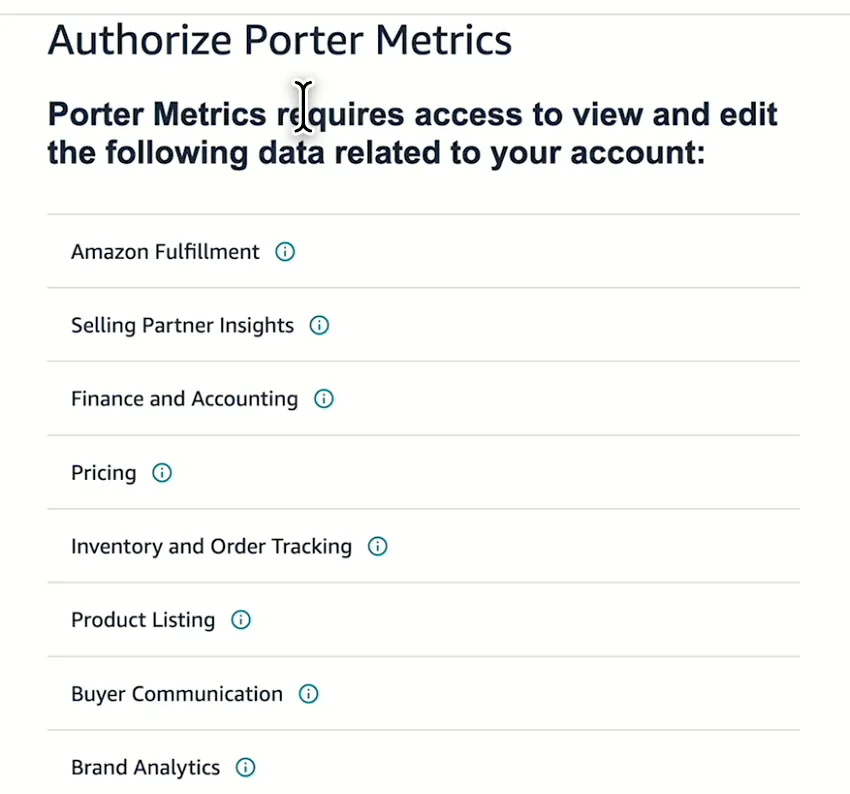
Amazon Seller Central page asking you to authorize Porter Metrics
First, sign in to Seller Central and authorize Porter Metrics.
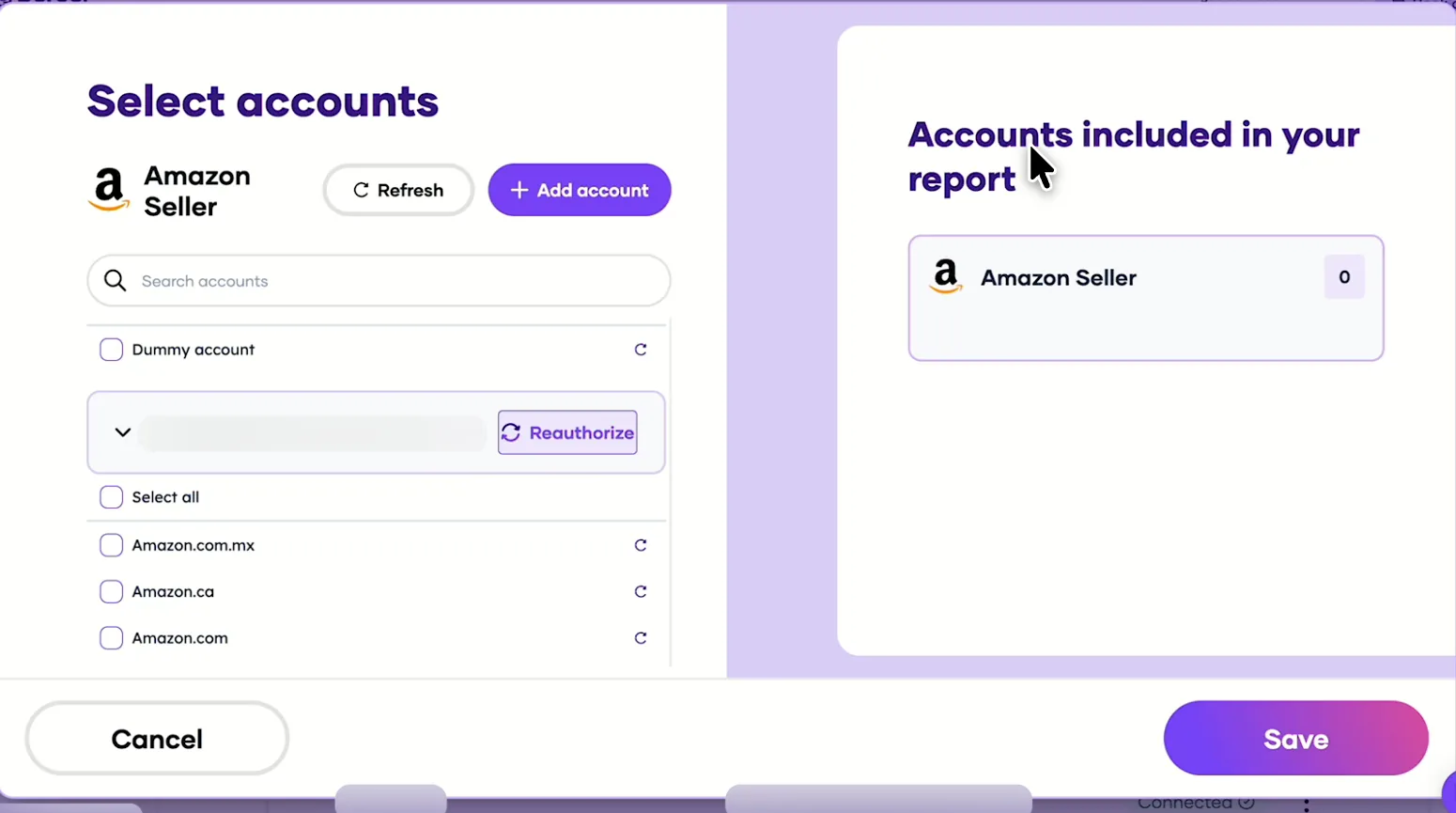
Porter's Select accounts window listing Amazon marketplaces such as Amazon.com and Amazon.ca
Then pick the marketplaces Claude can read and save.
$ claude mcp add --transport http --scope user porter https://mcp.portermetrics.com/mcp

$ claude mcp list
porter: https://mcp.portermetrics.com/mcp (HTTP)
Then, add Porter's MCP server from your terminal.
> /mcp
porter · needs authentication → Authenticate

> Which Amazon Seller Central accounts can you see?
● porter - list_accounts (MCP)
Trailgear Demo
After you sign in from /mcp, Claude Code lists your Amazon Seller Central accounts.
02Use cases and prompts

What you can do in Claude Code

Claude Code works inside your project, so Amazon Seller Central answers can become files, scripts and dashboards instead of chat replies. Each use case has a prompt to copy and uses the Amazon Seller Central fields Porter reads.

Can Claude Code export Amazon sales by ASIN?

The problemSeller Central reports download one at a time and need cleanup before they are useful.

What Claude Code doesClaude Code pulls ASIN, Seller SKU, Title, Quantity Ordered and Item Price through Porter and writes them to a CSV in your project.

What you getA clean sales file in your repo, ready for a model or a teammate.

Prompt
For the last full month, by ASIN and Seller SKU, pull Title, Quantity Ordered and Item Price from Amazon Seller Central and save it as data/amazon-asins.csv.

Can Claude Code warn me before FBA stock runs out?

The problemA best seller that goes out of stock loses rank, and the inventory report doesn’t say when.

What Claude Code doesClaude Code reads Fulfillable Quantity and inbound stock per SKU, compares it with recent daily sales and lists the SKUs with the fewest days left.

What you getA restock list sorted by days of stock left.

Prompt
From my FBA inventory, list Seller SKU, Product Name, Fulfillable Quantity and Inbound Shipped Quantity. Compare with each SKU’s Quantity Ordered over the last 30 days and save the SKUs with under 21 days of stock to reports/restock.csv.

Can I schedule an Amazon Seller Central report with Claude Code?

The problemSeller Central’s business reports need a new download every week before anyone can compare sales.

What Claude Code doesA scheduled claude -p run pulls Total Sales, Order Count and Unit Count by Date for last full week and the week before, with % change.

What you getreports/amazon-weekly.md, the weekly sales picture without a CSV download.

Prompt
claude -p "Build my weekly Amazon report for the last full week vs the week before: Total Sales, Order Count and Unit Count by Date, with % change. Write it to reports/amazon-weekly.md" --allowedTools "mcp__porter" "Write"

Can Claude Code compare Amazon and Shopify sales?

The problemMarketplace and store sales live in two dashboards, so the channel split takes a spreadsheet.

What Claude Code doesClaude Code pulls daily sales from both through the same porter server and writes one table by date.

What you getOne file with both channels side by side.

Prompt
For the last 30 days, pull daily Total Sales from Amazon Seller Central and daily sales from Shopify, and save one table by date with each channel’s share to reports/amazon-vs-shopify.csv.

Can Claude Code combine Amazon sales with my ad spend?

The problemAds run in other platforms, so true return on Amazon sales means joining two sources.

What Claude Code doesClaude Code pulls daily Amazon Total Sales and daily spend from your connected ad platforms and works out blended return by day.

What you getBlended return on real marketplace sales.

Prompt
For the last 30 days, pull daily Total Sales from Amazon Seller Central and daily spend from every ad platform I connected, and write daily blended return to reports/amazon-blended.csv.
03Why Porter

Why Porter for Amazon Seller Central in Claude Code

Porter connects Seller Central with no SP-API registration or developer app, and puts Amazon next to Shopify, your ad platforms and 30+ other sources behind the same server.

✓

One server for all your sources

The same porter server answers about Amazon Seller Central, Meta Ads, Google Ads, GA4 and Shopify, so one script can pull every channel.

⊞

Changes only after you approve

Claude Code can fix listing titles and bullet points through Porter, and each change waits for your yes.

⚙

No SP-API registration

You approve Porter in Seller Central and sign in with Google in Claude Code. There is no SP-API developer registration or token to maintain.

↻

Hosted dashboards when a file isn’t enough

Ask for a Porter AI dashboard and it is published at its own link, synced automatically and ready to share with a client.

04Dashboard

Dashboard template

Start from a ready-made Amazon Seller Central template, or ask Claude Code to build a live one with AI dashboards.

AI dashboards

Build a live Amazon Seller Central dashboard from your terminal

Describe the dashboard in one sentence and Porter builds it. A client-ready dashboard in minutes, with no chart dragging and no BI tool to learn. Ask Claude Code:

Prompt
Build a live Amazon Seller Central dashboard for my account with the last 30 days, the main KPIs and a weekly trend.
Live URLEach dashboard at its own link: no login, no app, no download
Auto-syncFresh Amazon Seller Central data, nobody re-exports each period
Scheduled deliveryEmail or PDF sends on a set day
White labelYour logo and branding for clients
Sharing permissionsView or edit access per person
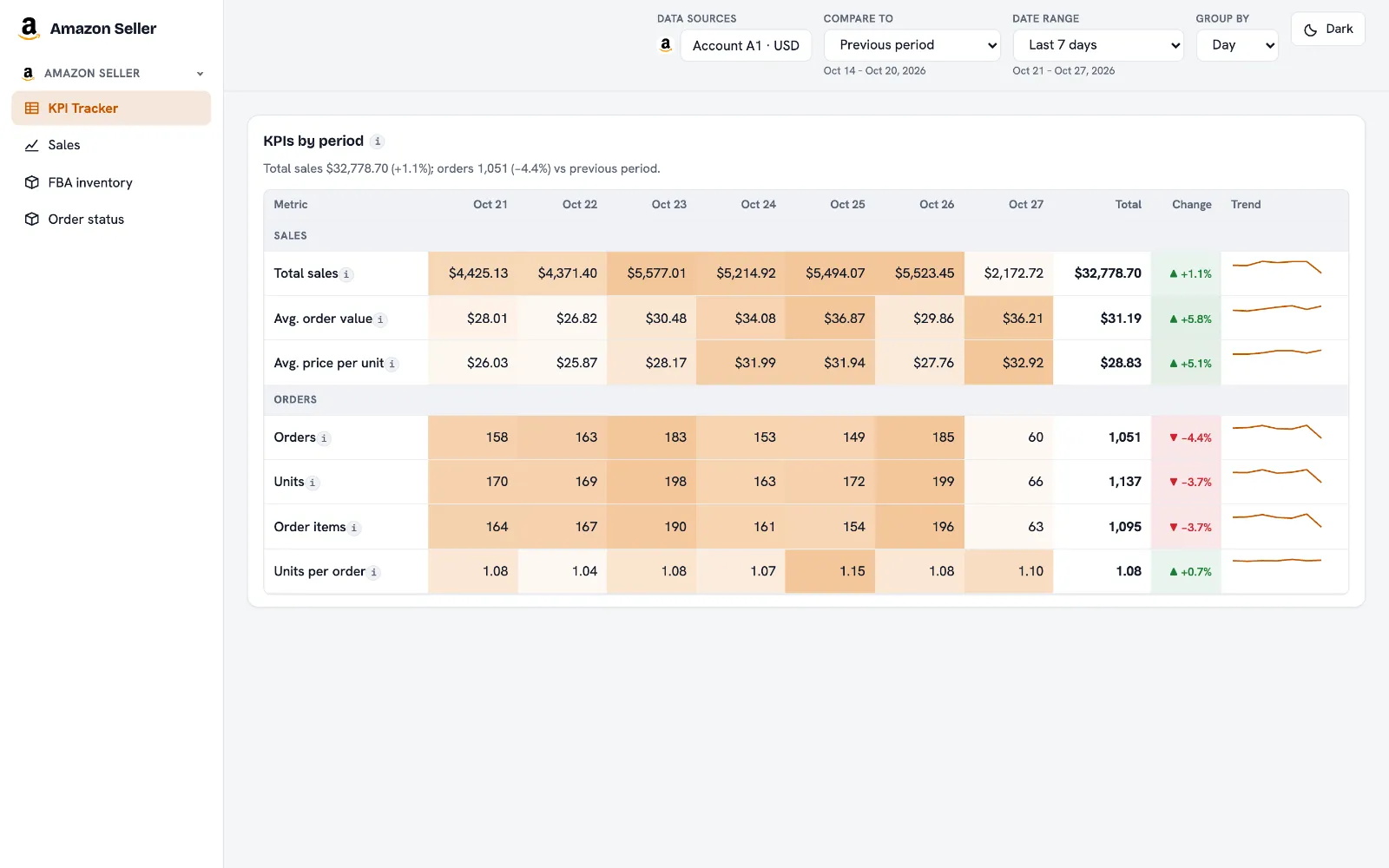
Amazon Seller Central dashboard template by Porter
Template

The Amazon Seller Central dashboard template

Start from Porter’s official Amazon Seller Central dashboard template, or run the prompt above in Claude Code and Porter publishes the dashboard at its own link.

Or start from a template

05Pricing

Pricing

You can start free, since Porter’s Amazon Seller Central connector for Claude comes with every plan. Use the calculator for your number of accounts, or see Porter pricing for every plan.

What you get

  • Free plan: never expires, with unlimited connected accounts and the last 15 days of data in Claude (30 days in Data Studio and Sheets)
  • Reporting: from $12.50 per account a month billed annually, or $15 month to month for one account
  • Billing: each seller and marketplace pair counts as one account, with volume discounts and no per-seat fee
  • Changes: 1 AI credit per completed change; failed tasks are free, and the Free plan includes 100 credits a month
  • Trial: 14 days of full access, no card

Price calculator

$33.33/mo$6.67 per account

An account is one ad account, Stripe account, store, page or GA4 property. The Free plan never expires and has unlimited accounts, with the last 15 days of data in AI chats.

06Data and actions

Amazon Seller Central data and actions in Claude Code

Through the Amazon Seller Central connector, Claude works with 133 fields: daily sales, orders, order items, FBA inventory and listings. Actions also add competitive price lookups, catalog items with sales ranks, Amazon reports and listing changes. Finally, labels and IDs for each field are in the full list of Amazon Seller fields.

The 12 Seller Central fields Claude uses most

In Fulfillment Channel, AFN means FBA, while MFN means merchant-fulfilled.

FieldWhat it's for
Total SalestotalSalesProduct sales per day
Order CountorderCountOrders per day
Unit CountunitCountUnits ordered per day
ASIN · Seller SKU · TitleASIN · SellerSKU · TitleProduct-level rows (with a date)
Quantity OrderedQuantityOrderedUnits per product
Item PriceItemPricePrice per item on each order line
Order Status · Fulfillment ChannelOrderStatus · FulfillmentChannelOrder lists, FBA vs FBM
Latest Ship DateLatestShipDateLate-shipment checks
Is Prime · Is Business OrderIsPrime · IsBusinessOrderOrder mix
Fulfillable QuantityfulfillableQuantityFBA stock ready to sell
Total Unfulfillable QuantitytotalUnfulfillableQuantityUnsellable FBA stock
Listing Item Statuslisting_item_statusCatalog health

Can Claude change my Seller Central listings?

Yes. Claude can create a listing or fully replace one, change single attributes like the title or bullet points, as well as delete a listing.

It also reads orders, FBA inventory, competitive prices, catalog items and Amazon reports. Prices, order confirmations and FBA shipments stay in Seller Central, where you handle them as usual.

How far back can Claude read Seller Central data?

Amazon's sales metrics reach 2 years back (Amazon's sales metrics window). In Porter's tests, though, orders and order items reached a year back. FBA inventory and listings, meanwhile, show today's state.

The Free plan covers the last 15 days in Claude (30 days in Data Studio and Sheets).

Why is each marketplace a separate account?

Amazon authorizes each seller and marketplace pair, so Porter shows Amazon.com, Amazon.ca and Amazon.com.mx as separate accounts, each with its own marketplace ID (Amazon's marketplace IDs). Non-Amazon channels for the same seller also show up as separate accounts.

Claude queries the accounts one by one, then combines the answers into one table, a row per marketplace.

Product stats

WhatAmazon Seller Central connector
Fields133 across daily sales, orders, order items, FBA inventory and listings
ActionsCompetitive prices (up to 20 ASINs per lookup), catalog items with sales ranks, Amazon reports, and listing create, edit and delete after you approve
FreshnessFBA inventory and listings show today's state; Claude's answer shows the time of Porter's last refresh
HistorySales metrics up to 2 years back, orders and order items a year back in Porter's tests; the last 15 days in Claude on the Free plan (30 days in Data Studio and Sheets)
Rate limitsSet by Amazon per seller and app pair; a call that comes too fast gets a 429 error and can retry
AccountsOne per seller and marketplace pair
AccessLogin with Amazon approval, renewed every 365 days

See all 133 Amazon Seller Central fields

07Security

Is it safe?

Yes, because Porter keeps reading apart from changing. Analytics and reporting leave your account exactly as you set it, and Claude shows you every listing change before Porter sends it. Only you can revoke the access you approved (Amazon's page on revoking app authorizations).

How Claude asks before changing Seller Central

Claude shows you the exact listing change and asks before Porter sends it to Amazon. Listing changes and deletions are permanent, so read the draft before you approve.

Each completed change also uses 1 AI credit.

What the connector needs from Seller Central

You approve Porter through Login with Amazon, so use a Seller Central login that can authorize apps. Amazon's consent screen then shows the access Porter asks for. Buyer names, emails and postal codes stay with Amazon.

Amazon asks you to re-authorize every 365 days from Manage Your Apps in Seller Central (Amazon's reauthorization guide). Re-authorizing can leave a second row for the same account, but both rows read the same data.

08FAQ

FAQ

Answers on setup, scope, scripts and credits, plus fixes for the most common Claude Code errors with Amazon Seller Central. Setup questions every source shares, like where Claude Code saves the server and how to share it with your team, are in the Claude Code hub FAQ.

Can I put Meta Ads spend next to Amazon sales?

Yes. Connect Meta Ads in Porter and ask for Amount spent next to Total Sales by Date. Claude Code reads both through the same Porter server and writes them to one report.

Can I connect more than one marketplace?

Yes. Each marketplace connects as its own account in Porter, so Claude Code can report the US, UK or EU stores together or one at a time.

Do Claude Code questions use Porter credits?

Reading Amazon Seller Central data uses no AI credits. Each completed change, such as pausing a listing change, uses 1 credit, and every Porter account gets 100 free credits a month.

Troubleshooting

Why does /mcp show porter as needing authentication?

Claude Code adds the server before you sign in. Pick porter in /mcp, choose Authenticate and sign in with the Google account you use in Porter.

Why does my claude -p script stop and ask for permission?

Scripts can’t answer permission prompts. Pass the tools the script may use, for example --allowedTools "mcp__porter" "Write", so Claude Code can read Porter and save files without stopping.

09Next

More Claude connectors

Seller Central answers get sharper when they sit next to your store, site and email data. Porter brings each of those into Claude through the same MCP URL as the Amazon Seller Central connector. Browse all Claude connectors, then add the sources you sell and market through. Or start a client report from Porter's Amazon templates as well as the reporting tools comparison.

Not only Claude. Send Amazon Seller Central data anywhere

The same Porter account and connection also send Amazon Seller Central data to these destinations, at no extra cost.

Try the connector in Claude Code

Porter’s Amazon Seller Central connector for Claude Code takes one command, so your first sales file can land in your project today. Start with a CSV, then build a restock list or a weekly script.

Free plan · 14-day trial · No card needed

Amazon sellers: sales, stock and listing fixes get handled from the terminal, after your yes.

E-commerce marketers: Amazon and Shopify sales land in one file.

Agencies: one script builds the weekly report for every seller account.