Google Business Profile connector for ChatGPT

Use Porter’s Google Business Profile connector for ChatGPT (formerly Google My Business) to rank every location by views, calls and direction requests, then reply to the reviews you confirm on Business, Enterprise or Edu.

  • Rank locations by calls, directions and website clicks
  • Draft replies to the reviews still waiting for one
  • Find listings missing a phone, website or hours
  • Check if profile clicks turn into GA4 sessions
G2★★★★★Rated 4.6/5 from 288 G2 reviews (October 2026)

By Porter Metrics team · Last updated October 20, 2026

ChatGPTPorter connected
Show Total impressions, Phone calls, Directions requests and Website clicks per location for the last 30 days.
Porter / Google Business Profile / Trailgear Demo✓ 4 rows
Downtown gets the most calls (214). Airport has plenty of impressions but the fewest direction requests.
LocationImpressionsCallsDirections
Downtown24.6K214388
Westside17.9K151302
Riverside12.4K96215
Airport15.1K6288
Demo data, Trailgear Demo account
145 Business Profile fields
01Setup

How to connect Google Business Profile to ChatGPT

Setting up the Google Business Profile connector for ChatGPT takes 3 steps and needs neither code nor a Google Cloud project. Sign in with Google in Porter and pick your locations, add Porter’s MCP URL to ChatGPT as a custom MCP server, then sign in and ask. Porter’s Business Profile to ChatGPT tutorial also has screenshots.

What you need

  • You need a Google account that’s either an owner or a manager of each location. However, website admin rights or access to other Google products don’t count. The profile must be verified, since Google shows performance only for verified profiles. You also need a free Porter account and a ChatGPT plan that supports custom MCP servers.
  • Custom MCP servers are in beta in ChatGPT on the web, so set up Porter and ask your questions from a browser. On Business, Enterprise or Edu, an admin or owner turns on developer mode, and then ChatGPT can also make the changes you confirm. On Pro, you turn on developer mode yourself, and ChatGPT reads and recommends (OpenAI’s guide to custom MCP apps).
  • Works in ChatGPT on the web (chatgpt.com, custom MCP servers in beta) and in Codex, with the same Porter MCP URL.
  1. Step 1: Connect your locations in Porter

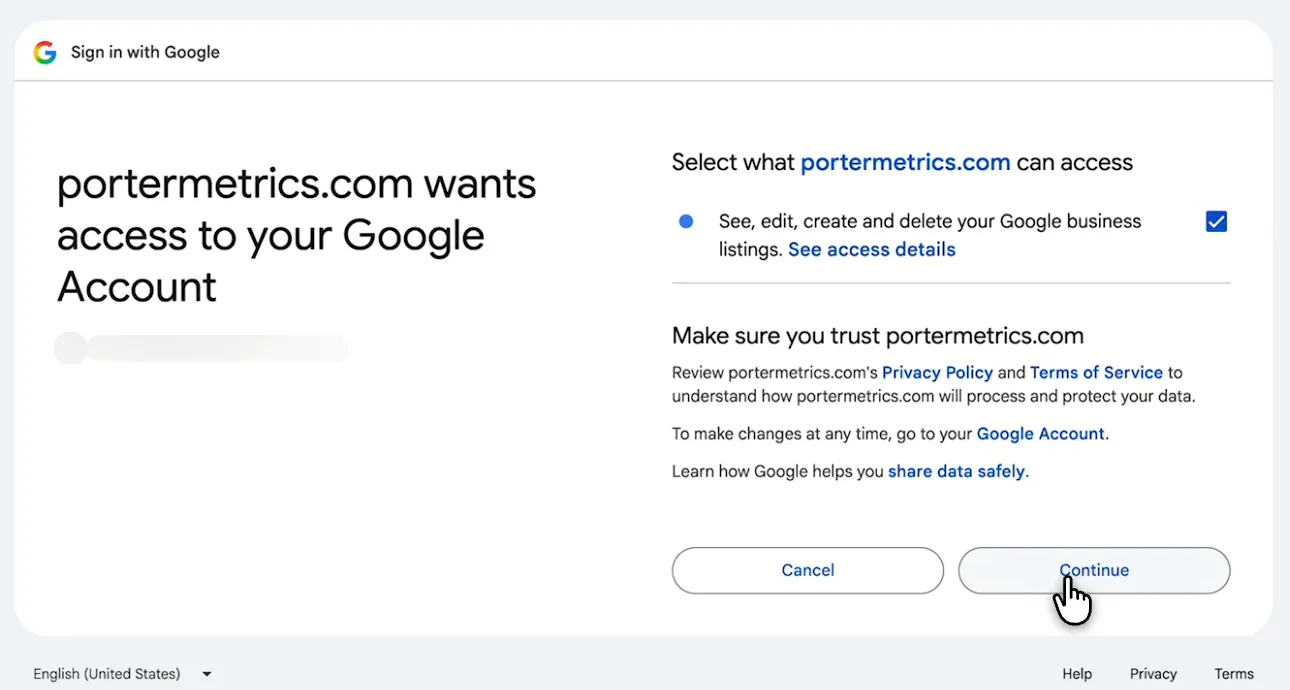
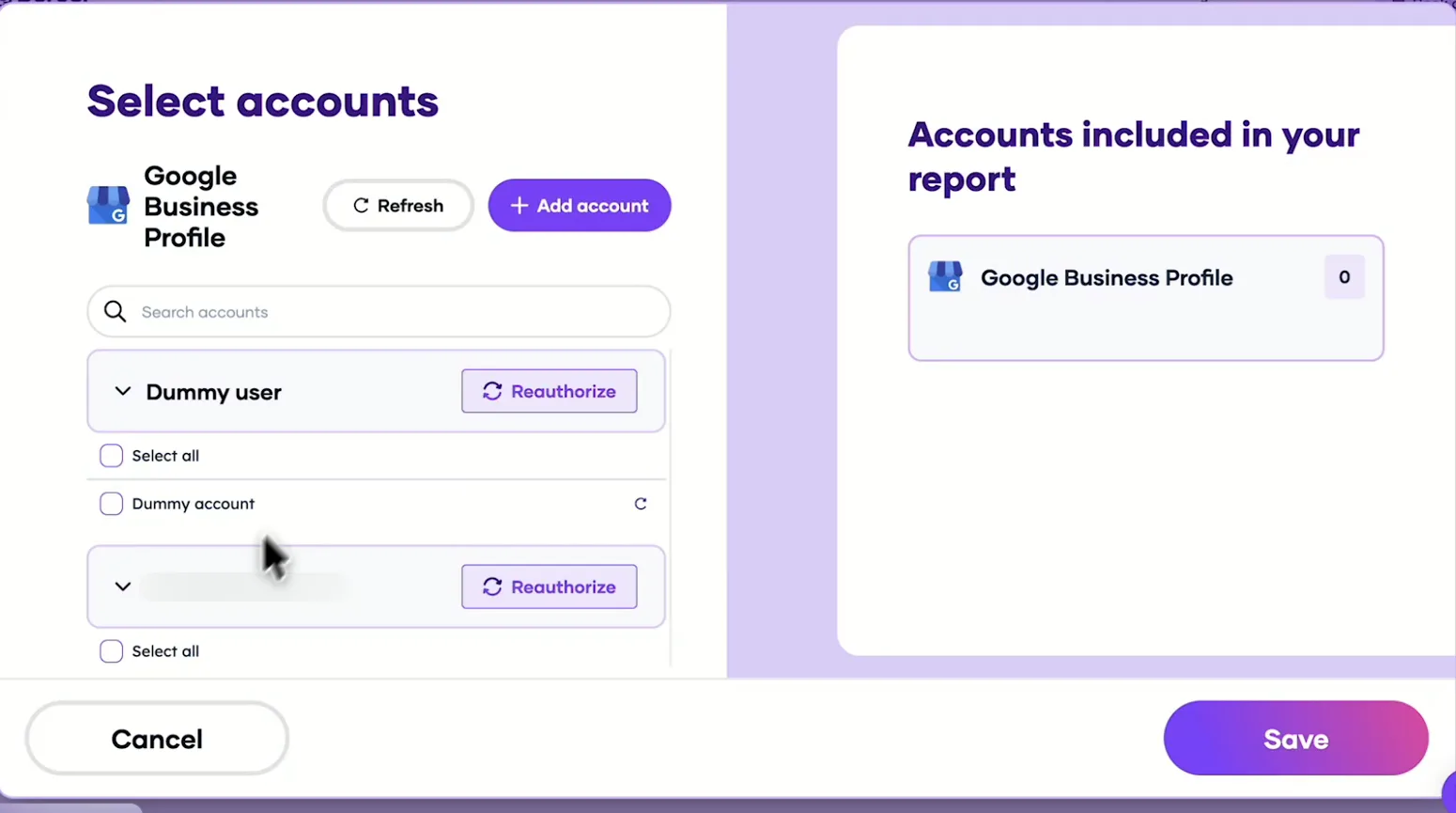
    Sign up free at Porter, then pick Google Business Profile as the source, sign in with Google and tick the Business Profile permission. Select the locations ChatGPT should read, then pick ChatGPT as the destination.

  2. Step 2: Add the Business Profile connector to ChatGPT

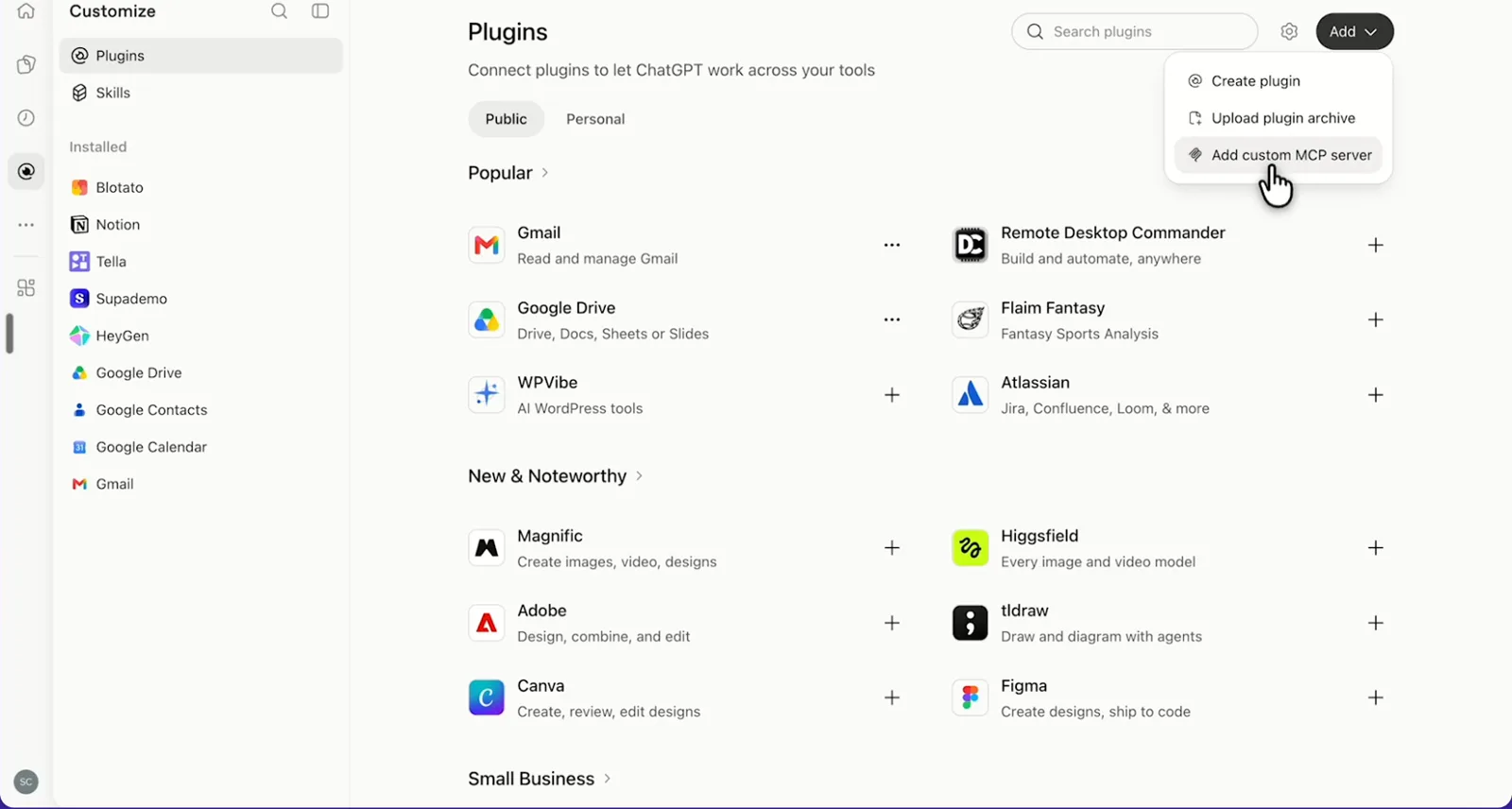
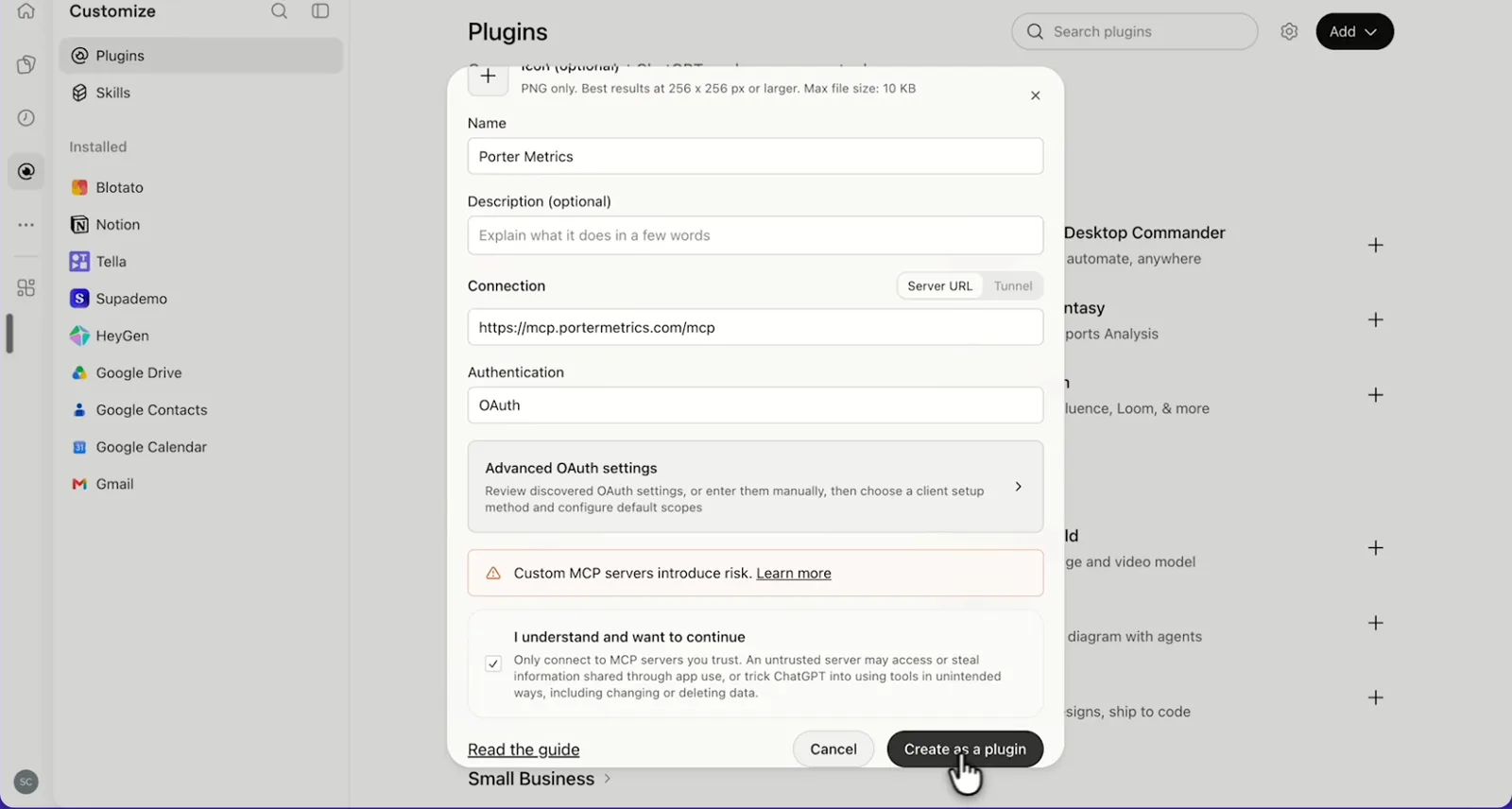
    In ChatGPT, open Customize › Plugins, click Add and choose Add custom MCP server. On Business, an admin does this from Workspace settings › Apps › Create. Name it Porter Metrics, paste this URL as the Server URL and keep OAuth as the authentication:

    MCP URL
    https://mcp.portermetrics.com/mcp

    Tick “I understand and want to continue”, then select Create as a plugin.

  3. Step 3: Ask ChatGPT about your Business Profile

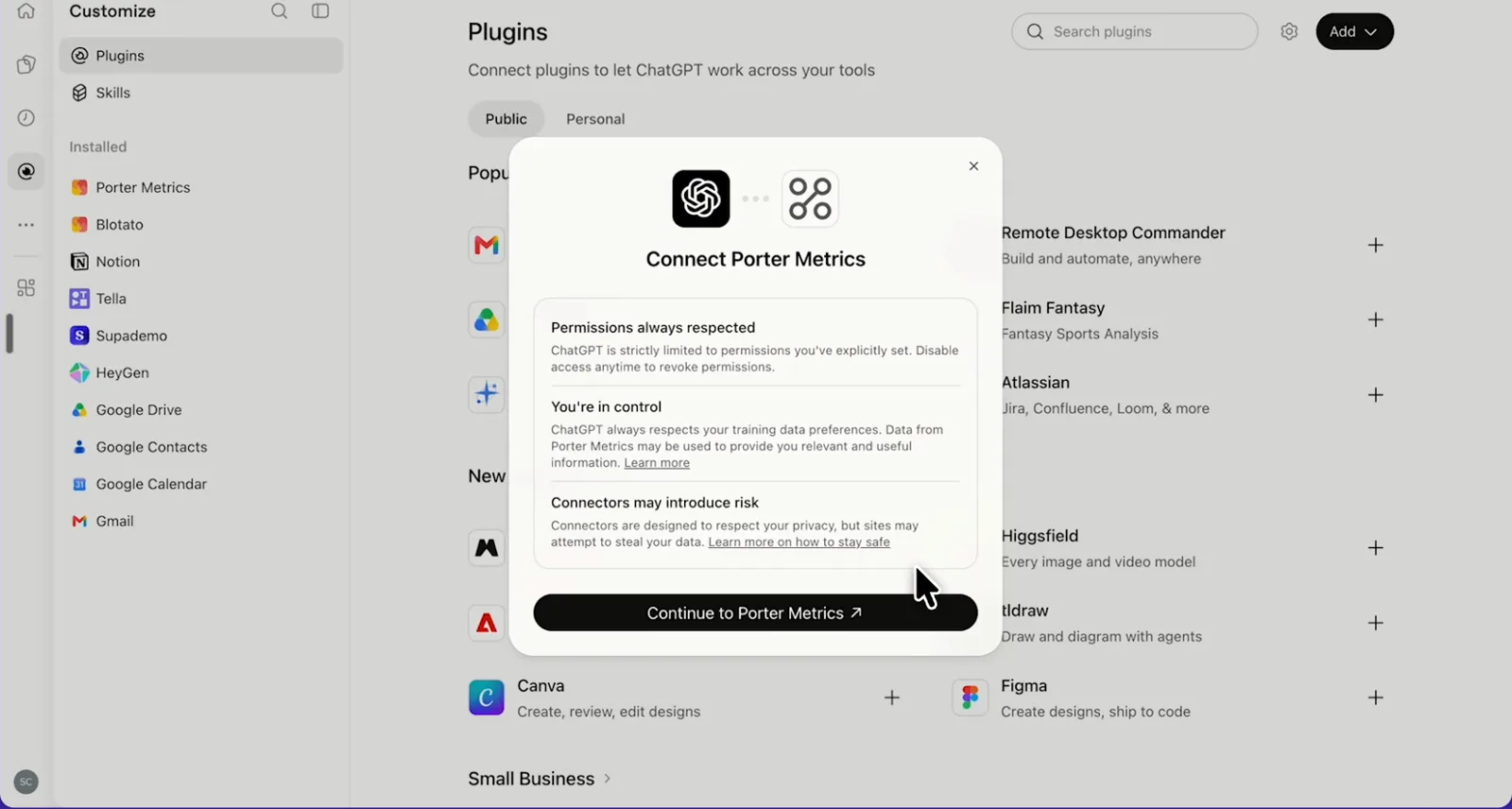
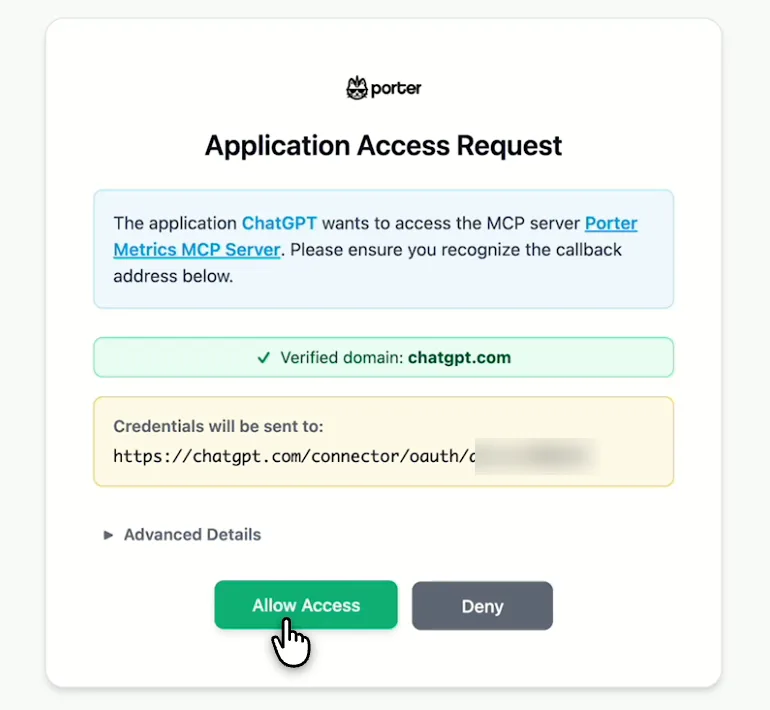
    Next, select Continue to Porter Metrics, sign in to Porter and click Allow Access. Then select Try in chat and paste this prompt:

    Prompt
    List my Google Business Profile locations with Location name, Store code and Locality, then show Total impressions, Phone calls, Directions requests and Website clicks per location for the last 30 days ending 4 days ago.

Guides and videos

app.portermetrics.com / create
Google screen where you allow Porter Metrics to manage your Google business listings
First, sign in with Google and allow access to your listings.
Porter's Select accounts window for Google Business Profile with a demo account
Then, pick the locations Claude can read and save.
ChatGPT's Plugins page with the Add menu open on Add custom MCP server
In ChatGPT, open Customize, then Plugins, and choose Add custom MCP server.
ChatGPT's Add custom MCP server form with the name Porter Metrics, Porter's MCP URL and OAuth filled in
Then, paste Porter's MCP URL, keep OAuth, tick the box and select Create as a plugin.
ChatGPT's Connect Porter Metrics window with the Continue to Porter Metrics button
Next, ChatGPT asks you to continue to Porter Metrics to sign in.
Porter's Application Access Request screen asking you to let ChatGPT use the Porter MCP server
Finally, sign in to Porter and select Allow Access.
If you prefer video, watch the whole Google Business Profile to ChatGPT setup (1:36, no sound).
Interactive walkthrough, so you can click along here
02Use cases and prompts

What you can ask ChatGPT

Each use case comes with a prompt to copy, the fields it uses from the fields list and who it’s for. Prompts end 4 days ago, because Google publishes profile views and actions late. On Business, Enterprise or Edu, ChatGPT can also make the changes you confirm; on Pro it reads and recommends.

Can ChatGPT rank locations by calls, directions and website clicks?

The problemOne store’s calls fell off weeks ago, and nobody caught it because checking every profile’s Performance tab takes an afternoon.

What ChatGPT doesChatGPT ranks every location by calls, direction requests and website clicks for the last 30 complete days, with actions per 100 profile views. It names the locations that get seen but not chosen. If one location errors on performance, ask for it on its own.

What you getYou then know which listings to fix first, without opening a single profile.

Prompt
For all my Google Business Profile locations, show Location name, Store code, Total impressions, Phone calls, Directions requests and Website clicks for the 30 days ending 4 days ago. Add calls + directions + website clicks per 100 impressions, rank by that rate and flag the 3 lowest.

For: multi-location marketers · local SEO agencies

Fields used: Location nameStore codeTotal impressionsPhone callsDirections requestsWebsite clicks

Do customers find you on Google Maps or Google Search, on mobile or desktop?

The problemYour earlier reports split direct and discovery searches. Now you can’t tell if a store is found on Maps or by people who already know its name.

What ChatGPT doesChatGPT splits profile views into Search and Maps, mobile and desktop, per location and month, then lines that up against calls and direction requests. Note that Google counts one person once a day per device and surface. You see whether each store is a Maps business or a Search business.

What you getNow you know where each location’s local SEO work belongs: either Maps signals like categories and photos, or Search content.

Prompt
For each Google Business Profile location, show Month and year, Impressions on mobile maps, Impressions on desktop maps, Impressions on mobile search, Impressions on desktop search, Phone calls and Directions requests for the last 3 complete months. Tell me which locations get most of their views on Maps and whether that's where their direction requests come from.

For: local SEO agencies · multi-location marketers · small-business owners

Fields used: Month and yearLocation nameImpressions on mobile mapsImpressions on desktop mapsImpressions on mobile searchImpressions on desktop searchPhone callsDirections requests

Can ChatGPT find reviews needing a reply and reply to them?

The problemReviews sit unanswered for weeks at the busiest locations, because nobody owns the reply queue across profiles.

What ChatGPT doesChatGPT lists the last 30 days of reviews with no reply, oldest first, and drafts a short reply for each in your tone. On Business, Enterprise or Edu, Porter posts only the replies you confirm. Translated reviews come with both Google’s translation and the original in one field.

What you getThe weekly reply round across every location then turns into one read-through of drafts.

Prompt
List reviews from the last 30 days across my Google Business Profile locations where Review reply comment is empty: Location name, Review ID, Reviewer name, Review star rating (Number), Review creation date and Review comment, oldest first. Draft a 2–3 sentence reply for each — thank 4–5 star reviewers for something they mentioned, and for 3 stars or less apologise and invite them to contact us — and wait for my approval before posting any.

For: local SEO managers · agencies · small-business owners

Fields used: Location nameReview IDReviewer nameReview star rating (Number)Review creation dateReview commentReview reply comment
Actions: review_list · review_reply

Can ChatGPT sum up what 1- and 2-star reviews say?

The problemThe star rating slips at one store, but reading every low review to find out why never makes the to-do list.

What ChatGPT doesChatGPT reads the text of the quarter’s low-star reviews and groups them into themes such as wait time, staff or parking. It also adds counts and short quotes per location. Then it compares each location’s rating for the quarter with its all-time rating, because Total average review rating ignores the dates you pick.

What you getYou get a short list of what to fix at each store, in customers’ own words.

Prompt
For each Google Business Profile location, read reviews from the last 90 days with Review star rating (Number) of 2 or less: Review creation date and Review comment. Group the complaints into themes with a count and one short quote each. Then, in a second table, show Average review rating and Total reviews time frame for the same 90 days next to Total average review rating.

For: local SEO managers · multi-location marketers

Fields used: Location nameReview star rating (Number)Review creation dateReview commentAverage review ratingTotal reviews time frameTotal average review rating

Can ChatGPT write the monthly local SEO report for every location?

The problemMonth-end means downloading each location’s performance, pasting it into a sheet and then rewriting the same client summary.

What ChatGPT doesChatGPT compares this month with last month for each location: profile views, calls, direction requests, website clicks, new reviews and rating. It then ends with three takeaways you can paste into a client email or deck.

What you getOne prompt replaces the month-end download, while the follow-up turns it into a view you can send to the client.

Prompt
For each Google Business Profile location, compare last complete month with the month before: Total impressions, Phone calls, Directions requests and Website clicks with % change. Then, in a second table, show Total reviews time frame and Average review rating for both months. End with three takeaways for a client report.
Then ask
Prompt
Turn this into a one-page dashboard I can share with the client.

For: local SEO agencies · marketing leads

Fields used: Month and yearLocation nameTotal impressionsPhone callsDirections requestsWebsite clicksTotal reviews time frameAverage review rating

Can ChatGPT find listings missing a phone, website or hours?

The problemA franchisee changed a phone number and a duplicate listing came back, but you heard about it from a customer who called the wrong store.

What ChatGPT doesChatGPT lists every location’s address, phone, website and store code, as well as status flags and regular hours. It also flags empty fields, pending edits, duplicates and locations not marked open. On Business, Enterprise or Edu, ChatGPT can then update the description, website or phone you confirm, while you edit hours in Business Profile as usual.

What you getA listing audit you’d run by hand once a quarter becomes a check you can run before every client call.

Prompt
List all my Google Business Profile locations with Location name, Locality, Address lines, Primary phone, Website URL, Store code, Location has pending edits, Location state is duplicate and Open information status. Flag any empty phone or website, pending edits, duplicates and locations not open. Then, in a second table, show Regular operating open days and Regular operating open hours and flag locations with no hours.

For: multi-location marketers · local SEO agencies

Fields used: Location nameLocalityAddress linesPrimary phoneWebsite URLStore codeLocation has pending editsLocation state is duplicateOpen information statusRegular operating open daysRegular operating open hours (regularOperatingOpenHours). Action (optional): location_update

Can ChatGPT draft and publish a weekly Google post for each location?

The problemThe flagship location posts every week while the other profiles look abandoned, because nobody writes one post per location.

What ChatGPT doesChatGPT drafts an update, offer or event post with a call to action per location, as well as an optional photo from a public link. On Business, Enterprise or Edu, Porter publishes the drafts you confirm, so a weekly post per location takes one prompt.

What you getEvery location keeps a fresh post, and your weekly job is reading drafts rather than writing them.

Prompt
For each of my Google Business Profile locations, show Location name, Store code and Website URL. Draft a 'What's new' update of under 300 characters for each, with a Learn more button to its Website URL, show me the drafts, and publish only the ones I approve.

For: small-business owners · local SEO agencies

Fields used: Location nameStore codeWebsite URL
Actions: post_create · post_update · media_create

Do website clicks turn into website sessions? (Google Analytics 4)

The problemThe profile shows website clicks climbing, but in GA4 those visits disappear into google / organic with everything else.

What ChatGPT doesBefore you ask, connect GA4 in Porter too, next to your Business Profile locations. ChatGPT then puts weekly Business Profile website clicks next to GA4 sessions and engaged sessions from google / organic. Without UTM tags on the profile’s website link, GA4 counts these visits inside google / organic, so compare trends, not totals.

What you getYou can show a client whether profile clicks reach the site before you argue for UTM tags on every listing.

Prompt
By Week and year for the last 12 complete weeks, show Google Business Profile Website clicks for all locations next to Google Analytics 4 Sessions and Engaged sessions where Session source / medium is google / organic. Tell me whether the two trends move together.

For: marketing leads · local SEO agencies

Fields used: Week and yearWebsite clicksSessionsEngaged sessionsSession source / medium
03Why Porter

Why Porter for Google Business Profile in ChatGPT

Google has no official Google Business Profile MCP: Google Cloud’s list of supported MCP products covers BigQuery, Cloud SQL and Maps Grounding Lite. For public place details, such as any business’s address or route time, Google’s Maps Grounding Lite MCP server fits better. You can run both.

✓

Every location in one answer

ChatGPT compares every location you own or manage in one answer, with Location name and Store code as columns, instead of one Performance tab at a time.

⊞

Read and change your profiles

ChatGPT reads every location on any plan. On Business, Enterprise or Edu, it drafts review replies, posts and listing updates, and Porter sends only the ones you confirm. On Pro it reads and recommends.

⚙

145 ready-made fields

ChatGPT gets named fields for Search and Maps profile views, calls, direction requests, website clicks, bookings, reviews and replies, plus 13 actions for locations, reviews and posts.

Aa

Business Profile next to GA4

Ask about profile clicks next to GA4 sessions, Search Console and Google Ads, together with your other sources from all ChatGPT connectors.

↻

One URL, nothing to host

Sign in with Google in Porter and add one MCP URL to ChatGPT on the web. A community server such as satheeshds/gbp-review-agent on GitHub needs a Google Cloud project, approved API access and a server you run.

✓

One connection, every destination

The same locations in Porter’s Business Profile connector also feed Claude, Data Studio and BigQuery, at no extra cost.

⊞

Two years of profile performance

Google serves Business Profile performance as daily values. Porter returned them 2 years back in tests, plus every review on the listing, so on paid plans ChatGPT compares this month’s calls and direction requests with last year’s.

⚙

Live dashboards, not only chat answers

Ask ChatGPT for a dashboard and Porter’s AI dashboards publish it at its own link, synced automatically and ready to share. Official MCP servers answer inside the chat and stop there.

04Dashboard

Dashboard template

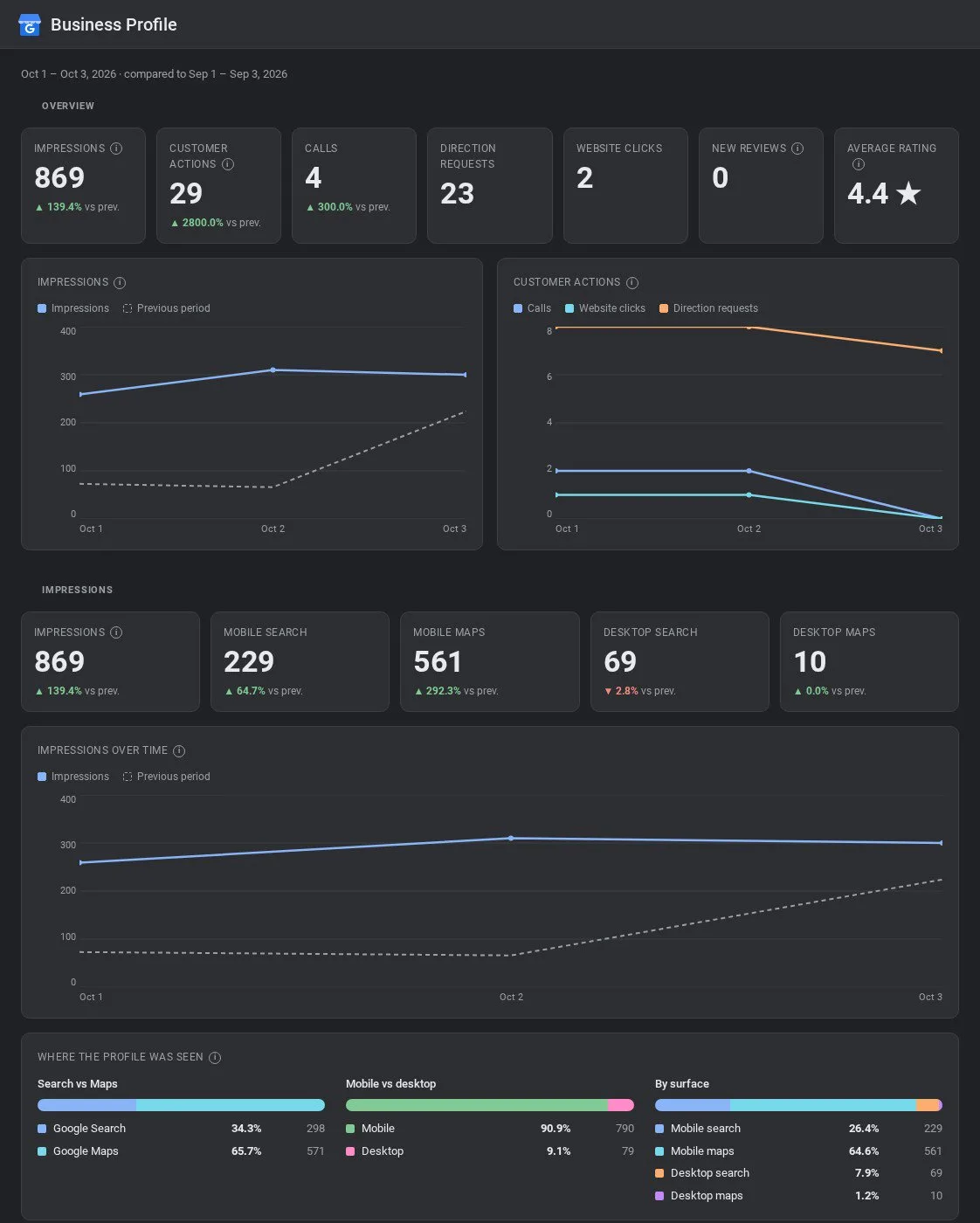
Want a shared view instead of a ChatGPT chat? Porter’s free Business Profile dashboard templates show profile views, calls and direction requests, as well as website clicks and reviews by location. For reviews, start from the Business Profile reviews dashboard instead.

AI dashboards

Build a live Google Business Profile dashboard from the chat

Describe the dashboard in one sentence and Porter builds it. A client-ready dashboard in minutes, with no chart dragging and no BI tool to learn. Ask ChatGPT:

Prompt
Build a live Google Business Profile dashboard for my account with the last 30 days, the main KPIs and a weekly trend.
Live URLEach dashboard at its own link: no login, no app, no download
Auto-syncFresh Google Business Profile data, nobody re-exports each period
Scheduled deliveryEmail or PDF sends on a set day
White labelYour logo and branding for clients
Sharing permissionsView or edit access per person
05Pricing

Pricing

You can start free, since Porter’s Google Business Profile connector for ChatGPT comes with every plan. Use the calculator for your number of accounts, or see Porter pricing for every plan.

What you get

  • Free plan: never expires, with unlimited connected accounts and the last 15 days of data in ChatGPT (30 days in Data Studio and Sheets)
  • Reporting: from $12.50 per account a month billed annually, or $15 month to month for one account
  • Billing: every 10 Business Profile locations count as one account, with volume discounts and no per-seat fee
  • Changes: 1 AI credit per completed change you confirm on Business, Enterprise or Edu; failed tasks are free, and the Free plan includes 100 credits a month
  • Trial: 14 days of full access, no card

Price calculator

$33.33/mo$6.67 per account

An account is one ad account, Stripe account, store, page or GA4 property. The Free plan never expires and has unlimited accounts, with the last 15 days of data in AI chats.

06Data and actions

Google Business Profile data and actions in ChatGPT

The Google Business Profile connector gives ChatGPT 145 fields, including listing details, hours, profile views, calls, direction requests, website clicks, bookings, reviews and replies. It also gets 13 actions for locations, reviews and posts. The full fields list shows every label and ID.

The 12 Business Profile fields ChatGPT uses most

FieldWhat it's for
Location name · Store codelocationName · storeCodeWhich location each row belongs to
Total impressionstotalSearchImpressionsProfile views, the Performance tab's "Views"
Impressions on mobile maps · desktop maps · mobile search · desktop searchImpressionsMobileMaps · ImpressionsDesktopMaps · ImpressionsMobileSearch · ImpressionsDesktopSearchProfile views by surface and device, one person counted once a day
Phone callsactionsPhoneClicks on the call button
Directions requestsactionsDrivingDirectionsDirection requests to the location
Website clicksactionsWebsiteClicks on the profile's website link
BookingsBusinessBookingsBookings through Reserve with Google
Review comment · Review star rating (Number) · Review creation datereviewComment · reviewIntegerRating · reviewCreationTimeWhat each review says, its stars and date
Review reply comment · Review Time to Respond (Hours)reviewerReplyComment · reviewTimeToRespondHoursYour reply and how long it took
Average review rating · Total average review ratingaverageReviewsStarRatingTimeFrame · averageRatingRating for the dates you pick, and all-time
Total reviews time frame · Total reviewstotalReviewsTimeFrame · totalReviewCountNew reviews in the period, and all-time count
Primary phone · Website URL · Location has pending edits · Location state is duplicateprimaryPhone · websiteUrl · hasPendingEdits · isDuplicateListing health checks

Can ChatGPT reply to reviews and publish Business Profile posts?

On Business, Enterprise and Edu plans, yes, after you confirm. Porter gives ChatGPT both analytics and write actions, so it replies to reviews and publishes, edits or deletes update, offer, event and alert posts. It also uploads photos or videos from a link and changes the description, website or phone. On Pro, ChatGPT reads the profile and drafts the changes for you to make in Business Profile. Hours, categories, attributes, service areas, Q&A and post scheduling stay in Business Profile, where you handle them as usual.

How fresh is Business Profile data in ChatGPT?

Google publishes profile views, calls, direction requests and website clicks about 3 to 4 days late. Porter reads those days as 0 until they arrive. Reviews and replies show up as soon as they're posted. Listing details and hours, however, are current values. The Free plan reads the last 15 days in ChatGPT (30 days in Data Studio and Sheets), while paid plans have no Porter history cap.

Product stats

WhatGoogle Business Profile connector
Fields145 across listing details, hours, profile views, calls, direction requests, website clicks, bookings, reviews and replies
Actions13 for locations, reviews and posts: review replies, posts, photos and videos, description, website and phone, after you confirm on Business, Enterprise or Edu
ChatGPT plansReads on Pro; reads and changes you confirm on Business, Enterprise and Edu (web, beta)
FreshnessProfile views and actions arrive 3 to 4 days late; reviews and replies as soon as they're posted
HistoryProfile views and actions day by day, 2 years back in Porter's tests; every review on the listing; the last 15 days in ChatGPT on the Free plan (30 days in Data Studio and Sheets)
Rate limits10 edits a minute per profile, set by Google, so ChatGPT works in batches
BillingEvery 10 locations count as one account
AccessGoogle sign-in from a location owner or manager, with the business.manage permission

See all 145 Google Business Profile fields

07Security

Is it safe?

Yes, with confirmations. On Business, Enterprise or Edu, ChatGPT shows you every review reply, post or listing change, and Porter sends only the ones you confirm; on Pro it reads and recommends. Replies and posts go public the moment they're sent, so read each draft. Porter's Google Business Profile connector for ChatGPT only works on locations your Google account owns or manages, while reading data leaves the profile exactly as you set it.

How changes are approved

ChatGPT asks you to confirm changes based on the app's permissions and holds back some high-risk actions for extra care. Review replies and new or deleted posts are permanent through Porter, so edit a reply in Business Profile or delete a post when you need to. Google allows 10 edits a minute per profile (Business Profile API usage limits), so ChatGPT works through many locations in batches. Each completed change uses one AI credit, while Google may review description, website or phone edits before they show.

What the Business Profile connector needs

Porter needs a Google sign-in from either an owner or a manager of the location, as Google's guide to Business Profile owners and managers describes. Then tick the Business Profile permission on Google's consent screen.

Google's Business Profile API has one permission, business.manage, for both reading and editing (Google's OAuth scope for the Business Profile API). Reading data uses that same permission, and ChatGPT still asks you to confirm every change. If ChatGPT says the authorization lost access to a location, reconnect in Porter and tick it again.

08FAQ

FAQ

Before connecting, local teams usually ask about the old Google My Business name, agencies with many locations and Claude. They also ask about Data Studio, ChatGPT's own answers and competitors. The last three answers help with troubleshooting.

Is Google My Business the same as Google Business Profile?

Yes. Google renamed Google My Business to Google Business Profile, so Porter reads the same listing under either name. The Business Profile APIs documentation still sits under the old name, so Porter's connector ID is google-my-business. In other words, GMB and GBP are the same listing.

Can I connect many locations or clients' profiles?

Yes. Select every location you manage when you connect it to Porter. ChatGPT then compares them in one answer, with Location name and Store code as columns. Each location is its own account in Porter, but every 10 locations bill as one.

Can I use Porter in Claude too?

Yes. Porter's MCP URL, the same one behind the Google Business Profile connector for ChatGPT, also works in Claude as a custom connector, with the same Porter account and locations. See Porter's Google Business Profile connector for Claude for the Claude setup and what it covers.

I already use Porter with Looker Studio. Do I need to reconnect?

No. A location connected in Porter feeds every Porter destination, including ChatGPT and the Business Profile connector for Data Studio, at no extra cost. Just add Porter's MCP URL to ChatGPT, then ask. The Business Profile to BigQuery connector also uses the same connection.

Will this help my business show up in ChatGPT's answers?

Porter lets you analyze and manage your own profile in ChatGPT. Whether ChatGPT mentions your business when someone asks for a recommendation depends on what's published about it on the web, including your Business Profile.

Can ChatGPT read competitors' Business Profiles?

Porter reads performance for the locations your Google account owns or manages, so a competitor's calls, views and reviews stay with that competitor. Public details of any business, such as address and hours, come from Google's Maps tools, which you can run alongside Porter.

Troubleshooting

Why don't the numbers match the Performance tab?

ChatGPT's numbers through Porter differ from the Performance tab for four reasons. The tab's Views equals Porter's four impression fields added together, and the latest 3–4 days read 0 until Google publishes them. Total reviews and Total average review rating are also all-time. And Google's Business Profile performance help says paid results count too.

Why does a field come back as 0 or empty?

Drop the field and ask for profile views, calls or reviews instead. An empty or 0 field usually means Google retired the metric or Porter doesn't read it yet: Photo views, Conversations and Food orders return 0 and Followers fails, while bookings read 0 without a booking partner. An empty phone or website was never filled in.

Why does ChatGPT return no data for a location?

Reconnect in Porter and tick the Business Profile box again, then check that the profile is verified and your Google account is an owner or manager. ChatGPT returns no data when one of those is missing or the authorization lost access to that location. If one location errors only on performance, tell Porter support.


09Next

More ChatGPT connectors

Porter also brings your ad and analytics sources into ChatGPT, each with its own prompts, fields and limits. Browse all ChatGPT connectors or open a related page below.

Not only ChatGPT. Send Google Business Profile data anywhere

The same Porter account and connection also send Google Business Profile data to these destinations, at no extra cost.

Try it on your own locations

Once the Google Business Profile connector is in ChatGPT, every location answers in one chat, so the profile-by-profile check is gone. Ask which stores lost calls, which reviews are waiting for a reply and which listings lost a phone number, then fix it right there.

Free plan · 14-day trial · No card needed

Local SEO agencies: one monthly report prompt covers every client location.

Multi-location marketers: a dropped call count or a missing phone shows up during the week it happens.

Small-business owners: every unanswered review gets a draft reply, while posts stop going stale.