






ActiveCampaign connector for ChatGPT

Use Porter’s ActiveCampaign connector for ChatGPT to rank campaigns, audit automations, review deals and tag contacts you confirm on Business, Enterprise or Edu, next to GA4.

  • Rank campaigns by opens, clicks and unsubscribes
  • See which automations still get contacts
  • Tag contacts and add them to an automation
  • Match email clicks to GA4 sessions and key events
G2★★★★★Rated 4.6/5 on G2 (288 reviews, October 2026)

By Porter Metrics team · Last updated October 20, 2026

ChatGPTPorter connected
List campaigns sent in the last 30 days with Sends, Unique Opens and Subscriber Clicks.
Porter / ActiveCampaign / Trailgear Demo✓ 4 rows
October product drop earned the most clicks (612). Webinar reminder had the best open rate.
CampaignSendsUnique opensClicks
October product drop18,4007,180612
Webinar reminder6,2003,410288
Win-back offer9,8002,650174
Monthly newsletter21,3007,450401
Demo data, Trailgear Demo account
236 ActiveCampaign fields
01Setup

How to connect ActiveCampaign to ChatGPT

Porter’s ActiveCampaign connector for ChatGPT takes three steps, with no code or server. Paste your API key and account URL in Porter, add the MCP URL to ChatGPT as a custom MCP server and ask. For more screenshots, see the step-by-step ActiveCampaign to ChatGPT tutorial. MCP (Model Context Protocol) is the open standard ChatGPT uses to connect to tools.

What you need first

  • You need an ActiveCampaign API key and account URL from Settings › Developer (ActiveCampaign’s API key guide), as well as a free Porter account and a ChatGPT plan that supports custom MCP servers.
  • Custom MCP servers are in beta in ChatGPT on the web, so set up Porter and ask your questions from a browser. On Business, Enterprise or Edu, an admin or owner turns on developer mode, and then ChatGPT can also make the changes you confirm. On Pro, you turn on developer mode yourself, and ChatGPT reads and recommends (OpenAI’s guide to custom MCP apps).
  • Works in ChatGPT on the web (chatgpt.com, custom MCP servers in beta) and in Codex, with the same Porter MCP URL.
  1. Step 1 · Connect ActiveCampaign in Porter

    Sign up free at Porter, pick ActiveCampaign as the source and paste your API key and URL, then pick ChatGPT as the destination.

  2. Step 2 · Add the connector to ChatGPT

    Then, in ChatGPT, open Customize › Plugins, click Add and choose Add custom MCP server. On Business, an admin does this from Workspace settings › Apps › Create. Name it Porter Metrics, paste this URL as the Server URL and keep OAuth as the authentication:

    MCP URL
    https://mcp.portermetrics.com/mcp

    Tick “I understand and want to continue”, then select Create as a plugin.

  3. Step 3 · Ask ChatGPT about ActiveCampaign

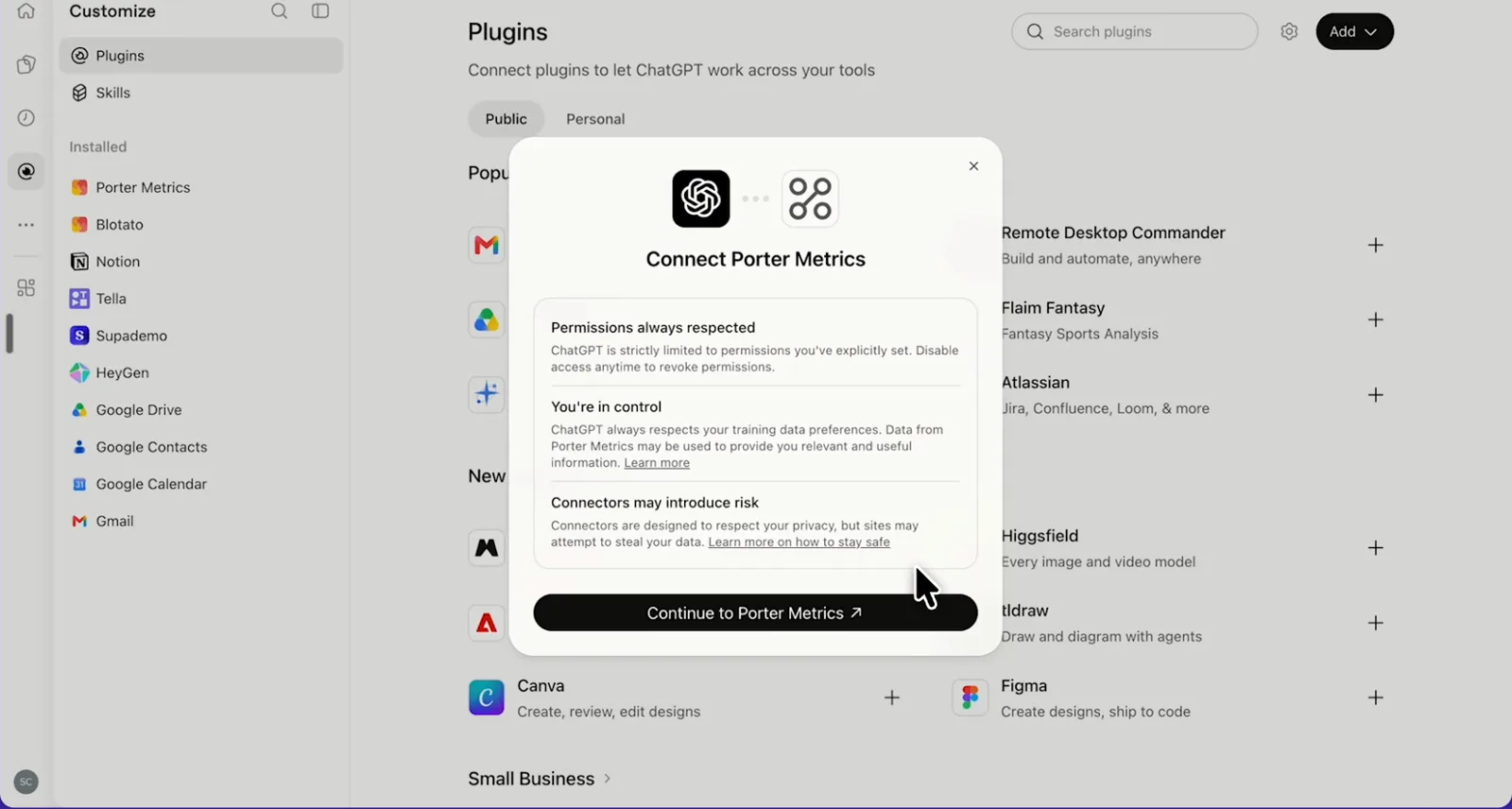
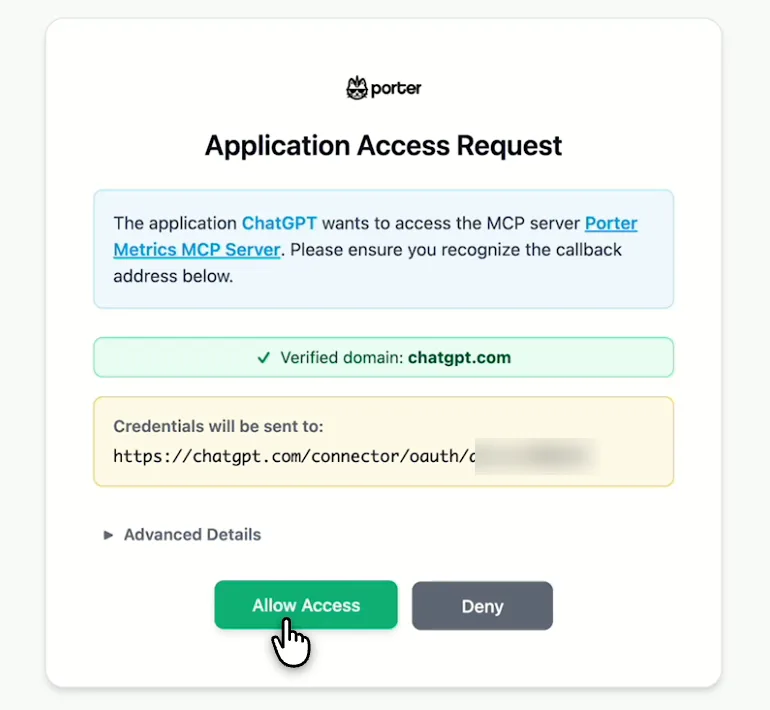
    Next, select Continue to Porter Metrics, sign in to Porter and click Allow Access. Then select Try in chat and paste this prompt:

    Prompt
    From my ActiveCampaign account, show Total Current Contacts, then list campaigns with a Campaign Send Date in the last 30 days with Campaign Sends, Campaign Unique Opens and Campaign Subscriber Clicks.
app.portermetrics.com / create
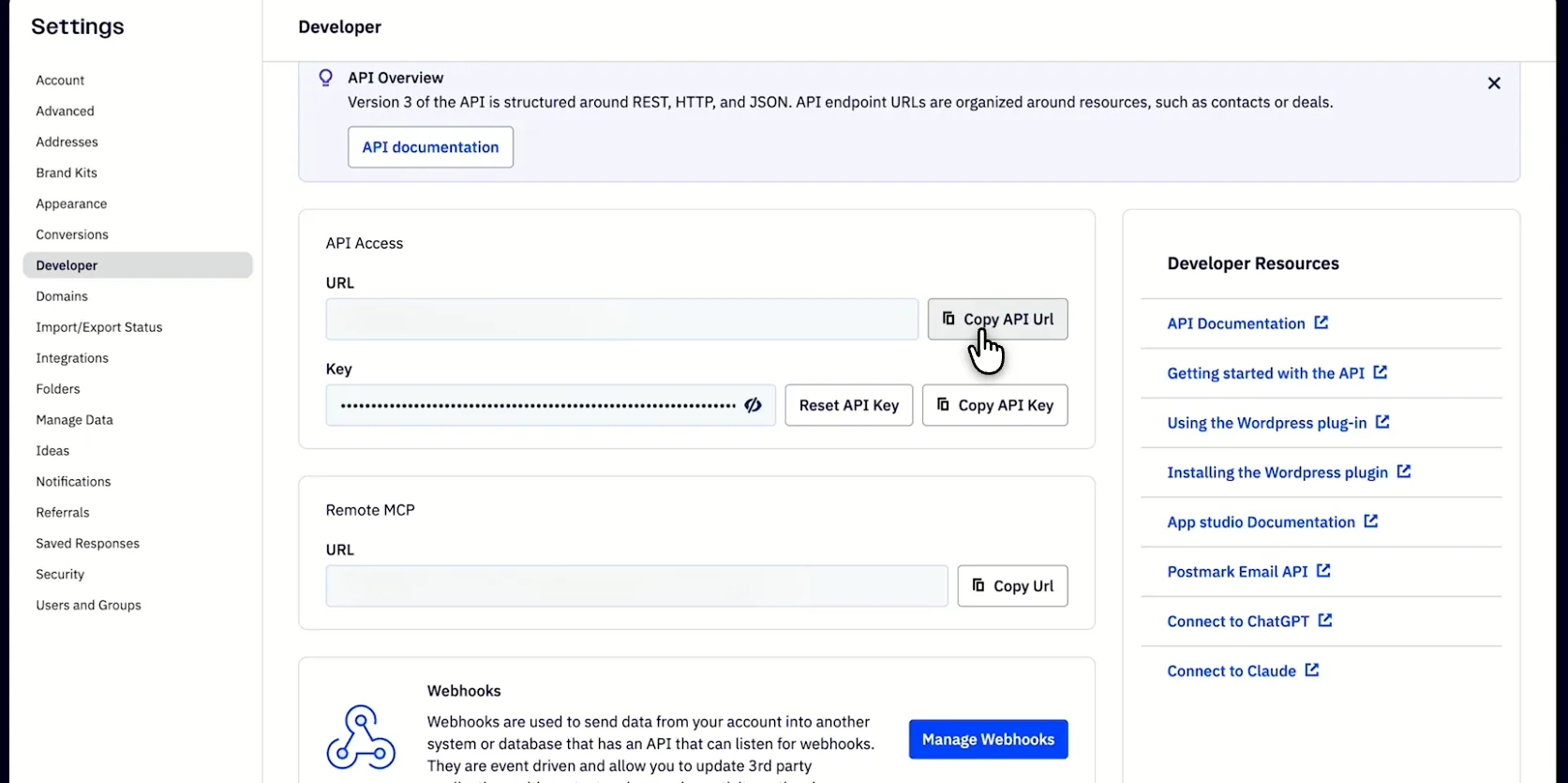
ActiveCampaign Settings > Developer page with the API URL and API key you paste into Porter
First, copy the API URL and key from Settings > Developer in ActiveCampaign.
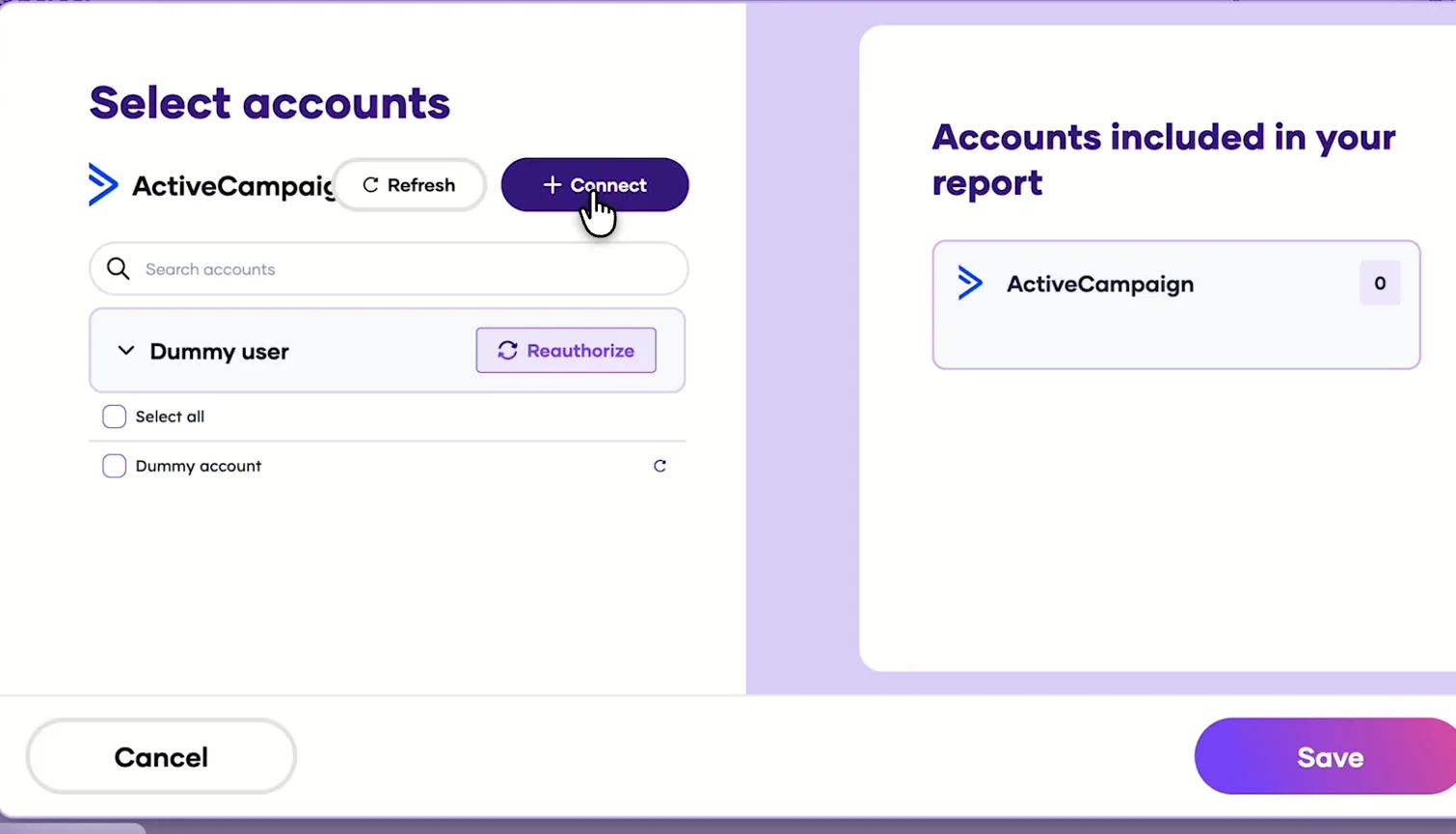
Porter's Select accounts window for ActiveCampaign with a demo account ready to save
Then, back in Porter, pick the accounts Claude can read and save.
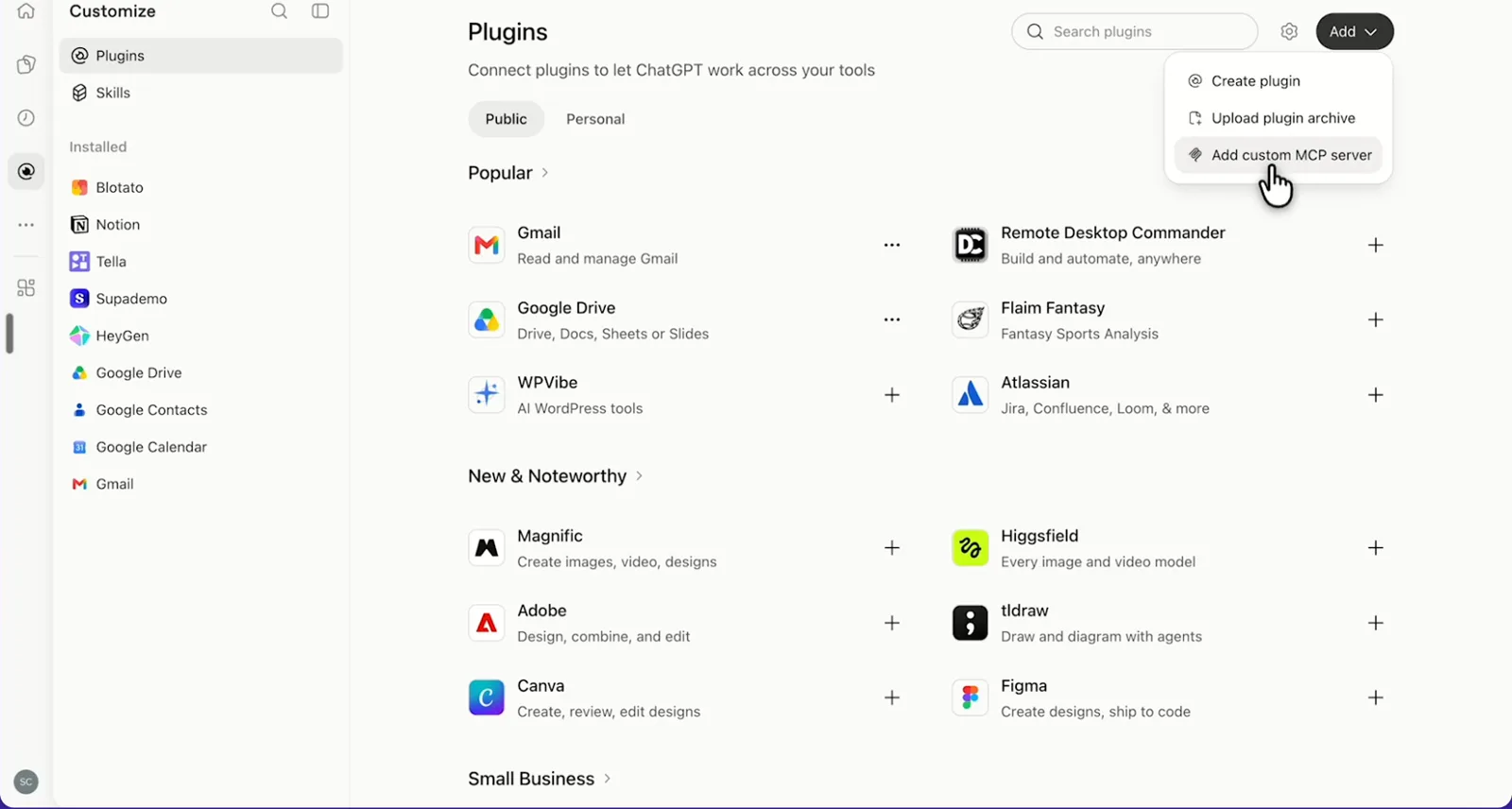
ChatGPT's Plugins page with the Add menu open on Add custom MCP server
In ChatGPT, open Customize, then Plugins, and choose Add custom MCP server.
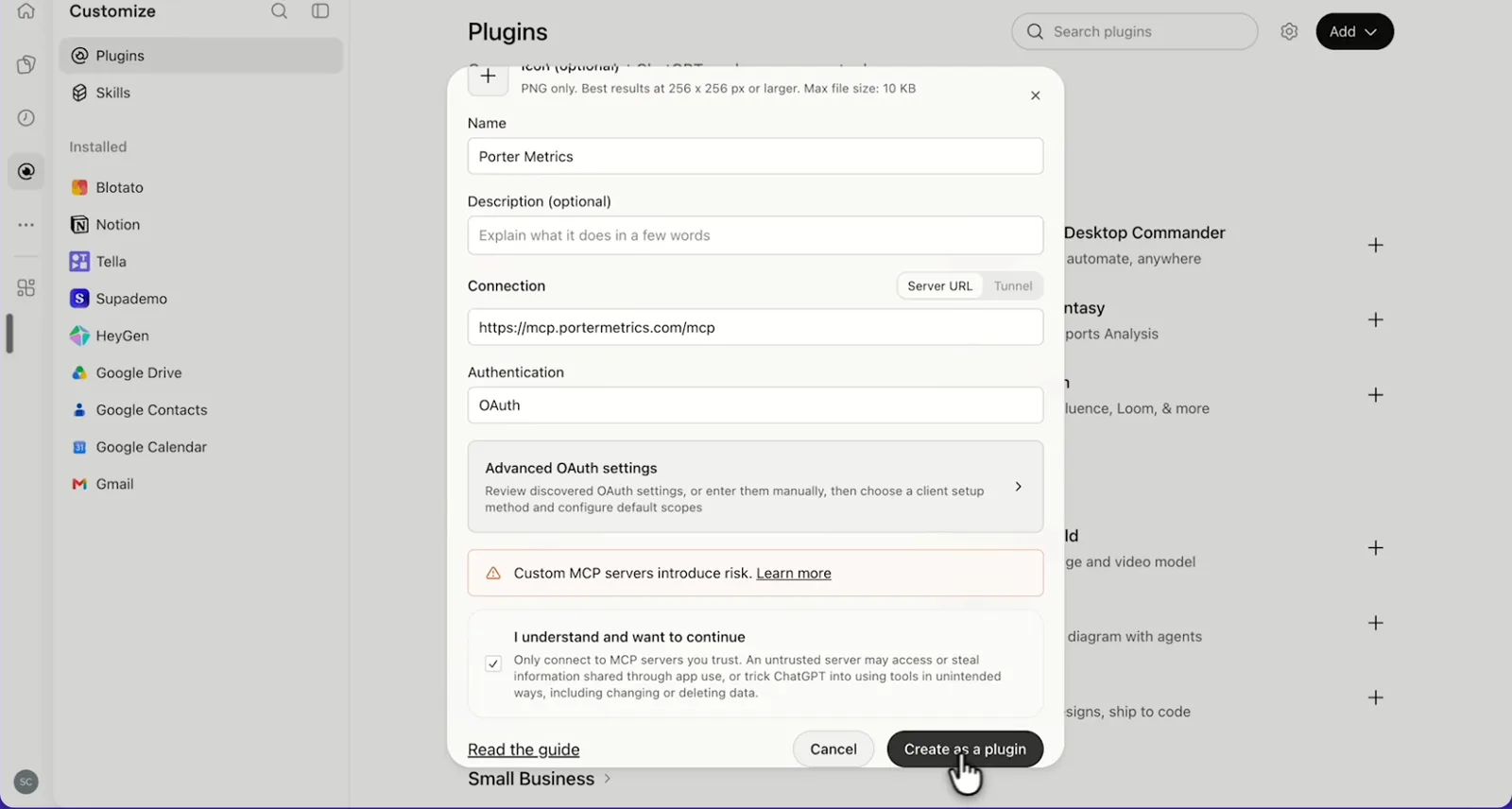
ChatGPT's Add custom MCP server form with the name Porter Metrics, Porter's MCP URL and OAuth filled in
Then, paste Porter's MCP URL, keep OAuth, tick the box and select Create as a plugin.
ChatGPT's Connect Porter Metrics window with the Continue to Porter Metrics button
Next, ChatGPT asks you to continue to Porter Metrics to sign in.
Porter's Application Access Request screen asking you to let ChatGPT use the Porter MCP server
Finally, sign in to Porter and select Allow Access.
If you prefer video, watch the whole ActiveCampaign to ChatGPT setup (1:52, no sound).
Interactive walkthrough, so you can click along here
02Use cases and prompts

What you can ask ChatGPT

Each use case comes with a prompt to copy, the fields it uses from the ActiveCampaign fields list and who it’s for. The prompts pick campaigns by Campaign Send Date, because ActiveCampaign stores campaign results as lifetime totals. On Business, Enterprise or Edu, ChatGPT can also make the changes you confirm; on Pro it reads and recommends.

Can ChatGPT show which campaigns got the most opens and clicks?

The problemEvery campaign report opens on its own page, so comparing a quarter of sends side by side means copying numbers into a sheet.

What ChatGPT doesChatGPT lists campaigns sent in the last 90 days with sends, unique and verified opens, clicking contacts, unsubscribes and hard bounces. Then it works out rates per send and flags campaigns that lost subscribers.

What you getYou stop opening reports one by one, and the unsubscribe flag shows you which send to review before the next one goes out.

Prompt
From my ActiveCampaign account, list campaigns with a Campaign Send Date in the last 90 days, showing Campaign Name, Campaign Type, Campaign Send Date, Campaign Sends, Campaign Unique Opens, Campaign Verified Unique Opens, Campaign Subscriber Clicks, Campaign Unsubscribes and Campaign Hard Bounces. Work out open, click and unsubscribe rates per send, rank by click rate and flag any campaign where unsubscribes are above 0.5% of sends.

For: email marketers · agencies running client accounts · e-commerce teams

Fields used: Campaign NameCampaign TypeCampaign Send DateCampaign SendsCampaign Unique OpensCampaign Verified Unique OpensCampaign Subscriber ClicksCampaign UnsubscribesCampaign Hard Bounces
Can ChatGPT show how many contacts enter and leave each automation?

The problemAutomations built years ago keep running, and nobody on the team knows which ones still get contacts.

What ChatGPT doesChatGPT lists your automations with contacts entered and exited, how many are still inside and which are active. It also flags active automations that almost nobody enters. Counts cover each automation’s whole life.

What you getThe audit that meant clicking into every automation becomes one list, so you decide which ones to retire or rebuild.

Prompt
List my ActiveCampaign automations with Automation Name, Automation Entered and Automation Exited, and tell me which ones are active. Show how many contacts are still inside each (Entered minus Exited), rank by that number and list active automations with fewer than 10 contacts entered.

For: marketing ops · lifecycle marketers

Fields used: Automation NameAutomation IdAutomation EnteredAutomation Exited
Action: automation_list (status)

Can ChatGPT summarize deal pipeline by stage?

The problemThe deals board shows cards by stage, but someone still types out the weekly pipeline update deal by deal.

What ChatGPT doesChatGPT lists open deals with value, win probability and next date, then looks up your pipeline and stage names. It also groups the deals by stage and lists the ones with no next step.

What you getYou get the pipeline for the sales meeting grouped by stage, while deals missing a next step get called out.

Prompt
List my open ActiveCampaign deals (Deal Status 0) with Deal Title, Deal Group, Deal Stage, Deal Value, Deal Currency, Deal Win Probability, Deal Created Date and Deal Next Date. Look up the pipeline and stage names, group the deals by stage, and list open deals with no Deal Next Date.

For: B2B marketers · CRM managers · agencies managing a client CRM

Fields used: Deal TitleDeal StatusDeal GroupDeal StageDeal ValueDeal CurrencyDeal Win ProbabilityDeal Created DateDeal Next Date
Action: pipeline_list (names)

Do email clicks turn into GA4 sessions and key events?

The problemActiveCampaign says a campaign got clicks, while GA4 says email sessions dropped. But the two reports never sit on one screen.

What ChatGPT doesBefore you ask, connect GA4 in Porter too. ChatGPT then puts each campaign’s link clicks and clicking contacts next to GA4 sessions and key events for that campaign. Your campaigns also need Google Analytics link tracking. Clicks and sessions count differently, so compare campaigns instead of adding the numbers up.

What you getYou see which emails bring people who act on your site, and plan the next send, instead of matching two exports by hand.

Prompt
For ActiveCampaign campaigns with a Campaign Send Date last month, show Campaign Name, Campaign Analytics Campaign Name, Campaign Link Clicks and Campaign Subscriber Clicks. Then from Google Analytics 4, show Sessions and Key events by Session campaign where Session medium is email for the same month. Match the two on Campaign Analytics Campaign Name and Session campaign, and list campaigns with many clicks but few sessions.

For: e-commerce and growth marketers · agencies

Fields used: Campaign NameCampaign Analytics Campaign NameCampaign Send DateCampaign Link ClicksCampaign Subscriber ClicksSession campaignSession mediumSessionsKey events

Can ChatGPT tag contacts and add them to an automation?

The problemAfter every webinar, someone still tags the attendees and drops them into the follow-up automation by hand, one list at a time.

What ChatGPT doesChatGPT finds the contacts on a list and shows you who they are. On Business, Enterprise or Edu, it then creates the tag, applies it and enrolls them in an existing automation once you confirm. It can also save a one-time campaign as a draft and send you a test.

What you getThe follow-up runs from one chat instead of three screens, and you check the list before anyone gets tagged.

Prompt
In ActiveCampaign, find the contacts on my list 'Webinar – October' and tell me how many there are. Then create the tag 'webinar-attended', apply it to those contacts and add them to my 'Post-webinar follow-up' automation. Show me the plan and wait for my OK before you change anything.

For: marketing ops · agencies · small-business owners

Fields used: optional campaign_create
Actions: list_list · contact_list (by list) · tag_create · contact_tag · automation_list · automation_add_contact · campaign_test_send
03Why Porter

Why Porter for ActiveCampaign in ChatGPT

Porter reports on ActiveCampaign next to every other source you connect, and makes the changes you confirm. Need deal notes, custom objects or a contact’s email activity? Use ActiveCampaign’s official MCP server for ChatGPT, and you can run both.

✓

Email results next to GA4 and ads

Ask about ActiveCampaign next to GA4, Google Ads, Meta Ads, HubSpot, Klaviyo and 30+ more sources in one chat, such as campaign clicks against GA4 sessions.

⊞

Changes you confirm

On Business, Enterprise or Edu, ChatGPT tags contacts, enrolls them in automations and drafts, tests or sends one-time campaigns you confirm. On Pro it reads and recommends.

⚙

236 ready-made fields

ChatGPT gets 236 named fields across campaigns, contacts, lists, tags, forms, automations, deals and accounts, plus 13 read actions that look up names such as pipelines and stages.

Aa

Stored copy, unlimited history

Porter answers reports from a stored copy, so they stay clear of ActiveCampaign’s 5-requests-per-second limit. Paid plans keep unlimited history.

↻

One connection, every destination

Add one MCP URL to ChatGPT on the web and Porter runs the rest. The same ActiveCampaign account also feeds Claude, Data Studio, Sheets and BigQuery at no extra cost.

✓

Live dashboards, not only chat answers

Ask ChatGPT for a dashboard and Porter’s AI dashboards publish it at its own link, synced automatically and ready to share. Official MCP servers answer inside the chat and stop there.

04Dashboard

Dashboard template

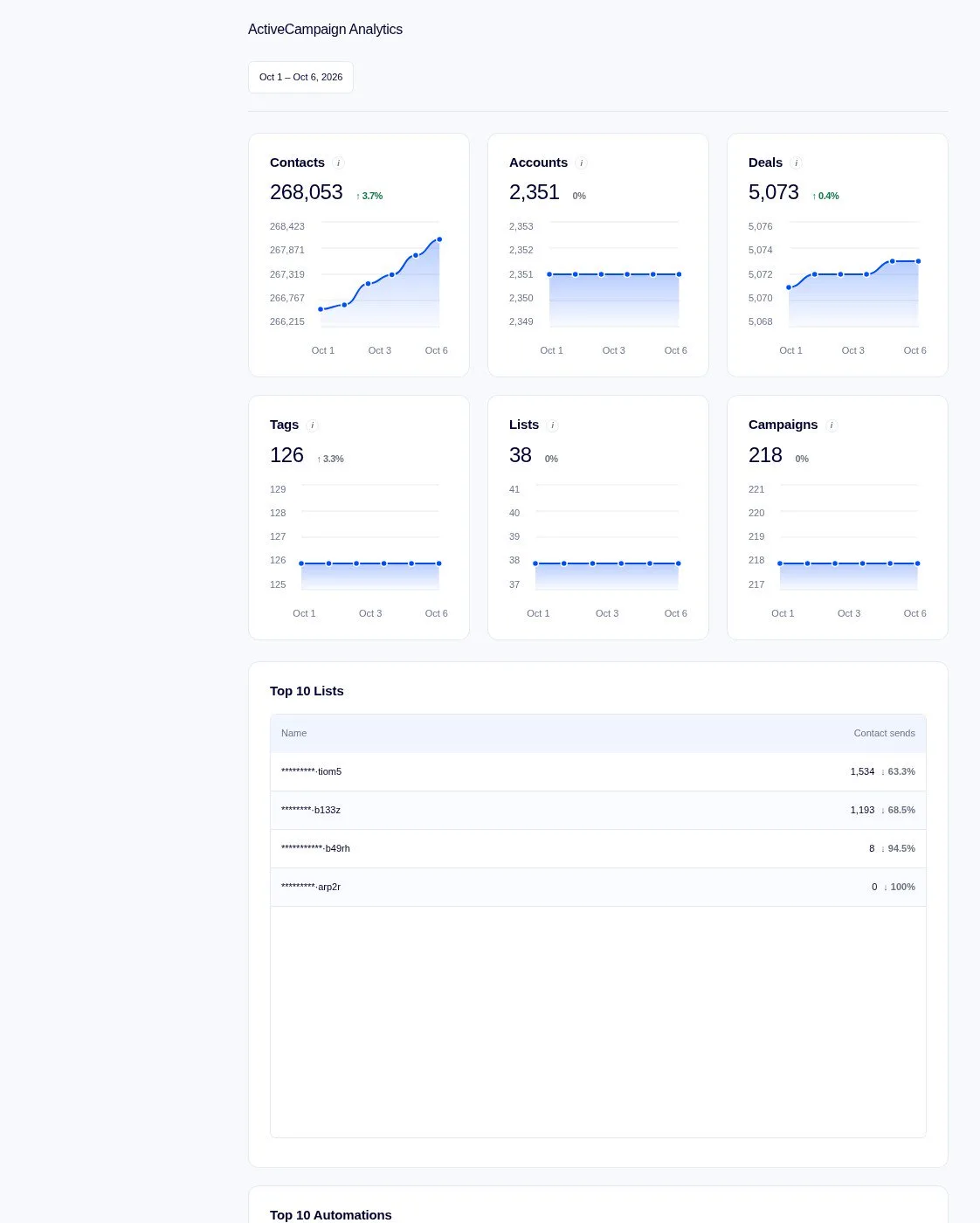
Porter’s free ActiveCampaign dashboard shows account health and email performance as well as deals, tags and lists in one place. Either ask ChatGPT to build the same view live from your account, or open one of the free ActiveCampaign dashboard templates.

AI dashboards

Build a live ActiveCampaign dashboard from the chat

Describe the dashboard in one sentence and Porter builds it. A client-ready dashboard in minutes, with no chart dragging and no BI tool to learn. Ask ChatGPT:

Prompt
Build a live ActiveCampaign dashboard for my account with the last 30 days, the main KPIs and a weekly trend.
Live URLEach dashboard at its own link: no login, no app, no download
Auto-syncFresh ActiveCampaign data, nobody re-exports each period
Scheduled deliveryEmail or PDF sends on a set day
White labelYour logo and branding for clients
Sharing permissionsView or edit access per person
05Pricing

Pricing

You can start free, since Porter’s ActiveCampaign connector for ChatGPT comes with every plan. Use the calculator for your number of accounts, or see Porter pricing for every plan.

What you get

  • Free plan: never expires, with unlimited connected accounts and the last 15 days of data in ChatGPT (30 days in Data Studio and Sheets)
  • Reporting: from $12.50 per account a month billed annually, or $15 month to month for one account
  • Billing: each ActiveCampaign account counts as one account, with volume discounts and no per-seat fee
  • Changes: 1 AI credit per change you confirm on Business, Enterprise or Edu; failed tasks are free, and the Free plan includes 100 credits a month
  • Trial: 14 days of full access, no card

Price calculator

$33.33/mo$6.67 per account

An account is one ad account, Stripe account, store, page or GA4 property. The Free plan never expires and has unlimited accounts, with the last 15 days of data in AI chats.

06Data and actions

ActiveCampaign data and actions in ChatGPT

The ActiveCampaign connector gives ChatGPT 236 fields, including campaign sends, opens, clicks, unsubscribes and bounces, plus contacts, lists, tags, forms, automations, deals and accounts. Porter also adds 43 actions that read and change your account. The full list of ActiveCampaign fields has every label, if you need one.

The 12 ActiveCampaign fields ChatGPT uses most

FieldWhat it's for
Campaign Name · Campaign Send DatecampaignName · campaignSdatePick campaigns by the day they went out
Campaign SendscampaignSend_amtThe base for open, click and unsubscribe rates
Campaign Unique Opens · Campaign Verified Unique OpenscampaignUniqueopens · campaignVerified_unique_opensOpens, with verified opens beside them
Campaign Subscriber Clicks · Campaign Link ClickscampaignSubscriberclicks · campaignLinkclicksClicking contacts; total link clicks
Campaign Unsubscribes · Campaign Hard BouncescampaignUnsubscribes · campaignHardbouncesList health per send
Contact Sends · Contact Created DatecontactSentcnt · contactCdateDaily sends; new contacts
List Name · Contact List Status · Contact List UnsubreasonlistsName · contactListsStatus · contactListsUnsubreasonSubscription status and why people left
Tag Name · Tag Subscriber CounttagName · tagSubscriber_countContacts per tag
Automation Name · Automation Entered · Automation ExitedautomationName · automationEntered · automationExitedLifetime entries and exits per automation
Deal Value · Deal Status · Deal StagedealValue · dealStatus · dealStageOpen, won and lost deals by stage
Form Name · Form Entries · Form ContactsformName · formEntries · formContactsSign-up form results
Total Current ContactstotalCurrentContactsAccount size today, asked on its own

Can ChatGPT send campaigns or change ActiveCampaign contacts?

On Business, Enterprise and Edu plans, ChatGPT creates, updates, tags and deletes contacts and changes list subscriptions after you confirm. It either enrolls contacts in automations, which is how you trigger marketing automations, or removes them. It also edits companies, deals and pipelines, creates lists, tags and custom fields, and drafts, schedules, tests and sends one-time campaigns.

On Pro, ChatGPT reads the account and lists the changes for you to make in ActiveCampaign. You build automations and A/B, RSS or recurring campaigns in ActiveCampaign, then ChatGPT enrolls contacts and reports on the results.

How fresh is the data, and how far back?

Porter answers from a stored copy of your account and tells you when it last refreshed. Because of that, reports stay clear of ActiveCampaign's 5-requests-per-second limit. Campaigns and deals go back to the oldest record, while daily sends were tested two years back.

Product stats

WhatActiveCampaign connector
Fields236 across campaigns, contacts, lists, tags, forms, automations, deals and accounts
Actions43: 13 that read, 30 that change your account after you confirm (Business, Enterprise, Edu)
ChatGPT plansReads on Pro; reads and changes you confirm on Business, Enterprise and Edu (web, beta)
FreshnessStored copy of your account; ChatGPT tells you when it last refreshed
HistoryCampaigns and deals back to the oldest record; daily sends tested 2 years back; 30 days on the Free plan, 15 in AI chats
Rate limitsActiveCampaign allows 5 API requests per second; bulk changes run in steps
Campaign resultsLifetime totals per campaign, picked by Campaign Send Date
AccessOne user's API key, with that user's access

See all 236 ActiveCampaign fields

07Security

Is it safe?

Yes, and you review each step. On Business, Enterprise or Edu, ChatGPT makes only the ActiveCampaign changes you confirm, and on Pro it reads and recommends. Campaign sends, deletes and automation removals are permanent, so check each one before you confirm it. Porter's connector uses one user's API key, so it gets that user's access.

How approvals work

ChatGPT asks you to confirm changes based on the app's permissions and holds back some high-risk actions for extra care. Sends, automation removals and deletes of contacts, deals, lists and tags are final, so test a campaign on one inbox first. Each completed change uses one AI credit, while bulk changes use one per contact.

What the connector needs from ActiveCampaign

Each ActiveCampaign user has their own API key, and Porter gets the access of the user whose key you paste (ActiveCampaign's note that each user has their own API key). If answers come back empty while the account looks connected, enter the key again in Porter.

08FAQ

FAQ

Four common questions come first, including agency accounts, Claude, existing Data Studio users and automatic triggers. Then three fixes for numbers that look wrong or come back empty.

Can I connect several accounts, like an agency?

Yes. Connect each client's ActiveCampaign account in Porter, then ask ChatGPT about one account or compare several in one chat. Porter bills each connected account separately, while one subscription covers every client. A new client then just means one more account.

Can I use Porter in Claude too?

Yes. Porter's MCP URL, the same one behind the ActiveCampaign connector for ChatGPT, also works in Claude as a custom connector, so one connection serves both. Then Claude can read your campaigns and tag contacts through Porter.

See Porter's ActiveCampaign connector for Claude for the Claude setup and what it covers.

I already send ActiveCampaign to Looker Studio with Porter. Do I need to reconnect for ChatGPT?

No. One ActiveCampaign account in Porter feeds every Porter destination, including ChatGPT, at no extra cost. Just add Porter's MCP URL to ChatGPT, then ask. The ActiveCampaign connector for Data Studio and the ActiveCampaign to Looker Studio tutorial keep working as before.

Can ChatGPT act on its own when something changes?

ChatGPT runs when you ask, such as a Monday check of new deals. For instant reactions to a contact or deal change, pair it with ActiveCampaign's own automations. On Business, Enterprise or Edu, ChatGPT enrolls the contacts you confirm, then the automation takes it from there.

Troubleshooting

Why don't the numbers match ActiveCampaign's reports?

Porter returns campaign results as lifetime totals, while ActiveCampaign's reports can filter by date. The Date on a campaign row is its created date, so ask by Campaign Send Date. Also compare like with like: Porter lists Campaign Verified Unique Opens next to Campaign Unique Opens.

Why can't ChatGPT combine these fields?

Ask about one group at a time, then let ChatGPT combine the answers. Porter keeps campaign, contact, deal, list, tag, form and automation fields in separate groups, so each question reads one group. Total Current metrics answer on their own, with no breakdown.

Why does ChatGPT return no data?

Start by entering your ActiveCampaign API key again in Porter, since a key that stopped working still looks connected. Next, check that your plan's history reaches your dates; the Free plan covers 15 days in AI chats. Finally, Account Deal Count returns 0, so ask ChatGPT to count deals from the Deal fields.

09Next

More ChatGPT connectors

Porter connects ActiveCampaign to more than ChatGPT, and ChatGPT to more than ActiveCampaign. Browse all ChatGPT connectors or open a related page below.

Not only ChatGPT. Send ActiveCampaign data anywhere

The same Porter account and connection also send ActiveCampaign data to these destinations, at no extra cost.

Try it on your own account

You're 3 steps from your first question, since the free plan already includes the ActiveCampaign connector for ChatGPT. Start by ranking last quarter's campaigns, checking which automations still get entries, or listing open deals by pipeline stage.

Free forever plan · 14-day full trial · No card

Email marketers: campaign rankings and GA4 sessions from one prompt instead of two exports.

Marketing ops: both the automation audit and the webinar tagging in one chat.

Agencies: every client account answers, so nobody builds a new report.