


Google Search Console connector for Claude Code

Use Porter’s Google Search Console connector for Claude Code to pull queries, pages, clicks and positions into your terminal, then turn them into files, scripts and scheduled SEO reports in your own project.

  • Save queries and pages as CSV in your repo
  • Find pages close to the first page
  • Run a weekly SEO report from a script
  • Join Search Console with GA4 by page
G2★★★★★Rated 4.6/5 from 288 G2 reviews (October 2026) · Used by 1,600+ marketing teams and agencies

By · Last updated November 26, 2026

Claude Codeporter connected
Find queries with Average Position between 8 and 20 and over 500 Impressions in the last 90 days, and save them to reports/striking-distance.csv
porter / Google Search Console / Trailgear Demo✓ 4 rows
Saved reports/striking-distance.csv with 4 queries. best hiking tent has the most impressions at position 11.
QueryImpressionsAvg. position
best hiking tent6,42011.2
ultralight backpack4,1809.6
trekking poles review2,95014.8
camping stove guide1,21018.1
Demo data, Trailgear Demo account
27 Search Console fields
01Setup

How to connect Google Search Console to Claude Code

Connecting Google Search Console to Claude Code takes 3 steps and no API keys: connect your Search Console properties in Porter with Google, add Porter’s MCP server to Claude Code with one command, then sign in from /mcp and ask. The same server also works in Cursor, VS Code and Codex, as Porter’s Google Search Console MCP server page shows. Using the Claude app instead? See the Google Search Console connector for Claude.

Before you start

  • You need Claude Code installed (Anthropic’s Claude Code overview), a free Porter account and a Google account with access to the Search Console property.
  • Works with any Claude model in Claude Code, from Opus to Sonnet and Haiku.
  1. Step 1: Connect Google Search Console in Porter

    Sign up free at Porter, pick Google Search Console as the source and sign in with Google. Tick every property you want Claude Code to read.

  2. Step 2: Add Porter to Claude Code

    In your terminal, run this command. It adds Porter for every project on your machine; drop --scope user to add it to the current project only.

    Terminal
    claude mcp add --transport http --scope user porter https://mcp.portermetrics.com/mcp

    Or, inside Claude Code, install Porter’s plugin, which adds the server and Porter’s skill together: /plugin marketplace add portermetrics/porter, then /plugin install porter-metrics@portermetrics.

  3. Step 3: Sign in and ask

    Start claude, type /mcp, pick porter and sign in with the Google account you use in Porter. When porter shows as connected, paste this prompt:

    Prompt
    Which Search Console properties can you see? For the last 28 days ending 3 days ago, list my top 20 pages by Clicks and save them to reports/gsc-top-pages.csv.

Guides and videos

app.portermetrics.com / create
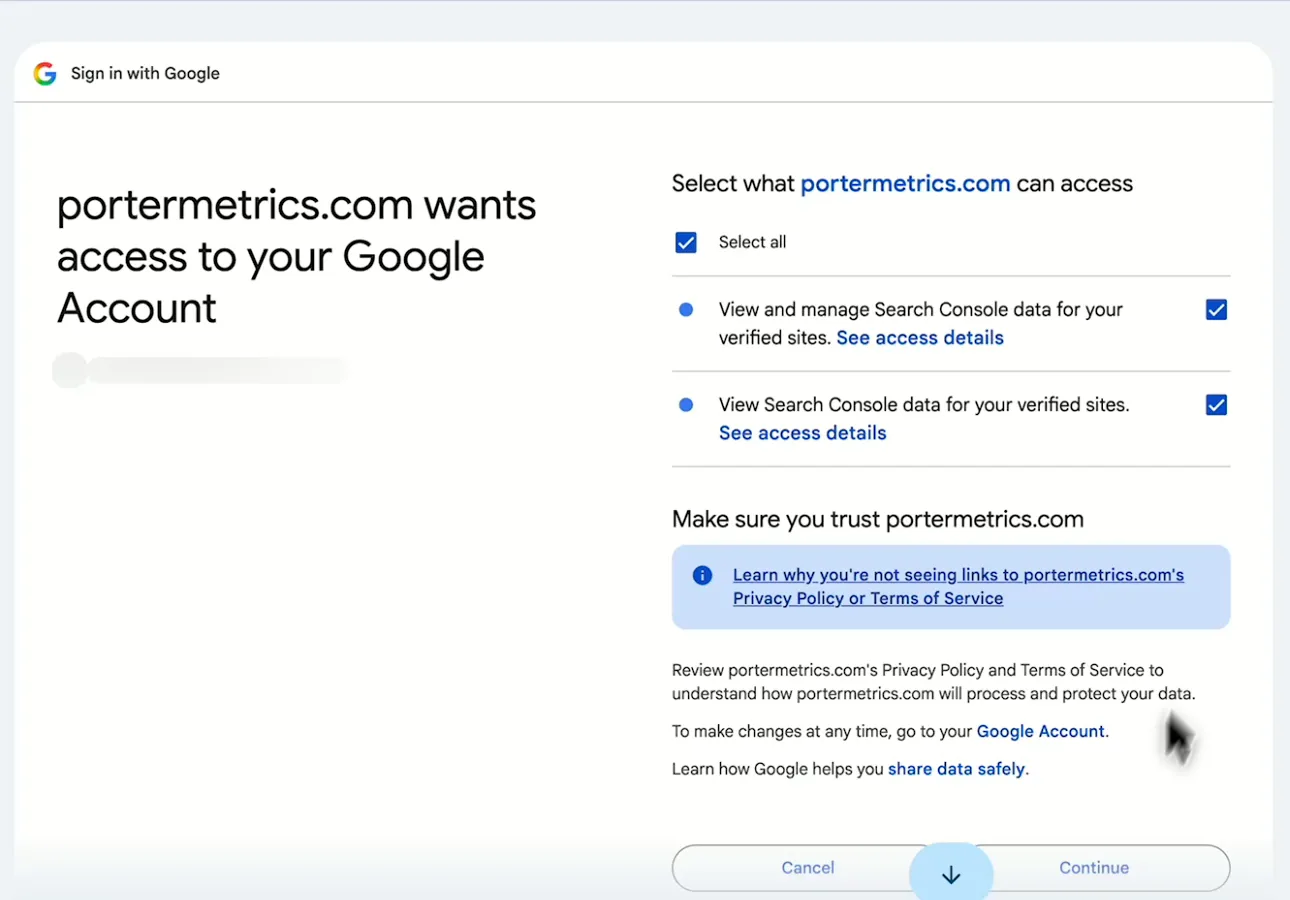
Google screen where you allow Porter Metrics to view your Search Console data
First, sign in with Google and allow access to Search Console.
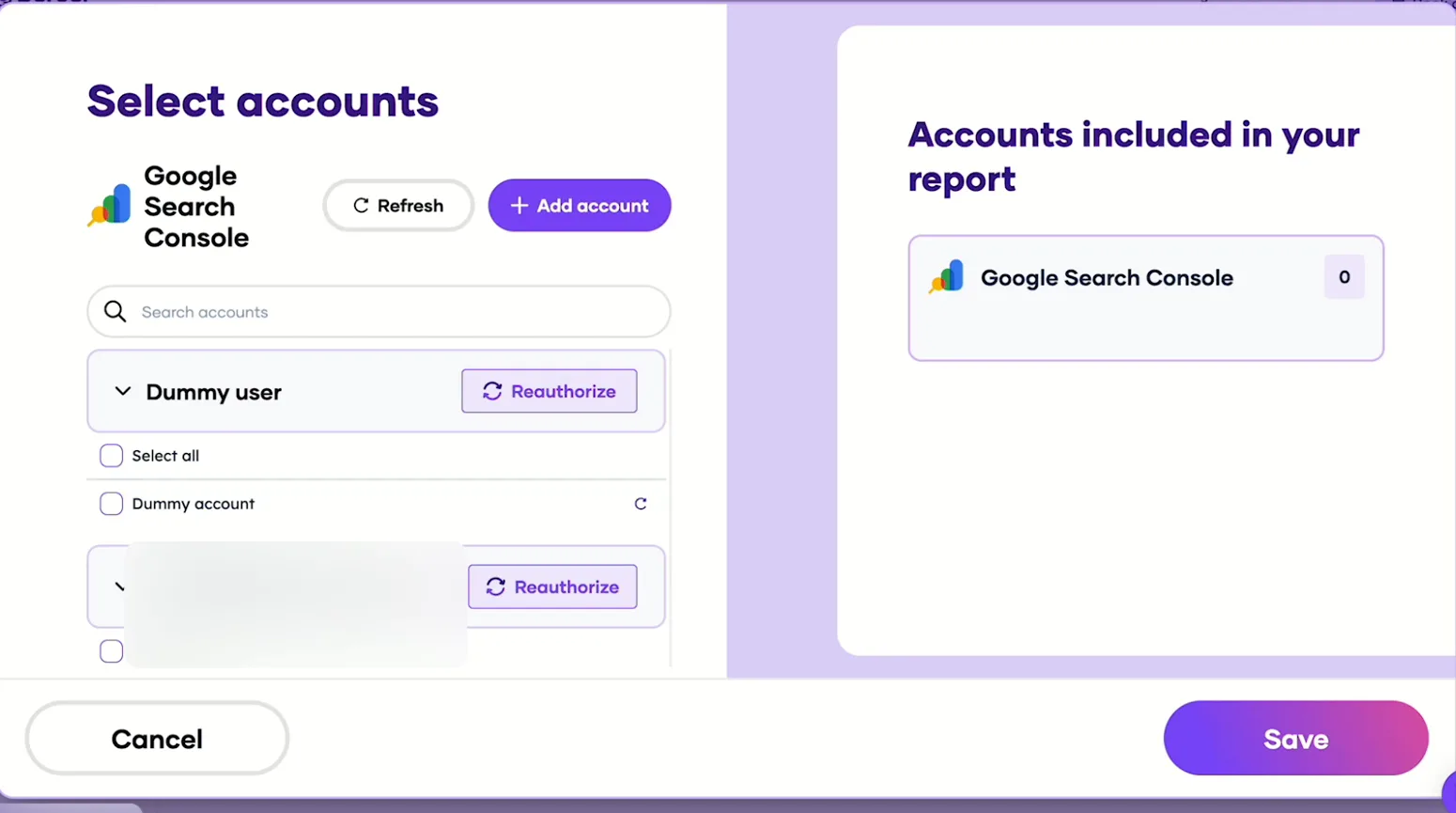
Porter's Select accounts window for Google Search Console with a demo account
Then, pick the Search Console sites Claude can read and save.
$ claude mcp add --transport http --scope user porter https://mcp.portermetrics.com/mcp

$ claude mcp list
porter: https://mcp.portermetrics.com/mcp (HTTP)
Then, add Porter's MCP server from your terminal.
> /mcp
porter · needs authentication → Authenticate

> Which Google Search Console accounts can you see?
● porter - list_accounts (MCP)
Trailgear Demo
After you sign in from /mcp, Claude Code lists your Google Search Console accounts.
02Use cases and prompts

What you can do in Claude Code

Claude Code works inside your project, so Google Search Console answers can become files, scripts and dashboards instead of chat replies. Each use case has a prompt to copy and uses the Google Search Console fields Porter reads.

Can Claude Code export Search Console data?

The problemThe Search Console UI caps exports at 1,000 rows and one view at a time.

What Claude Code doesClaude Code pulls Query, Page URL, Clicks, Impressions and Average Position through Porter and writes them to a CSV in your project.

What you getA full query and page file in your repo, ready for analysis.

Prompt
For the last 28 days ending 3 days ago, by Query and Page URL, pull Clicks, Impressions and Average Position from Search Console and save it as data/gsc-28d.csv.
Which of my pages are close to the first page of Google?

The problemPages ranking 8 to 20 get impressions but few clicks, and they are easy to miss.

What Claude Code doesClaude Code filters Query and Page URL pairs by Average Position and Impressions and writes a ranked list.

What you getA short list of pages where an update can win clicks fast.

Prompt
For the last 90 days ending 3 days ago, list Query and Page URL pairs with Average Position between 8 and 20 and at least 500 Impressions, and save them ranked by Impressions to reports/striking-distance.csv.

Which pages lost the most clicks?

The problemA drop in total clicks doesn’t say which pages caused it.

What Claude Code doesClaude Code compares Clicks and Average Position by Page URL across two periods and ranks the biggest losses.

What you getThe pages to check first after a drop.

Prompt
Compare Clicks, Impressions and Average Position by Page URL for the last 3 full months vs the 3 months before, and save the 15 pages with the largest click loss to reports/gsc-losers.csv.

Can I schedule a Search Console report with Claude Code?

The problemSearch Console can compare two weeks, but sorting pages by lost clicks still means an export.

What Claude Code doesA weekly claude -p job compares Clicks, Impressions and Average Position and lists the 10 pages that gained and lost the most clicks.

What you getreports/gsc-weekly.md, a short list of pages to check first each Monday.

Prompt
claude -p "Compare last week with the week before in Search Console: Clicks, Impressions and Average Position, plus the 10 pages that gained and lost the most clicks. Write it to reports/gsc-weekly.md" --allowedTools "mcp__porter" "Write"

Can Claude Code combine Search Console and GA4?

The problemRankings live in Search Console and sessions in GA4, and joining them by page takes a spreadsheet.

What Claude Code doesClaude Code pulls Clicks by Page URL from Search Console and Sessions by landing page from GA4 through the same porter server, then joins them.

What you getOne page-level table with search and on-site numbers.

Prompt
For the last 28 days, join Search Console Clicks and Average Position by Page URL with GA4 Sessions and Key events by landing page, and save the top 50 pages to reports/seo-pages.csv.
03Why Porter

Why Porter for Google Search Console in Claude Code

You can also script the Search Console API yourself, but each script needs a Google Cloud project and its own auth. Porter needs only a Google sign-in and puts Search Console next to GA4 and 30+ other sources behind the same server.

✓

One server for all your sources

The same porter server answers about Google Search Console, Meta Ads, Google Ads, GA4 and Shopify, so one script can pull every channel.

⊞

More than 1,000 rows

Porter pulls the full query and page list, not only the 1,000 rows the Search Console UI exports.

⚙

No Cloud project or service account

You sign in with Google in Porter and in Claude Code. There is no Google Cloud project or service account to set up.

↻

Hosted dashboards when a file isn’t enough

Ask for a Porter AI dashboard and it is published at its own link, synced automatically and ready to share with a client.

04Dashboard

Dashboard template

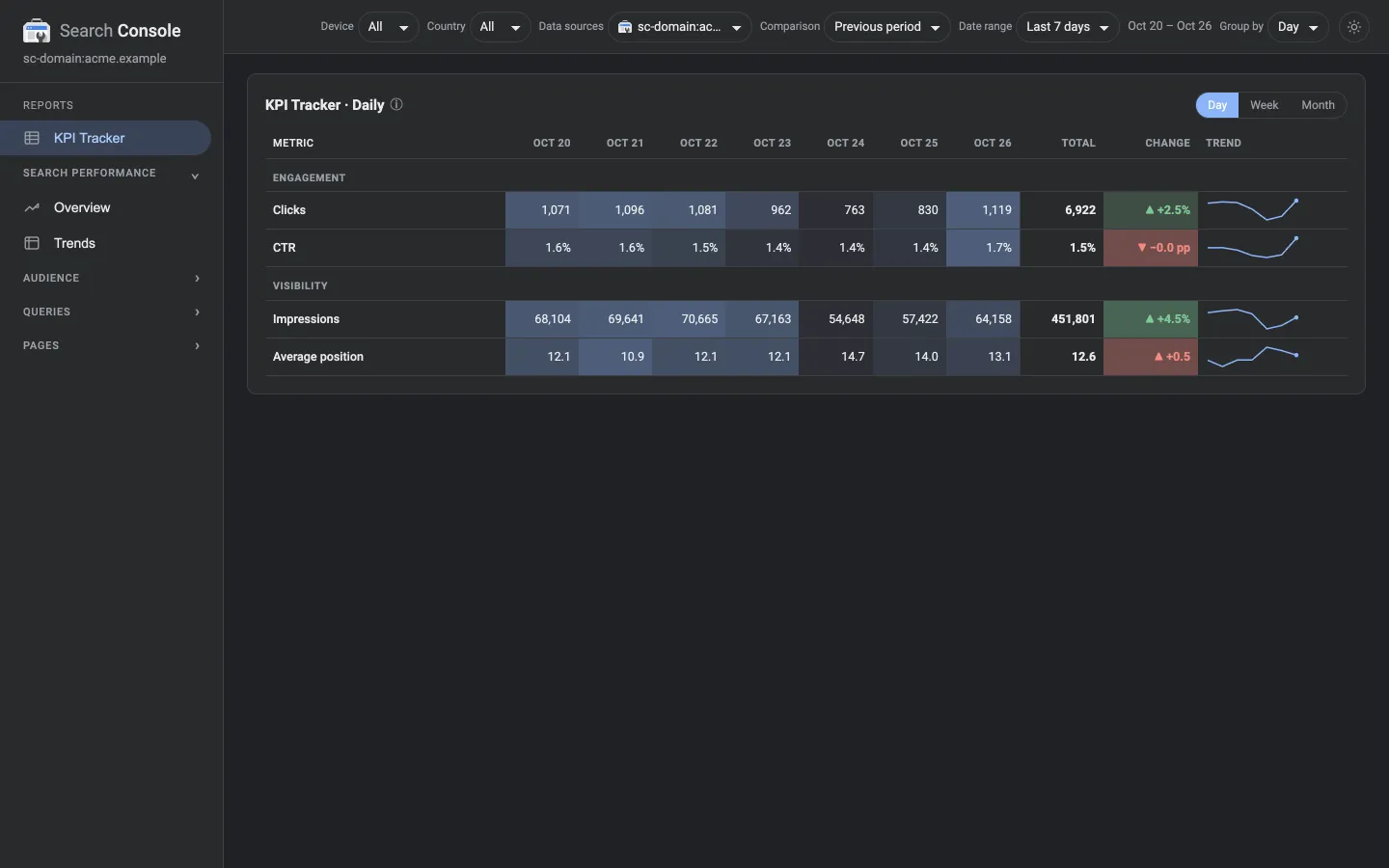
Porter’s free SEO dashboard template shows clicks, impressions, CTR, average position as well as top queries and top pages in one report. Claude can either build the same view live from your property, or you can open the template.

AI dashboards

Build a live Google Search Console dashboard from your terminal

Describe the dashboard in one sentence and Porter builds it. A client-ready dashboard in minutes, with no chart dragging and no BI tool to learn. Ask Claude Code:

Prompt
Build a live Google Search Console dashboard for my account with the last 30 days, the main KPIs and a weekly trend.
Live URLEach dashboard at its own link: no login, no app, no download
Auto-syncFresh Google Search Console data, nobody re-exports each period
Scheduled deliveryEmail or PDF sends on a set day
White labelYour logo and branding for clients
Sharing permissionsView or edit access per person
Google Search Console dashboard template by Porter
Template

The Google Search Console AI dashboard template

Start from Porter’s official Google Search Console dashboard template, or run the prompt above in Claude Code and Porter publishes the dashboard at its own link.

05Pricing

Pricing

You can start free, since Porter’s Google Search Console connector for Claude comes with every plan. Use the calculator for your number of accounts, or see Porter pricing for every plan.

Free plan

$0, and it never expiresUnlimited connected accounts, the last 15 days of data in Claude (30 in Data Studio and Sheets) and 100 AI credits a month.

Start free

What you get

  • Reporting: from $12.50 per account a month billed annually, or $15 month to month for one account
  • Billing: each Search Console property (Domain or URL-prefix) counts as one account, with volume discounts and no per-seat fee
  • Changes: 1 AI credit per completed change; failed tasks are free, and the Free plan includes 100 credits a month
  • Trial: 14 days of full access, no card

Price calculator

$33.33/mo$6.67 per account

An account is one ad account, Stripe account, store, page or GA4 property. The Free plan never expires and has unlimited accounts, with the last 15 days of data in AI chats.

06Data and actions

Google Search Console data and actions in Claude Code

The Google Search Console connector gives Claude every Performance field, including clicks, impressions, CTR and average position. Each one then breaks down by query, page, country, device, search appearance, search type and date. It also gets actions to list properties, inspect URLs and manage sitemaps. The full fields list shows every label and ID.

The 12 Search Console fields Claude uses most

FieldWhat it's for
ClicksclicksClicks from Google Search results
ImpressionsimpressionsTimes your pages appeared in results
CTRctrClicks divided by impressions, returned as a fraction
Average PositionpositionRanking weighted by impressions; use it instead of Average Position (raw)
QueryqueryWhat people searched; rare queries are hidden
Page URLpageThe URL shown in results
CountrycountryThree-letter country codes, such as usa
DevicedeviceDesktop, mobile or tablet
Search Appearancesearch_appearanceRich-result types; ask for it alone or by Page URL
Search Type: Web · Image · Video · News · Discover · Google Newssearch_type_web · search_type_image · search_type_video · search_type_news · search_type_discover · search_type_googlenewsWhich Google surface the numbers come from, one per question
Aggregation Type: By Page · By Propertyaggregation_type_bypage · aggregation_type_bypropertyEach URL counted, or the site counted once per result
Week · Month · Year-Monthweek · month · year_monthTrends by period

Can Claude inspect URLs and submit Search Console sitemaps?

Yes. Claude lists every property your Google account can open, inspects URLs for index status, canonical, crawl and rich results, and lists, submits or deletes sitemaps. Indexing requests, property verification, users and settings stay in Search Console, where you handle them as usual.

How far back and how fresh is the data?

Google keeps 16 months of Search Performance data (Google's 16-month data announcement). Porter reads it live, so Claude sees the same window. Recent days show up when Google marks them final, dated in Pacific time (Search Analytics query reference). The free plan reads the last 15 days in Claude (30 days in Data Studio and Sheets).

Can Claude see past the Search Console 1,000-row limit?

Yes. Search Console's tables stop at 1,000 rows (Google's 1,000-row table limit), but Google's API lets Porter request up to 25,000 at a time. Google keeps up to 50,000 rows a day per search type, sorted by clicks (Google's 50,000-row daily limit). Rare queries remain hidden either way, though.

Product stats

WhatGoogle Search Console connector
FieldsEvery Performance field: clicks, impressions, CTR and average position by query, page, country, device, search appearance, search type and date
Actions5: list properties, inspect URLs, and list, submit or delete sitemaps
FreshnessLive from Google; days appear once Google marks them final, dated in Pacific time
History16 months, Google's full window, on paid plans; the last 15 days in Claude on the Free plan (30 days in Data Studio and Sheets)
RowsUp to 25,000 per request; Google keeps up to 50,000 a day per search type
URL inspectionUp to 2,000 URLs a day per property
AccessGoogle sign-in; webmasters.readonly for reports, webmasters for sitemap changes

See all Google Search Console fields

07Security

Is it safe?

Yes. Reading data through Porter's Google Search Console connector for Claude Code never changes your property, because reports only read data. Claude's changes are sitemap submissions and deletions, and it shows you the sitemap URL and asks before Porter sends it. In addition, Porter only sees the properties your chosen Google account can open.

How changes are approved

Deleting a sitemap is permanent, so resubmit the URL if you need it back. Each completed change also uses one AI credit. URL inspection and reports, however, never change anything.

What the Search Console connector needs

Porter needs a Google sign-in from an account with access to the property, as Search Console users and permissions describes for owners and users. Reports use the webmasters.readonly scope, while sitemap changes use webmasters (Search Console API authorization scopes).

Each Domain (sc-domain:) or URL-prefix property connects as its own account, so it has its own numbers. If you reconnect, Porter adds a second row for the same property, but both rows read the same data.

08FAQ

FAQ

Answers on setup, scope, scripts and credits, plus fixes for the most common Claude Code errors with Google Search Console. Setup questions every source shares, like where Claude Code saves the server and how to share it with your team, are in the Claude Code hub FAQ.

Can I join Search Console clicks with GA4 key events?

Yes. Connect both in Porter and ask for Clicks by page next to Key events by landing page. Claude Code reads both through one server and writes them to the same table.

Why do prompts end 3 days ago?

Search Console data takes about 2 to 3 days to settle, so prompts on this page end 3 days ago to compare full days.

Do Claude Code questions use Porter credits?

Reading Search Console data uses no AI credits, so questions and reports on this page are free on every plan.

Troubleshooting

Why does /mcp show porter as needing authentication?

Claude Code adds the server before you sign in. Pick porter in /mcp, choose Authenticate and sign in with the Google account you use in Porter.

Why does my claude -p script stop and ask for permission?

Scripts can’t answer permission prompts. Pass the tools the script may use, for example --allowedTools "mcp__porter" "Write", so Claude Code can read Porter and save files without stopping.

Why does Claude Code see my property but return no data?

Usually the Google user has no access to that exact property, since domain and URL-prefix versions are separate. Check access in Search Console under Settings, then Users and permissions.

09Next

More Claude connectors

Porter also connects Claude to other Google sources, each with its own prompts, fields and limits. Either start with these pages and templates, or browse Porter's MCP servers for marketing data to use Search Console in other AI clients.

Not only Claude. Send Google Search Console data anywhere

The same Porter account and connection also send Google Search Console data to these destinations, at no extra cost.

Try the connector in Claude Code

Porter’s Google Search Console connector for Claude Code takes one command, so your first query file can land in your project today. Start with a CSV, then find pages close to page one or schedule a weekly script.

Free plan · 14-day trial · No card needed

SEO specialists: striking-distance pages and click losses come out of the terminal as files.

Content marketers: the pages to refresh are ranked by the impressions they can win.

Agencies: one script builds the weekly SEO report for every client property.