




Google Tag Manager connector for Claude

Use Porter’s Google Tag Manager connector for Claude to ask about the version of your container that is live on your site: which tags fire and which are paused, which pixel and conversion ids are installed, which tags and triggers nobody uses, and how the container changed from one version to the next.

  • List every live tag, with its triggers and whether it is paused
  • Find the Meta pixel, Google Ads conversion and GA4 ids in the container
  • Spot tags with no trigger and triggers with no tag
  • Follow the version history with tag, trigger and variable counts
G2★★★★★Rated 4.6/5 on G2 (288 reviews, October 2026)

By Porter Metrics team · Last updated November 12, 2026

ClaudePorter connected
Which tags in my published container are paused?
Porter / Google Tag Manager / Demo Container✓ 3 rows
2 of 3 tags in the live version are paused, so they don’t fire on your site.
TagTypePaused
GA4 – purchasegaaweNo
Meta Pixel – basehtmlYes
Ads conversion – leadawctYes
Demo data, Demo Container
51 Google Tag Manager fields
01Setup

How to connect Google Tag Manager to Claude

Google Tag Manager connects to Claude through Porter in 3 steps, with no code and no server to run. Sign in with Google in Porter and pick your container, add Porter’s MCP URL to Claude as a custom connector, then ask your first question. MCP (Model Context Protocol) is the open standard Claude uses to read data from tools such as Porter.

What you need before you start

  • You need a Google account with access to the Tag Manager container. You sign in on Google’s own page, so you never share a password. Add a free Porter account and any Claude plan: Free through Enterprise add custom connectors, and Free allows one (Anthropic’s guide to custom connectors in Claude).
  • Google is still reviewing Porter’s Tag Manager app. Until the review ends, Google’s sign-in can show a “Google hasn’t verified this app” screen. To continue, choose Advanced and then continue to Porter.
  • Works in Claude.ai, Claude Desktop, Cowork and Claude Code, with any Claude model, from Opus to Sonnet and Haiku.
  1. Step 1: Connect Google Tag Manager in Porter

    In Porter, choose Create, then Claude, then Google Tag Manager. Sign in with Google, accept the permissions and pick the container Claude can use. Each container is one connection.

  2. Step 2: Add the connector to Claude

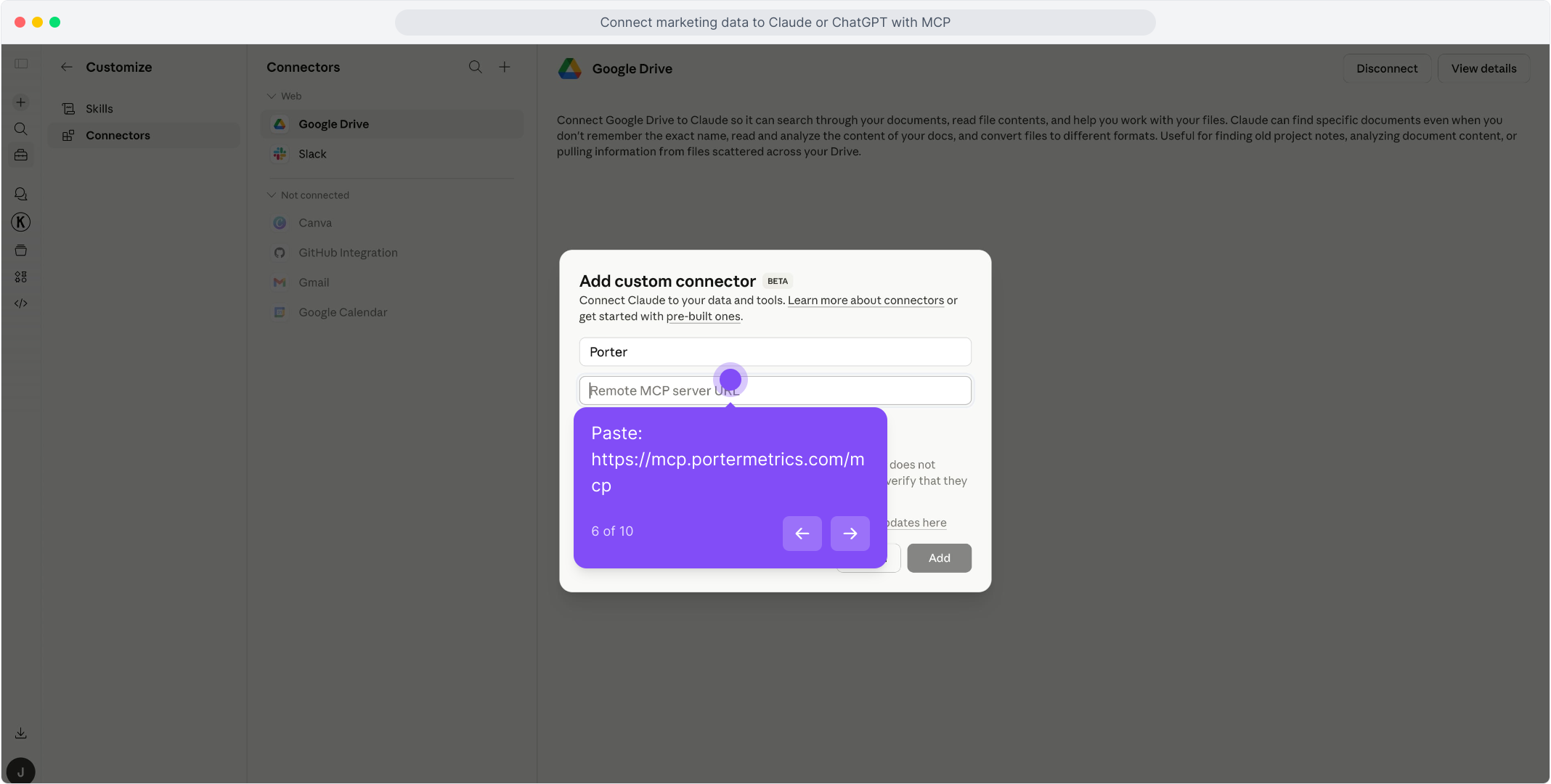
    In Claude, open Customize, then Connectors, and choose + Add, then Add custom connector. Name it Porter and paste this URL:

    MCP URL
    https://mcp.portermetrics.com/mcp
  3. Step 3: Ask Claude about Google Tag Manager

    Sign in to Porter, then try:

    Prompt
    Using Google Tag Manager, list the paused tags in the published version of my container, with tag name, tag type and firing triggers.
app.portermetrics.com / create

Create: Google Tag Manager to Claude

Sign in with Google

Select the container Claude can use.

Porter's MCP URL pasted into the Remote MCP server field of Claude's custom connector dialog

Claude

Using Porter / Google Tag Manager …

Demo data
02Use cases and prompts

What you can ask Claude

Each use case comes with a prompt to copy, the fields it uses from the Google Tag Manager fields list and who it’s for. Porter reads the published version of your container, the one live on your site, so changes still in a workspace don’t show until you publish them.

Which tags fire on my site, and which are paused?

The problemA container that has grown for years has dozens of tags, and Tag Manager shows them one screen at a time, so nobody is sure what still runs.

What Claude doesClaude reads every tag of the published version with its type, the triggers that fire it and whether it is paused, then groups them by type.

What you getAn inventory of what your site really loads, with the paused tags listed apart so you can decide whether to bring them back or remove them.

Prompt
Using Google Tag Manager, list every tag in the published version of my container with tag name, tag type, paused and firing triggers. Group them by tag type and list the paused tags separately.

For: web analysts · marketing ops · agencies

Fields used: TagTag typePausedFiring triggers

Is the Meta pixel or the Google Ads conversion in the container, and with what id?

The problemA campaign reports no conversions and the first question is always whether the pixel or the conversion tag is installed, and with which id.

What Claude doesClaude lists the tags that carry a Meta pixel id, a Google Ads conversion id and label, a Google tag id or a GA4 measurement id. Porter reads the pixel ids out of custom HTML tags, so you don’t have to open each one.

What you getEvery tracking id in the live container in one table, with duplicates and paused tags in plain sight.

Prompt
Using Google Tag Manager, show the tags in my published container that have a Meta pixel id, a Google Ads conversion id and label, a Google tag id or a GA4 measurement id, with tag name, tag type and paused. Tell me if the same id appears in more than one tag.

For: performance marketers · web analysts · agencies

Fields used: TagTag typePausedMeta pixel IDsGoogle Ads conversion IDGoogle Ads conversion labelGoogle tag IDGA4 measurement ID

How did the container change from one version to the next?

The problemTracking breaks after a release and someone has to find which version of the container moved, scrolling a version list with hundreds of entries.

What Claude doesClaude reads the version history with the number of tags, triggers and variables in each version and marks the live one, then finds the versions where the counts jumped.

What you getThe versions worth opening in Tag Manager, instead of comparing them one by one.

Prompt
Using Google Tag Manager, list the last 10 versions of my container with version ID, version name, tags in version, triggers in version and variables in version, and mark the live one. Tell me between which versions the number of tags changed the most.

For: web analysts · developers · agencies

Fields used: Version IDVersion nameTags in versionTriggers in versionVariables in versionIs live

Which tags have no trigger?

The problemA tag without a firing trigger never fires on its own, but it stays in the container and looks like working tracking.

What Claude doesClaude lists the tags of the published version that have no firing trigger and leaves out the ones that run as the setup or cleanup tag of another tag, because those fire with no trigger of their own.

What you getThe tags that really never fire, ready to fix or clean up.

Prompt
Using Google Tag Manager, list the tags in my published container that have no trigger, with tag name, tag type, paused and whether they run in a sequence. Leave out the ones that run in a sequence and tell me which of the rest look forgotten.

For: web analysts · marketing ops

Fields used: TagTag typeHas a triggerRuns in a sequencePaused

Which triggers does no tag use?

The problemTriggers pile up as tags are removed, and a container full of unused triggers is slow to read and easy to break.

What Claude doesClaude reads each trigger of the published version with its type and the number of tags it fires, and lists the ones that fire none.

What you getA clean-up list for the next release of the container.

Prompt
Using Google Tag Manager, list the triggers in my published container with trigger name, trigger type and tags fired, and show the ones that fire no tag.

For: web analysts · developers

Fields used: TriggerTrigger typeTags fired
03Why Porter

Why Porter for Google Tag Manager in Claude

Porter puts your Tag Manager container in the same Claude connector as your analytics and ad sources, so a question about missing conversions can start with what the container sends and end with what GA4 and the ad platforms report.

✓

The live version, not the draft

Porter reads the version published on your site. Workspace changes that are not published yet stay out, so the answer describes what visitors really load.

⊞

Tags next to your analytics and ads

Ask about Google Tag Manager next to GA4, Google Ads, Search Console and other sources from all Claude connectors in the same chat, through one Porter URL.

⚙

Tracking ids as columns

Meta pixel ids read out of custom HTML, Google Ads conversion ids and labels, Google tag and GA4 measurement ids: each one a field Claude can filter and compare.

Aa

51 ready-made fields

Claude gets 51 named fields across the container, its tags, triggers and variables, and the version history, each with its definition.

↻

One URL, nothing to host

Sign in with Google and add one MCP URL to Claude. There is no container export to download and no warehouse to keep in sync.

✓

Live dashboards, not only chat answers

Ask Claude for a dashboard and Porter’s AI dashboards publish it at its own link, synced automatically and ready to share.

04Dashboard

Dashboard template

Ask Claude to build a live Google Tag Manager dashboard with AI dashboards, or browse Porter’s templates for other sources.

AI dashboards

Build a live Google Tag Manager dashboard from the chat

Describe the dashboard in one sentence and Porter builds it. A client-ready dashboard in minutes, with no chart dragging and no BI tool to learn. Ask Claude:

Prompt
Build a live Google Tag Manager dashboard for my container: tags in the live version by tag type, paused tags, tags with no trigger, triggers that fire no tag and the last 20 versions with their number of tags.
Live URLEach dashboard at its own link: no login, no app, no download
Auto-syncFresh Google Tag Manager data, nobody re-exports each period
Scheduled deliveryEmail or PDF sends on a set day
White labelYour logo and branding for clients
Sharing permissionsView or edit access per person

Or start from a template

05Pricing

Pricing

You can start free, since Porter’s Google Tag Manager connector for Claude comes with every plan. Use the calculator for your number of accounts, or see Porter pricing for every plan.

What you get

  • Free plan: never expires, with unlimited connected accounts and the last 15 days of data in Claude (30 days in Data Studio and Sheets)
  • Reporting: from $12.50 per account a month billed annually, or $15 month to month for one account
  • Billing: each Tag Manager container counts as one account, with volume discounts and no per-seat fee
  • No credits needed: Claude's Google Tag Manager questions are reads, so they use no AI credits
  • Trial: 14 days of full access, no card

Price calculator

$33.33/mo$6.67 per account

An account is one ad account, Stripe account, store, page or GA4 property. The Free plan never expires and has unlimited accounts, with the last 15 days of data in AI chats.

06Data and actions

Google Tag Manager data Claude can use

Claude reads five tables, with all 51 fields in the Google Tag Manager fields list: the container, the tags, triggers and variables of its published version, and the list of versions. They are snapshots, not daily series: the date range in your question doesn't change them, and the version list is the history.

12 Google Tag Manager fields Claude uses most

FieldWhat it's for
Tag · Tag typegtm_tag_name · gtm_tag_typeThe tag and GTM's type for it: html, gaawe (GA4 event), googtag, awct (Google Ads conversion)…
Pausedgtm_tag_pausedWhether the tag is paused in the published version
Firing triggers · Blocking triggersgtm_tag_firing_triggers · gtm_tag_blocking_triggersTrigger names, built-in ones such as All Pages included
Has a trigger · Runs in a sequencegtm_tag_has_trigger · gtm_tag_is_sequenceFind the tags that never fire
Meta pixel IDsgtm_tag_meta_pixel_idsPixel ids found in custom HTML tags
Google Ads conversion ID · labelgtm_tag_ads_conversion_id · gtm_tag_ads_conversion_labelThe conversion a Google Ads conversion tag reports to
Google tag ID · GA4 measurement IDgtm_tag_google_tag_id · gtm_tag_measurement_idThe G-… and AW-… ids the tags send to
Last modifiedgtm_tag_last_modifiedWhen the tag was last saved
Trigger · Trigger type · Tags firedgtm_trigger_name · gtm_trigger_type · gtm_trigger_tagsEach trigger and how many tags it fires; 0 means no tag uses it
Variable · Variable typegtm_variable_name · gtm_variable_typeUser-defined variables: data layer, custom JavaScript…
Live version name · Live version createdgtm_live_version_name · gtm_live_version_created_atThe published version and when it was created (not when it was published)
Version ID · Is live · Tags in versiongtm_version_id · gtm_version_is_live · gtm_version_num_tagsThe version history, with counts per version

Product stats

WhatGoogle Tag Manager connector
Fields51 in 5 groups: 39 dimensions and 12 metrics
TablesContainers; tags, triggers and variables of the published version; version history
FreshnessRead from Google Tag Manager when you ask; the published version only, not workspace drafts
DatesNo daily series. Google Tag Manager gives no publication date and no author for a version: the dates are when each version or item was saved
VersionsNumber of tags, triggers and variables per version; no tag-by-tag comparison between two versions
Rate limitsGoogle allows Porter's Tag Manager app 30 requests per minute; reading a container takes 1 request and the version list 2
AccessGoogle sign-in with access to the container; one container per connection
Not includedWorkspace drafts, who published a version, a tag-by-tag comparison of two versions and the code inside custom HTML tags

See all 51 Google Tag Manager fields

07Security

Is it safe?

Yes. You sign in on Google's own page and never share a password. Every question on this page is a read: none of them edits, publishes or deletes anything in your container.

Google's own sign-in

Reading your container uses Google's read-only Tag Manager permission. Google's screen also asks to edit and publish containers: Porter asks for those now so you won't have to connect again when container changes from Claude arrive. You can remove Porter's access from your Google account at any time.

Google is still reviewing the app

Google is still reviewing Porter's Tag Manager app. Until the review ends, the sign-in can show a "Google hasn't verified this app" screen. To continue, choose Advanced and then continue to Porter.

What Porter never asks for

Porter never asks Google for permission to delete containers or to manage your Tag Manager accounts and users. Claude queries Porter, not Tag Manager directly, and Porter reads only the containers you connect.

08FAQ

FAQ

Before connecting Google Tag Manager to Claude through Porter, analysts and agencies usually ask about several containers, unpublished changes, version dates and comparing versions. After those come 5 fixes: Google's unverified-app screen, dates that change nothing, tags you didn't add, tags that fire with no trigger and pixel ids that show as variables.

Can I connect several containers?

Yes. Connect each container in Porter; each one is one connection and bills as one data source account, and you name the container you mean when you ask Claude.

Does Claude see changes I haven't published?

No. Porter reads the version that is published on your site. Changes still in a workspace show up after you publish them.

Can Claude tell me who published a version, and when?

Not exactly. Google Tag Manager gives no author and no publication date for a version. Porter reads when each version was created, from the timestamp Google stores with it: in a test container measured on November 10, 2026 it matched the second the version was created. A version can be published later than that.

Can Claude compare two versions tag by tag?

Not yet. The version list gives the number of tags, triggers and variables in each version, which shows how much changed but not which tag. Open the two versions in Tag Manager to see the detail.

Does Porter's Google Tag Manager connection work in other AI tools?

Yes. The same Porter account and connection work in any AI tool that supports MCP, with the same container and fields.

Troubleshooting

Why does Google say it hasn't verified the app?

Google is still reviewing Porter's Tag Manager app. Until the review ends, Google's sign-in can show a "Google hasn't verified this app" screen. Choose Advanced and then continue to Porter: the permissions you accept are the same.

Why doesn't the date range change anything?

A container has no daily series. Every table is a snapshot of the published version, so Porter answers with the container as it is today whatever dates you ask for. For history, ask about the versions.

Why do I see tags I never added?

Tag Manager adds some tags by itself. In a test container in November 2026, creating a GA4 event tag and a Google Ads conversion tag with new ids made Tag Manager add two destination tags of its own, unpaused, on Initialization - All Pages. They show with tag type dest_ga or dest_aw.

Why does a tag with no trigger still fire?

It can run as the setup or cleanup tag of another tag, which fires it with no trigger of its own. Runs in a sequence tells you which tags those are, so leave them out before you clean up tags with no trigger.

Why does a pixel id show as {{...}}?

The tag reads the id from a Tag Manager variable. Porter shows the reference as it is written in the tag, not the value the variable takes on your site.

09Next

More Claude connectors

What the container sends makes more sense next to what your analytics and ad platforms report, and Porter brings each of those sources in through the same MCP URL. Add the ones you report on, or browse all Claude connectors:

Not only Claude

The same Porter account and connection work in any AI tool that supports MCP, at no extra cost.

Try it on your own container

Connect Google Tag Manager to Claude through Porter and ask which tags fire, which tracking ids are installed and how the container changed between versions. Setup takes one Google sign-in, and the free plan includes the Google Tag Manager connector for Claude.

Free plan · 14-day trial · No card needed

Web analysts: the live tags, their triggers and their ids from one question.

Performance marketers: check the pixel and the conversion tag before blaming the campaign.

Agencies: every client container next to its analytics and ads in one chat.