BigQuery connector for Claude

Use Porter’s BigQuery connector for Claude to ask about any table your Google account can query, then build views and fix rows after you approve.

  • Map the datasets, tables, rows and size in a project
  • Summarize a table by week without writing SQL
  • Compare warehouse revenue with Meta Ads spend by week
  • Create views and fix duplicate rows after you approve
G2★★★★★Rated 4.6/5 on G2 (288 reviews, October 2026)

By Porter Metrics team · Last updated October 19, 2026

ClaudePorter connected
List the datasets in my BigQuery project, the tables in each, and the number of rows and size of each table.
Porter / BigQuery / Trailgear Demo✓ 4 rows
marketing.ga4_events is the largest table (48.2M rows, 31.4 GB). The rest stay under 1 GB.
TableRowsSize
marketing.ga4_events48.2M31.4 GB
marketing.ads_daily1.9M820 MB
sales.orders412K96 MB
sales.customers88K21 MB
Demo data, Trailgear Demo account
Watch the setupConnect BigQuery to Claude, fast and easyPorter Metrics on YouTube
Any table you can query
01Setup

How to connect BigQuery to Claude

Porter’s BigQuery connector for Claude takes 3 steps, with no code and no server to host. Sign in with Google in Porter, add one MCP URL to Claude as a custom connector, then ask. Porter can also run next to Google’s own BigQuery MCP in Claude.

Before you start

  • You need a Google account with BigQuery Job User and BigQuery Data Viewer on the project (Google’s BigQuery IAM roles). Besides that, you need a free Porter account and any Claude plan. To make changes, you also need BigQuery Data Editor (or higher) on those datasets.
  • Custom connectors work in Claude and Cowork as well as Claude Desktop, on Free, Pro, Max, Team and Enterprise. But Free allows only one (Anthropic’s guide to custom connectors).
  1. Step 1: Sign in to BigQuery, then pick Claude

    Sign up free at Porter, pick BigQuery as the source, then sign in with the Google account that can query the project. After that, pick Claude as the destination.

  2. Step 2: Add the connector to Claude

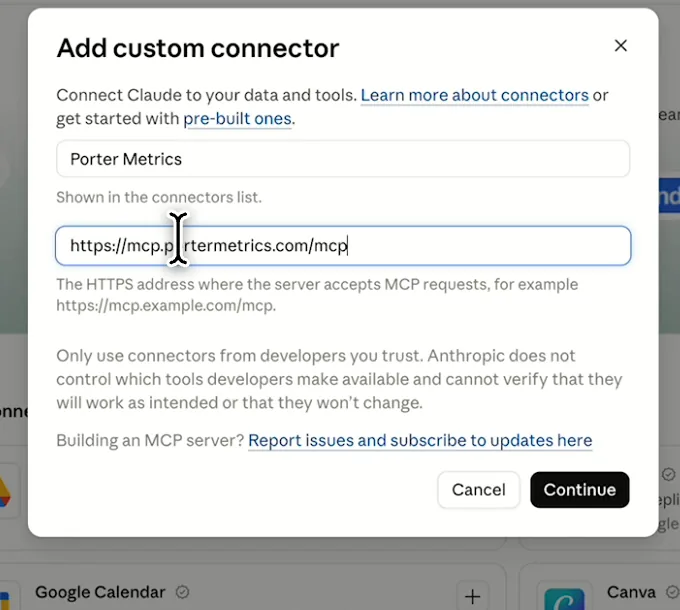
    In Claude, open Customize, then Connectors. Next, choose + Add and then Add custom connector. Finally, name it Porter Metrics and paste this URL:

    MCP URL
    https://mcp.portermetrics.com/mcp
  3. Step 3: Ask Claude about BigQuery

    Sign in to Porter, then try this:

    Prompt
    List the datasets in my BigQuery project <project>, the tables in each, and the number of rows and size of each table.

Guides and videos

Connect BigQuery to Claude free

app.portermetrics.com / create
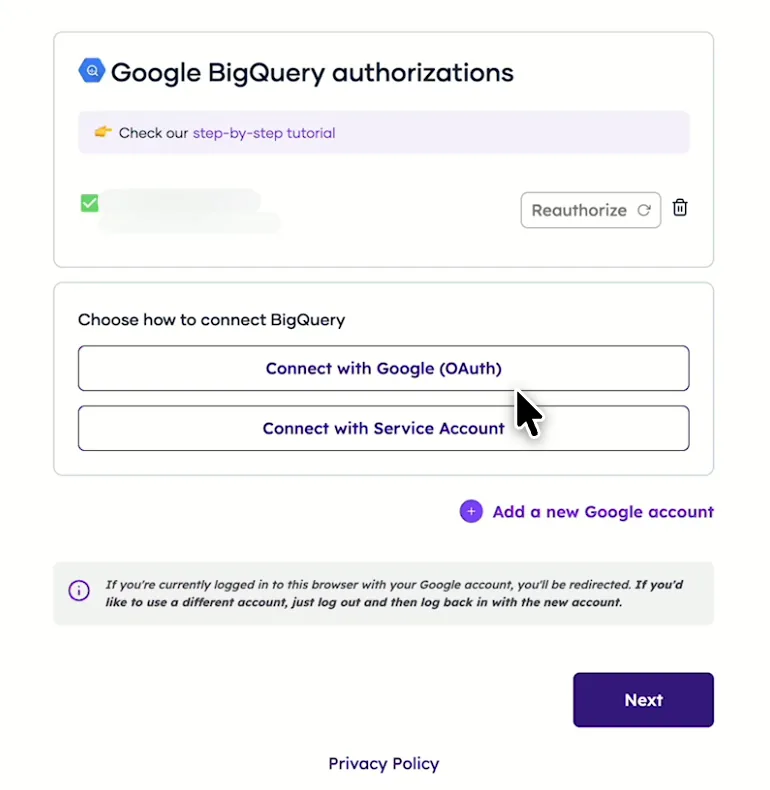
Porter's BigQuery form with the choice to connect with Google OAuth or a service account
First, choose whether to connect with Google or a service account.
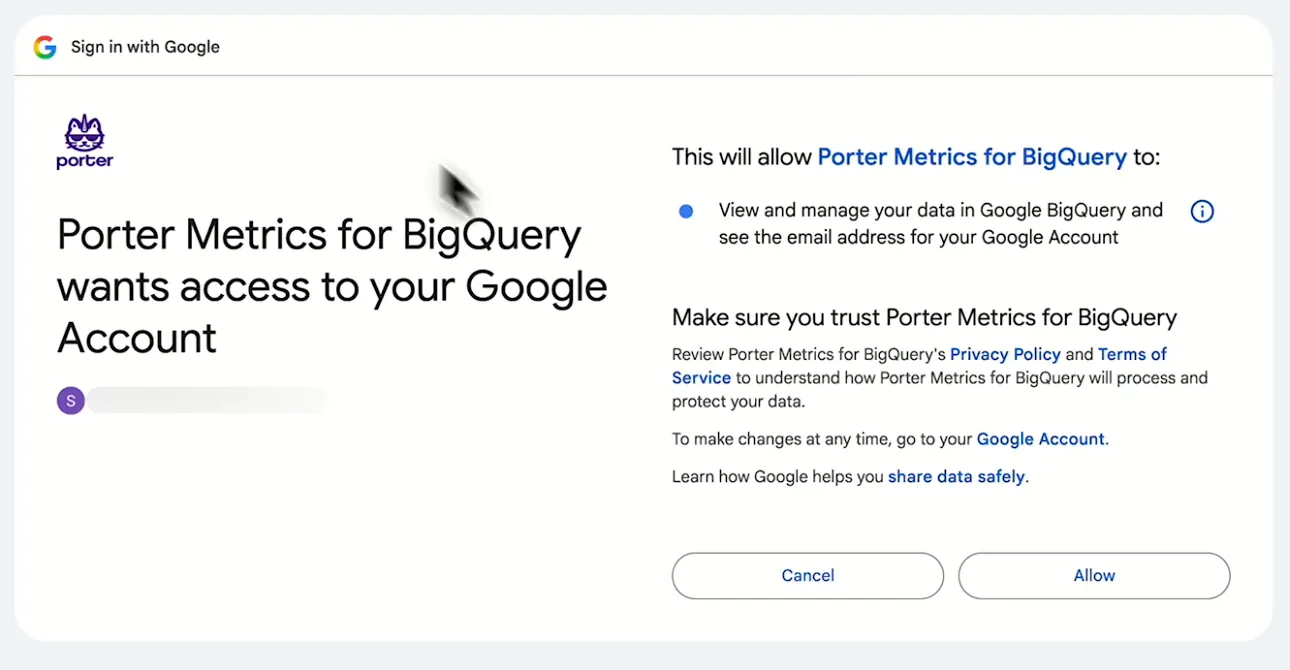
Google screen asking you to let Porter Metrics for BigQuery view and manage your BigQuery data
If you pick Google, allow Porter Metrics for BigQuery in your account.
Claude's Add custom connector window with the name Porter Metrics and Porter's MCP URL filled in
Then, in Claude, add a custom connector with Porter's MCP URL.
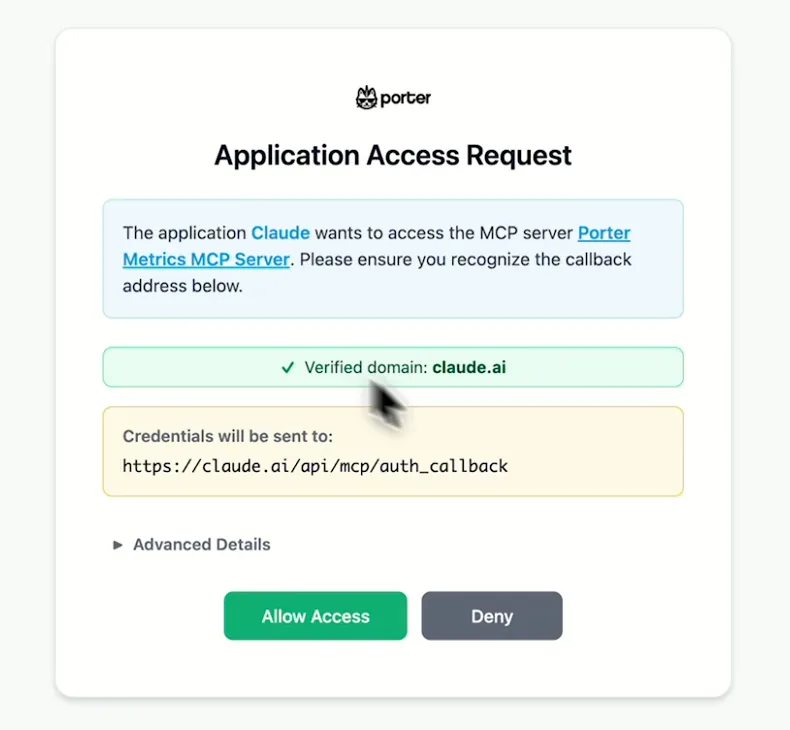
Porter's Application Access Request screen asking you to let Claude use the Porter MCP server
When Claude asks, sign in to Porter and select Allow Access.
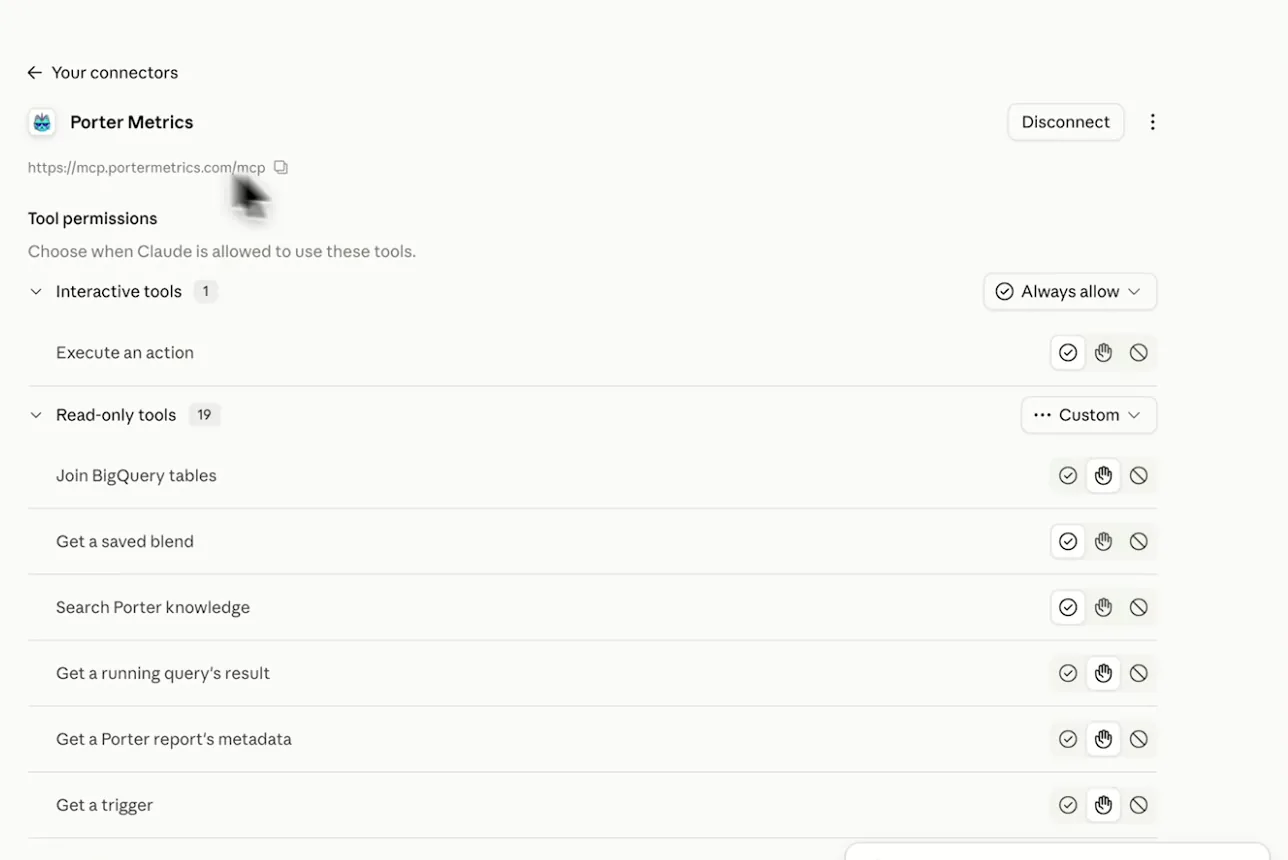
Porter Metrics listed as a connected connector in Claude with its read-only tools
After that, Porter shows as connected, so you can ask your first question.
If you prefer video, watch the whole BigQuery to Claude setup (1:40, no sound).
Interactive walkthrough, so you can click along here
02Use cases and prompts

What you can ask Claude

Each use case comes with a prompt to copy, the tables, columns or actions it uses and who it’s for. Before you run one, swap the angle-bracket parts for your own dataset, table and column names.

Can Claude tell me what's in my project?

You skip an afternoon of clicking around the console before the first real question.

Prompt
In my BigQuery project <project>, list every dataset and its tables with row count and size. Flag empty tables, the 5 largest, and any set of daily shards (names ending in a date). Then list the columns of <dataset>.<table>.

For: agencies taking over a client warehouse · analytics leads · consultants

Fields used: bigquery.dataset_listbigquery.table_listbigquery.table_get (schema, rows, size)columns from list_fields as bigquery_{dataset}__{table}__{column}

Can Claude summarize a table without writing SQL?

The account manager gets an answer the same day, and the analyst’s queue stays free for harder work.

Prompt
From <dataset>.<table>, show <spend column>, <clicks column>, <conversions column> and <revenue column> by week for the last 8 weeks using <date column>. Compute cost per conversion and revenue per dollar from the weekly totals, not from any stored rate column.

For: marketing analysts · account managers · in-house marketing teams

Fields used: the table's own columns, e.g. bigquery_{dataset}__{table}__{date column}bigquery_{dataset}__{table}__{spend column}bigquery_{dataset}__{table}__{revenue column} (names come from your schema)

Can Claude put revenue next to my Meta Ads spend?

You see whether the extra spend pays back, without exporting either side.

Prompt
For the last 12 weeks, sum <revenue column> from <dataset>.<orders table> by week, put it next to Meta Ads Amount spent by week, and show revenue per dollar spent. Did weeks with more spend bring more revenue?

For: growth and performance marketers · e-commerce teams · agencies

Fields used: BigQuery bigquery_{dataset}__{table}__{column} (date, revenue)Amount spent

Can Claude create a view or table from chat?

Your dashboards get a clean reporting layer, built without opening the console.

Prompt
Draft a view <dataset>.<view name> over <dataset>.<orders table> that excludes rows where <status column> is 'test' and sums <revenue column> by day. Show me the SQL first; create the view only after I approve.

For: analytics engineers · marketing ops · agency data leads

Fields used: bigquery.view_createbigquery.table_createbigquery.data_insertbigquery.dataset_create

Can Claude fix rows with UPDATE, DELETE or MERGE?

The fix ships in minutes, and you see the SQL before it touches the table.

Prompt
In <dataset>.<table>, count rows where <date column> = '<date>' grouped by <id column> having more than one row. Then write a statement that keeps one row per <id column> for that date. Show me the SQL and the row count before running anything.

For: analytics engineers · data leads

Fields used: read with query_data on the tablewrite with bigquery.query_run
03Why Porter

Why Porter for BigQuery in Claude

Porter brings your BigQuery tables into Claude with a Google sign-in, next to your ad platforms. Need free SQL across tables, joins or forecasts? Use Google’s official BigQuery MCP, which is free and the better tool for heavy SQL. You can run both.

✓

Google sign-in, nothing to host

Sign in with Google in Porter and add one MCP URL to Claude. There’s no OAuth client, consent screen or redirect URI to create in your Google Cloud project.

⊞

Your warehouse next to your ads

Ask about BigQuery tables next to Meta Ads, Google Ads, GA4 and other Porter connectors, so warehouse revenue sits beside ad spend in one answer.

⚙

Builds as well as reads

Claude can create datasets, tables and views, insert rows and run UPDATE, DELETE or MERGE from the same chat. Nothing runs until you approve it.

Aa

Your IAM roles set the limits

Porter connects through your Google account, so Data Viewer and Job User let it read, while Data Editor lets it change data. You can remove Porter’s access anytime.

↻

Send marketing data in, too

Porter can also write blends of ad, analytics and CRM sources to a BigQuery dataset on a schedule. Claude then reads those tables through the same connector.

✓

Free plan to start

The BigQuery connector comes with every Porter plan, including Free, so your first table costs nothing to try. BigQuery still bills its own query costs.

04Pricing

Pricing

You can start free, since Porter’s BigQuery connector for Claude comes with every plan. Use the calculator for your number of accounts, or see Porter pricing for every plan.

What you get

  • Free plan: the MCP, unlimited connected accounts and 30 days of history (15 days in AI chats)
  • Reporting: from $12.50 per account a month billed annually, or $15 month to month for one account
  • Billing: each BigQuery table Claude reads counts as one account, with volume discounts and no per-seat fee; BigQuery still bills its own query costs
  • Changes: views and row fixes run only after you approve; AI credits as listed on Porter pricing
  • Trial: 14 days of full access, no card

Price calculator

$33.33/mo$6.67 per account

An account is one ad account, Stripe account, store, page or GA4 property. The Free plan has unlimited accounts with 30 days of history.

05Data and actions

BigQuery data Claude can use

Since every warehouse differs, the BigQuery connector gives Claude no fixed field list. Claude sees your own warehouse: the tables your Google account can query and each table's columns, read live when you ask. Claude reads one table per question and lines up the results. Porter's guide to BigQuery datasets vs tables also explains the difference.

Each level maps to Google's BigQuery API reference, so you can check any of them there.

How Claude reads BigQuery

LevelWhat Claude seesWhat it's for
ProjectThe datasets it holdsMap the warehouse
DatasetIts tables and locationFind the right table
TableSchema, number of rows, sizeSpot empty or oversized tables
ColumnsEach column as a metric or dimension, named bigquery_{dataset}__{table}__{column}Prompts and filters
Date columnThe date range of a questionWeekly and monthly views

Product stats

WhatBigQuery connector
FieldsNo fixed list; each column of your tables is a metric or dimension
ActionsCreate datasets, tables and views, insert rows, and run UPDATE, DELETE or MERGE, after you approve
ReadsOne table per question, plus dataset and table metadata
FreshnessEach table is read the moment Claude asks
History30 days on the Free plan, 15 in AI chats
AccessYour IAM roles: Data Viewer and Job User to read, Data Editor to change data
Query costsBilled by BigQuery, at least 10 MB per table and per query; first 1 TiB a month free
06Security

Is it safe?

Yes. Porter connects through your Google account, so your IAM roles set the limits. Data Viewer and Job User let it read, while BigQuery Data Editor lets it change data. You can also remove Porter's access from your Google account anytime (Google's help on removing an app's access).

What the connector needs from BigQuery

The BigQuery connector for Claude needs Data Viewer on the tables or dataset as well as Job User on the project that runs the query, since a query needs both. A read-only scope covers reads, while auth/bigquery or auth/cloud-platform also allows writes (BigQuery API OAuth scopes).

Claude waits for approval before BigQuery changes

Before anything runs, Claude shows you the statement or object. Nothing runs until you approve it. query_run, view_update, table_delete and dataset_delete are permanent, so test risky statements on a copy first.

07FAQ

FAQ

Most questions cover query costs, GA4 export tables, several projects and sending data in, as well as freshness. Then come 3 fixes: numbers that don't match, empty lists, and a change that fails with a 403.

Will this add to my BigQuery bill?

Yes. Every query Claude runs bills the bytes it reads, at least 10 MB per table and per query, and LIMIT doesn't lower it (BigQuery on-demand pricing). The first 1 TiB a month is free, while a date range on a partitioned table scans less (how BigQuery costs add up).

Can Claude read my GA4 export?

Porter lists each daily events_YYYYMMDD table of a GA4 export as its own table, and Claude reads one day per question. For a month, point Claude at a partitioned summary table. Intraday tables are deleted as soon as the day is complete (Google's GA4 BigQuery export guide).

Can I connect several projects or client warehouses?

Yes. As long as your Google sign-in can see a BigQuery project, Claude sees it. For example, agencies with several Porter companies see each authorization under its own company. Each table Claude reads is billed as one data source account, so start with the tables clients ask about most.

Can Porter also send data into BigQuery?

Yes. Porter can also send marketing data to BigQuery: blends of ad, analytics and CRM sources written to a dataset on a schedule. Claude then reads those tables through the same BigQuery connector, next to your team's own tables.

How fresh is the data?

Porter reads each table the moment Claude asks, so answers are as fresh as the table. Streamed rows can be queried as soon as BigQuery acknowledges them. On the free plan, date ranges reach back 30 days, though only 15 days inside AI chats.

Troubleshooting

Why don't the numbers match BigQuery?

BigQuery numbers come back to Claude through Porter as text, and so do dates. Stored ratio columns such as CTR get summed when no column splits them, so divide totals instead. A range that includes today is still incomplete. Finally, tables that require a partition filter need the date range on that column (Google's guide to partitioned tables).

Why do I see no projects or an empty table?

Reconnect with the Google account that owns the project. An empty project list means the account you signed in with lists no BigQuery project, so there is nothing for Claude to read yet. Similarly, an empty column list means the item isn't a table, or your account has no read access to it.

Why did a change fail with a 403?

Reconnect BigQuery in Porter with a write scope, then ask Claude to run the change again. A 403 on a change means the Google sign-in Porter holds has a read-only scope, so reads keep working while writes wait for the new scope.


08Next

More Claude connectors

Since most warehouses are filled with ad, analytics and store data, Porter brings those same sources into Claude through the same MCP URL. Add the ones your tables come from, so Claude can check a table against its source, or browse all Claude connectors:

Try the connector in Claude

Sign in with Google, add Porter to Claude, then ask what's in your warehouse, which table moved, or what a view should look like. Setting up the BigQuery connector for Claude takes one sign-in and one URL. Since the free plan includes the MCP, your first table costs nothing to try.

Free plan · 14-day trial · No card needed

Marketing analysts: last week's numbers come straight from the table, without a ticket.

Agencies: a client's warehouse is mapped before the kickoff call ends.

Data leads: views and row fixes arrive as reviewed SQL rather than as requests in a queue.