Meta Ads (Facebook Ads) connector for ChatGPT

Use Porter’s Meta Ads connector for ChatGPT to analyze Facebook and Instagram spend, ROAS and frequency, then pause ads, shift budgets and launch campaigns you confirm on Business, Enterprise or Edu.

  • Spot creative fatigue and pause the tired ads
  • Find the placements and audiences that convert cheapest
  • Pace budgets and move spend between campaigns
  • Compare Meta Ads with Google Ads and Shopify in one chat
G2★★★★★Rated 4.6/5 from 288 G2 reviews (October 2026) · Used by 1,600+ marketing teams and agencies

By Porter Metrics team · Last updated October 20, 2026

ChatGPTPorter connected
Rank my Meta Ads campaigns by Purchase ROAS for the last 7 full days and flag any campaign whose Cost per purchase rose more than 20%.
Porter / Meta Ads / Trailgear Demo✓ 4 rows
Retargeting – Carts leads at 5.8 Purchase ROAS. Prospecting – Video is the one to watch: Cost per purchase rose 27%.
CampaignPurchase ROASCost / purchase
Retargeting – Carts5.8$14.20
Advantage+ – Lookalike3.9$21.60
Prospecting – Video2.1$38.40
Brand – Reach1.4$52.10
Demo data, Trailgear Demo account
1,378 Meta Ads fields
01Setup

How to connect Meta Ads to ChatGPT

Porter’s Meta Ads connector for ChatGPT takes 3 steps and no code. Connect your ad accounts in Porter with Facebook Login, add Porter’s MCP URL to ChatGPT as a custom MCP server, then sign in and ask. Porter’s guide on how to connect Meta Ads to ChatGPT also has screenshots and the other free routes. MCP (Model Context Protocol) is the open standard ChatGPT uses to connect to tools such as Porter.

Before you start

  • You need a Facebook user with a role on the ad account in Meta Business Manager, a free Porter account and a ChatGPT plan that supports custom MCP servers. If a Facebook profile has no assigned ad account, it shows no accounts in Porter. In Meta’s ad account roles, Admins and Advertisers can create and edit ads while Analysts only view. ChatGPT’s changes therefore need one of the first two.
  • Custom MCP servers are in beta in ChatGPT on the web, so set up Porter and ask your questions from a browser. On Business, Enterprise or Edu, an admin or owner turns on developer mode, and then ChatGPT can also make the changes you confirm. On Pro, you turn on developer mode yourself, and ChatGPT reads and recommends (OpenAI’s guide to custom MCP apps).
  • Works in ChatGPT on the web (chatgpt.com, custom MCP servers in beta) and in Codex, with the same Porter MCP URL.
  1. Step 1: Connect Meta Ads in Porter

    Sign up free at Porter, pick Meta Ads as the source and then sign in with Facebook. Tick every ad account you want ChatGPT to read, then pick ChatGPT as the destination.

  2. Step 2: Add the Meta Ads connector to ChatGPT

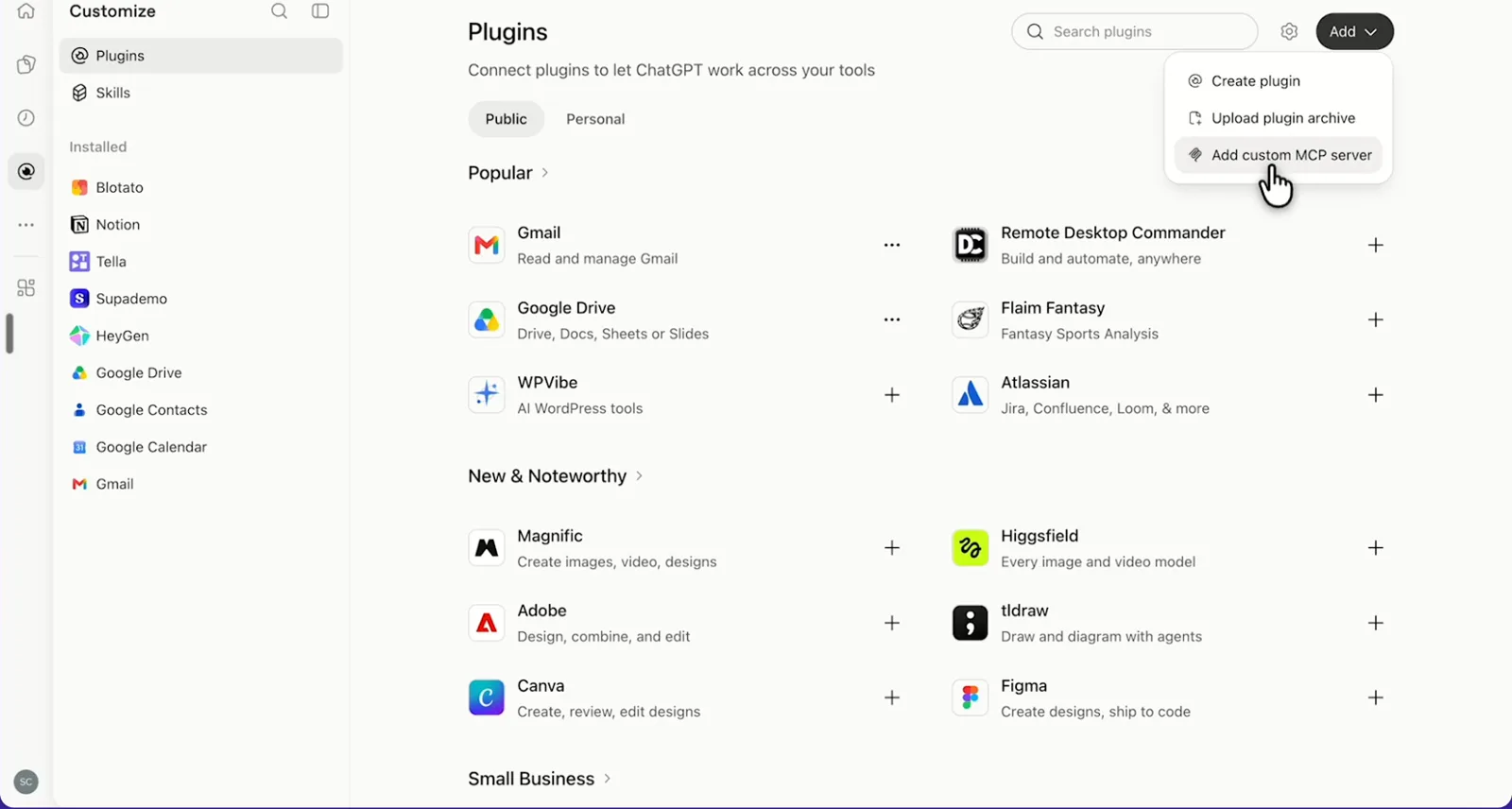
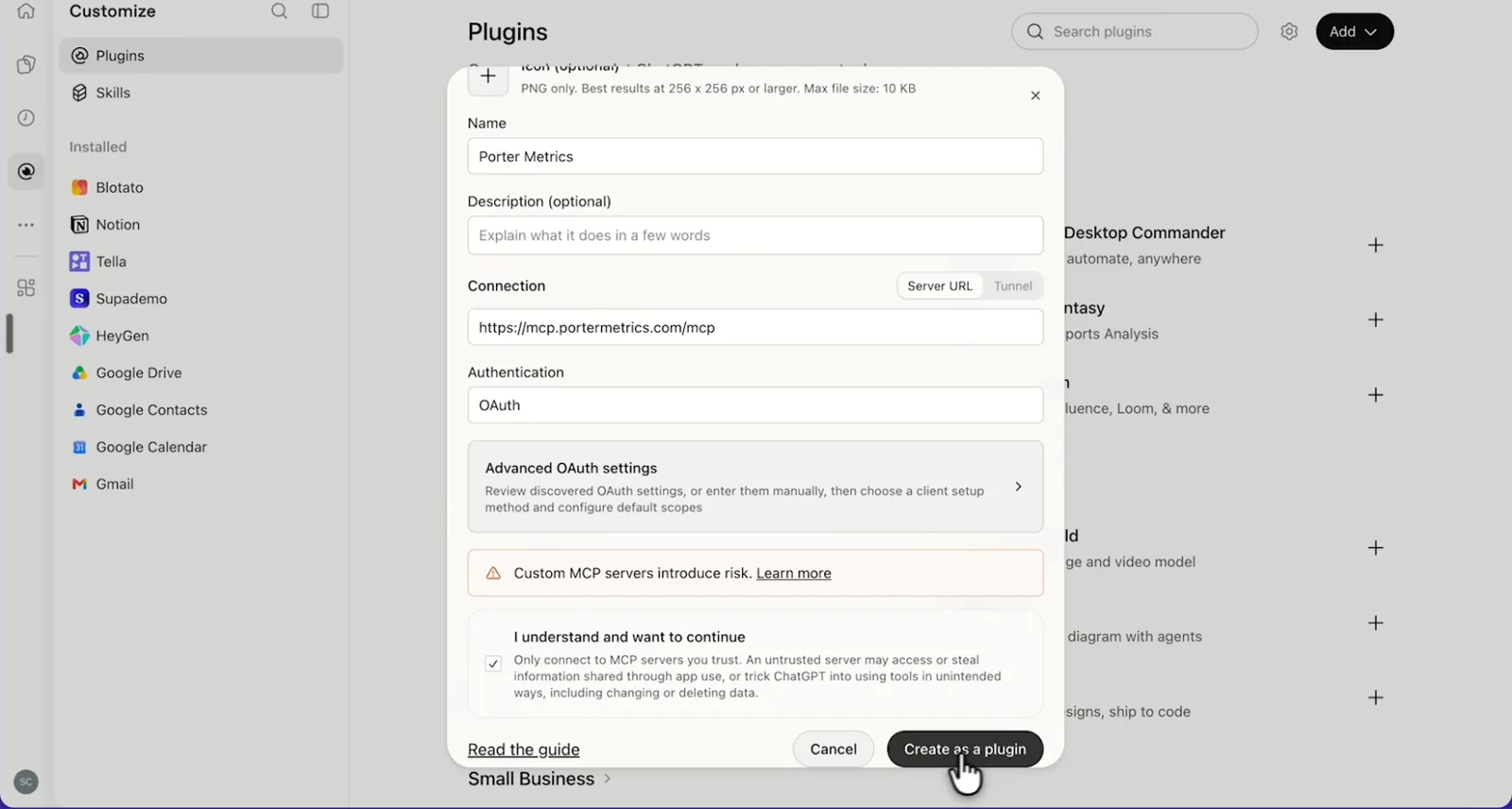
    Then, in ChatGPT, open Customize › Plugins, click Add and choose Add custom MCP server. On Business, an admin does this from Workspace settings › Apps › Create. Name it Porter Metrics, paste this URL as the Server URL and keep OAuth as the authentication:

    MCP URL
    https://mcp.portermetrics.com/mcp

    Tick “I understand and want to continue”, then select Create as a plugin.

  3. Step 3: Ask ChatGPT about Meta Ads

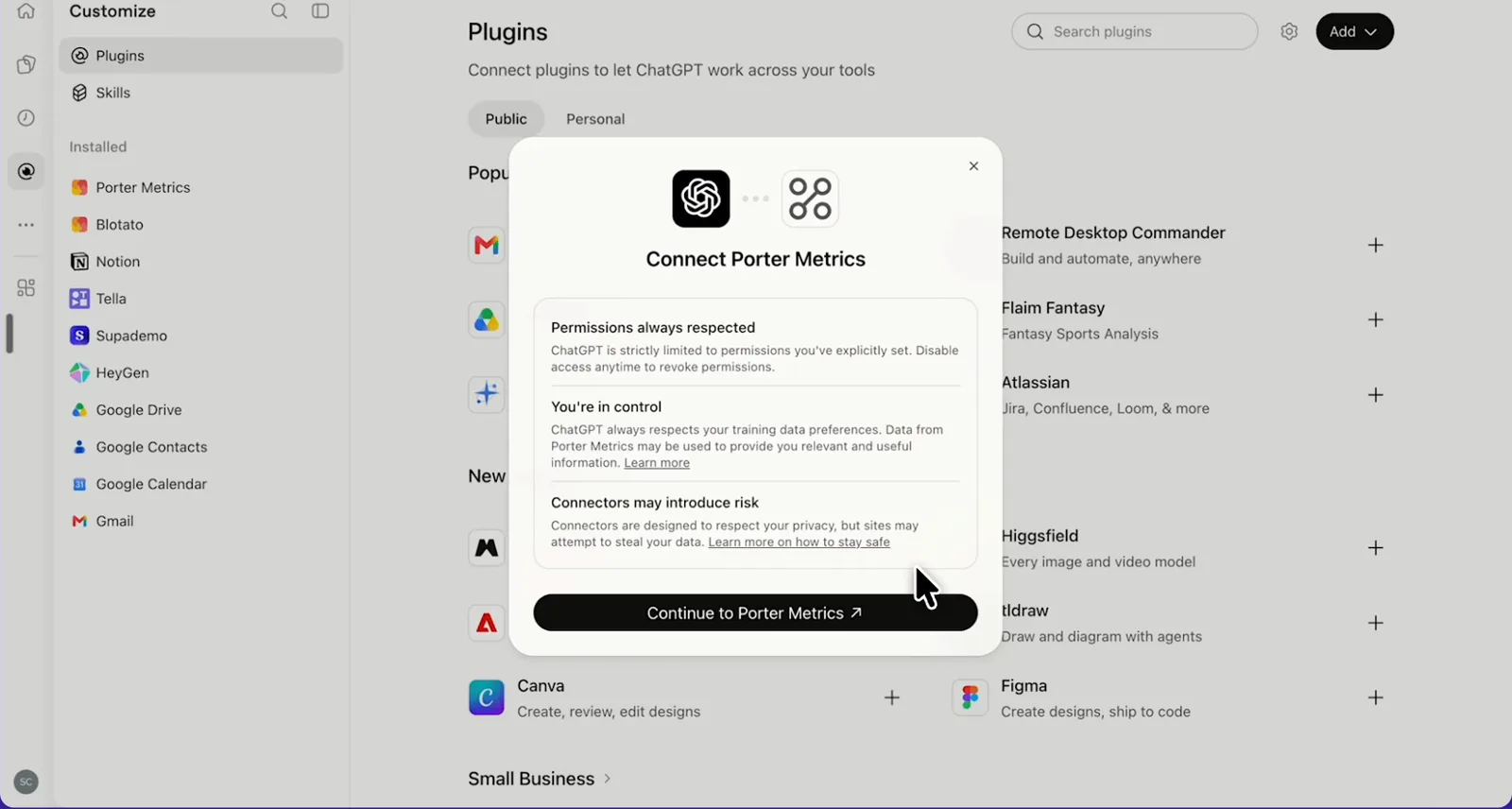
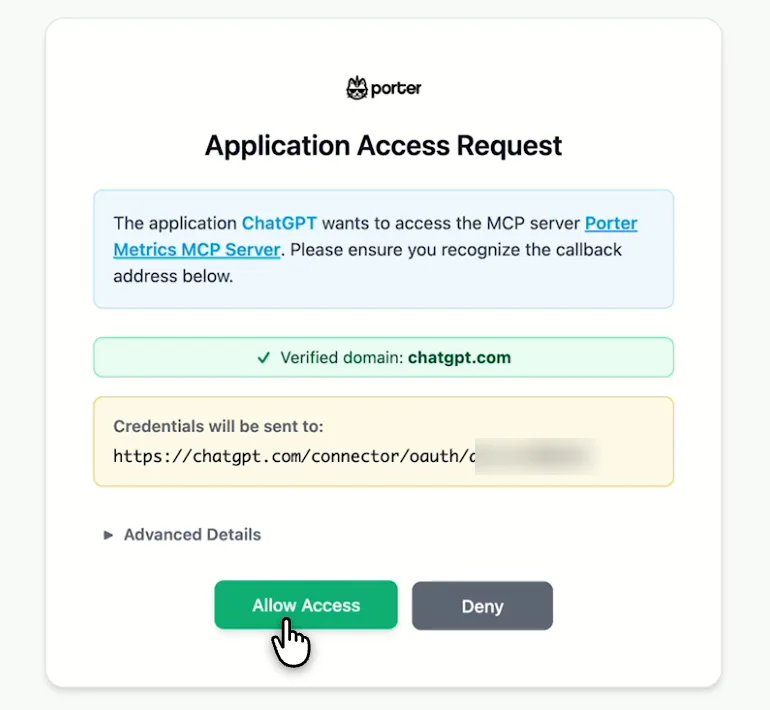
    Next, select Continue to Porter Metrics, sign in to Porter and click Allow Access. Then select Try in chat and paste this prompt:

    Prompt
    Rank my Meta Ads campaigns by Purchase ROAS for the last 7 full days and flag any campaign whose Cost per purchase rose more than 20% versus the 7 days before.

Guides and videos

app.portermetrics.com / create
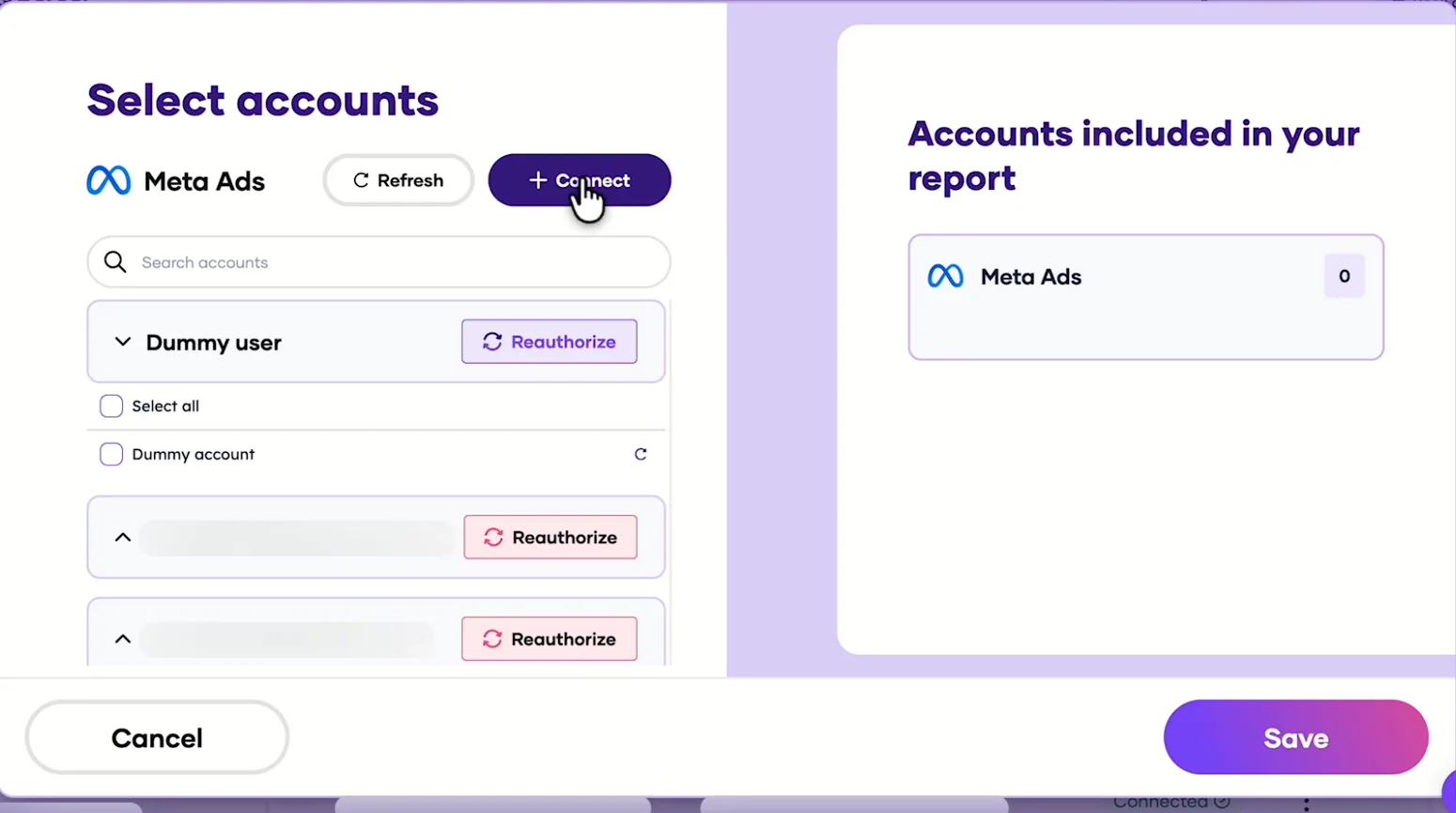
Porter's Select accounts window for Meta Ads with a demo account and the Connect button
First, in Porter, open Meta Ads and select Connect.
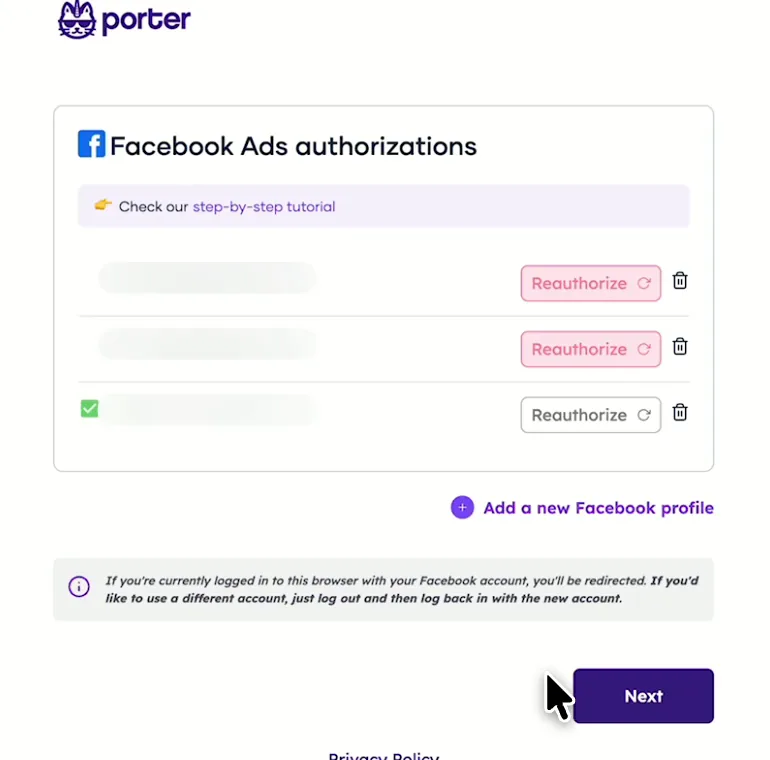
Porter's Facebook Ads authorization page with the authorized profile
Then, log in with Facebook and come back to Porter.
ChatGPT's Plugins page with the Add menu open on Add custom MCP server
In ChatGPT, open Customize, then Plugins, and choose Add custom MCP server.
ChatGPT's Add custom MCP server form with the name Porter Metrics, Porter's MCP URL and OAuth filled in
Then, paste Porter's MCP URL, keep OAuth, tick the box and select Create as a plugin.
ChatGPT's Connect Porter Metrics window with the Continue to Porter Metrics button
Next, ChatGPT asks you to continue to Porter Metrics to sign in.
Porter's Application Access Request screen asking you to let ChatGPT use the Porter MCP server
Finally, sign in to Porter and select Allow Access.
If you prefer video, watch the whole Meta Ads to ChatGPT setup (1:36, no sound).
Interactive walkthrough, so you can click along here
02Use cases and prompts

What you can ask ChatGPT

Each use case comes with a prompt to copy, the fields it uses from the Meta Ads fields list and who it’s for. Every prompt uses fields that passed Porter’s tests. On Business, Enterprise or Edu, ChatGPT can also make the changes you confirm; on Pro it reads and recommends.

Can ChatGPT spot creative fatigue before it wastes spend?

The problemThe ad that won last month now costs more per purchase. But Ads Manager won’t call it fatigue until you line up frequency and CTR day by day.

What ChatGPT doesChatGPT catches creative fatigue when it tracks frequency, link CTR and CPM per ad by day. Then it flags ads where frequency climbs while link CTR falls, shows each one’s mobile-feed preview and pauses the ones you pick.

What you getYou replace the day-by-day frequency check in Ads Manager, so tired ads come off before they push up cost per purchase.

Prompt
For the last 14 days, by Ad name and Date, show Amount spent, Impressions, Frequency, CTR (Link click-through rate), CPM (Cost per 1000 impressions) and Cost per purchase. Flag ads where Frequency rose above 3 while CTR (Link click-through rate) fell 3 days in a row.
Then ask
Prompt
Show the Ad preview URL: mobile feed for the flagged ads, then pause the 3 with the highest Amount spent after I confirm.

For: in-house media buyers · creative strategists · agencies

Fields used: Ad nameDateAmount spentImpressionsFrequencyCTR (Link click-through rate)CPM (Cost per 1000 impressions)Cost per purchasemobile feed
Action: ad_update (status)

Can ChatGPT compare ROAS across attribution windows?

The problemYour store’s revenue says one ROAS while Ads Manager says another. Part of the gap is due to the attribution window each ad set reports on.

What ChatGPT doesFor each ad set, ChatGPT shows the default window (the ad set’s own setting, as in Ads Manager). Then it puts 1-day click, 7-day click and 1-day click + 1-day view next to it, and names the window behind each number.

What you getYou can tell a real ROAS drop from a window difference before you cut a budget.

Prompt
For each ad set in the last 30 days, show Adset name, Attribution setting, Purchases, Purchases (7 days click), Purchases (1d_click + 1d_view), Purchase ROAS (Return on ad spend), Purchase ROAS (Return on ad spend) (1 day click), Purchase ROAS (Return on ad spend) (7 days click) and Purchase ROAS (Return on ad spend) (1d_click + 1d_view). Don't add up ad sets with different Attribution settings.

For: e-commerce marketers · marketing analysts · agencies

Fields used: Adset nameAttribution settingPurchasesPurchases (7 days click)Purchases (1d_click + 1d_view)Purchase ROAS (Return on ad spend)Purchase ROAS (Return on ad spend) (1 day click)Purchase ROAS (Return on ad spend) (7 days click)Purchase ROAS (Return on ad spend) (1d_click + 1d_view)

Can ChatGPT find the placements and audiences that convert cheapest?

The problemAdvantage+ placements spread your budget across Feeds, Stories, Reels and Audience Network, but you can’t see which ones bring the purchases.

What ChatGPT doesChatGPT ranks cost per purchase and ROAS by platform and position, then by age and gender in a second query. That’s because Meta allows one breakdown family per query. It can also drop a placement from an ad set or narrow its age range.

What you getOne answer replaces two breakdown exports, so you move budget or cut a placement based on numbers you can see.

Prompt
For the last 30 days, show Amount spent, Purchases, Cost per purchase and Purchase ROAS (Return on ad spend) by Publisher platform and Platform position. Then, in a separate query, show the same metrics by Age and Gender. Where should more budget go?
Then ask
Prompt
Remove Audience Network from the placements of ad set {name} after I confirm.

For: in-house media buyers · e-commerce marketers · agencies

Fields used: Publisher platformPlatform positionAgeGenderAmount spentPurchasesCost per purchasePurchase ROAS (Return on ad spend)
Action: adset_update (placements, age)

Can ChatGPT pace budgets and move spend between campaigns?

The problemHalfway through the month, one campaign is running out of budget while another barely spends.

What ChatGPT doesChatGPT compares spend with daily, lifetime and remaining budget at campaign and ad set level, then ranks each by cost per purchase. After that, it proposes new budgets in your account currency and applies the ones you choose.

What you getThe pacing sheet you rebuild every week becomes one question, while the budget shift happens in the same chat.

Prompt
For active campaigns this month, show Campaign name, Campaign daily budget, Campaign lifetime budget, Campaign budget remaining, Amount spent, Purchases and Cost per purchase. For ad sets with their own budget, show Adset name, Adset daily budget and Adset budget remaining. Which will run out early and which are under-spending?
Then ask
Prompt
Move 20% of the daily budget from the campaign with the highest Cost per purchase to the one with the lowest. Show me the change first.

For: in-house media buyers · agencies

Fields used: Campaign nameCampaign statusCampaign daily budgetCampaign lifetime budgetCampaign budget remainingAdset nameAdset daily budgetAdset budget remainingAmount spentPurchasesCost per purchase
Actions: campaign_update · adset_update

Can ChatGPT launch a campaign from a brief?

The problemA new campaign still means hunting down Page and pixel IDs, uploading creatives and clicking through every level of Ads Manager.

What ChatGPT doesChatGPT finds your Page, pixel and targeting IDs before it uploads the image or video. Then it builds the campaign, ad set and ad for you to review. Meta locks the objective and optimization goal once a campaign exists, so set both in your first prompt.

What you getYou review a finished draft instead of building it field by field.

Prompt
Find my Page and pixel, then create a paused Sales campaign optimizing for website purchases with a $50 daily budget, one ad set for women 25–44 in the United States on Facebook and Instagram, and one ad using the image at {URL} with this primary text and headline: {text}.
Then ask
Prompt
Create a 1% lookalike in the United States from my purchasers custom audience and add it to a second paused ad set.

For: in-house media buyers · agencies · e-commerce marketers

Actions: page_list · pixel_list · geolocation_search · interest_search · image_upload · video_upload · campaign_create · adset_create · ad_create · lookalike_create

Can ChatGPT build one weekly report across all my Meta Ads accounts?

The problemEvery Monday, someone clicks between client ad accounts in Business Manager, then copies the same columns into one sheet.

What ChatGPT doesChatGPT queries every connected ad account in one request, compares exact date ranges, converts spend to one currency and then drafts a summary per client. It uses Amount spent rather than Account amount spent, which repeats the lifetime total on every row.

What you getAccount switching and copy-paste drop out, so each client email starts from the accounts that actually moved.

Prompt
For every Meta ad account I've connected, show Account name, Account ID, Amount spent (USD), Purchases, Cost per purchase and Purchase ROAS (Return on ad spend) for {Monday date}–{Sunday date} versus the 7 days before. Flag accounts where Cost per purchase rose more than 20%.
Then ask
Prompt
Write a 3-line summary per flagged account I can paste into a client email.

For: agencies · freelancers

Fields used: Account nameAccount IDDateAmount spent (USD)PurchasesCost per purchasePurchase ROAS (Return on ad spend)

Can ChatGPT analyze competitors' ads in the Meta Ad Library?

The problemA competitor floods your feed with new ads, but scrolling the Ad Library one creative at a time tells you little about what they’re testing.

What ChatGPT doesChatGPT pulls any brand’s live ads from the public Ad Library, then groups duplicates by creative. It also transcribes the videos and sorts hooks and angles into a hosted report. The Ad Library is public, so this works without an ad account.

What you getYou get a competitor’s hooks and angles for your next creative brief instead of scrolling the library ad by ad.

Prompt
Pull the live Meta ads of {brand} from the Ad Library, group them by unique creative, transcribe the videos and list the hooks and angles they use most. Publish it as a report.

For: creative strategists · agencies · e-commerce marketers

Fields used: Competitor creative analytics comes with the Scale plan.
Actions: meta_ads_research.run_audit · enrich_creatives · view_creative · publish_report

Can ChatGPT report Meta lead ads by cost per lead?

The problemLead campaigns keep filling forms, but comparing CPL by ad means one report in Ads Manager and another trip to the Page’s lead forms.

What ChatGPT doesChatGPT ranks campaigns and ads by leads and CPL, and also lists the lead forms on your Page. Pass a Page access token in the chat and ChatGPT reads the submitted leads too.

What you getYou see which campaigns and ads bring the cheapest leads before you raise their budgets.

Prompt
For the last 30 days, show Campaign name, Ad name, Leads and CPL (Cost per lead), sorted by CPL. Then list the lead forms on my Page.

For: B2B marketers · lead gen marketers · agencies

Fields used: Campaign nameAd nameLeadsCPL (Cost per lead)
Actions: leadform_list · lead_list
03Why Porter

Why Porter for Meta Ads in ChatGPT

Porter reads any ad account your Facebook user can reach, next to the rest of your marketing data. If Meta has enabled your ad account and you only need Meta, including catalog ads, A/B tests and signal diagnostics, Meta’s official Ads AI connector fits well (Meta’s Ads MCP server docs). You can run both.

✓

1,378 ready-made fields

ChatGPT reads 1,378 fields, from account down to ad and creative, across every ad account where your Facebook user has a role. Meta doesn’t need to enable anything first.

⊞

Changes you confirm

On Business, Enterprise or Edu, ChatGPT pauses ads, moves budgets and builds campaigns, ad sets, ads and audiences through 32 actions, once you confirm each change. On Pro it reads and recommends. New campaigns start paused, and large budgets need an extra confirmation.

⚙

Meta Ads next to Google Ads and Shopify

Compare Meta Ads with the Google Ads connector for ChatGPT or the Shopify connector for ChatGPT in the same chat, so ROAS meets the rest of your marketing data.

Aa

37 months of history, live

Meta keeps 37 months of daily delivery, cost and conversion data. On paid plans Porter queries that full window live, today included, so ChatGPT compares this month with the same month two years back.

↻

Ad Library teardowns and new creatives

ChatGPT pulls any brand’s live ads from the Ad Library and sorts their hooks and angles. Porter also generates ad images and videos that ChatGPT uploads to a new ad.

✓

One connection, every destination

Sign in with Facebook once and add one MCP URL to ChatGPT on the web. The same ad accounts also feed Claude and other AI clients through Porter’s MCP server for any MCP client, Data Studio and BigQuery (Meta Ads to BigQuery connector).

⊞

Live dashboards, not only chat answers

Ask ChatGPT for a dashboard and Porter’s AI dashboards publish it at its own link, synced automatically and ready to share. Official MCP servers answer inside the chat and stop there.

04Dashboard

Dashboard template

If your team reviews ads together, you can skip the chat: Porter fills the free Facebook Ads Dashboard template in Data Studio (formerly Looker Studio). It charts impressions, clicks, Amount spent, CPC and CTR by campaign, ad set and ad, since Porter’s Meta Ads to Data Studio connector feeds it.

AI dashboards

Build a live Meta Ads dashboard from the chat

Describe the dashboard in one sentence and Porter builds it. A client-ready dashboard in minutes, with no chart dragging and no BI tool to learn. Ask ChatGPT:

Prompt
Build a live Meta Ads dashboard for my account with the last 30 days, the main KPIs and a weekly trend.
Live URLEach dashboard at its own link: no login, no app, no download
Auto-syncFresh Meta Ads data, nobody re-exports each period
Scheduled deliveryEmail or PDF sends on a set day
White labelYour logo and branding for clients
Sharing permissionsView or edit access per person
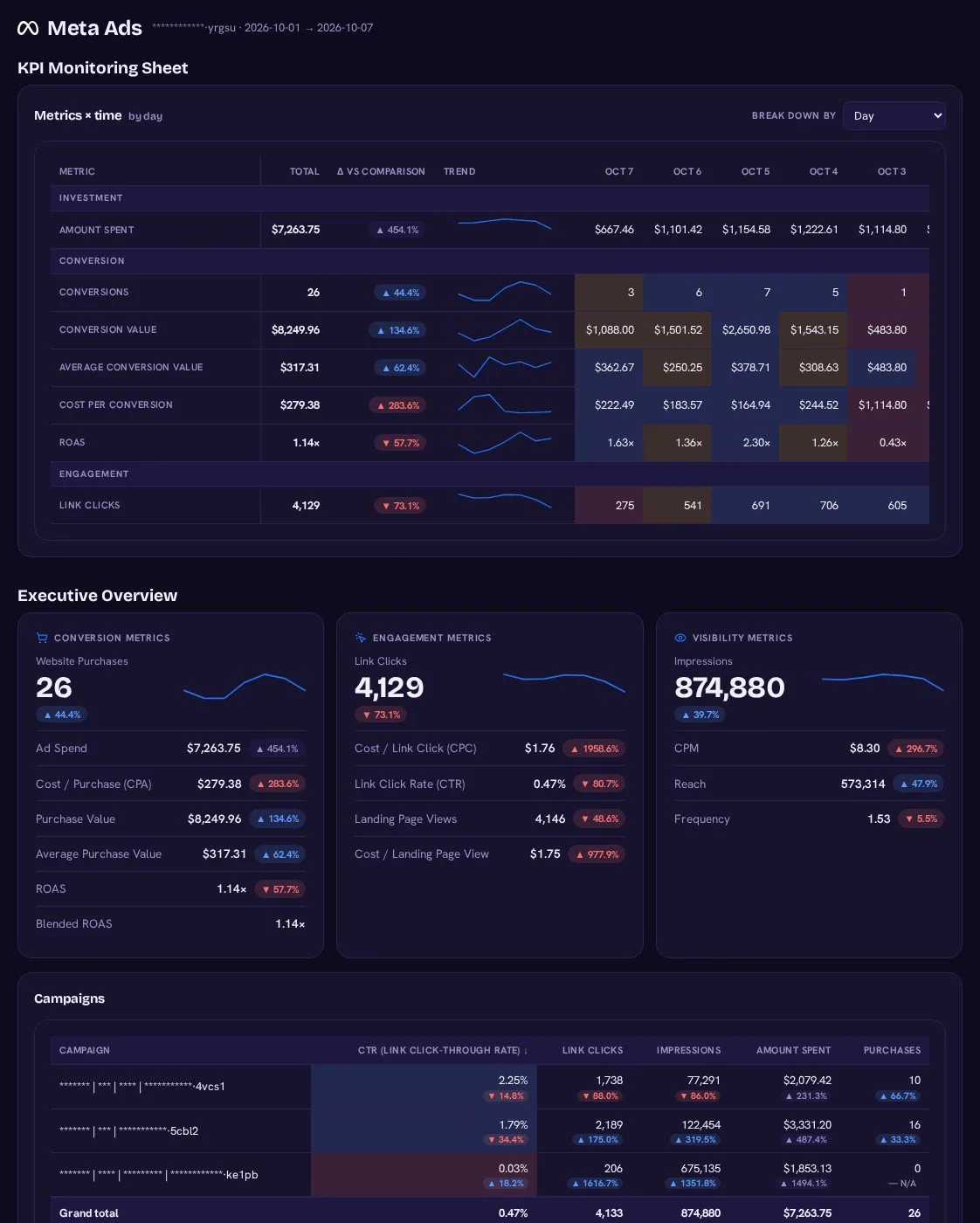
Meta Ads AI dashboard template built with Porter Metrics AI dashboards
Template

The Meta Ads AI dashboard template

Built with Porter's AI dashboards on a real account. Open it live, then ask ChatGPT to make one like it for your account.

Open the live Meta Ads dashboard

05Pricing

Pricing

You can start free, since Porter’s Meta Ads connector for ChatGPT comes with every plan. Use the calculator for your number of accounts, or see Porter pricing for every plan.

What you get

  • Free plan: never expires, with unlimited connected accounts and the last 15 days of data in ChatGPT (30 days in Data Studio and Sheets)
  • Reporting: from $12.50 per account a month billed annually, or $15 month to month for one account
  • Billing: each Meta ad account counts as one account, with volume discounts and no per-seat fee
  • Changes: 1 AI credit per completed change you confirm on Business, Enterprise or Edu; failed tasks are free, and the Free plan includes 100 credits a month
  • Trial: 14 days of full access, no card

Price calculator

$33.33/mo$6.67 per account

An account is one ad account, Stripe account, store, page or GA4 property. The Free plan never expires and has unlimited accounts, with the last 15 days of data in AI chats.

06Data and actions

Meta Ads data and actions in ChatGPT

The Meta Ads connector gives ChatGPT 1,378 fields, including 167 dimensions, from account down to ad and creative. Porter also gives ChatGPT 32 actions to read and change the account. Most questions need only the 12 fields below, while the Meta Ads fields list has every label and id.

The 12 Meta Ads fields ChatGPT uses most

FieldWhat it's for
Amount spentspendSpend in the account currency for the period
Purchase ROAS (Return on ad spend)purchase_roas_purchaseROAS on each ad set's own attribution setting
Cost per purchasecost_per_purchaseCPA for purchase campaigns
PurchasespurchasePurchases on the ad set's attribution setting
Purchase conversion valuevalue_omni_purchaseRevenue Meta attributes to ads
FrequencyfrequencyAverage times each person saw an ad; a fatigue signal
CTR (Link click-through rate)inline_link_click_ctrLink clicks per impression
CPM (Cost per 1000 impressions)cpmCost of reach by audience or placement
Publisher platformpublisher_platformFacebook, Instagram, Audience Network, Messenger or Threads
Attribution settingattribution_settingWhich window an ad set reports on
Campaign budget remainingcampaign_budget_remainingPacing for campaign budgets
Ad preview URL: mobile feedad_mobile_feed_preview_urlThe creative behind the numbers

Can ChatGPT pause, edit or create Meta Ads campaigns?

On Business, Enterprise and Edu plans, ChatGPT pauses, edits, creates and deletes campaigns, ad sets, ads, audiences and lead forms after you confirm. Deletes are permanent, so check each one first. On Pro, ChatGPT reads the account and lists the changes for you to make in Ads Manager.

TypeCountExamples
Read14Campaigns, ad sets, ads, any object by ID, audiences, pixels, custom conversions, Pages, lead forms, leads, interest and location search
Create9Campaigns, ad sets, ads, image and video uploads, custom audiences and customer lists, lookalikes, lead forms
Update5Campaign, ad set and ad status, budget, bid, schedule, targeting, placements, creative; audiences; lead forms
Delete4Campaigns with their ad sets and ads, ad sets, ads, audiences

How far back can ChatGPT read Meta Ads data?

Meta serves ads insights for up to 37 months, per Meta's 37-month reporting limit. Paid Porter plans read everything Meta returns, while the Free plan reads the last 15 days in ChatGPT (30 days in Data Studio and Sheets).

Product stats

WhatMeta Ads connector
Fields1,378 (167 dimensions), from account down to ad and creative
Actions32 (14 read, 9 create, 5 update, 4 delete)
ChatGPT plansReads on Pro; reads and changes you confirm on Business, Enterprise and Edu (web, beta)
FreshnessLive query to Meta on each question, today included
HistoryUp to 37 months on paid plans; the last 15 days in ChatGPT on the Free plan (30 days in Data Studio and Sheets)
Attribution windowsDefault, 1-day click, 7-day click, 28-day click and 1-day click + 1-day view
Rate limitsMeta's Insights cap: 600 calls per ad account per hour on the Dev tier, 190,000 with full Ads API access
AccessFacebook Login on the ad accounts you tick; changes need an Admin or Advertiser role

See all 1,378 Meta Ads fields

07Security

Is it safe?

Yes, the Meta Ads connector for ChatGPT signs in with Facebook Login, so Porter reaches only the ad accounts you tick. Deleting a campaign, ad set, ad or audience is permanent, so check each delete before you confirm it.

What the connector needs from Meta Ads

Meta ties each task to a permission: ads_read for reports, ads_management for changes and leads_retrieval for lead forms, as Meta's Marketing API permissions list them. Porter then reads and writes only on the ad accounts you tick at sign-in, and you can revoke its access anytime.

How you confirm changes

ChatGPT asks you to confirm changes based on the app's permissions and holds back some high-risk actions for extra care. New campaigns and creatives are created paused, so nothing delivers until you turn it on. Large budgets also need an extra confirmation.

Status, budget and targeting changes can be reverted with another change. However, deleting a campaign also deletes its ad sets and ads. Each completed change uses 1 AI credit.

Will Meta ban my ad account for using an MCP?

No. Meta says "it's unlikely that an account would be banned simply for using" its ads MCP (Meta's guidance on connecting the ads MCP safely). Porter calls the same Marketing API through Facebook Login, while Porter's guide on Meta Ads ban risk covers what does get ad accounts disabled.

Instead, the real limit is Meta's rate limit (Meta Marketing API rate limits). Insights calls per ad account per hour cap at 600 on Meta's Dev tier, compared to 190,000 with full Ads API access. In addition, you get 400 per active ad.

08FAQ

FAQ

These answers cover Instagram, Facebook Pages, custom conversions, live data and Claude. The last three help when numbers or queries look wrong in ChatGPT, and Porter's setup tutorial also has more fixes.

Does the Meta Ads connector include Instagram ads?

Yes, Instagram ads run through Meta Ads, so ChatGPT reads them alongside Facebook, Audience Network, Messenger and Threads. Split results by Publisher platform, then by Platform position for feed, Stories and Reels, and compare cost per purchase across them.

Is the Meta Ads connector the same as the Facebook Pages connector?

No. The Meta Ads connector brings paid Facebook and Instagram campaigns, also called Facebook Ads, into ChatGPT. Organic Page posts, reach and followers, however, come from Porter's Facebook Pages connector, which works through the same MCP URL.

If you connect both in Porter, you can compare paid and organic results in one chat.

Can ChatGPT read my custom conversions?

Yes, ChatGPT lists the custom conversions in your ad account, then reads Cost per website custom conversion next to campaigns, ad sets and ads. You can rank them by cost the way you rank purchases, then compare them across campaigns in one prompt.

Is Meta Ads data in ChatGPT live?

Yes, because Porter stores no Meta Ads data, each question queries Meta live, including today's partial day. Meta refreshes insights about every 15 minutes and stops changing them after 28 days (Meta's insights refresh schedule), so recent days can move between questions.

Can I use Porter in Claude too?

Yes. Porter's MCP URL, the same one behind the Meta Ads connector for ChatGPT, also works in Claude as a custom connector. If your team uses both, you can then ask about the same campaigns in either one.

See Porter's Meta Ads connector for Claude for the Claude setup and what it covers.

Troubleshooting

Why don't ChatGPT's numbers match Ads Manager?

ChatGPT's numbers can drift from Ads Manager because of mixed settings. Purchases and ROAS follow each ad set's own attribution setting, so an account total adds windows together (Meta's guide to multiple attribution settings).

Compare 7-day click in ChatGPT with 7-day click in Ads Manager, and ask for exact dates, since presets use UTC. Also, reach can't be summed across rows.

Why does ChatGPT show an error from Porter?

Ask again with one breakdown per query or a shorter range. Porter returns this error when a query breaks a Meta Ads rule and Meta sends back no reason. One usual cause is two breakdown families at once, such as Age with Publisher platform or Country code. The others are any DMA breakdown, or a date range older than Meta keeps.

Why does ChatGPT list my ad accounts but return no data?

ChatGPT lists ad accounts but returns no data when the Facebook consent screen closed before the ad account was ticked. Then every query asks you to reconnect. In that case, reconnect Meta Ads in Porter and tick each account. If one still shows nothing, check that your Facebook user has a role on it in Business Manager.

09Next

More ChatGPT connectors

ChatGPT reads more than Meta Ads through Porter, and the same Meta Ads connection also feeds Porter's other destinations. Browse all ChatGPT connectors or pick another ad platform below, since each page lists that platform's prompts, fields and limits.

Not only ChatGPT. Send Meta Ads data anywhere

The same Porter account and connection also send Meta Ads data to these destinations, at no extra cost.

Try the connector in ChatGPT

Porter's Meta Ads connector for ChatGPT takes 3 steps, so your first question can go out today. For example, ask ChatGPT to catch tired creatives, find the placements that convert cheapest or draft a new campaign for review. Then decide what to change in the same chat.

Free plan · 14-day trial · No card needed

In-house media buyers: creative fatigue, placement costs and pacing get checked, then fixed, in one chat.

Agencies: the Monday roll-up across client ad accounts takes one prompt, including competitor teardowns.

E-commerce marketers: budget moves rest on ROAS from the attribution window you trust.