
- Sign up free at Porter, choose TikTok Ads and sign in with TikTok.
- In Claude, open Customize, then Connectors, click + Add and choose Add custom connector.
- Name it Porter Metrics and paste
https://mcp.portermetrics.com/mcp. - Click Connect, sign in to Porter and allow access.
- Open a new chat and ask about spend, video hooks or CPA.
Is there an official TikTok Ads MCP?
Yes. TikTok runs the TikTok for Business MCP Server, and it’s in Claude’s connector directory. It’s built for running TikTok Ads from Claude: around 400 tools for campaigns, Smart+, catalogs, audiences and Business Center. Porter’s connector is built for marketers who report across channels: it puts TikTok next to Meta Ads, Google Ads and GA4, and any change it makes waits for your approval.
| Method | Setup | Sign-in | Works in | Free? | Best for |
|---|---|---|---|---|---|
| Porter connector (MCP) | 5 steps, no code | Stays connected until you revoke it | claude.ai, Claude Desktop, Cowork, Claude Code | Free plan, last 15 days | Reporting TikTok next to your other channels |
| TikTok’s official MCP server | Sign in, no code | Lasts 30 days, then you reauthorize | claude.ai and Claude Desktop (Pro or Max), ChatGPT, Cursor | No price listed | Running TikTok-only campaigns, catalogs and Business Center |
| CSV export from Ads Manager | Every time you need fresh data | None | Any Claude chat | Yes | A one-off analysis |
Comparing MCP options in more detail? See Porter’s TikTok Ads MCP server.
Set up TikTok’s official MCP server
TikTok’s guide to connecting Claude asks for a TikTok for Business account and Claude on the Pro or Max plan. There are two ways to add it.
From Claude’s connector directory
- In Claude, open Customize, then Connectors, and search for TikTok.
- Pick TikTok’s connector from the list and click Connect.
- Sign in to TikTok Ads Manager, review the permissions and click Authorize.
Watch the official TikTok Ads setup in Claude, step by step:
By URL, with every tool
The directory version leaves out 26 tools, mostly billing and payments. To get them, add the server by URL: open Customize, then Connectors, click + Add, name it, paste one of these URLs and click Add, then Connect and Authorize.
https://business-api.tiktok.com/open_mcp/tt-ads-mcp-flathttps://business-api.tiktok.com/open_mcp/tt-ads-mcp-layerThe first loads every tool when you connect. The second loads around 40 core tools and finds the rest when a question needs them, which keeps long chats lighter.
What it can do
It reports on and manages campaigns, ad groups and ads, including Smart+, plus catalogs and Business Center. Its sign-in lasts 30 days, then you reauthorize with the same TikTok for Business account.
Limitations and features of the official MCP
TikTok’s server is the better pick for running campaigns inside TikTok, with about 400 tools. It reads only TikTok and its sign-in lasts 30 days, so for reporting TikTok next to your other channels, Porter fills the gaps.
| TikTok’s official MCP | Porter | |
|---|---|---|
| Sign-in | Lasts 30 days, then you reauthorize | Stays connected until you revoke it |
| Claude plan | Pro or Max, per TikTok’s guide | Any plan; the Free plan allows one custom connector |
| Tools | About 400; the directory version leaves out 26, mostly billing and payments | 628 ready-made TikTok Ads fields, plus campaign changes |
| Changes | Creates and edits campaigns, ad groups, ads, audiences and catalogs | Every change waits for your approval |
| Other sources | TikTok only | TikTok next to Meta Ads, Google Ads, GA4 and 30+ sources |
| Output | Answers in chat | Answers in chat, plus live dashboards with their own link |
| Cost | No price listed | Free plan with unlimited accounts and the last 15 days in AI chats |
Before you start
- A TikTok Ads account you can sign in to
- Claude on any plan. The Free plan allows one custom connector
- A free Porter account
How to connect TikTok Ads to Claude (claude.ai)
Connect TikTok Ads in Porter
Sign up free at Porter, open Data sources and choose TikTok Ads. Sign in with TikTok and allow access. Porter lists every ad account your login can reach.
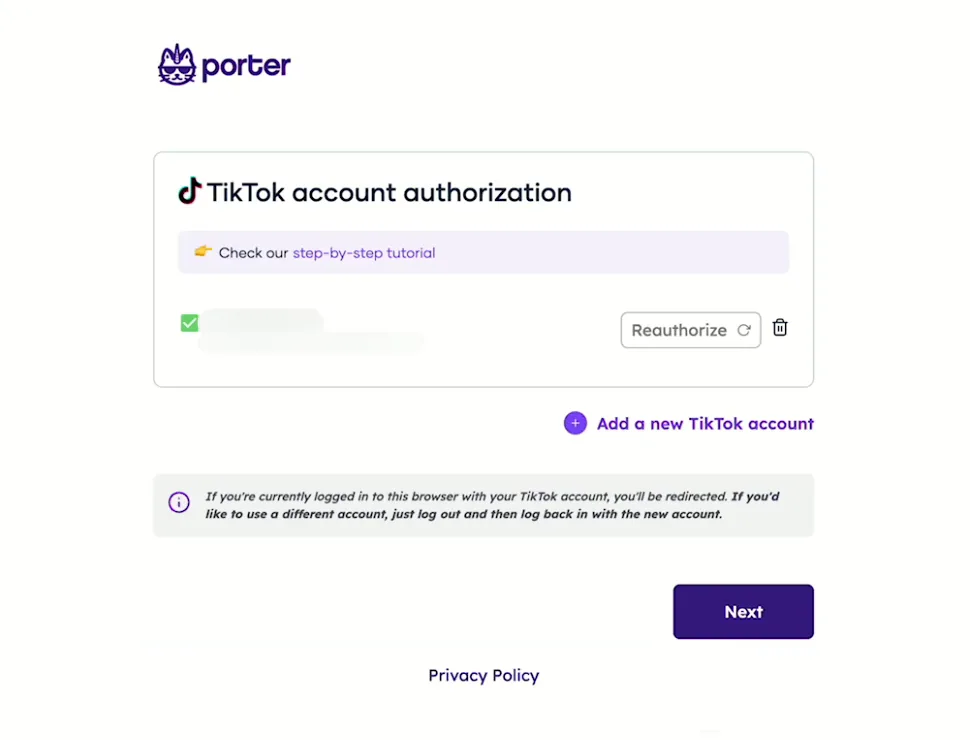
Your TikTok account, authorized in Porter.
Open Connectors in Claude
In Claude, open Customize, then Connectors, click + Add and choose Add custom connector.
Where to find custom connectors in Claude.
Paste Porter’s MCP URL
Name it Porter Metrics and paste this URL, then click Add:
https://mcp.portermetrics.com/mcp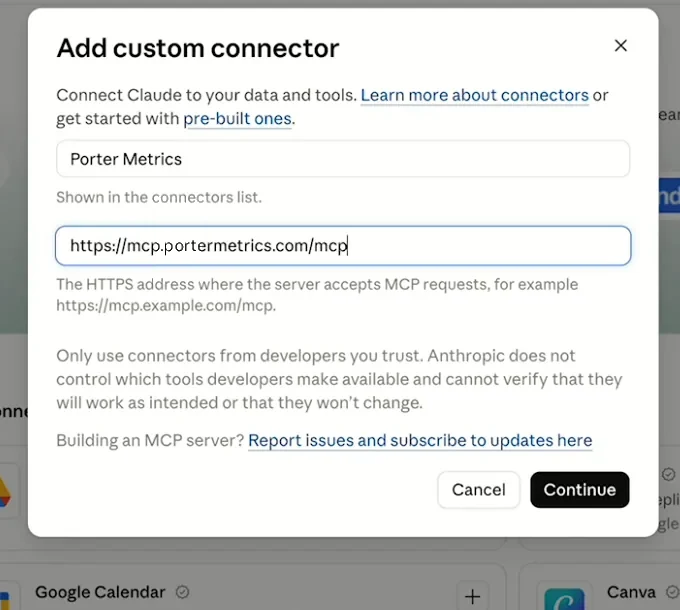
Claude, Customize, Connectors, Add custom connector.
Sign in and allow access
Click Connect next to Porter Metrics, sign in with the account you use in Porter and allow access.
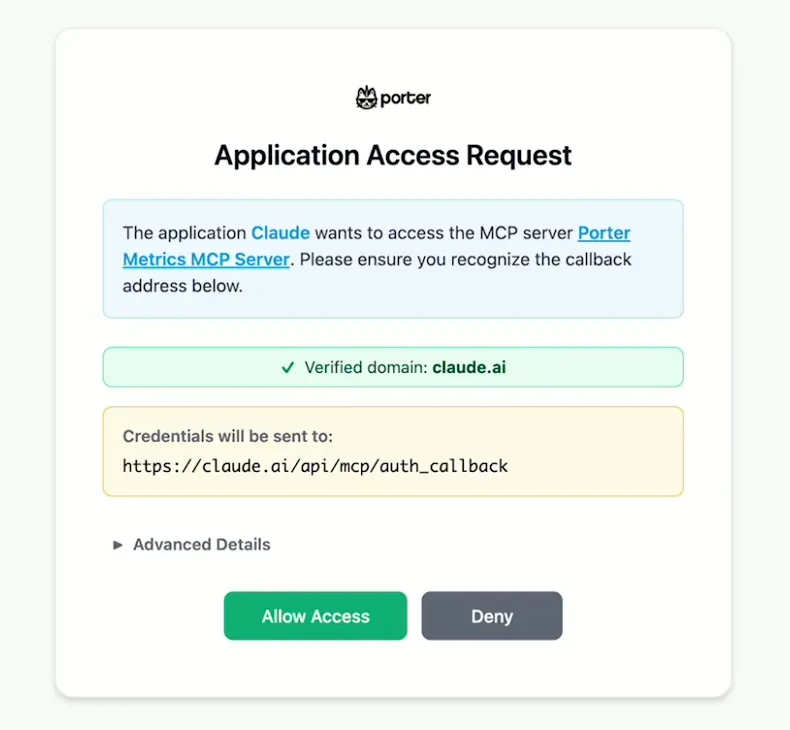
Porter asks you to allow Claude to use the Porter MCP server.
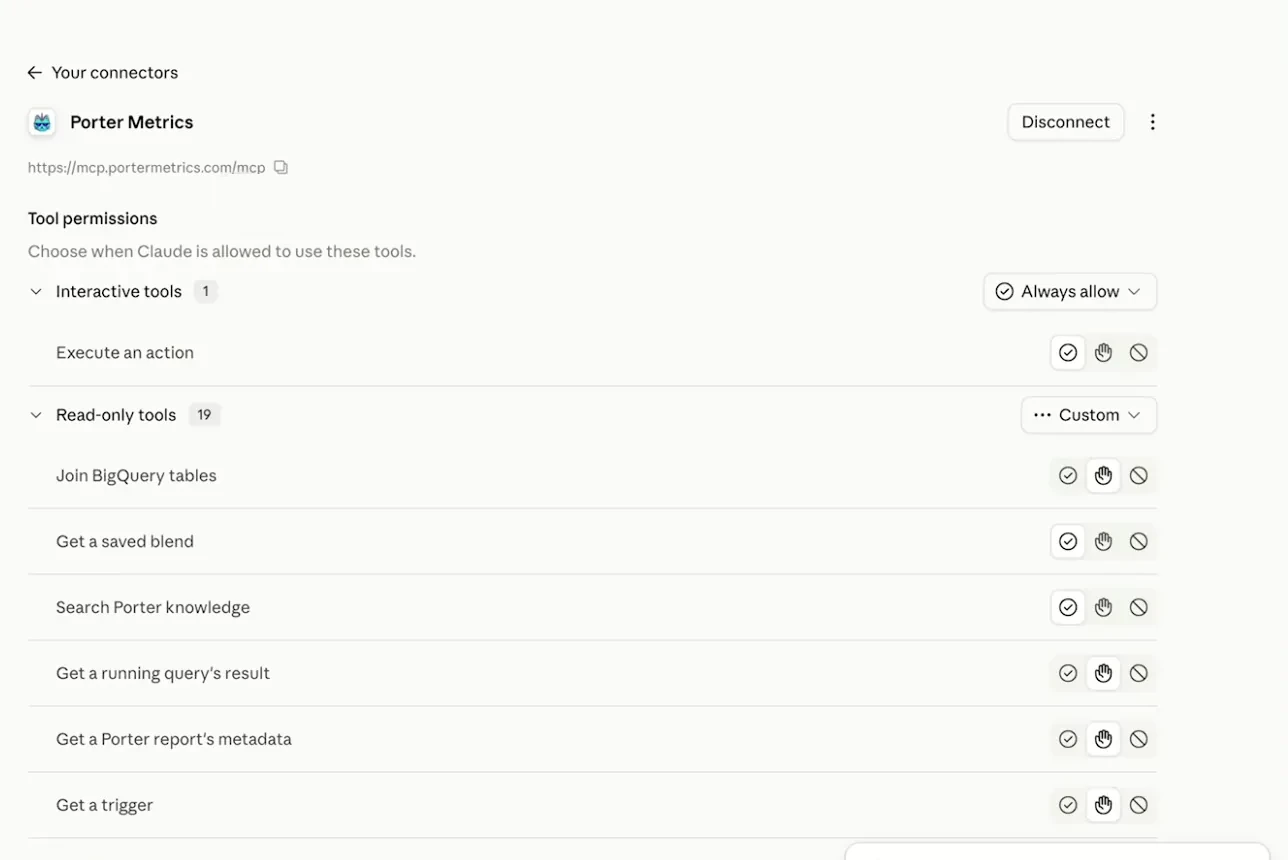
Porter Metrics connected in Claude.
Ask your first question
Open a new chat and try: “Show Spend, Conversions and Cost per conversion by ad for the last 14 days, worst CPA last.”
 Claude
 Porter connected
 Porter / TikTok Ads / Trailgear✓ 4 rows
| Ad | Spend | CPA |
|---|---|---|
| UGC · Unboxing | $960 | $9.90 |
| Spark · Founder story | $1,580 | $10.46 |
| Static slideshow | $1,230 | $25.62 |
Claude Desktop, Cowork, Claude Code and Team plans
Add Porter once on claude.ai and it shows up in Claude Desktop and Cowork when you sign in with the same Claude account. The steps are the same on every model, from Opus to Haiku.
Claude Code
Claude Code runs in your terminal, so you add Porter with one command. --scope user makes it available in every project:
claude mcp add --transport http porter https://mcp.portermetrics.com/mcp --scope userThen type /mcp, pick porter and sign in in the browser tab that opens.
Claude Team and Enterprise plans
On Team and Enterprise, an owner adds Porter first in Organization settings, then Connectors, with the same URL. After that, each member opens Customize, then Connectors, clicks Connect next to Porter Metrics and signs in with their own Porter account.
Connect several TikTok ad accounts
Agencies sign in to TikTok once in Porter, and every ad account that login reaches is available. Name the account in your question, or ask for all of them in one table. The Free plan has no limit on connected accounts.
What you can do once TikTok Ads is connected
- Video hooks: 2-second and 6-second views next to quartile drop-off, per ad.
- CPA and ROAS: cost per conversion and purchase ROAS by campaign, ad group and ad.
- Creative wear-out: spot ads whose CTR falls while frequency climbs.
- Campaign changes: draft campaigns, ad groups and budget changes that start paused and wait for your approval.
- Cross-channel reporting: put TikTok next to Google Ads in Claude, Meta Ads and GA4 in one table.
First prompts to run
Build a TikTok Ads dashboard with AI
Ask Claude to turn your TikTok data into a live dashboard with its own link you can share. Porter keeps it synced, so you don’t rebuild it every week.
Start from the TikTok Ads dashboard template, or see the TikTok Ads connector for Claude for fields and pricing.
TikTok Ads metrics Claude can read
Through Porter, Claude reads 628 TikTok Ads fields, among them:
- Spend, Cash Spend, Impressions, Reach and CPM
- Video Play Actions, Video Watched 2S and Video Watched 6S
- Video Views P25, P50, P75 and P100, and Average Video Play
- Clicks, CTR and Cost per click
- Conversions and Cost per conversion
- Likes, Comments, Shares and Follows
- Campaign Name, Adgroup Name, Ad Name and Ad Text
See every TikTok Ads field in Porter
Troubleshooting
Porter doesn’t show in my chat.
Open the tools menu in the chat and turn Porter Metrics on, or start a new chat after adding it.
Authorization failed.
Remove the connector, add it again and sign in with the same account you use in Porter.
The numbers don’t match TikTok Ads Manager.
Check the dates first: TikTok reports follow each ad account’s time zone, and recent days still change. Spend includes voucher spend, while Cash Spend counts cash only.
CTR shows as 0.0088.
Porter returns rates as fractions, so 0.0088 means 0.88%. Ask Claude to show percentages.
TikTok’s official connector stopped working.
Its authorization lasts 30 days. Reauthorize it from Connectors in Claude with the same TikTok for Business account.
Is the TikTok Ads MCP safe?
Both routes keep your TikTok password out of Claude. Porter uses a TikTok sign-in that you can revoke in Porter at any time. TikTok’s own server asks you to review its permissions before you authorize it, and the authorization ends after 30 days. Keep these rules:
- Connect only the ad accounts you need.
- Turn on Claude’s tool approval so you see each action before it runs.
- Review budgets, bids and new campaigns before you approve them.
- Ask Claude to explain a change before it makes it.
Through Porter, new TikTok campaigns and ad groups start paused, and nothing changes until you approve it.
Frequently asked questions
Is there an official TikTok Ads MCP?
Yes. TikTok runs the TikTok for Business MCP Server, and it is listed in Claude’s connector directory. You authorize it with your TikTok for Business account, and Claude can report on and manage campaigns, ad groups, ads, catalogs and Business Center through around 400 tools.
What is the TikTok Ads MCP server URL?
TikTok’s server has two URLs: https://business-api.tiktok.com/open_mcp/tt-ads-mcp-flat loads around 400 tools at once, and https://business-api.tiktok.com/open_mcp/tt-ads-mcp-layer loads around 40 core tools and finds the rest on demand. Porter’s server URL is https://mcp.portermetrics.com/mcp.
How long does the TikTok MCP sign-in last?
TikTok’s authorization lasts 30 days. After that you reauthorize the connection with the same TikTok for Business account. Porter’s TikTok sign-in stays connected until you revoke it.
Is it free to connect TikTok Ads to Claude?
Yes. TikTok doesn’t list a price for its MCP server, and its guide asks for Claude Pro or Max. Porter has a free plan with unlimited connected accounts and the last 15 days of data in Claude, on any Claude plan.
Can Claude change my TikTok campaigns?
Yes, with either route. TikTok’s server can create and edit campaigns, ad groups and ads. Through Porter, new campaigns and ad groups start paused and every change waits for your approval before it runs.
Does it work in ChatGPT?
Yes. TikTok has a guide for connecting ChatGPT to its MCP server, and Porter’s MCP URL also works as a ChatGPT connector.