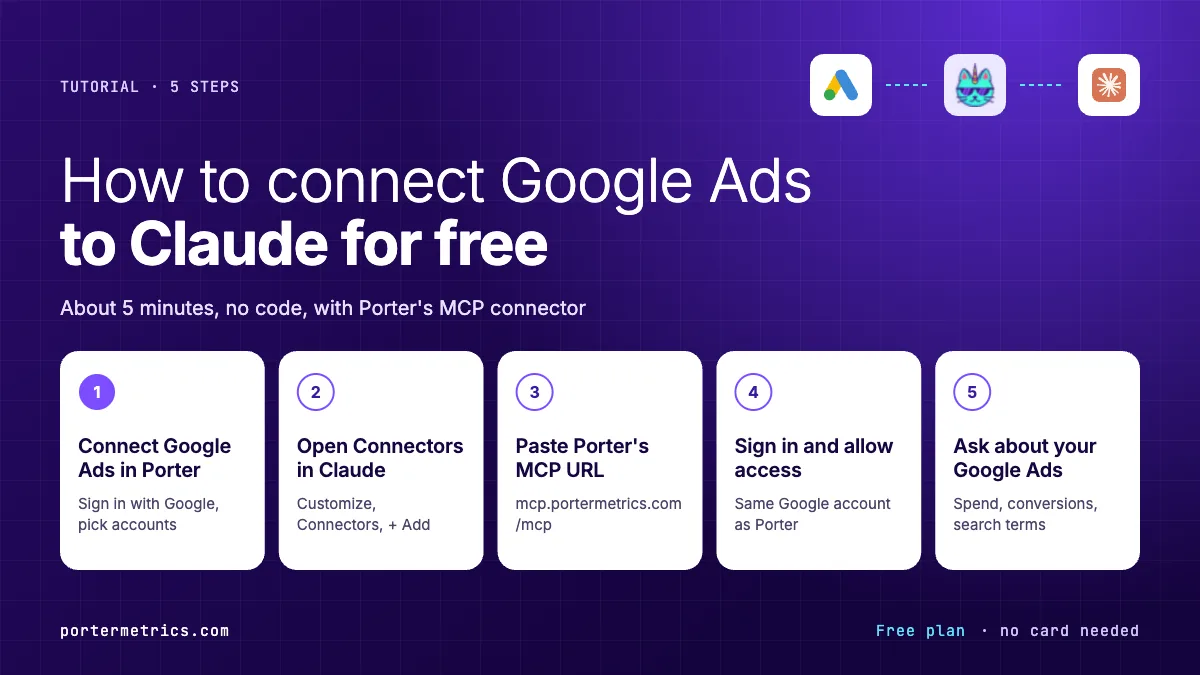
- Sign up free at Porter and connect Google Ads under Data sources.
- In Claude, open Customize, then Connectors, click + Add and choose Add custom connector.
- Name it Porter Metrics and paste
https://mcp.portermetrics.com/mcp. - Click Connect, sign in to Porter and allow access.
- Open a new chat and ask about spend, conversions or search terms.
Is there an official Google Ads MCP?
Yes. Google released an open-source Google Ads API MCP server in October 2025. It’s free, but you run it yourself: it needs a Google Cloud project with Google Ads API access, an OAuth client and Python. Porter’s connector reads the same data with no setup, and can also make changes after you approve them.
| Method | Setup | Read or write | Works in | Free? | Best for |
|---|---|---|---|---|---|
| Porter connector (MCP) | 5 minutes, no code | Reads, and changes budgets, bids and status after you approve | claude.ai, Claude Desktop, Cowork, Claude Code | Free plan, last 15 days | Most people |
| Google’s official MCP server | 1 to 2 hours | Reads with GAQL; adds assets and labels only | Claude Code; claude.ai if you host it on Cloud Run | Yes | Developers who want full GAQL control |
| Google Ads API with Claude Code | A few hours | Whatever your API access allows | Claude Code | Yes | Developers building their own tools |
| CSV from Google Ads | 10 minutes each time | Read only, a snapshot | Any Claude chat | Yes | A one-off analysis |
Comparing MCP options in more detail? See Porter’s Google Ads MCP server.
Before you start
- A Google account with access to the Google Ads accounts you want
- Claude on any plan. The Free plan allows one custom connector
- A free Porter account
How to connect Google Ads to Claude (claude.ai)
Connect Google Ads in Porter
Sign up free at Porter, open Data sources and choose Google Ads. Sign in with Google, allow access and select the ad accounts Claude should read.
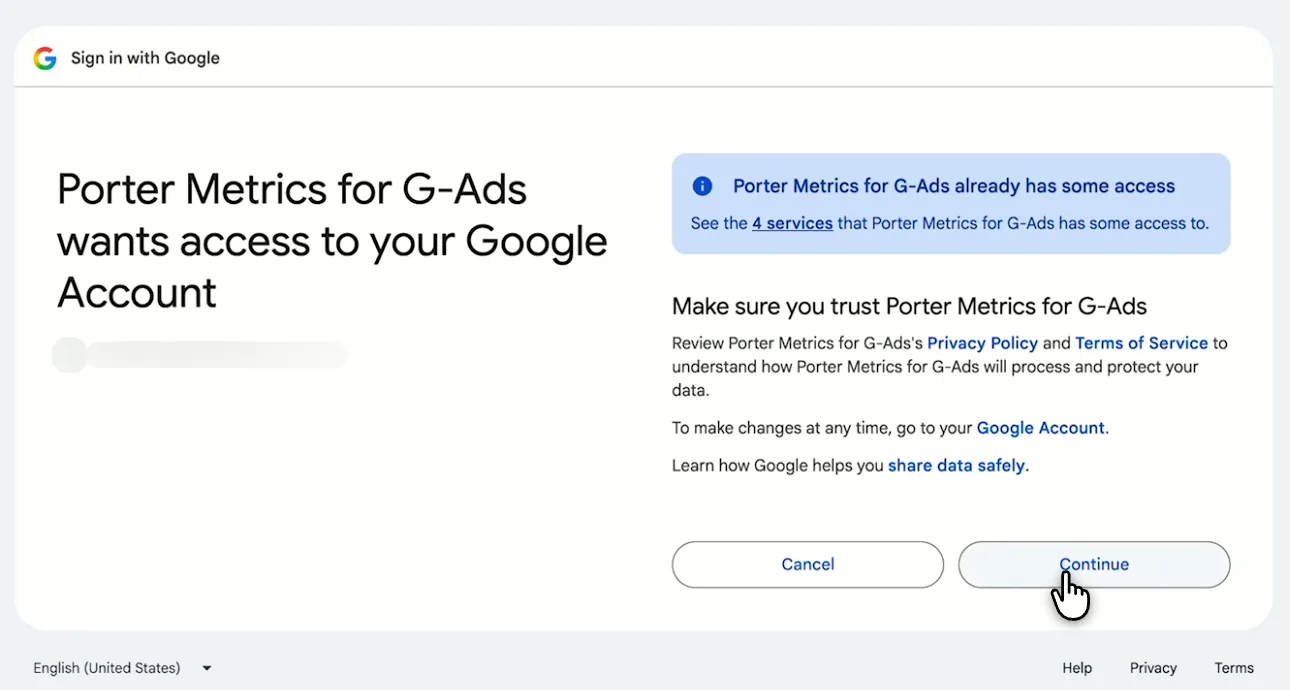
Google asks you to let Porter read your Google Ads accounts.
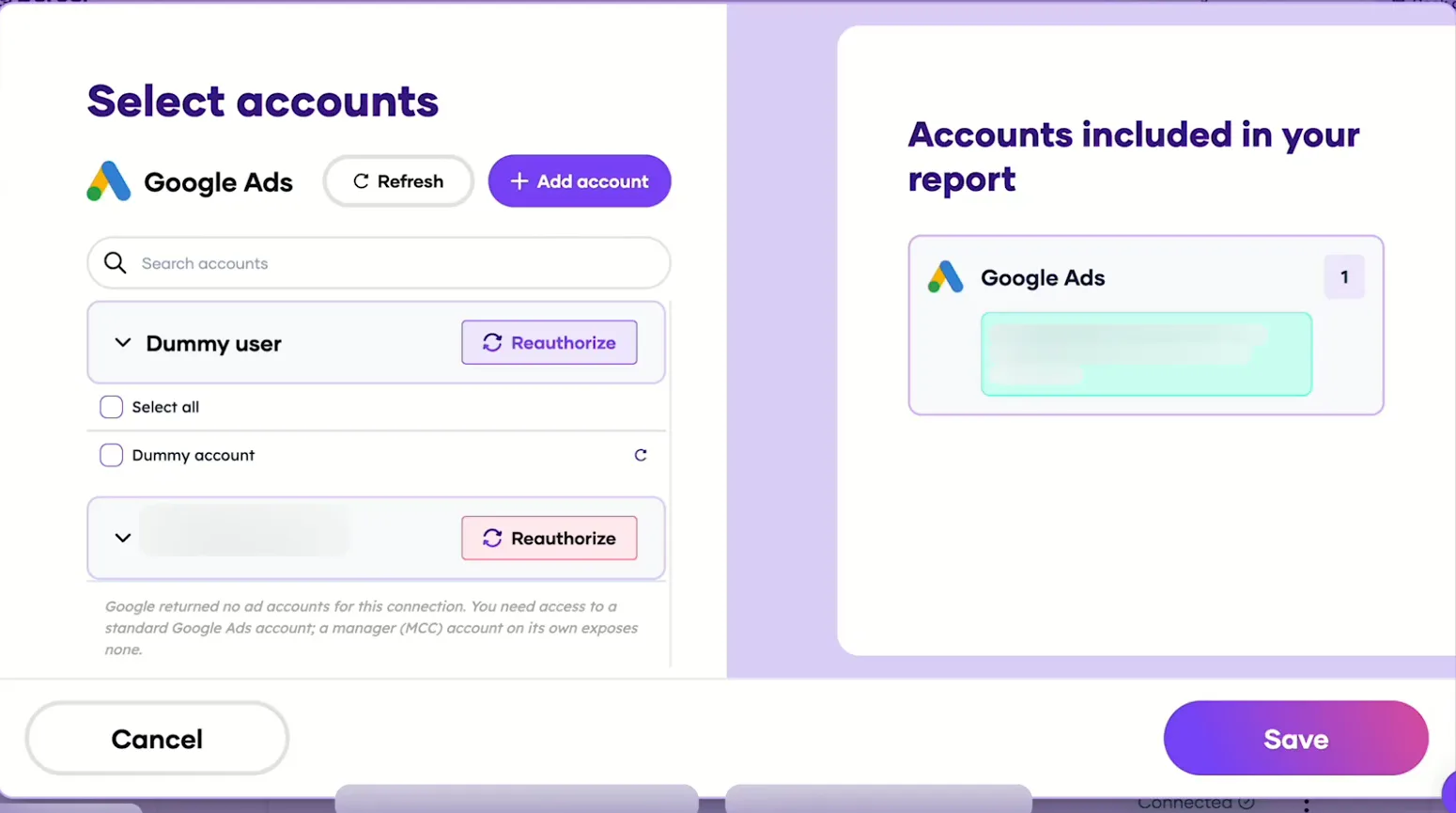
Porter, Data sources, Google Ads, Select accounts.
Open Connectors in Claude
In Claude, open Customize, then Connectors, click + Add and choose Add custom connector.
Where to find custom connectors in Claude.
Paste Porter’s MCP URL
Name it Porter Metrics and paste this URL, then click Add:
https://mcp.portermetrics.com/mcp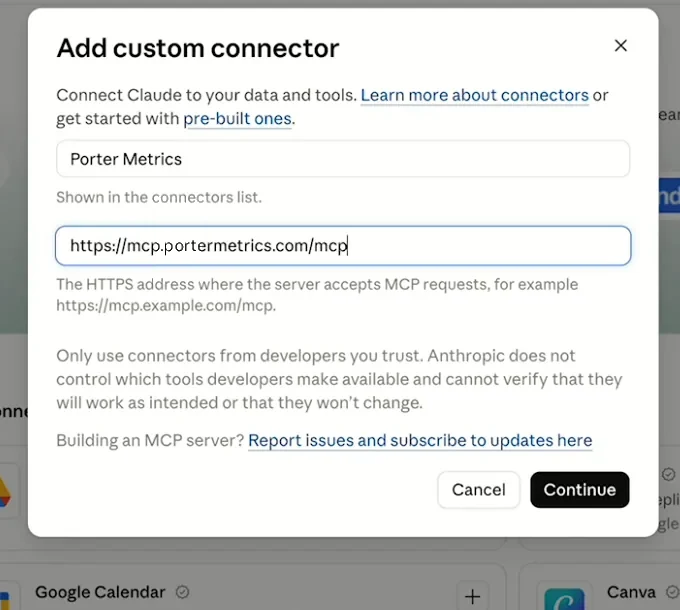
Claude, Customize, Connectors, Add custom connector.
Sign in and allow access
Click Connect next to Porter Metrics, sign in with the Google account you use in Porter and allow access.
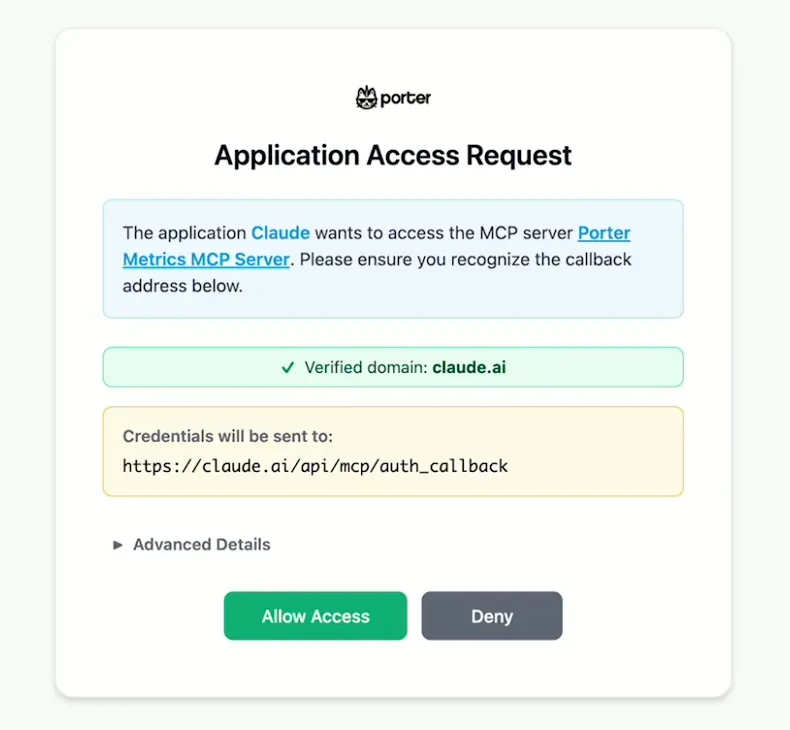
Porter asks you to allow Claude to use the Porter MCP server.
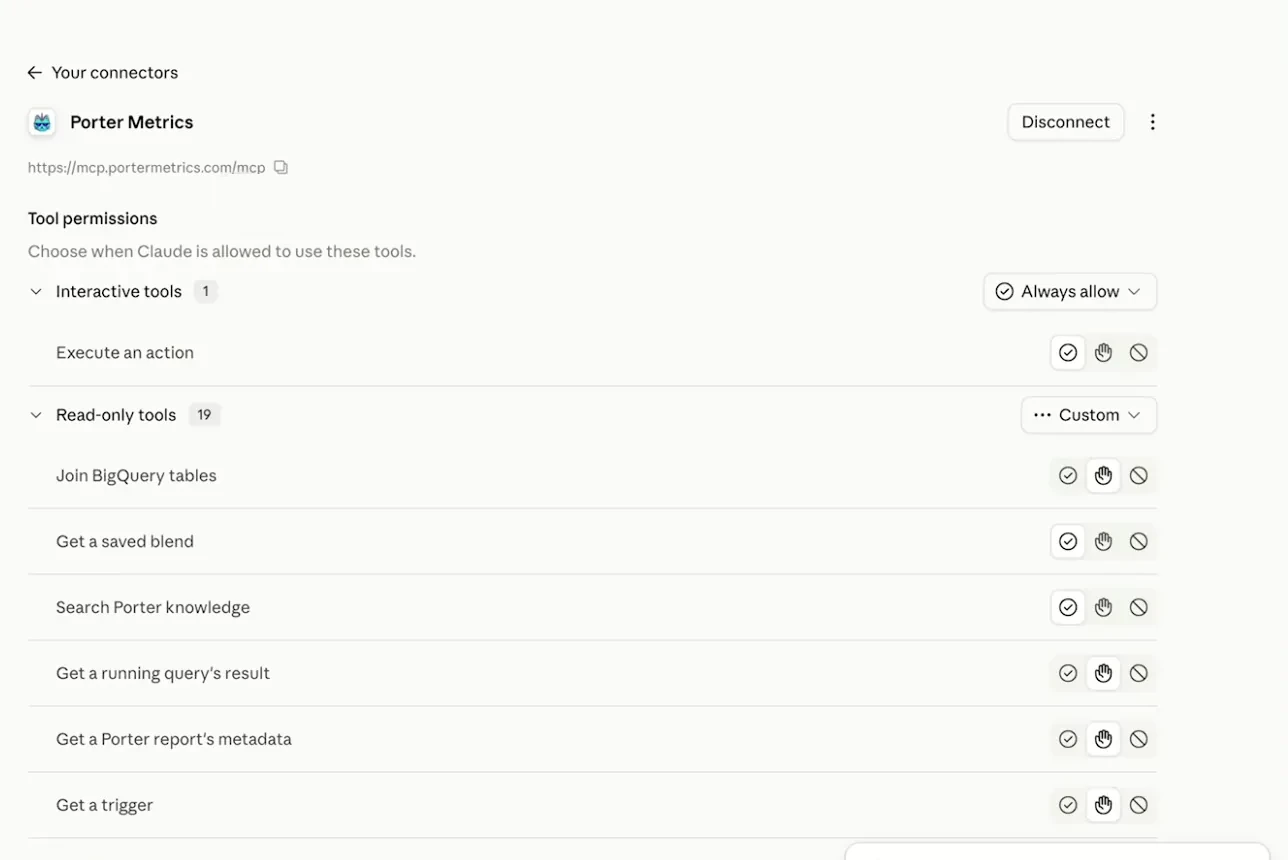
Porter Metrics connected in Claude.
Ask your first question
Open a new chat and try: “Which campaigns spent the most in the last 14 days with no conversions?”
 Claude
 Porter connected
 Porter / Google Ads / Trailgear✓ 9 rows
| Campaign | Clicks | Cost | Conversions |
|---|---|---|---|
| Search · Boots broad | 1,140 | $920 | 0 |
| PMax · Jackets | 2,310 | $610 | 0 |
| Display · Remarketing | 3,870 | $310 | 0 |
Prefer clicking through it? Open the interactive Google Ads to Claude demo.
Claude Desktop, Cowork, Claude Code and Team plans
Add Porter once on claude.ai and it shows up in Claude Desktop and Cowork when you sign in with the same Claude account. The steps are the same on every model, from Opus to Haiku.
Claude Code
Claude Code runs in your terminal, so you add Porter with one command. --scope user makes it available in every project:
claude mcp add --transport http porter https://mcp.portermetrics.com/mcp --scope userThen type /mcp, pick porter and sign in in the browser tab that opens.
Claude Team and Enterprise plans
On Team and Enterprise, an owner adds Porter first in Organization settings, then Connectors, with the same URL. After that, each member opens Customize, then Connectors, clicks Connect next to Porter Metrics and signs in with their own Porter account.
Connect several Google Ads accounts
Agencies connect each account, or a manager account, in Porter once. Then name the account in your question (“Compare cost per conversion for Brand A and Brand B last month”), or ask for all of them in one table. The Free plan has no limit on connected accounts.
Set up Google’s official Google Ads MCP server
Google’s open-source Google Ads API MCP server lives on GitHub as googleads/google-ads-mcp. It runs on your computer with Python, or on Google Cloud Run if you deploy it yourself.
What you need
- A Google Cloud project with the Google Ads API turned on
- Google Ads API access at Explorer, Basic or Standard level for real accounts. New projects start with Test access only
- An OAuth client file with the Google Ads scope
- Python 3.10 or later, pipx and the gcloud CLI
- Your manager account ID if you reach accounts through an MCC
Set it up in Claude Code
- Sign in by running
gcloud auth application-default loginwith the Google Ads scope and your OAuth client file. - Add the server to
~/.claude/settings.jsonwith the config below, using your own file path and project ID. - Restart Claude Code and ask it to list the Google Ads accounts it can access.
{"mcpServers":{"google-ads-mcp":{"command":"pipx","args":["run","--spec","git+https://github.com/googleads/google-ads-mcp.git","google-ads-mcp"],"env":{"GOOGLE_APPLICATION_CREDENTIALS":"PATH_TO_CREDENTIALS_JSON","GOOGLE_PROJECT_ID":"YOUR_PROJECT_ID"}}}}What it can do
It lists the accounts you can access, runs any GAQL search (campaigns, ad groups, keywords, search terms and their metrics) and looks up field details. It writes very little: it can create standalone assets, upload videos (local setup only) and manage labels. It can’t create or edit campaigns, ad groups, ads, budgets or bids, and you can switch it to read-only.
Using claude.ai on the web or desktop? You have to host Google’s server on Cloud Run and add its /mcp URL as a custom connector. The Google Ads MCP developer guide has the steps.
What you can do once Google Ads is connected
- Reporting: cost, clicks, conversions and cost per conversion by campaign, ad group or keyword.
- Search terms: find wasted spend and get negative keyword ideas.
- Quality: spot keywords with a low Quality Score and low search impression share.
- Changes: Claude can pause ads, keywords or ad groups, change budgets and bids, and create campaigns, which start paused. It asks you before each change.
- Cross-channel: compare Google Ads with Meta Ads in Claude or GA4 in one table.
First prompts to run
Build a Google Ads dashboard with AI
Ask Claude to turn your Google Ads data into a live dashboard with its own link you can share. Porter keeps it synced, so you don’t rebuild it every week.
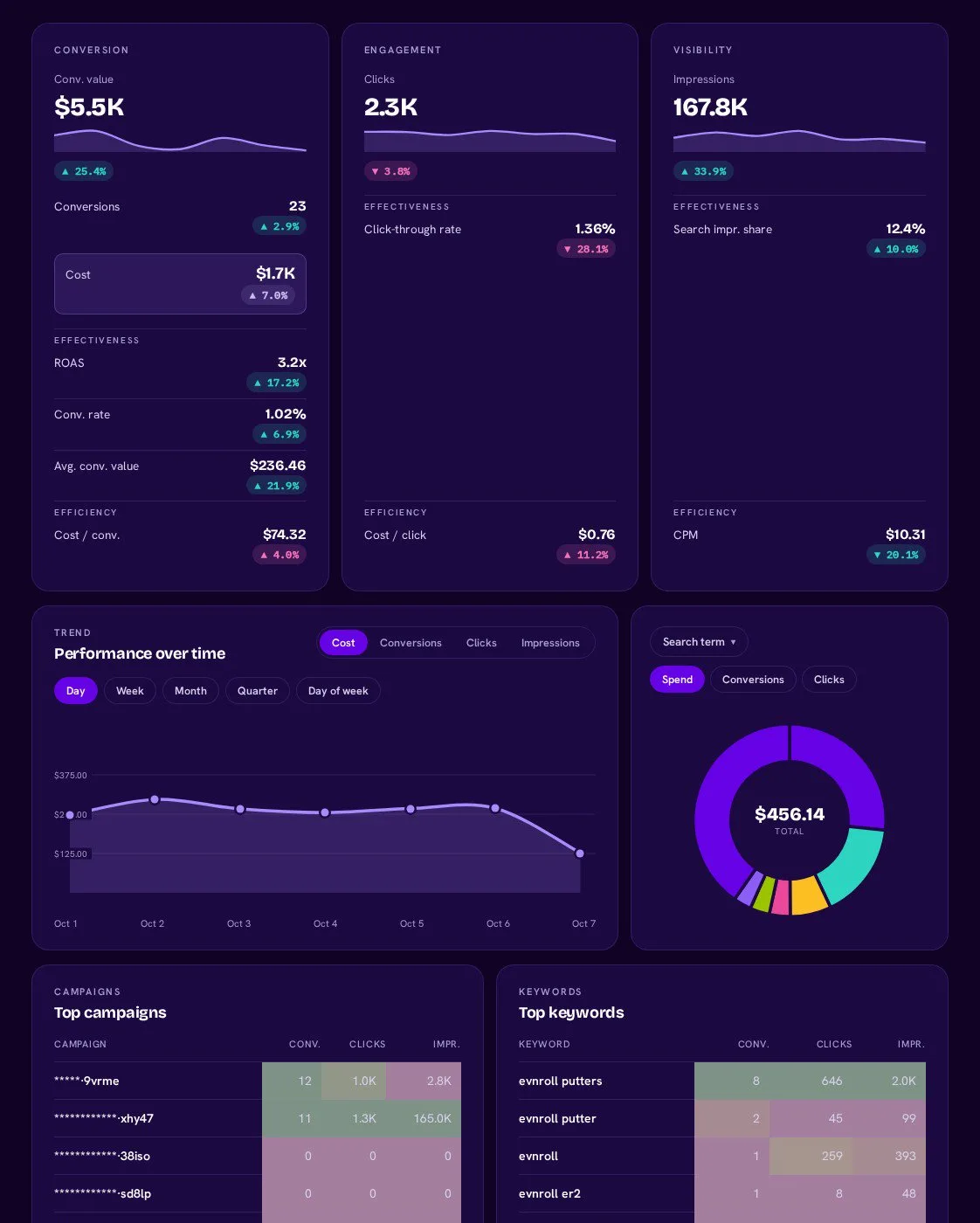
Google Ads AI dashboard template, demo data.
Or start from the free Google Ads dashboard template for Claude and browse all dashboard templates.
Google Ads metrics Claude can read
Through Porter, Claude reads these Google Ads fields, among others:
- Cost, impressions and clicks
- CTR and average CPC
- Conversions, conversions value and cost per conversion
- Campaign, ad group, ad and keyword
- Search term and match type
- Keyword Quality Score and search impression share
- Device, location and date
See every Google Ads field in Porter
Troubleshooting
Porter doesn’t show in my chat.
Open the tools menu in the chat and turn Porter Metrics on, or start a new chat after adding it.
Authorization failed.
Remove the connector, add it again and sign in with the same Google account you use in Porter.
My Google Ads account isn’t listed.
Check that the Google account you used in Porter has access to it in Google Ads. For accounts under a manager account, connect the manager account and select the client accounts.
The numbers don’t match Google Ads.
Check the date range, the account time zone and which conversion column you compare. Recent conversions can keep coming in for a few days.
CLOUD_PROJECT_NOT_APPROVED_FOR_PRODUCTION (official server).
Your Google Cloud project only has Test access to the Google Ads API. Apply for Explorer or Basic access, or use Porter, which doesn’t need your own API access.
Is the Google Ads MCP safe?
Both routes connect through Google sign-in and the official Google Ads API, so Claude never sees your password and you can remove access from your Google account at any time. Keep these rules:
- Use the official API, through Google’s server or an approved connector, never scraping tools.
- Review every change before Claude makes it, especially budgets and bids.
- Check new campaigns in Google Ads before you turn them on.
- Give Claude access only to the accounts it needs.
Porter reads through the official Google Ads API, and Claude asks you before it changes anything. New campaigns are created paused.
Frequently asked questions
Is there an official Google Ads MCP?
Yes. Google publishes an open-source Google Ads API MCP server on GitHub (googleads/google-ads-mcp). It is free and reads your account with GAQL queries, and it can add assets and labels. It needs a Google Cloud project, Google Ads API access and some setup.
Is it free to connect Google Ads to Claude?
Yes. Google’s server is free, and you only pay for Google Cloud if you host it there. Porter has a free plan with the last 15 days of data in Claude and 100 AI credits a month for changes. Questions that only read data use no credits.
Can Claude edit my Google Ads campaigns?
With Porter, yes. Claude can pause ads, keywords and ad groups, change budgets and bids, and create campaigns, which start paused. It shows you each change before making it. Google’s official server can’t create or edit campaigns, budgets or bids.
Do I need a developer token?
Not with Porter, which uses your Google sign-in. For Google’s server you need a Google Cloud project with Google Ads API access, and Google’s developer guide explains which credentials your setup needs.
Can I connect several Google Ads accounts?
Yes. Connect each account, or your manager account, in Porter once, then name the account in your question or ask for all of them in one table. The Free plan has no limit on connected accounts.
Does the Google Ads MCP work in ChatGPT?
Yes. Porter’s MCP URL works as a ChatGPT connector too. Google’s server can be added to ChatGPT if you deploy it on Google Cloud Run and add its URL as a custom connector.