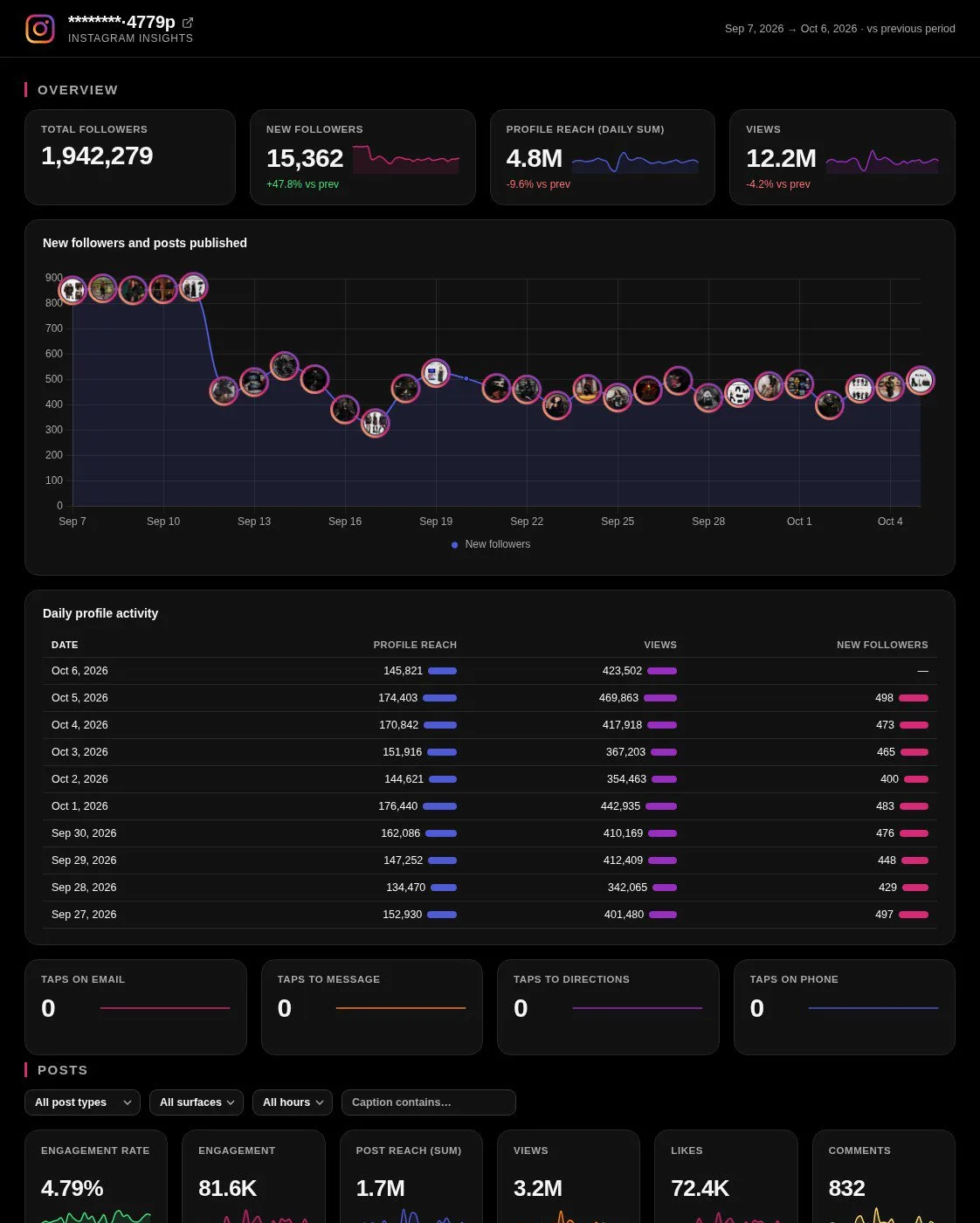



- A free Instagram dashboard template
- 11 prompt templates for managing, researching, reporting and creating
- A free weekly report skill you can add to Claude
Templates save you from rewriting the same request every week. Here are three kinds for running Instagram from Claude: a dashboard you open, prompts you paste, and a skill that remembers how you like your report. All of them work with your account connected through Porter’s free connector (how to connect Instagram to Claude), and every prompt uses 14 days so it works on Porter’s Free plan.
Instagram dashboard template
A ready-made Instagram dashboard with reach, engagement, followers and your top posts, live on your own data. Open it, connect your account and share the link with your team or client.
Get the free Instagram dashboard template
Prefer to build your own? Ask Claude:
Build an Instagram dashboard with reach, saves, new followers, a daily trend and a table of my posts from the last 14 days, and give me a link to share.Prompt templates
Swap the words in brackets and paste them into Claude.
Management
Caption in your style
Look at my 5 Instagram posts with the most saves in the last 14 days and write 3 caption options for a new post about (topic) in the same style.Reply to comments
Find the comments on my last 5 Instagram posts that I haven't replied to and draft a short reply for each in my tone. Don't post anything until I approve.Publish a post
Publish this image to my Instagram with this caption. Show me the final version and wait for my OK: (link) (caption)Research
Content ideas
From my 5 most-saved Instagram posts in the last 14 days, give me 5 ideas for next week, each with a hook, a format and the post it is based on.Competitor check
Compare these public Instagram accounts: @account1, @account2. Show followers, posts per week and average likes and comments on their last 12 posts.Best time to post
At what hours are my Instagram followers most online? Give me the 3 best hours.Reporting
Weekly report
Compare my Instagram this week with last week: reach, new followers, saves, and my top 3 posts by saves.Format comparison
Compare my Reels, carousels and images from the last 14 days on average reach, saves and comments per post.Monthly audit
Audit my Instagram: bio, posts per week, formats, my 3 best and 3 worst posts of the last 14 days, and 5 things to improve.Creation
Carousel from your best post
Turn my most-saved Instagram post from the last 14 days into a 7-slide carousel at 1080 x 1350 and export it as PNG images.Reel script
Write a 30-second Reel script from my most-saved post of the last 14 days, with a hook in the first 2 seconds and on-screen text for each cut.Free skill: weekly Instagram report
A skill is a saved set of instructions Claude follows whenever the task comes up. With this one, “do my weekly Instagram report” is enough: Claude knows which metrics to pull, how to compare them with the week before and how to lay out the report.
- Copy the text below into a file called
SKILL.md, inside a folder calledweekly-instagram-report. - Zip the folder.
- In Claude, turn on Settings, Capabilities, Create and edit files, then go to Customize, Skills, +, Create skill, Upload a skill, and upload the ZIP.
- Ask: “Do my weekly Instagram report.”
---
name: weekly-instagram-report
description: Builds the weekly report for an Instagram Business or Creator account with Porter data (last 7 days vs the 7 before). Use it when the user asks for their weekly Instagram report or "how did my Instagram do this week".
---

# Weekly Instagram report

Needs the Porter connector (https://mcp.portermetrics.com/mcp) with an Instagram account connected.

## Period
- This week: the last 7 full days. Last week: the 7 days before.
- If the user has several Instagram accounts, ask which one first.

## Pull
1. Account summary, this week vs last week with % change: profile reach, new followers (sum of days), profile visits if available.
2. One row per post (use the post ID so same-day posts stay separate): date, type, first words of the caption, link, reach, saves, comments, likes. For Reels add plays and shares (shares exist only for Reels).
3. Top 3 posts by saves and by reach.
4. Winning format: average reach and saves per post type.

## Rules
- Never sum an account metric such as total followers across rows.
- Don't use impressions; Meta retired it. Say reach and views.
- If a week has no data, say so. Don't invent numbers.

## Deliver
1. Three lines: the best thing, the worst thing, one thing to do next week.
2. Account summary table with % change.
3. Posts table sorted by reach.
4. Top 3 and the winning format.
5. One concrete recommendation for next week, based only on this data.More: 10 ways to use Claude for Instagram · how to analyze your Instagram with AI · Instagram carousels with Claude
Frequently asked questions
Are there Instagram templates for Claude?
Yes: a free Instagram dashboard template, prompt templates for managing, researching, reporting and creating, and a weekly report skill you can upload to Claude.
What is a Claude skill?
A saved set of instructions Claude follows whenever a task comes up, uploaded under Customize, Skills. Skills are available on Claude’s Free and paid plans.
Do these templates need my Instagram connected?
Yes, to use your real data. Connect Instagram to Claude through Porter’s free connector, which takes about 5 minutes.
Can I share the dashboard with a client?
Yes. The dashboard lives at its own link and refreshes on its own, so your client always sees current numbers.