
- Sign up free at Porter, choose Amazon Seller and sign in to Seller Central.
- In Claude, open Customize, then Connectors, click + Add and choose Add custom connector.
- Name it Porter Metrics and paste
https://mcp.portermetrics.com/mcp. - Click Connect, sign in to Porter and allow access.
- Open a new chat and ask about sales, orders or inventory.
Is there an official Amazon Seller MCP?
Yes, three, and each does a different job. The Selling Partner plugin brings Seller Central into Claude, in beta for US stores with a waitlist. The Amazon Ads MCP server runs Amazon Ads from Claude for partners with API credentials. The local SP-API server helps developers build on the Selling Partner API. Porter’s connector works today for any store you connect, and puts Amazon next to Shopify, GA4 and your ads.
| Option | What it does | Who can use it | Status | Best for |
|---|---|---|---|---|
| Porter connector (MCP) | Reads 130+ Amazon Seller fields; changes listings after you confirm | Any seller who connects in Porter | Available | Reporting Amazon next to your other channels |
| Selling Partner plugin | Sales, inventory, traffic and listings in Claude, with actions you approve | US stores, Professional plan | Beta, waitlist | Running one US store from Claude |
| Amazon Ads MCP server | Campaigns, reports, account settings and billing for Amazon Ads | Amazon Ads partners with API credentials | Open beta | Ads teams and agencies on the Ads API |
| Local SP-API MCP | Developer tools and workflows for the Selling Partner API | Developers with SP-API credentials | Available | Building an SP-API integration |
Comparing MCP options in more detail? See Porter’s Amazon Seller MCP server.
Set up Amazon’s official options
Selling Partner plugin (Seller Central)
Amazon’s Seller Central help page lists these steps. The plugin is for US stores on a Professional selling plan, and an account owner or administrator authorizes it.
- In Claude, open the plugin directory, search for Selling Partner plugin and click Install.
- Sign in with your Amazon selling account.
- Review what the plugin can access and confirm.
- Ask a question about your business to check the connection.
It works with sales and revenue, inventory health, traffic and conversion, and listing health. Changes wait for your approval by default. Access is rolling out over time: if you land on the waitlist, Amazon emails you when it’s ready.
Watch the official Amazon setup in Claude, step by step:
Amazon Ads MCP server
Amazon’s Ads MCP guide connects with OAuth and an Amazon Ads API client ID. It’s in open beta for Amazon Ads partners with active API credentials, and can create and update campaigns and run reports.
https://advertising-ai.amazon.com/mcpLocal MCP for the SP-API (developers)
Amazon’s local MCP for the SP-API runs on your computer as an npm package. It gives a coding assistant SP-API docs, code generation and workflows, and needs an SP-API client ID, client secret and refresh token for live calls.
Limitations and features of the official MCP
The Selling Partner plugin is the better pick for working inside one US store from Claude once you have access. It’s in beta with a waitlist and reads only Amazon, so for reporting today across stores and next to Shopify, GA4 and your ads, Porter fills the gaps.
| Selling Partner plugin | Porter | |
|---|---|---|
| Access | Beta, rolling out with a waitlist | Available now on the Free plan |
| Stores | US stores on a Professional plan | Any store you connect; you pick the marketplace |
| Data | Sales, inventory, traffic, conversion and listing health | 130+ fields: sales, orders, items, FBA inventory and listings |
| Changes | Proposes changes and waits for your approval | Creates, updates or deletes a listing only after you confirm |
| Other sources | Amazon only | Amazon next to Shopify, GA4, Meta Ads and 30+ sources |
| Output | Answers in chat | Answers in chat, plus live dashboards with their own link |
| Cost | No separate price listed | Free plan with unlimited accounts and the last 15 days in AI chats |
Before you start
- An Amazon Seller Central account you can authorize
- Claude on any plan. The Free plan allows one custom connector
- A free Porter account
How to connect Amazon Seller Central to Claude (claude.ai)
Connect Amazon Seller in Porter
Sign up free at Porter, open Data sources and choose Amazon Seller. Name the account, pick your marketplace, sign in to Seller Central and confirm, then choose the accounts Claude can read.
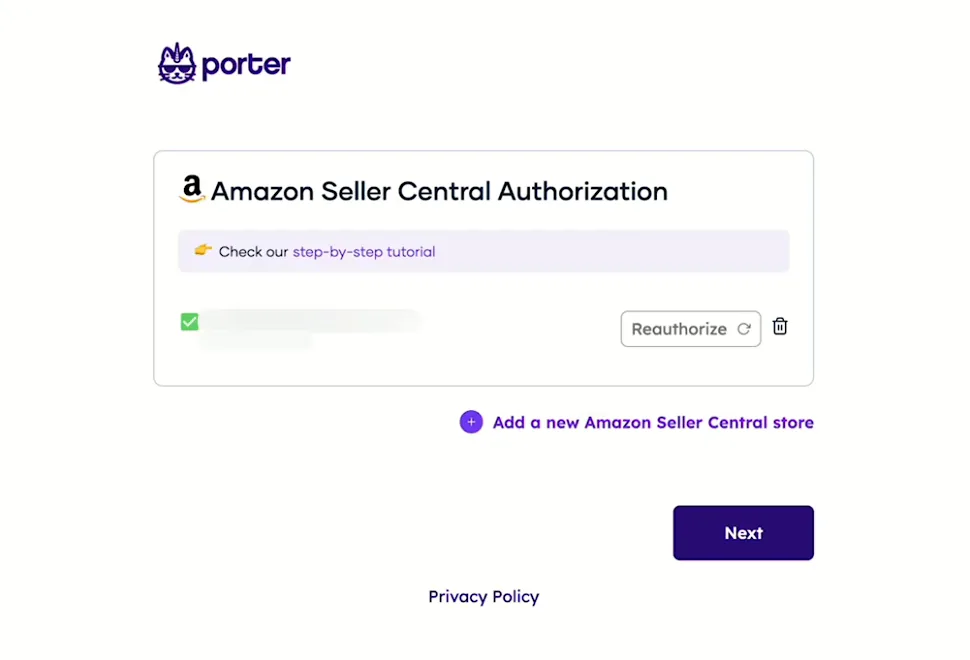
Your Amazon Seller Central store, authorized in Porter.
Open Connectors in Claude
In Claude, open Customize, then Connectors, click + Add and choose Add custom connector.
Where to find custom connectors in Claude.
Paste Porter’s MCP URL
Name it Porter Metrics and paste this URL, then click Add:
https://mcp.portermetrics.com/mcp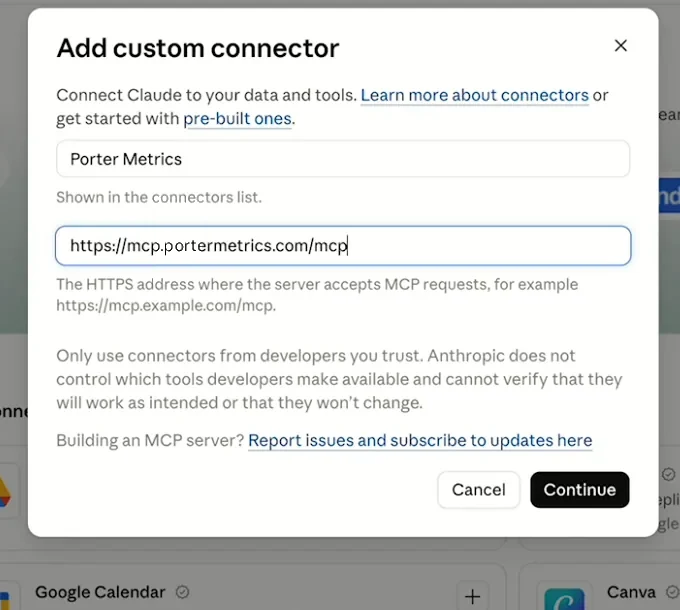
Claude, Customize, Connectors, Add custom connector.
Sign in and allow access
Click Connect next to Porter Metrics, sign in with the account you use in Porter and allow access.
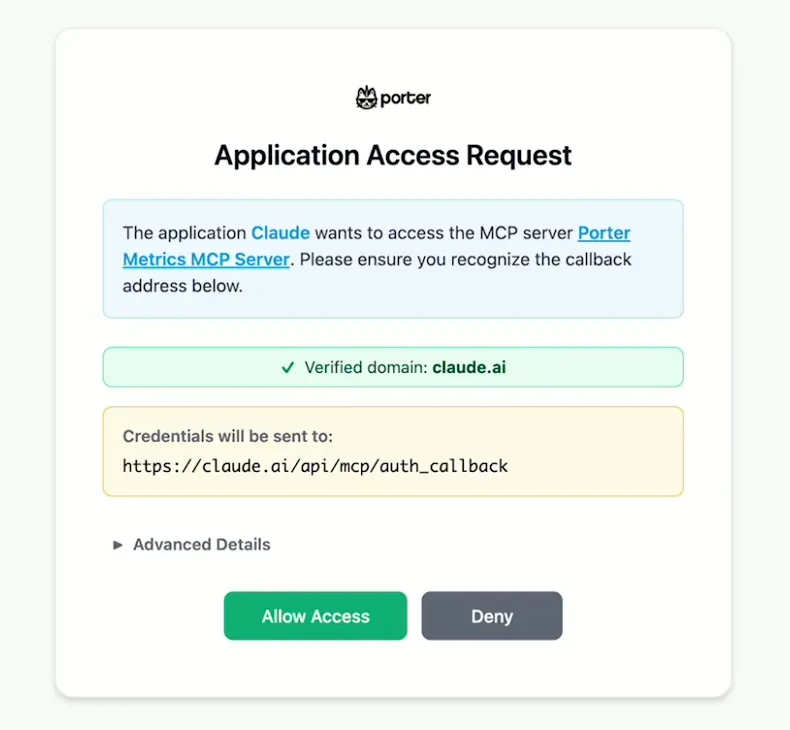
Porter asks you to allow Claude to use the Porter MCP server.
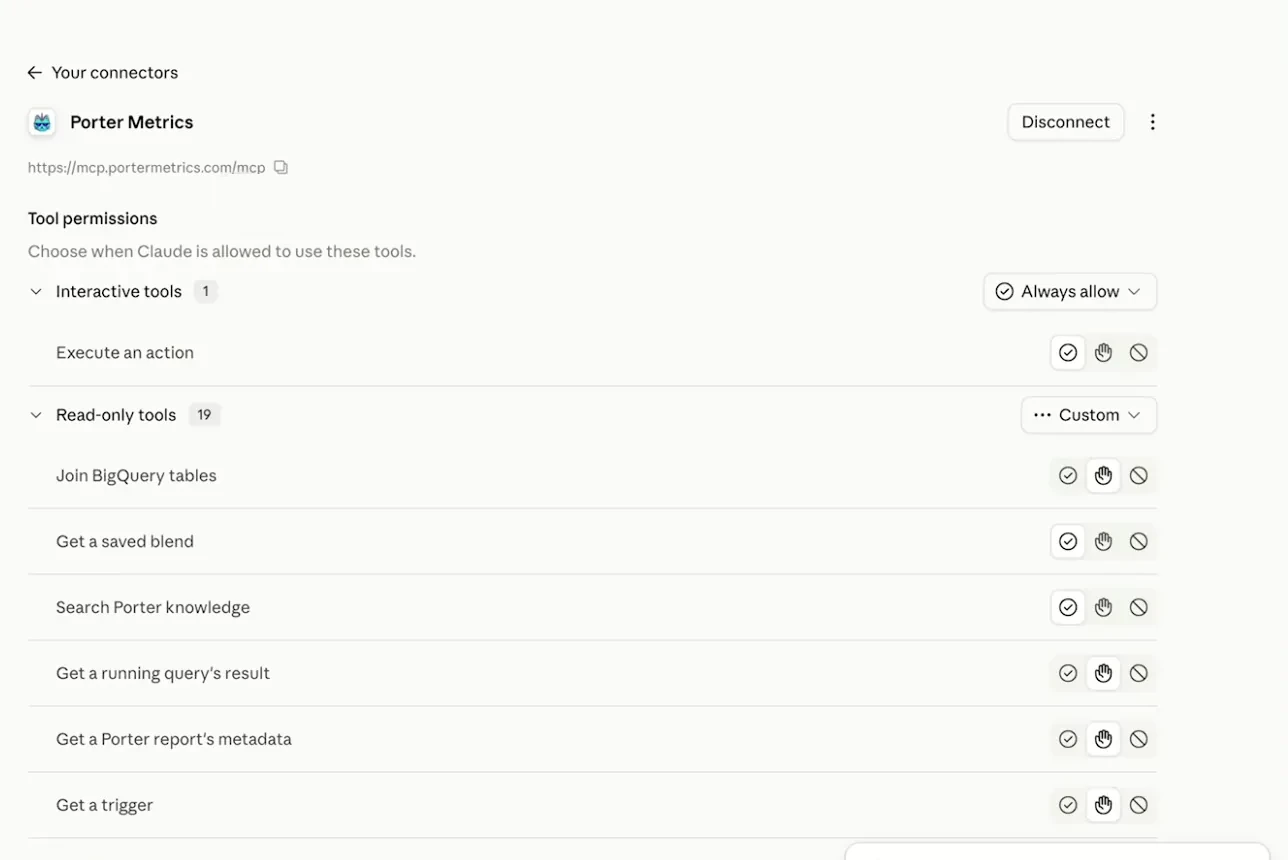
Porter Metrics connected in Claude.
Ask your first question
Open a new chat and try: “For my Seller Central account, show Total Sales, Order Count and Unit Count by Date for the last 14 days.”
 Claude
 Porter connected
 Porter / Amazon Seller / Trailgear✓ 14 rows
| Date | Total Sales | Orders |
|---|---|---|
| Nov 22 | $1,910 | 63 |
| Nov 21 | $1,240 | 41 |
| Nov 15 | $1,780 | 59 |
Claude Desktop, Cowork, Claude Code and Team plans
Add Porter once on claude.ai and it shows up in Claude Desktop and Cowork when you sign in with the same Claude account. The steps are the same on every model, from Opus to Haiku.
Claude Code
Claude Code runs in your terminal, so you add Porter with one command. --scope user makes it available in every project:
claude mcp add --transport http porter https://mcp.portermetrics.com/mcp --scope userThen type /mcp, pick porter and sign in in the browser tab that opens.
Claude Team and Enterprise plans
On Team and Enterprise, an owner adds Porter first in Organization settings, then Connectors, with the same URL. After that, each member opens Customize, then Connectors, clicks Connect next to Porter Metrics and signs in with their own Porter account.
Connect several Amazon stores
Agencies add each client’s Seller Central account in Porter once, and every store is available in the same chat. Name the store in your question, or ask for all of them in one table. The Free plan has no limit on connected accounts.
What you can do once Amazon Seller is connected
- Weekly sales report: sales, orders and units by day, with what changed.
- Product ranking: your best ASINs and the ones losing sales.
- Stock check: days of cover for every FBA SKU, lowest first.
- Order mix: FBA vs FBM, Prime and business orders.
- Cross-channel reporting: put Amazon next to Shopify in Claude, GA4 and your ads.
First prompts to run
Build an Amazon Seller dashboard with AI
Ask Claude to turn your Amazon data into a live dashboard with its own link you can share. Porter keeps it synced, so you don’t rebuild it every week.
Start from the Amazon Seller Central sales and orders template, or see the Amazon Seller connector for Claude for fields and pricing.
Amazon Seller data Claude can read
Through Porter, Claude reads 130+ Amazon Seller fields, among them:
- Total Sales, Order Count, Unit Count and Average Unit Price
- ASIN, Seller SKU, Title, Quantity Ordered and Item Price
- Fulfillable Quantity, Inbound Shipped Quantity, Total Reserved Quantity and Total Unfulfillable Quantity
- Order Status, Fulfillment Channel, Is Prime and Is Business Order
- Promotion Discount, Shipping Price and Item Tax
See every Amazon Seller field in Porter
Troubleshooting
Porter doesn’t show in my chat.
Open the tools menu in the chat and turn Porter Metrics on, or start a new chat after adding it.
Porter can’t read my Amazon store.
Open Data sources in Porter, choose Amazon Seller and click Reauthorize, then sign in to Seller Central again with an account that can authorize apps.
The Selling Partner plugin says I’m on the list.
Amazon is rolling access out over time and emails you when it’s ready. You don’t need to do anything else; use Porter in the meantime.
I can’t authorize the plugin.
Only account owners and administrators can authorize it by default, on a Professional selling plan. Ask the owner to give you permission, or to authorize it.
Is the Amazon Seller MCP safe?
Your Amazon password stays out of Claude on every route. Porter and the Selling Partner plugin sign you in through Amazon, and you can remove their access in Seller Central at any time. Keep these rules:
- Turn on Claude’s tool approval so you see each action before it runs.
- Check the SKU and marketplace before you approve a listing change.
- Give the access only to the owner or admin who needs it.
- Ask Claude to explain a change before it makes it.
Through Porter, Claude asks before it creates, updates or deletes a listing. Reading sales, orders and inventory changes nothing.
Frequently asked questions
Is there an official Amazon Seller MCP?
Yes, three options. The Selling Partner plugin connects Seller Central to Claude, in beta for US stores. The Amazon Ads MCP server is in open beta for Amazon Ads partners with active API credentials. The local MCP for the SP-API is a developer tool you run yourself.
How do I get the Selling Partner plugin in Claude?
In Claude’s plugin directory, search for Selling Partner plugin, click Install and sign in with your Amazon selling account. Access is rolling out over time; if you join the waitlist, Amazon emails you when it’s ready.
Who can use Amazon’s Selling Partner plugin?
Sellers in Amazon’s US stores on a Professional selling plan. Account owners and administrators can authorize it; secondary users need permission first.
What is the Amazon Ads MCP server URL?
Amazon’s guide gives https://advertising-ai.amazon.com/mcp, with OAuth and an Amazon Ads API client ID. Porter’s server URL is https://mcp.portermetrics.com/mcp.
Is it free to connect Amazon Seller Central to Claude?
Amazon doesn’t list a price for the Selling Partner plugin. Porter has a free plan with unlimited connected accounts and the last 15 days of data in Claude, on any Claude plan.
Can Claude change my Amazon listings?
Amazon’s plugin proposes changes and waits for your approval by default. Through Porter, Claude can create, update or delete a listing only after you confirm, and reads orders, inventory and pricing without changing anything.