
- Sign up free at Porter, choose Klaviyo and paste a Klaviyo private API key.
- In Claude, open Customize, then Connectors, click + Add and choose Add custom connector.
- Name it Porter Metrics and paste
https://mcp.portermetrics.com/mcp. - Click Connect, sign in to Porter and allow access.
- Open a new chat and ask about campaigns, flows or lists.
Is there an official Klaviyo MCP?
Yes. Klaviyo runs a remote MCP server, and its connector is listed in Claude. It’s built for working inside one Klaviyo account from Claude: about 350 tools for campaigns, flows, lists, profiles, templates and reports. Porter’s connector is built for marketers who report across accounts and channels: it puts every Klaviyo account next to GA4, Shopify and your ads, and any change it makes waits for your approval.
| Method | Setup | Sign-in | Accounts | Free? | Best for |
|---|---|---|---|---|---|
| Porter connector (MCP) | 5 steps, no code | Private API key in Porter | Every connected account in one chat | Free plan, last 15 days | Reporting Klaviyo next to your other channels |
| Klaviyo’s official MCP server | 3 steps, no code | OAuth; Owner, Admin or Manager role | One account per connector | No separate price listed | Working inside one Klaviyo account |
| CSV export from Klaviyo | Every time you need fresh data | None | One export at a time | Yes | A one-off analysis |
Comparing MCP options in more detail? See Porter’s Klaviyo MCP server.
Set up Klaviyo’s official MCP server
Klaviyo’s guide to connecting the MCP server asks for an Owner, Admin or Manager role in Klaviyo. There are two ways to add it to Claude.
From Claude’s connector directory (one account)
- In Claude, open Customize, then Connectors, and search for Klaviyo.
- Pick Klaviyo’s connector and click Connect.
- Sign in to Klaviyo and approve access.
Watch the official Klaviyo setup in Claude, step by step:
By URL, for more accounts or fewer tools
Klaviyo’s guide says custom connectors work on Claude Pro, Max, Team and Enterprise. Open Customize, then Connectors, click + Add, name it, paste the URL and click Add, then Connect.
https://mcp.klaviyo.com/mcpTo add a second account, add the server again with ?company= and the account’s name at the end of the URL. Add ?read-only=true to turn off every tool that changes your account, or ?core-tools-only=true for about 30 core tools. The listed connector doesn’t take these options.
What it can do
It reads and changes campaigns, flows, lists, segments, profiles, templates, catalogs and coupons, and it pulls campaign and flow reports. A few actions, like scheduling a campaign, ask for your confirmation first.
Limitations and features of the official MCP
Klaviyo’s server is the better pick for day-to-day work inside one Klaviyo account. It connects one account at a time and reads only Klaviyo, so for reporting across accounts and next to GA4 and your ads, Porter fills the gaps.
| Klaviyo’s official MCP | Porter | |
|---|---|---|
| Sign-in | OAuth; needs an Owner, Admin or Manager role | A private API key in Porter; a read-only key is enough to analyze |
| Accounts | One account per connector; add the URL again for each account | Every connected Klaviyo account in one question |
| Tools | About 350: 173 read and 177 change data | 70+ ready-made Klaviyo fields, plus campaign drafts |
| Changes | Creates, edits, schedules and sends campaigns and changes flows, lists and profiles | Drafts campaigns and creates lists and profiles after you approve; flows stay read-only |
| Other sources | Klaviyo only | Klaviyo next to GA4, Shopify, Meta Ads and 30+ sources |
| Output | Answers in chat | Answers in chat, plus live dashboards with their own link |
| Cost | No separate price listed | Free plan with unlimited accounts and the last 15 days in AI chats |
Before you start
- A Klaviyo private API key; read-only access is enough to analyze, and drafts need write access
- Claude on any plan. The Free plan allows one custom connector
- A free Porter account
How to connect Klaviyo to Claude (claude.ai)
Connect Klaviyo in Porter
Sign up free at Porter, open Data sources and choose Klaviyo. Name the account, paste your Klaviyo private API key and choose the accounts Claude can read.
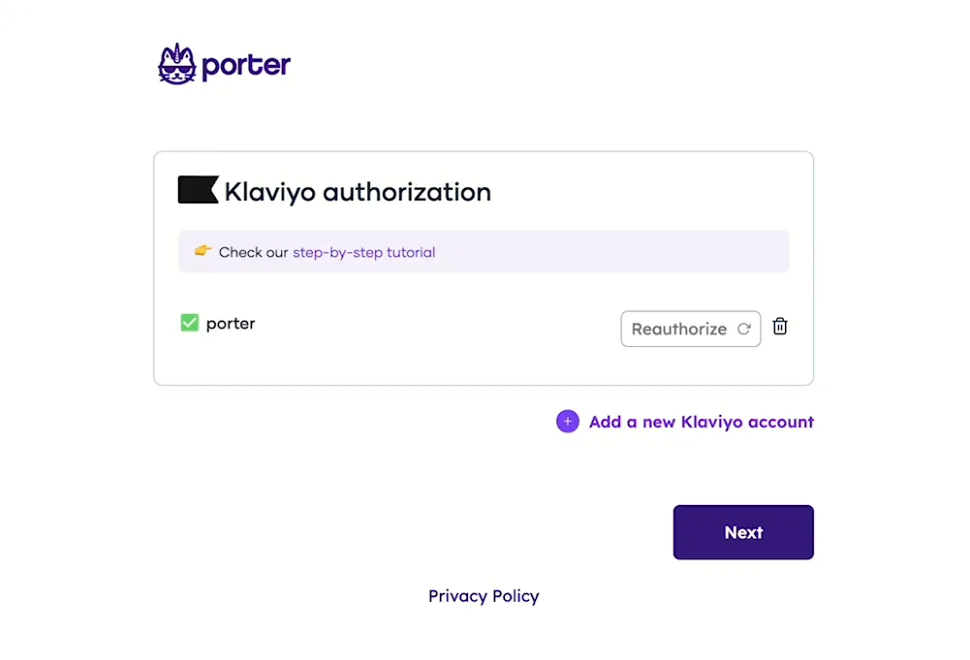
Your Klaviyo account, authorized in Porter.
Open Connectors in Claude
In Claude, open Customize, then Connectors, click + Add and choose Add custom connector.
Where to find custom connectors in Claude.
Paste Porter’s MCP URL
Name it Porter Metrics and paste this URL, then click Add:
https://mcp.portermetrics.com/mcp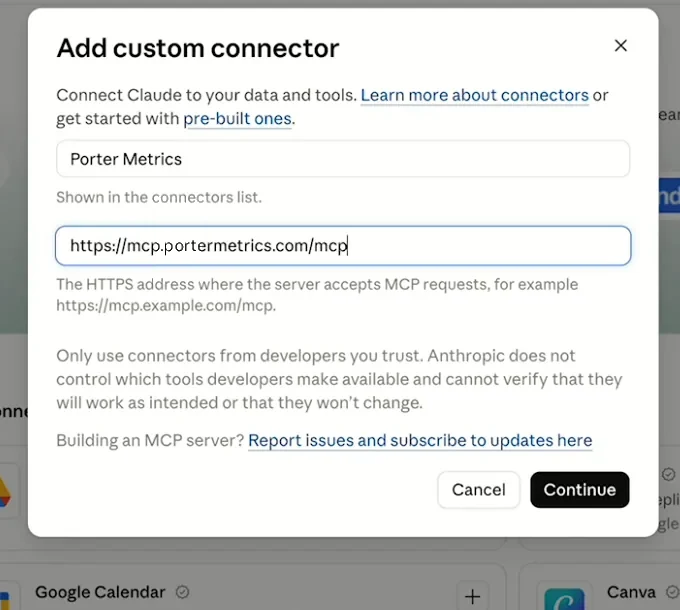
Claude, Customize, Connectors, Add custom connector.
Sign in and allow access
Click Connect next to Porter Metrics, sign in with the account you use in Porter and allow access.
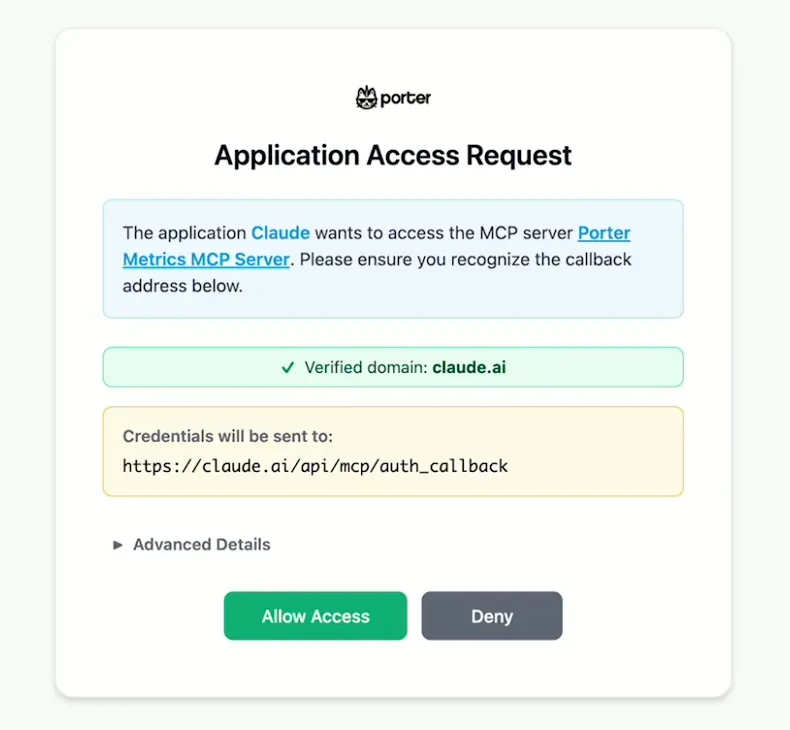
Porter asks you to allow Claude to use the Porter MCP server.
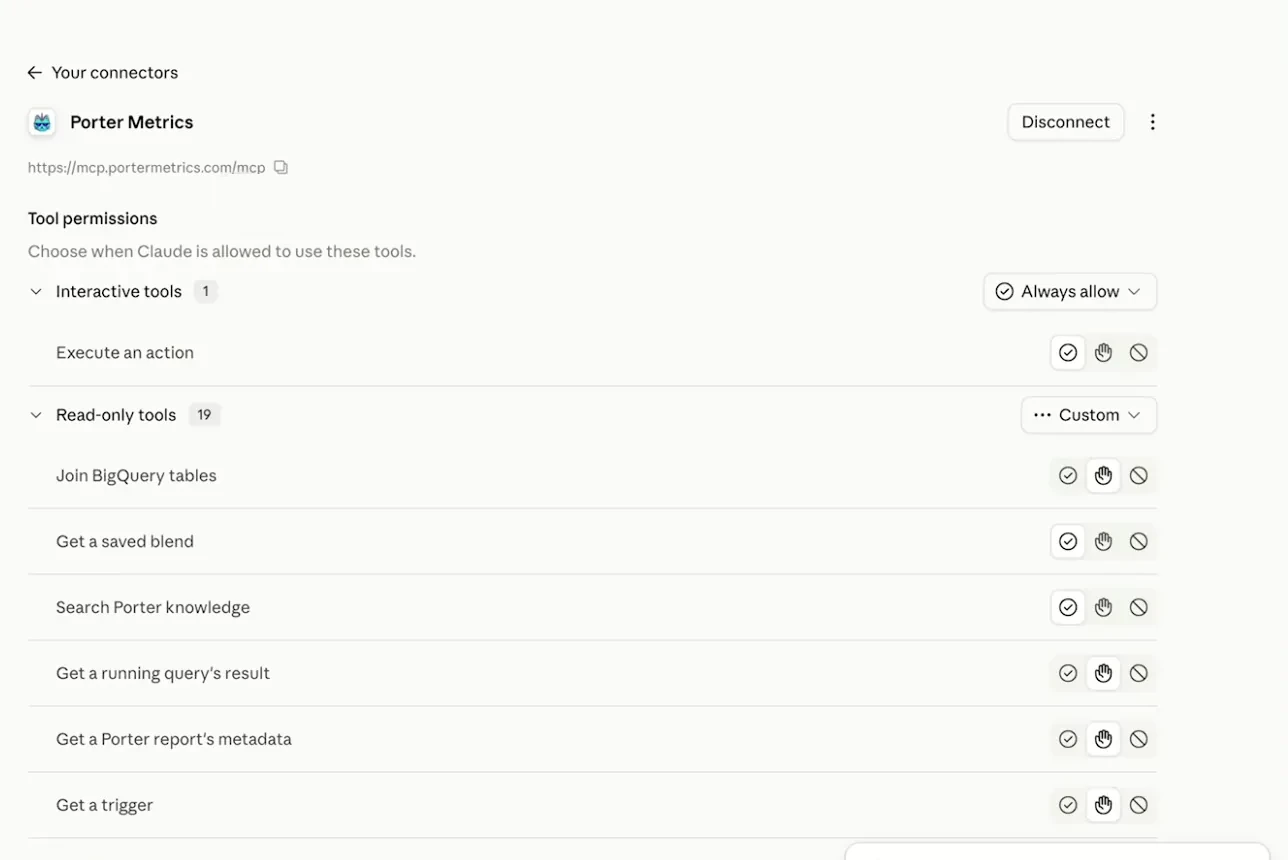
Porter Metrics connected in Claude.
Ask your first question
Open a new chat and try: “List my Klaviyo email campaigns with Campaign Name, Campaign Status and Campaign Send Time, newest first, and tell me how many were sent in each of the last 4 weeks.”
 Claude
 Porter connected
 Porter / Klaviyo / Trailgear✓ 4 rows
| Campaign | Status | Sent |
|---|---|---|
| Black Friday early access | Sent | Nov 20 |
| Winter restock alert | Sent | Nov 13 |
| Weekend flash sale | Sent | Nov 7 |
Claude Desktop, Cowork, Claude Code and Team plans
Add Porter once on claude.ai and it shows up in Claude Desktop and Cowork when you sign in with the same Claude account. The steps are the same on every model, from Opus to Haiku.
Claude Code
Claude Code runs in your terminal, so you add Porter with one command. --scope user makes it available in every project:
claude mcp add --transport http porter https://mcp.portermetrics.com/mcp --scope userThen type /mcp, pick porter and sign in in the browser tab that opens.
Claude Team and Enterprise plans
On Team and Enterprise, an owner adds Porter first in Organization settings, then Connectors, with the same URL. After that, each member opens Customize, then Connectors, clicks Connect next to Porter Metrics and signs in with their own Porter account.
Connect several Klaviyo accounts
Agencies add each client’s Klaviyo account in Porter once, and every account is available in the same chat. Name the account in your question, or ask for all of them in one table. The Free plan has no limit on connected accounts.
What you can do once Klaviyo is connected
- Send calendar: every campaign sent or scheduled this month, by account and channel.
- Pre-send check: catch campaigns with tracking, UTMs or Smart Sending turned off.
- Flow review: see which flows are live, drafts or archived, and what triggers them.
- Campaign drafts: draft a campaign for a list or segment, then approve it.
- Cross-channel reporting: put Klaviyo next to Shopify in Claude, GA4 and your ads.
First prompts to run
Build a Klaviyo dashboard with AI
Ask Claude to turn your Klaviyo data into a live dashboard with its own link you can share. Porter keeps it synced, so you don’t rebuild it every week.
Start from the Klaviyo dashboard template, or see the Klaviyo connector for Claude for fields and pricing.
Klaviyo data Claude can read
Through Porter, Claude reads 70+ Klaviyo fields, among them:
- Campaign Name, Campaign Channel, Campaign Status, Campaign Send Time and Campaign Scheduled At
- Campaign Is Tracking Opens, Campaign Is Tracking Clicks, Campaign Is Add UTM and Campaign Use Smart Sending
- Flow Name, Flow Status and Flow Trigger Type
- List Name, List Created At and List Updated At
- Profile Total CLV, Profile Predicted CLV and Profile Churn Probability
- Profile Average Order Value and Profile Average Days Between Orders
See every Klaviyo field in Porter
Troubleshooting
Porter doesn’t show in my chat.
Open the tools menu in the chat and turn Porter Metrics on, or start a new chat after adding it.
Porter can’t read my Klaviyo account.
Check that the private API key is still active in Klaviyo, then paste it again in Porter. Drafting campaigns needs a key with write access.
Klaviyo’s official connector won’t connect.
Klaviyo’s server needs an Owner, Admin or Manager role. Ask an Owner to change your role or to connect it.
I only see one Klaviyo account with the official server.
Each connector reads one account. Add the server again by URL with ?company= and the other account’s name, or connect every account in Porter.
Is the Klaviyo MCP safe?
Both routes keep your Klaviyo password out of Claude. Porter uses a private API key you can delete in Klaviyo at any time. Klaviyo’s own server signs you in with OAuth and only for Owner, Admin and Manager roles. Keep these rules:
- Use a read-only key or
?read-only=trueif you only need reports. - Turn on Claude’s tool approval so you see each action before it runs.
- Review audiences and content before you approve a campaign.
- Ask Claude to explain a change before it makes it.
Through Porter, new Klaviyo campaigns are created as drafts, and nothing is sent until you send it in Klaviyo.
Frequently asked questions
Is there an official Klaviyo MCP?
Yes. Klaviyo runs a remote MCP server at https://mcp.klaviyo.com/mcp, and its connector is listed in Claude. You sign in with OAuth, and you need an Owner, Admin or Manager role in Klaviyo. It has about 350 tools, 173 that read and 177 that change data.
What is the Klaviyo MCP server URL?
Klaviyo’s remote server URL is https://mcp.klaviyo.com/mcp. To connect a second Klaviyo account, add the server again with ?company= and the account’s name at the end. Porter’s server URL is https://mcp.portermetrics.com/mcp.
Can I connect several Klaviyo accounts?
With Klaviyo’s server, you add one connector per account. With Porter, every Klaviyo account you connect is available in the same chat, so you can compare them in one table.
Is it free to connect Klaviyo to Claude?
Klaviyo doesn’t list a separate price for its MCP server. Porter has a free plan with unlimited connected accounts and the last 15 days of data in Claude, on any Claude plan.
Can Claude change my Klaviyo account?
Yes. Klaviyo’s server can create, edit, schedule and send campaigns and change flows, lists, profiles and templates, and you can turn writes off with read-only=true in the URL. Through Porter, Claude drafts campaigns and creates lists and profiles only after you approve, and flows stay read-only.
Does it work in ChatGPT?
Yes. Klaviyo has a ChatGPT app and a custom server option, and Porter’s MCP URL also works as a ChatGPT connector.