Klaviyo connector for ChatGPT

Use Porter’s Klaviyo connector for ChatGPT to list and check campaigns, flows and lists, compare Klaviyo with GA4, and draft the campaigns you confirm on Business, Enterprise or Edu.

  • List what every account sent or scheduled this month
  • Check tracking, UTMs and Smart Sending before a send
  • Draft a campaign for a segment, then confirm it
  • Match Klaviyo campaigns with GA4 sessions and revenue
G2★★★★★Rated 4.6/5 on G2 (288 reviews, October 2026)

By Porter Metrics team · Last updated October 20, 2026

ChatGPTPorter connected
List my email campaigns with name, status and send time, newest first, and count how many went out each week.
Porter / Klaviyo / Trailgear Demo✓ 4 rows
You sent 9 campaigns in the last 4 weeks; the week of Sep 28 had the most (3).
CampaignStatusSent
Fall restock alertSentOct 7
Weekend flash saleSentOct 4
New arrivalsSentOct 1
Loyalty points reminderSentSep 29
Demo data, Trailgear Demo account
Campaigns, flows and profiles
01Setup

How to connect Klaviyo to ChatGPT

Porter’s Klaviyo connector for ChatGPT takes 3 no-code steps. Connect Klaviyo in Porter with a private API key, add one MCP URL to ChatGPT as a custom MCP server, sign in and ask. The step-by-step Klaviyo to ChatGPT tutorial has screenshots of every step. MCP (Model Context Protocol) is the open standard ChatGPT uses to connect to tools.

What you need before you start

  • To start, you need a Klaviyo private API key, a free Porter account and a ChatGPT plan that supports custom MCP servers. An Owner or Admin creates the key. Read-only access is enough to analyze, but drafts need Full Access or write access (Klaviyo’s guide to private API keys).
  • Custom MCP servers are in beta in ChatGPT on the web, so set up Porter and ask your questions from a browser. On Business, Enterprise or Edu, an admin or owner turns on developer mode, and then ChatGPT can also make the changes you confirm. On Pro, you turn on developer mode yourself, and ChatGPT reads and recommends (OpenAI’s guide to custom MCP apps).
  • Works in ChatGPT on the web (chatgpt.com, custom MCP servers in beta) and in Codex, with the same Porter MCP URL.
  1. Step 1: Connect Klaviyo in Porter

    Sign up free at Porter, pick Klaviyo as the source and then paste the private API key. Choose the accounts ChatGPT should read, then pick ChatGPT as the destination.

  2. Step 2: Add the connector to ChatGPT

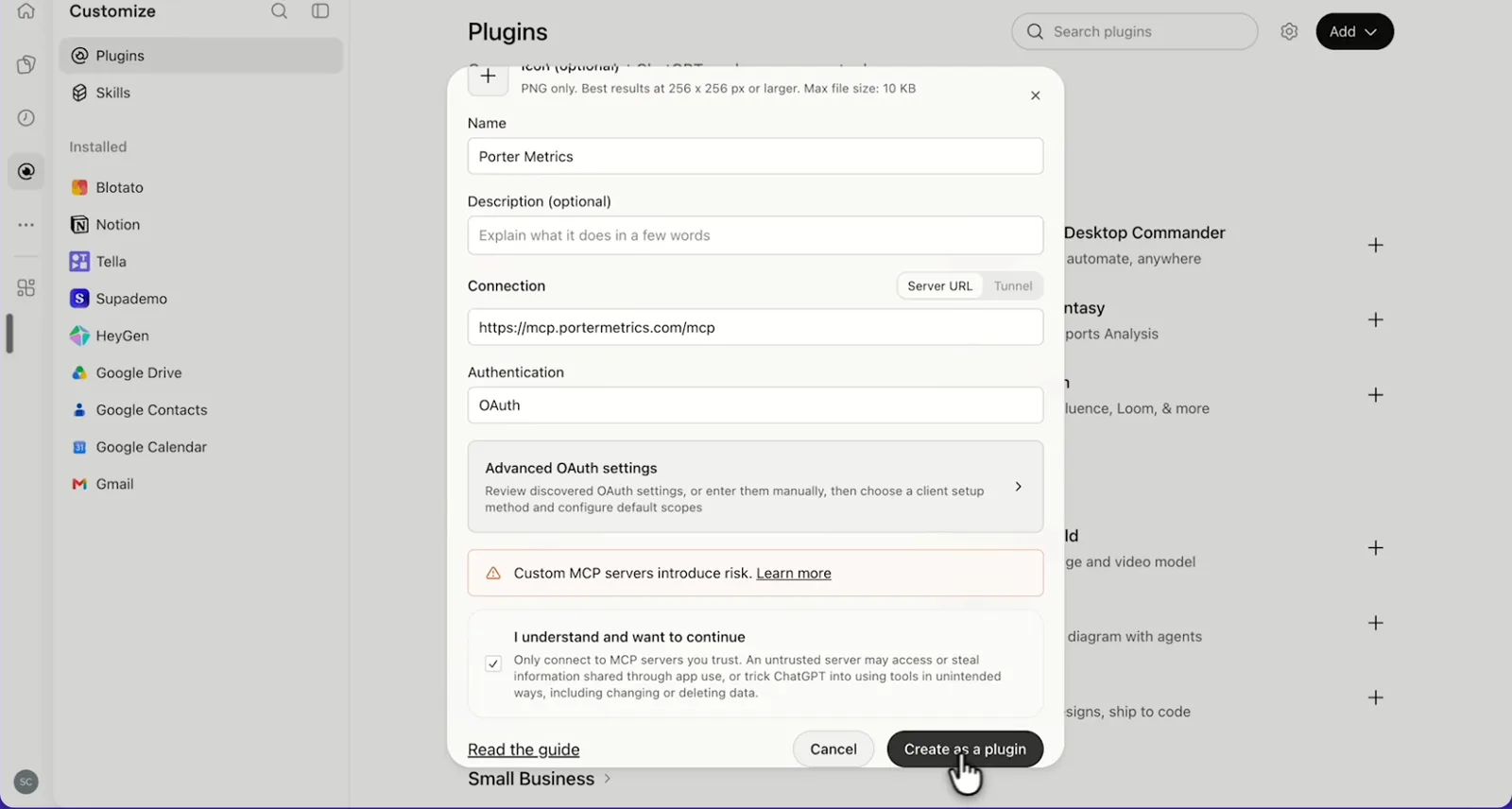
    In ChatGPT, open Customize › Plugins, click Add and choose Add custom MCP server. On Business, an admin does this from Workspace settings › Apps › Create. Name it Porter Metrics, paste this URL as the Server URL and keep OAuth as the authentication:

    MCP URL
    https://mcp.portermetrics.com/mcp

    Tick “I understand and want to continue”, then select Create as a plugin.

  3. Step 3: Ask ChatGPT about Klaviyo

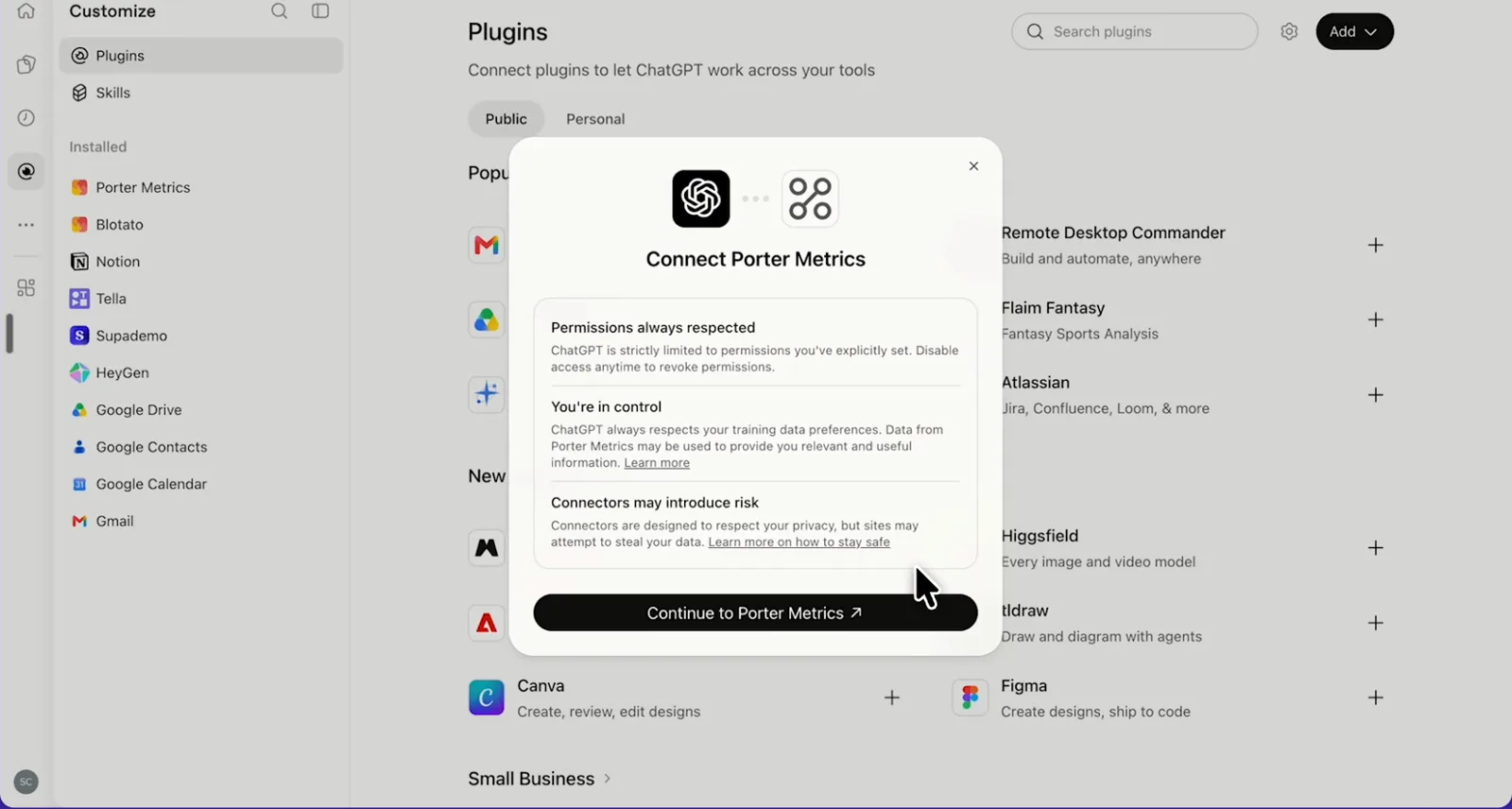
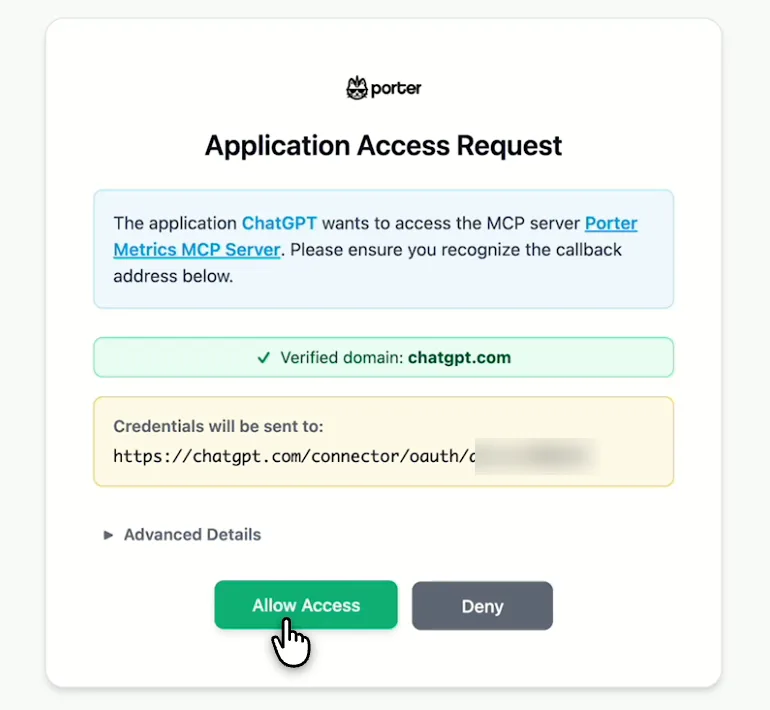
    Next, select Continue to Porter Metrics, sign in to Porter and click Allow Access. Then select Try in chat and paste this prompt:

    Prompt
    List my Klaviyo email campaigns with Campaign Name, Campaign Status and Campaign Send Time, newest first, and tell me how many were sent in each of the last 4 weeks.

Guides and videos

app.portermetrics.com / create
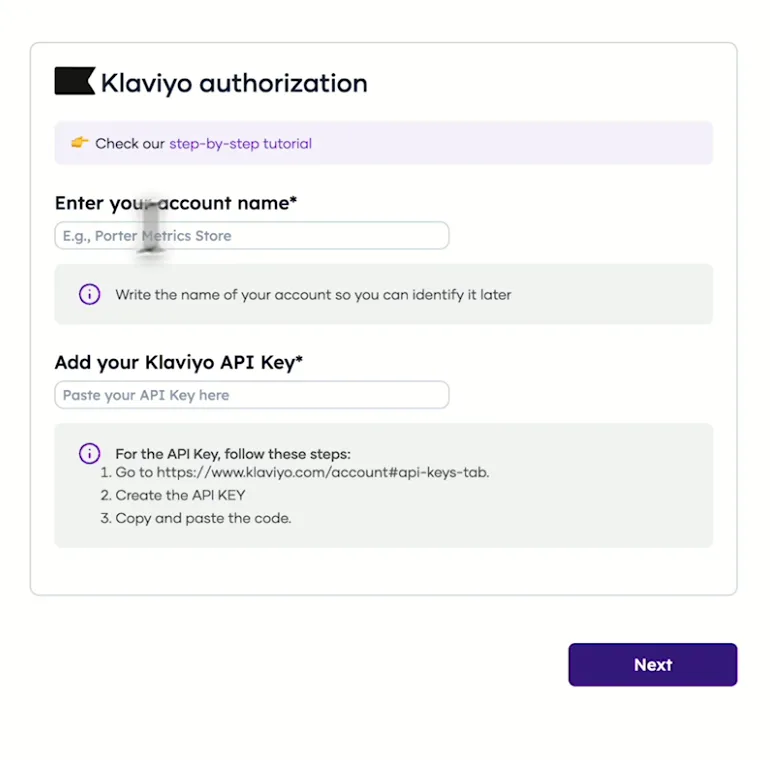
Porter's Klaviyo authorization form with the account name and private API key fields
First, name the account and paste a Klaviyo private API key.
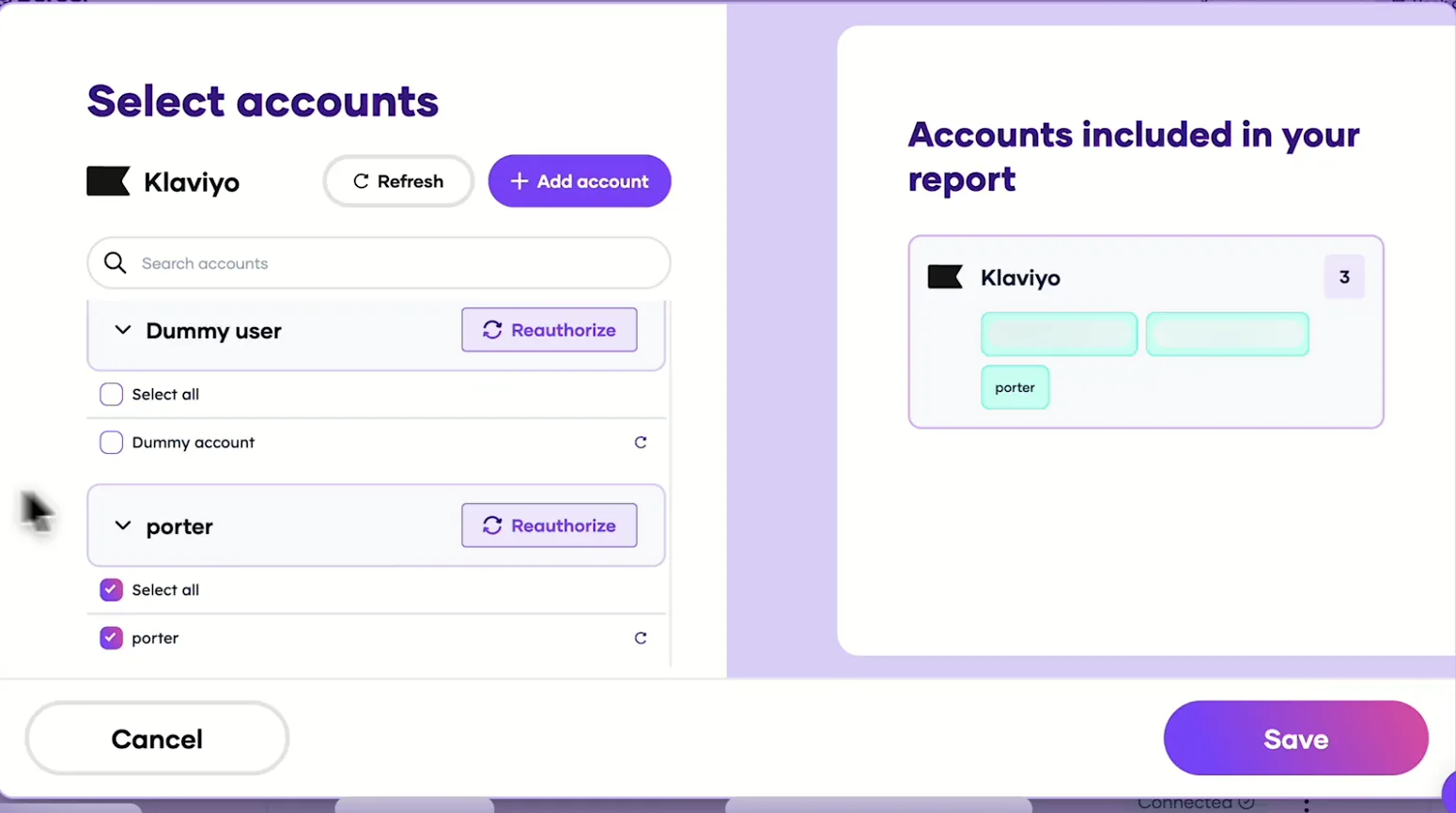
Porter's Select accounts window for Klaviyo with the connected account
Then, pick the Klaviyo accounts Claude can read and save.
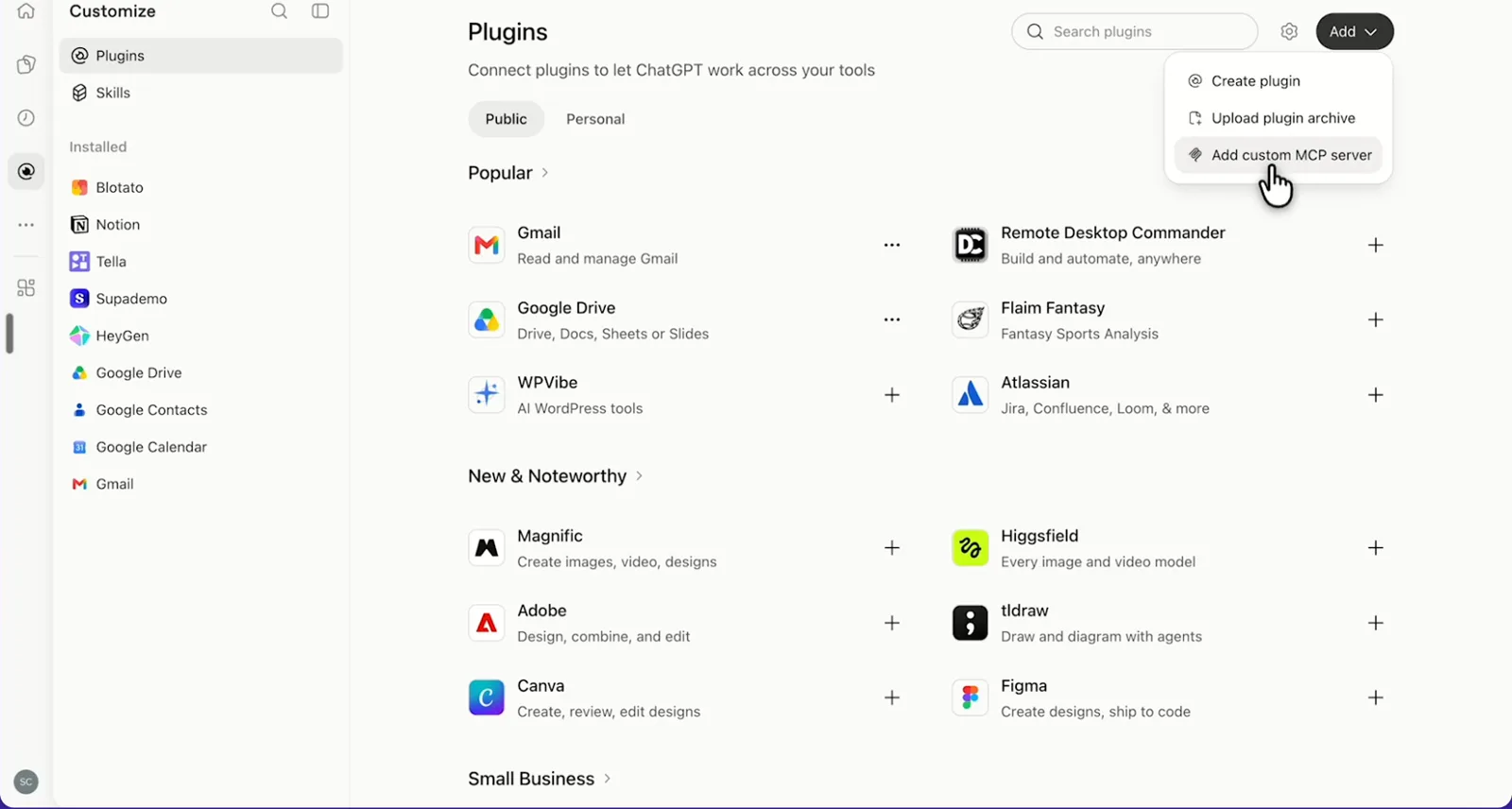
ChatGPT's Plugins page with the Add menu open on Add custom MCP server
In ChatGPT, open Customize, then Plugins, and choose Add custom MCP server.
ChatGPT's Add custom MCP server form with the name Porter Metrics, Porter's MCP URL and OAuth filled in
Then, paste Porter's MCP URL, keep OAuth, tick the box and select Create as a plugin.
ChatGPT's Connect Porter Metrics window with the Continue to Porter Metrics button
Next, ChatGPT asks you to continue to Porter Metrics to sign in.
Porter's Application Access Request screen asking you to let ChatGPT use the Porter MCP server
Finally, sign in to Porter and select Allow Access.
If you prefer video, watch the whole Klaviyo to ChatGPT setup (1:49, no sound).
Interactive walkthrough, so you can click along here
02Use cases and prompts

What you can ask ChatGPT

Each use case comes with a prompt to copy, the fields it uses from the Klaviyo fields list and who it’s for. Prompts ask about one Klaviyo object at a time (campaigns, flows, lists or profiles), because Klaviyo stores them separately. On Business, Enterprise or Edu, ChatGPT can also make the changes you confirm; on Pro it reads and recommends.

Can ChatGPT list what we sent or scheduled this month, by channel?

The problemTwo people booked sends for the same Thursday, and nobody noticed until the calendar was full.

What ChatGPT doesChatGPT lists every campaign, including its channel, status and scheduled or send time, for each Klaviyo account you connect. Then it groups them by week and channel and flags weeks with no send or a crowded calendar.

What you getYou get the monthly send calendar as one table per account instead of a calendar view you screenshot tab by tab.

Prompt
For each connected Klaviyo account, list campaigns with Campaign Name, Campaign Channel, Campaign Status, Campaign Scheduled At and Campaign Send Time for the last 30 days. Group them by week and channel, and flag weeks with no sends or more than 4 email sends.

For: email agencies · in-house CRM managers · founders and marketing leads

Fields used: Campaign NameCampaign ChannelCampaign StatusCampaign Scheduled AtCampaign Send TimeAccount Name

Do upcoming campaigns have tracking, UTMs and Smart Sending on?

The problemA campaign went out with UTMs off, so the visits it drove showed up in GA4 as direct traffic.

What ChatGPT doesChatGPT checks draft and scheduled campaigns, then flags any with open or click tracking off, UTMs not added or Smart Sending off. You fix them before they go out, not in next week’s report.

What you getThe pre-send check becomes one list of what to fix instead of a click through every campaign’s settings.

Prompt
List Klaviyo campaigns where Campaign Status is draft or scheduled. Show Campaign Name, Campaign Channel, Campaign Scheduled At, Campaign Is Tracking Opens, Campaign Is Tracking Clicks, Campaign Is Add UTM and Campaign Use Smart Sending, and flag every campaign where any of the last four is false.

For: in-house CRM managers · email agencies · email marketers

Fields used: Campaign NameCampaign StatusCampaign ChannelCampaign Scheduled AtCampaign Is Tracking OpensCampaign Is Tracking ClicksCampaign Is Add UTMCampaign Use Smart Sending

Can ChatGPT count real opens and clicks on my last campaigns?

The problemApple Mail Privacy opens made last month’s subject line test look like a tie.

What ChatGPT doesChatGPT finds Klaviyo’s Opened Email and Clicked Email metrics, pulls those events for each campaign’s send window and then counts them per campaign. It also leaves out Apple Mail Privacy opens (machine_open) and bot clicks, so you count real people.

What you getYou see which subject line got real human opens instead of exporting event logs and filtering out machine opens by hand.

Prompt
For my last 5 sent email campaigns, count unique Opened Email and Clicked Email events per campaign in the 3 days after each Campaign Send Time, excluding machine opens and bot clicks. Show the counts side by side and which campaign got the most clicks.

For: in-house CRM managers · email agencies

Actions: campaign_list · metric_list · event_list

Can ChatGPT show which flows are live or drafts, and their triggers?

The problemThe account you inherited has three welcome series, but nobody can say which one new subscribers get.

What ChatGPT doesChatGPT lists every flow with its status, trigger type and created and updated dates, then groups flows that share a trigger. It also flags drafts and manual flows nobody has touched in 90 days.

What you getYou can retire duplicate flows before they confuse the team, without opening each one in the flow builder.

Prompt
List all Klaviyo flows with Flow Name, Flow Status, Flow Trigger Type, Flow Created At and Flow Updated At. Group them by Flow Trigger Type, flag possible duplicates, and list draft or manual flows not updated in the last 90 days.

For: lifecycle marketers · email agencies · in-house CRM managers

Fields used: Flow NameFlow StatusFlow Trigger TypeFlow Created AtFlow Updated AtFlow Is Archived

Can ChatGPT find lists and segments I can retire?

The problemThe list picker scrolls past old giveaway imports as well as “final_v2” lists nobody remembers creating.

What ChatGPT doesChatGPT lists your lists with created and updated dates, plus your segments, and flags lists untouched for 6 months and names that look like duplicates. Then it drafts a keep, merge or retire plan.

What you getCleanup then starts from a plan instead of a scroll through the Lists & Segments page.

Prompt
List all Klaviyo lists with List Name, List Created At and List Updated At, and all segments by name. Flag lists not updated in 6 months and names that look like duplicates, then propose which to keep, merge or retire. Don't delete anything.

For: in-house CRM managers · email agencies

Fields used: List NameList Created AtList Updated At
Action: segment_list

Can ChatGPT draft a campaign for a segment?

The problemThe win-back segment is built, but the email for it has sat on someone’s to-do list for weeks.

What ChatGPT doesChatGPT finds the segment or list, then writes the subject line, preview text and body. On Business, Enterprise or Edu, it then creates the template and a draft campaign for that audience in Klaviyo once you confirm, and stops at the draft. On Pro, ChatGPT writes the copy for you to paste into Klaviyo.

What you getThe campaign goes from brief to Klaviyo draft in one chat, ready for you to review before you send it.

Prompt
Find my Klaviyo segment for customers who haven't ordered in 90 days. Draft a win-back email (subject, preview text, body), create it as a template and a draft email campaign for that segment, and show me the draft before creating anything.

For: email marketers · email agencies · e-commerce marketers

Actions: segment_list · list_list · template_create · campaign_create · campaign_update · campaign_send (only when you ask)

Does traffic turn into revenue on my site?

The problemKlaviyo says email had a strong month, but the founder asks why GA4 tells a smaller story.

What ChatGPT doesWith GA4 also connected in Porter, ChatGPT lines up each campaign’s send date with GA4 sessions, ecommerce purchases and purchase revenue from Klaviyo-tagged visits. It also lists campaigns sent without UTMs, which GA4 can’t credit to email.

What you getYou judge email on what the site recorded as well as what Klaviyo recorded, in one answer.

Prompt
List my Klaviyo email campaigns sent in the last 30 days with Campaign Name, Campaign Send Time and Campaign Is Add UTM. From GA4, show Sessions, Ecommerce purchases and Purchase revenue by Session campaign where Session source / medium contains 'klaviyo', and match them to the campaigns by name and date.

For: e-commerce marketers · growth leads · email agencies

Fields used: Campaign NameCampaign Send TimeCampaign Is Add UTMSession source / mediumSession campaignSessionsEcommerce purchasesPurchase revenue
03Why Porter

Why Porter for Klaviyo in ChatGPT

Porter puts Klaviyo next to GA4 and every client account, with nothing to host. For campaign and flow performance reports, or to edit flows and segments, use Klaviyo’s official MCP server. You can run both.

✓

Klaviyo next to GA4 and 30+ sources

Ask about Klaviyo campaigns next to GA4 sessions and purchase revenue in one answer, so you judge email on what the site recorded, not only on Klaviyo’s attribution.

⊞

Every client account in one connector

Connect several Klaviyo accounts and ChatGPT lists or compares them with Account Name as a column. Klaviyo’s own MCP connects one account at a time.

⚙

Safe for client accounts

ChatGPT reads every campaign and flow, tells you what to fix, and leaves your Klaviyo account exactly as you set it. With write access on Business, Enterprise or Edu, it drafts the campaigns, sends and deletes you confirm; on Pro it reads and recommends.

Aa

Every campaign and flow, stored

Porter keeps your Klaviyo campaigns, flows, lists and profiles in stored tables, so ChatGPT sees every campaign the account holds, whatever the date range. Each answer shows when the tables were last refreshed.

↻

Ready-made fields and actions

ChatGPT reads 83 named fields across campaigns, flows, lists and profiles, plus actions for segments, metrics and events, so a send calendar or flow audit takes one prompt.

✓

One URL, nothing to host

Paste a private API key in Porter and add one MCP URL to ChatGPT on the web. The same accounts also feed Claude, Data Studio, Google Sheets, BigQuery and Power BI.

⊞

Live dashboards, not only chat answers

Ask ChatGPT for a dashboard and Porter’s AI dashboards publish it at its own link, synced automatically and ready to share. Official MCP servers answer inside the chat and stop there.

04Dashboard

Dashboard template

One prompt to the Klaviyo connector gets you campaigns, flows and lists from your account in one ChatGPT answer. Want a shared view instead of a ChatGPT chat? For a report your team opens every week, copy one of Porter’s free Klaviyo dashboard templates instead.

AI dashboards

Build a live Klaviyo dashboard from the chat

Describe the dashboard in one sentence and Porter builds it. A client-ready dashboard in minutes, with no chart dragging and no BI tool to learn. Ask ChatGPT:

Prompt
Build a live Klaviyo dashboard for my account with the last 30 days, the main KPIs and a weekly trend.
Live URLEach dashboard at its own link: no login, no app, no download
Auto-syncFresh Klaviyo data, nobody re-exports each period
Scheduled deliveryEmail or PDF sends on a set day
White labelYour logo and branding for clients
Sharing permissionsView or edit access per person
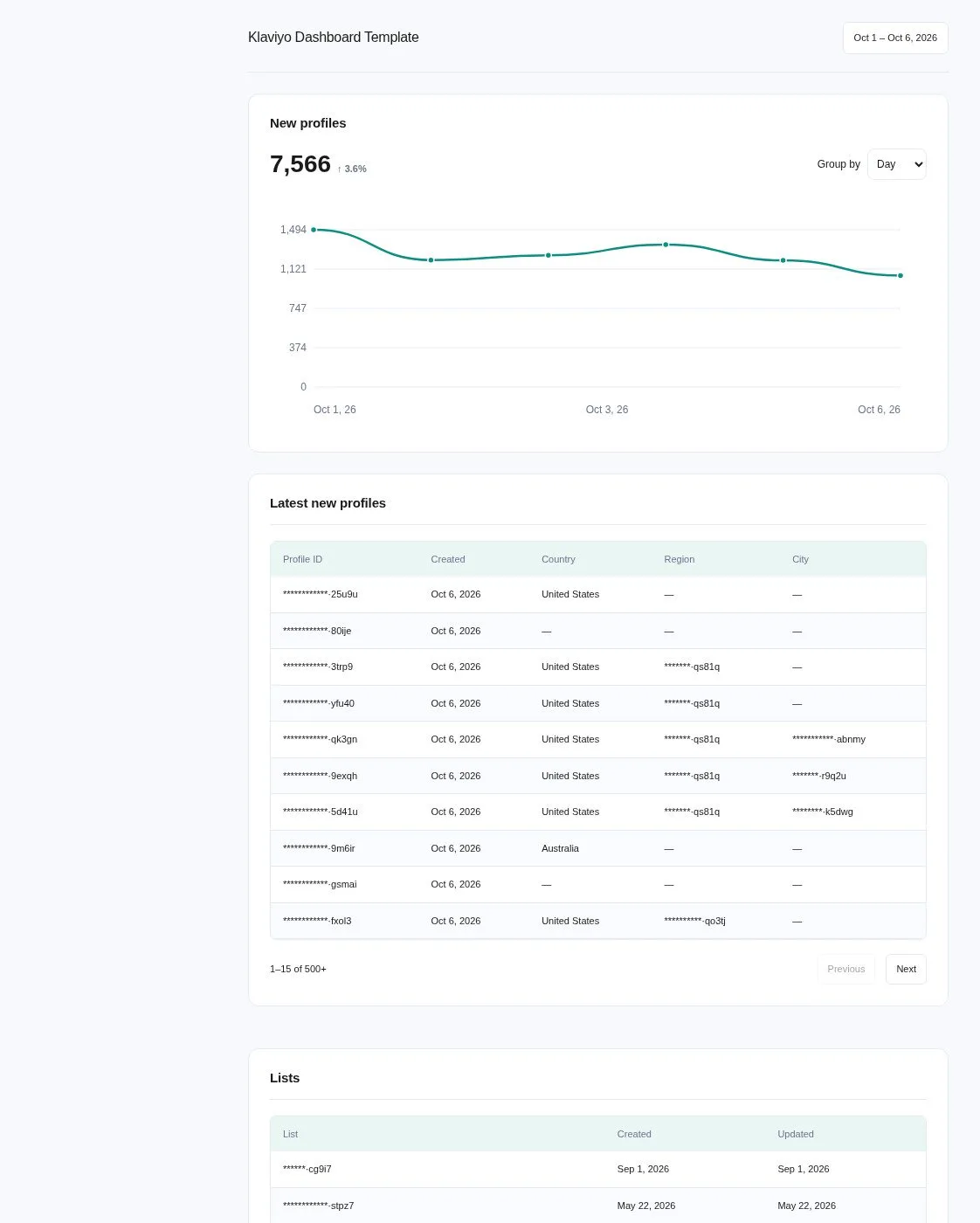
Klaviyo AI dashboard template built with Porter Metrics AI dashboards
Template

The Klaviyo AI dashboard template

Built with Porter's AI dashboards on a real account. Open it live, then ask ChatGPT to make one like it for your account.

Open the live Klaviyo dashboard

05Pricing

Pricing

You can start free, since Porter’s Klaviyo connector for ChatGPT comes with every plan. Use the calculator for your number of accounts, or see Porter pricing for every plan.

What you get

  • Free plan: never expires, with unlimited connected accounts and the last 15 days of data in ChatGPT (30 days in Data Studio and Sheets)
  • Reporting: from $12.50 per account a month billed annually, or $15 month to month for one account
  • Billing: each Klaviyo account counts as one account, with volume discounts and no per-seat fee
  • Changes: 1 AI credit per completed change; failed tasks are free, and the Free plan includes 100 credits a month
  • Trial: 14 days of full access, no card

Price calculator

$33.33/mo$6.67 per account

An account is one ad account, Stripe account, store, page or GA4 property. The Free plan never expires and has unlimited accounts, with the last 15 days of data in AI chats.

06Data and actions

Klaviyo data and actions in ChatGPT

Through the Klaviyo connector, ChatGPT reads 83 fields across campaigns, flows, lists and profiles. Actions let it read segments, metrics and events, as well as draft campaigns, templates, lists and profiles. The full list of Klaviyo fields also has every label and ID.

The 13 Klaviyo fields ChatGPT uses most

FieldWhat it's for
Campaign NamecampaignNameNaming each send in answers
Campaign ChannelcampaignChannelEmail, SMS or push
Campaign StatuscampaignStatusDraft, scheduled or sent
Campaign Send TimecampaignSendTimeSend calendar (comes back as YYYYMMDD)
Campaign Scheduled AtcampaignScheduledAtUpcoming sends
Campaign Is Tracking Opens · Campaign Is Tracking ClickscampaignIsTrackingOpens · campaignIsTrackingClicksPre-send tracking check
Campaign Is Add UTMcampaignIsAddUTMUTM check before a send
Campaign Use Smart SendingcampaignUseSmartSendingSmart Sending check
Flow NameflowNameFlow inventory
Flow StatusflowStatusLive, draft or manual
Flow Trigger TypeflowTriggerTypeGrouping flows by trigger
List NamelistNameList cleanup
Account NameaccountNameComparing client accounts

Can ChatGPT send Klaviyo campaigns, edit flows or build segments?

On Business, Enterprise and Edu plans, yes, for campaigns, templates, lists and profiles, after you confirm. ChatGPT can draft and update campaigns and templates, as well as create and rename lists. In addition, it can add up to 1,000 profiles to a list at a time, or remove them. It can also create or update profiles and track custom events.

Sending, scheduling and deleting campaigns, and deleting lists, follow the confirm steps in the security section. On Pro, ChatGPT reads the account and lists the changes for you to make in Klaviyo. For flows and segments, use Klaviyo's builder or Klaviyo's own connector.

Which Klaviyo numbers can't ChatGPT get yet?

ChatGPT counts opens and clicks from raw events (use case 3), and Klaviyo's own connector adds Klaviyo's campaign and flow report tools for sends, open rate, conversion value and revenue per recipient. Porter's Klaviyo fields cover campaigns, flows, lists and profiles.

Predicted CLV, churn and order-count fields return 0 for now, while event and subscription fields return errors or blanks.

How fresh is the Klaviyo data in ChatGPT?

Porter answers from stored Klaviyo tables and tells ChatGPT when they last refreshed. Event actions, however, read Klaviyo live. Klaviyo's app groups results by send date, while events are dated when they happened (Klaviyo's note on send date vs event date).

Product stats

WhatKlaviyo connector
Fields83 across campaigns, flows, lists and profiles
ActionsRead segments, metrics and events; draft and update campaigns and templates; create lists; add or update profiles, up to 1,000 per list at a time; changes you confirm on Business, Enterprise or Edu
FreshnessStored Klaviyo tables with their last refresh time; event actions read Klaviyo live
HistoryEvery campaign, flow and list in the account, plus profiles stored since the first sync; 30 days on the Free plan, 15 in AI chats
Rate limitsKlaviyo allows 3 requests a second on Tier S, and events are read page by page, so large sends take longer
Report metricsNot yet: sends, opens, clicks, open rate, conversion value and revenue per recipient
AccessPrivate API key from an Owner or Admin: Read-only to analyze, Full Access or write access for drafts

See all 83 Klaviyo fields

07Security

Is it safe?

Yes, if you pick the right key. Reading never changes your Klaviyo account, and ChatGPT writes to Klaviyo only on Business, Enterprise or Edu, and only the changes you confirm. With a Read-only private API key, your account stays exactly as you set it, and profile data such as emails reaches ChatGPT only when you ask.

How ChatGPT asks before changing Klaviyo

ChatGPT asks you to confirm changes based on the app's permissions and holds back some high-risk actions for extra care. Sending a campaign, deleting a campaign and deleting a list are permanent, so check each one before you confirm it. A sent email stays sent, while a deleted list's profiles stay in Klaviyo.

What the connector needs from Klaviyo

Porter needs a private API key (pk_…) created by an Owner or Admin (Klaviyo user roles). If you only analyze, use Read-only access. For drafts, use Full Access or write access to campaigns, templates, lists and profiles instead.

To change access later, create a new key, since Klaviyo fixes a key's scopes when you create it (Klaviyo's note that key scopes can't be edited). When you want to cut access, delete the key in Klaviyo. Profile fields include emails and phone numbers, so only ask for what you need.

08FAQ

FAQ

Five questions come up most before teams connect: agency accounts, Claude, existing Data Studio users, Klaviyo's own connector and SMS. Then three fixes: numbers that look off, accounts ChatGPT can't see and empty profile fields.

Can I connect several accounts, like an agency?

Yes. Each Klaviyo account is one account in Porter, and ChatGPT can list or compare them together with Account Name as a column. One subscription covers all your clients, while each Klaviyo account is billed as one. Keep recommendations per account, since one brand's results rarely transfer to another.

Can I use Porter in Claude too?

Yes. Porter's MCP URL, the same one behind the Klaviyo connector for ChatGPT, also works in Claude as a custom connector, with the same Porter account and Klaviyo accounts, so you don't reconnect anything. See Porter's Klaviyo connector for Claude for the Claude setup and what it covers.

I already send Klaviyo to Looker Studio with Porter. Do I need to reconnect for ChatGPT?

No. One connected Klaviyo account feeds every Porter destination at no extra cost, including the Klaviyo connector for Data Studio, Google Sheets and Klaviyo to BigQuery. Instead, add Porter's MCP URL to ChatGPT and ask. For drafts, though, the key needs write access.

Can I use Klaviyo's connector and Porter together?

Yes, you can run both. Use Klaviyo's connector for its campaign and flow performance reports, and Porter for the same campaigns next to GA4 or across client accounts. Porter adds to ChatGPT as one custom MCP server, so every Klaviyo account and every other Porter source comes through that single URL.

Does it cover SMS and push campaigns?

Yes. Campaign Channel shows whether each campaign is email, SMS or push, so ChatGPT can list and check all three. On Business, Enterprise or Edu, ChatGPT can also draft the SMS and push campaigns you confirm. The open and click counts in use case 3 are for email.

Troubleshooting

Why don't the numbers match Klaviyo?

Klaviyo's campaign reports group results by send date, while ChatGPT's event counts follow when each open or click happened. ChatGPT also leaves out Apple Mail Privacy opens and bot clicks, which Klaviyo's open rate counts. Finally, Klaviyo's conversion figures depend on the conversion metric you choose.

Why can't ChatGPT see my account?

Create a new private API key with read access to campaigns, flows, lists and profiles, pick the account in Porter, then reconnect. ChatGPT misses an account when its key was deleted or lacks that access, or when the account wasn't picked in Porter. Reconnecting can leave a second row for the same account, but both read the same data.

Why are CLV, churn or subscription fields zero or empty?

Use the Klaviyo app for these fields until Porter's fix ships. Porter's Klaviyo profile metrics and subscription fields aren't returning data right now, a known issue. Klaviyo also calculates predicted CLV and churn only once an account has 500+ customers with an order and 180 days of order history (Klaviyo's thresholds for predicted CLV).


09Next

More ChatGPT connectors

Klaviyo rarely runs alone, because store data and other channels usually sit next to it. Porter connects each of them to ChatGPT the same way as the Klaviyo connector. Then pick the sources your team reports on from all ChatGPT connectors, compare reporting tools, or start a client report from a template.

Not only ChatGPT. Send Klaviyo data anywhere

The same Porter account and connection also send Klaviyo data to these destinations, at no extra cost.

Try the connector in ChatGPT

Your next send calendar, flow audit or win-back draft can start in ChatGPT. Add Porter's MCP URL, connect your Klaviyo accounts and ask what went out, what's scheduled and what needs fixing before Thursday. The free plan includes the Klaviyo connector for ChatGPT, and the trial also needs no card.

Free forever plan · 14-day full trial · No card

Email agencies: every client's calendar and flow list from one prompt, so the Monday recap starts from a table.

In-house CRM managers: tracking, UTM and Smart Sending gaps show up before the send, not in next week's numbers.

E-commerce marketers: Klaviyo campaigns next to what GA4 recorded on the site, in one answer.