Instagram connector for ChatGPT

Use Porter’s Instagram connector for ChatGPT to compare posts and Reels, track follower growth, read Stories and reply to the comments you confirm on Business, Enterprise or Edu.

  • Rank last month’s posts by reach and saves
  • Compare Reels, carousels and single images on reach
  • Find the Story frames where viewers leave
  • Put Instagram reach next to GA4 website sessions
G2★★★★★Rated 4.6/5 from 288 G2 reviews (October 2026)

By Porter Metrics team · Last updated October 20, 2026

ChatGPTPorter connected
List my 4 posts with the highest reach in the last 14 days, with post type and saves.
Porter / Instagram / Trailgear Demo✓ 4 rows
The Reel from Oct 3 reached the most accounts (18.4K) and earned the most saves.
Post dateTypeReachSaves
Oct 3Reel18.4K612
Sep 30Carousel9.7K348
Oct 6Reel8.9K205
Sep 28Image4.2K96
Demo data, Trailgear Demo account
Posts, Reels and Stories
01Setup

How to connect Instagram to ChatGPT

Porter’s Instagram connector for ChatGPT takes 3 steps, with no code and no server to host. Connect the account in Porter, add Porter’s URL to ChatGPT as a custom MCP server, then sign in and ask. Porter’s Instagram to ChatGPT tutorial also has screenshots.

What you need

  • Before you start, you need an Instagram Business account linked to a Facebook Page (Instagram’s guide to professional accounts). You also need a free Porter account and a ChatGPT plan that supports custom MCP servers. Follower and audience numbers also need 100+ followers (Meta’s Instagram User Insights reference).
  • Custom MCP servers are in beta in ChatGPT on the web, so set up Porter and ask your questions from a browser. On Business, Enterprise or Edu, an admin or owner turns on developer mode, and then ChatGPT can also make the changes you confirm. On Pro, you turn on developer mode yourself, and ChatGPT reads and recommends (OpenAI’s guide to custom MCP apps).
  • Works in ChatGPT on the web (chatgpt.com, custom MCP servers in beta) and in Codex, with the same Porter MCP URL.
  1. Step 1: Connect your account in Porter

    Sign up free at Porter, then pick Instagram Insights as the source (that’s the connector’s name in Porter). Connect your Instagram account, and approve access to both it and its Facebook Page. Then pick ChatGPT as the destination.

  2. Step 2: Add the connector to ChatGPT

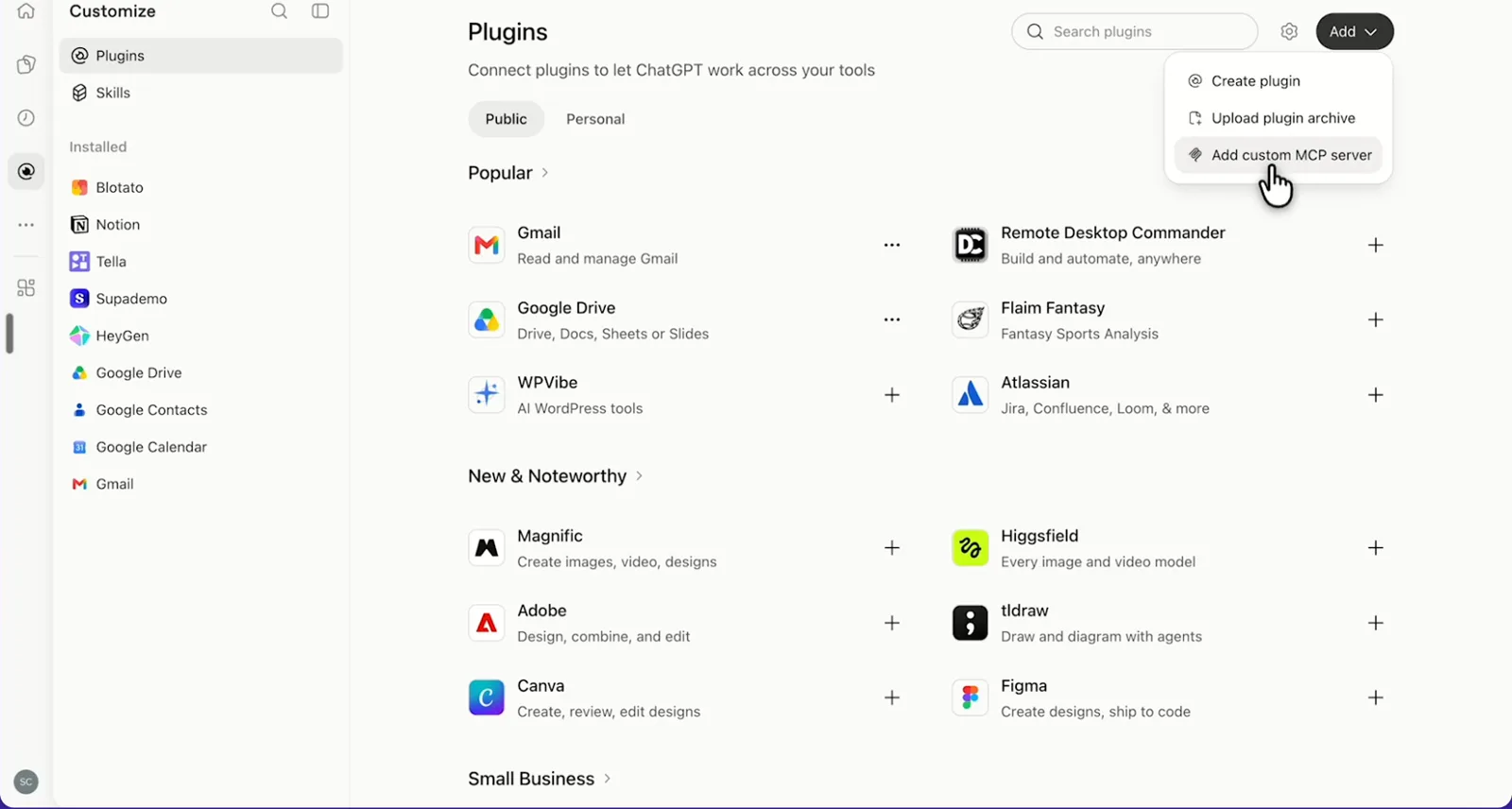
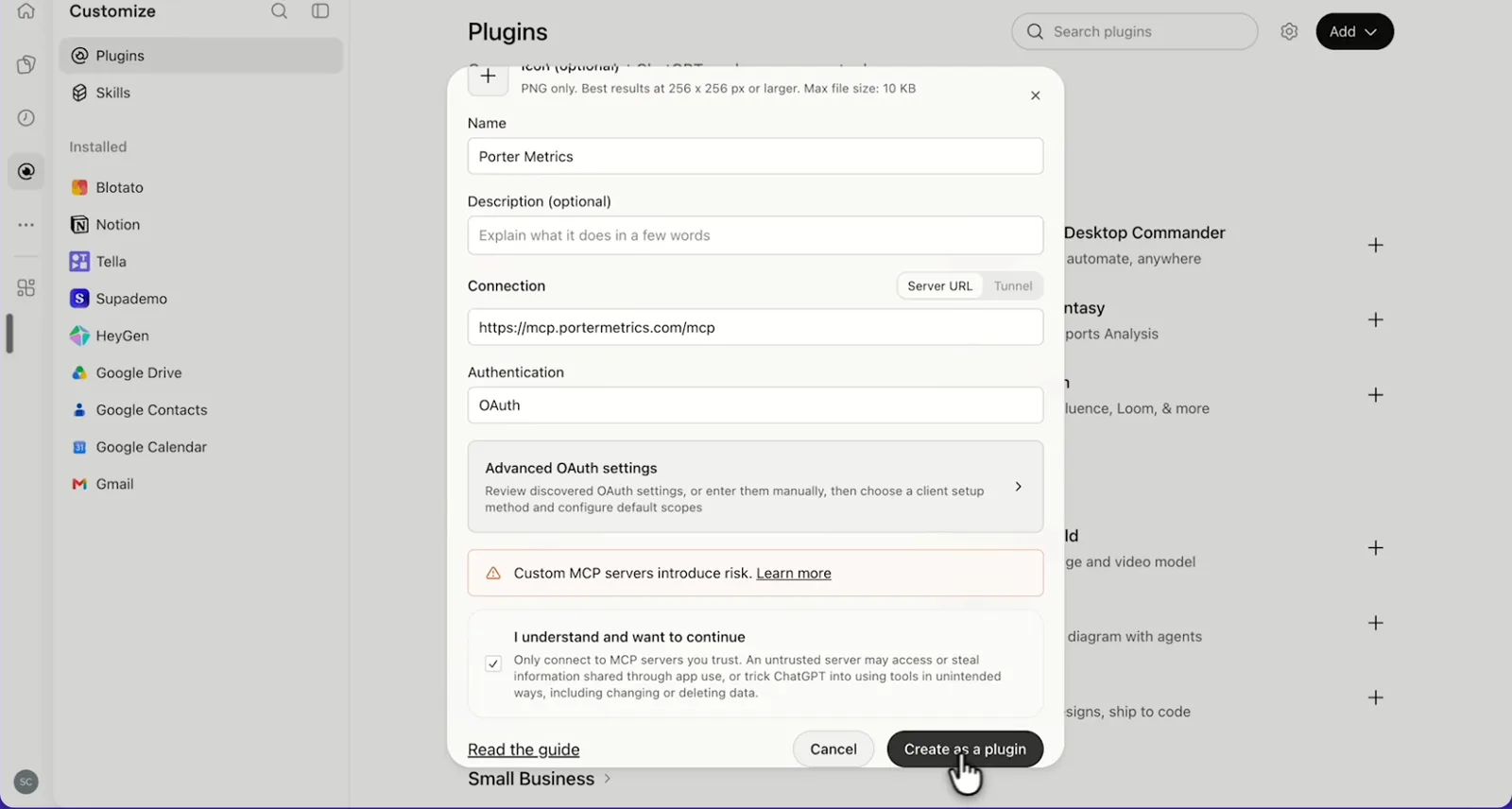
    In ChatGPT, open Customize › Plugins, click Add and choose Add custom MCP server. On Business, an admin does this from Workspace settings › Apps › Create. Name it Porter Metrics, paste this URL as the Server URL and keep OAuth as the authentication:

    MCP URL
    https://mcp.portermetrics.com/mcp

    Tick “I understand and want to continue”, then select Create as a plugin.

  3. Step 3: Ask ChatGPT about Instagram

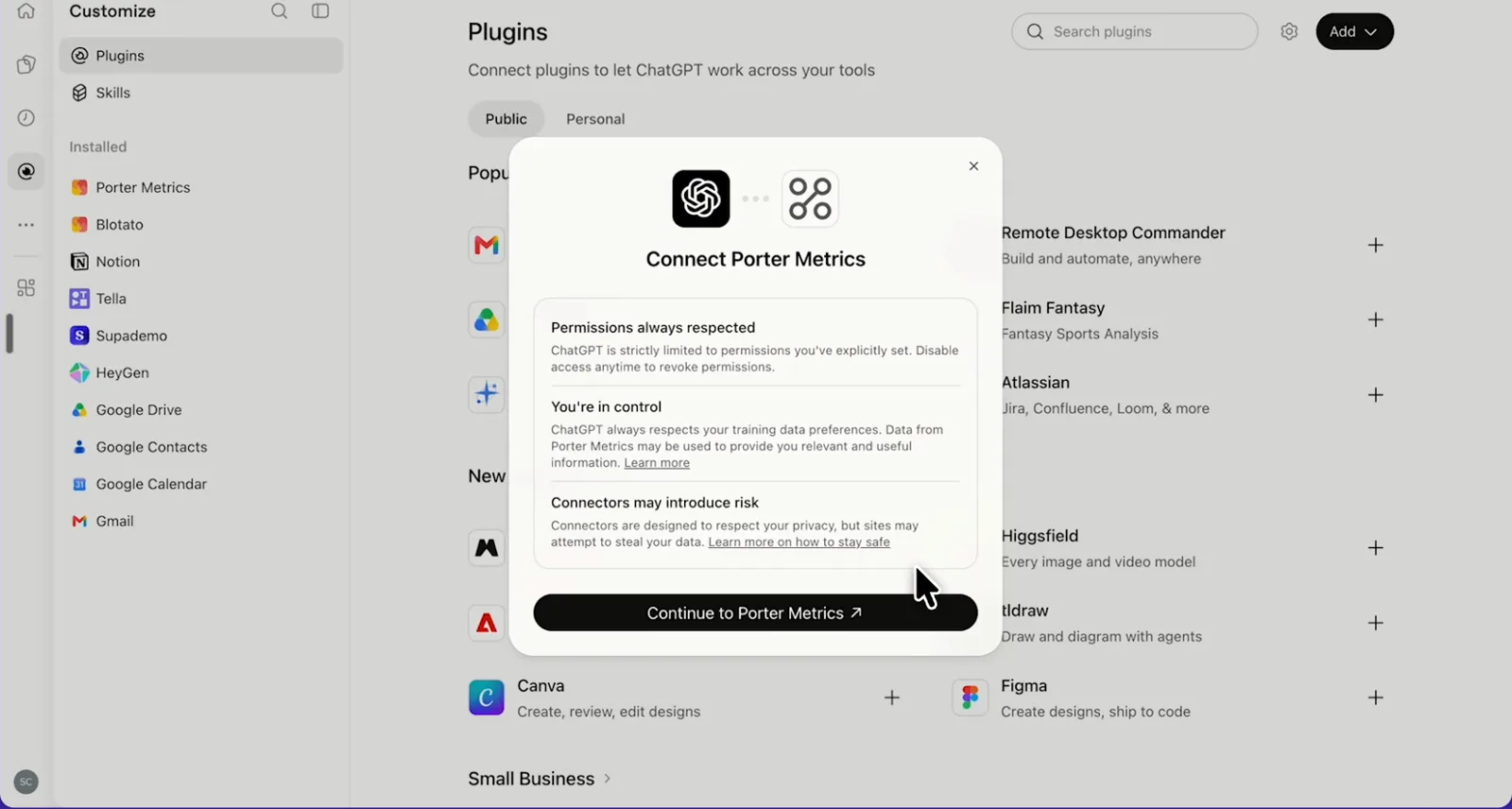
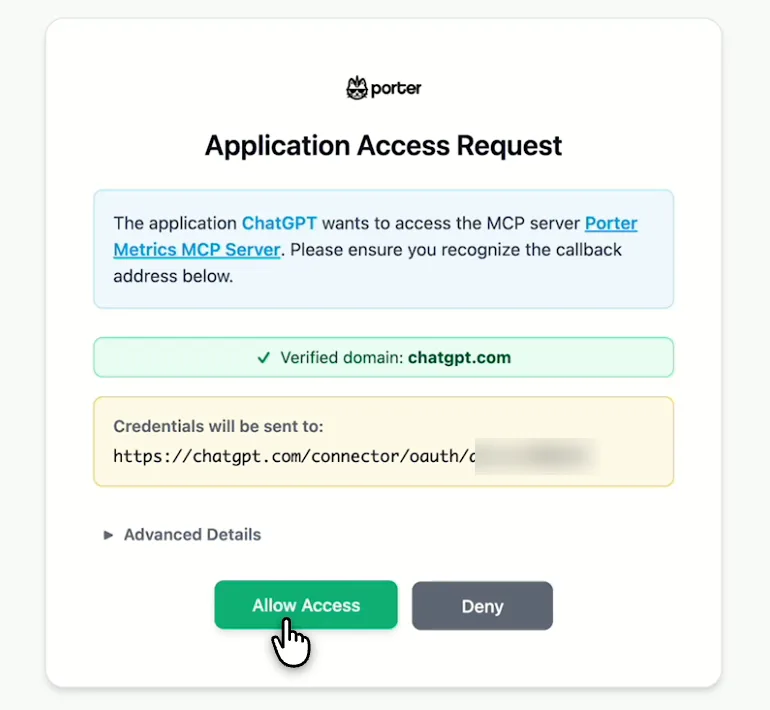
    Next, select Continue to Porter Metrics, sign in to Porter and click Allow Access. Then select Try in chat and paste this prompt:

    Prompt
    For my Instagram account, show Profile reach, Profile new followers and Total followers by Date for the last 14 days, then list my 5 posts with the highest Post reach in that period with Post date, Post type and Post link.

Guides and videos

app.portermetrics.com / create
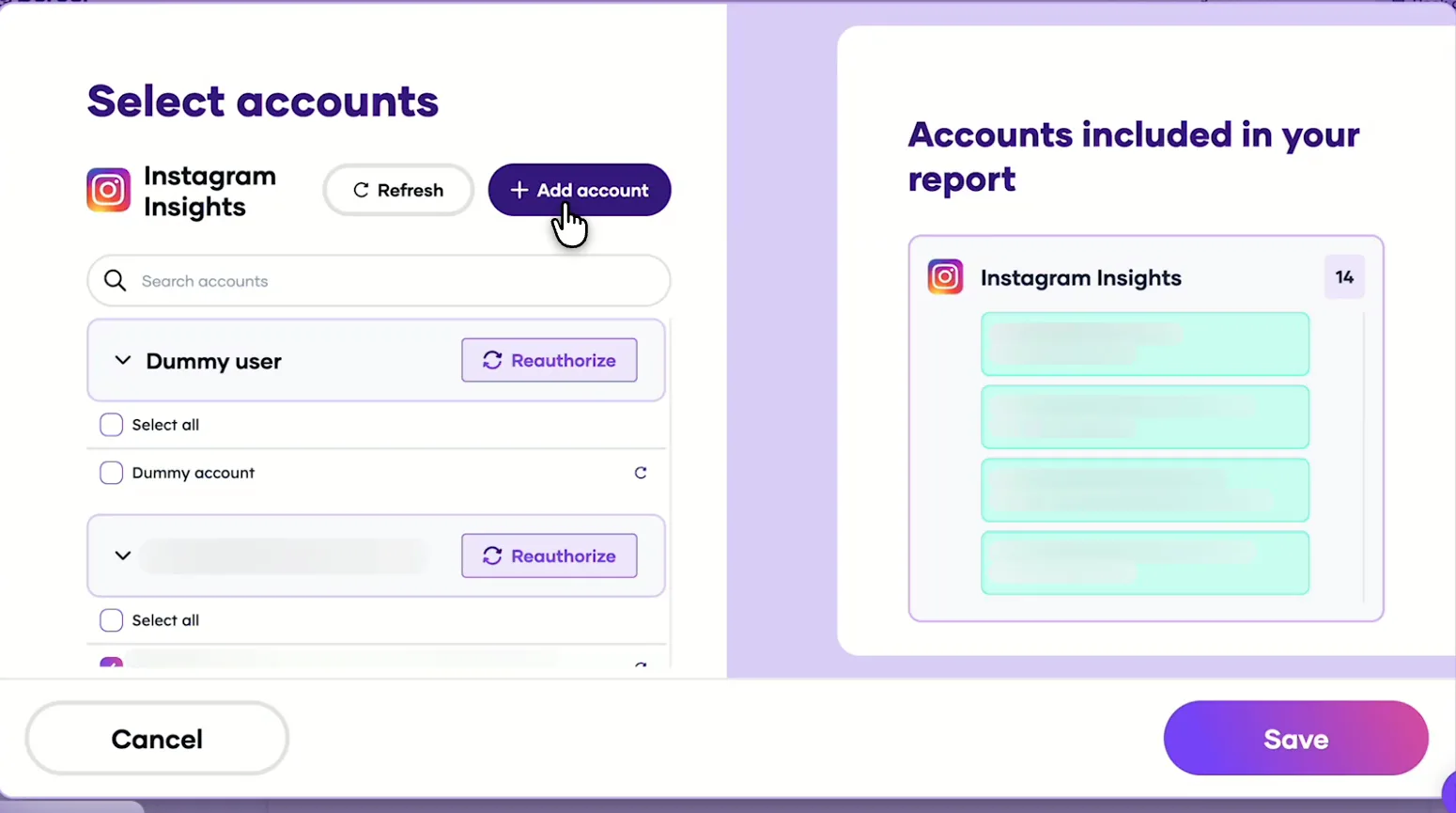
Porter's Select accounts window for Instagram Insights with the Add account button
First, in Porter, open Instagram Insights and select Add account.
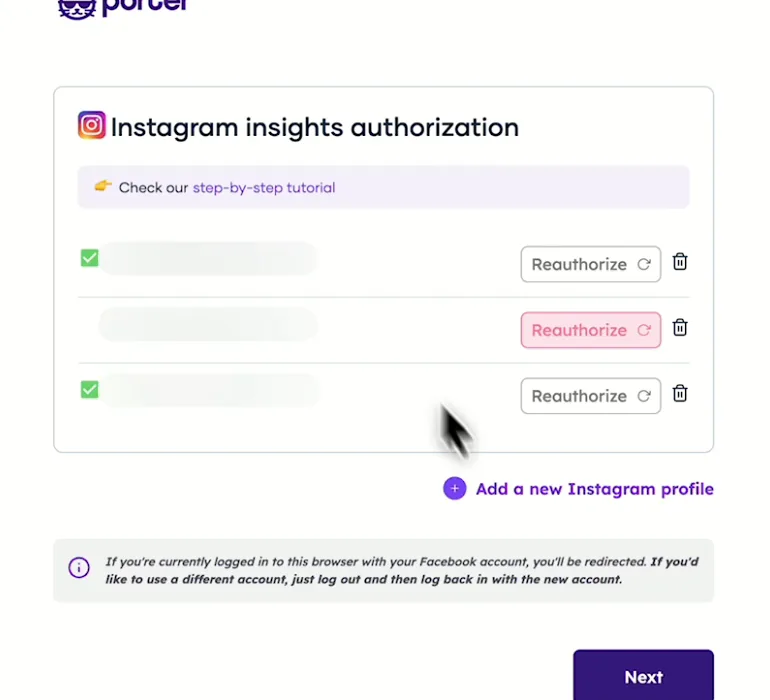
Porter's Instagram Insights authorization page with the authorized profiles
Then, log in with Facebook and pick the Instagram profiles.
ChatGPT's Plugins page with the Add menu open on Add custom MCP server
In ChatGPT, open Customize, then Plugins, and choose Add custom MCP server.
ChatGPT's Add custom MCP server form with the name Porter Metrics, Porter's MCP URL and OAuth filled in
Then, paste Porter's MCP URL, keep OAuth, tick the box and select Create as a plugin.
ChatGPT's Connect Porter Metrics window with the Continue to Porter Metrics button
Next, ChatGPT asks you to continue to Porter Metrics to sign in.
Porter's Application Access Request screen asking you to let ChatGPT use the Porter MCP server
Finally, sign in to Porter and select Allow Access.
If you prefer video, watch the whole Instagram to ChatGPT setup (1:39, no sound).
Interactive walkthrough, so you can click along here
02Use cases and prompts

What you can ask ChatGPT

Each use case comes with a prompt to copy, the fields it uses from the Instagram fields list and who it’s for. Every prompt uses fields that return data today. It also keeps profile, post, Story and audience data in separate tables, the way Instagram reports them. On Business, Enterprise or Edu, ChatGPT can also make the changes you confirm; on Pro it reads and recommends.

Can ChatGPT show which posts got the most saves and reach?

The problemSaves show which posts people want to keep. But the app shows them one post at a time, so you miss the pattern behind a good month.

What ChatGPT doesChatGPT ranks last month’s posts by reach, with saves, likes, comments and engagement next to each. Then it names what the top posts share: format, weekday or the caption’s first line. Post numbers are lifetime totals, while the date range picks posts by publish day.

What you getNext month’s plan starts from what people saved, not from scrolling last month’s grid with a notes app open.

Prompt
For my Instagram account, list posts published last month with Post date, Post date week day, Post type, Media product type, the first 80 characters of Post caption, Post link, Post reach, Post saves, Post total like count, Post comments count and Post engagement. Rank by Post reach, add saves per 1,000 reached, and tell me what the top 5 have in common.

For: social media managers · content marketers · agency social teams

Fields used: Post datePost date week dayPost typeMedia product typePost captionPost linkPost reachPost savesPost total like countPost comments countPost engagement

Do Reels reach more people than carousels or single images?

The problemEveryone says Reels win on reach, but your carousels keep collecting saves. Which format deserves more of your week?

What ChatGPT doesChatGPT averages reach, saves, likes and comments per post, then compares Reels, carousels and single images. It also adds Reels shares and total interactions, then tells you which format to post more of. Reach is the number Instagram reports for every format, so the comparison is fair.

What you getYour own averages settle the format debate, so next month’s mix of Reels and carousels has a reason behind it.

Prompt
For posts from the last 90 days, group by Post type and Media product type. For each group show Posts count, average Post reach, average Post saves, average Post total like count and average Post comments count. Then list my Reels alone with Post caption, Post link, Post reach, Reels shares and Reels total interactions, ranked by Reels shares.

For: content marketers · social media managers · creative strategists

Fields used: Post typeMedia product typePosts countPost reachPost savesPost total like countPost comments countPost captionPost linkReels sharesReels total interactions

Is my account gaining followers?

The problemYour follower count jumped on Tuesday, but the app doesn’t say which post brought the new people in.

What ChatGPT doesChatGPT shows new followers per day for the last 30 days with profile reach and your follower total. It also flags spike days, then lists the posts published on them. Total followers is a daily snapshot, so ChatGPT reads the latest value.

What you getYou get a shortlist of posts worth repeating instead of a guess about what drove the jump.

Prompt
For the last 30 days, show Profile new followers and Profile reach by Date, and today's Total followers. Flag the 3 days with the most Profile new followers. In a second table, list posts published on those days with Post date, Post caption, Post link and Post reach.

For: social media managers · growth leads · agency social teams

Fields used: DateProfile new followersProfile reachTotal followersPost datePost captionPost linkPost reach

Can ChatGPT write my weekly Instagram report?

The problemFriday afternoon goes to copying reach and follower numbers from the app into the same template, one account after another.

What ChatGPT doesChatGPT compares last week with the week before on views, reach and new followers, then lists the week’s top posts. Finally, it adds 3 takeaways for an email or client update. Note that account reach can include boosted posts.

What you getThe weekly copy-paste becomes one prompt per account, and you edit the takeaways instead of writing them from scratch.

Prompt
Build my weekly Instagram report for the last full week vs the week before: Profile impressions (call it views), Profile reach and Profile new followers by Week with % change, plus the latest Total followers. In a second table, list that week's posts with Post date, Post caption, Post link, Post reach and Post saves, ranked by Post reach. Finish with 3 bullets: what grew, what dropped, what to post next week.

For: agency social teams (one report per client account) · social media managers · marketing leads

Fields used: WeekProfile impressionsProfile reachProfile new followersTotal followersPost datePost captionPost linkPost reachPost saves

Can ChatGPT show which Stories keep people watching?

The problemViewers drop off halfway through your Story sequence, but you can’t tell which frame lost them.

What ChatGPT doesChatGPT lists each Story, including reach, exits, forward and back taps and replies. It then works out an exit rate per Story and compares image and video Stories. Instagram keeps Story data for about 24 hours, so keep Porter connected while Stories are live.

What you getYou see the frame where people leave, so the next sequence cuts it or moves the key frame earlier.

Prompt
For Stories from the last 14 days, show Story date, Story type, Story reach, Story exits, Stories taps (forward), Stories taps (backwards), Stories swipe (forward) and Stories replies. Add exit rate (Story exits ÷ Story reach) and forward-tap rate, rank by exit rate, and compare IMAGE vs VIDEO Stories.

For: social media managers · content marketers · e-commerce marketers running Story sequences

Fields used: Story dateStory typeStory reachStory exitsStories taps (forward)Stories taps (backwards)Stories swipe (forward)Stories replies

Can ChatGPT show where my followers are and when they're online?

The problemYou post in the evening because a blog said so, not because that’s when your own followers scroll.

What ChatGPT doesChatGPT lists your followers’ top countries and cities, one breakdown per table. Then it shows the hours and weekdays when most of them are online, so you can plan posting times. Online followers are an average over the date range.

What you getYour posting schedule comes from your own followers’ online hours instead of a generic best-time chart.

Prompt
Show Followers country (metric) by Followers country, top 10 with each country's share. Then do the same by Followers city. Then, in a separate table, show Online followers by Online followers hour of day for the last 30 days, and in another by Online followers day of week.

For: social media managers · content marketers · local business owners

Fields used: Followers countryFollowers country (metric)Followers cityFollowers city (metric)Online followersOnline followers hour of dayOnline followers day of weekFollowers gender & ageFollowers gender & age (Metric)

Do posts send people to my website?

The problemYour manager asks whether Instagram brings anyone to the website, and the answer sits in two tools.

What ChatGPT doesIf GA4 is also connected in Porter, ChatGPT puts weekly Instagram reach and posts published next to website sessions from Instagram. GA4 sessions then show the trend: do busier posting weeks bring more visits?

What you getYou answer “does Instagram drive traffic?” with a weekly trend instead of a hunch.

Prompt
For the last 12 full weeks, by Week, show Instagram Profile reach and Posts count next to GA4 Sessions where Session source contains 'instagram'. Compare the trends and point out weeks where reach rose but sessions didn't.

For: small-business owners · e-commerce marketers · agencies

Fields used: WeekProfile reachPosts countSessionsSession source

Can ChatGPT reply to comments or publish a post?

The problemQuestions pile up under your latest Reel while you’re busy filming the next one.

What ChatGPT doesChatGPT lists recent comments and drafts replies. On Business, Enterprise or Edu, it also hides spam and prepares image, Reel or carousel posts for Porter to publish once you confirm. Because comments sit next to your numbers, ChatGPT can spot the posts that worked and draft replies on them in the same chat. Published replies and posts are permanent, so check each one before you confirm.

What you getAnswers go out while the post is still reaching people, and spam is gone before it sits under your best Reel.

Prompt
List comments from the last 3 days on my latest 5 posts. Draft a short, friendly reply to each question and show them to me. Post only the replies I approve, and hide comments that are spam.
Then ask
Prompt
Check how many posts I can still publish today. Then prepare a carousel from these 3 JPEG image URLs with this caption: {caption}. Show me the post before you publish it.

For: community managers · agency social teams · small-business owners

Fields used: Post datePost captionPost linkPost comments count
Actions: media_list · comment_list · comment_reply · comment_hide · publishing_limit_get · media_create · media_status · media_publish
03Why Porter

Why Porter for Instagram in ChatGPT

Meta has no official MCP server for Instagram, so Porter reads your posts, Reels, Stories and followers through Meta’s official Instagram API. If you run ads too, Meta’s ads MCP server at mcp.facebook.com/ads fits that side (Meta’s ads MCP server overview). You can run both.

✓

Organic data Meta's MCP doesn't cover

Meta’s ads MCP server lists tools for ads and catalogs. Porter is how ChatGPT reads your profile, posts, Reels, Stories, comments, followers and audience.

⊞

Read and change your account

On Business, Enterprise or Edu, ChatGPT drafts replies, hides spam and prepares image, Reel and carousel posts, then publishes only what you confirm. On Pro it reads and recommends. Porter checks Instagram’s daily publishing quota before it publishes.

⚙

Follower history Instagram doesn't keep

Instagram doesn’t keep its own follower history. On paid plans, Porter stores total followers day by day, new followers per day and Stories from the day you start paying, so you can compare months later.

Aa

Instagram next to your other channels

Ask about Instagram next to GA4, Facebook Insights, Meta Ads and your other Porter sources in the same chat, so one answer covers organic, paid and website visits.

↻

One URL, nothing to host

Connect the account in Porter and add one URL to ChatGPT on the web. A community server such as mcpware/instagram-mcp on GitHub needs a Facebook developer account, an access token and a Python server you host.

✓

One connection, every destination

The same Instagram account also feeds Claude and Data Studio at no extra cost, so you don’t reconnect for each tool.

⊞

Live dashboards, not only chat answers

Ask ChatGPT for a dashboard and Porter’s AI dashboards publish it at its own link, synced automatically and ready to share. Official MCP servers answer inside the chat and stop there.

04Dashboard

Dashboard template

Want a shared view instead of a ChatGPT chat? Porter’s free Instagram Insights dashboard template shows followers, reach, top posts and Stories ready-made.

AI dashboards

Build a live Instagram dashboard from the chat

Describe the dashboard in one sentence and Porter builds it. A client-ready dashboard in minutes, with no chart dragging and no BI tool to learn. Ask ChatGPT:

Prompt
Build a live Instagram dashboard for my account with the last 30 days, the main KPIs and a weekly trend.
Live URLEach dashboard at its own link: no login, no app, no download
Auto-syncFresh Instagram data, nobody re-exports each period
Scheduled deliveryEmail or PDF sends on a set day
White labelYour logo and branding for clients
Sharing permissionsView or edit access per person
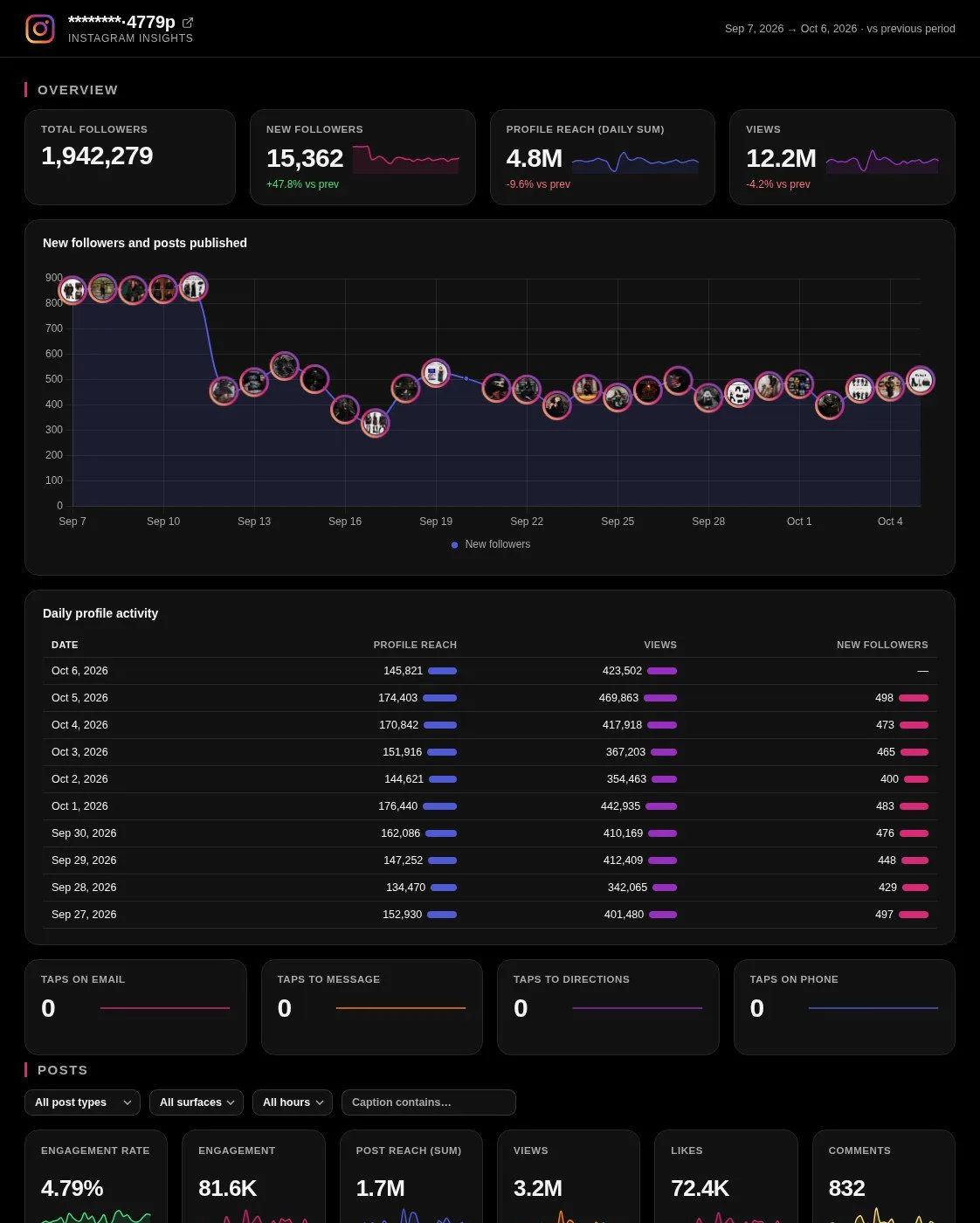
Instagram AI dashboard template built with Porter Metrics AI dashboards
Template

The Instagram AI dashboard template

Built with Porter's AI dashboards on a real account. Open it live, then ask ChatGPT to make one like it for your account.

Open the live Instagram dashboard

05Pricing

Pricing

You can start free, since Porter’s Instagram connector for ChatGPT comes with every plan. Use the calculator for your number of accounts, or see Porter pricing for every plan.

What you get

  • Free plan: never expires, with unlimited connected accounts and the last 15 days of data in ChatGPT (30 days in Data Studio and Sheets)
  • Reporting: from $12.50 per account a month billed annually, or $15 month to month for one account
  • Billing: each Instagram account counts as one account, with volume discounts and no per-seat fee
  • Changes: 1 AI credit per completed change you confirm on Business, Enterprise or Edu; failed tasks are free, and the Free plan includes 100 credits a month
  • Trial: 14 days of full access, no card

Price calculator

$33.33/mo$6.67 per account

An account is one ad account, Stripe account, store, page or GA4 property. The Free plan never expires and has unlimited accounts, with the last 15 days of data in AI chats.

06Data and actions

Instagram data and actions in ChatGPT

Through the connector, ChatGPT reads your Instagram followers, reach, views, likes, comments, saves, Reels shares, Story exits and taps, audience and online followers. It can also read comments, publish posts and moderate comments. The full list of Instagram Insights fields shows every field, including its ID.

12 Instagram fields ChatGPT uses most

Most questions need only these 12 fields, so start here.

Field (label)What it's for
Total followersfollowers_countLatest follower total
Profile new followersfollower_countNew followers per day
Profile reachreachAccounts reached per day
Profile impressionsimpressionsDaily account views, under the old name
Post reachpost_reachAccounts reached per post
Post savessavedSaves per post
Post total like count / Post comments countlike_count / comments_countLikes and comments per post
Post engagementengagementLikes plus comments per post
Reels shares / Reels total interactionsreels_shares / reels_total_interactionsShares and interactions per Reel
Story reach / Story exitsstory_reach / exitsHow many saw a Story and how many left it
Followers country / Followers cityaudience_country_name_related / audience_city_relatedWhere followers live
Online followersonline_followersWhen followers are online, with Online followers hour of day

Can ChatGPT post or reply to Instagram comments?

On Business, Enterprise and Edu plans, yes, after you confirm. ChatGPT can publish content or manage comments on your account. Images go out as JPEG, without shopping tags or filters (Meta's Instagram content publishing guide).

Stories, caption edits, post deletes, DMs and boosts stay in the Instagram app as usual. On Pro, ChatGPT reads the account and drafts the posts and replies for you to publish in Instagram.

  • publish image, Reel and carousel posts, after Porter checks Instagram's daily publishing quota
  • comment on your posts, reply to comments and delete your own comments
  • hide or unhide comments, turn comments on or off and edit tagged people
  • read hashtag top posts, posts you're tagged or mentioned in, and public Business or Creator profiles

What happened to impressions?

Instagram made Views its main metric in August 2024, then Meta retired impressions, Reels plays and replays from the API on April 21, 2025 (Meta's announcement of the Views metric).

Porter's catalog still uses the old names (Profile impressions, Post impressions, Reels plays), and those fields still return numbers. This page calls them views instead.

How fresh is the data, and how far back?

Porter refreshes data once a day, so your newest posts can sit a few percent under the app. Posts go back years, while daily profile reach starts in January 2025. On paid plans, Porter stores follower totals and new followers daily from the day you start paying. The free plan covers the last 15 days in ChatGPT (30 days in Data Studio and Sheets).

Product stats

WhatInstagram connector
FieldsProfile, posts, Reels, Stories, comments, followers and audience
ActionsPublish image, Reel and carousel posts; comment, reply, hide comments or delete your own; turn comments on or off, each after you confirm on Business, Enterprise or Edu
ChatGPT plansReads on Pro; reads and changes you confirm on Business, Enterprise and Edu (web, beta)
FreshnessRefreshed once a day
HistoryPosts go back years; daily profile reach from January 2025; follower totals and new followers stored daily on paid plans, from the day you start paying; the last 15 days in ChatGPT on the Free plan (30 days in Data Studio and Sheets)
StoriesInstagram deletes them after 24 hours; Porter stores them daily on paid plans, from the day you start paying
AccessInstagram Business account linked to a Facebook Page, through Meta's official API

See all Instagram fields

07Security

Is it safe?

Yes. Porter uses Meta's official Instagram API, with only the permissions you grant when you connect. There's neither password sharing nor scraping. Reading posts, Reels, Stories and follower numbers leaves your account exactly as you set it.

How changes get approved

ChatGPT asks you to confirm changes based on the app's permissions and holds back some high-risk actions for extra care, so it drafts the reply, comment or post first. Published posts, comments and replies are permanent, so check each one before you confirm, and you can still delete your own comment or hide someone else's. Porter checks Instagram's publishing quota before it publishes, and each completed change uses one AI credit.

What the connector needs from Instagram

Porter needs an Instagram Business account linked to a Facebook Page, and you approve access when you connect it. Meta's Instagram API overview explains how the API publishes media and moderates comments on professional accounts.

To read reports, Meta's API needs instagram_basic and instagram_manage_insights, as well as pages_show_list and pages_read_engagement. Publishing needs instagram_content_publish, while comments need instagram_manage_comments (Meta's permissions reference).

08FAQ

FAQ

People mostly ask about other profiles, personal accounts, agencies, Claude, boosted posts and other Porter destinations. The last 3 answers help when numbers don't match the app, a metric returns 0 or an account shows no data.

Can ChatGPT look at competitors' Instagram profiles?

Yes, for public Business and Creator accounts. ChatGPT reads the public profile and recent posts of any Instagram Business or Creator account, and hashtag search shows top public posts. For regular competitor reports, connect Instagram public data to ChatGPT with Porter's public data connector.

Do personal Instagram accounts get insights?

Instagram shows insights on professional accounts, and switching is free in the app's settings (Instagram's guide to professional accounts). Insights then appear in the professional dashboard. Porter reads them as soon as the account is a Business account linked to a Facebook Page, so ChatGPT answers from the same numbers.

Can I connect several Instagram accounts, for example as an agency?

Yes. Connect each Instagram account in Porter, then ask ChatGPT to compare them with Account name as a column. Each account is billed as one connected account, while one Porter subscription covers all your clients. You can then run the weekly report prompt once per client account.

Can I use Porter in Claude too?

Yes. Porter's MCP URL, the same one behind the Instagram connector for ChatGPT, also works in Claude as a custom connector, with neither a second connection nor an extra fee. See Porter's Instagram connector for Claude for the Claude setup and what it covers.

Can ChatGPT see my ads or boosted posts?

Yes, with Porter's Meta Ads connector for ChatGPT in the same chat. The Instagram connector reads organic posts, Reels and Stories, while the Meta Ads connector covers boosted posts and ads. Both run through the same Porter URL, so organic and paid results share one chat.

I already send Instagram to Data Studio with Porter. Do I need to reconnect for ChatGPT?

No. One account connected in Porter feeds every Porter destination, including ChatGPT, at no extra cost. If you already use the Instagram Insights connector for Data Studio (formerly Looker Studio), add Porter's URL to ChatGPT and ask your first question.

Troubleshooting

Why don't ChatGPT's numbers match Instagram Insights?

ChatGPT's Instagram numbers can differ from the app for a few known reasons. Instagram closes each day on Pacific time, but post times are in UTC, and the app says Views where Porter's fields say impressions or plays. Account reach can also include boosted content (Meta's Instagram User Insights reference), and adding up Total followers across days overshoots.

Why does an Instagram metric come back as 0 or fail?

Remove the field and ask with reach, followers or website sessions instead, and ChatGPT answers from fields that return data today. Profile views, Taps on website link and Post video views return 0 in Porter, while Followers country and language code returns an error.

Why does ChatGPT show no data for my Instagram account?

Reconnect the account in Porter and accept every permission, after switching a personal account to Business in the Instagram app. ChatGPT shows no Instagram data when the account is personal, isn't linked to a Facebook Page, or wasn't selected with its Page when you connected. An expired grant also blocks queries.


09Next

More ChatGPT connectors

Besides the Instagram connector, ChatGPT can read many other sources through Porter, so you can compare social and paid accounts in one chat. Browse all ChatGPT connectors or open a related page below.

Not only ChatGPT. Send Instagram data anywhere

The same Porter account and connection also send Instagram data to these destinations, at no extra cost.

Try the connector in ChatGPT

Set up the Instagram connector for ChatGPT, then ask which posts, Reels and Stories earned the most reach this month. The answer comes from your own account instead of a screenshot. Then ask what to post next week.

Written by the Porter Metrics team, who build and test Porter's Instagram connector and its setup for ChatGPT and Claude. Last updated October 20, 2026.

Free forever plan · 14-day full trial · No card

Social media managers: the monthly content review starts from reach and saves per format, so the plan for next month has numbers behind it.

Agencies: every client account answers the same weekly report prompt, so it's ready for your edits.

Content marketers: follower spikes and online hours sit next to the posts from those days, ready for the next content plan.