TikTok Organic connector for ChatGPT

Use Porter’s TikTok Organic connector for ChatGPT to rank videos by views and watch time, see what wins followers and reply to comments you confirm on Business, Enterprise or Edu.

  • Rank videos by views, watch time and full-watch rate
  • Find the second where viewers swipe away
  • See which videos brought the most followers
  • Draft and post the comment replies you confirm
G2★★★★★Rated 4.6/5 from 288 G2 reviews (October 2026)

By Porter Metrics team · Last updated October 20, 2026

ChatGPTPorter connected
Show Profile Video Views, Profile Views, New Followers and Lost Followers by week for the last 4 full weeks.
Porter / TikTok Organic / Trailgear Demo✓ 4 rows
The week of Sep 21 had the most video views (142K) and the best net follower gain (+1,310).
WeekVideo viewsNew followersLost
Sep 1496K880140
Sep 21142K1,490180
Sep 28118K1,120210
Oct 5104K930160
Demo data, Trailgear Demo account
88 TikTok Organic fields
01Setup

How to connect TikTok Organic to ChatGPT

Since Porter hosts it, the TikTok Organic connector for ChatGPT takes 3 steps and no code. Sign in with TikTok in Porter, add Porter’s URL to ChatGPT as a custom MCP server, then ask. For screenshots, see Porter’s guide on how to connect TikTok Organic to ChatGPT.

What you need

  • Before you start, you need a TikTok Business or personal account with Analytics on, as TikTok’s Accounts API docs require. You also need a free Porter account and a ChatGPT plan that supports custom MCP servers. Demographics, however, need 100+ followers.
  • Custom MCP servers are in beta in ChatGPT on the web, so set up Porter and ask your questions from a browser. On Business, Enterprise or Edu, an admin or owner turns on developer mode, and then ChatGPT can also make the changes you confirm. On Pro, you turn on developer mode yourself, and ChatGPT reads and recommends (OpenAI’s guide to custom MCP apps).
  • Works in ChatGPT on the web (chatgpt.com, custom MCP servers in beta) and in Codex, with the same Porter MCP URL.
  1. Step 1: Connect your account in Porter

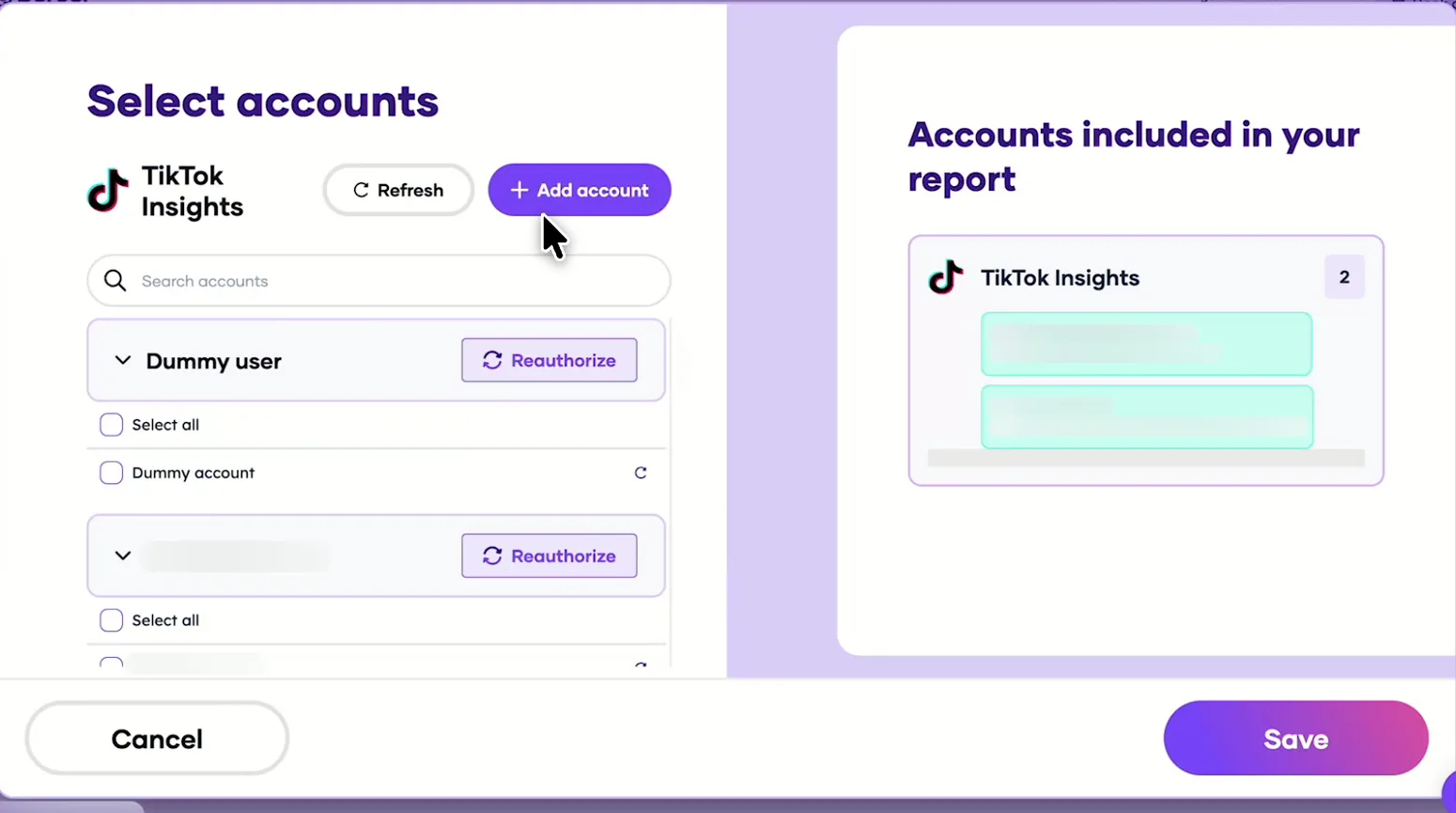
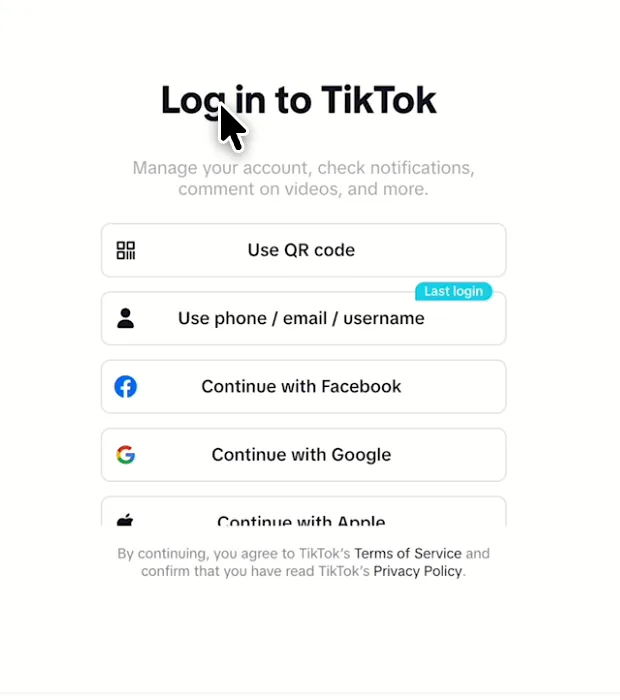
    Sign up free at Porter, then pick TikTok Insights as the source (that’s the connector’s name in Porter) and sign in with TikTok. Then pick ChatGPT as the destination.

  2. Step 2: Add the TikTok connector to ChatGPT

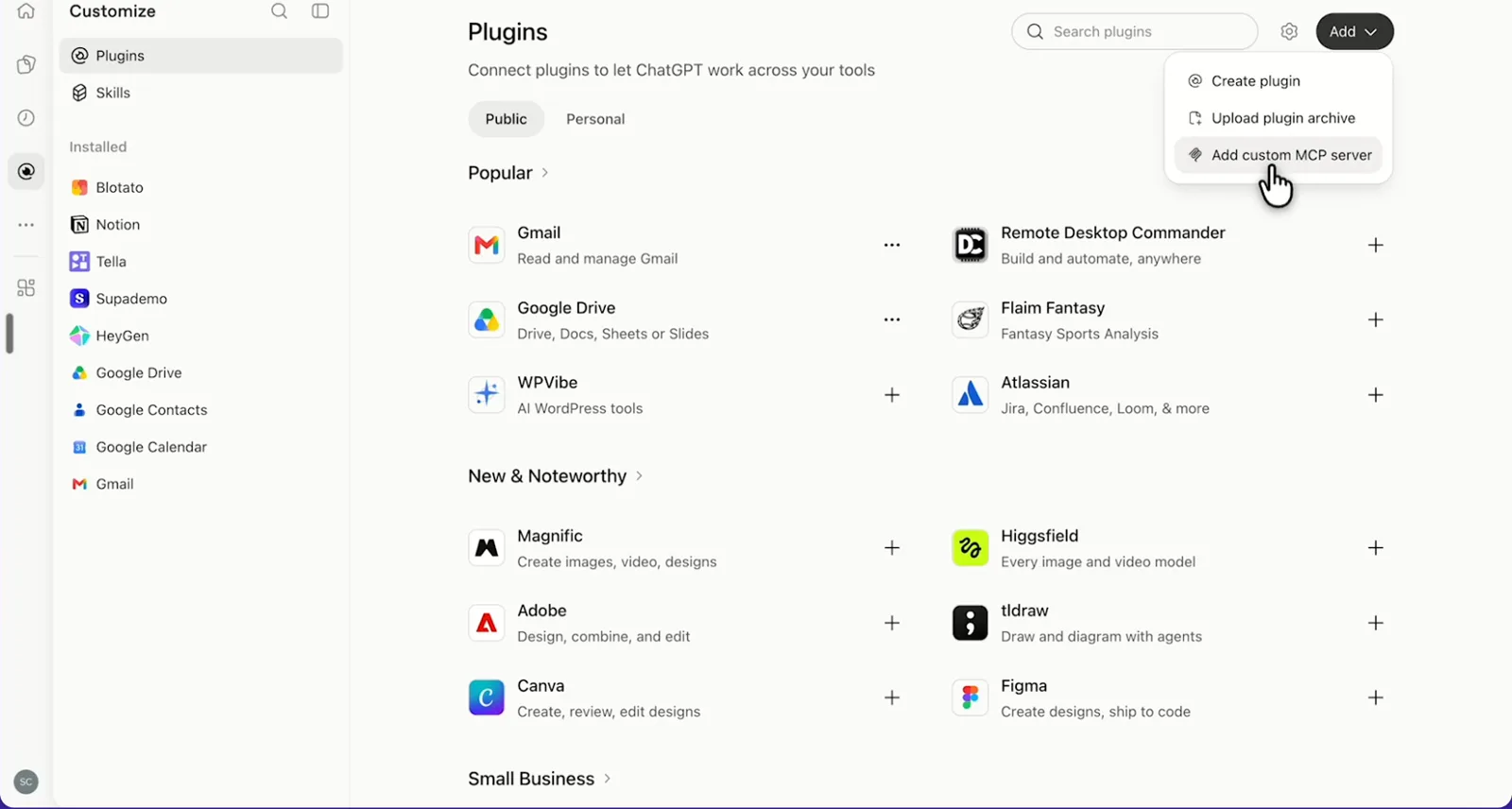
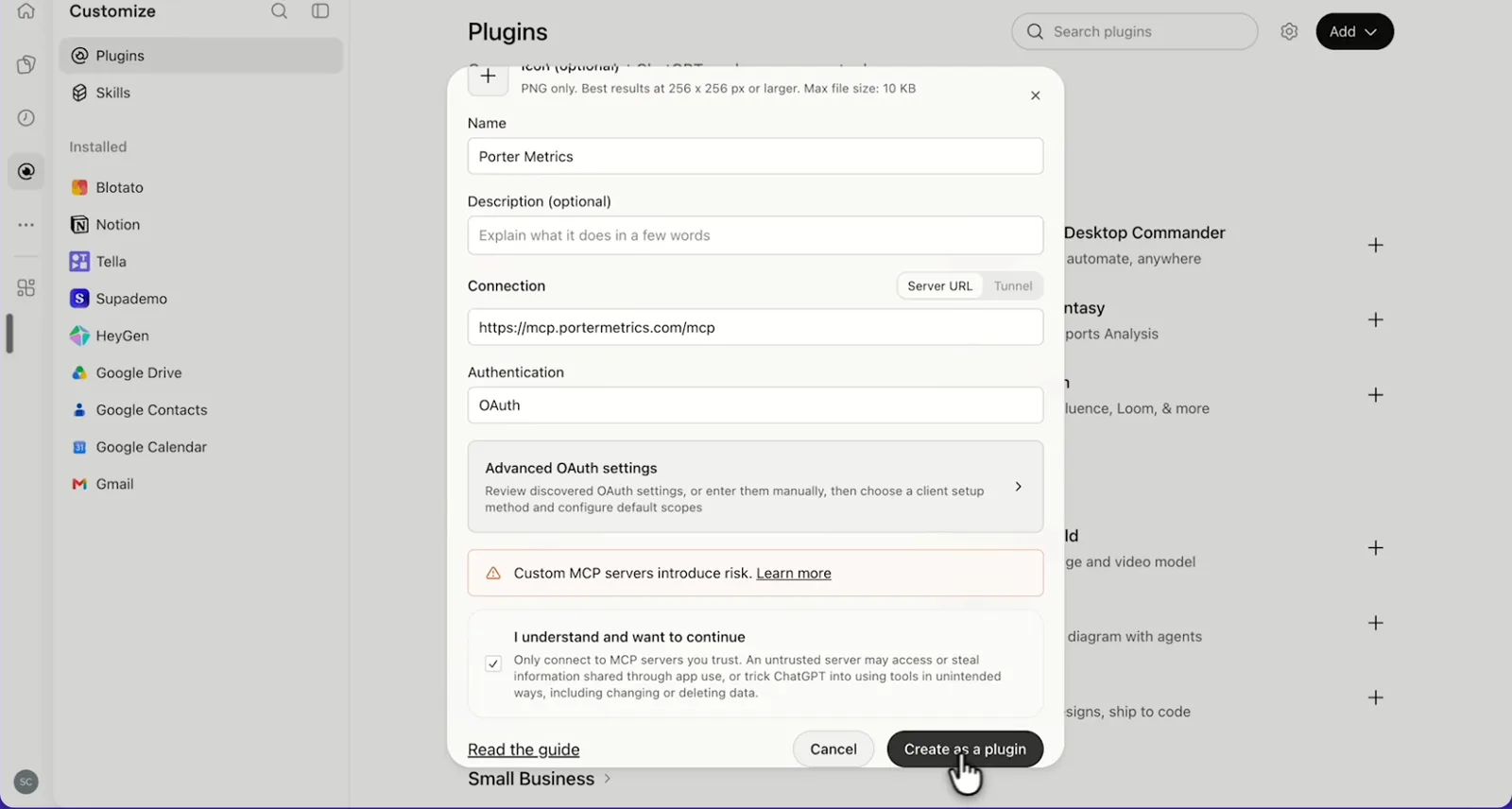
    In ChatGPT, open Customize › Plugins, click Add and choose Add custom MCP server. On Business, an admin does this from Workspace settings › Apps › Create. Name it Porter Metrics, paste this URL as the Server URL and keep OAuth as the authentication:

    MCP URL
    https://mcp.portermetrics.com/mcp

    Tick “I understand and want to continue”, then select Create as a plugin.

  3. Step 3: Ask ChatGPT about TikTok Organic

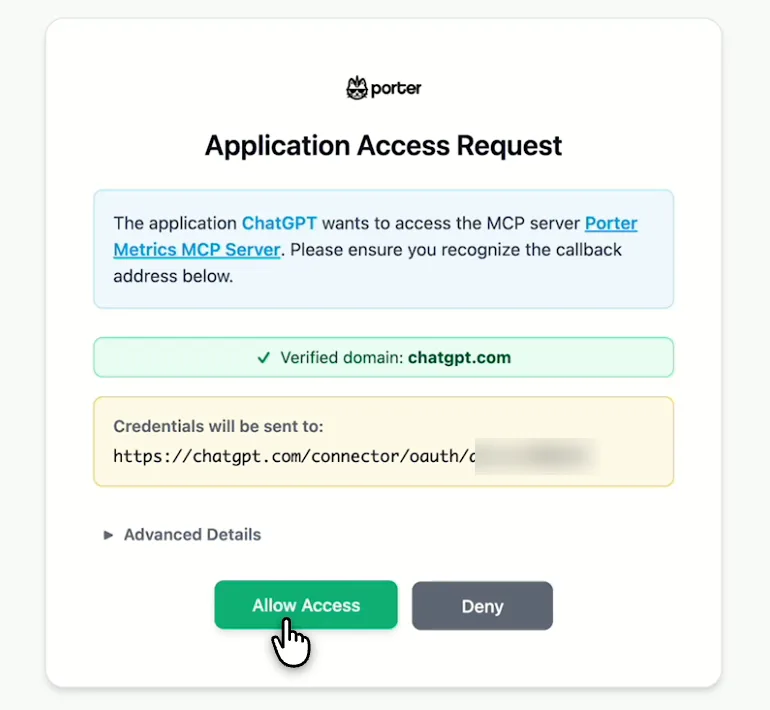
    Next, select Continue to Porter Metrics, sign in to Porter and click Allow Access. Then select Try in chat and paste this prompt:

    Prompt
    For my TikTok account, show Profile Video Views, Profile Views, Profile New Followers and Profile Lost Followers by Week for the last 4 full weeks.

Guides and videos

app.portermetrics.com / create
Porter's Select accounts window for TikTok Insights with the Add account button
First, in Porter, open TikTok Insights and select Add account.
TikTok log-in options you see when you connect TikTok Insights to Porter
Then, log in to TikTok to authorize Porter.
ChatGPT's Plugins page with the Add menu open on Add custom MCP server
In ChatGPT, open Customize, then Plugins, and choose Add custom MCP server.
ChatGPT's Add custom MCP server form with the name Porter Metrics, Porter's MCP URL and OAuth filled in
Then, paste Porter's MCP URL, keep OAuth, tick the box and select Create as a plugin.
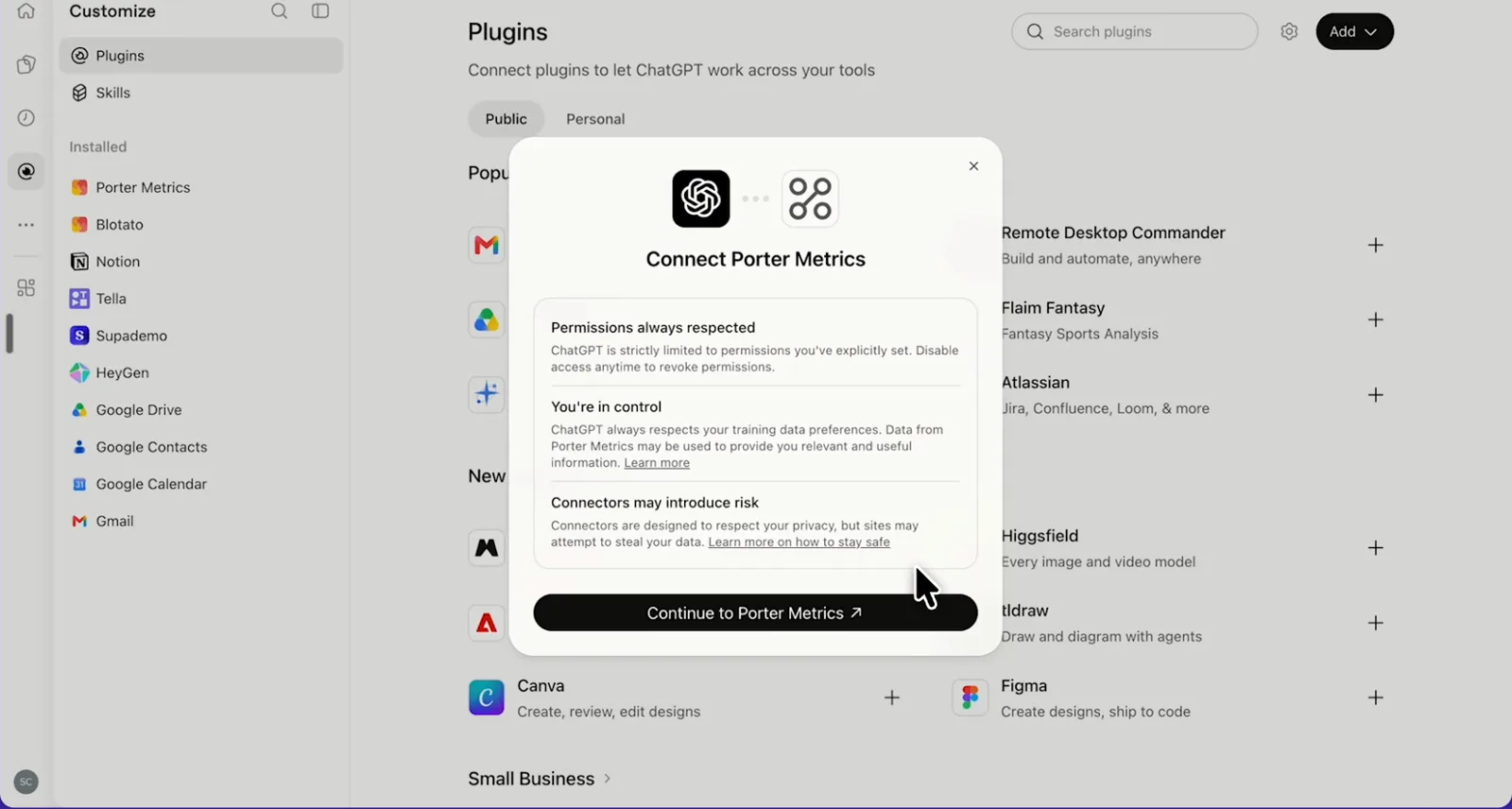
ChatGPT's Connect Porter Metrics window with the Continue to Porter Metrics button
Next, ChatGPT asks you to continue to Porter Metrics to sign in.
Porter's Application Access Request screen asking you to let ChatGPT use the Porter MCP server
Finally, sign in to Porter and select Allow Access.
If you prefer video, watch the whole TikTok Organic to ChatGPT setup (1:48, no sound).
Interactive walkthrough, so you can click along here
02Use cases and prompts

What you can ask ChatGPT

Each use case comes with a prompt to copy, the fields it uses from the TikTok Insights fields list and who it’s for. Prompts ask for followers by week, since TikTok fills follower changes and reach weekly, and keep video and account metrics apart. On Business, Enterprise or Edu, ChatGPT can also make the changes you confirm; on Pro it reads and recommends.

Can ChatGPT show which videos got the most views and watch time?

The problemOne video takes off on For You while the next five stall, and TikTok Studio only shows them one post at a time.

What ChatGPT doesChatGPT ranks last month’s posts by views, with reach, likes, comments, shares, favorites, average watch time and full-watch rate next to each.

What you getNext month’s videos then start from what held attention instead of guessing which trend to chase.

Prompt
For my TikTok account, list videos published last month with Video Create Time, Video Duration, the first 80 characters of Video Caption, Video Views, Video Reach, Video Likes, Video Comments, Video Shares, Video Favorites, Video Average Time Watched and Video Full Watched Rate (show it as a percentage). Rank by Video Views and tell me what the top 5 have in common, including length and weekday.

For: social media managers · agency social teams

Fields used: Video IDVideo Create TimeVideo DurationVideo CaptionVideo ViewsVideo ReachVideo LikesVideo CommentsVideo SharesVideo FavoritesVideo Average Time WatchedVideo Full Watched Rate

Can ChatGPT show where viewers drop off?

The problemViewers swipe away in the first seconds, but you have to open TikTok Studio’s retention graph video by video to see where.

What ChatGPT doesChatGPT reads one video’s retention curve at a time, second by second, then finds the exact moment viewers scroll away. It also compares that moment with average watch time.

What you getYou see which openings to reuse and which hooks to reshoot before the next filming day.

Prompt
Take my 5 most-viewed TikTok videos from last month. For each one separately, pull Video View Retention % by Video Seconds Timeline filtered on its Video ID. Sort seconds as numbers and rescale each curve so second 0 = 100%. Tell me the second where retention falls fastest, and compare with Video Average Time Watched and Video Full Watched Rate.

For: creative strategists · social media managers

Fields used: Video IDVideo Seconds TimelineVideo View Retention %Video Average Time WatchedVideo Full Watched Rate

Can ChatGPT show which videos brought the most followers?

The problemViews spike while the follower count barely moves, and nobody can say which videos turn viewers into followers.

What ChatGPT doesChatGPT lists last month’s videos by new followers and profile views per 1,000 views.

What you getYou make more of the videos that grow the account rather than just the ones that collect views.

Prompt
List my TikTok videos published last month with Video Caption, Video Views, Video New Followers and Video Profile Views, and add new followers per 1,000 views. Rank by Video New Followers. Then, as a separate query, show Profile New Followers, Profile Lost Followers and Profile Net Followers Growth by Week for the last 8 full weeks, plus the latest Total Followers.

For: social media managers · brand and small-business owners

Fields used: Video IDVideo CaptionVideo ViewsVideo New FollowersVideo Profile ViewsWeekProfile New FollowersProfile Lost FollowersProfile Net Followers GrowthTotal Followers

Can ChatGPT write my weekly report?

The problemThe brand team wants a TikTok update every week, but pulling views, profile views and new followers out of TikTok Studio eats the morning.

What ChatGPT doesChatGPT compares last full week with the week before for video views, reach, profile views, likes, comments, shares and new and lost followers. Then it ends with three takeaways. A follow-up prompt also compares the account with TikTok’s averages for its industry.

What you getThe weekly update becomes one prompt, and the benchmark shows whether the account keeps pace with its category.

Prompt
Build my weekly TikTok report for the last full week vs the week before: Profile Video Views, Profile Unique Video Views (call it reach), Profile Views, Profile Likes, Profile Comments, Profile Shares, Profile New Followers and Profile Lost Followers by Week, with % change, and the latest Total Followers. Finish with 3 bullets: what grew, what dropped, what to post next week.
Then ask
Prompt
Compare my account with TikTok's industry benchmark for {category}: followers, 30-day follower growth, engagement rate and views per video.

For: agency social teams (one report per client account) · social media managers · brand owners

Fields used: WeekProfile Video ViewsProfile Unique Video ViewsProfile ViewsProfile LikesProfile CommentsProfile SharesProfile New FollowersProfile Lost FollowersTotal Followers
Action: benchmark_get

Can ChatGPT reply to comments or post for me?

The problemComments pile up under yesterday’s video, but answering them one by one from the phone never quite gets done.

What ChatGPT doesChatGPT lists recent comments on your latest videos and drafts replies. On Business, Enterprise or Edu, it then posts the ones you confirm as your account, hides spam and publishes a finished video or photo carousel, or saves it as a draft. On Pro it drafts the replies for you to post.

What you getYou clear the comment backlog in the same chat where you also check which video earned it.

Prompt
List comments from the last 3 days on my latest 5 TikTok videos that I haven't replied to. Draft a short, friendly reply for each and show them to me. Post only the replies I approve, and hide any comment I mark as spam.

For: social media managers · agency social teams

Fields used: Video IDVideo CaptionVideo Comments
Actions: video_list · comment_list · comment_reply · comment_hide · photo_publish · video_publish · publish_settings_get
03Why Porter

Why Porter for TikTok Organic in ChatGPT

Porter brings your own TikTok videos, followers and comments into ChatGPT, with nothing to host. TikTok’s official TikTok for Business MCP Server covers its ads platform instead, so use it for ads, audiences and creatives. You can run both.

✓

Organic data TikTok's MCP doesn't cover

TikTok’s official MCP names no organic tools, so Porter is how ChatGPT reads your profile, videos, retention, demographics and comments through TikTok’s official Accounts API.

⊞

88 ready-made fields

ChatGPT gets 88 named fields, from Total Followers to Video View Retention %, so it ranks videos and reads retention curves without exports from TikTok Studio.

⚙

Replies and posts you confirm

On Business, Enterprise or Edu, ChatGPT drafts replies, hides spam and publishes videos or photo posts, and nothing reaches your account until you confirm each one. On Pro it drafts and recommends.

Aa

History past TikTok's 60 days

TikTok’s API keeps 60 days of daily account metrics. On paid plans, Porter stores them daily from the day you start paying, so your history keeps building past 60 days.

↻

TikTok next to Instagram and GA4

Ask about TikTok next to Instagram, GA4 and other Porter connectors in one chat, instead of comparing exports one file at a time.

✓

One URL, nothing to host

Sign in with TikTok in Porter and add one URL to ChatGPT on the web. There’s no developer app, Login Kit token or local install to manage.

⊞

Live dashboards, not only chat answers

Ask ChatGPT for a dashboard and Porter’s AI dashboards publish it at its own link, synced automatically and ready to share. Official MCP servers answer inside the chat and stop there.

04Dashboard

Dashboard template

Porter’s ready-made dashboard puts followers, views, engagement and top videos in one view, and ChatGPT can also rebuild it live from your account. Either start from Porter’s free TikTok dashboard template, or ask ChatGPT for your own layout.

AI dashboards

Build a live TikTok Organic dashboard from the chat

Describe the dashboard in one sentence and Porter builds it. A client-ready dashboard in minutes, with no chart dragging and no BI tool to learn. Ask ChatGPT:

Prompt
Build a live TikTok Organic dashboard for my account with the last 30 days, the main KPIs and a weekly trend.
Live URLEach dashboard at its own link: no login, no app, no download
Auto-syncFresh TikTok Organic data, nobody re-exports each period
Scheduled deliveryEmail or PDF sends on a set day
White labelYour logo and branding for clients
Sharing permissionsView or edit access per person
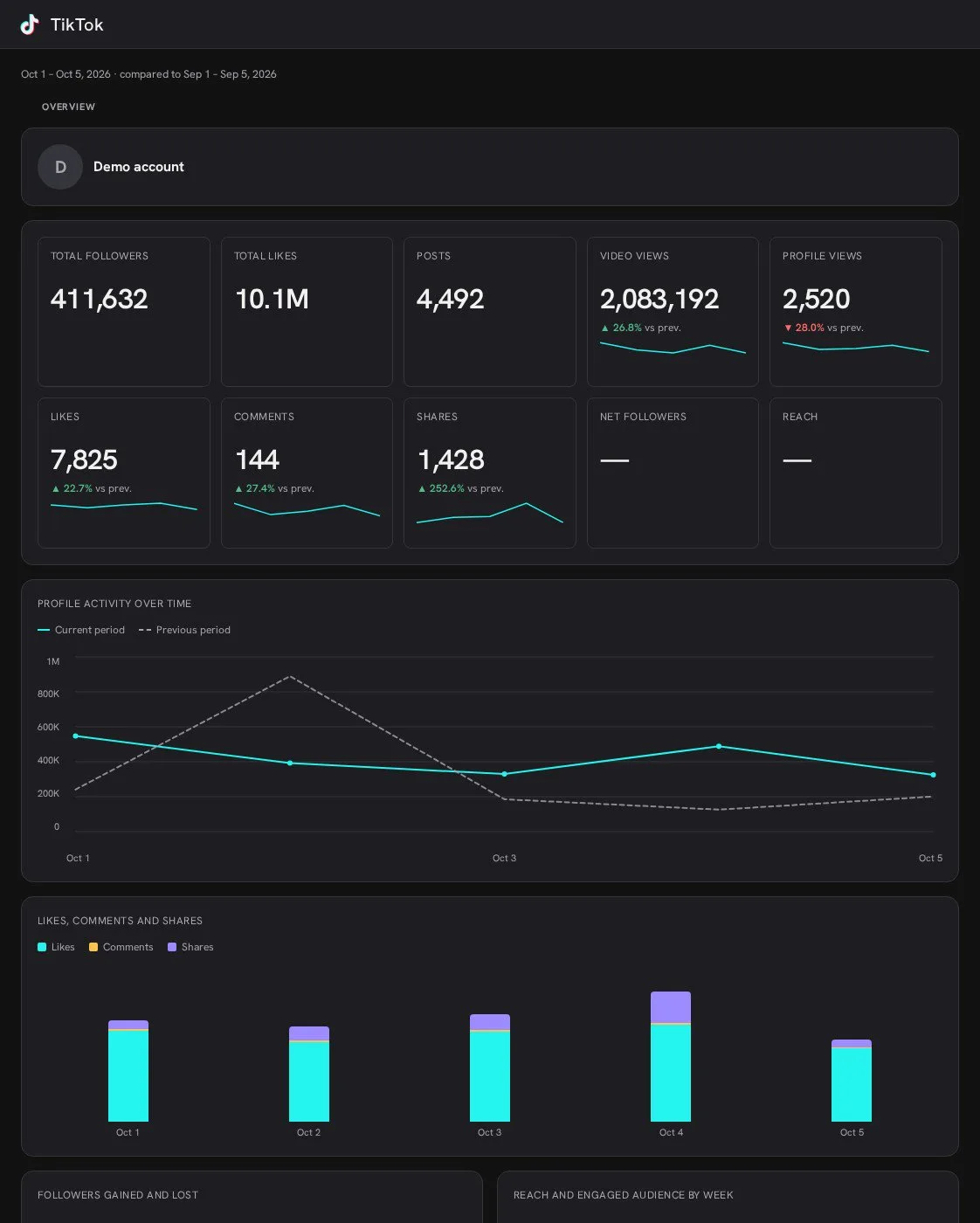
TikTok Organic AI dashboard template built with Porter Metrics AI dashboards
Template

The TikTok Organic AI dashboard template

Built with Porter's AI dashboards on a real account. Open it live, then ask ChatGPT to make one like it for your account.

Open the live TikTok Organic dashboard

05Pricing

Pricing

You can start free, since Porter’s TikTok Organic connector for ChatGPT comes with every plan. Use the calculator for your number of accounts, or see Porter pricing for every plan.

What you get

  • Free plan: never expires, with unlimited connected accounts and the last 15 days of data in ChatGPT (30 days in Data Studio and Sheets)
  • Reporting: from $12.50 per account a month billed annually, or $15 month to month for one account
  • Billing: each TikTok account counts as one account, with volume discounts and no per-seat fee
  • Changes: 1 AI credit per completed change you confirm on Business, Enterprise or Edu; failed tasks are free, and the Free plan includes 100 credits a month
  • Trial: 14 days of full access, no card

Price calculator

$33.33/mo$6.67 per account

An account is one ad account, Stripe account, store, page or GA4 property. The Free plan never expires and has unlimited accounts, with the last 15 days of data in AI chats.

06Data and actions

TikTok Organic data and actions in ChatGPT

The TikTok Organic connector gives ChatGPT 88 fields from both your profile and public posts. They cover followers, video views, reach, likes, comments, shares and favorites, as well as watch time, retention and demographics. The full TikTok Insights field reference also lists each label and ID.

12 TikTok Organic fields ChatGPT uses most

FieldWhat it's for
Total Followersfollowers_countToday's follower count; a snapshot, never summed
Profile New Followers · Profile Lost Followers · Profile Net Followers Growthdaily_new_followers · daily_lost_followers · daily_total_followersFollower growth, asked by week
Profile Video Viewsprofile_video_viewsViews across all your videos
Profile Unique Video Viewsprofile_unique_video_viewsPeople who watched at least one video (reach)
Profile Viewsprofile_viewsVisits to your profile
Profile Likes · Profile Comments · Profile Shareslikes · comments · sharesAccount engagement by day or week
Video Views · Video Reachvideo_views · video_reachRanking videos
Video Likes · Video Comments · Video Shares · Video Favoritesvideo_likes · video_comments · video_shares · video_favoritesWhat viewers did with each video
Video Average Time Watched · Video Full Watched Ratevideo_average_time_watched · full_video_watched_rateAttention per video
Video Seconds Timeline · Video View Retention %video_specific_second · video_view_retention_percentageWhere viewers drop off
Video New Followers · Video Profile Viewsvideo_new_followers · video_profile_viewsWhich videos win followers
Followers Country % · Followers Gender % · Followers Age %audience_countries_percentage · audience_genders_percentage · audience_ages_percentageWho follows you

Can ChatGPT post videos or reply to comments when you confirm?

On Business, Enterprise and Edu plans, yes, after you confirm: ChatGPT publishes either a video or a photo carousel of 1–35 images, as a post or a draft. It also replies as you, hides or unhides any comment, deletes your own, likes comments and suggests hashtags. On Pro, ChatGPT drafts replies and captions for you to post in TikTok.

How fresh is the data, and how far back?

Profile details and new posts appear in real time, while daily metrics, demographics and video metrics arrive 24–48 hours late (UTC). TikTok's API keeps 60 days of daily account metrics, but on paid plans Porter stores them daily from the day you start paying, so history builds past that.

Product stats

WhatTikTok Organic connector
Fields88 from your profile and public posts
ActionsPublish videos or photo carousels of 1–35 images as posts or drafts; reply to, hide, unhide and like comments; delete your own
ChatGPT plansReads on Pro; reads and changes you confirm on Business, Enterprise and Edu (web, beta)
FreshnessProfile details and new posts in real time; daily metrics, demographics and video metrics 24–48 hours late (UTC)
HistoryTikTok's API keeps 60 days of daily account metrics; on paid plans Porter stores them daily from the day you start paying, so history builds past that. 30 days on the Free plan, 15 in AI chats
Follower totalsTikTok's API gives today's count only; Porter keeps a value per day on paid plans, from the day you start paying
Video metricsLifetime totals; TikTok stops updating a video 365 days after it's published
Follower dataFollower changes and reach fill in weekly; demographics need 100+ followers
AccessTikTok sign-in with read, publishing and comment permissions; your own account's public posts only

See all 88 TikTok Organic fields

07Security

Is it safe if ChatGPT posts?

Yes, nothing reaches your account until you confirm it: ChatGPT posts only on Business, Enterprise or Edu, shows every reply or post first, and Porter publishes only what you confirm before posting. Porter's TikTok Organic connector for ChatGPT uses TikTok's official API, on the accounts you sign in with.

How changes get confirmed before posting

ChatGPT asks you to confirm changes based on the app's permissions and holds back some high-risk actions for extra care. Published posts and replies are permanent, so read each one before you confirm. After that, you can still delete your own comments or hide anyone's. Each completed change also uses one AI credit.

What the TikTok Organic connector needs

Porter needs a TikTok sign-in on its app, including read, publishing and comment permissions. If a permission is missing or a sign-in expires, you get a reconnect link. If you want to revoke access, remove Porter in the TikTok app: Settings and privacy › Security › Manage app permissions.

08FAQ

FAQ

Before connecting, people most often ask about seeing analytics, watching or making videos, personal accounts, ads and Data Studio (formerly Looker Studio). The last three answers help when numbers differ from TikTok Studio, recent days show 0 or data is missing.

Is there a way to see TikTok analytics?

Yes, TikTok shows analytics in TikTok Studio and on the app's Analytics page when you turn it on after your first post. Porter reads those same numbers for ChatGPT, so you can compare videos and weeks side by side.

Can ChatGPT watch videos or open TikTok links?

ChatGPT reads your account's numbers, captions and comments, such as views, watch time, retention and followers, rather than watching the videos or loading TikTok links. That's enough to say which videos worked, and where viewers swipe away, second by second.

Can ChatGPT make TikTok videos?

With Porter, ChatGPT writes captions, scripts and hook ideas for your next video and suggests hashtags. When your video or photo carousel is finished, Porter can publish it to your account or save it as a draft.

Does Porter work with a personal TikTok account?

Yes, TikTok's API serves both personal and Business accounts, so Porter connects either one. Contact button clicks need a Verified Business Account, and daily reach and follower changes need either one or TikTok's Advanced Access. Otherwise, everything works on both account types.

Can ChatGPT see my TikTok Ads or TikTok Shop?

Porter's TikTok Organic connector for ChatGPT covers your own account's videos, followers and comments. Ad results come through Porter's TikTok Ads connector, which works through the same URL. TikTok Shop orders come through Porter's TikTok Shop connector for ChatGPT.

I already send TikTok data to Looker Studio with Porter. Do I need to reconnect for ChatGPT?

No, a TikTok account connected in Porter feeds every Porter destination at no extra cost, including ChatGPT and the TikTok Insights connector for Data Studio. Just add Porter's URL to ChatGPT, then sign in with the same Porter account and ask.

Troubleshooting

Why don't ChatGPT's numbers match TikTok Studio?

ChatGPT's TikTok numbers differ from TikTok Studio for four reasons, including time zones. The API closes days in UTC, while the app uses your time zone. API shares include "Send to friends", views include paid views and rewatches, and daily likes aren't net of unlikes.

Why do recent days or daily followers show 0?

Ask for recent days again after 48 hours, and ask for follower changes and reach by week. TikTok sends daily numbers to Porter 24–48 hours late, so a late day shows as 0 until it arrives. Follower changes and reach fill in weekly.

Why does ChatGPT show no TikTok data?

Use the reconnect link ChatGPT shows, then ask again. ChatGPT shows no TikTok data when the TikTok sign-in has expired, or a question needs a permission you haven't granted. If an account still errors, report it to Porter support.


09Next

More ChatGPT connectors

Porter also connects ChatGPT to other social and commerce sources, each with its own prompts, fields and limits. Start with these or see all ChatGPT connectors. For Claude and other AI clients, browse Porter's MCP servers for marketing data instead.

Not only ChatGPT. Send TikTok Organic data anywhere

The same Porter account and connection also send TikTok Organic data to these destinations, at no extra cost.

Try the TikTok connector in ChatGPT

Once the TikTok Organic connector is in ChatGPT, the questions you answered by scrolling TikTok Studio go there instead. Ask which video won the most followers, where viewers swiped away or which comments still need a reply, then act in the same chat.

Written by the Porter Metrics team.

Free plan · 14-day trial · No card needed

Social media managers: the weekly TikTok update takes one question instead of a morning.

Creative strategists: you see where viewers leave before the next shoot.

Agencies: every client account answers the same prompt, including new ones.