Mailchimp connector for ChatGPT

Use Porter’s Mailchimp connector for ChatGPT to analyze campaign reports, audiences and subscribers, then tag contacts and set up draft campaigns you confirm on Business, Enterprise or Edu.

  • Rank campaigns by clicks and revenue
  • Compare subject line patterns by open and click rate
  • Check each campaign against your industry’s benchmarks
  • Match Mailchimp campaigns to Shopify orders and gross sales
G2★★★★★Rated 4.6/5 on G2 (288 reviews, October 2026)

By Porter Metrics team · Last updated October 20, 2026

ChatGPTPorter connected
List campaigns sent in the last 30 days with emails sent, open rate and click rate.
Porter / Mailchimp / Trailgear Demo✓ 4 rows
Back in stock has the highest click rate (4.8%). Monthly digest reached the most people.
CampaignSentOpen rateClick rate
Back in stock8,24046.1%4.8%
Monthly digest22,91038.4%2.1%
Event invite5,37041.7%3.2%
Survey request12,05033.9%1.4%
Demo data, Trailgear Demo account
204 Mailchimp fields
01Setup

How to connect Mailchimp to ChatGPT

Three steps, with no data-center prefix to find and no server to host. Sign in with Mailchimp in Porter, add one MCP URL to ChatGPT as a custom MCP server, then ask. For more screenshots, see the step-by-step Mailchimp to ChatGPT tutorial. MCP (Model Context Protocol) is the open standard ChatGPT uses to connect to tools.

What you need before you start

  • You need a Mailchimp login for the account, a free Porter account and a ChatGPT plan that supports custom MCP servers, since Porter uses Mailchimp’s own sign-in.
  • Custom MCP servers are in beta in ChatGPT on the web, so set up Porter and ask your questions from a browser. On Business, Enterprise or Edu, an admin or owner turns on developer mode, and then ChatGPT can also make the changes you confirm. On Pro, you turn on developer mode yourself, and ChatGPT reads and recommends (OpenAI’s guide to custom MCP apps).
  • Works in ChatGPT on the web (chatgpt.com, custom MCP servers in beta) and in Codex, with the same Porter MCP URL.
  1. Step 1: Connect Mailchimp in Porter

    Sign up free at Porter, pick Mailchimp as the source and sign in with Mailchimp, so every audience in that account comes with it. Then pick ChatGPT as the destination.

  2. Step 2: Add the connector to ChatGPT

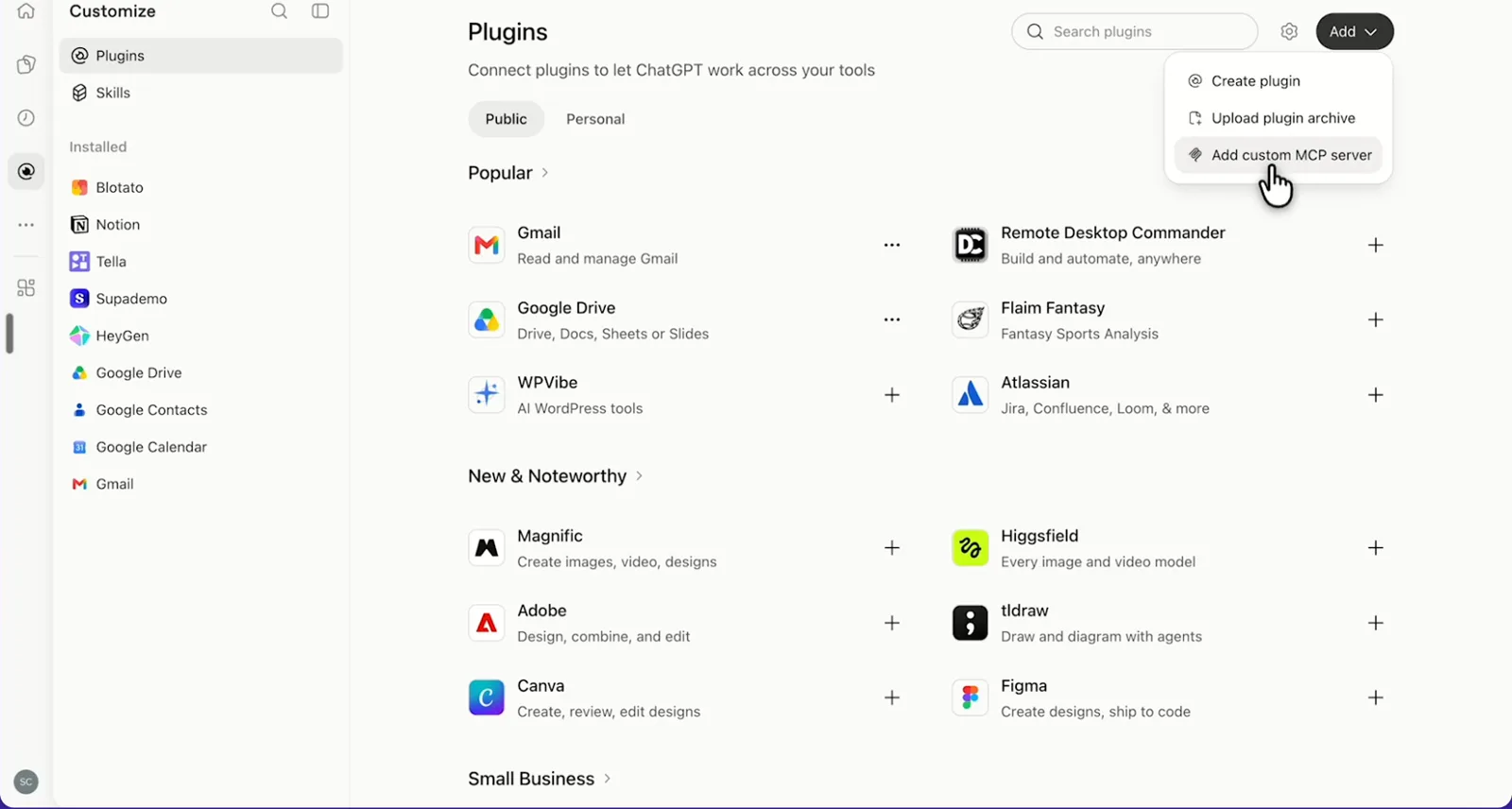
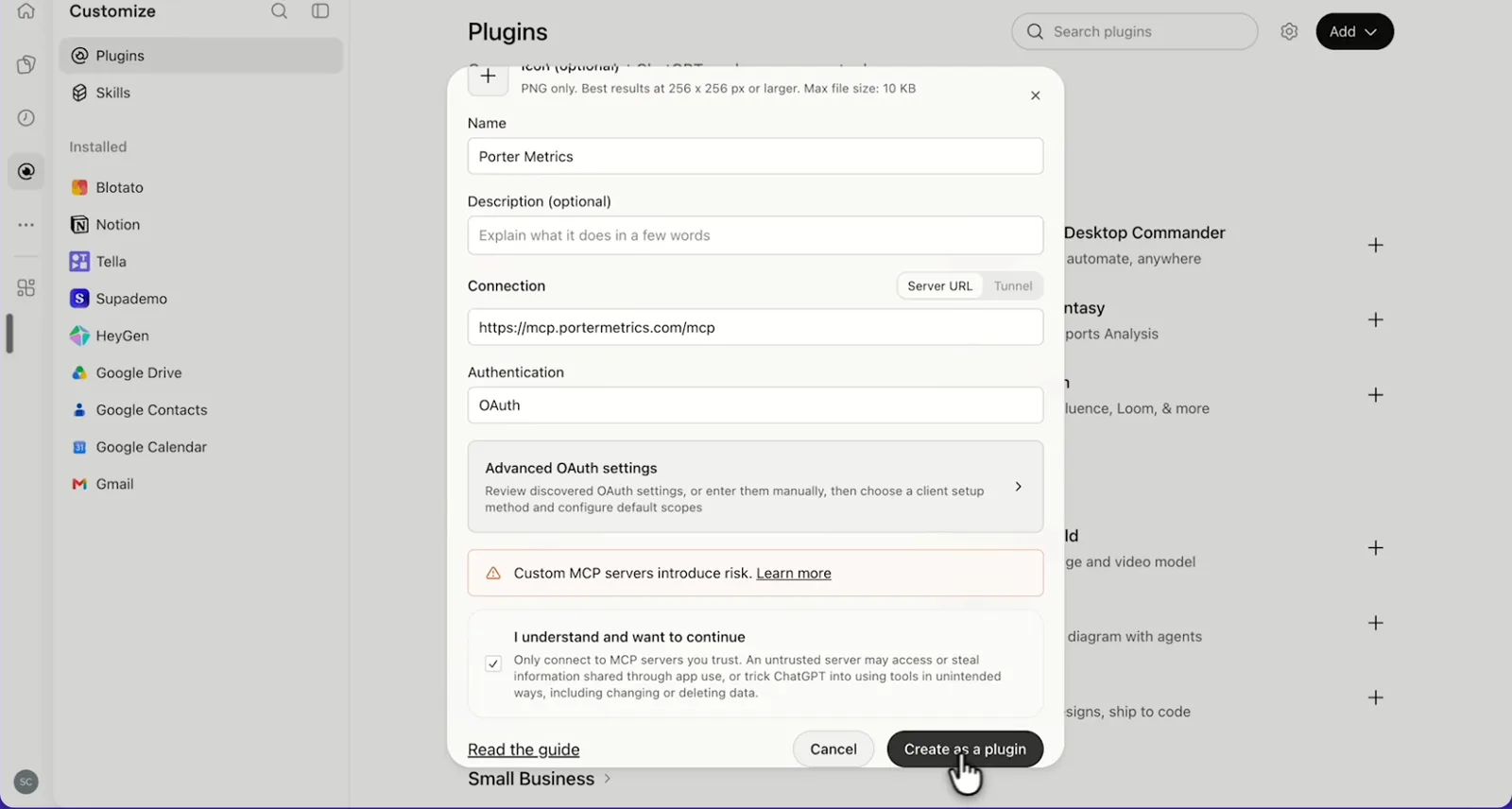
    In ChatGPT, open Customize › Plugins, click Add and choose Add custom MCP server. On Business, an admin does this from Workspace settings › Apps › Create. Name it Porter Metrics, paste this URL as the Server URL and keep OAuth as the authentication:

    MCP URL
    https://mcp.portermetrics.com/mcp

    Tick “I understand and want to continue”, then select Create as a plugin.

  3. Step 3: Ask ChatGPT about Mailchimp

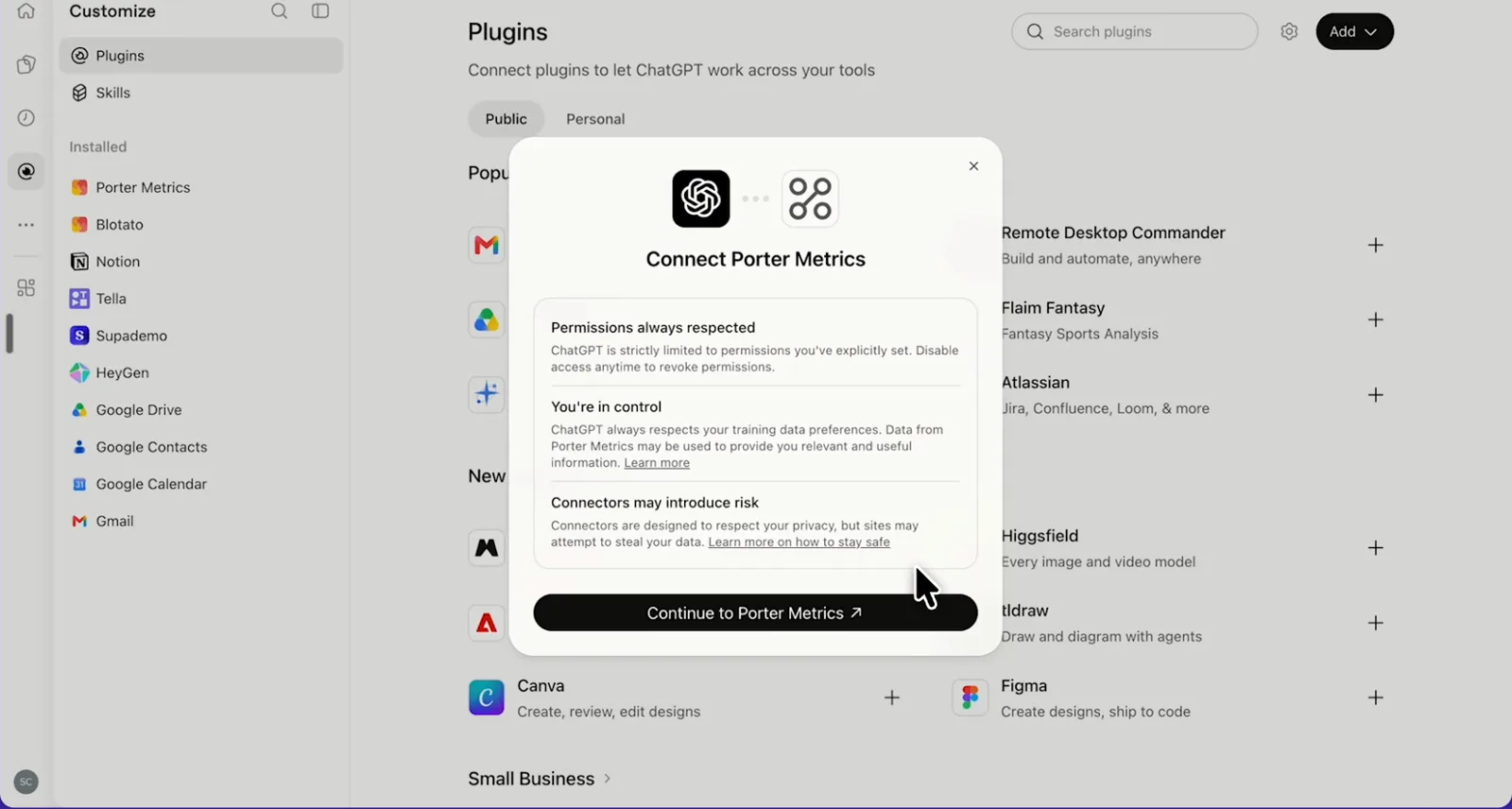
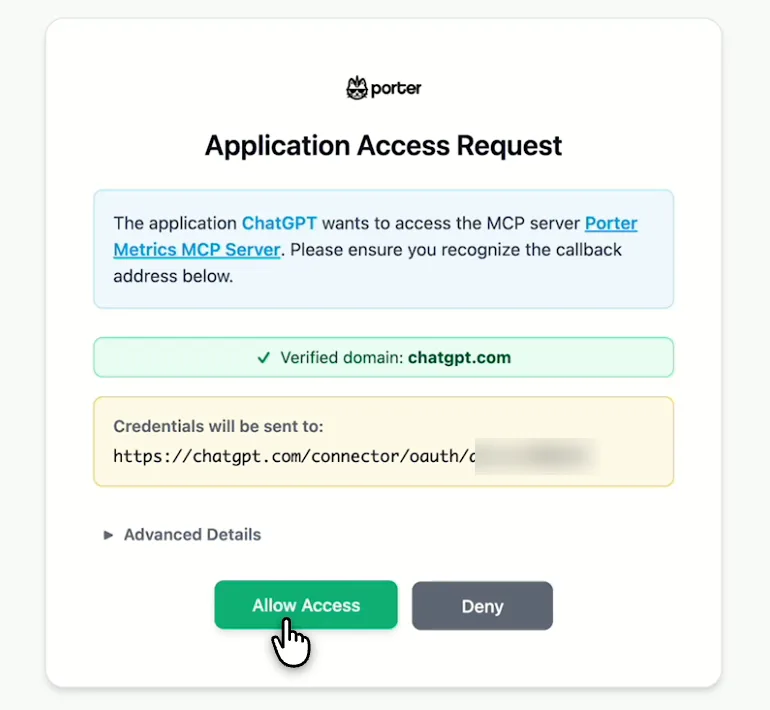
    Next, select Continue to Porter Metrics, sign in to Porter and click Allow Access. Then select Try in chat and paste this prompt:

    Prompt
    List my Mailchimp campaigns sent in the last 30 days with E-mails sent, Campaign open rate and Campaign click rate, as %.

Guides and videos

app.portermetrics.com / create
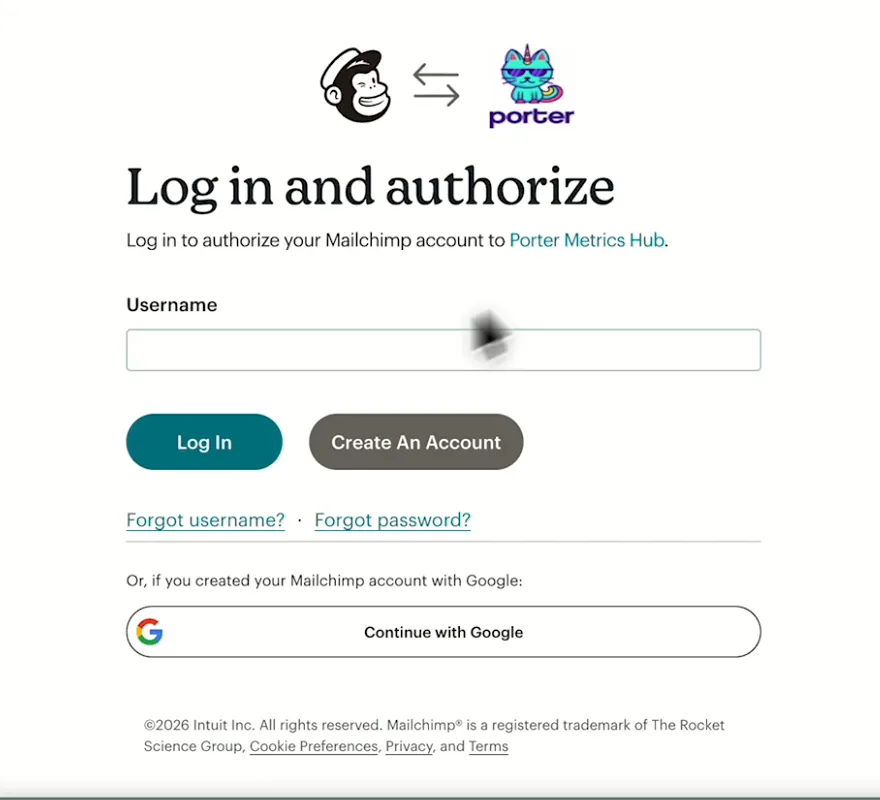
Mailchimp Log in and authorize screen for Porter Metrics
First, log in to Mailchimp and authorize Porter Metrics.
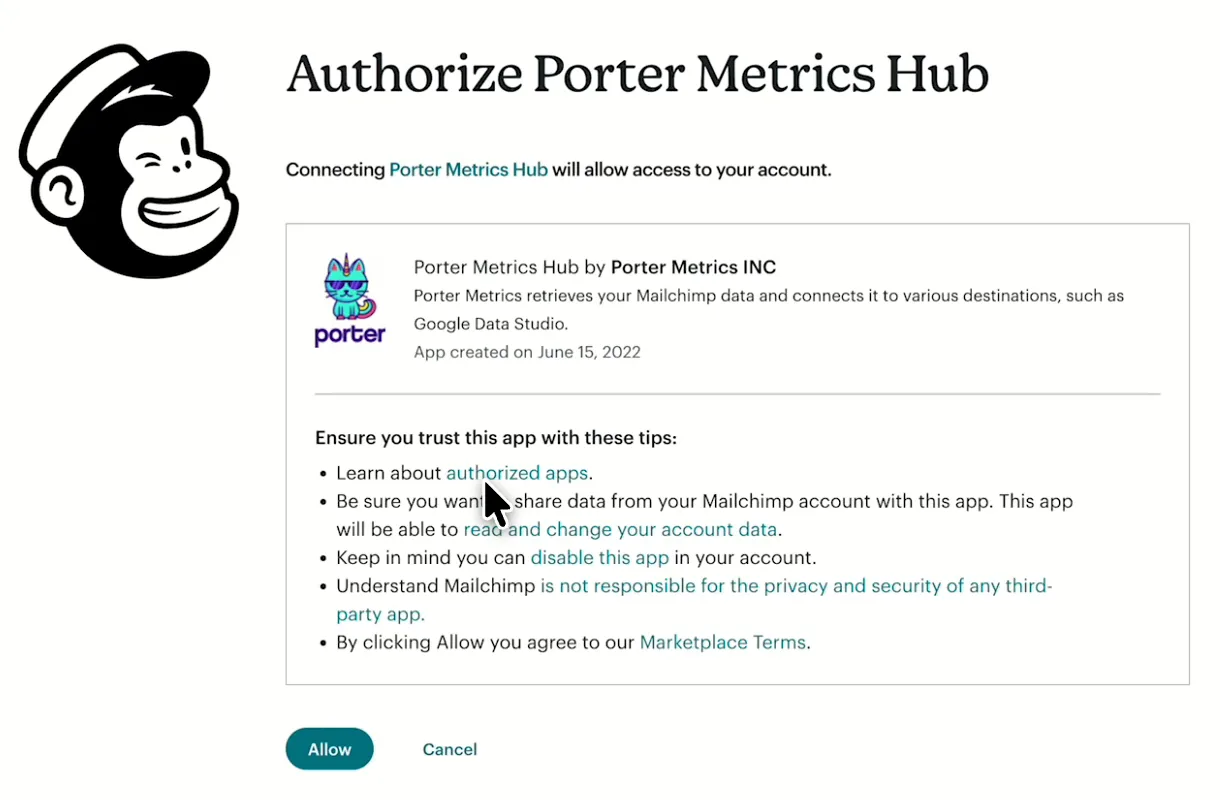
Mailchimp screen asking you to authorize Porter Metrics Hub
Then, allow Porter Metrics Hub to access your Mailchimp account.
ChatGPT's Plugins page with the Add menu open on Add custom MCP server
In ChatGPT, open Customize, then Plugins, and choose Add custom MCP server.
ChatGPT's Add custom MCP server form with the name Porter Metrics, Porter's MCP URL and OAuth filled in
Then, paste Porter's MCP URL, keep OAuth, tick the box and select Create as a plugin.
ChatGPT's Connect Porter Metrics window with the Continue to Porter Metrics button
Next, ChatGPT asks you to continue to Porter Metrics to sign in.
Porter's Application Access Request screen asking you to let ChatGPT use the Porter MCP server
Finally, sign in to Porter and select Allow Access.
If you prefer video, watch the whole Mailchimp to ChatGPT setup (1:44, no sound).
Interactive walkthrough, so you can click along here
02Use cases and prompts

What you can ask ChatGPT

With the Mailchimp connector, ChatGPT can analyze past campaign data from your account. Each use case comes with a prompt to copy, the fields it uses from the Mailchimp fields list and who it’s for. Campaign numbers are lifetime totals for the campaigns sent in your date range, so the prompts pick campaigns by send date. On Business, Enterprise or Edu, ChatGPT can also make the changes you confirm; on Pro it reads and recommends.

Can ChatGPT show which campaigns drove the most clicks and revenue?

The problemThe newsletter everyone opened last quarter sold almost nothing, while a plain promo nobody liked paid for the month.

What ChatGPT doesChatGPT lists every campaign sent in the period, including emails sent, open rate, click rate, unique clicks, orders and revenue. It ranks them by revenue and flags campaigns with strong opens but no sales.

What you getIf your store is also connected in Porter (see how to connect Shopify to ChatGPT), ask for the store’s side too. Mailchimp and Shopify credit orders differently, so compare trends, not exact totals.

Prompt
List every Mailchimp campaign sent in the last 90 days with Campaign name, Send time, E-mails sent, Campaign open rate, Campaign click rate (as %), Campaign unique clicks, E-commerce total orders and E-commerce total revenue. Rank by revenue and flag any campaign in the top 10 by open rate with zero revenue.
Then ask
Prompt
With my Shopify store connected in Porter too, match these campaigns to Shopify Orders and Gross Sales where UTM Source is mailchimp and UTM Campaign matches, and show both revenue numbers side by side.

For: email marketers · e-commerce and DTC marketers · agencies

Fields used: Campaign nameSend timeE-mails sentCampaign open rateCampaign click rateCampaign unique clicksE-commerce total ordersE-commerce total revenueOrdersGross SalesUTM SourceUTM Campaign

Can ChatGPT show which subject lines get opens and clicks?

The problemHalf the team swears emojis in the subject line help, while the other half swears they hurt. Nobody has checked, though.

What ChatGPT doesChatGPT groups your subject lines by pattern (question, number, emoji, first name, urgency word), then averages open and click rate for each. Finally, it lists the 5 best and 5 worst subject lines.

What you getYour next subject line follows your own results rather than a list of tips written for someone else’s audience.

Prompt
For Mailchimp campaigns sent in the last 6 months, group Subject line by pattern (question, number, emoji, first name, urgency word, plain). For each pattern show the number of campaigns, average Campaign open rate and average Campaign click rate as %, then list the 5 best and 5 worst subject lines by click rate.
Then ask
Prompt
For my A/B split campaigns in that period, show Opens A, Opens B, Clicks A, Clicks B and the A/B winner criteria, and tell me whether the winner also won on clicks.

For: email marketers · small business owners · agencies

Fields used: Subject linePreview textCampaign nameSend timeE-mails sentCampaign open rateCampaign click rateOpens AOpens BClicks AClicks BA/B winner criteria

Can ChatGPT tell if I'm above or below my industry's benchmarks?

The problemWhen a client looks at the open rate in the monthly report, they ask the one thing the report can’t answer: is that good?

What ChatGPT doesChatGPT puts each campaign’s open, click, bounce and unsubscribe rate next to Mailchimp’s benchmarks for your account’s industry, then flags every campaign that falls short.

What you get“Is that good?” gets an answer from Mailchimp’s own industry numbers instead of a guess on a call.

Prompt
For campaigns sent in the last 90 days, show Campaign open rate, Campaign click rate and Campaign bounce rate as %, and Unsubscribed ÷ E-mails sent, next to Industry open rate, Industry click rate, Industry bounce rate and Industry unsubscribe rate for my Industry type. Flag every campaign below its industry benchmark.

For: email marketers · marketing leads · agencies

Fields used: Campaign nameE-mails sentCampaign open rateCampaign click rateCampaign bounce rateUnsubscribedIndustry typeIndustry open rateIndustry click rateIndustry bounce rateIndustry unsubscribe rate

Can ChatGPT find campaigns that caused bounces, unsubscribes or complaints?

The problemAn old import slipped into the main audience, but the bounces only surfaced a few sends later.

What ChatGPT doesChatGPT checks recent campaigns for hard bounces, bounce rate, unsubscribes and abuse reports against thresholds you set. Then it tells you which audience to clean or which campaign type to pause.

What you getYou clean the audience before your sender reputation pays for it, without opening each report’s bounce and complaint tabs.

Prompt
For Mailchimp campaigns sent in the last 30 days, flag any with Campaign bounce rate above 2%, Campaign hard bounces above 0.5% of E-mails sent, Campaign abuse rate above 0.1% or Unsubscribed above 0.5% of E-mails sent. For each flag, show the value, the threshold and one recommended action.

For: deliverability and list owners · email marketers · agencies

Fields used: Campaign nameSend timeE-mails sentCampaign hard bouncesCampaign soft bouncesCampaign bounce rateUnsubscribedCampaign abuse reportsCampaign abuse rate

Is my audience growing or shrinking?

The problemThe contact count keeps climbing, but so does the cleaned pile. Still, nobody can say what the net change was.

What ChatGPT doesChatGPT charts weekly subscribes, other adds and other removes from Mailchimp’s daily audience activity, then adds today’s audience size, unsubscribed and cleaned counts.

What you getYou get the quarter’s net growth instead of exporting audience activity and stitching weeks together.

Prompt
Show Mailchimp daily list activity by Week for the last 6 months: subscribes, Other adds, Other removes and List emails sent. Then, separately, show today's List total members, List unsubscribed members, List cleaned members, List average subscriptions per month and List average unsubscriptions per month for each List name.

For: small business owners · email marketers · e-commerce and DTC marketers

Fields used: WeeksubscribesOther addsOther removesList emails sentList nameList total membersList unsubscribed membersList cleaned membersList average subscriptions per monthList average unsubscriptions per month

Can ChatGPT find which audiences need attention?

The problemOver the years the account picked up an audience for every event and pop-up, but some haven’t had an email since.

What ChatGPT doesChatGPT ranks every audience in the account by members, all-time open and click rate, unsubscribes per month, cleaned members, rating and last campaign date. It also flags audiences you haven’t mailed in 30 days.

What you getYou decide which audiences to re-engage, merge or retire from one table, instead of checking the audience dashboard one audience at a time.

Prompt
For every List name in my Mailchimp account, show List total members, List all-time open rate, List click rate, List average unsubscriptions per month, List cleaned members, List hard bounces, List rating (Number) and List campaign last sent date. Rank by List click rate and flag any audience not mailed in 30 days.
Then ask
Prompt
Do the same for every Mailchimp account I've connected and put them in one table.

For: agencies (one table per client account) · multi-brand marketing teams · deliverability and list owners

Fields used: List nameList total membersList all-time open rateList click rateList average unsubscriptions per monthList cleaned membersList hard bouncesList rating (Number)List campaign last sent date

Can ChatGPT find my most engaged subscribers and tag them?

The problemYour best customers get the same newsletter as people who joined for a coupon but never opened again.

What ChatGPT doesChatGPT finds the subscribed contacts with the highest open rate, click-through rate, orders and revenue, then groups them by signup source and country. After that, on Business, Enterprise or Edu, it adds a tag such as “vip-2026” to the contacts you confirm, or creates a segment you can mail.

What you getThe VIP segment comes from your own engagement and order data instead of a CSV you filter and re-import.

Prompt
In my main audience, list subscribed members with Member open rate above 50% and at least 1 order. Show Member source, Member country, Member open rate, Member average click-through rate, Member number of orders and Member total revenue, top 50 by revenue.
Then ask
Prompt
Tag the top 20 as vip-2026. Show me the list before you tag them.

For: lifecycle and CRM marketers · e-commerce and DTC marketers · small business owners

Fields used: Member statusMember sourceMember countryMember open rateMember average click-through rateMember number of ordersMember total revenueMember tags
Actions: member_list · member_tag · segment_create

Can ChatGPT set up my next campaign?

The problemThe email is designed, but every send still means picking the audience, segment, sender and send time by hand.

What ChatGPT doesOn Business, Enterprise or Edu, ChatGPT creates a draft campaign with the audience, segment, subject line, preview text, from name, reply-to and template you choose. When you’ve checked the email in Mailchimp, ChatGPT schedules it for the time you confirm.

What you getYou set up the campaign in the same chat where you planned it, so the brief and the settings don’t drift apart.

Prompt
List my Mailchimp audiences and saved templates. Then create a draft regular campaign to the 'Newsletter' audience with subject line 'Spring picks are here', preview text 'Three new arrivals for you', from name 'Acme' and my 'Monthly' template. Show me the settings before you create it.
Then ask
Prompt
Schedule that draft for Tuesday at 9:00 a.m. New York time. Confirm the exact time before you schedule it.

For: small business owners · email marketers · agencies

Actions: list_list · template_list · campaign_create · campaign_update · campaign_schedule · campaign_send
03Why Porter

Why Porter for Mailchimp in ChatGPT

Porter gives ChatGPT your Mailchimp campaign reports, audiences and subscribers to analyze, next to Shopify and your other sources. If you only want answers inside Mailchimp, Mailchimp’s own Analytics AI chat does that on paid Mailchimp accounts. You can run both.

✓

Campaign results, ready to ask

ChatGPT reads 204 fields from every sent campaign: opens, clicks, bounces, revenue, A/B results and Mailchimp’s industry benchmarks.

⊞

No API key to manage

Porter signs in with Mailchimp’s own login, so there’s no API key, data-center prefix or server to look after. You add one MCP URL to ChatGPT on the web and ask.

⚙

Read and change your account

On Business, Enterprise or Edu, ChatGPT also tags contacts, builds segments and creates, schedules or sends the draft campaigns you confirm. On Pro it reads and recommends.

Aa

Audience activity past 180 days

Mailchimp’s API returns daily audience activity for the last 180 days only. Porter keeps older days, tested two years back to the list’s creation, so ChatGPT tracks new subscribers, opens and clicks across years.

↻

Email next to your store

Ask about Mailchimp campaigns next to Shopify orders, or 30+ other sources, in the same chat, so one question covers email and the store.

✓

One table across clients

Each Mailchimp account connects once with all its audiences. Agencies compare every client in one table, with the account as a column.

⊞

One connection, every destination

One connected Mailchimp account also feeds Claude, Data Studio, BigQuery and Google Sheets at no extra cost.

⚙

Live dashboards, not only chat answers

Ask ChatGPT for a dashboard and Porter’s AI dashboards publish it at its own link, synced automatically and ready to share. Official MCP servers answer inside the chat and stop there.

04Dashboard

Dashboard template

Want a shared view instead of a ChatGPT chat? Copy one of Porter’s free Mailchimp dashboard templates for the report your team opens every week, with campaigns, opens, clicks, bounces, unsubscribes, revenue and audience growth in one view.

AI dashboards

Build a live Mailchimp dashboard from the chat

Describe the dashboard in one sentence and Porter builds it. A client-ready dashboard in minutes, with no chart dragging and no BI tool to learn. Ask ChatGPT:

Prompt
Build a live Mailchimp dashboard for my account with the last 30 days, the main KPIs and a weekly trend.
Live URLEach dashboard at its own link: no login, no app, no download
Auto-syncFresh Mailchimp data, nobody re-exports each period
Scheduled deliveryEmail or PDF sends on a set day
White labelYour logo and branding for clients
Sharing permissionsView or edit access per person

Open the live Mailchimp dashboard

Or start from a template

05Pricing

Pricing

You can start free, since Porter’s Mailchimp connector for ChatGPT comes with every plan. Use the calculator for your number of accounts, or see Porter pricing for every plan.

What you get

  • Free plan: never expires, with unlimited connected accounts and the last 15 days of data in ChatGPT (30 days in Data Studio and Sheets)
  • Reporting: from $12.50 per account a month billed annually, or $15 month to month for one account
  • Billing: each Mailchimp account, with all its audiences, counts as one account, with volume discounts and no per-seat fee
  • Changes: 1 AI credit per completed change you confirm on Business, Enterprise or Edu; failed tasks are free, and the Free plan includes 100 credits a month
  • Trial: 14 days of full access, no card

Price calculator

$33.33/mo$6.67 per account

An account is one ad account, Stripe account, store, page or GA4 property. The Free plan never expires and has unlimited accounts, with the last 15 days of data in AI chats.

06Data and actions

Mailchimp data and actions in ChatGPT

Through the Mailchimp connector, ChatGPT reads 204 fields. They cover campaign reports, including opens, clicks, bounces, unsubscribes, abuse reports, revenue and industry benchmarks. They also cover A/B results, audiences, subscribers and daily audience activity. Besides reading, actions manage contacts, tags, audiences, segments and draft campaigns. The full list of Mailchimp fields also has every label and ID.

The 12 Mailchimp fields ChatGPT uses most

FieldWhat it's for
Campaign namecampaign_nameNaming each send in answers
Send timesend_timePicking campaigns by date
Subject linesubject_lineSubject line patterns
E-mails sentemails_sentSize of each send
Campaign open ratecampaign_open_rateOpens per delivered email
Campaign click ratecampaign_click_rateClicks per delivered email
UnsubscribedunsubscribedUnsubscribes per campaign
Campaign hard bouncescampaign_hard_bouncesDeliverability checks
E-commerce total revenuee_commerce_total_revenueRevenue per campaign
Industry open rate · Industry click rateindustry_open_rate · industry_click_rateBenchmarks for your industry
List name · List total memberslist_name · list_total_membersAudience size today
Member open rate · Member total revenuemember_open_rate · member_total_revenueFinding engaged subscribers

Can ChatGPT create, schedule and send Mailchimp campaigns?

On Business, Enterprise and Edu plans, yes. ChatGPT reads every audience, campaign, report, classic automation and template, and can add, update, tag and delete the contacts you confirm. It can also create and edit audiences, segments and draft campaigns, and schedule or send them.

On Pro, ChatGPT reads the account and lists the changes for you to make in Mailchimp. You write the email body, edit sent campaigns and run Customer Journeys and automations in Mailchimp as usual.

Why are campaign numbers lifetime totals?

Mailchimp reports each campaign's results since the moment it went out (Mailchimp's campaign reports API). So ChatGPT gets lifetime opens, clicks and revenue for the campaigns sent in your date range.

Daily audience activity (subscribes, other adds and removes, emails sent) splits by day, so ChatGPT asks about it in its own question.

How far back does Mailchimp data go in ChatGPT?

Campaign reports cover every campaign as long as Mailchimp keeps it. Daily audience activity goes past Mailchimp's 180-day list activity limit, because Porter keeps older days. Audience and subscriber fields, however, show today's values. The free plan reads 15 days in AI chats (30 days in Data Studio and Sheets), while paid plans have no cap.

Product stats

WhatMailchimp connector
Fields204 across campaign reports, A/B results, benchmarks, audiences, subscribers and daily audience activity
ActionsAdd, update, tag or delete contacts; create audiences, segments and draft campaigns; schedule or send them
ChatGPT plansReads on Pro; reads and changes you confirm on Business, Enterprise and Edu (web, beta)
Campaign numbersLifetime totals for the campaigns sent in your date range
HistoryEvery campaign Mailchimp keeps; daily audience activity past Mailchimp's 180-day limit; 30 days on the Free plan, 15 in AI chats
RatesReturned as fractions, so 0.32 means 32%
Rate limits10 simultaneous connections per user, set by Mailchimp
AccessMailchimp's own sign-in, no API key; valid until you revoke Porter

See all 204 Mailchimp fields

07Security

Is it safe?

Yes. ChatGPT reads your reports through the Mailchimp connector, and your account stays exactly as you set it. ChatGPT makes changes only on Business, Enterprise or Edu, and only the ones you confirm, from a tag to a send. Porter signs in through Mailchimp's own login, so you never paste an API key into a chat or a config file.

How ChatGPT asks before changing Mailchimp

ChatGPT asks you to confirm changes based on the app's permissions and holds back some high-risk actions for extra care. These 6 actions are permanent, so check them before you confirm:

Each completed change also uses one AI credit.

What the connector needs from Mailchimp

Porter needs a Mailchimp login for the account and signs in with Mailchimp's OAuth instead of an API key. Each sign-in connects one Mailchimp account, including every audience.

Mailchimp's access doesn't expire, so it stays valid until you revoke Porter in Mailchimp or that user is removed from the account (Mailchimp's OAuth guide).

08FAQ

FAQ

Five questions teams ask before they connect. They cover Mailchimp's Analytics AI, Claude, agencies, Data Studio users and the Mailchimp API. Then three fixes for numbers that look off, empty answers and reconnecting.

Is this the same as Mailchimp's Analytics AI?

No. Analytics AI is Mailchimp's own chat inside Mailchimp, for Admins and Owners on paid Mailchimp accounts (Mailchimp's Analytics AI help). Porter puts your Mailchimp data in ChatGPT instead, next to Shopify and your other sources, so one question can cover email and the store.

Can I use Porter in Claude too?

Yes. Porter's MCP URL, the same one behind the Mailchimp connector for ChatGPT, also works in Claude as a custom connector, with the same Porter account and audiences. See Porter's Mailchimp connector for Claude for the Claude setup and what it covers.

Can I connect several accounts, like an agency?

Yes. Each Mailchimp account is one Porter account with all its audiences, so ChatGPT can query or compare accounts together, with the account as a column. Agencies get one table across every client, while recommendations stay per account, because one client's audience rarely behaves like another's.

I already send Mailchimp to Looker Studio with Porter. Do I need to reconnect for ChatGPT?

No. One connected Mailchimp account feeds every Porter destination at no extra cost, including ChatGPT. The same connection serves the Mailchimp connector for Data Studio (formerly Looker Studio), Mailchimp to BigQuery and import Mailchimp into Google Sheets. You only add Porter's MCP URL to ChatGPT, then ask.

Is there a Mailchimp API?

Yes. The Mailchimp Marketing API, version 3.0, covers audiences, campaigns, reports and automations (Mailchimp Marketing API docs). Porter uses it behind the scenes, so you don't write API calls, look up your data center or manage an API key.

Troubleshooting

Why don't ChatGPT's numbers match Mailchimp?

Read rates as fractions (0.32 means 32%) and pick campaigns by send date, and ChatGPT's Mailchimp numbers through Porter should line up. Campaign numbers are lifetime totals for campaigns sent in your date range, while audience fields show today's values. Open rates include Apple Mail machine opens, so they can top 100%. Bounce, unsubscribe and industry fields cover regular campaigns.

Why does ChatGPT return no rows?

Ask by Automation type rather than Automation name when you add a metric, and ask about daily audience activity and campaign metrics in separate questions. Those two pairings are what return no Mailchimp rows in ChatGPT. A/B fields read 0 on campaigns that weren't A/B tests, so use them on your A/B campaigns.

Why does ChatGPT ask me to reconnect?

Reconnect Mailchimp in Porter with a user who still has access, then ask ChatGPT again. ChatGPT asks for this when Porter can no longer read your Mailchimp account: the sign-in may not have finished, you may have revoked Porter in Mailchimp, or the user who connected was removed from the account.


09Next

More ChatGPT connectors

Most teams report on more than one email or CRM tool, and Porter connects each of them to ChatGPT just like the Mailchimp connector. Then add the other platforms you report on from all ChatGPT connectors, compare Mailchimp analytics tools, or start a client report from a template.

Not only ChatGPT. Send Mailchimp data anywhere

The same Porter account and connection also send Mailchimp data to these destinations, at no extra cost.

Try the connector in ChatGPT

Your next campaign review, audience cleanup or VIP tag can start in ChatGPT. Connect Mailchimp, add Porter's MCP URL, then ask which sends earned clicks and revenue. The free plan includes the Mailchimp connector for ChatGPT, and the trial also needs no card.

Free forever plan · 14-day full trial · No card

Email marketers: the monthly recap starts from one ranked table of every campaign instead of a click through each report.

E-commerce teams: Mailchimp revenue and Shopify orders sit side by side in one answer.

Agencies: every client's Mailchimp audiences answer one prompt, with the account as a column.