







Trusted by 1,600+ marketing teams and agencies


What you can do with this Meta Ads budget pacing dashboard
3 jobs this template does. Click one to see its view, then ask Claude the same question about your own data.
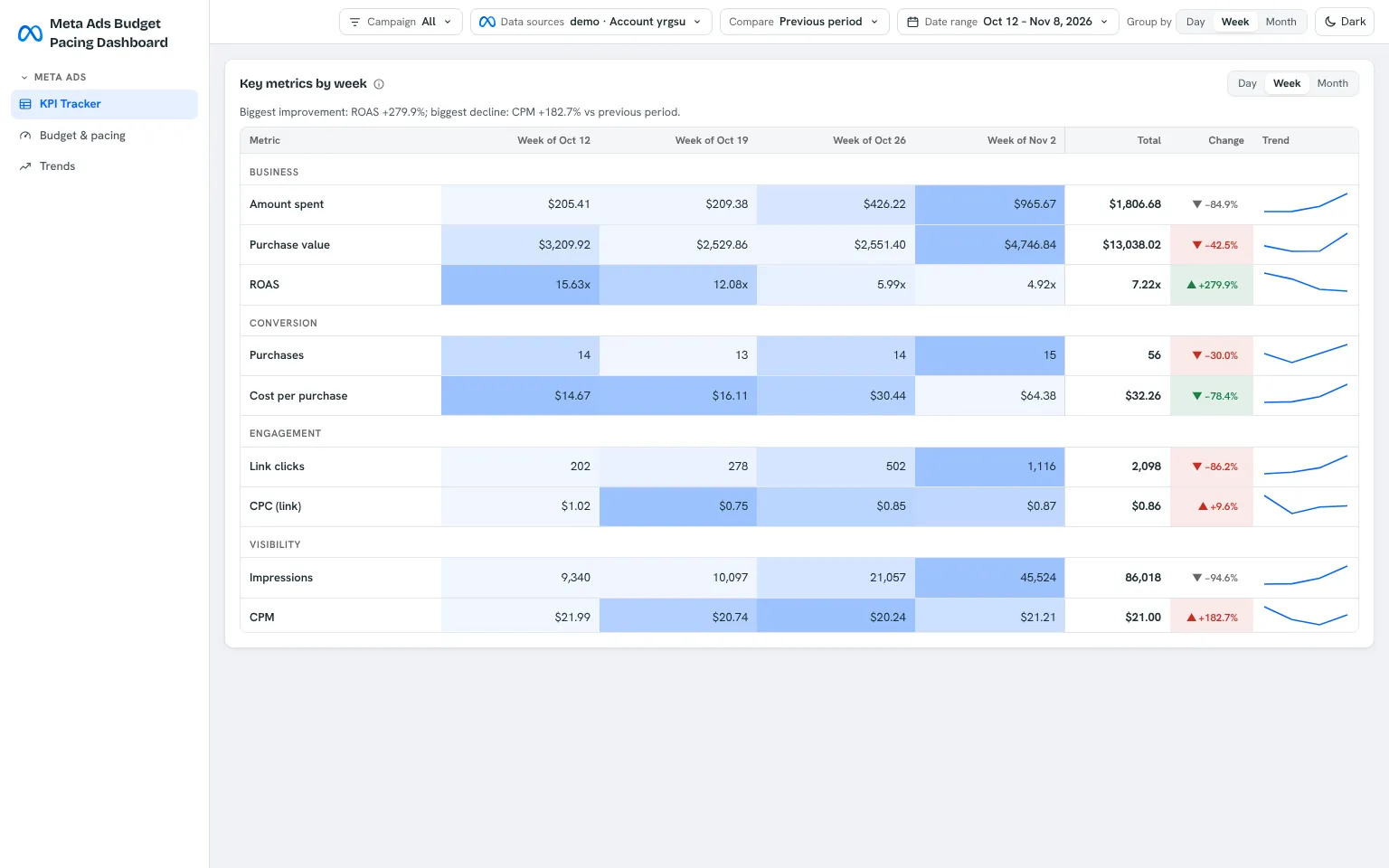
Track the KPIs behind the spend
Spend, ROAS, cost per purchase and CPM by week with the change.
- Is ROAS holding as spend grows?
- Which week spent the most?
Show my Meta Ads amount spent, ROAS, cost per purchase and CPM by week for the last 4 weeks with the change vs the period before.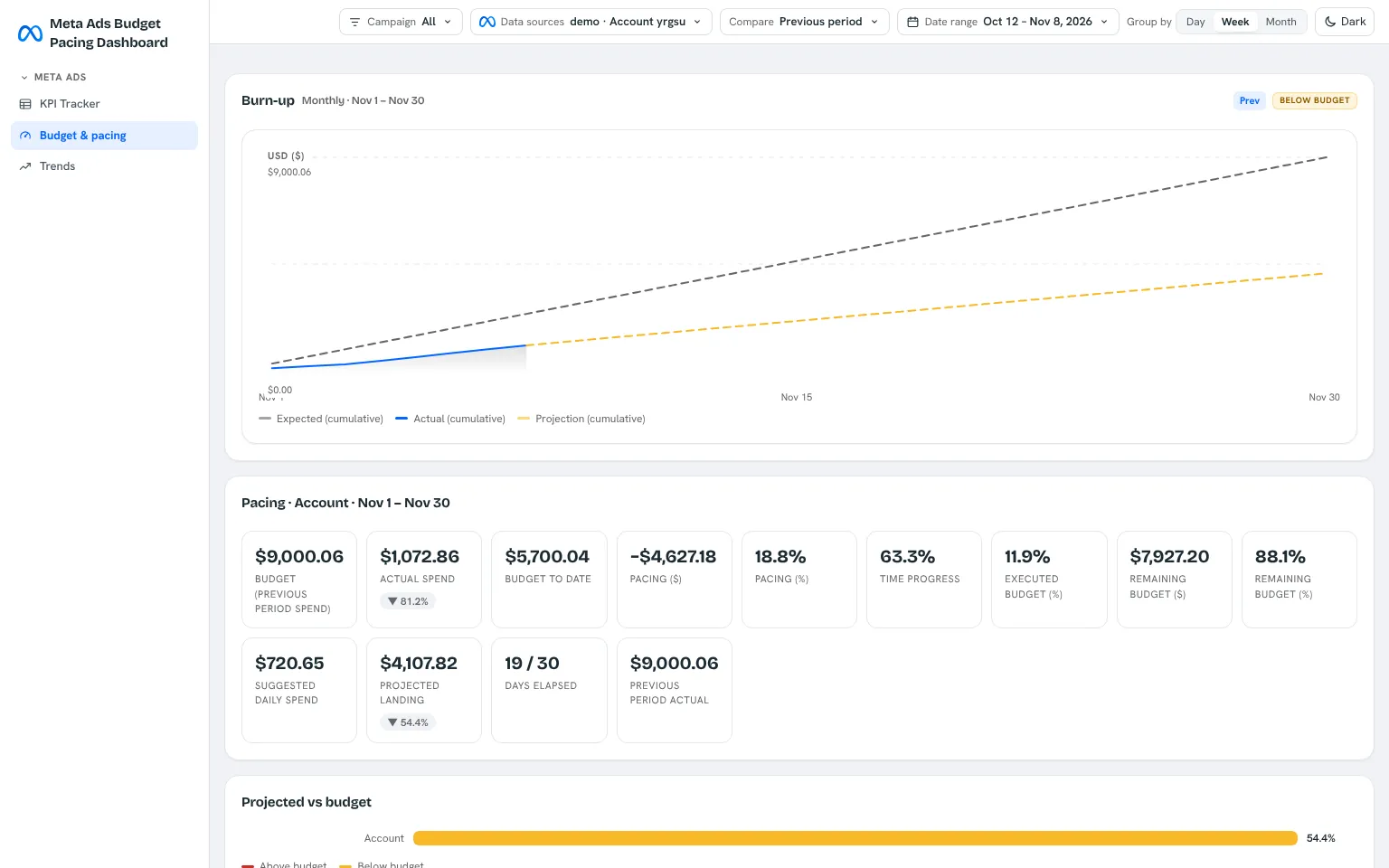
See if the month will land on budget
Actual vs expected spend, the projected landing and a suggested daily spend for the days left.
- Will we over-spend this month?
- How much should we spend per day from now on?
My Meta Ads monthly budget is [amount]. Compare spend so far this month with the expected pace, project where the month lands and tell me the daily spend I need to hit the budget.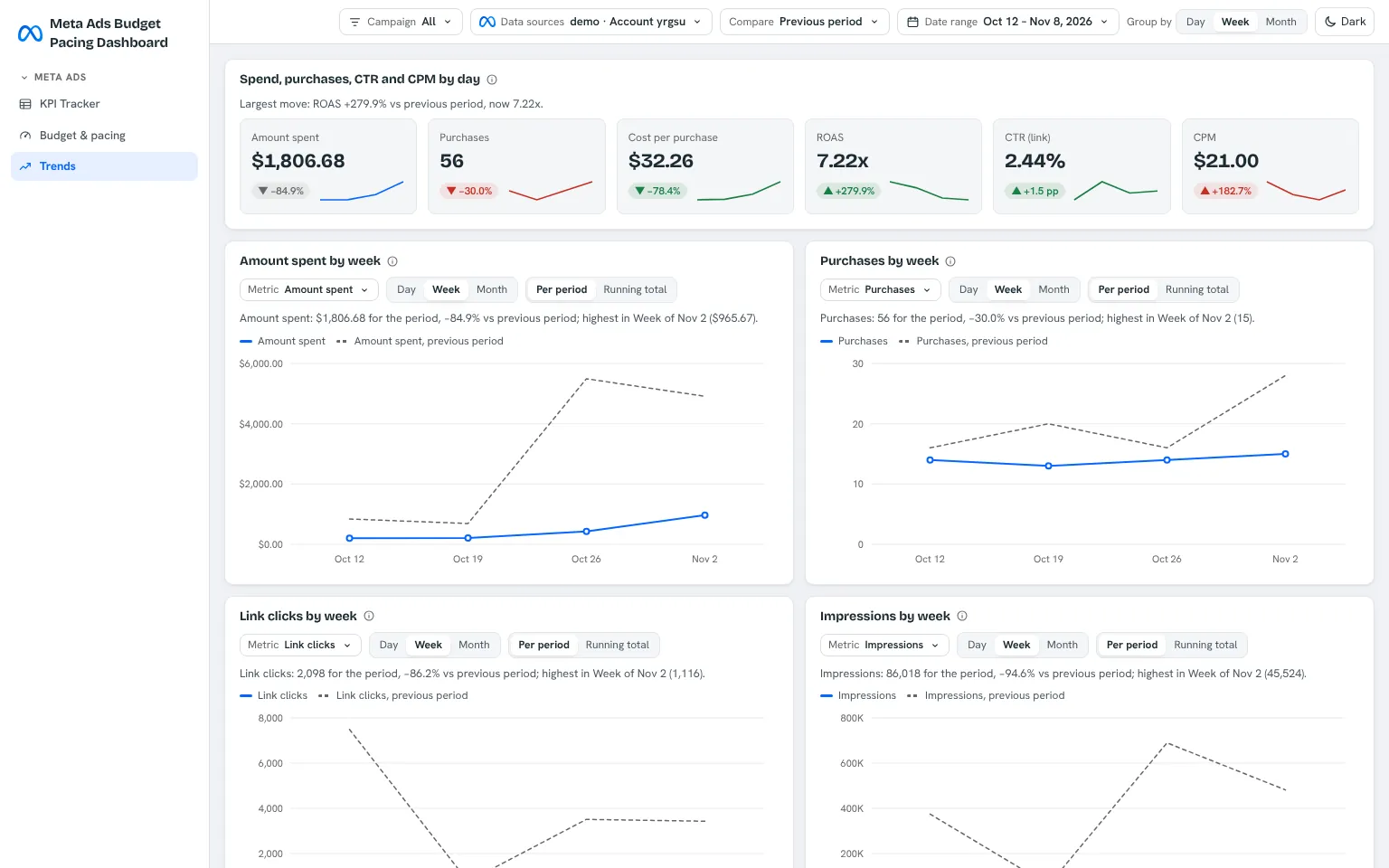
Check spend against results
Spend, purchases, CTR and CPM by week, so extra spend shows whether it bought more sales.
- Did the extra spend bring more purchases?
- Did CPM rise when we raised budget?
Chart my Meta Ads amount spent and purchases by week for the last 8 weeks and tell me if purchases followed the changes in spend.How to analyze your Meta Ads budget pacing data
Read it in three steps. When a number drops, find the step that broke before you change anything.
- 1 · Pace
Are we on pace?
- Spend to date vs expected
- Days elapsed
Watch: pacing %
- 2 · Landing
Where does the month end?
- Projected spend
- Remaining budget
Watch: projected vs budget
- 3 · Return
Is the spend worth it?
- Purchases and ROAS by week
- Cost per purchase
Watch: ROAS as spend changes
Four steps, once a month
- Start with the totals. Compare this period with the one before on the KPI Tracker page.
- Find what broke the trend. Sort by change, not by size.
- Find the step that broke. Use the three questions above to name the cause.
- Fix one cause, then check next month. Ask Claude to compare before and after.
How to set up the Meta Ads budget pacing dashboard
You need a free Porter account and Claude on any plan. The Free plan covers the last 15 days in Claude. For monthly trends, start the 14-day trial (no card).
Connect your data in Porter
Sign up free at Porter, open Data sources and add Meta Ads and pick your ad accounts. The step-by-step tutorial shows each click.
Add Porter to Claude
In Claude, go to Customize → Connectors → Add custom connector, paste https://mcp.portermetrics.com/mcp and name it Porter Metrics. Click Continue, then sign in to Porter and allow access.
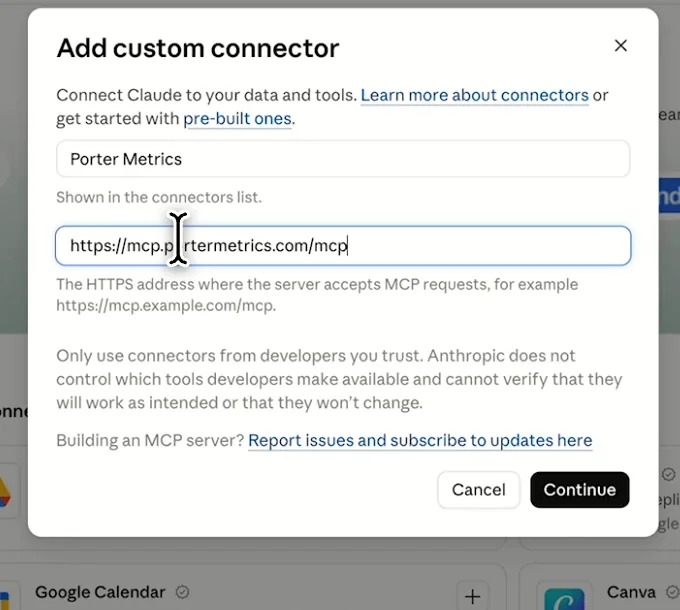
In Claude: Customize, Connectors, Add custom connector, then paste Porter’s MCP URL Paste the copy prompt
Open a new chat, paste this prompt and replace anything in brackets. Porter copies the dashboard onto your accounts and Claude sends you its link.
Copy promptMake a copy of this Porter dashboard on my own data: https://report.portermetrics.com/b4907b24-dcf6-4abd-bc46-5e7e5f0725fb Use my Meta Ads. My monthly budget is [amount]. Then send me the link to my copy.
Meta Ads budget pacing fields and data
The data sources, metrics and dimensions behind every page, and the five KPIs worth watching.
Top 5 KPIs to watch
What each one tells you
- Pacing
Under 90% or over 110% mid-month needs a budget change now, not at month end.
- Projected spend
Where the month lands at the current daily rate.
- Suggested daily spend
What to set per day to land on budget.
- ROAS
Check it does not fall as you raise spend.
- CPM
Rising CPM eats budget faster than planned.
Data sources
Metrics
- Amount spent
- Purchases
- Cost per purchase
- Purchase ROAS (Return on ad spend)
- CTR (Link click-through rate)
- CPM (Cost per 1000 impressions)
Dimensions
- Ad account name
- Campaign name
- Date
How the numbers are calculated
Pacing = spend to date ÷ budget to date.
Budget to date = monthly budget × days elapsed ÷ days in month.
Suggested daily spend = remaining budget ÷ days left.
Recent days read low until each platform publishes them.
What makes this Meta Ads budget pacing dashboard different
What a native report or a spreadsheet export can’t give you.
Get it in your inbox every Monday
Schedule the dashboard by email, so the weekly check happens without opening Ads Manager.
See every ad account in one place
Pick several Meta ad accounts in the Data sources filter instead of switching in Ads Manager.
Send a client-ready PDF
Export all 3 pages as one PDF for the monthly review.
Get your free Meta Ads budget pacing dashboard
Sign up free, connect your data and paste the copy prompt. Your own data fills the same 3 pages as the demo.
Free plan · 14-day trial · No card needed